Running multiple Google Ads accounts is normal in 2026. Alphabet reported $402.8 billion in total revenue in 2025, and its filing describes Google advertising revenues as including Google Search & other, YouTube ads, and Google Network. For many advertisers, Google Ads remains a major traffic channel where account access can directly affect leads, sales, and client work.
When ad accounts are tied to real revenue, one review or suspension can affect more than campaigns. It can affect leads, sales, client work, and daily cash flow. This guide explains how to run multiple Google Ads accounts with a cleaner structure, when to use MCC, when browser separation helps, and what mistakes can make accounts look linked.
Can You Run Multiple Google Ads Accounts?
Yes, you can run multiple Google Ads accounts if each account has a clear and legitimate business reason. Agencies often manage one account for each client. Companies may also use separate accounts for different brands, regions, or legal entities. The risk is not having multiple accounts itself, but using them to promote the same business in a way that looks like duplicate advertising or rule avoidance.
A Google Ads Manager Account, also called MCC, is the normal way to manage several Google Ads accounts from one place. It helps you switch between accounts, manage access, and keep reporting organized. But MCC does not make risky account setups safe. If several accounts use the same website, same offer, same billing details, or are created after a suspension to continue the same ads, they may still be reviewed or linked.
Why Do Multiple Google Ads Accounts Get Linked or Reviewed?
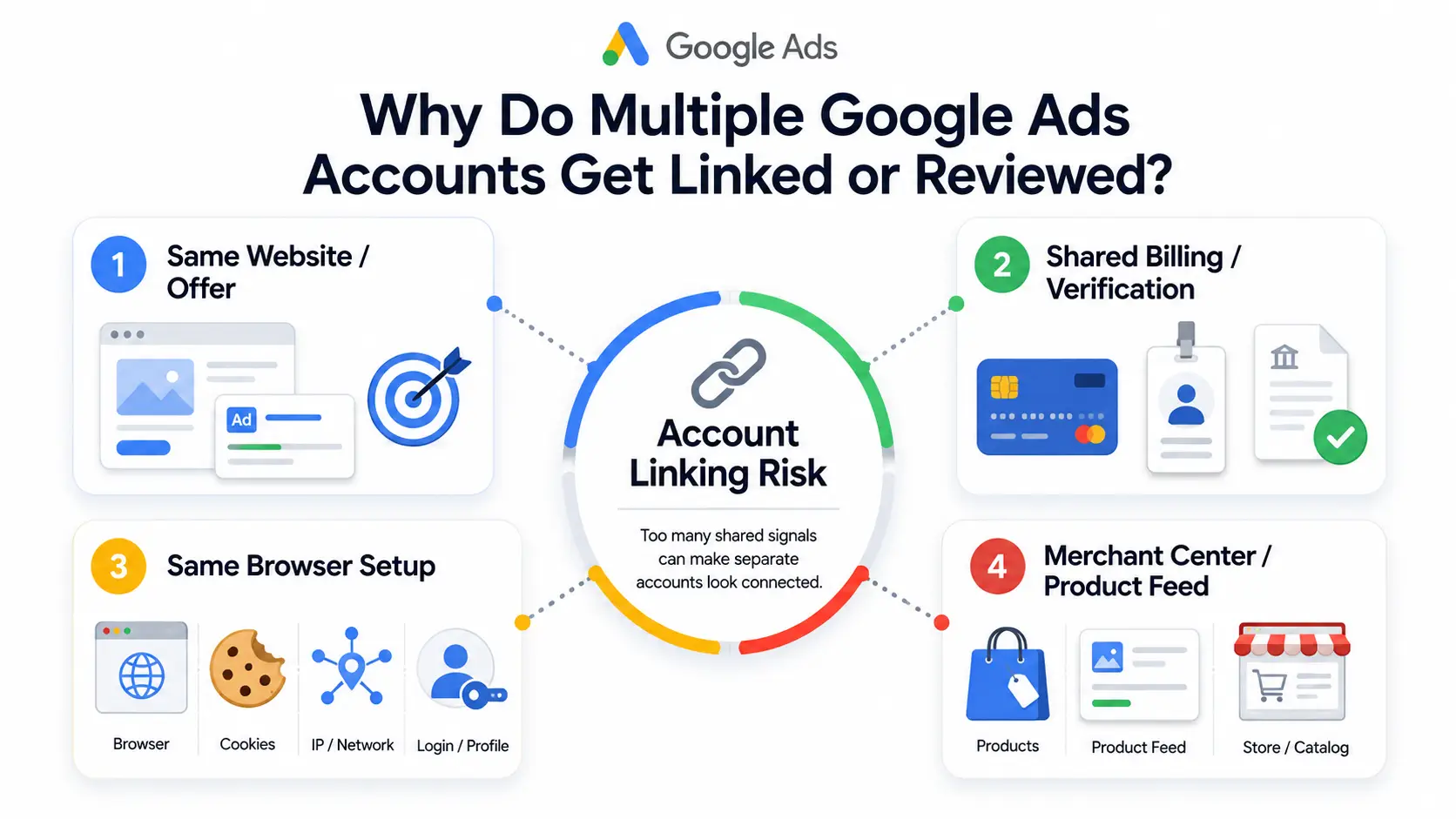
Multiple Google Ads accounts may get linked or reviewed when they share too many signals. These signals can make separate accounts look like the same advertiser, the same business, or the same unresolved policy issue. The biggest risks usually come from the business being promoted, billing details, browser profile, and e-commerce data.
Same business, same website, or same offer
Accounts become risky when they all promote the same business in a similar way. For example, several accounts sending traffic to the same landing page, using similar ads, and selling the same offer can look like one advertiser trying to get more ad space. This is very different from an agency managing separate clients with different websites and goals.
Shared billing, verification, or account history
Billing and verification details can also connect accounts. If unrelated accounts use the same card, business name, address, contact details, or verification information, they may not look truly separate. The risk is higher if one related account already has a suspension or review history.
Same browser profile, cookies, IP, and login habits
Technical signals can add more risk when every account is opened from the same messy browser setup. If a team logs into many Google Ads accounts from one Chrome profile, cookies, sessions, saved passwords, and extensions can get mixed together. This also makes human mistakes more likely, such as opening the wrong account or using the wrong saved login.
Merchant Center and product feeds can also connect e-commerce accounts
For e-commerce advertisers, Google Ads is not the only signal. Merchant Center, product feeds, domains, product images, shipping pages, return policies, and business details can also make stores look connected. If several stores look like copies of the same business, separate ad accounts may still be reviewed.
What Is the Best Way to Manage Multiple Google Ads Accounts?
The best way is to use MCC for official account management and a multi-accounting browser when accounts need separate login environments. MCC keeps account access, reporting, and billing more organized. A multi-accounting browser keeps daily login sessions cleaner when many accounts are handled from one device or team.
1. Use MCC
A Google Ads Manager Account, often called MCC, is the standard way to manage multiple Google Ads accounts from one dashboard. It is especially useful for agencies, consultants, franchises, and businesses with multiple brands, regions, or client accounts. Instead of logging in and out of different accounts, you can link them to one MCC and switch between them more easily.
How it works:
- Create a Manager Account with the Google Account you want to use for management.
- Choose the account name, billing country, time zone, and currency carefully.
- Enter the customer ID of the Google Ads account you want to link.
- Send a link request to the account owner.
- The original account owner must approve the request. MCC access is permission-based management, not a transfer of account ownership.
What MCC helps with:
- Cross-account performance overview and quick account switching
- Account labels, such as “E-commerce,” “Lead Gen,” or “High Budget”
- Cleaner team access and permission management
- Shared assets, such as negative keyword lists, remarketing lists, and conversion tracking
- Consolidated billing, mainly for accounts under the same business structure
Important limits:
- MCC does not remove the risk of similar websites, ads, or offers being reviewed.
- MCC cannot recover or replace a suspended account.
- MCC does not make duplicate advertising or policy violations safe.
2. Use a Multi-Accounting Browser
A multi-accounting browser is useful when different Google Ads accounts need separate login environments. This is common when a team manages several independent clients, brands, or stores from the same device. Each account can stay inside its own browser profile instead of being mixed into one regular Chrome profile.
What it helps separate:
- Cookies and session data
- Saved passwords and login history
- Browser extensions and local browser data
- Workspaces for different clients, brands, or stores
When it makes sense:
- One team manages many unrelated Google Ads accounts.
- Different clients should not share the same browser session.
- A media buyer needs a cleaner workspace for each account.
- The team wants to reduce wrong-account logins and mix saved data.
Important limits:
- A multi-accounting browser does not replace MCC.
- It mainly helps with login environment separation.
- It does not fix suspended accounts, billing issues, duplicate ads, or policy violations.
MCC vs Multi-Accounting Browser: Which One Should You Use?
| Need |
MCC |
Multi-Accounting Browser |
| Manage several Google Ads accounts from one dashboard |
✔ |
❌ |
| Link client accounts for official access |
✔ |
❌ |
| View reports across accounts |
✔ |
❌ |
| Organize accounts with labels |
✔ |
❌ |
| Manage shared assets across linked accounts |
When appropriate |
❌ |
| Keep cookies and sessions separate |
❌ |
✔ |
| Reduce messy browser switching |
❌ |
✔ |
| Separate workspaces by client or store |
Partly |
✔ |
| Fix a suspended account |
❌ |
❌ |
| Make duplicate ads safe |
❌ |
❌ |
| Best use case |
Account structure, access, reporting, and billing |
Browser session separation |
For most serious teams, the better setup is not choosing one and ignoring the other. Use MCC when accounts need official management, reporting, and access control. Use a multi-accounting browser when those accounts also need separate browser workspaces. This gives you a cleaner structure without pretending that tools can fix policy, billing, or duplicate-ad problems.
How to Combine MCC with DICloak for Cleaner Google Ads Account Management
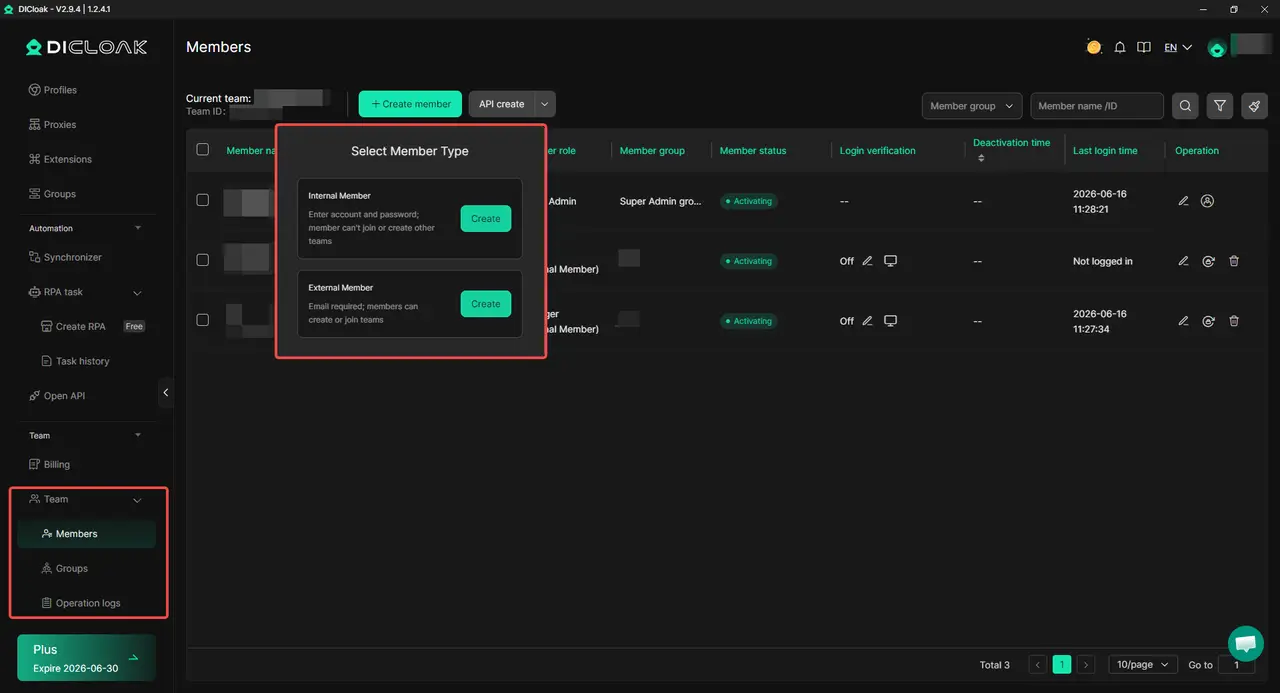
The cleanest setup is to use MCC for official Google Ads management and DICloak for separate browser workspaces. MCC handles linked accounts, access, and reporting. With DICloak, each Google Ads account can stay in its own browser profile with separate sessions, proxy settings, and team access.
1. Keep MCC as your main management layer
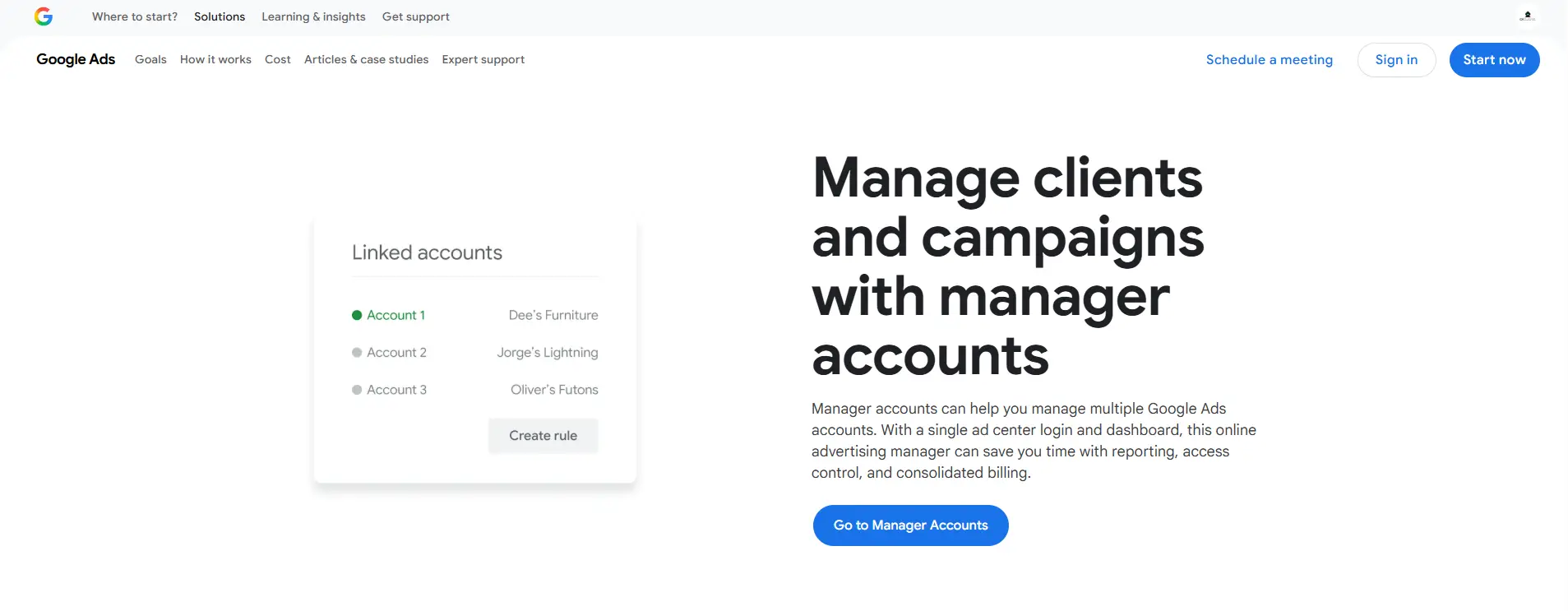
Start with a Google Ads Manager Account when you manage several Google Ads accounts from one place. This works well for agencies, consultants, franchises, and teams handling different brands or client accounts. Each account can stay linked under MCC, while the manager account gives you one place to switch accounts, check performance, and manage access.
MCC is still permission-based management, not account ownership transfer. The original account owner needs to approve the link request. Each account should also keep clear billing, verification, and business details.
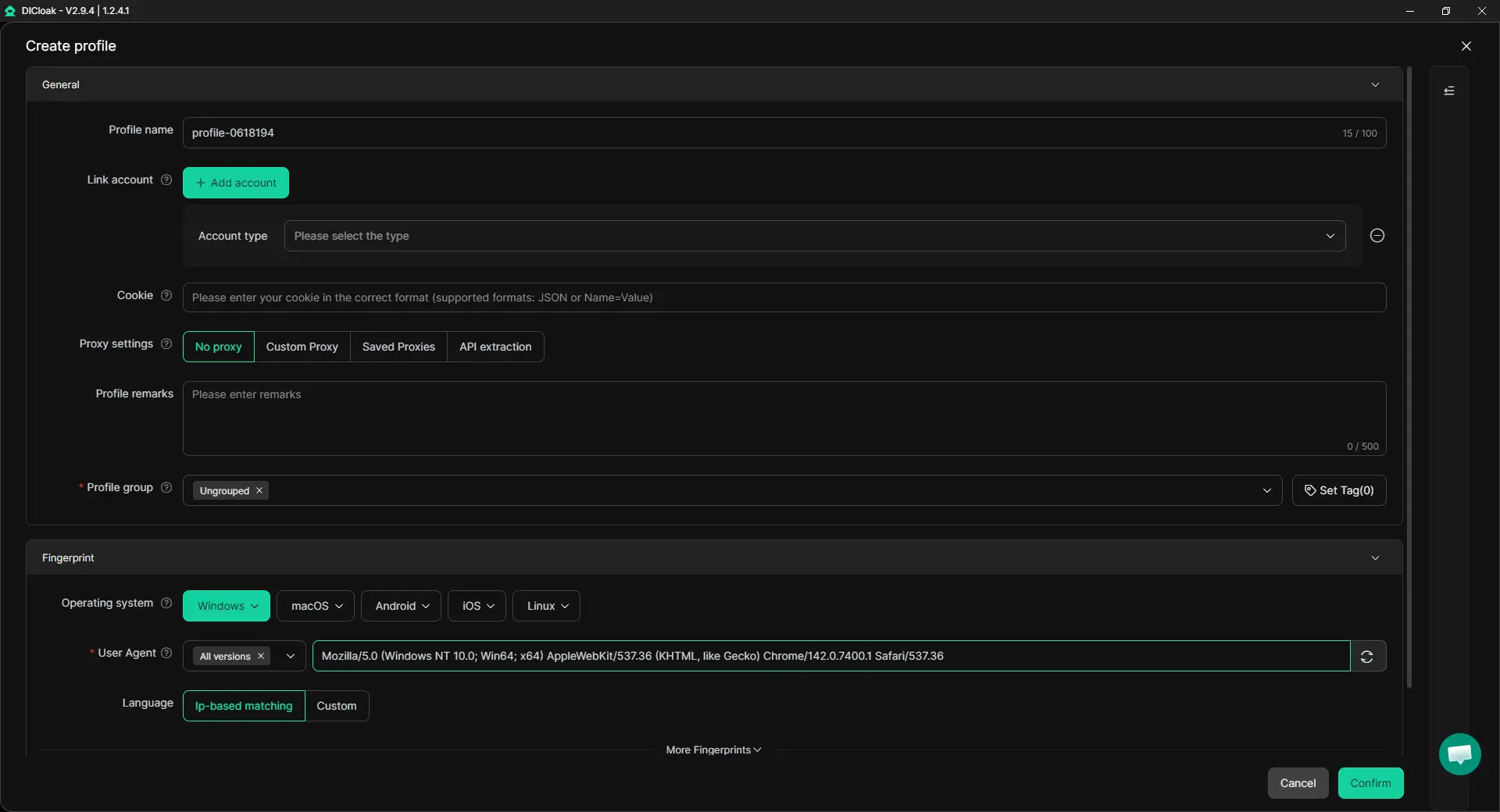
2. Create one browser profile for each Google Ads account
After the MCC structure is clear, create one DICloak browser profile for each Google Ads account. An agency can create separate profiles for Client A, Client B, and Client C. A multi-store seller can create separate profiles for each store, market, or brand.
Each profile can keep its own cookies, session data, login status, and browser workspace. This helps avoid mixing every account into one regular Chrome profile. Daily work also becomes cleaner because each profile has a clear account purpose.
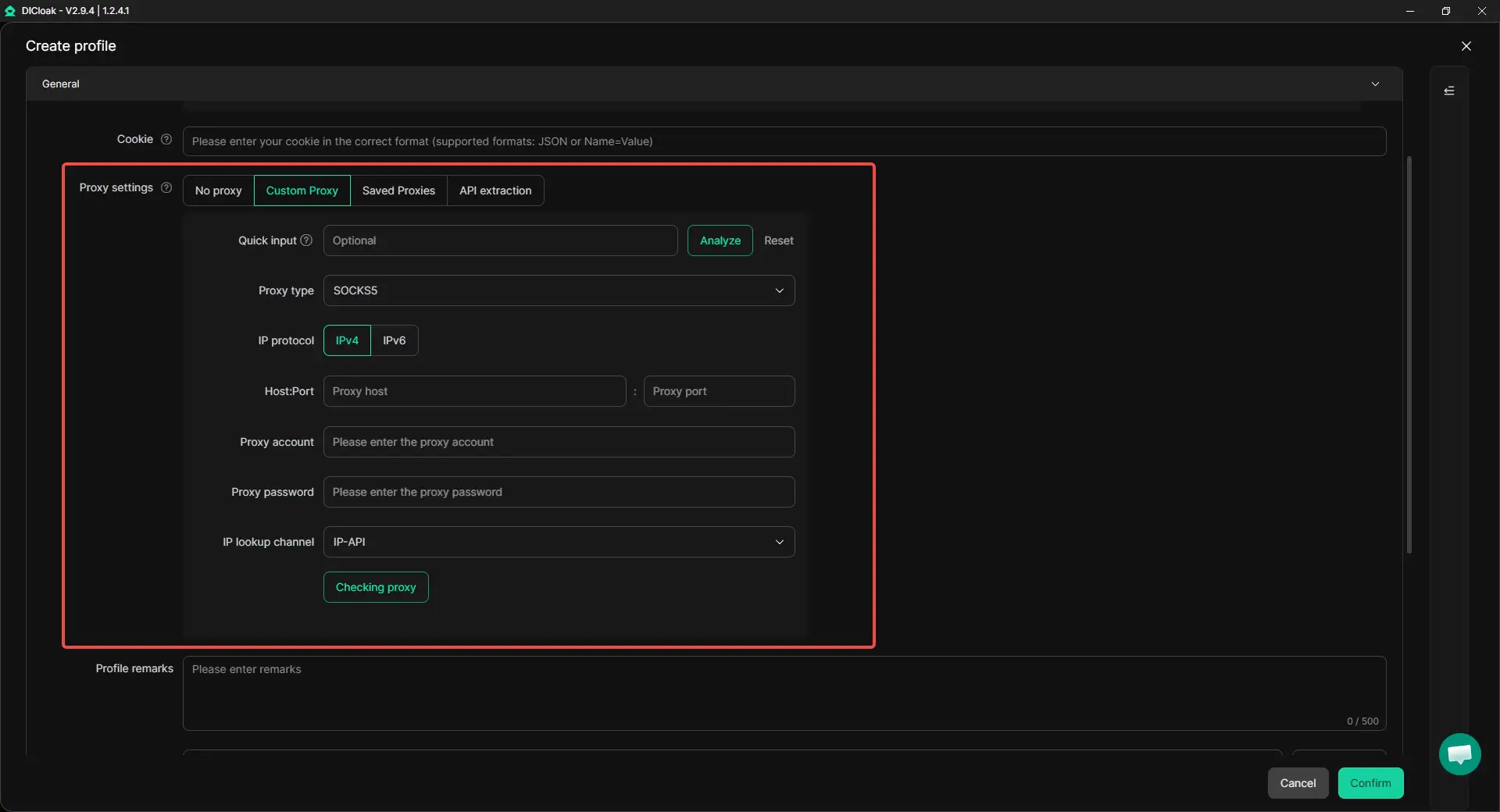
3. Set proxy settings for each profile
If proxy configuration is needed, set it at the profile level and keep the setup consistent. Randomly changing locations just to make accounts look different can make operations harder to control. A stable setup is easier to manage and review.
With DICloak, teams can configure proxies for different browser profiles. This is useful when accounts belong to different clients, markets, or store operations.
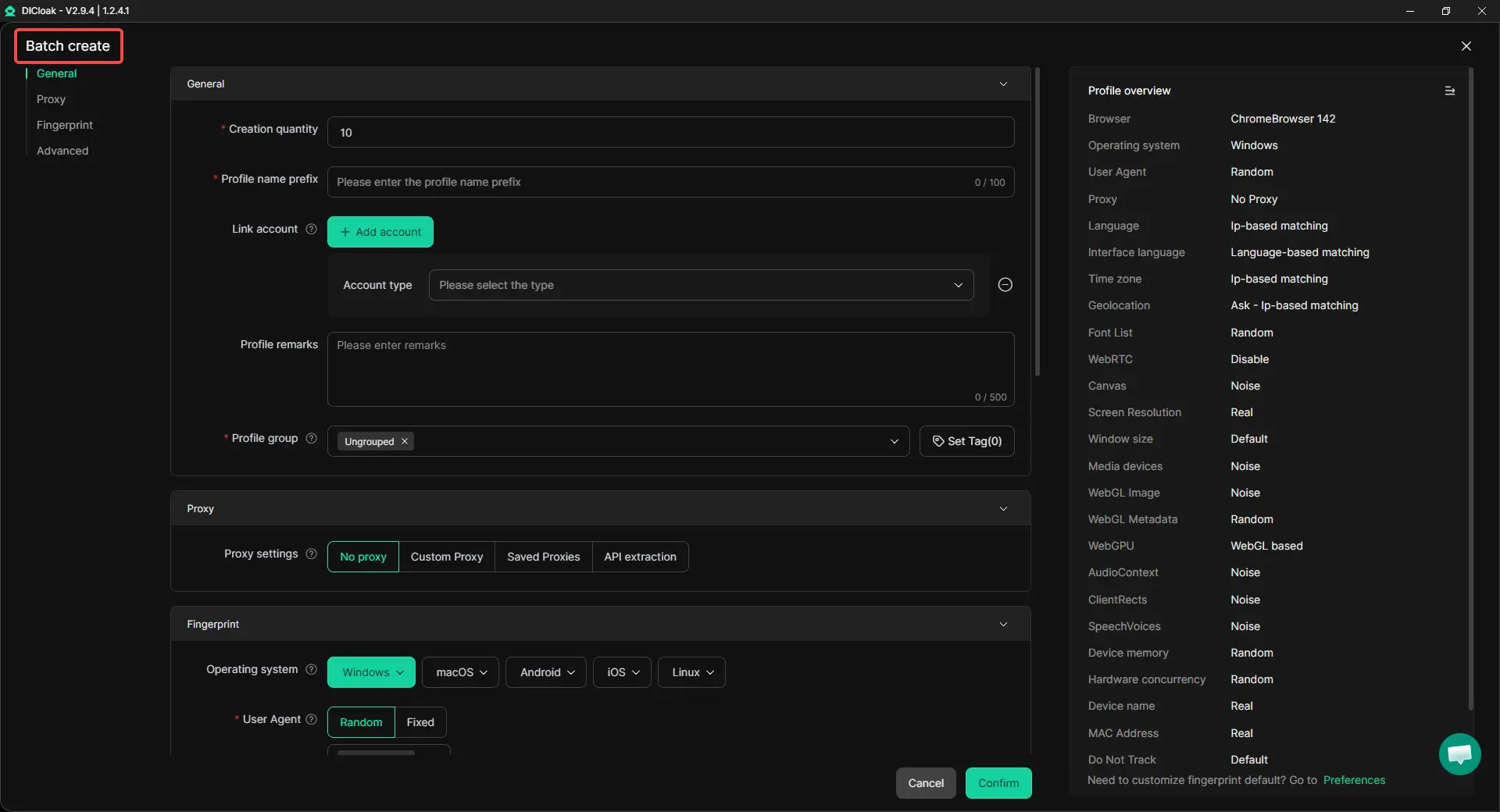
4. Use bulk profile management for larger account lists
When only two or three accounts are involved, manual profile setup is fine. When dozens of accounts are involved, profile names, proxy notes, groups, and ownership records can get messy fast. That is usually when bulk profile management becomes useful.
With DICloak, teams can create and organize multiple profiles more efficiently. Profiles can be grouped by client, store, market, or campaign team. This helps new accounts fit into the same structure instead of becoming another messy list.
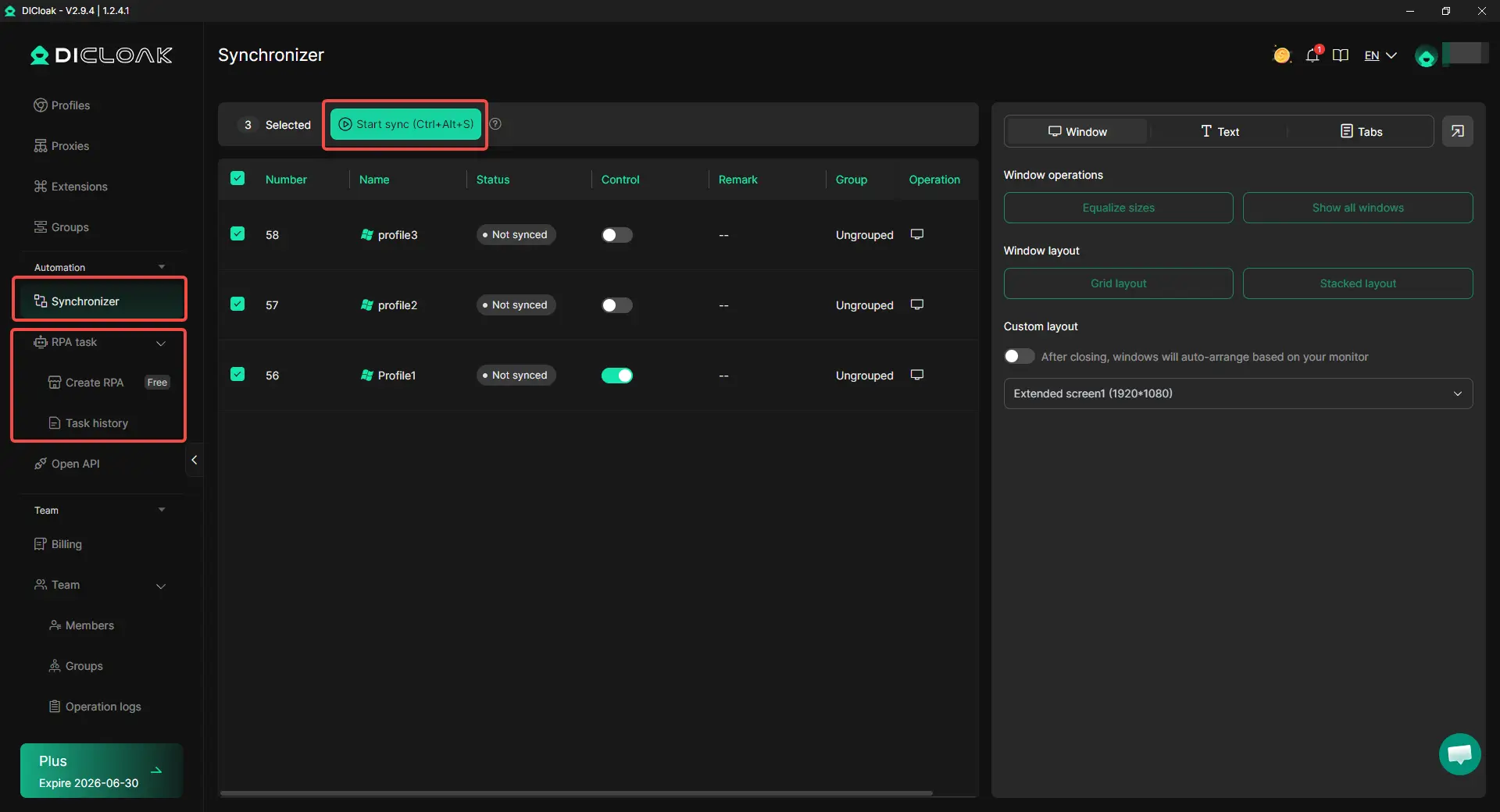
5. Use Synchronizer and custom RPA for repeated workflows
Some Google Ads work is repetitive. A team may need to open several profiles, check dashboards, review pages, or repeat the same internal workflow across different workspaces. Doing this by hand every time takes time and increases mistakes.
With DICloak’s Synchronizer, selected profiles can be operated in multi-window workflows. Custom RPA can also support team-defined repetitive tasks.
6. Use team permissions to reduce account mix-ups
Shared access is one of the easiest ways to create account confusion. One media buyer may open the wrong client account. Another person may use a saved login that belongs to a different profile. Small mistakes like this become harder to trace as the team grows.
With DICloak, team members can be given access only to the profiles they need. This keeps client or store workspaces more controlled. MCC manages the official Google Ads structure, while DICloak helps separate browser profiles, proxy settings, bulk profile operations, repeated workflows, and team access.
What Mistakes Should You Avoid When Running Multiple Google Ads Accounts?
The biggest mistake is treating extra Google Ads accounts as a quick fix for messy account problems. Multiple accounts are safer when each one has a clear business reason, clean ownership, and a separate purpose. They become risky when they are used to repeat the same ads, escape a suspension, or hide a setup that should be fixed first.
Do not create a replacement account before fixing the real issue
If one account is suspended or under review, do not rush to open another account for the same business. First, check the real reason behind the issue, such as billing, verification, landing page quality, Merchant Center problems, or policy violations. A new account may carry the same risk if the old problem is still there.
This is where many advertisers panic and make things worse. They change the email, create a new account, and send traffic to the same website again. That does not solve the root problem, and it can make the account pattern look even more suspicious.
Do not run the same website and same offer from several accounts
Several accounts promoting the same website, same product, and same offer can look like one advertiser trying to take more ad space. This is very different from an agency managing different clients with different websites and goals. If the accounts are not truly separate, the setup is harder to defend.
If you only need to promote different products, seasons, or audiences for the same business, separate campaigns may be enough. You do not always need a new Google Ads account. A separate account makes more sense when there is a different business owner, billing setup, legal entity, or major market structure.
Do not mix client billing, verification, and login access
Client accounts should not be treated like one shared internal account. Billing, verification, ownership, and access should match the real business behind each account. If several unrelated clients use the same payment method, same business details, or the same shared login, the setup can become hard to explain later.
This is especially important for agencies. A cleaner setup is to let each client keep clear ownership while the agency manages access through proper permissions. When a client leaves, access should be removed cleanly instead of leaving old users, old billing details, or shared credentials behind.
Do not manage every account from one messy browser profile
Managing every Google Ads account from one regular browser profile may feel faster at first. But over time, cookies, saved passwords, login sessions, and extensions can get mixed together. This increases the chance of opening the wrong account, using the wrong saved login, or making changes in the wrong place.
A clean operating habit matters when account volume grows. Each account should have a clear workspace, clear login routine, and clear access owner. The goal is not to make risky accounts safe, but to reduce avoidable mistakes that make account management harder to control.
Frequently Asked Questions About Running Multiple Google Ads Accounts Without Triggering Account Linking
Can I have more than one Google Ads account?
Yes, you can have more than one Google Ads account when there is a clear business reason. Agencies often manage separate accounts for separate clients. A company may also use different accounts for different brands, legal entities, markets, or billing setups. The risk starts when multiple accounts are used to promote the same business in a way that looks like duplicate advertising, policy avoidance, or unfair auction behavior.
Is it safe to manage Google Ads accounts under one MCC?
Yes, using a Google Ads Manager Account, also called MCC, is the normal way to manage multiple Google Ads accounts from one place. It helps with account switching, reporting, access control, and client management. But MCC does not remove policy risk. If several linked accounts promote the same website, use the same offer, or continue a suspended business issue, they may still be reviewed.
Should I create a new Google Ads account or just a new campaign?
Create a new campaign when the same business is promoting different products, audiences, locations, or offers under the same website and billing setup. Create a separate Google Ads account only when there is a real reason, such as a different client, legal entity, billing owner, brand, or market structure. Many advertisers create new accounts too early when a campaign-level structure is cleaner and safer.
Can I create a new Google Ads account after suspension?
You should not create a new Google Ads account just to continue the same ads after a suspension. First, review the suspension reason and fix the real issue, such as billing, verification, landing page quality, Merchant Center problems, or policy violations. A new account can still be reviewed if it is tied to the same unresolved issue. Treat account recovery as a cleanup process, not a quick reset.
Can DICloak help reduce Google Ads account linking risk?
Yes. DICloak Antidetect Browser can help keep Google Ads workspaces cleaner by separating browser profiles, cookies, sessions, proxy settings, and team access. This is useful when agencies or multi-store teams manage different accounts from the same device or team environment. For the safest setup, each account should still have a clear business purpose, clean billing details, consistent website content, proper Merchant Center data, and no unresolved suspension history.
Conclusion
To run multiple Google Ads accounts without triggering account linking, the safest approach is to keep every account tied to a real business reason. Agencies, multi-brand companies, franchises, and e-commerce teams can manage several accounts, but each account should have clear ownership, clean billing, consistent verification, and a separate campaign purpose. Problems usually start when several accounts promote the same website, same offer, or the same unresolved policy issue.
A strong setup combines structure and separation. Use MCC for official Google Ads account management, reporting, and access control. Use a multi-accounting browser like DICloak Antidetect Browser to keep browser profiles, sessions, proxies, and team access organized when different accounts are operated from the same device or team. Multiple Google Ads accounts are easier to manage safely when account structure, business identity, billing, website content, and daily login environments all stay clear and consistent.
 Web Proxy Tools
 Free Tools
 Cookie Plugin
 UA Generator
 MAC Address Generator
 IP Generator
 IP Address List
 2FA Code Generator
 World Clock
 Anonymous Check
 WebRTC Leak Test
 UUID Generator
 Free Web Proxy Site
 Proxy Checker
 FB Ad Checker
 AI Web Scraping
 Free SMM Tools
 Twitter Shadowban Checker
 Instagram Name Checker
 UTM Generator
 Username Generator
 AI Hashtag Generator
 LinkedIn Headline Generator
 Social Media Image Resizer