Getting hit with a social media account violation can throw your entire workflow off balance. One day you're scheduling posts and checking analytics; the next, you're locked out or stuck with limits you never expected. The problem isn't just about losing access, it's not knowing exactly why you were flagged or what step will actually get your account back to normal.
Just firing off an appeal or waiting usually doesn't fix social media account violations. Platforms like Facebook, Instagram, TikTok, and Twitter/X don't always tell you the real reason for the restriction, and the "help" articles often send you in circles. Even if you recover a restricted social media account, missing a key action (like checking for shadow bans or cleaning up connected devices) can get you flagged again within days.
The real issue is that every platform has its own triggers, review queues, and recovery paths. What works for TikTok might get you nowhere on Instagram. To actually resolve social media account violations in 2026, you need a step-by-step approach, one that covers the technical checks, the timing, and the details that trip up most users. This guide breaks down what actually matters, what to skip, and how to spot if your account is at risk before it happens.
Start by mapping out which type of violation you’re facing and how platforms flag suspicious activity.
What Usually Triggers Social Media Account Violations in 2026?
Most social media account violations in 2026 start with platform rule updates, aggressive AI flagging, or simple mistakes that look suspicious to automated systems. If your account is under review, odds are you triggered one of these patterns, often without realizing it.
Policy Changes and New Automated Detection
Platform policies now shift every few months, and AI-driven moderation tracks both content and user behavior. Meta, TikTok, and X update their enforcement rules quietly, so something allowed last quarter may now get you flagged. Even small tweaks in comment style or account linking can trigger an action review.
High-Risk Behaviors and Content Types
The fastest way to get flagged is by matching the same patterns as spam or fake engagement bots. Mass liking, following hundreds of accounts in a day, or sending out the same DM to dozens of users gets noticed right away. Accounts that push trending but sensitive topics, like political protests, health claims, or copyright-heavy content, land in manual review queues more often in 2026. An example: reposting music clips is now riskier on Instagram, as automated copyright scans catch even short samples. If your page suddenly gains followers from suspicious sources, or you buy likes to boost engagement, you may see a restriction without warning. Trying to disable automation, remove third-party posting tools, or delete questionable posts after the fact rarely helps, platform logs already recorded your actions. The real risk isn't just the ban, but getting marked as "untrustworthy" in platform backends, which can affect future appeals and reach.
Technical Triggers: Device, IP, and Fingerprint Patterns
- Logins from new countries (especially within minutes) raise red flags.
- Switching between browsers or devices without clearing old sessions can look like account sharing.
- Using proxies or automation tools with mismatched browser fingerprints often results in instant verification prompts or temporary locks.
Understanding which technical detail got you flagged is usually harder than spotting content triggers. Many users miss the device and session patterns that actually cause automated bans.
If your account is already restricted, the next step is to pinpoint the exact trigger, guessing wastes time and makes recovery harder.
How to Diagnose the Real Reason for Your Account Violation
If your account just got hit with a violation, the real question isn’t “why did it happen”, it’s “how do I figure out the exact cause before I screw up the appeal or trigger a second ban?” Most users only see a vague notice, but the actual reason is usually buried in logs, hidden guidelines, or flagged activity. Pinpointing this early is your best shot at a clean recovery.
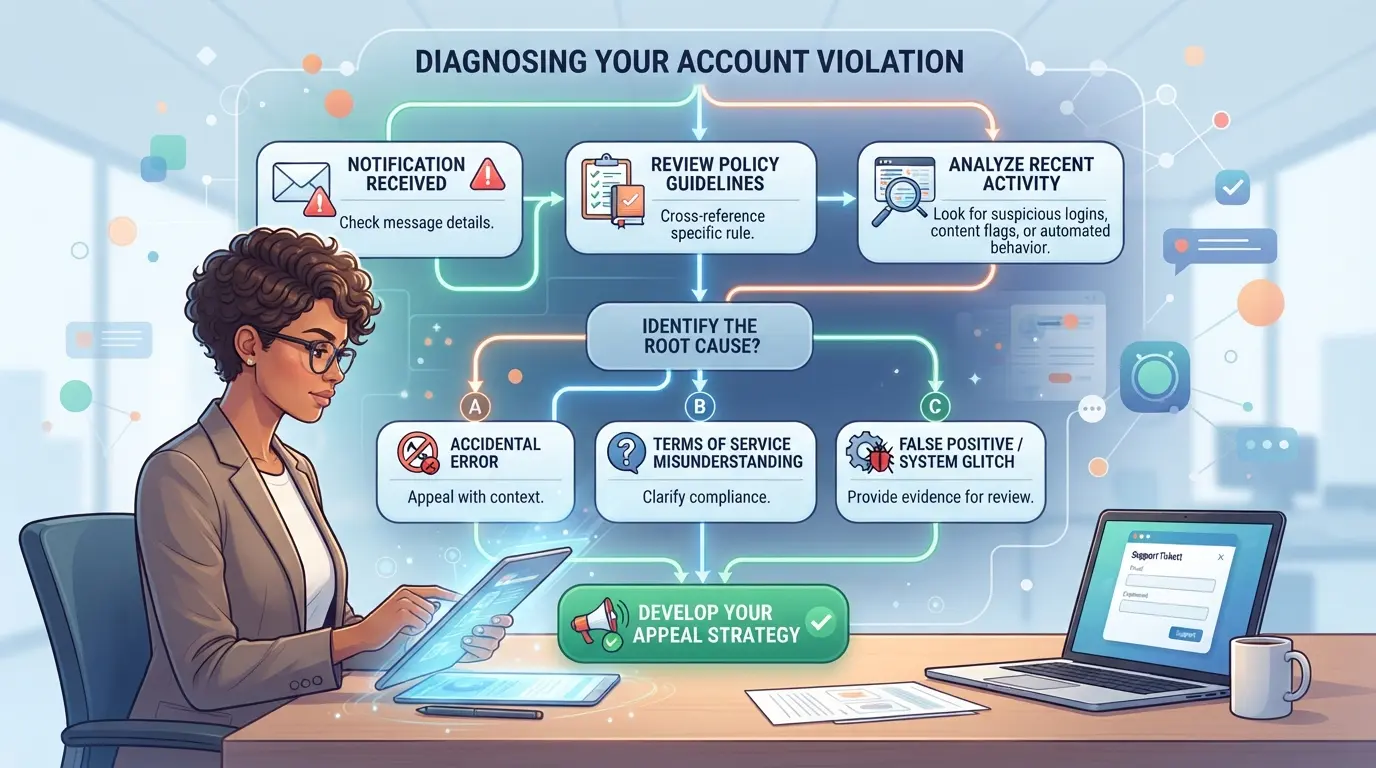
Check Platform Notifications and Emails
- Open your main notification feed and email inbox. Platform notices usually arrive within 5 minutes of the restriction, but many users miss them because email filters send alerts to junk or “updates.”
- Look for phrases like “violated our policies,” “suspicious activity,” or “content removed.” If the message is generic, that often means the action was flagged by automated systems, manual review is less likely.
- Expand “show more” or click through any warning modal. Detailed explanations sometimes hide behind a second link or drop-down, especially on Facebook and TikTok.
- Save every message and timestamp. If you appeal later, those records show whether you were warned before the ban, which can affect review outcomes.
Review Account Activity and Access Logs
- Check your login history for unexpected devices, locations, or times. A login from a city you’ve never visited is a red flag.
- Scan recent posts, comments, and follows from the week before the violation. Bulk actions, like following 20 accounts in 10 minutes, often trigger restrictions.
- Look for changes to account info, like email, phone number, or password updates. If you see edits you didn't make, your account may have been compromised.
- If your activity log is empty or missing, it usually means the platform locked your account before saving new changes. Don’t try to force access, waiting for support is safer.
Compare Against Updated Community Guidelines
- Visit the platform’s official policy page (Instagram, TikTok, Twitter/X, etc). New rules roll out quietly, what was allowed last month might now trigger a ban.
- Search for updates in sections like “Spam,” “Impersonation,” or “Automated Behavior.” These are the top areas where platforms quietly tighten restrictions.
- If you find a new rule you broke, note it for your appeal. Platforms are more likely to reinstate accounts if you acknowledge the specific guideline.
- Missed rules, like using certain hashtags or posting similar content too often, are the most common reason appeals fail.
When to Seek Expert or Legal Help
- You need outside help if your account was restricted with no clear violation and you operate a business or manage client profiles.
- Document every step: save notifications, logs, emails, and screenshots. Missing evidence makes appeals weaker.
- If you get a threat of permanent ban or legal action, consult a specialist familiar with platform rules. Lawyers aren’t always needed, but account recovery consultants often solve cases faster.
- When support replies with “final decision” or ignores your appeal, escalate using documented proof, platforms sometimes reconsider when shown gaps in their review.
Spotting the real cause now means your next actions can target the actual violation, not just symptoms. Up next: what to do right after you get the notice, so you don’t make your situation worse.
What Steps to Take Immediately After a Violation Notice
When you get a social media account violation notice, your first move is to protect evidence and freeze risky actions, waiting or guessing often makes things worse. Acting in the first hour matters more than trying random fixes later. Here’s exactly what to do next.
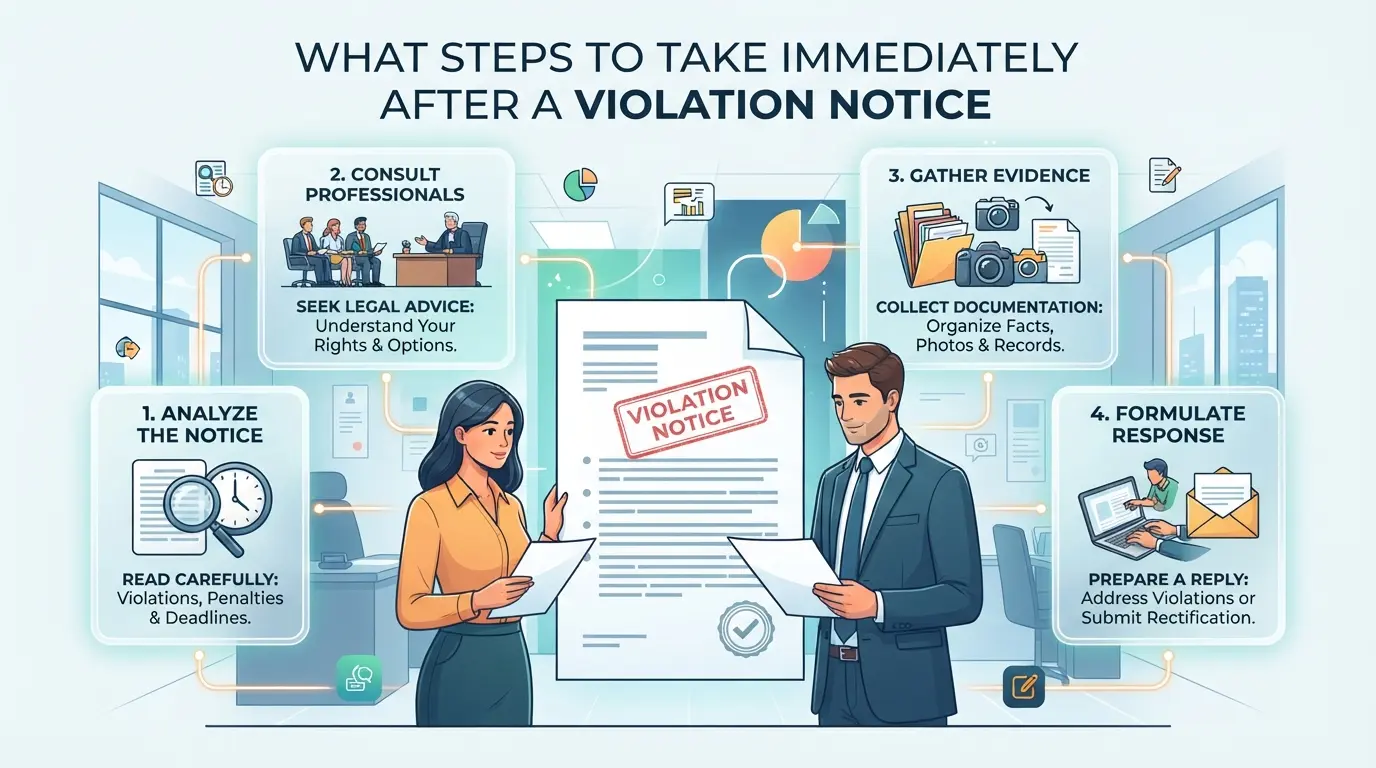
Preserve Evidence and Account Data
Save every message and record before making any changes. Download your account history and store screenshots of the violation notice, including timestamps and the full error text. If the platform shows a warning banner, capture it as-is, removing or editing posts now can erase proof you’ll need for appeals. Most platforms let you export basic account data; grab this before restrictions tighten. If you skip this step, you risk losing access to key logs once the platform escalates the violation.
Stop Risky Actions and Secure Access
- Pause all automation tools or mass actions immediately.
- Change your account password; review and remove any non-essential team or tool access.
- Check for connected devices, log out sessions you don’t control.
If you leave bots running after a restriction, platforms often escalate to permanent bans. Changing passwords cuts off old sessions that might be triggering ongoing alerts.
Avoid Common Mistakes That Worsen Violations
Don’t spam the appeal form or reply to automated emails, this usually flags your account for delayed review. Creating new accounts linked with the same device or email can get both accounts banned. If you’re tempted to edit posts or delete content, stop; platforms often track these actions and treat them as attempts to hide evidence, making your case harder.
Notify Stakeholders if the Account Is Business-Critical
If your account manages business pages or ad budgets, alert your team or clients right away. Even a short downtime can impact campaigns or customer service.
- Message your team and clients about the violation status and possible downtime.
- Prepare backup communication channels (email, SMS, or alternate platforms).
- Document every action you take for later review.
Skipping this step means your team may double down on risky actions or miss urgent alerts, keeping everyone informed prevents accidental escalation and helps coordinate the appeal.
The next step is to assemble your evidence and begin the appeal process, which covers the technical details that make or break your recovery.
How to Appeal or Resolve a Social Media Account Violation (Step-by-Step for 2026)
If you want to fix a restricted or banned social media account in 2026, you need to follow the platform’s appeal process step by step. Skipping details or submitting a rushed appeal often leads to longer bans, ignored tickets, or even permanent loss.
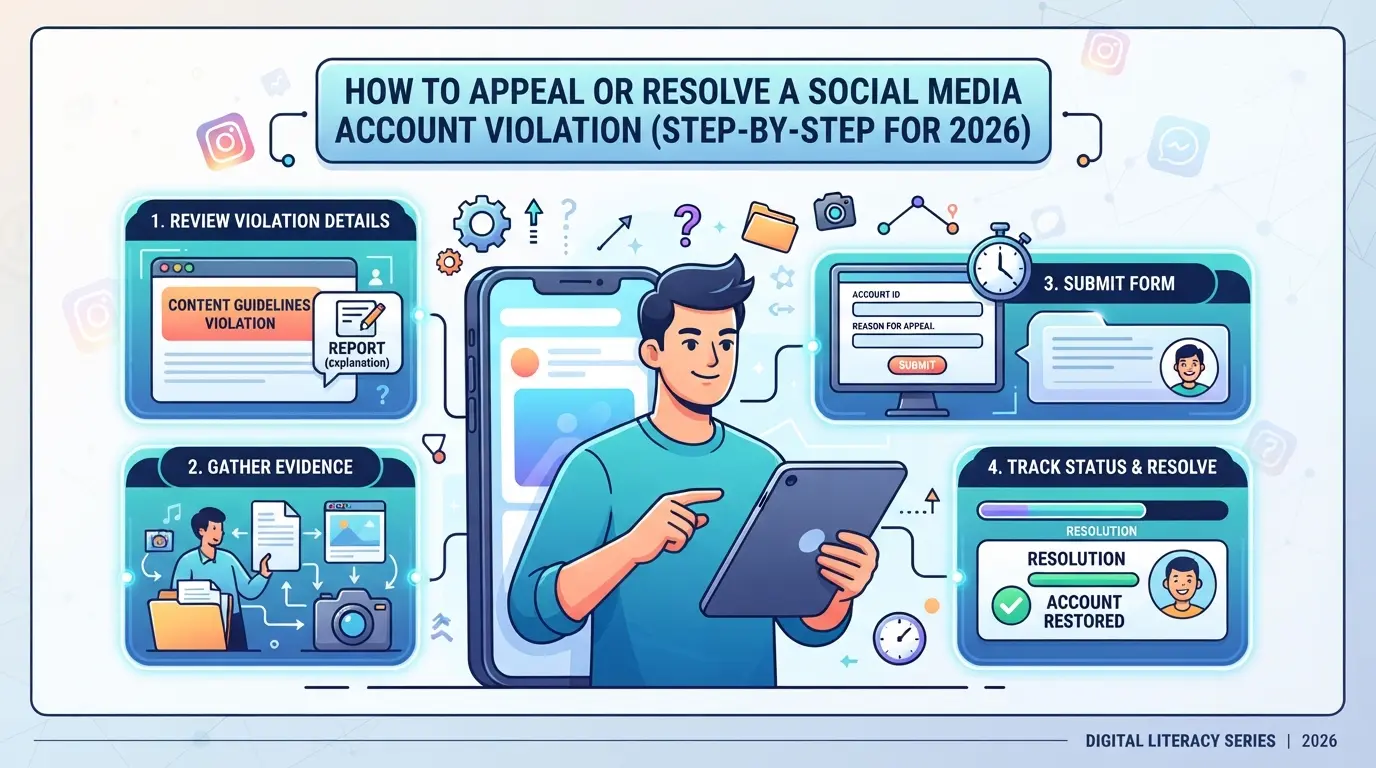
Understand the Platform’s Appeal Process
- Check the violation notice for a direct appeal link, most platforms now include it inside the app or web dashboard.
- Open the official support or help center page; search "account appeal" or “ban review” for the latest form.
- Review published timelines. Facebook and TikTok usually reply in 24-72 hours; Instagram and X (Twitter) may take up to 7 days.
- If you can’t find a form, look for an in-app chat or support email. Submitting appeals outside these channels rarely works.
Prepare a Clear, Honest Appeal
- Write your appeal using plain language. Stick to facts, dates, and what you did, not what you meant.
- Admit any honest mistakes. Trying to hide or spin the story can get your request auto-rejected.
- If you’re unsure what triggered the violation, say so, but explain your recent actions step by step.
- Avoid blaming the platform or threatening legal action in your first message. These often stall your case.
Submit Supporting Evidence and Documentation
- Attach up to three screenshots, focus on violation notices, your recent activity, and any error messages.
- Include logs or receipts if you’re challenging a payment- or identity-related block. Label each attachment clearly.
- Add proof of ownership (such as the original sign-up email) only if the form asks. Submitting extra files can slow review.
- Keep all evidence in one submission. Multiple back-and-forth threads split your case and create more delays.
Follow Up and Track Your Appeal Status
- Check the support page or inbox daily for updates. Most platforms post the status inside the app’s Help section.
- If there’s no update after the published timeline, send a short follow-up, never spam with repeated appeals.
- Escalate only if you get a generic rejection. Reference your case ID and ask for a human review.
- If your appeal is closed with no option to reply, move to your backup plan right away.
Missing a deadline or submitting incomplete info means you’ll likely wait longer, or lose your account for good. Next, focus on what you can do to avoid new violations, especially if you operate more than one account.
How to Reduce Future Violation Risk When Managing Multiple Social Media Accounts
Recovering a restricted account means nothing if your next login triggers another violation, especially for agencies and teams running many profiles. The real solution is to change how you handle accounts so platform systems stop flagging you for suspicious activity.
Separate Account Environments and Access
Sharing browsers or devices across accounts is a shortcut to getting multiple bans. Each account should have its own environment, with no profile data, cookies, or logins overlapping. For teams, assign accounts so each person only touches a defined group, never swap logins between staff or machines.
Use Consistent Device, IP, and Fingerprint Settings
If your device, IP, or browser fingerprint jumps around, most social networks will notice.
- Platforms track device and location, switching these can trigger risk flags or forced verification.
- Always log in from the same device and network for each account. If you need to travel or rotate staff, plan ahead and update trusted device lists.
Control Team Permissions and Audit Access
Too many admins or unclear access logs often lead to mistakes, one person tries a risky action, and all connected accounts get flagged. Limit permissions based on need, and keep clear records of who accessed each account. When you spot a violation, check logs before assuming it was a platform error.
Using DICloak to Separate Browser Profiles and Configure Proxies for Multi-Account Social Media Management
When running several platform accounts, the fastest way to trigger new violations is letting sessions overlap or leak signals between logins. Teams managing multiple social media accounts often need each profile to act as a “clean slate”, with its own device signals and network. DICloak supports this workflow by letting operators set up isolated browser profiles and user-owned proxies for every account, keeping technical triggers separate. The focus here is on building the right environment to reduce headaches, not on platform-side outcomes.
Create Separate Browser Profiles and Configure Fingerprints in DICloak
Operators can create a new browser profile in DICloak for each platform account, storing that profile’s settings and history completely apart from others. Supported fingerprint controls include system type, User Agent, interface and content language, time zone, screen size, and graphics details. For a social media manager, that means every client account logs in from a profile with its own fingerprint, not reusing cookies or storage between sessions. The scope is limited to browser-profile access; it does not change the connected social platform.

Assign User-Owned Proxies to Each Profile
Each DICloak profile can use its own proxy connection, set up by the operator. This lets teams route different account sessions through proxies they manage, using the Custom Proxy or Saved Proxies modes. Before opening a session, operators can test the proxy to confirm the connection and check details like exit IP and region. Proxy selection and management stay with the user, DICloak does not provide or rotate proxies.

What to Do If Your Appeal Fails or Your Account Is Permanently Banned
Losing a social media account for good means you have to act fast to keep your business or personal brand moving, waiting won’t change the ban.
Export Data and Notify Contacts
If you still have access, download your posts and follower lists right away. Message your audience about the change so they know where to find you next.
Plan for New Account Creation or Platform Migration
Building a new account comes with risk, registering right after a ban can trigger another restriction. Instead, pause for a few days, change device fingerprints, and consider moving to a different platform if your niche allows. For businesses, this step is often the only way to recover lost reach.
Review and Update Your Account Management Practices
- Check which actions led to the violation
- Update your workflow to reduce risky behaviors
- Document lessons so you don’t repeat the same mistakes
Frequently Asked Questions About how to resolve social media account violations
Can I recover my social media account if I don't know the exact violation?
Yes, you can try to recover your account even if the platform gives a vague reason. Start by checking your email or account dashboard for any clues. Contact support, explain your confusion, and ask for details. Be polite and specific. Sometimes, platforms restore accounts after a clear and respectful appeal.
How long does it usually take to resolve a social media account violation in 2026?
Resolution times vary. Simple cases can be fixed in a few days, but complex violations may take up to several weeks. The speed depends on the platform, the type of violation, and how quickly you respond to requests for information. Some platforms offer faster reviews for business or verified accounts.
Is it safe to use proxies for social media account management?
Proxies can help manage multiple accounts or protect privacy, but they carry risks. Using low-quality or banned proxies may trigger security alerts or violations. Always use trusted, residential proxies and avoid switching locations too often. Never use free or public proxies, as they are less secure and more likely to be flagged.
What should I avoid doing after receiving a violation notice?
Don’t ignore the notice, create new accounts, or try to bypass restrictions. Avoid arguing with support or flooding them with messages. Never use fake documents or information. Doing these things can make it harder to fix the violation and may lead to a permanent ban.
Can I appeal a permanent ban or is it final?
Some platforms allow you to appeal a permanent ban. Check for an official appeal process in your account dashboard or help center. Submit honest information and explain your situation clearly. While not all appeals succeed, some bans are overturned if you provide new evidence or clarify misunderstandings.
Taking prompt and informed steps can make a significant difference in restoring your online presence after a violation. If you’re ready to safeguard your digital identity and minimize future risks, consider exploring protective tools that help manage your accounts securely. Try DICloak For Free
 Web Proxy Tools
 Free Tools
 Cookie Plugin
 UA Generator
 MAC Address Generator
 IP Generator
 IP Address List
 2FA Code Generator
 World Clock
 Anonymous Check
 WebRTC Leak Test
 UUID Generator
 Free Web Proxy Site
 Proxy Checker
 FB Ad Checker
 AI Web Scraping
 Free SMM Tools
 Twitter Shadowban Checker
 Instagram Name Checker
 UTM Generator
 Username Generator
 AI Hashtag Generator
 LinkedIn Headline Generator
 Social Media Image Resizer