Managing multiple Amazon stores used to mean fumbling between browsers, dealing with cookie conflicts, and risking account bans for even small mistakes. Now the field is crowded with amazon seller tools, from Amazon FBA tools to specialized browser automation, each promising safer scaling and smoother workflows. Sellers face a real tradeoff: pick tools that claim tighter security, or stick to old habits and hope platform rules don’t shift underfoot.
But the wrong software choice can backfire. Some tools leave digital fingerprints that connect your accounts, raising red flags with Amazon’s detection systems. Others mix cookies or mishandle proxies, causing login issues right when you need to launch a campaign. Sellers who ignore these risks often find out too late, after a suspension notice lands and revenue stalls for days.
What’s usually overlooked is how the small operational step, like switching between accounts or copying ad settings, can trigger detection. A tool that seems convenient on the surface may actually bundle accounts together in Amazon’s eyes. The real question isn’t just which Amazon seller software has the flashiest dashboard, but which tool actually separates your workflows at the technical level, without adding new risks or slowing you down during busy launches.
Here’s what you need to check before betting your business on any tools for Amazon sellers.
What to Check Before You Start Using Any Amazon Seller Tool
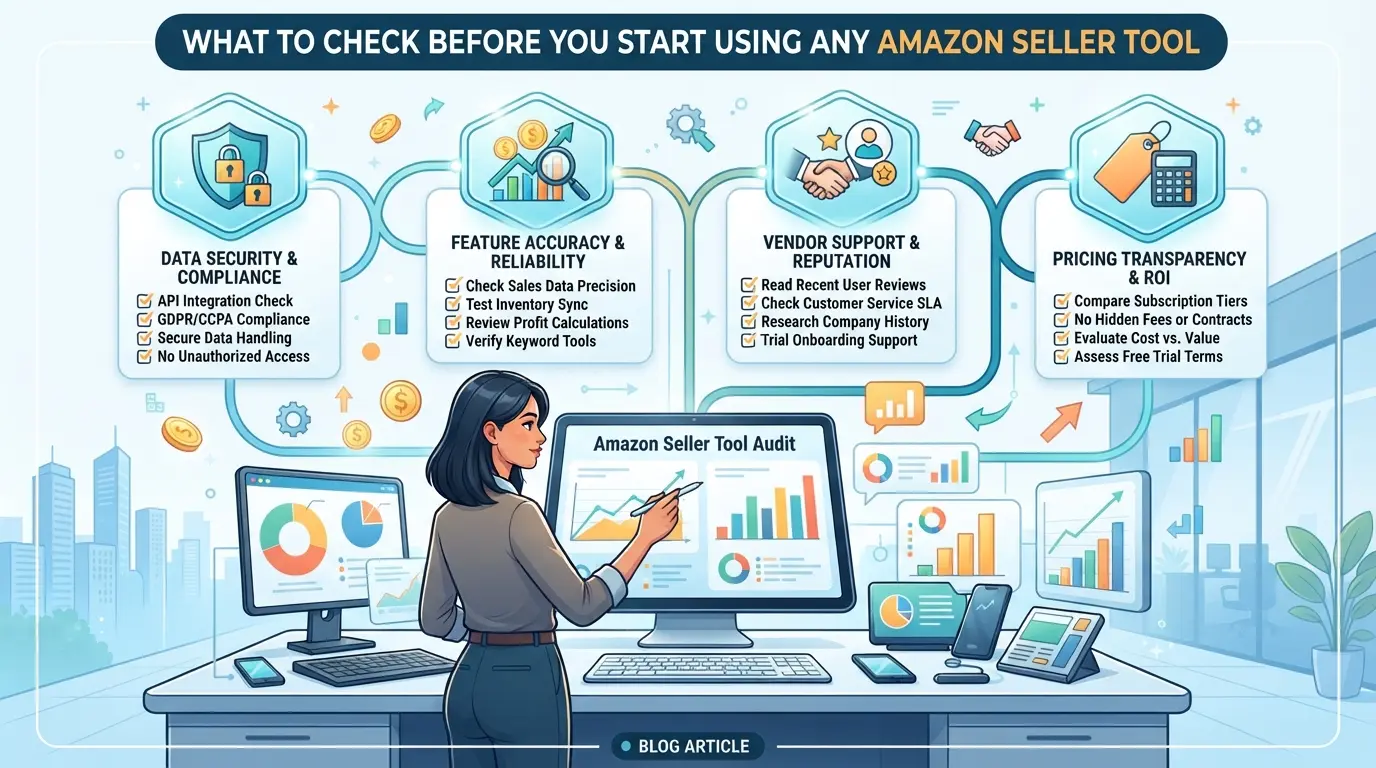
Before you link any new tool to your Amazon seller account, stop and check these risks, missing just one can get your account flagged or your data exposed. Don’t trust a slick interface without proof that it plays by Amazon’s rules.
Is the tool officially approved or compliant with Amazon policies?
Skip any tool that can’t prove it is an Amazon Partner Network member or officially listed in Amazon’s Appstore. Unofficial tools might work for a while, but Amazon tracks unauthorized API calls and account automation. When you see “connect your account” but no clear compliance info, treat that as a red flag. A single rule-breaking integration can trigger warnings or suspensions that lock up your funds for weeks.
What data does the tool access or require?
Check the tool’s permissions before connecting anything:
- Read the list of requested API scopes, avoid tools asking for more access than needed.
- Look for a clear privacy policy covering what happens with your account data.
- Make sure you can revoke access quickly from your Amazon account settings if something feels off.
Does the tool fit your current seller stage and business model?
Too many sellers buy software designed for huge FBA businesses when basic features cover what they need. Extra complexity can slow you down or break your workflow.
- Confirm the tool supports your regional Amazon marketplace (US, EU, etc.).
- Check that the features match your operation size, solo seller, team, agency, or brand.
- Review the pricing structure, are you paying for advanced analytics or ad tools you won’t use for months?
The single most overlooked check is whether the tool changes or combines your account’s browser fingerprint or device history behind the scenes, this is where “easy” logins can turn into surprise lockouts or bans.
Missing these checks is why some sellers end up worse off than before, next, see why even popular tools can cause headaches if you skip these basics.
Why Some Amazon Seller Tools Cause More Problems Than They Solve
Most sellers get caught off guard not by missing features, but by tools that quietly break account safety or workflow. The real risk is picking software that looks helpful but ends up making your daily work messier, your accounts less secure, or your team slower when it matters.

Security and account risk: How unsafe tools can trigger restrictions
A tool that mishandles cookies, leaks credentials, or uses undocumented APIs can expose your Amazon account to detection and restriction. One missed warning sign, like a tool asking for your full login without two-factor prompts, often means your session data could be logged or reused elsewhere. Once Amazon sees strange login patterns, you’ll face verification requests or outright bans.
Tool overlap and feature bloat: When too many tools create chaos
Stacking multiple tools seems harmless until you’re juggling four dashboards, each syncing orders or product data their own way. That’s where feature bloat shows up: auto-repricing in one extension, listing edits in another, and ad management in a third. Now, every change must be duplicated or cross-checked by hand. The real headache kicks in when two tools overwrite the same inventory or pricing field, suddenly, you’re fielding customer complaints and chasing down which tool “won.” Sellers waste hours reconciling conflicts, canceling orders, or chasing support tickets. It’s rarely about picking “more powerful” tools, but about picking too many tools that don’t play well together.
Workflow lock-in: When a tool makes it hard to switch or scale
- No bulk export: You can’t easily move product listings or ad data out, your history is stuck.
- Closed system: The tool only supports its own format or API; switching means starting over.
- Team scaling limits: User permissions or profile settings don’t transfer, so new staff have to rebuild everything from scratch.
The hidden cost isn’t just wasted money, it’s the wasted hours and lost control when you find out your “helper” tool has boxed you in. The next step is figuring out how to match tools to real-world use cases, not just feature lists.
How to Compare Amazon Seller Tools by Real-World Use Case
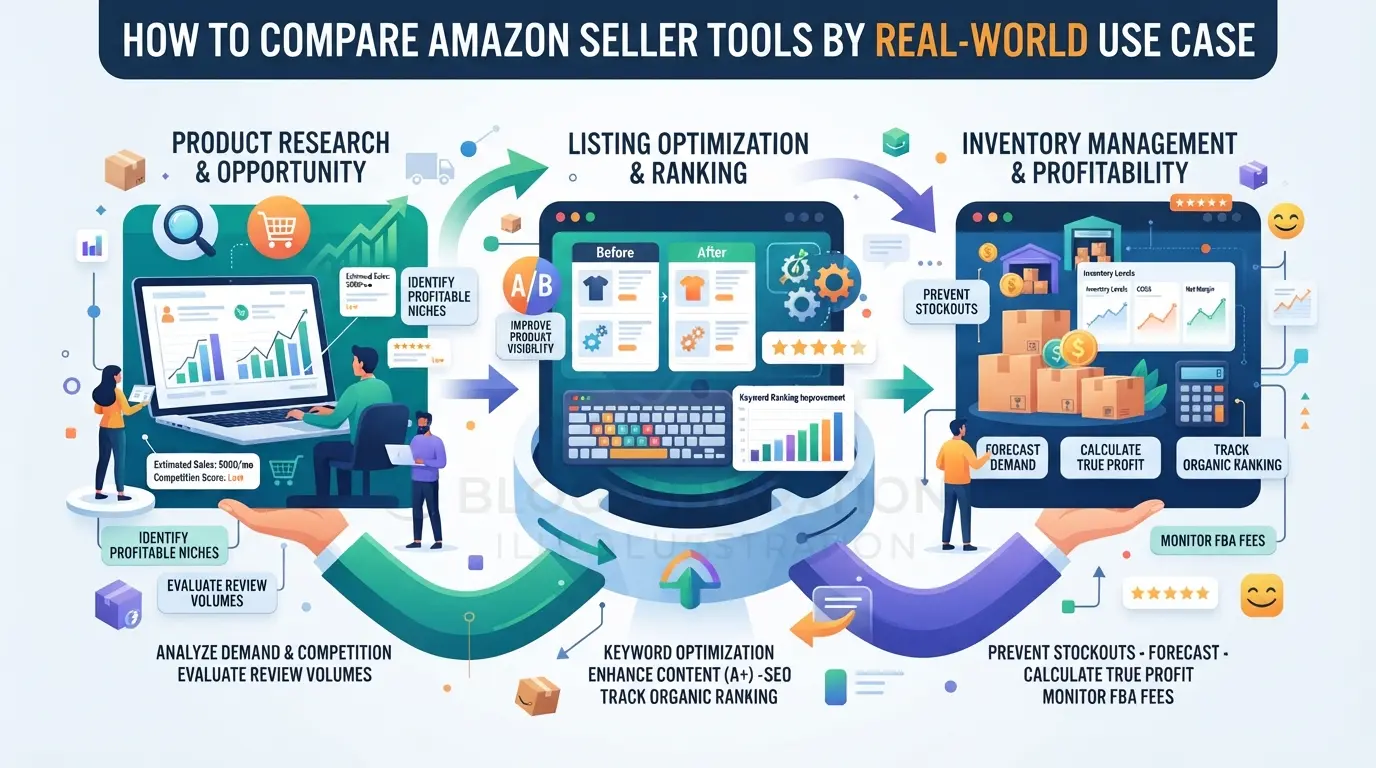
The right Amazon seller tool depends on how you actually run your business, not what looks impressive on a feature sheet. Too many sellers grab the first dashboard they see, then waste time wrestling with workflows that don’t fit. Matching the tool to your stage, model, and team size is what keeps your operations clean and avoids hidden headaches.
New sellers vs. established brands: What matters most at each stage
| Seller Type |
Must-Have Features |
Caution Points |
| New Seller |
Inventory tracker, basic analytics |
Avoid complex automations |
| Established Brand |
Bulk listing, multi-store support |
Watch for account links |
Beginners should stick to simple tools that don’t bundle accounts or overcomplicate setup. Scaling brands need software that can handle bulk uploads and keep profiles separated, the biggest risk is a tool that quietly connects all stores.
Private label, wholesale, and agency workflows: Key differences
Private label sellers need tools that track product reviews and pricing changes. Wholesale operators should focus on inventory and order sync. Agencies often need permission controls and account switching features. Using a tool built for another workflow often means you miss critical data or accidentally cross accounts.
Solo sellers vs. teams: Collaboration, permissions, and security
If you run solo, basic tools are fine. For teams, choose software that offers clear role settings and keeps data isolated by account. Shared logins or weak permission features can lead to accidental store linking, sometimes all it takes is one missed setting for Amazon to flag multiple stores.
What Features Actually Matter in Amazon Seller Tools (and Which Are Overhyped)
Sellers waste hours comparing dashboards and fancy features, but the only thing that counts is whether a tool cuts manual work and actually protects your account. Product research and data accuracy drive sales, the rest is often noise. Here’s how to spot what matters before you pay for any Amazon seller software.
Must-have features for product research, listing, and analytics
The real must-haves are:
- Bulk product research with up-to-date pricing and sales estimates, if a tool lags by days, you’ll miss trends and lose your edge.
- Listing management that lets you edit, duplicate, or relist in seconds. Slow batch edits mean lost sales during inventory spikes.
- Analytics showing which SKUs perform and why, broken down by region, ad source, and returns. If analytics only show top-level numbers, you’ll miss patterns that help you scale.
Overrated features that rarely deliver real ROI
A lot of tools market extras like “AI keyword suggestions” or “automated review reply” but these rarely move the needle unless you’re running high-volume stores. Many sellers pay for bundled chat features, fancy widgets, or generic automation that sound impressive but do nothing for conversion or risk reduction. For example, auto-review responses can trigger spam flags, resulting in account warnings if Amazon’s filters detect patterns. The most common trap is buying into features you never use; you end up paying monthly for a dashboard that looks busy but doesn’t actually make your workflow faster or safer. Stick to features that measurably save time or directly help you sell more.
The fastest way to lose your Amazon business is to treat accounts and team logins as interchangeable. If you want real protection, you need a setup where one person’s mistake or a single browser slip doesn’t connect your accounts in Amazon’s detection net. Skip the setup, and you risk everything, one flagged login, and you might see multiple stores suspended at once.
Why Amazon cracks down on linked accounts and shared logins
- Never log into two Amazon accounts from the same browser profile or device, Amazon fingerprints both hardware and browser details, so reuse links accounts even if you clear cookies.
- Avoid sharing credentials by email or chat, Amazon can see rapid location or device changes, and repeated handoffs often trigger restrictions.
- Don’t use the same network IP for multiple accounts without proper isolation, shared IPs make your accounts look related, which Amazon’s detection scripts flag as suspicious.
Best practices for separating accounts and workflows
- Create a unique browser profile for each Amazon account, this keeps cookies, cache, and fingerprint data fully separated.
- Assign a dedicated proxy to each profile, never reuse proxies across accounts, or you’ll create a direct link in Amazon’s logs.
- Limit physical device access, ideally, one device per account, but if that’s not possible, at least use hardened isolation tools that prevent cross-profile leaks.
Team management: Assigning access and tracking changes
- Give each team member access only to the accounts they need, least-privilege is safer and you’ll spot issues faster if something goes wrong.
- Require individual logins for every action, shared logins erase your audit trail, so you can’t see who made a change if problems pop up.
- Track all logins and changes in an operation log, if an account gets restricted, you need to know exactly who accessed it, when, and from which device.
Careless setups tend to blow up when you grow past a handful of accounts or bring more people onto your team. The single biggest mistake is thinking isolation is optional, Amazon’s linking algorithms get sharper every year, so shortcuts that worked in the past now create risk for everyone on your team.
Once you understand the risks here, setting up proper technical isolation and role controls becomes non-negotiable. The next section walks through the hands-on steps to set up isolated profiles, proxies, and team permissions for Amazon operations.
How to Set Up Isolated Browser Profiles, Proxies, and Team Permissions for Amazon Accounts in DICloak
For teams running several Amazon stores, keeping account sessions and team access clean is not just a checkbox, it’s a daily operational risk. If you also need to separate browser profiles, assign a different network for each store, and control who can access which account, this workflow in DICloak covers those needs without mixing up profiles or leaking data between team members.
Create Separate Browser Profiles and Configure Fingerprints for Each Amazon Account
Operators can create a unique browser profile in DICloak for every Amazon account, making sure each session uses its own storage and configurable fingerprint settings. This setup means every store workflow gets its own browser profile: you decide on the reported operating system, language, time zone, and other browser details for each profile. The scope here is limited to browser profile and fingerprint settings, it does not touch Amazon-native objects or guarantee platform outcomes.

Assign a User-Owned Proxy to Each Profile for Network Separation
If your workflow needs each profile to run through a separate network, operators can assign a user-owned proxy, like SOCKS5 or HTTP, to each DICloak profile. You enter your proxy details, then test the exit IP and location to confirm the connection. This step gives each store its own network route, which helps keep activities from crossing over. Responsibility for proxy quality and compliance always sits with the operator; DICloak’s role stops at storing and applying the proxy per profile.

Set Up Team Collaboration and Permissions to Control Access
Admins can build member groups in DICloak and control which profiles and sections each team member can see or use. For example, a new staff member might get access only to specific Amazon account profiles and nothing else, limiting risk from accidental changes or leaks. These permissions work at the DICloak workspace level; they don’t affect what happens inside Amazon itself.

For sellers deciding if these controls are worth it, the next section looks at where free amazon seller tools fit, and when a more advanced workflow is actually needed.
When Free Amazon Seller Tools Are Enough, and When to Upgrade
Free tools like Seller Central, the Seller App, and Brand Analytics handle basics, listing products, checking sales, and reviewing performance. But you’ll hit limits fast if you need bulk uploads, multi-account switching, or detailed keyword tracking. Here’s a quick comparison:
| Tool |
What You Get Free |
Where It Falls Short |
| Seller Central |
Listings, orders, basic reports |
No bulk edits, basic analytics only |
| Seller App |
Inventory, sales updates |
Limited account management |
| Brand Analytics |
Competitor data, search terms |
No deep keyword or trend tracking |
If you only run one store and handle a few products, free tools cover your workflow.
When paid tools unlock real value
You’ll need paid amazon seller tools when managing multiple accounts, automating pricing, or running team workflows. Once you’re spending more time on manual tasks or missing sales data, it’s time to upgrade.
How to Avoid Wasting Money on the Wrong Amazon Seller Tool
Switching from free to paid tools can backfire if you rush. Regret usually comes from missing one small but expensive detail, like a tool that locks you in or fails during peak sales.
Checklist: 7 things to confirm before you buy or subscribe
- Ask for a free trial or demo. If you can’t actually use it first, assume onboarding will hit a snag you didn’t expect.
- Test support before paying. Email or chat them with a real question. Slow or useless replies now mean bigger problems later.
- Review refund rules. Short trial windows or “no refund” policies are a red flag, especially if the software costs more than $30/month.
The real mistake is treating flashy features as proof the tool fits your daily ops. A checklist like this keeps you from buying just to chase a promise that doesn’t hold up under real Amazon workflows.
Frequently Asked Questions About amazon seller tools
What are Amazon seller tools and how do they work?
Amazon seller tools are software or web apps that help sellers run their Amazon businesses. They can track sales, manage inventory, find keywords, analyze competitors, and automate pricing. These tools connect to your Amazon Seller Central account using APIs, making it easier to handle daily tasks and improve your store’s performance.
Can I use free Amazon seller tools for a new business in 2026?
Yes, there are free tools like Amazon’s own Seller App, FBA Revenue Calculator, and some basic keyword research tools. These are great for beginners but often come with limits on features and data. As your business grows, you may need paid software for things like bulk listing, advanced analytics, or inventory forecasting.
How do I keep my Amazon accounts safe when using third-party tools?
Only use trusted and Amazon-approved software. Never share your Seller Central login details with anyone. Use unique passwords and enable two-factor authentication. Avoid connecting tools that ask for full account access unless absolutely needed, and check reviews before installing any new software to reduce risk of account suspension.
What features should I prioritize when choosing Amazon seller software?
For new sellers, focus on tools that help with product research, listing optimization, and sales tracking. Larger businesses may need inventory management, automated repricing, and multi-channel support. Wholesale and private label sellers should look for profit calculators, competitor monitoring, and order automation to save time and boost profits.
Is it safe to manage multiple Amazon accounts or stores with one tool?
Managing multiple accounts with one tool can be risky. Amazon may link your accounts and suspend them if you break their rules. Use separate browsers, IP addresses, and avoid sharing account info. Advanced tools that mask digital fingerprints may help, but always follow Amazon’s policies to stay safe.
Now is the ideal moment to evaluate which tools best align with your business goals and workflow. By testing solutions that simplify operations and improve your decision-making, you can gain the competitive edge needed for sustainable growth. Try DICloak For Free
 Web Proxy Tools
 Free Tools
 Cookie Plugin
 UA Generator
 MAC Address Generator
 IP Generator
 IP Address List
 2FA Code Generator
 World Clock
 Anonymous Check
 WebRTC Leak Test
 UUID Generator
 Free Web Proxy Site
 Proxy Checker
 FB Ad Checker
 AI Web Scraping
 Free SMM Tools
 Twitter Shadowban Checker
 Instagram Name Checker
 UTM Generator
 Username Generator
 AI Hashtag Generator
 LinkedIn Headline Generator
 Social Media Image Resizer