Claude is one of the most popular AI assistants in 2026. People use it to write, research topics, work with documents, create code, analyze data, and solve everyday problems. The good news is that you do not need a paid subscription to start using Claude. Anthropic still offers a Claude Free plan for $0. Free users can chat with Claude on the web, desktop, iOS, and Android. The free plan also includes tools such as web search, memory, file creation, code execution, and extended thinking, although usage limits apply.
However, learning how to use Claude for free is a little more complex than simply opening the website. Claude is only available in supported locations. New users may need phone verification, and free accounts have usage limits that can change based on demand and the work being done. Some features that look similar are also easy to confuse. For example, Claude Free can generate and run code inside Claude, but Claude Code, Anthropic's developer tool for terminals and IDEs, is not included in the regular Free plan.
This guide explains the main ways to use Claude for free in 2026, how signup works, what limits to expect, and what to do when access stops. It also explains the real situation with free Claude Code access. The information below was checked against Anthropic's current documentation in September 2026.

Steps to Access Claude for Free Without Paying
The easiest way to get free Claude access is still Anthropic's official Free plan. You do not need to find a special coupon or a third-party Claude site. Anthropic lists Free as a $0 individual plan designed mainly for occasional use.
You can use the same Claude account on different official apps. The web version is usually the fastest place to start, while desktop and mobile apps are useful if you want Claude available during normal work or while away from your computer.
Which Signup Options Offer Free Access
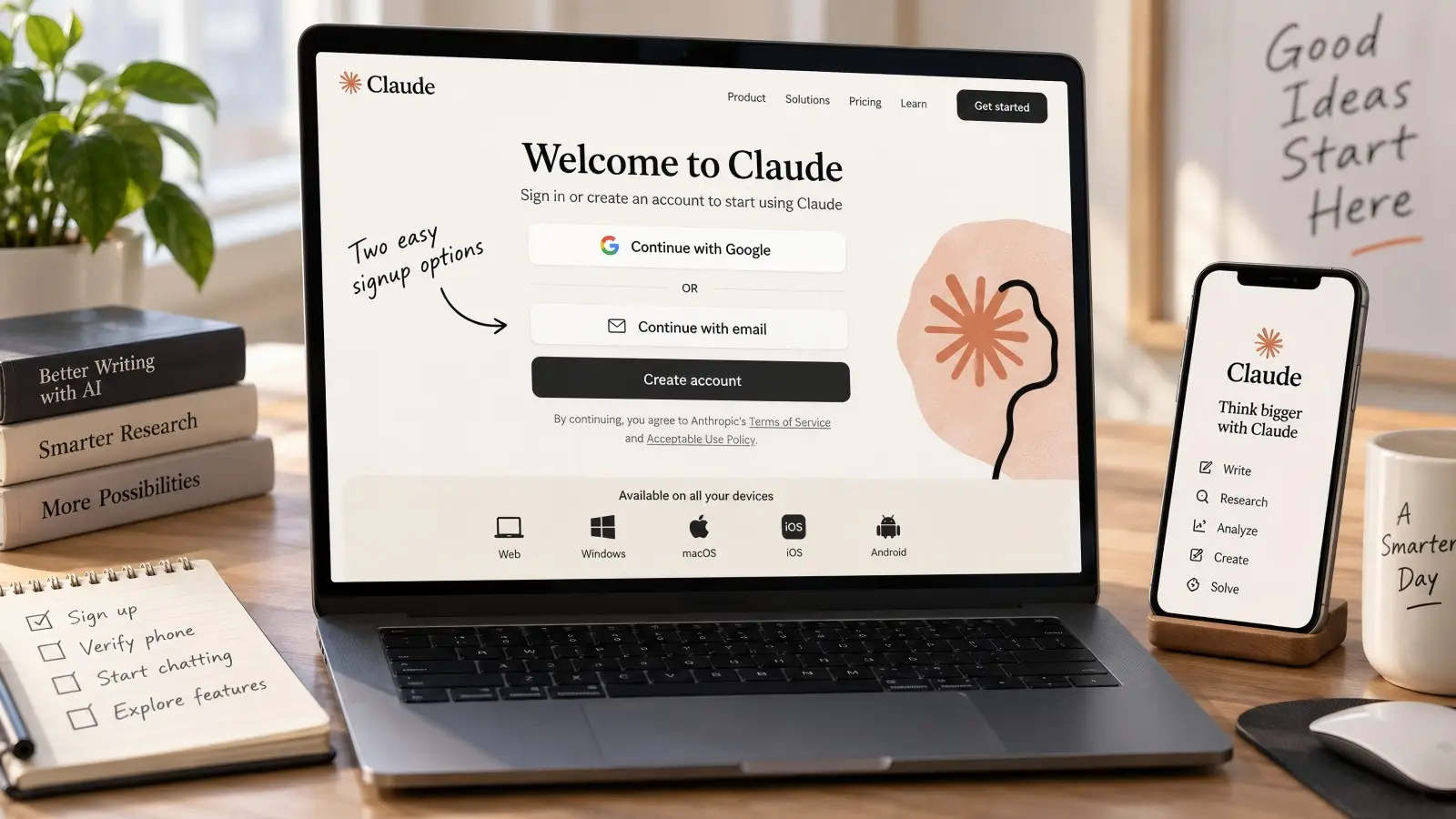
For most people, there are two main signup methods: Google login and email login. Both can lead to a normal Claude Free account. Anthropic's current login guide shows Continue with Google and Continue with email as the standard choices.
After creating the account, you can use Claude on the web or sign into the official desktop and mobile apps with the same account. Claude's current download page says the apps are available to Free, Pro, Max, Team, and Enterprise users, although some advanced features remain limited to paid plans.
This is important because installing the desktop app does not create a second free allowance. It is another way to use the same account. The best choice is therefore based on convenience, not on getting extra free messages.
How to Navigate the Free Tier Signup Process
The normal process is simple:
Open the official Claude website and choose Google login or enter your email address. If you choose email, open the secure login message Anthropic sends you. Complete the login on the same device when possible. Next, finish any required phone verification using an eligible SMS-capable number from a supported location. Complete the basic account setup, stay on the Free plan rather than choosing a paid upgrade, and then open a new chat to start using Claude.
A simple first prompt might be: “Explain photosynthesis in simple English for a middle school student.” You can then test other free features by asking Claude to rewrite an email, summarize text, create a small table, or generate sample code.
Do not rush into adding payment information simply because you see Pro or Max options. Claude Free remains a separate $0 plan. Paid plans are useful when you need more usage or features such as Claude Code, but payment is not required simply to use the standard Free experience.
What to Expect After Signing Up for Free
Claude Free offers more than basic text chat. Anthropic's current pricing page says Free users can chat on web, desktop, iOS, and Android, search the web, use memory across conversations, create files, execute code, connect supported tools, and use extended thinking for complex work.
A student, for example, could ask Claude to explain a difficult chapter and then create practice questions. A marketer could paste a draft email and ask for a simpler version. A developer could paste a Python function and ask Claude to find a bug. These tasks do not require Claude Code because normal Claude chat already understands and generates programming code.
The trade-off is capacity. Free users have lower usage than paid users, and the limit resets in five-hour sessions. Heavy features can use more of that allowance. Web search, long files, long conversation histories, extended reasoning, and multi-step work can all increase usage.
How to Use Claude Code for Free
There is an important correction to make before discussing how to use Claude Code for free. As of September 2026, Anthropic does not include Claude Code in the standard Claude Free plan. Its official plan comparison shows Claude Code as unavailable for Free users and included with Pro, Max, Team, and Enterprise access.
That means there is no normal trick that turns a Claude Free account into free Claude Code. You may still use Claude Code at no personal cost when access is supplied by an employer, school, eligible organization, grant, or official promotional program. Some users may also have cloud promotional credits, but those credits come from the relevant provider and should not be treated as permanent free Claude Code access.
Setting Up Claude Code on Different Operating Systems
Claude Code itself can be installed before or after you arrange eligible access. Anthropic's current quick-start documentation supports native installation on macOS, Linux, Windows, and WSL. For example, macOS users can install it through Homebrew with brew install --cask claude-code, while Windows users can use winget install Anthropic.ClaudeCode. Anthropic also provides native shell installers for macOS, Linux, WSL, Windows PowerShell, and Windows Command Prompt.
After installation, running claude --version confirms that the command is available. You can then enter a project folder and run claude. On the first launch, Claude Code asks you to authenticate.
The key point is that installing the software is not the same as getting free model usage. Anthropic's current documentation says Claude Code can authenticate through an eligible Claude subscription, a Claude Console account with prepaid API access, supported cloud platforms, or certain organization gateways. The ordinary Claude Free plan is not one of those Claude Code access methods.
How to Connect Claude Code Through Third-Party Tools
Claude Code can work inside supported development environments instead of only in a terminal. Anthropic currently supports integrations with VS Code, Cursor and other VS Code-based editors, and JetBrains IDEs such as IntelliJ and PyCharm. Users on eligible plans can sign in with the same account they use for Claude Code in the terminal.
Claude Code can also connect through enterprise cloud services. Anthropic's current documentation lists Amazon Bedrock, Google's Agent Platform, and Microsoft Foundry among supported cloud access routes. These options can be useful when a company already manages AI spending through its cloud provider. However, they are generally metered services rather than a public unlimited free plan.
Be careful with unofficial apps that claim they can give you “free Claude Code” if you paste in your Claude login or API key. Anthropic says third-party software should normally use API-key authentication through Claude Console or a supported cloud provider. Giving credentials to an unknown service can create both account and billing risks.
Solving Common Setup Issues with Claude Code
One of the easiest mistakes is authenticating with the wrong billing method. If an ANTHROPIC_API_KEY environment variable is already set, Claude Code can use that API key instead of your Claude subscription. That may result in API charges even when you have Pro or Max access. Anthropic specifically warns users about this behavior.
If Claude Code will not start, first run claude --version to confirm installation. Then update the client and use /login again if authentication appears wrong. Windows users should also check whether they are running PowerShell, Command Prompt, WSL, or Git for Windows because installation commands differ between those environments.
If your organization provides Claude Code, confirm that you selected the correct organization account during login. Do not assume that having a Free personal account and a company account under the same email gives both accounts the same benefits. Claude can keep individual and organization access separate.
Comparing Free Access Methods for Claude
“Free Claude” can mean several different things. For most people, it simply means the official $0 Claude Free plan. For someone at a company, university, or research program, it may instead mean that another organization pays for the access.
These routes should not be treated as equal. Some are always free to the user but limited in usage. Others are only free because a company, grant, promotion, or cloud credit is paying the real cost.
Which Free Method Suits Different User Types
The official Free plan is usually enough for a person who asks a few questions each day, rewrites text, studies documents, does light research, or gets occasional coding help. It has no subscription price and works across Claude's main consumer apps.
A developer who specifically needs Claude Code should first check whether an employer or organization already provides Claude access. Anthropic includes Claude Code with Pro, Max, Team, and Enterprise plans, and organization-provided access can mean the developer pays nothing personally. Researchers may also qualify for special programs. For example, Anthropic announced 10,000 scientist seats in August 2026, with standard seats offered free for one year under that program.
A developer who needs API calls rather than normal chat should treat the Claude Console as a separate product. Anthropic confirms that a Claude consumer account and Console account can use the same email but operate independently. API and Claude Code usage through Console is generally based on prepaid credits rather than the Free chat allowance.
Pros and Cons of Each Free Access Route
| Access route |
Personal cost |
Best use |
Main limit |
| Claude Free |
$0 |
Chat, writing, research, light coding |
Lower usage allowance |
| Free Claude desktop/mobile app |
$0 |
Using the same Free account on more devices |
Does not create extra usage |
| Organization-provided Claude |
Often $0 to the user |
Work, teams, Claude Code |
Depends on employer or organization |
| Official grant or promotion |
May be $0 |
Eligible research or special programs |
Eligibility and expiration rules |
| Cloud promotional credits |
May start at $0 |
API or developer testing |
Credits can expire or run out |
| Claude Console without credits |
Not free |
API and Claude Code |
Usage is billed |
The main advantage of the standard Free plan is simplicity. You know where the service comes from, there is no third-party reseller, and you can use many core Claude features. The main disadvantage is that heavy work can hit usage limits quickly.
Organization or promotional access can offer more features, but it depends on eligibility. Cloud credits can be useful for developers, but they are not the same as a permanent free tier. Once promotional credits end, normal provider billing rules can apply.
How to Choose the Best Free Method for Your Needs
Start with the official Claude Free plan if you mainly want AI chat. It is the simplest route and covers far more tasks than many new users expect. You can write, edit, search the web, analyze information, create files, and work with code without paying for a subscription.
If your main goal is coding inside a repository, check whether you actually need Claude Code. Asking Claude to explain JavaScript or fix a small Python function can be done in the Free chat. Claude Code becomes more useful when you want an agent to work directly with project files, Git, terminal commands, and development tools.
For work use, check what your company already provides before opening a separate paid account. A Team or Enterprise seat can give you Claude Code and organization controls that a personal Free account does not have.
Risks of Using Free Access to Claude
Using Claude Free does not create a special technical danger simply because the plan costs $0. The main risks are practical. You can run out of usage at the wrong time, depend on a feature that is not included, or trust an unofficial “free Claude” service that asks for sensitive information.
It is better to understand these limits before putting Claude at the center of an important deadline. Free access works very well for flexible tasks, but a limited plan should not be treated as guaranteed unlimited infrastructure.
Potential Limitations of Free Access
The largest limit is capacity. Anthropic says Free usage resets every five hours, but the number of messages is not fixed. Longer conversations, larger files, tool use, web search, model choice, and complex tasks can all change how much of your allowance is consumed.
Feature access is another limit. Claude Free has many useful tools, but it does not include everything found in Pro or Max. Claude Code is one clear example. Current pricing also reserves some other advanced tools and additional model access for paid plans.
A final issue is availability during heavy demand. Paid plans include more capacity and may receive better access during busy periods. A person who only needs Claude a few times a day may never care about this. Someone who depends on Claude for a six-hour work session may notice it quickly.
How Free Access Might Affect Your Workflow
Imagine that you are writing a 4,000-word research report. You upload several PDFs, use web search, ask Claude for multiple revisions, and keep everything inside one long conversation. This is convenient, but it can consume your Free allowance faster than short, separate tasks.
If your limit appears halfway through the work, you may need to wait until the session resets. That is manageable when the deadline is tomorrow. It is much more frustrating when a client expects the result in 20 minutes.
The solution is not to create extra Free accounts to jump around the limit. A better workflow is to use Claude Free for tasks that can tolerate pauses and keep important source files available outside the chat. That way, a temporary limit does not stop your entire project.
What to Watch Out for When Using Free Features
Be cautious with websites that promise unlimited Claude for free. Some may be legitimate products that use Anthropic's API, but others may collect prompts, account details, or API keys. A third-party service also has its own privacy terms, which may differ from Anthropic's.
You should also think before entering sensitive business information into a personal AI account. Anthropic provides privacy controls, and Free users can use incognito chats that are not saved to chat history or memory and are not used for training. Anthropic says those temporary chats are still normally retained for 30 days.
For important legal, medical, financial, or business decisions, Claude's answer should also be checked against reliable sources. Free and paid access use powerful AI models, but paying for a plan does not turn every answer into verified fact.
How to Extend Your Free Access to Claude
There is no legitimate setting that turns the Free plan into unlimited Claude. When people talk about “extending” free access, the useful goal is to get more work from the usage Anthropic already gives you.
This means reducing wasted context and expensive tool calls. It does not mean creating duplicate accounts, rotating identities, or trying to bypass Anthropic's usage system.
Tips for Maximizing Your Free Usage
Start with a clear prompt. Instead of sending five short messages to explain the task, give Claude the goal, important background, desired format, and main constraints in one well-organized message. This can reduce unnecessary back-and-forth.
For example, “Help with my resume” will usually lead to more questions. A better prompt would explain the target job, your experience, the section you want revised, and the length you want. You are more likely to get a useful first answer and use less of your session.
Anthropic also recommends planning conversations, limiting unnecessary file content, and thinking about which tools you really need. Its usage guidance notes that files, tool calls, web search, model choice, reasoning effort, and multi-step tasks can all affect usage.
How to Avoid Hitting Usage Limits
Do not use web search for questions that do not require current information. If you are asking Claude to rewrite an email or explain a math idea, web search adds little value. Anthropic specifically recommends disabling web search when it is not needed because search and web fetching consume Free usage.
Long conversations can also become expensive because Claude needs enough context to understand what came before. When you move to a completely different topic, start a fresh conversation. For example, do not keep your tax question, Python debugging task, vacation plan, and product description inside one giant thread.
Large attachments should be handled the same way. If you only need an answer from three pages of a 200-page report, give Claude the relevant pages when possible. More context is not always better context.
Strategies for Keeping Your Free Access Active
Keep your account in good standing rather than trying to force more usage from it. Use Claude from supported locations, follow Anthropic's terms, and complete verification honestly. Anthropic says account creation from unsupported locations and Terms or Usage Policy violations can lead to enforcement.
Keep your account secure as well. Review active sessions when something looks unusual, end sessions you do not recognize, and avoid passing your login links or verification codes to other people. Claude's account settings make it possible to manage active devices and sign out remotely.
Most importantly, do not treat multiple Free accounts as a way to reset limits. If Free capacity is no longer enough for your real workload, the practical choices are to wait for the reset, reduce usage, use organization-provided access, or consider a paid plan.
Claude Free works well for personal use, but account management can become more complicated when a team works with several authorized Claude accounts or workspaces. Logging in and out of the same browser can mix cookies, sessions, and browser data. It can also make it harder to tell which account belongs to which project.
DICloak antidetect browser gives users separate browser Profiles for different accounts and workflows. Each Profile can keep its own login data, browser settings, and network configuration. This does not increase Claude's free usage or bypass Anthropic's limits. Instead, it can help users keep legitimate Claude sessions organized and easier to manage.
Keep Claude Accounts in Separate Browser Profiles
DICloak lets users create an independent browser Profile for each authorized Claude account or workspace. Cookies, session data, local storage, and other browser data stay inside that Profile, so users do not need to sign out and switch accounts repeatedly in one browser.
This can be useful for a team that uses different Claude environments for different projects. For example, one Profile could contain a personal Claude account, while another is used for a company workspace. Users can also adjust settings such as operating system, user agent, language, time zone, geolocation, fonts, Canvas, WebGL, and WebRTC for each Profile.
The goal should be consistency rather than frequent changes. Keeping the same account in the same Profile can make daily access easier to organize and reduce accidental session mixing.

Use a Stable Network Setup for Each Profile
Users can also assign a separate proxy connection to each DICloak Profile. The proxy settings support fields such as host, port, username, and password, and users can check the connection before opening the Profile.
This can be helpful for teams that already use company proxies, fixed remote gateways, or other approved network connections. For example, a remote employee can keep one work Profile connected through the company's normal network setup instead of changing connection settings every time Claude is opened.
A proxy should not be used to bypass Claude's country restrictions or Free plan limits. In most cases, a stable and legitimate network setup is more useful than frequently changing IP addresses.

Control Team Access and Review Account Activity
For teams, DICloak also provides permission controls around browser Profiles. Admins can decide which members can view or open Profiles and can restrict actions such as editing Profiles, viewing saved passwords, changing extensions, or accessing browser developer tools.
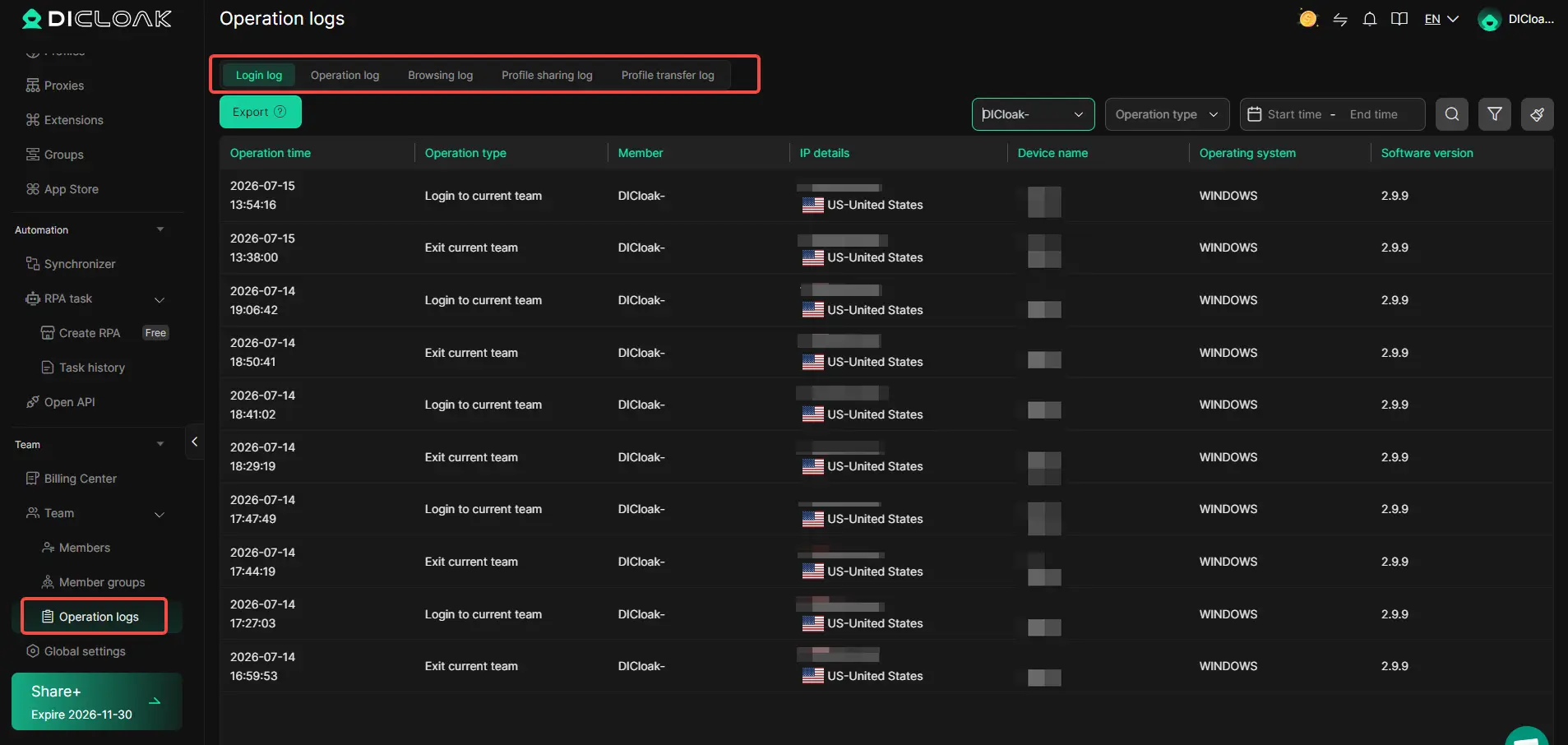
Operation Logs add another layer of visibility. Admins can review login activity, Profile operations, Profile sharing records, transfers, and browsing activity. This makes it easier to see which team member accessed a Profile and when an action took place.
For example, if several employees use Claude for different client projects, an admin can give each member access only to the Profiles needed for their work. This is more organized than sharing account credentials through messages or letting everyone use the same browser session.
FAQs About Using Claude for Free
How to Use Claude for Free in 2026?
You can use Claude for free through Anthropic’s official Free plan. Sign up with an eligible account, complete any required verification, and start chatting without paying for a subscription.
Can I Use Claude for Free Outside the US?
Yes. If you are looking for how to use Claude for free outside the US, Claude is available in many supported countries and regions. Check Anthropic’s current location list before signing up.
How Long Can I Use Claude for Free?
Claude Free is not a short-term trial. You can keep using the Free plan, but usage is limited and normally resets every five hours.
Are There Hidden Costs When You Use Claude for Free?
No. The official Claude Free plan costs $0. However, Claude API usage, Claude Code through paid access, and some advanced features may have separate charges.
What Happens When I Reach the Claude Free Limit?
If you reach the Free usage limit, you usually need to wait until your allowance resets. Knowing how to use Claude for free efficiently, such as using shorter chats and fewer unnecessary tool calls, can help your allowance last longer.
Conclusion
Learning how to use Claude for free in 2026 is still straightforward. Create an account through Anthropic's official Claude service, complete the required verification, stay on the $0 Free plan, and use Claude on the web, desktop, iOS, or Android. Free users can already handle writing, research, document work, web search, file creation, coding help, and many everyday AI tasks without paying for a subscription.
The main thing to understand is the limit. Free Claude is not unlimited, and its five-hour usage allowance can vary with your prompts, files, tools, and workload. Use clear prompts, avoid unnecessary web searches, start new chats when the topic changes, and plan large tasks before you begin. Those habits can make the Free plan much more useful without trying to work around Anthropic's controls.
Claude Code also deserves a clear distinction. The normal Claude Free plan does not include Claude Code in 2026. Developers need an eligible paid subscription, organization-provided access, approved promotional access, or metered API/cloud access. Tools such as DICloak can help legitimate teams keep authorized browser sessions, network settings, and account workflows separate, but they should support normal account management rather than attempts to bypass Claude's usage, region, or verification rules.
 Web Proxy Tools
 Free Tools
 Cookie Plugin
 UA Generator
 MAC Address Generator
 IP Generator
 IP Address List
 2FA Code Generator
 World Clock
 Anonymous Check
 WebRTC Leak Test
 UUID Generator
 Free Web Proxy Site
 Proxy Checker
 FB Ad Checker
 AI Web Scraping
 Free SMM Tools
 Twitter Shadowban Checker
 Instagram Name Checker
 UTM Generator
 Username Generator
 AI Hashtag Generator
 LinkedIn Headline Generator
 Social Media Image Resizer