AI stealth browsers have changed the browser automation conversation. A few years ago, "stealth browser" usually meant a niche scraping setup or a patched testing tool. In 2026, the term is showing up in a much broader market: browser-using agents, automated research assistants, data workflows, checkout assistants, QA scripts, and internal operations tools that need to open real websites and complete tasks.
Foil's June 2026 research on AI stealth browsers describes the shift clearly: demand no longer comes only from scrapers. It now comes from agent developers who need automated browser sessions to keep working when websites score or challenge automation. That demand has pushed open-source stealth-browser projects to grow quickly, and it has also made the category harder to talk about responsibly.
For teams that use multiple browser profiles, the lesson is not "find a magic browser that can never be detected." That promise is unrealistic. The better lesson is operational: browser identity, network settings, automation behavior, team access, and logs now need to be managed as one workflow.
DICloak sits in that workflow at the browser profile and operations layer. Operators can create separate browser profiles, configure profile-level browser signals, add their own proxies, run selected RPA tasks, mirror supported actions with the Window Synchronizer, manage profile groups, and review supported team activity. Those controls do not promise platform acceptance, but they give teams a clearer way to organize multi-profile work without mixing every session into one unmanaged browser.
What Is an AI Stealth Browser?
An AI stealth browser is usually a browser or browser-control stack designed to make automated browsing look less like automation. It may start from Chromium, Firefox, Playwright, Puppeteer, Selenium, or a custom headless engine. Then it changes the signals that websites can observe.
Those signals can come from several layers:
| Layer |
What websites may observe |
Why it matters |
| Driver layer |
Automation protocol behavior, WebDriver state, script injection timing, stack traces |
A site may detect that a browser is being controlled by automation |
| Browser signal layer |
User Agent, Canvas, WebGL, fonts, device memory, hardware concurrency, WebRTC, language, time zone |
A site may compare whether the browser's reported environment is internally consistent |
| Network layer |
IP address, proxy behavior, TLS fingerprint, locale and geolocation alignment |
A site may compare the network route with the claimed browser profile |
| Behavior layer |
Click timing, scroll rhythm, form input patterns, pauses, corrections |
A site may score whether the session behaves like a person or a script |
| Fleet layer |
Repeated values across large session sets, shared constants, reused profile patterns |
A site may identify that multiple sessions belong to the same automated population |
The important point is that stealth is not one switch. It is a stack of tradeoffs. A browser can reduce one class of automation signal and still expose another. A profile can look coherent in one session but become easy to cluster when hundreds of sessions share the same assumptions. A proxy can change the exit IP but cannot, by itself, make the rest of the browser profile consistent.
This is why teams should think beyond "does this pass one public fingerprint test?" A browser profile workflow should answer more practical questions:
- Which profile belongs to which platform account or task?
- Which proxy, language, time zone, and geolocation settings belong together?
- Who is allowed to open, edit, share, or transfer each profile?
- Which steps are manual, synchronized, RPA-based, or API-connected?
- What logs are available when something changes unexpectedly?
Why AI Agents Made Stealth Browsers More Visible
Traditional browser automation was often built for testing, scraping, monitoring, or repetitive internal tasks. AI agents changed the buyer. A developer building an agent does not only care whether a script can open a page. They care whether the user-facing workflow completes: search, compare, fill a form, read a dashboard, check a listing, or submit a request.
When the browser session is challenged, scored down, or blocked, the agent fails. That pressure has created demand for browsers that hide automation traces more carefully.
The uncomfortable part is that the same technical progress can serve very different users. A legitimate agent that navigates a website for a user and a risky automated operation can use similar browser-control infrastructure. The browser does not know the operator's intent. That is why the next stage of this category is not only technical. It is also about governance, access control, review, and responsible use.
For a team running real business workflows, the goal should be controlled browser operations. That means separating browser profiles, documenting who uses them, choosing automation methods carefully, and staying within the rules of the platforms being accessed.
The Four Technical Directions Behind Modern Stealth Browsers
Foil's research breaks the current market into several technical directions. You do not need to read source code to understand the operational lesson behind each one.
Driver-Level Stealth: The Automation Tool Can Leak
Some stealth projects focus on the driver layer, meaning the part that lets automation tools control the browser. Standard automation can leave traces through WebDriver flags, protocol timing, script injection, console behavior, or stack frames created by page.evaluate and similar calls.
The operational takeaway is simple: automation method matters. A team should not treat every automated action as equivalent. Running a one-time internal QA check, mirroring a live setup step across several windows, and scheduling a repeated browser workflow are different use cases.
With DICloak, operators can choose between different workflow patterns:
- Use a normal browser profile for manual work.
- Use the Window Synchronizer when one live action needs to be mirrored to selected profile windows.
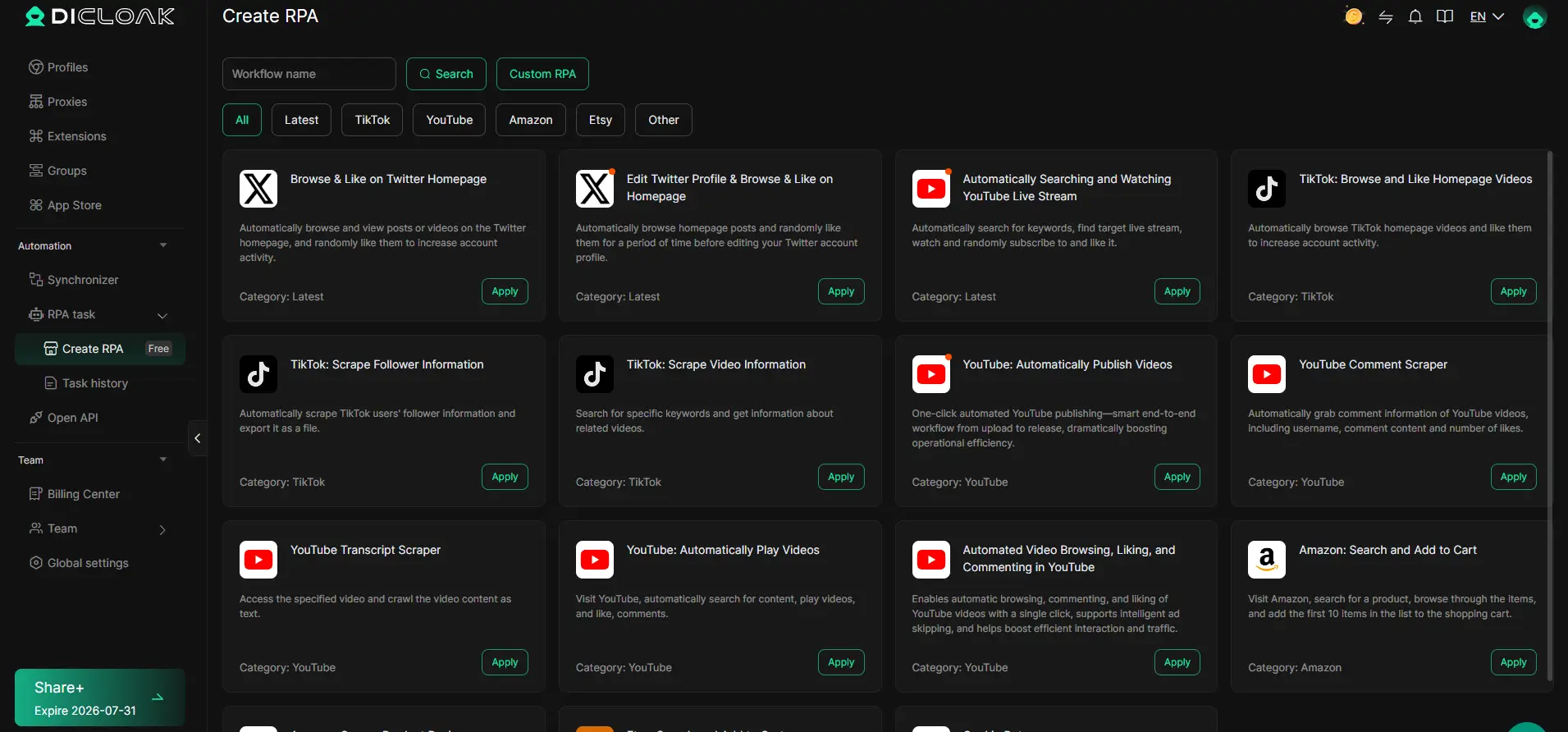
- Use RPA when a repeatable, rule-based browser workflow should run in selected profiles.
- Use Local API when a local integration needs to open a DICloak profile and connect supported automation clients to the returned debug endpoint.
That choice should be intentional. Automation is easier to manage when the team knows which layer is responsible for each action.
Browser-Signal Stealth: Fingerprint Coherence Matters
Other stealth approaches focus on the browser itself. Websites can read a wide set of browser-identification signals: User Agent, screen size, fonts, Canvas, WebGL, WebGPU, AudioContext, device memory, hardware concurrency, WebRTC behavior, language, and time zone.
Changing one value is rarely enough. A browser that claims one operating system while exposing fonts, GPU metadata, or language settings from another can look inconsistent. A browser that changes Canvas but leaves related graphics or audio surfaces untouched can still produce a pattern that stands out.
DICloak browser profiles are built for this profile-level configuration problem. Operators can create separate profiles and configure the browser-identification signals exposed by each profile, including operating system, User Agent, interface language, content language, time zone, geolocation, screen resolution, window size, font list, WebRTC behavior, Canvas, ClientRects, AudioContext, WebGL metadata, WebGPU, SpeechVoices, hardware concurrency, device memory, battery, and related settings where supported by the current product interface.
The point is not to claim that any configuration is undetectable. The point is to keep each profile's browser profile organized and internally considered, instead of running multiple accounts or tasks through the same default browser state.

Network and Proxy Settings: IP Is Only One Part of the Environment
Network settings are another layer. Teams sometimes over-focus on IP address and under-focus on consistency. A proxy exit location, browser time zone, interface language, geolocation setting, and platform account history can all become part of the same risk picture.
Operators can configure their own proxy connection for each DICloak browser profile. DICloak supports profile-level modes such as No Proxy, Custom Proxy, Saved Proxies, and API Extraction where available. For Custom Proxy, users can enter host, port, username, and password, then run a built-in connectivity check that displays detected exit IP, country or region, and time zone.
That check is not a trust certificate. It is a setup check. Teams still need to choose proxy providers responsibly, follow applicable laws and platform rules, and avoid assuming that an IP change alone solves browser identity problems.

Fleet-Level Realism: Scale Creates Its Own Signals
The hardest problem in modern browser automation may not be one session. It may be the session fleet.
A single profile can appear internally coherent while a fleet still shares patterns: the same hardware values, the same timezone mistakes, the same proxy geography mismatch, the same automation timing, the same launch URL, the same notes copied across accounts, or the same bulk-edited setting applied too broadly.
This is where profile operations become important. DICloak Bulk Operations can reduce repetitive profile-management work, such as batch opening or closing profiles, assigning groups, editing remarks or tags, checking exit IPs, updating supported profile fields, exporting profiles, sharing or transferring profiles, clearing local cache, and creating or importing profiles in batches where supported.
Bulk editing should be used carefully. Shared settings are fast, but a mistaken batch change can affect a large profile group. For growing teams, a useful rule is to batch the administrative work, then review the profile logic before the profiles are used in production workflows.
Managing Browser Profiles With DICloak
DICloak should be understood as an operations layer for browser profiles, not as a promise that a website will accept every session. That distinction matters. A responsible workflow connects DICloak features to concrete team tasks.
Separate Profiles for Separate Work Contexts
A DICloak browser profile is a separately configured browser profile. Operators can store profile-level information such as the profile name, group, linked platform account, proxy configuration, and remarks. They can create, open, edit, delete, group, filter, clone, share, transfer, export, and clear cache for profiles.
For teams handling multiple platform accounts, client accounts, ad accounts, seller accounts, or social media accounts, this provides a practical inventory. Instead of asking employees to remember which browser, proxy, cookie jar, or local session belongs to which account, the team can organize that data at the profile level.
Choose the Right Automation Method
AI-agent workflows often mix different kinds of browser control. Some are interactive. Some are repeated. Some are developer-integrated. Treating all of them as "automation" can create confusion.
In DICloak, the distinction is clearer:
- Window Synchronizer mirrors supported live actions from a master browser window to selected profile windows. It is useful for simultaneous interactive operations while the operator watches and controls the master window.
- RPA runs configured browser workflows in one or more selected profiles. It is better suited for repeatable, rule-based operations with task settings, execution status, run logs, and task history.
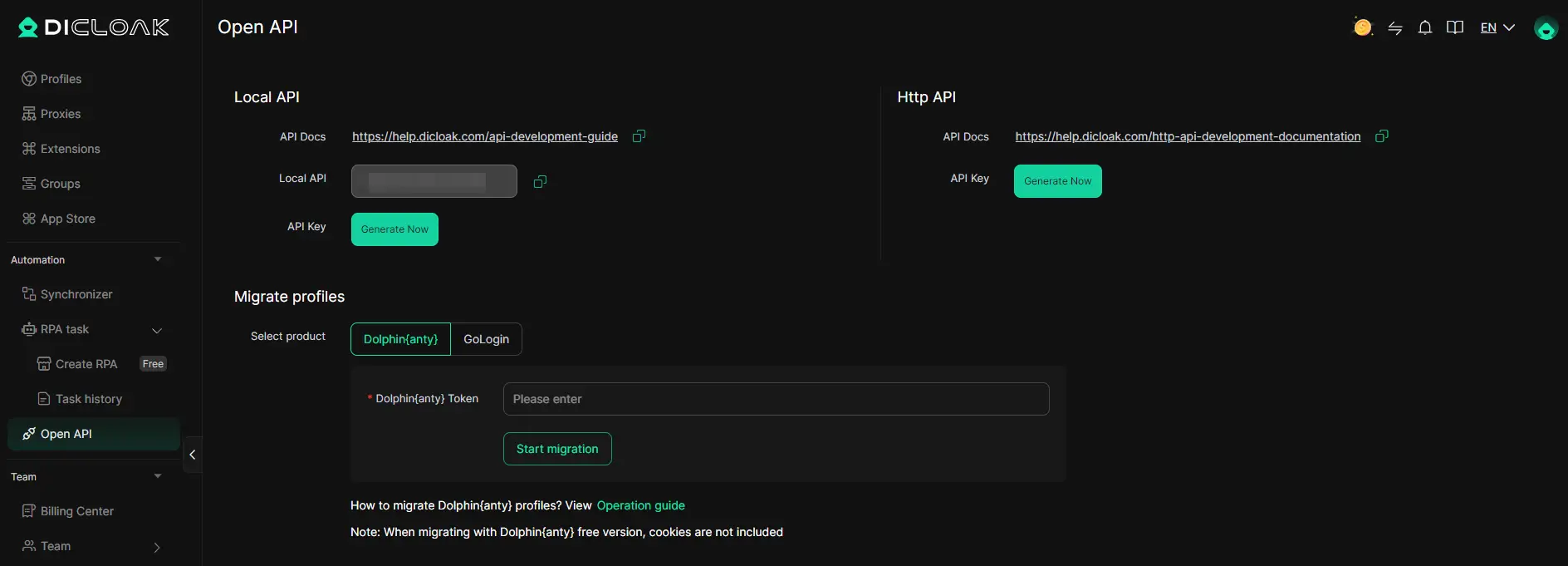
- Open API exposes supported operations for DICloak resources such as browser profiles, profile groups, proxies, and team members. Local API can be used through a logged-in desktop client, and HTTP API can be used for documented remote management operations.
None of these should be described as a CAPTCHA solver, a web-scraping API, or an assurance that automated activity will be accepted by a target platform. They are workflow-control options. The team remains responsible for task design, compliance, testing, and review.
Add Team Permissions Before Workflows Grow Messy
Stealth-browser discussions often focus on browser internals, but real teams usually fail in more ordinary ways: too much profile-edit access, unclear proxy changes, shared passwords in chat, or members seeing fields they do not need.
Team administrators can use DICloak member groups, profile groups, and field visibility settings to create a cleaner access model. A least-privilege setup might give a regular member only the ability to view the Profiles list and open assigned profiles. Administrators can separately control which functional sections or action buttons are visible, which profile groups a member can access, and which Profiles-list fields are visible.
That does not replace permissions inside the third-party websites opened in a profile. It only governs actions inside DICloak. Still, for multi-profile browser operations, that separation is useful.

Review Logs When Something Changes
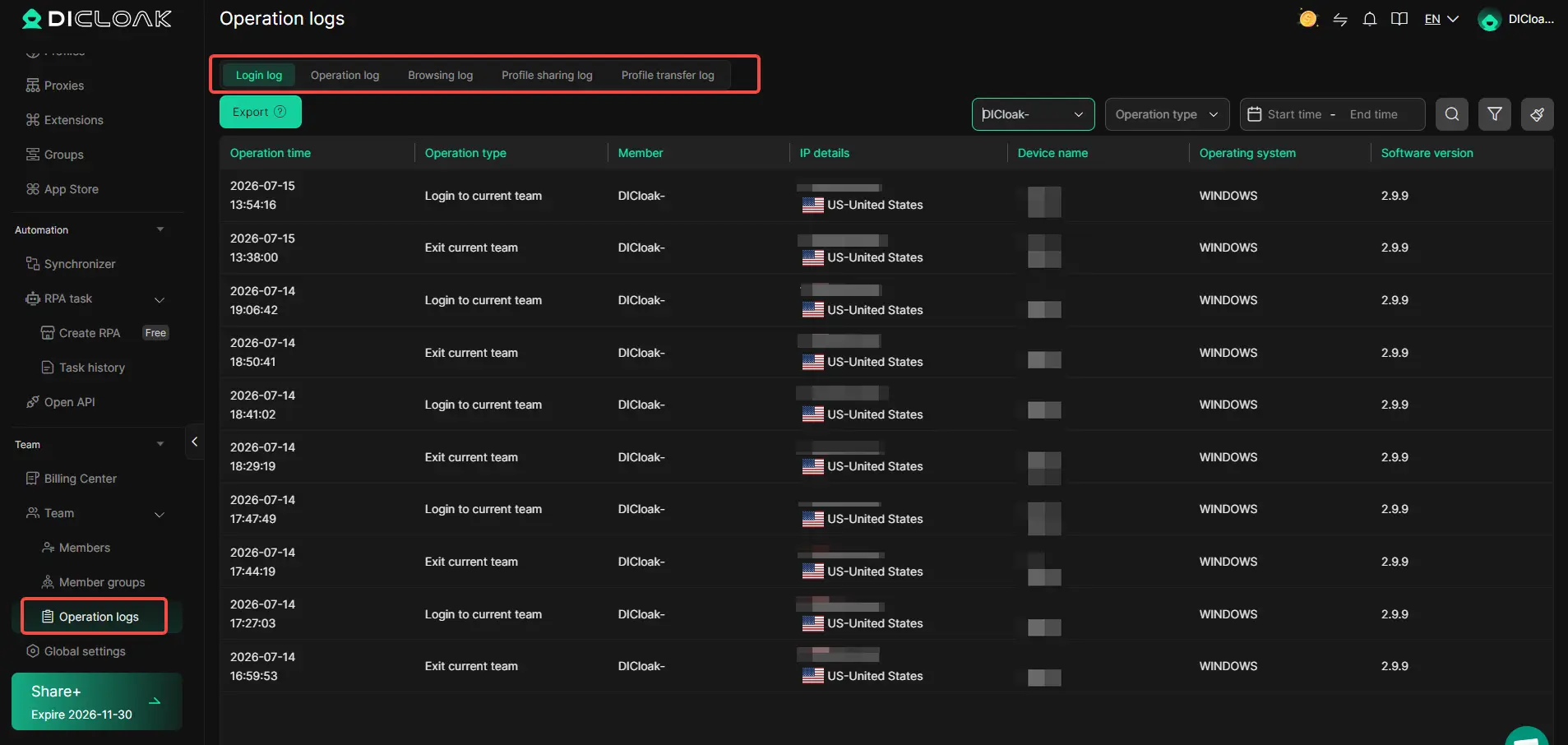
When profile volume and team size increase, logs become part of the workflow. Administrators can review supported member activity in DICloak, including team login records, operation logs, browsing logs, profile sharing logs, and profile transfer logs.
These logs support monitoring and troubleshooting. They should not be described as a complete or tamper-proof compliance ledger. Their practical value is that teams can filter supported records by member, time, device, IP, profile, URL, or action type when they need to understand what happened.
A Practical Checklist for Teams Using Browser Profiles in 2026
The AI stealth-browser boom can make the category sound more mysterious than it is. Most operational problems still come down to a few repeatable decisions.
Use this checklist before expanding a browser-profile workflow:
- Define the legitimate business use case before choosing any automation method.
- Assign one clear owner for every profile group.
- Keep each profile tied to a specific account, client, task, or operating context.
- Match proxy settings, time zone, language, and geolocation deliberately.
- Use No Proxy when local network access is the intended setup.
- Use Custom Proxy, Saved Proxies, or API Extraction only when the team already has suitable proxy credentials or extraction URLs.
- Avoid applying identical fingerprint settings across a large profile group unless that is truly intended.
- Use Bulk Operations for profile administration, then review the result before active use.
- Use Window Synchronizer for watched, simultaneous actions.
- Use RPA for repeatable configured workflows, with logs reviewed afterward.
- Store API keys outside source code and follow the current Open API documentation.
- Give team members the minimum DICloak access needed for their role.
- Review operation logs after unexpected profile changes, sharing events, transfers, or browsing activity.
- Do not treat any browser profile, proxy, or automation tool as protection from platform restrictions.
Common Misconceptions About AI Stealth Browsers
"A stealth browser is undetectable"
No browser stack can honestly promise this. Detection changes, browser APIs change, and websites combine a wide range of signals. A setup can reduce some mismatches and still expose others.
"Changing IP is enough"
IP address is only one layer. If the browser's language, time zone, geolocation, WebRTC behavior, account history, or automation pattern does not fit the network route, the session can still look unusual.
"Automation and profile management are the same thing"
They are connected, but they are not the same. Profile management controls the browser profile and stored profile data. Automation controls actions performed inside a browser session. A clean workflow names which layer is responsible for each part.
"More profiles always means more safety"
More profiles can also mean more mistakes. At scale, teams need naming rules, profile groups, permission controls, logs, and review habits. Otherwise profile sprawl becomes its own risk.
"RPA replaces human review"
RPA can run configured workflows, but it does not remove the need to test tasks, review results, handle errors, and follow target-site rules. For sensitive workflows, review is part of the process.
FAQ about stealth browser
What is the difference between a stealth browser and a browser profile manager?
A stealth browser usually focuses on reducing automation or fingerprint signals exposed to websites. A browser profile manager organizes separate browser profiles, profile data, proxy settings, profile groups, team access, and related operations. DICloak belongs to the browser profile and workflow-management side.
Can DICloak be used with browser automation tools?
Where supported, DICloak Local API can open a local browser profile and return connection information that supported clients such as Playwright, Puppeteer, Selenium, or ChromeDriver can use. Teams should follow the current DICloak API documentation and the rules of the websites they access.
Are proxies built into the profile workflow?
No. Users can configure their own proxies in DICloak browser profiles. DICloak stores and applies the proxy settings, but proxy selection, quality, provider choice, rotation rules, and compliance remain the user's responsibility.
Does using a separate browser profile prevent account restrictions?
No. A separate profile can organize browser profile settings and session data, but it does not promise that a platform will accept an account or activity. Platform rules, account history, content behavior, payment signals, network quality, and other factors may matter.
Should teams use RPA or Window Synchronizer?
Use Window Synchronizer when an operator needs to mirror supported live actions from one master window to selected profile windows. Use RPA when a repeatable browser workflow should run with configured task rules, execution status, and logs. Use neither as a substitute for compliance review or task testing.
Final Thoughts
AI agents made stealth browsers more visible because they turned browser automation from a niche technical workflow into a product feature. That shift will keep pushing browser-control tools forward.
For operations teams, the useful response is not to chase impossible certainty. It is to manage the browser profile with more discipline: separate profiles, coherent settings, careful proxy configuration, intentional automation methods, least-privilege access, and reviewable logs.
With DICloak, operators can build that kind of multi-profile workflow around browser profiles instead of scattered local browsers and undocumented habits. In 2026, that operational layer matters just as much as the browser technology itself. Teams planning feature access or quotas should verify the current details on the DICloak pricing page before publishing plan-specific claims.
 Web Proxy Tools
 Free Tools
 Cookie Plugin
 UA Generator
 MAC Address Generator
 IP Generator
 IP Address List
 2FA Code Generator
 World Clock
 Anonymous Check
 WebRTC Leak Test
 UUID Generator
 Free Web Proxy Site
 Proxy Checker
 FB Ad Checker
 AI Web Scraping
 Free SMM Tools
 Twitter Shadowban Checker
 Instagram Name Checker
 UTM Generator
 Username Generator
 AI Hashtag Generator
 LinkedIn Headline Generator
 Social Media Image Resizer