Scroll through TikTok comments and you’ll see text, emojis, and sometimes, picture comments that seem out of reach for most users. The platform officially blocks direct image uploads in comments, yet dozens of posts show creative workarounds and hacks, with some creators getting thousands of likes by embedding memes or screenshots right under viral videos. This leaves users searching for how to comment pictures on tiktok, not just for fun, but to boost engagement and stand out in crowded threads.
The catch is, TikTok’s app doesn’t support native picture comments for everyone. Some regions report limited tests, while most profiles, even verified ones, can’t attach images. Instead, users rely on indirect tricks: posting a stitched video as a “picture” reply, sharing links to image hosts, or screenshotting and uploading visuals in replies to their own content. Each method comes with trade-offs, risk of restriction, lower visibility, or outright deletion if TikTok flags it as spam. Even tools claiming to automate picture comments often fail when TikTok updates its detection rules, as seen in recent Reddit threads.
This guide breaks down exactly which picture comment methods actually work, what risks you need to avoid, and step-by-step instructions for staying visible without getting your account flagged. If you want your comment to stand out, here’s what you need to know before you try.
What Changed: Can You Really Comment Pictures on TikTok Now?
TikTok’s recent update made it possible for some users to add pictures directly in comments. This is a big shift, before, the only way to show visuals was by linking out or stitching a video. But not everyone can use this feature right away. If you’re searching for "how to comment pictures on tiktok," here’s what’s actually changed and who gets access.
How TikTok's Picture Comment Feature Works
The new feature shows up as a small image icon next to the comment box. If your account has access, tapping the icon lets you pick a photo from your device and post it beneath any public video. Early access went to accounts with high activity, newer app versions, and those in test regions. Most verified creators saw the feature first, while regular users in some countries had to wait. For a quick look, see TikTok’s official feature update blog.
Why Some Users Can't Comment Pictures Yet
A lot of users still don’t see the image icon. This usually comes down to app version and device compatibility, older versions and some Android models are left out. TikTok also rolls out features by region, so accounts in the US or UK often get updates sooner than others. If your account doesn’t show the picture option, updating the app or switching devices rarely solves it. Feature access depends on TikTok’s rollout schedule, not user action.
Step-by-Step: How to Comment Pictures on TikTok (If You Have the Feature)
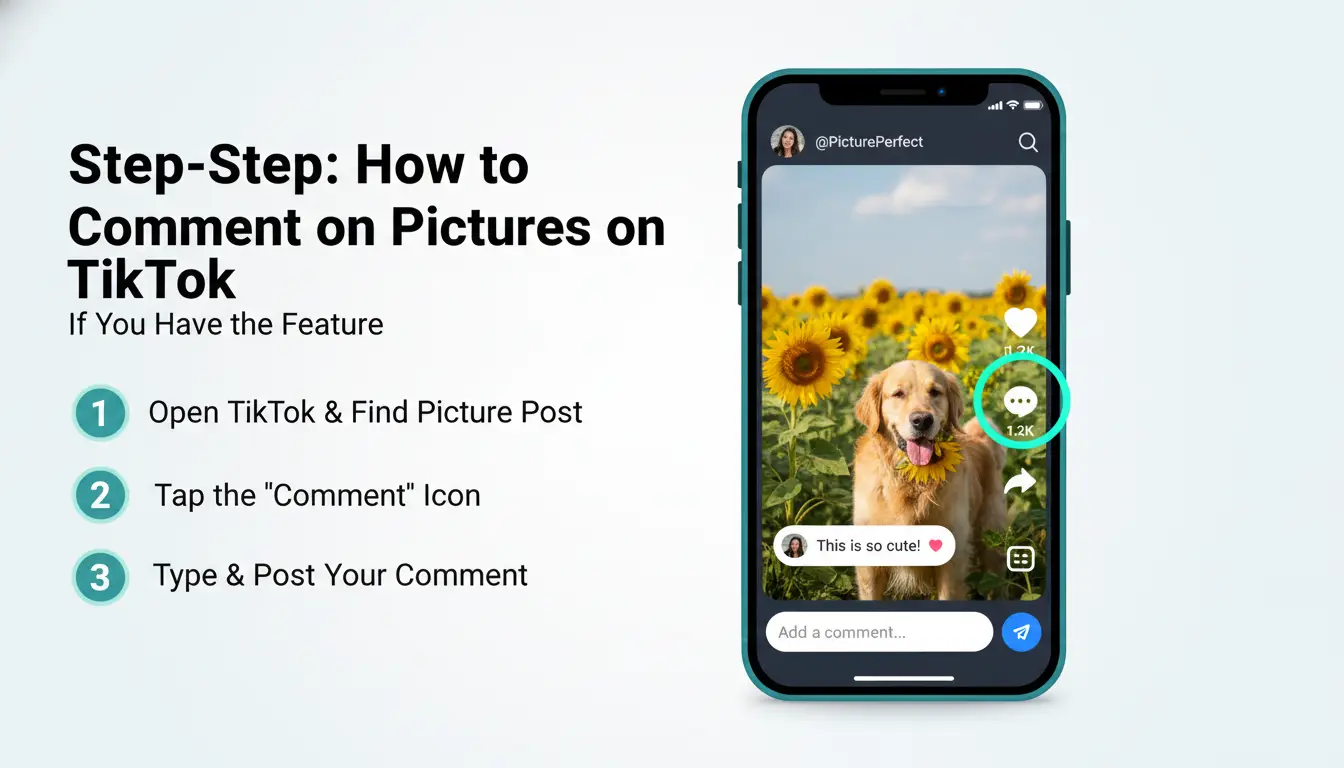
TikTok’s picture comment feature isn’t available to everyone. If you see the option, you can post images directly in comment threads, making your reply more visual and eye-catching. Here’s exactly how to comment pictures on TikTok without risking your account.
Preparing Your TikTok App for Picture Comments
Start by updating TikTok to the newest version from Google Play or Apple App Store. After launching the app, tap into a video’s comment section. Look for a small image icon or camera button next to the text box. If you don’t see it, your account might not have access yet, or the feature is being tested.
Posting a Picture in a TikTok Comment: Full Instructions
If you spot the picture comment icon, tap it. Choose an image from your phone’s gallery. Before posting, you can add text or stickers over the photo. Some accounts get access to quick editing tools. Hit “Post” to share your image as a comment. Always double-check the image for sensitive content, TikTok’s filters can remove comments fast if they flag violations.
Editing or Deleting a Picture Comment
To remove your picture comment, tap and hold on it, then select “Delete.” Editing is limited, most users can’t change the image after posting. If you need to update, delete the old comment and repost with the corrected image and text.
Why Can't I Comment Pictures on TikTok? Common Issues and Fixes
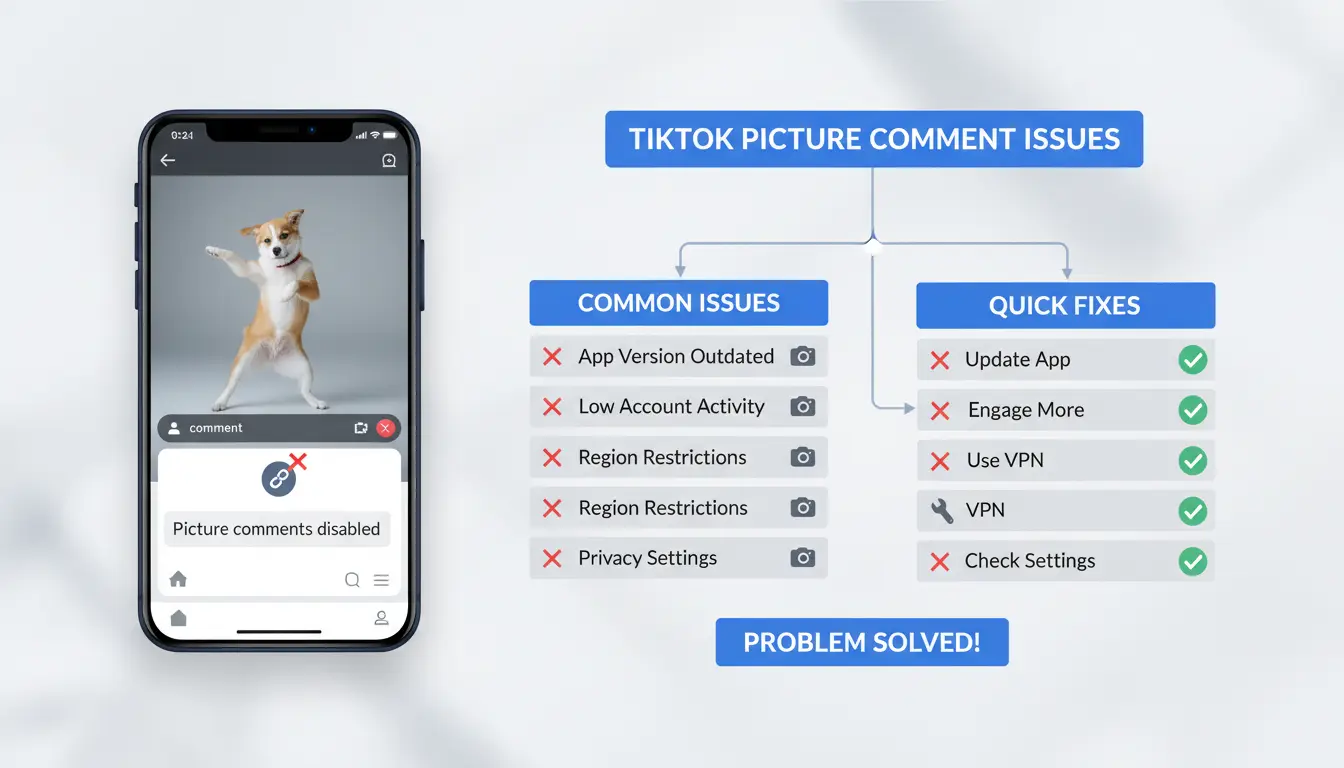
TikTok’s picture comment feature isn’t available to everyone. Even though you see users posting image replies, the option can disappear for some accounts or never show up at all. If you’re searching for "how to comment pictures on tiktok" and don’t see the feature, you’re not alone, these are the most common reasons and fixes.
Feature Not Showing Up: What Causes It?
Most users lose picture comment access because their app version lags behind or TikTok rolls out features slowly by region. If your app isn’t updated, or if TikTok hasn’t enabled the feature in your area, picture comments won’t appear. Sometimes, TikTok restricts accounts that have triggered its moderation system, like those flagged for spam or minor bans, so the feature gets hidden. Even verified accounts can suddenly lose access after an update or restriction.
How to Fix: Step-by-Step Troubleshooting
Start by updating your TikTok app through the official app store. Next, clear the app cache and reinstall TikTok. Make sure your device permissions are set to allow media uploads. If you’re outside supported regions, switching your account location can help, but this doesn’t always work. 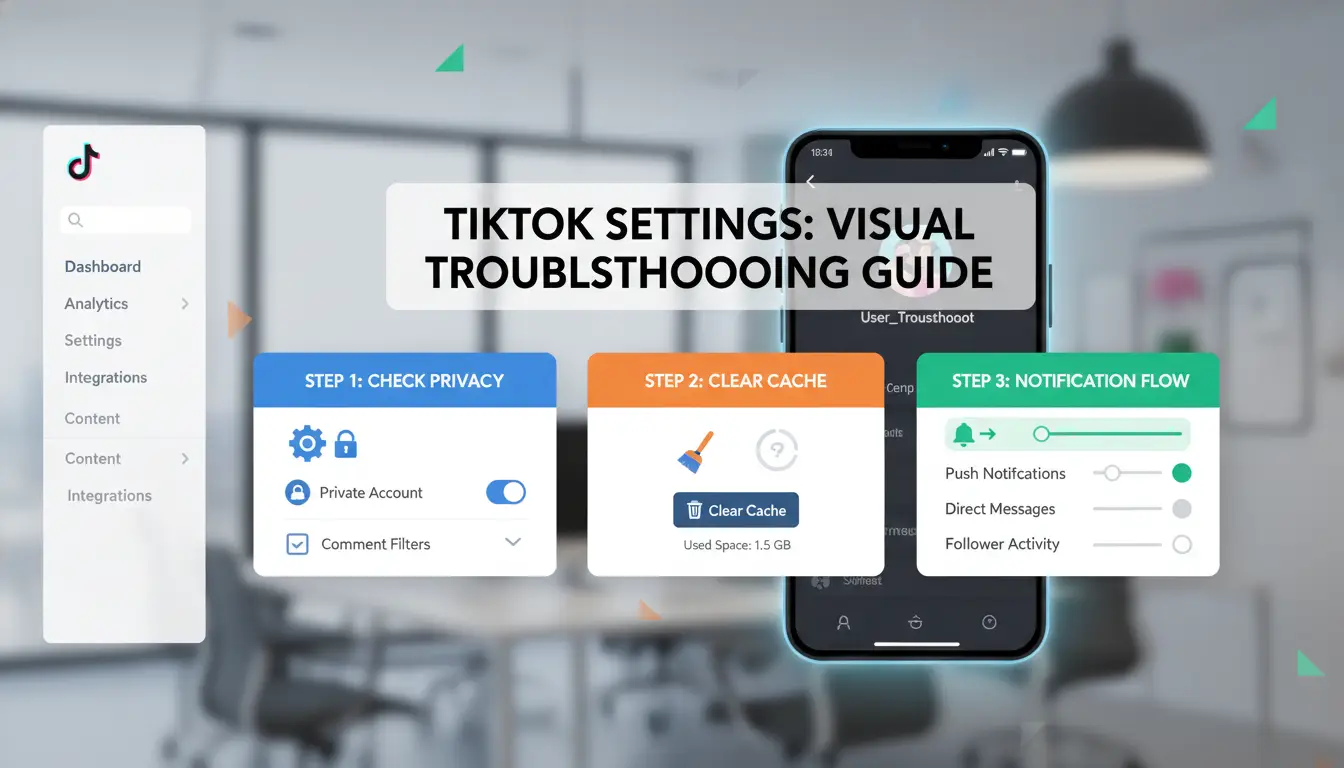
When to Contact TikTok Support
If none of these steps restore picture comments, use TikTok’s Help Center to report the issue. Provide your app version, device details, and screenshots showing the missing feature. TikTok support often responds faster if you document every step you’ve already tried.
The real fix is often updating your app and checking for account restrictions before chasing complicated solutions.
Workarounds: How to Share Pictures in TikTok Comments If You Don't Have the Feature
Not everyone can post images in TikTok comments directly. If you’re searching for how to comment pictures on TikTok, these workarounds help you share visuals or get your message across safely.
Replying with a Video or Image Post
The most common method is to reply with a video. When someone asks for a photo, create a short video or slideshow and post it as a public reply to their comment. To link your reply, press “Reply” under their comment while filming. Always tag the original poster with @username in your caption or comment, this increases the chance they’ll see your post. Keep the video short and focused so viewers know it’s meant as a picture response.
Using External Links or QR Codes
Some try to share image links from sites like Imgur or Google Photos, or even post QR codes that lead to a picture. TikTok often blocks or hides comments with links, accounts risk being flagged as spam or restricted. If you use this method, use well-known sites and write out the link in a way that avoids triggering filters (for example, add spaces). Never use suspicious link shorteners.
Creative Alternatives: Emoji Art and Text-Based Images
If you want to avoid risk, use emoji mosaics or ASCII art. By arranging emojis or simple symbols, you can create a visual message that stands out. This approach is much safer because TikTok rarely flags plain text or emoji comments. When you can’t post a real image, creative emoji art draws more attention than a risky link.
Risks and Privacy Concerns When Commenting Pictures on TikTok
Trying to figure out how to comment pictures on TikTok means facing more than just technical limits. Posting images, directly or through workarounds, puts your account at risk if you miss key privacy and copyright rules. Here’s what you need to check before you try.
What Happens to Your Image Data
Any image uploaded or linked in a TikTok comment, even using indirect tricks, becomes part of TikTok’s storage system. That means TikTok can scan, analyze, and sometimes share your image with moderation teams or automated filters. If your profile is set to public, the picture stays visible to anyone on the platform. Changing privacy settings later often won’t remove images already indexed. TikTok’s privacy policy explains their data handling, but details on comment image retention are vague.
Copyright and Content Moderation Risks
Images flagged by TikTok’s moderation system can disappear without warning. Copyrighted content, celebrity photos, meme templates, or anything with watermarks often gets removed. The safest way to avoid copyright issues is to use original images or visuals you have clear rights to. TikTok algorithms also scan for nudity, violence, and hate symbols, posting any of these risks an instant account restriction. See TikTok’s community guidelines for specifics.
Account Safety: Avoiding Suspicious Activity Flags
Posting too many images too quickly can trigger TikTok’s anti-spam filters, especially if you use automation tools or repeat the same picture. Accounts flagged for suspicious behavior may get shadowbanned or suspended. If you’re searching how to comment pictures on TikTok, pace your activity and avoid bot-like patterns, manual posting and varied content are less likely to get flagged.
Handling picture comments on TikTok with multiple accounts is tricky. TikTok tracks device fingerprints and IP addresses, making aggressive tactics risky. If you want to know how to comment pictures on TikTok without losing accounts, you need a clear, safe workflow.
Why Multi-Account Management Gets Risky on TikTok
Using several accounts from one device or IP often links them together. TikTok’s anti-spam system spots repeated device info, browser fingerprints, and unusual patterns. If one account gets flagged, others tied to the same device or IP may also get banned. Sudden bursts of similar picture comments, especially with links or reused images, raise red flags. Tools that promise “safe” automation rarely keep up with TikTok’s frequent updates, as recent Reddit threads show.
Best Practices for Safe Picture Commenting
Spread out comment activity. Don’t post picture comments from all accounts within minutes, wait at least 30–60 minutes between actions. Use separate browsers or browser profile isolation tools and proxies for each account to avoid fingerprint overlap. Avoid posting identical images or captions. Rotate image sources and customize text to stay under TikTok’s radar.
Workflow Tips for Teams and Agencies
Assign each team member a unique account and proxy to prevent accidental linking. Set clear permission levels: only trusted staff should handle accounts with higher follower counts. Track all comment activity in a shared sheet or dashboard. This way, you can spot patterns that might trigger detection and adjust quickly if TikTok blocks a method. For agencies managing volume, use batch tools with built-in fingerprint isolation, but always test changes on a spare account before scaling.
DICloak: The Safer Way to Automate and Manage TikTok Picture Comments for Social Media Teams
Picture comments on TikTok bring visibility, but posting them at scale, especially across multiple accounts, often leads to bans or account linking. The biggest risk is TikTok flagging repeated image uploads as spam, especially if accounts share device fingerprints or IP addresses. Tools like DICloak let you sidestep this by isolating each account with its own browser profile and proxy.
How DICloak Prevents Account Linking and Bans
You can use DICloak to set up unique browser fingerprints for every TikTok account. Each profile runs on a separate proxy, so TikTok can’t easily connect accounts. This means your team avoids mass bans and keeps comment workflows stable.
Automating Picture Comment Workflows with DICloak
DICloak’s RPA tools automate “how to comment pictures on tiktok” steps, letting you schedule and post image replies without manual errors. Activity sync across accounts makes it easier to boost engagement while staying under TikTok’s detection radar.
Team Collaboration and Permission Control
With DICloak, you can share browser profiles securely among team members. Permission controls and audit logs track who posted what, so workflows stay clean, and mistakes are caught before they trigger restrictions.
Expert Tips: How to Make Your TikTok Picture Comments Stand Out
Getting noticed on TikTok isn’t just about what you post, it’s about how you interact. If you want to master how to comment pictures on TikTok, focus on image choice, timing, and creative touches that push your comment above the noise.
Choosing the Right Image for Maximum Engagement
Images that spark a reaction, like funny memes, trending pop culture shots, or personal photos with clear faces, draw the most likes and replies. Avoid blurry screenshots, text-heavy graphics, or any image that looks spammy. TikTok’s automated checks flag nudity, violence, or copyrighted content fast. If you want your comment to stay up, stick to original or widely shared images that have already gone viral elsewhere, as seen on Know Your Meme.
Timing and Frequency: When to Post Picture Comments
Posting your picture comment within ten minutes of a video going live gives you the best shot at top placement, early comments often get pinned or noticed by creators. But overdoing it can get your account flagged. Limit yourself to one or two picture comments per trending video, and avoid posting the same image across multiple accounts or videos in a short span, both of which can look like bot behavior according to Reddit.
Using Text, Stickers, and Emojis for Extra Impact
Pair your image with a short, catchy caption, or add a sticker that matches the video’s theme. Emojis can draw extra attention, but too many look forced. The combination of a strong image and one sharp line of text is what actually gets people to tap reply.
Frequently Asked Questions
Why can't I comment pictures on TikTok even after updating?
If you can’t figure out how to comment pictures on TikTok, your account may not have access yet. TikTok releases new features like image comments gradually. First, check if your app is fully updated. Some regions, like the US, get new features later. It may take weeks before picture comments appear for all users.
Is it safe to post images in TikTok comments?
Posting images in TikTok comments can be risky. Always avoid sharing private or personal images. Never use images you don’t own, since copyright violations can get your comment removed. TikTok’s moderation may also flag or delete pictures that break community guidelines, so review the rules before posting.
Can I use proxies to manage multiple TikTok accounts for picture comments?
Yes, using proxies is a common method for managing more than one account, especially if you want to learn how to comment pictures on TikTok across profiles. Proxies help keep accounts separate, which lowers the risk of TikTok linking or banning them. Marketers often use proxies for safer multi-account management.
How do I automate picture commenting across accounts?
You can automate how to comment pictures on TikTok by using tools like DICloak with RPA (Robotic Process Automation). These tools let you manage different TikTok profiles, schedule picture comments, and avoid manual work. Make sure your automation follows TikTok’s rules to avoid getting flagged or banned.
What should I do if my picture comments keep getting removed?
If TikTok keeps deleting your picture comments, review their content guidelines. Most removals happen because of copyright issues or inappropriate images. Stick to original or royalty-free pictures and keep content friendly. If you follow the rules, your comments are more likely to stay visible.
Commenting on pictures on TikTok is a simple way to engage with creators and join conversations around visual content. By following the steps outlined, users can share their thoughts, ask questions, or connect with others directly through image comments. Try DICloak For Free
 Web Proxy Tools
 Free Tools
 Cookie Plugin
 UA Generator
 MAC Address Generator
 IP Generator
 IP Address List
 2FA Code Generator
 World Clock
 Anonymous Check
 WebRTC Leak Test
 UUID Generator
 Free Web Proxy Site
 Proxy Checker
 FB Ad Checker
 AI Web Scraping
 Free SMM Tools
 Twitter Shadowban Checker
 Instagram Name Checker
 UTM Generator
 Username Generator
 AI Hashtag Generator
 LinkedIn Headline Generator
 Social Media Image Resizer