You fix a script, clear your cookies, switch proxies, and reload, yet Cloudflare stops you again with a "Verify you are human" page or a 403 error. Even on clean browsers and fresh networks, their anti-bot system can block you before you finish a single workflow. What actually triggers this? It's not always as simple as "too many requests" or "using automation."
Most advice says Cloudflare bot protection checks IP reputation, browser fingerprints, or simple JavaScript challenges. But that misses what throws off the detection in real-world traffic: headless browser signals, reused TLS signatures, and cross-session cookie leaks. These tripwires can flag you even if you're not running a bot, especially with new device setups or when you test at scale.
The real problem is how quickly Cloudflare updates its detection logic. In 2026, minor tweaks, like a different user-agent order or missing WebGL entropy, can put you on a blocklist. If you think running residential proxies or changing user-agents is enough, you'll likely get stuck in a loop of temporary access and new bans.
Knowing how cloudflare bot detection works, down to what signals it checks, and what actually causes the system to flag you in practice, means you can adjust your stack before you get locked out. Here’s what actually sets off the system now.
What Actually Triggers Cloudflare Bot Detection in 2026?
Cloudflare flags traffic as a bot when it sees a mix of browser signals, network patterns, and behavior that don’t match how real people use the web. The system reacts fast, minor mismatches in fingerprint or activity can get you blocked before you even reach the site. Here’s what actually trips detection now.
Passive Detection: What Your Browser Reveals Instantly
Cloudflare doesn’t wait for you to click anything. It pulls signals right from your browser and connection. The most common tripwires:
- Browser fingerprint mismatches: User Agent, canvas, WebGL, and device entropy, if these don’t line up, you’re flagged immediately.
- IP reputation and geolocation: Known datacenter IPs, bulk proxy ranges, or a mismatch between geo and browser locale raise instant suspicion.
- TLS/JA3 and HTTP/2 fingerprints: If your connection uses odd signatures or protocol versions, Cloudflare often assumes you’re running a bot or automated tool.
Active Detection: How Cloudflare Challenges Suspicious Requests
If passive checks raise any red flags, Cloudflare moves to active testing. That means JavaScript challenges, CAPTCHAs, and real-time behavioral checks. The browser gets hit with scripts that track mouse movement, keyboard activity, and even how fast you fill out forms. The key signal is whether your environment can handle these scripts in a human-like way, most bots fail here, either by skipping events or responding too quickly.
For example, if you’re using a headless browser or automation tool, you might pass initial fingerprint checks. But once Cloudflare runs its JavaScript, your lack of real mouse events or missing API responses gets you blocked. Some operators try to script mouse movement or randomize timings, but Cloudflare’s behavioral logic now tracks dozens of event patterns. If you make a mistake, like sending mouse events too evenly, or skipping common environment queries, you’ll see a CAPTCHA or full block. Recovery is slow; even if you switch proxies, Cloudflare often ties the detection to your fingerprint and account, not just your IP.
This also means that stacking residential proxies or tweaking browser headers isn’t enough. The active challenge layer catches most automation attempts unless you can mimic both device and human interaction at scale.
These detection layers explain why simple bots and scrapers rarely last more than a few sessions before getting blocked.
Why Most Simple Bots and Scrapers Get Blocked Instantly

Basic scripts and off-the-shelf scrapers almost never last past Cloudflare’s first check. The reason: most fail on browser fingerprint, proxy, or behavioral signals before even reaching the page content. If your setup looks like a bot in any one area, you get blocked, fast.
Missing or Mismatched Browser Fingerprints
Cloudflare’s anti-bot system expects a real browser’s fingerprint, a unique combination of device, settings, and entropy values. Simple bots usually run headless, skip WebGL checks, or reuse common device profiles. That means their browser signature stands out immediately, often matching known automation patterns.
Proxy Pitfalls: IP Reputation and Leaks
Trying to hide behind cheap proxies is a losing game. Public and datacenter proxies are flagged by reputation databases that Cloudflare checks in real time. Even “fresh” residential proxies get burned if used by too many people or when geo and timezone settings don’t match browser claims. Here’s what usually goes wrong:
- You run a scraper using a datacenter IP. Cloudflare recognizes this IP as high-risk from past abuse reports. The bot never sees the page; it gets a CAPTCHA or outright block.
- You use a residential proxy, but your browser sends a timezone (UTC+8) that doesn’t fit the IP’s actual region (say, Paris). Cloudflare’s system spots the mismatch, your session gets challenged or blocked.
- IP leaks are common with poor proxy setup. If your browser requests leak your real IP (via WebRTC or DNS), Cloudflare instantly flags the session. Even one leak can burn the whole proxy pool for future attempts.
The fastest way to trigger Cloudflare’s defense is to combine a flagged proxy with a browser fingerprint that doesn’t fit the IP’s country or ISP record.
Ignoring Behavioral and Timing Checks
- No mouse or keyboard activity during page load, Cloudflare expects some.
- Navigation and click events happen at inhuman speed, real users pause, bots don’t.
- Repeated, identical requests to the same resource, pattern matching catches this fast.
Miss any of these, and you often get blocked before the page even loads. Even a small behavioral slip is enough for instant detection. The next section breaks down which signals matter most in detail.
What Signals Does Cloudflare Use to Detect Bots?
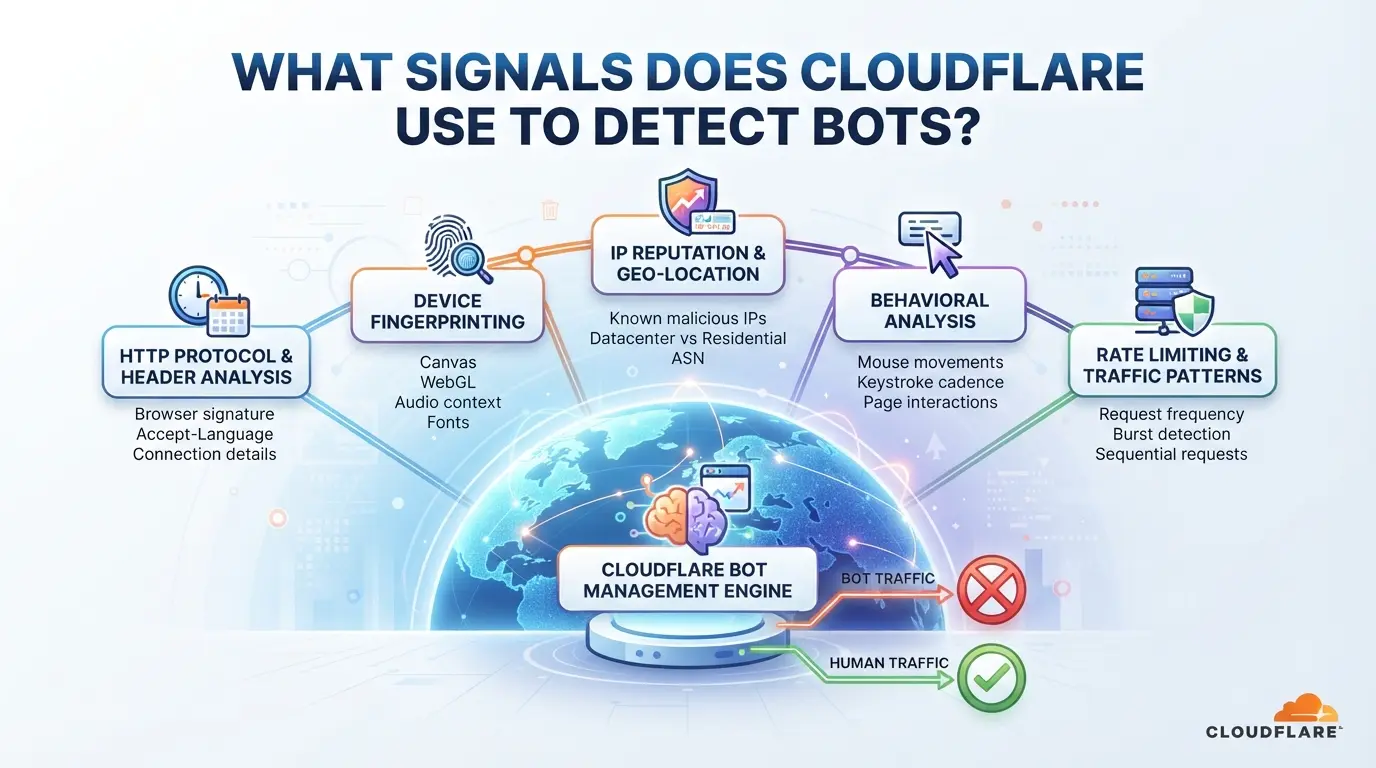
Cloudflare tracks dozens of technical signals to flag bot traffic. The system doesn’t rely on just one clue, it stacks fingerprints, browser quirks, header mismatches, and behavioral data. If even a single layer looks off, you can get blocked before your page loads.
Network and TLS Fingerprints
Cloudflare’s anti-bot system scans your TLS handshake and JA3 fingerprint. It compares how your browser negotiates encryption versus what’s normal for your device and network. If your TLS signature matches a known bot or scraper pattern, or your IP comes from a flagged ASN, you’re marked for extra checks. Residential proxies can help, but recycled IPs or suspicious ASN ranges make this layer unreliable.
Browser and Device Fingerprinting
The detection engine probes your browser for consistent device signals, canvas, WebGL, AudioContext, and OS version. For example, a headless Chrome with missing WebGL entropy or mismatched canvas output lands you in the “bot suspect” bucket. It’s common for automation tools to fake one or two values, but Cloudflare ties dozens of tiny checks together, even a single mismatch can tip the system into blocking mode. Operators who only spoof user agents or screen resolution miss out on the deeper fingerprinting. If your browser session lacks realistic entropy, or you fail to mimic normal hardware quirks, you’re flagged. This is why running real browsers with full device emulation works better than lightweight headless setups.
Header and Cookie Consistency
Cloudflare compares headers like User-Agent, Accept-Language, and Referer against expected patterns from your browser and region. If your Accept-Language doesn’t match your IP’s country, or cookies aren’t managed like a real user, the system notices. A bot that forgets to carry session cookies between requests, or sends inconsistent headers, triggers blocks fast. Even simple errors, like missing Referer, can get you stuck at a challenge page.
Behavioral and Anomaly Detection
- Mouse, scroll, and keyboard events are tracked, bots with no user interaction get flagged.
- Navigation timing is checked, impossibly fast page loads signal automation.
- Click and form patterns are monitored, repetitive actions or missing focus events raise suspicion.
Cloudflare stacks all these signals. If your setup misses even one, you’ll see blocks piling up. The next section dives into the mistakes that trigger these problems in practice.
Common Mistakes That Trigger Cloudflare Bot Blocks

Most blocks happen because operators repeat the same preventable errors. The fastest way to get flagged is to overlook small details that break session consistency or leak bot signals, these are not random; Cloudflare is tuned for them.
Fingerprint Inconsistencies Across Sessions
Switching browser versions or OS profiles halfway through a session almost always leaves a gap in your fingerprint. The bigger problem is timezone mismatches, if your proxy IP says “Germany” but your browser’s clock reads “Shanghai”, Cloudflare anti-bot system will spot the mismatch. Session fingerprint gaps are the top cause of instant blocks; consistency wins here.
Proxy Misconfiguration and Leaks
- Reusing IPs that got blocked last week, Cloudflare marks repeat offenders fast.
- DNS leaks from the proxy, real browser traffic rarely leaks DNS to public resolvers.
- WebRTC leaks, if your real IP slips through, session isolation is broken.
Automation Patterns That Stand Out
Bots with copy-paste click timing or zero randomization are easy for Cloudflare to spot. If every visit lands on the same pixel, in the same order, detection rates spike.
- Change navigation order each run, predictable flows are flagged.
- Randomize click delays, fixed intervals are a giveaway.
- Avoid exact screen coordinates, human traffic varies each session.
How to Reduce Cloudflare Bot Detection Risk When Managing Multiple Platform Accounts
If you’re juggling several accounts across platforms protected by Cloudflare, detection usually comes down to sloppy session handling, mismatched fingerprints, or patterns that look robotic. Copy-pasting browser sessions or rushing through logins will get you flagged fast. Here’s how to break the link between your accounts and avoid the common traps.
Separate Each Account Into Its Own Browser Environment
- Create a new browser profile for every account, never re-use or “switch” accounts in the same session, even if you clear cookies.
- Store and isolate cookies, cache, and local storage for each profile. Shared storage makes your accounts appear related and raises suspicion.
- Launch profiles with distinct device fingerprints (screen size, OS version, user agent). Overlapping details across accounts can connect them in Cloudflare’s logs.
- Double-check: if logging into two accounts from the same environment ever shows a cross-login or shared session, you missed a separation step, shut down and rebuild those profiles.
Match Fingerprints and Proxies to Each Session
- Assign a unique proxy IP to each account profile. Don’t rotate proxies during active sessions, Cloudflare tracks abrupt IP changes and flags them.
- Match your proxy’s location to the account’s expected country and region. If your IP says “France” but your browser language and timezone say “Vietnam,” you’ll get extra checks.
- Set timezone, browser language, and geo-location in each profile to line up with the proxy IP. Any mismatch is a fingerprint, Cloudflare anti-bot logic weighs these heavily.
- If you ever get a “verify you’re human” prompt or new login alert on the platform, your proxy or fingerprint settings are probably off.
| Setup Type |
Proxy Consistency |
Fingerprint Match |
Detection Risk |
| Correct |
Fixed per profile |
Aligned to proxy |
Low |
| Wrong: Proxy swap |
Rotates mid-use |
Mismatched |
High |
| Wrong: Language off |
Fixed |
Locale mismatch |
Medium |
Randomize and Humanize Automated Actions
- Vary click order and navigation paths, never run identical scripts across accounts.
- Insert random delays between actions (2–7 seconds is typical). Uniform timing looks robotic and triggers Cloudflare’s behavioral checks.
- Scroll and mouse-move at unpredictable intervals. No movement, or perfectly repeated patterns, mark automation.
- If you ever see repeated CAPTCHA pop-ups or sudden logouts, your action pattern is too regular, adjust delays and paths before retrying.
Staying undetected is about details. Rushing or skipping isolation steps makes you easy to spot. The next section explains how experienced operators handle these same challenges at scale.
How Operators Use DICloak to Manage Multiple Platform Accounts with Lower Bot Detection Risk
For operators managing several platform accounts behind Cloudflare, the manual process of keeping sessions separate and consistent is where mistakes usually trigger detection. If you’re running more than one account, a small slip, like overlapping browser storage or mismatched network signals, can trip Cloudflare’s anti-bot system. The practical fix is not just “change your IP” or “randomize fingerprints”, but to give each account its own browser profile and connection, then standardize any routine action. Here’s how teams use DICloak to do exactly that.
Isolate Each Platform Account with Separate Browser Profiles and Fingerprint Settings
Operators can create a new browser profile in DICloak for each platform account, then configure fingerprint signals, OS, User Agent, timezone, and WebGL entropy, to match the intended environment. This keeps browser storage, cookies, and session data from leaking across accounts. The real advantage is that every account stays in its own compartment, lowering the risk of accidental linkage. The scope stays at browser-profile and session level, DICloak does not manage platform accounts themselves. 
Assign User-Owned Proxies to Each Profile for Consistent Network Identity
After setting up profiles, operators can enter custom proxy details (HTTP, HTTPS, SOCKS5) for each one, then test the exit IP and region before login. This step gives every account a stable network path, but the proxy choice and rotation rules are up to the user. DICloak stores proxy settings per profile, so the connection stays consistent across sessions. Remember, DICloak does not sell proxies or guarantee platform access. 
Automate Repetitive Account Actions with RPA, While Monitoring for Anomalies
When routine browser steps, like navigation or form entry, need to run across profiles, operators can configure an RPA workflow in DICloak. Approved actions are scheduled and executed, with live status and logs available for review. Teams remain responsible for monitoring the results and adjusting workflows based on platform feedback. 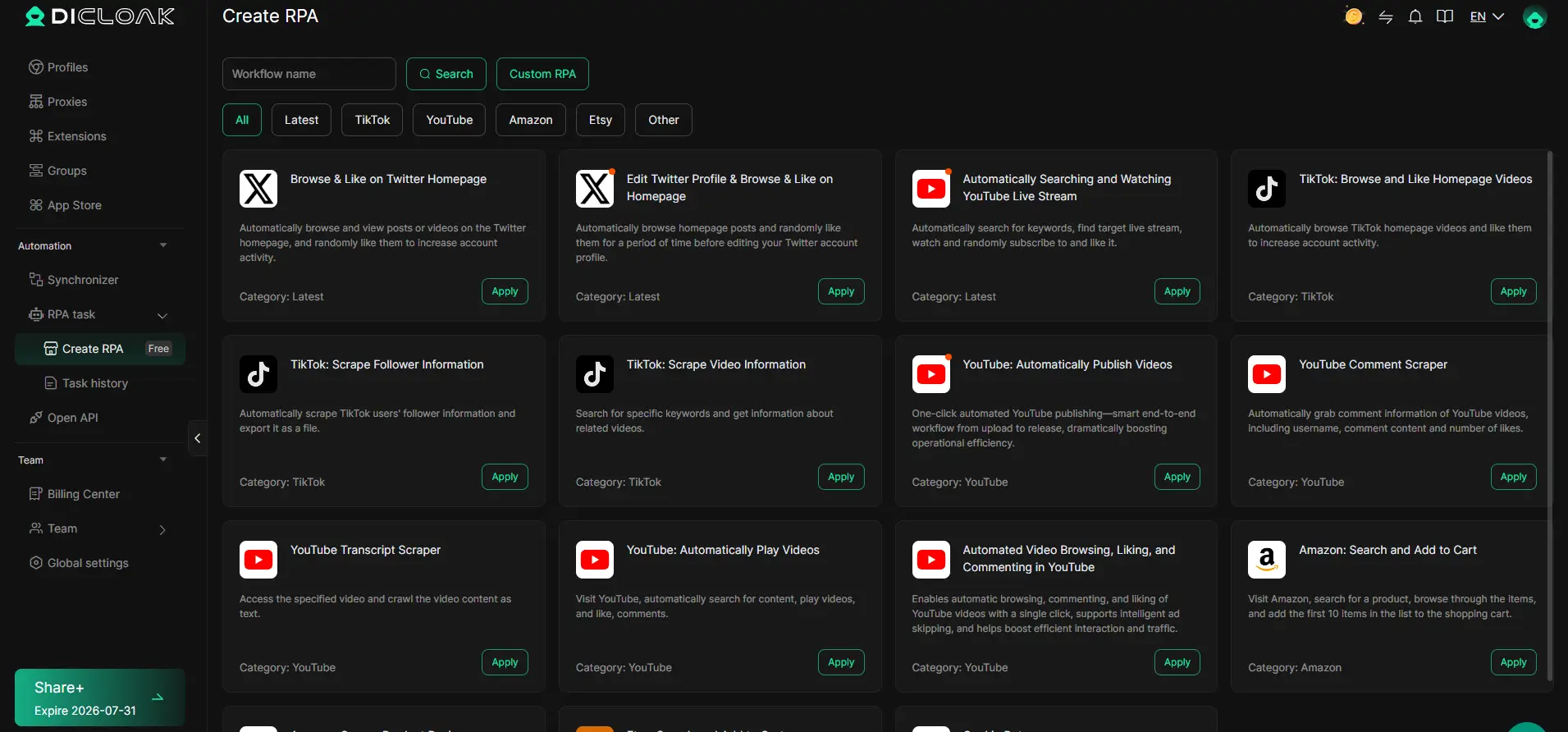
If Cloudflare detection risk is still high after these steps, legal and workflow limits come next.
When Cloudflare Detection Is Unavoidable: Legal, Compliance, and Workflow Limits
Terms of Service and Platform Compliance
Trying to avoid bot detection can break platform rules, most sites ban automated activity or attempts to hide identity. Getting flagged usually means accounts are banned, funds held, and future access cut off. Even a single failed evasion can lock your company’s domain or main user base for weeks.
Technical and Ethical Boundaries
No workflow or tool can keep you undetectable forever. Some regions treat bot evasion as a legal offense, and platforms can escalate to legal action or block your infrastructure completely.
- Detection fails look like sudden 403 errors, mass account suspensions, or proxy bans across your entire range.
- Safer practice is to review local laws, use only allowed automations, and keep a written record of compliance steps.
Key Takeaways: Safer Multi-Account Workflows Behind Cloudflare in 2026
If you want smoother multi-account workflows behind Cloudflare, focus less on tricks and more on fundamentals, most failures come from missing one of these basics, not from lacking some secret tool.
Checklist for Safer Operations
- Separate every account and session, never reuse cookies, browser profiles, or device fingerprints across identities.
- Make sure browser fingerprints and proxy locations match, misaligned signals almost always trip Cloudflare bot detection, especially across new sessions.
- Watch for new blocks or captchas and adjust, when you see unusual challenge pages or 403 errors, stop and check what changed in your stack.
Frequently Asked Questions About cloudflare bot detection
Can Cloudflare detect bots even if I use a proxy?
Yes, Cloudflare bot detection goes far beyond just checking your IP address. It looks at browser fingerprints, mouse movements, and request timing. Even if you use a proxy, Cloudflare can spot signs of automation by analyzing how you interact with the site and whether your browser setup seems suspicious.
What fingerprint signals does Cloudflare check most often?
Cloudflare checks several fingerprint signals to spot bots. These include canvas and WebGL fingerprinting, which tests how your browser draws graphics. User Agent strings and TLS/JA3 fingerprints reveal details about your browser and connection. Unusual combinations or mismatches can trigger bot protection.
Is it legal to try to bypass Cloudflare bot detection?
Trying to bypass Cloudflare anti-bot system may violate website terms of service. In some places, it could also break local laws. Always review the rules for the site you want to access and check your country’s regulations before attempting to bypass security measures.
Does using an antidetect browser guarantee I won't get blocked?
No antidetect browser can guarantee you’ll avoid Cloudflare bot protection. Cloudflare updates its detection methods and looks at behavior, not just browser fingerprints. You need to set up your browser carefully and keep adjusting settings to avoid detection, but blocks can still happen.
How often should I rotate proxies or update fingerprints?
Rotate proxies and update browser fingerprints whenever you start a new session or see signs of blocking. Keeping the same proxy and fingerprint within a session helps you look more real. Changing too often can create patterns that Cloudflare anti-bot system flags as suspicious.
For organizations seeking an edge in protecting their web assets, evaluating advanced bot mitigation solutions is a critical step. Assessing tools that offer customizable detection and smooth integration can help address evolving threats without disrupting user experience. Try DICloak For Free
 Web Proxy Tools
 Free Tools
 Cookie Plugin
 UA Generator
 MAC Address Generator
 IP Generator
 IP Address List
 2FA Code Generator
 World Clock
 Anonymous Check
 WebRTC Leak Test
 UUID Generator
 Free Web Proxy Site
 Proxy Checker
 FB Ad Checker
 AI Web Scraping
 Free SMM Tools
 Twitter Shadowban Checker
 Instagram Name Checker
 UTM Generator
 Username Generator
 AI Hashtag Generator
 LinkedIn Headline Generator
 Social Media Image Resizer