Making an Instagram ad is more difficult than it seems at first glance. Even if you already have a page and a ready-made creative, the standard "Promote" button often leads to a budget drain without a noticeable result. Nuances prevent you from setting up a truly working campaign: where to direct traffic, how to choose a format, how not to get blocked, and what to do with the new verification requirements in 2026.
The main trap is to think that everything is solved in a couple of clicks. In practice, superficial setting up advertising on Instagram most often leads to low coverage or clicks "in vain". Mistakes can be found even with experienced operators: wrong targeting, forgotten audience restrictions, the wrong connection between the account and the advertising account. As a result, the money goes away, and there are no leads or sales.
How to make an Instagram ad with a guaranteed launch and bypass sharp corners, the question is not so much about the buttons as about the procedure for action. It is important not only to know the interface, but also to understand when to go to Ads Manager, how to connect a business page correctly, what ad format really works in your segment, and how not to run into a ban already at the moderation stage.
Now let's figure out where to start and what not to miss at the start.
What you need to prepare before launching Instagram ads in 2026
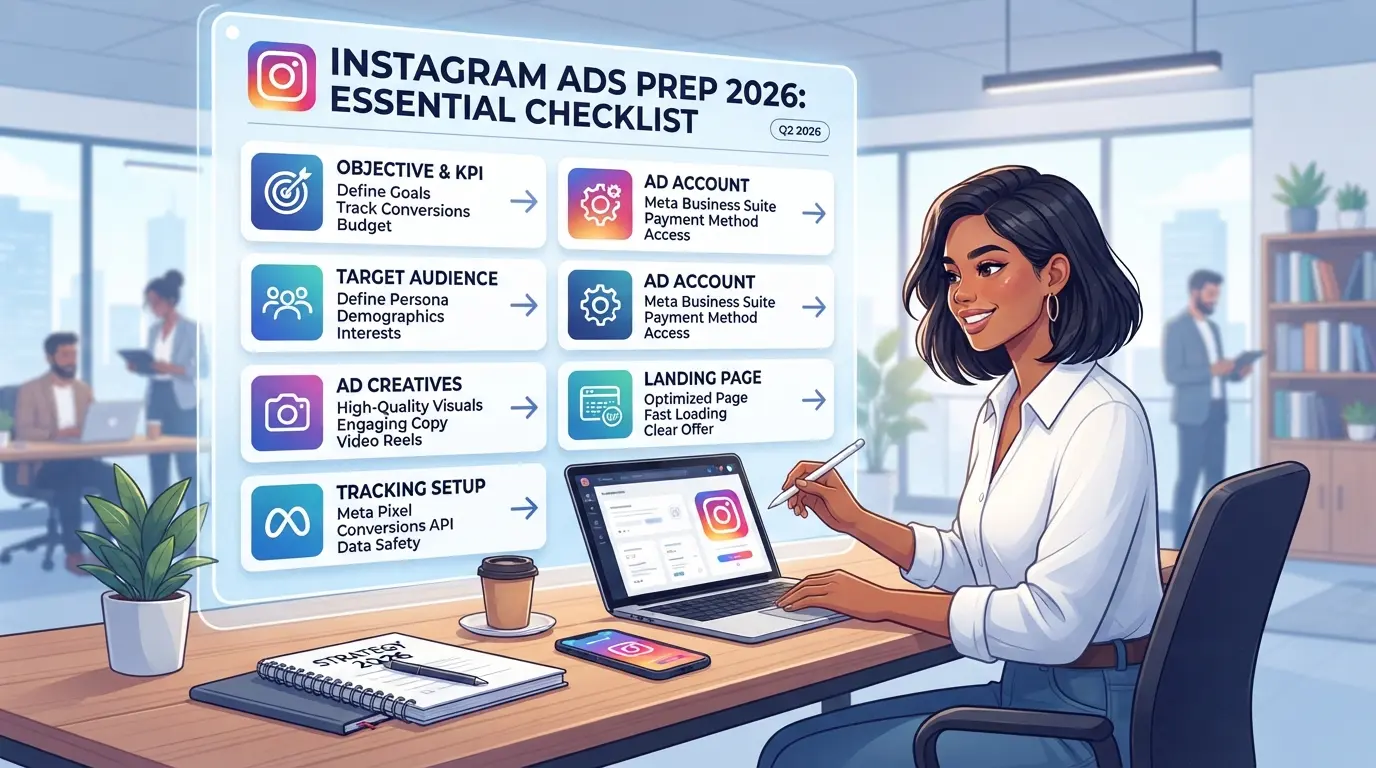
To prevent advertising on Instagram from going into "empty impressions" or blocking, you need to collect a working set of conditions and documents in advance, check the technical bundles and decide which audience you will target. Skipping these steps is an almost guaranteed way to drain the budget without a result. Below, a specific checklist of what must be done before launching.
Verification and registration of a business account
Without a business account, Instagram advertising tools are not available. The most common failure is an attempt to launch a campaign from a regular profile or with an incomplete design. It is not the "tick" that is important here, but the real procedure for doing so: , Transfer the profile to a business account through the Instagram settings. , Fill in all the fields: name, description, contacts, website. , Set an up-to-date photo and make sure that the profile is open. If at least one item is missed, moderation may reject the ad or limit the display. Even minor flaws such as the absence of a phone often cause blocking or reducing reach.
Contacting Facebook and setting up payments
Without a link to Facebook, access to Ads Manager is impossible, and payments do not go through.
- Check that the Instagram business account is linked to a valid Facebook business page.
- Verify admin privileges on both platforms.
- Add a working payment instrument (card, PayPal, business wallet) and select the payment currency.
Payment failures are most often due to the wrong choice of country or currency, make sure that the selected payment system works in your region.
Define your ad intent and audience
If you don't set the right goal and audience, Instagram algorithms will show ads to random users, and the budget will be spent on "noise". , Select the campaign goal: website traffic, reach, leads, sales, or applications. Configure audience parameters: age, geography, interests, behavior. Check if there are any overlaps with already launched campaigns (so as not to compete with yourself).
The most common mistake is launching ads "for everyone", without specified criteria. This is where blocking and low efficiency are most common.
At this stage, you get a working basis, an account, payments, and an audience ready. Now it's worth figuring out which ad formats really work in 2026 and how to choose the one that suits your business.
What types of Instagram ads work in 2026 and how to choose the right format
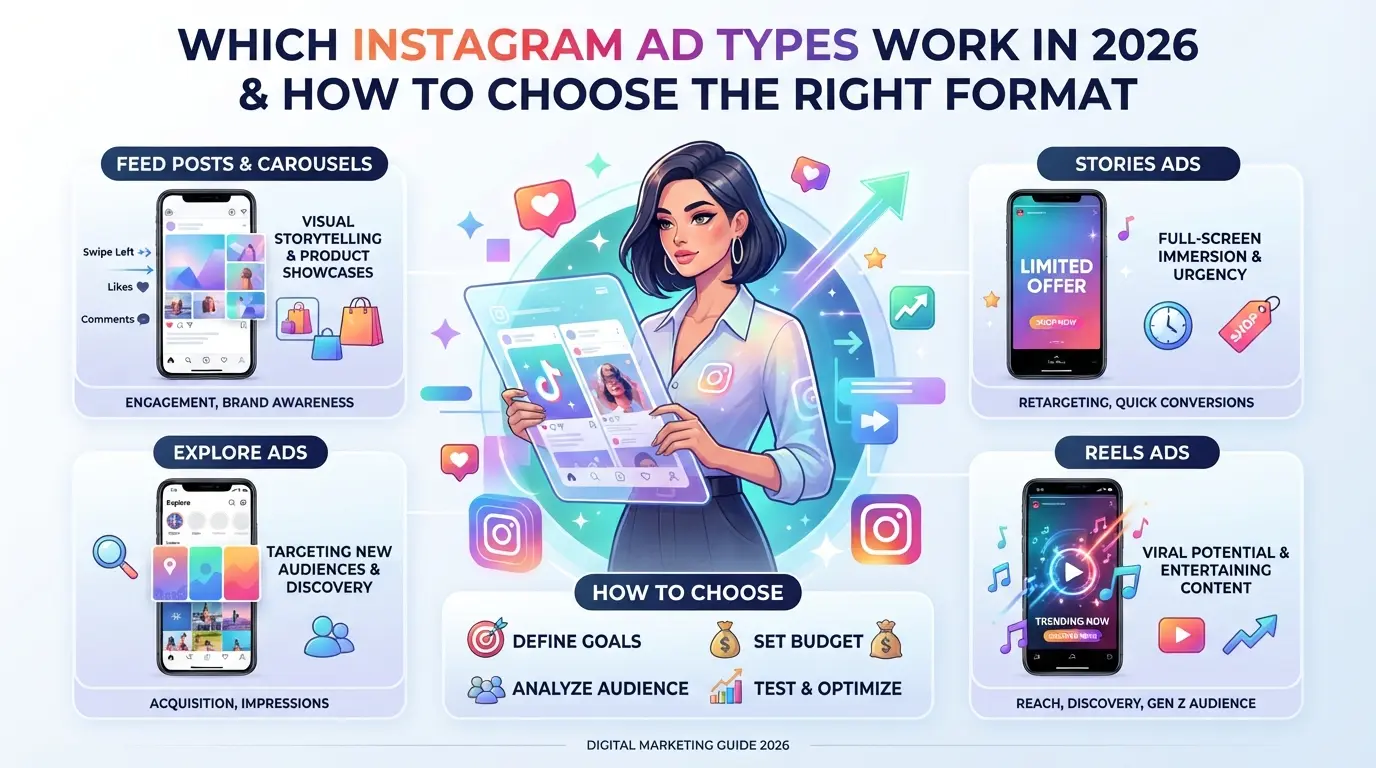
The choice of advertising format directly affects the reach, cost per lead, and the chance that the ad will pass moderation. Now there are three main areas that really work on Instagram: targeting through Ads Manager, integrations with bloggers, and simple promotion of publications. Do not scatter among everyone, first decide on the task and budget.
Targeted advertising: feed, stories, reels
The feed is suitable for products where it is important to show details, stories, for short promotions and quick solutions, reels, if the bet is on engagement and viral effect. The main difference is the behavior of the audience: the feed has higher engagement, stories, reaction speed, and reels are more often watched by new users.
| Format |
What is it suitable for? |
Min. Budget |
Features |
| Feed |
Product presentation, services |
500₽/day |
Classic, works stably |
| Stories |
Promotions, quick orders |
500₽/day |
It is important to be short and bright |
| Reels |
Reach, engagement, trends |
300₽/day |
Need video, often cheaper |
Table: difference in targeted advertising formats on Instagram, 2026
Advertising with bloggers and through affiliate integrations
Integrations work if you need to quickly check demand or reach a new audience. But bloggers often have an "overheated" audience, a surge in applications occurs only in the first hours after publication, and then the result drops. A classic mistake is to choose a blogger only by the number of subscribers. It is better to look at reach and engagement: if a blogger has 50,000 subscribers, and only 2,000 watch stories, there is little point in such an integration. In 2026, many people negotiate through exchanges, where the real performance of the account and past campaigns are visible.
Boosting posts and quick campaigns
- Works for: testing hypotheses, local business, testing new creatives.
- Limitations: you can't flexibly configure audiences, less analytics, high cost per result in competitive niches.
- Not suitable for long-term work: if you need a stable generation of requests, targeting through Ads Manager will be more profitable.
The right choice of advertising format saves you from unnecessary costs and allows you to get the first applications faster, otherwise the budget will simply "burn out" on tests. Next, let's move on to the step-by-step setting of advertising.
Step-by-step instructions: how to make an Instagram ad yourself
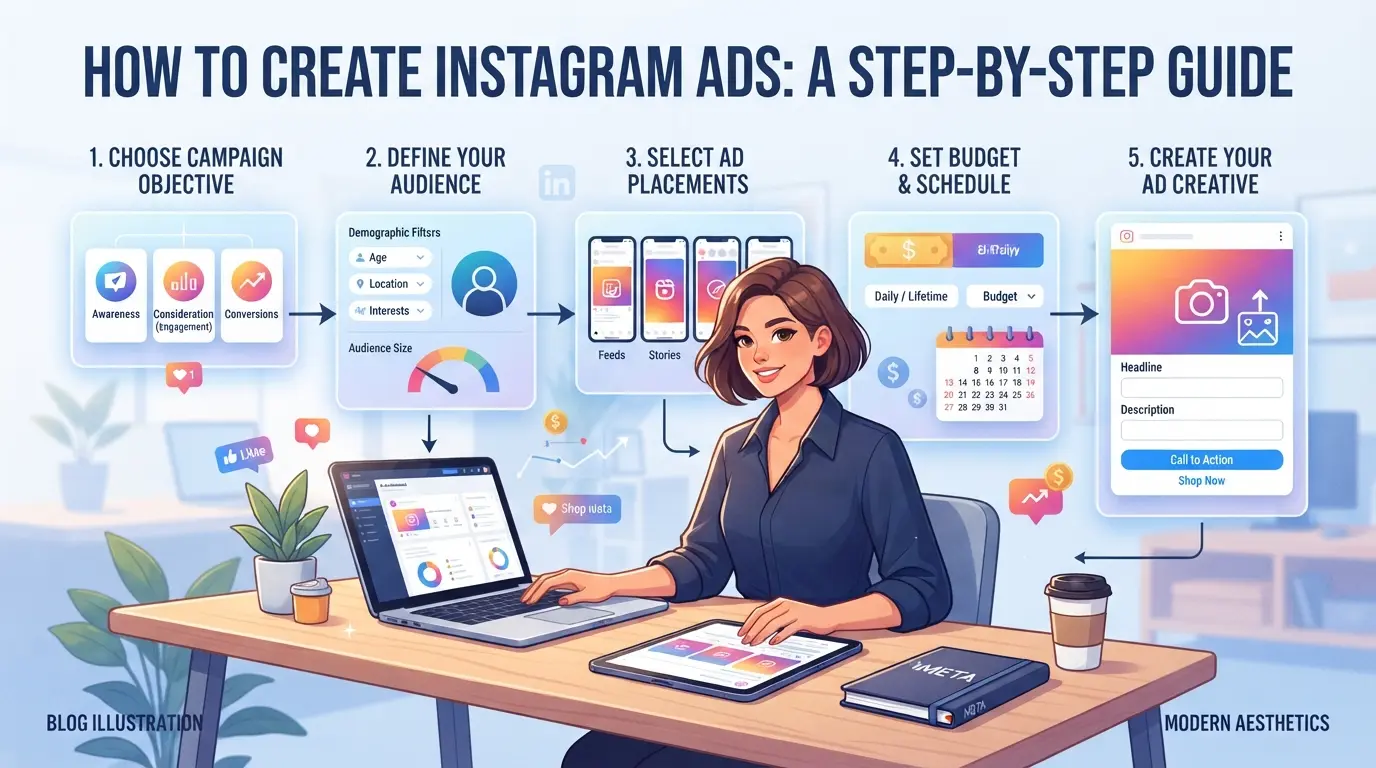
It is possible to quickly launch ads on Instagram in 2026 if you do not skip the basic steps and check in advance where problems may appear. Here is a clear algorithm that helps not to "drain" the budget at the start and reduce the risk of bans or zero results.
Step 1. Create an ad campaign in Ads Manager
- Open Ads Manager and select a campaign goal: "Traffic", "Conversions", "Engagement" or another one, based on the task. If you are not sure, it is better to take "Traffic" for the test, it passes moderation faster and gives the first data on the day of launch.
- Set a budget. For a test campaign, 1000 rubles per day is usually enough, but with a narrow audience, it is better to start with 1500-2000 rubles so as not to get too few impressions.
- Set a schedule: choose the dates and times of the show. If you are launching a promotion, limit the timing, a late start often leads to the fact that the ad continues to run after the end of the event.
- Check if the Instagram business page is properly connected to the advertising account. If there is a "No access to the page" error, the setting must be reconnected, otherwise the creative will simply not reach the audience.
Step 2. Setting up the audience and placements
- Specify the geography. If the product is local, limit the region, otherwise the budget will be spent on extra impressions. For online services, work across the country or several cities.
- Set up interests and demographics. The most common mistake here is too wide a scope. For beginners, it is better to narrow down to 2-3 interests and set an age that really corresponds to the target group.
- Choose placements: Instagram only or Facebook + Instagram right away. For the test, you should leave automatic selection, but if you only need Instagram, manually remove unnecessary sites.
- Check the restrictions: if the audience is too small (less than 5000), the ad may not be delivered at all or will be expensive. It is better to expand the parameters than to wait for impressions "drop by drop".
Step 3. Create a creative and run an ad
- Upload an image or video. In 2026, Instagram rigorously checks the quality: the minimum resolution is 1080×1080, without text overloads and logos that cover most of the picture.
- Write the ad text and a call to action. Try to keep it short, up to 90 characters, so that it doesn't get cut off on mobile.
- Check compliance with the rules. If there is a mention of "discount", "promo", or links to third-party sites, moderation may be delayed or immediately ban the ad.
- Launch the campaign and monitor the status. If you see "Rejected", check the reasons: most often this is an inappropriate format or a violation of platform policies.
The most common failure at this stage is a ban due to incorrect images or links that do not align with the stated purpose.
If the steps are completed in order, the ad will start showing within 30-60 minutes after approval. Next, it is important to monitor the statistics and not miss the mistakes that are discussed in the next section.
What mistakes most often lead to ad blocking or low performance
Advertising on Instagram most often does not work not because of "bad creativity", but because of simple mistakes at the start. The most common problems are related to violation of the rules, unsuccessful targeting and technical failures, each of them can lead to a ban or a leaked budget in a matter of hours.
Violations of Instagram and Facebook rules
An account can be blocked even for a trifle: prohibited topics (crypto, dietary supplements, gambling), links to suspicious sites, or the lack of a complete profile design. Moderation responds quickly, if at least one detail is not according to the rules, the launch of advertising is stalled, and re-submission of the application only worsens the reputation of the account.
Mistakes in setting up the audience and budget
Too wide or narrow an audience makes advertising ineffective, and an incorrectly placed budget quickly drains money.
- If you don't set restrictions on age, interests, or geography, most of the clicks will go to the wrong group.
- Without a test at minimum bids, it is easy to "fail" the campaign: a large budget immediately sets covers mistakes that, with proper configuration, could be caught at low costs.
The most common is unreasonably wide targeting and "filling" the budget without tests.
Technical glitches and payment issues
Frequent payment blocks are associated with inconsistencies in the profile data and payment information, attempts to use unsupported cards, or sudden changes in the budget. After the first mistake, the system often blocks new attempts, and it can be difficult to regain access without support. It is better to check all the data in advance and not change the payment parameters during the launch process.
Secure Infrastructure for Advertising and Team: DICloak in Real-World Practice
If you manage several ad accounts or work in a team, you need a separate approach to the infrastructure on top of the standard Instagram ad setup. After analyzing the typical mistakes and risks, it becomes clear that mass blocking is most often associated not with the targeting itself, but with the improper organization of profiles, proxies, and access. In 2026, marketers, agencies, and advertising specialists are using tools like DICloak to keep the work environment under control: allocate separate profiles for each account, set individual fingerprints, set up proxies, and clearly delineate access rights. This does not replace Ads Manager, but it allows you to avoid chaos and unnecessary risks at the stage of launching and scaling ads.
Profile Isolation and Browser Fingerprint Settings in DICloak
When working with several ad accounts, the main thing is to prevent them from being linked through the technical parameters of the browser. Operators create a separate profile for each account in DICloak and configure individual fingerprints: choose the operating system, User Agent, interface language, time zone, geolocation, canvas and WebGL parameters. Even a slight difference in the fingerprint settings reduces the likelihood of mass blocking for technical reasons. It is important to remember: DICloak does not manage accounts within the platform, but only ensures the uniqueness of the login environment.

Configuring a proxy for each profile
Working with different geos or testing advertising campaigns requires a separate proxy for each profile. In DICloak, the user manually adds a proxy to the desired profile: enters the host, port, login, and password, selects the mode (No Proxy, Custom Proxy, Saved Proxy, API Extraction), and checks the connection. This allows you to divide traffic by region and minimize the risk of IP blocking. Important: DICloak does not sell proxies and does not guarantee the security of the selected IP, the quality of the connection depends only on the user.

Teamwork and distribution of access rights
When several people work on advertising, chaos and leaks usually begin with incorrect access to profiles. The administrator in DICloak creates groups of employees, assigns them rights: who can see which profiles, what fields are available, which functions are allowed access. This allows you to organize work according to the principle of "minimal access", the employee sees only his profiles and the necessary buttons. Differentiation of rights in DICloak does not replace platform settings, but helps to avoid accidental errors and unauthorized actions within the working environment.

This approach to infrastructure makes it possible to calmly move on to assessing the budget and advertising effectiveness, without being distracted by technical failures and organizational risks.
How to calculate the budget and evaluate the effectiveness of advertising on Instagram
Without calculating costs and analyzing the result, launching an ad turns into a blind experiment. If you don't understand how much you can really spend and what you will get in return, advertising on Instagram will simply eat up the budget and will not give results.
Budget calculation methods and cost forecasting
The minimum budget for the test usually starts from 500-1000 rubles per day, but the real amount depends on the chosen format and the target action. The cost of a click and impression varies depending on the audience: for narrow segments, the price is higher, sometimes 2-3 times. If you are launching ads on Instagram for the first time, you should not immediately put large amounts, it is better to conduct a short test and see the result.
Key Ad Performance Metrics
Key indicators: CPC (cost per click), CPM (cost per thousand impressions), CTR (percentage of clicks to impressions), ROI (return on investment). The most important thing is to compare costs with real applications or sales, and not just with clicks. If the CTR is high, but there are no leads, then the setting does not work.
Typical mistakes in analysis and optimization
- Focus only on likes or subscriptions instead of applications
- Do not take into account seasonality, in summer the cost can jump
- Don't stop a campaign if costs are coming in and leads aren't coming in
When Instagram advertising doesn't work: alternative scenarios and solutions
Reasons for the failure of advertising campaigns
If the product does not solve the client's pain or the page does not convince to buy, the budget is drained, and there are no applications. In this situation, neither the "correct" setting up of advertising on Instagram, nor changing the format will help.
When is it better to choose other promotion channels
When advertising consistently does not respond, and the audience does not respond even to new creatives, it is worth looking towards alternatives:
- If there is traffic, but no conversions, the problem is often with the offer or site itself.
- It is better to temporarily switch to content marketing or active work in thematic communities, so it is easier to understand the real needs of the audience, test new approaches and not lose the budget for non-working advertising.
Frequently Asked Questions about How to Advertise on Instagram
Is it possible to advertise on Instagram without a Facebook account?
Yes, you can create an Instagram ad directly from the app using the "Boost Post" feature. However, the settings will be limited: you cannot select detailed audiences or use complex goals. For advanced features, you will need a Facebook advertising account.
How quickly are Instagram ads approved in 2026?
On average, moderation takes from 30 minutes to 2 hours. Sometimes the process can take up to a day if the ad contains complex content or requires additional verification. Clean images and text speed up approval.
What to do if Instagram ads don't show results?
Check your audience settings and creative. Use analytics to understand where you're losing performance. Try changing your image, text or targeting. Sometimes adjusting your budget or choosing a different campaign objective can help.
What is the minimum budget needed to launch advertising?
The minimum budget for setting up ads on Instagram usually starts from 100 rubles per day. With such a budget, the reach will be small. For more noticeable results, it is recommended to start from 300-500 rubles per day.
Is it safe to use proxies for advertising on Instagram?
Using proxies is possible, but it is important to choose only high-quality and proven services. Incorrect configuration or a bad proxy can lead to account blocking. Regularly check the stability of the connection and monitor data security.
Now you can start creating your first advertising campaign, taking into account the goals and characteristics of the audience. Check the settings and monitor the results to optimize the effectiveness of the promotion. Try DICloak for free
 Web Proxy Tools
 Free Tools
 Cookie Plugin
 UA Generator
 MAC Address Generator
 IP Generator
 IP Address List
 2FA Code Generator
 World Clock
 Anonymous Check
 WebRTC Leak Test
 UUID Generator
 Free Web Proxy Site
 Proxy Checker
 FB Ad Checker
 AI Web Scraping
 Free SMM Tools
 Twitter Shadowban Checker
 Instagram Name Checker
 UTM Generator
 Username Generator
 AI Hashtag Generator
 LinkedIn Headline Generator
 Social Media Image Resizer