You just visited a website for the first time. No cookies, no login, incognito mode enabled. Yet somehow, the site recognizes you from a previous visit. How is this possible?
The answer is canvas fingerprinting—one of the most powerful tracking techniques on the web. It's part of a larger trend of "cookieless tracking" that makes traditional privacy tools obsolete. Unlike cookies that you can delete, a canvas fingerprint is generated from how your specific device renders graphics. It’s persistent, highly accurate, and almost impossible to change without special tools.
In this guide, you will learn exactly what canvas fingerprinting is, how the technology works, how you can test your own fingerprint, and how to get complete protection using the DICloak antidetect browser.
What is Canvas Fingerprinting?
Canvas fingerprinting is a browser tracking method that identifies users by using the small, unique differences in how their computers draw graphics. The technique uses the HTML5 Canvas API—a feature for drawing graphics within a browser—to render a hidden image or piece of text. The exact pixel output of that rendering creates a unique identifier, or "fingerprint."
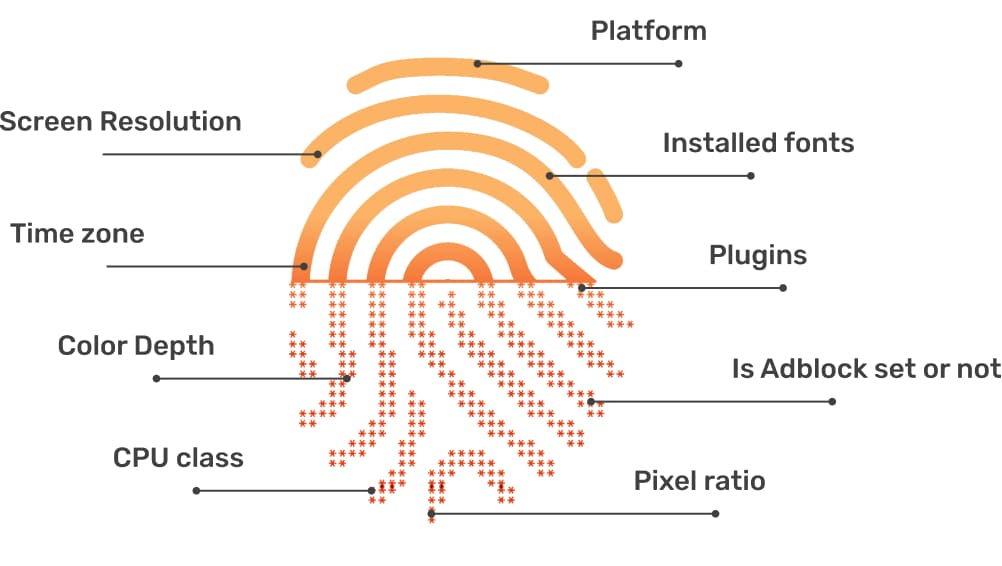
The core insight behind this technique is that no two devices render graphics exactly the same way. These subtle variations, while invisible to the human eye, are caused by a specific combination of factors unique to your machine:
- Graphics card (e.g., NVIDIA, AMD, Intel)
- GPU drivers and their specific versions
- Operating system (e.g., Windows, macOS, Linux)
- Browser version and its rendering engine
This combination creates a fingerprint that can be used to identify and track you across different websites, even without cookies.
How Does Canvas Fingerprinting Work?
The technical process of generating a canvas fingerprint can be broken down into four simple steps.
- Step 1: Canvas Drawing When you visit a website, it runs JavaScript code that tells your browser to draw an invisible image, text, or geometric shapes using the HTML5 Canvas element. This drawing happens in the background without you ever seeing it.
- Step 2: Rendering Variations Your computer's unique hardware and software configuration affects how this image is rendered. Key system components that introduce variations include the Graphics card, Operating system, Browser, and Font rendering settings like anti-aliasing. These numerous variables are precisely what an advanced antidetect browser like DICloak is designed to control, allowing it to create distinct browser profiles.
- Step 3: Hash Generation The website then extracts the raw pixel data from this rendered image and converts it into a unique string of characters called a hash. Because of the rendering variations, even a one-pixel difference between two devices will result in a completely different hash.
- Step 4: Fingerprint Storage This hash becomes your canvas fingerprint. The website stores it in its database and uses it to identify you every time you return, even if you have cleared your cookies, changed your IP address, or are using incognito mode.
Canvas Fingerprinting vs. WebGL Fingerprinting: What’s the Difference?

While both canvas and WebGL fingerprinting are graphics-based tracking techniques, they work differently and test separate aspects of your system.
The key difference is that Canvas fingerprinting tests basic 2D rendering, like fonts and simple shapes, while WebGL fingerprinting tests a GPU’s advanced 3D capabilities, such as how it processes complex shaders and 3D models.
Most advanced tracking systems use both techniques together for maximum accuracy. The table below highlights their main differences.
| Feature |
Canvas Fingerprinting |
WebGL Fingerprinting |
| API Used |
HTML5 Canvas (2D) |
WebGL (3D) |
| What It Tests |
Font rendering, colors |
GPU model, shader capabilities |
| Uniqueness Level |
Moderate |
Very High |
| Stability |
Very Stable |
Moderate |
| Resource Cost |
Low |
Medium-High |
For multi-account operators, the key takeaway is that platforms use both methods in tandem. Protecting against canvas alone is insufficient; a comprehensive solution that spoofs both 2D and 3D graphics fingerprints is non-negotiable for account security.
How to Test Your Canvas Fingerprinting Score
The best way to see your own canvas fingerprint is by using a free online tool like BrowserLeaks. It analyzes your browser and shows you exactly how unique your fingerprint is.
Follow these simple steps:
- Visit the BrowserLeaks Canvas Test: Navigate to
https://browserleaks.com/canvas in your browser. The test will run automatically.
- View Your Canvas Fingerprint: The page will display your canvas hash (the unique string) and a uniqueness score indicating how many other visitors share your exact fingerprint.
- Check Your WebGL Fingerprint: For a complete picture, also test your WebGL fingerprint at BrowserLeaks WebGL to see your GPU and renderer information.
Once the tests are complete, you will see one of three common results.
Result 1: “Your fingerprint is unique”
This means your combination of hardware and software is rare, making you highly trackable across the web. This is common if you use an uncommon GPU, have very new or outdated drivers, or use a less popular operating system.
Result 2: “Shared by X% of visitors”
This is the ideal result for privacy. It means your fingerprint is identical to a large group of other users, allowing you to blend in. This is typical for common setups, such as a Windows computer with a popular browser like Chrome and standard Intel graphics.
Result 3: “Very likely you are masking your fingerprint”
This message indicates that the testing site has detected an anti-fingerprinting tool. This often happens with simple blocker extensions that randomize the canvas output. While it may seem like a good thing, this result can make your account appear suspicious to websites, potentially leading to flags or blocks.
Why Common Methods to Stop Canvas Fingerprinting Fail
Not all protection methods are effective, and some can even make you more identifiable by creating suspicious inconsistencies.
Ineffective Protection Methods
- Canvas Blocker Extensions: These browser extensions are easily detected by websites. They often randomize your fingerprint on every page load, which is unnatural behavior that tracking systems can flag. The presence of the extension itself can become a unique part of your overall browser fingerprint. This detectability is why professional solutions don't just block or randomize data. Instead, a tool like DICloak creates entirely new, consistent browser fingerprints that appear authentic to websites.
- Firefox & Chrome Protection: While browsers like Firefox have built-in protection, it often works by making all users look identical. This can make you stand out as "the Firefox user trying to hide," can break legitimate website functions that use the canvas element, and fails to protect against other vectors like WebGL fingerprinting.
Partially Effective Methods
- Tor Browser: Tor provides strong privacy but is extremely slow and blocked by many websites and online services. Advanced tracking systems can still identify traffic coming from the Tor network, making it unsuitable for managing accounts.
- Brave Browser: Brave’s randomization of fingerprint data is a step up, but this randomization is still detectable by sophisticated systems. It also creates inconsistencies between browsing sessions, which is a red flag for fraud detection algorithms.
The Complete Solution for Canvas Fingerprinting Protection: DICloak
The most effective way to protect against canvas fingerprinting is not to block it, but to control it. Instead of using detectable blocking or randomization methods, DICloak generates a unique digital identity for every account you manage, making each one appear as a separate, legitimate user.

Here is how DICloak’s advanced fingerprint protection works:
- Guaranteed Account Isolation: Every account gets its own isolated browser profile with a custom fingerprint and a unique IP address via proxy integration. This prevents cross-contamination and drastically reduces the risk of platforms linking your accounts.
- Simulates Real Devices: DICloak automatically sets fingerprint parameters to mimic distinct devices, including their operating system (Windows, Mac, iOS, Android), software, and location, ensuring each profile appears authentic.
- Spoofs Key Fingerprint Elements: DICloak lets you spoof critical fingerprint elements, including Canvas, WebGL, WebGPU, cookies, and geo-location, giving you complete control over your digital identity for enhanced privacy.
- Persistent Fingerprints: Each browser profile maintains a stable and consistent fingerprint across all sessions. Websites expect this stability from legitimate users, so your accounts appear natural and avoid suspicion.
- Flexible Proxy Integration: DICloak seamlessly integrates with all major proxy protocols (HTTP/HTTPS, SOCKS5), allowing you to easily manage your IP pool and ensure each profile has a unique, corresponding IP address.
Who Needs Protection from Canvas Fingerprinting?
For professionals who manage multiple online accounts, robust protection against canvas fingerprinting isn't just about privacy—it's essential for business operations.
Social Media Marketers
Managing multiple client accounts on platforms like Facebook or TikTok without protection is a recipe for disaster. A single flagged account can trigger a catastrophic chain reaction, wiping out your entire client portfolio overnight if platforms link them to your device.
Operating multiple stores on platforms like Amazon, eBay, or Shopify from one computer can lead to sudden suspensions, locking you out of your revenue and inventory. These platforms use fingerprinting to enforce their "one seller, one account" policies with zero tolerance.
To test campaigns and manage various affiliate accounts, you need untraceable browser identities. Without them, platforms can link your accounts, voiding commissions and shutting down your campaigns if they trace back to a single fingerprint.
Digital Agencies
Agencies need to manage dozens of client accounts securely. DICloak provides the tools to create a unique, isolated fingerprint for each client, enabling secure team collaboration and preventing catastrophic cross-contamination where a single client issue compromises your entire agency's portfolio.
Frequently Asked Questions About Canvas Fingerprinting
1.What is canvas fingerprinting?
It is a browser tracking technique that identifies you by analyzing small differences in how your device renders graphics. A website asks your browser to draw a hidden image, and the resulting pixel data creates a unique identifier, or fingerprint, based on your specific hardware and software.
2.Can browser extensions really block canvas fingerprinting?
While extensions try to block it, they are often detected by websites and can make you look more suspicious. Their methods of randomizing data create unnatural fingerprints. A tool like DICloak, which creates consistent and unique fingerprints for each account, is a much safer and more effective approach.
3.What is the difference between canvas and WebGL fingerprinting?
Canvas fingerprinting tests your browser's basic 2D graphics rendering, such as fonts and shapes. WebGL fingerprinting tests more advanced 3D graphics capabilities tied directly to your GPU. Most websites use both together for more accurate tracking.
4.How does DICloak protect against canvas fingerprinting?
DICloak doesn't block fingerprinting, as that is detectable. Instead, it creates isolated browser profiles, each with its own unique and spoofed fingerprint (including canvas, WebGL, and IP). This makes each account appear to websites as a completely separate and legitimate user on a different device.
5.Is having a unique canvas fingerprint a bad thing?
For professionals managing multiple accounts, a unique fingerprint for each account is essential. This ensures platforms see each account as a separate, individual user, preventing them from being linked and banned together. DICloak is designed to create these distinct, isolated digital identities for each profile you manage.
Conclusion
Canvas fingerprinting is a widespread and powerful tracking technique that bypasses traditional privacy tools. Simple solutions like incognito mode, and browser extensions are ineffective and can even make you more suspicious.The only way to achieve complete and reliable protection is with a professional antidetect browser.
DICloak provides the definitive solution by replacing detectable blocking methods with a sophisticated approach to fingerprint management.Start your free DICloak trial today and take control of your digital identity.
 Web Proxy Tools
 Free Tools
 Cookie Plugin
 UA Generator
 MAC Address Generator
 IP Generator
 IP Address List
 2FA Code Generator
 World Clock
 Anonymous Check
 WebRTC Leak Test
 UUID Generator
 Free Web Proxy Site
 Proxy Checker
 FB Ad Checker
 AI Web Scraping
 Free SMM Tools
 Twitter Shadowban Checker
 Instagram Name Checker
 UTM Generator
 Username Generator
 AI Hashtag Generator
 LinkedIn Headline Generator
 Social Media Image Resizer