For millions of people, Discord has become an essential tool for work teams, study groups, and gaming communities. However, seeing a restricted Discord would frustrate anyone who wants to communicate with friends or coworkers and have them wondering, "How can I get Discord unblocked at school, workplace, and anywhere?"
This article is here to solve that problem. It starts by why your Discord get blocked. Then, the article gives 6 methods to help you get Discord unblocked, with a special focus on reliable tools. Especially when it comes to DICloak, an useful anti-detect browser, it offers a step-by-step guide on how to unblock on Discord. Let's explore it together.
Why is Discord get Blocked?
Before getting to know why is Discord get blocked, you may wonder what is Discord unblocked? It means you can open and use Discord without limits. Some users cannot access Discord because of network rules or device settings. When Discord is blocked, it may stop working entirely. This can be frustrating for students, gamers, and groups who rely on the service.
For example, some schools or workplaces block Discord in their firewalls. In those places, you might not be able to visit the website or use the app. Other people may have trouble on a Chromebook, where certain apps are restricted. In some cases, users accidentally block themselves by changing settings on a phone or computer.
And here are the main reasons why Discord may be unavailable:
School Network Restrictions
Many schools use web filters to block social media and gaming platforms. These filters are built into the school’s firewall. Discord is often placed in the same category as online games or chat apps. For example, a high school student may try to open Discord during lunch break and see a message like “Access Denied” or “This site is restricted.” The school blocks it to reduce distractions and keep students focused during class hours.
Workplace Firewalls
Many companies block Discord on office networks. IT departments often restrict messaging apps that are not approved for business use. For example, an employee working in an office may notice that Discord loads at home but not on the company Wi-Fi. The company firewall blocks it to:
- Protect internal data
- Reduce security risks
- Prevent non-work communication during work hours
Public Wi-Fi Restrictions
Hotels, airports, and cafes sometimes limit apps that use heavy bandwidth. Discord voice and video calls use real-time data. Some public networks block these services to keep the connection stable for all users. For example, a gamer traveling abroad may find that Discord text messages load slowly, but voice chat does not connect at all. The network may be limiting real-time communication services.
Device-Level Restrictions
Sometimes the issue is not the network. It can be the device. On managed Chromebooks (such as those issued by schools), administrators can disable certain apps. If Discord is not approved, it simply will not open. Parental control apps on home routers or phones can also block Discord automatically.
How to get Discord Unblocked?
Below, we offer different methods for getting Discord unblocked. Choose the one that best fits your tasks and limitations.
Accessing Discord via Proxy Servers
A proxy sends your web request through another address. For the external network (the blocking system), your request seems to come from the IP address of the proxy server rather than your real one. This makes it possible to bypass regional or network-based restrictions on accessing Discord. Some people try this when looking for discord unblocked for school.
Pros
- Can work in a browser without installing apps.
- Useful for quick testing (to see if Discord is blocked by the network).
Cons
- Many free proxies are unsafe or full of ads.
- Often slow, and voice chat may not work.
- School filters frequently block proxy sites.
How to unblock Discord using a proxy:
- Choose and purchase a high-quality proxy. To learn how to check proxy reliability, read our article on the subject.
- Configure the connection in your operating system settings. Find the manual proxy configuration section in network settings and enter the IP address and port.
Changing DNS Settings
A DNS server is like the internet’s phone book. It turns a website name into the IP address your device needs to connect. Most people use the DNS that comes with their ISP or school network. But you can switch to a public DNS service, such as Google Public DNS or Cloudflare. If Discord is being blocked only through DNS filtering, this change can help Discord load again.
Pros
- Simple fix for DNS-based filtering on home networks.
- Can improve reliability if your current DNS is unstable.
- No extra apps needed.
Cons
- Won’t help if the firewall blocks Discord directly.
- School Chromebooks often don’t allow DNS changes.
- Wrong DNS setup can break other sites.
How to unblock Discord by changing the DNS server:
- Open network settings on your PC and search for DNS.
- In the appropriate section, enter the address of an alternative public DNS (for example, 1.1.1.1 and 1.0.0.1 for Cloudflare).
- Save the changes and clear the DNS cache.
Using Mobile Hotspots for Access
A hotspot switches you to a different network (your phone’s carrier data). If Discord is restricted on a Wi-Fi network, such as at school or work, you can switch to mobile data instead. By using your phone’s 3G, 4G, or 5G connection, you bypass the local Wi-Fi network and access Discord through your cellular provider.
Pros
- Often the easiest way to get discord unblocked quickly.
- Bypasses school Wi-Fi restrictions because you are not using it.
- Works well for Discord voice chat if your signal is strong.
Cons
- Uses mobile data and may cost extra.
- Battery drain on your phone.
- Some campuses restrict hotspot use.
How to unblock Discord using a mobile hotspot:
- Enable the mobile hotspot on your smartphone or tablet.
- If you want to access Discord from a computer, connect your PC or laptop to your mobile network.
- Launch Discord or open the web version in a browser.
Accessing Discord with the Tor Browser
Tor Browser is designed to protect your privacy online. It hides your real IP address and protect your traffic by sending it through several relay servers across different countries. Because of this, Discord does not see your actual location, but instead the IP address of a Tor network exit node.
Pros
- Free
- Can bypass some basic website filters.
- Adds privacy on open networks.
Cons
- Often too slow for Discord voice or video.
- Discord may challenge logins from Tor exits.
- Many schools/workplaces block Tor traffic.
How to unblock Discord using Tor Browser:
- Download Tor Browser from the official website.
- Install and launch the browser.
- Wait for the connection to be established and then go to the Discord website.
Exploring Antidetect Browsers
If the previous methods did not work, the issue is usually not your fingerprint. In many cases, Discord is blocked at the network or regional level (for example, by a school firewall, a workplace filter, or local restrictions), which can prevent the site or app from loading at all. However, fingerprint does matter once you can access Discord and try to log in, especially if you manage more than one account or you keep getting extra verification steps. In this case, you can use an anti-detect browser such as DICloak. It creates separate profiles, each with its own fingerprint. You can create your proxy to each profile. As a result, Discord will perceive each profile as a new user with a unique device. This helps unblock Discord even under complex restrictions.
Pros:
- Helps bypass even the most complex Discord blocks.
- Allows you to manage multiple Discord accounts at the same time.
Cons:
- Require a paid subscription.
How to get Discord unblocked using DICloak:
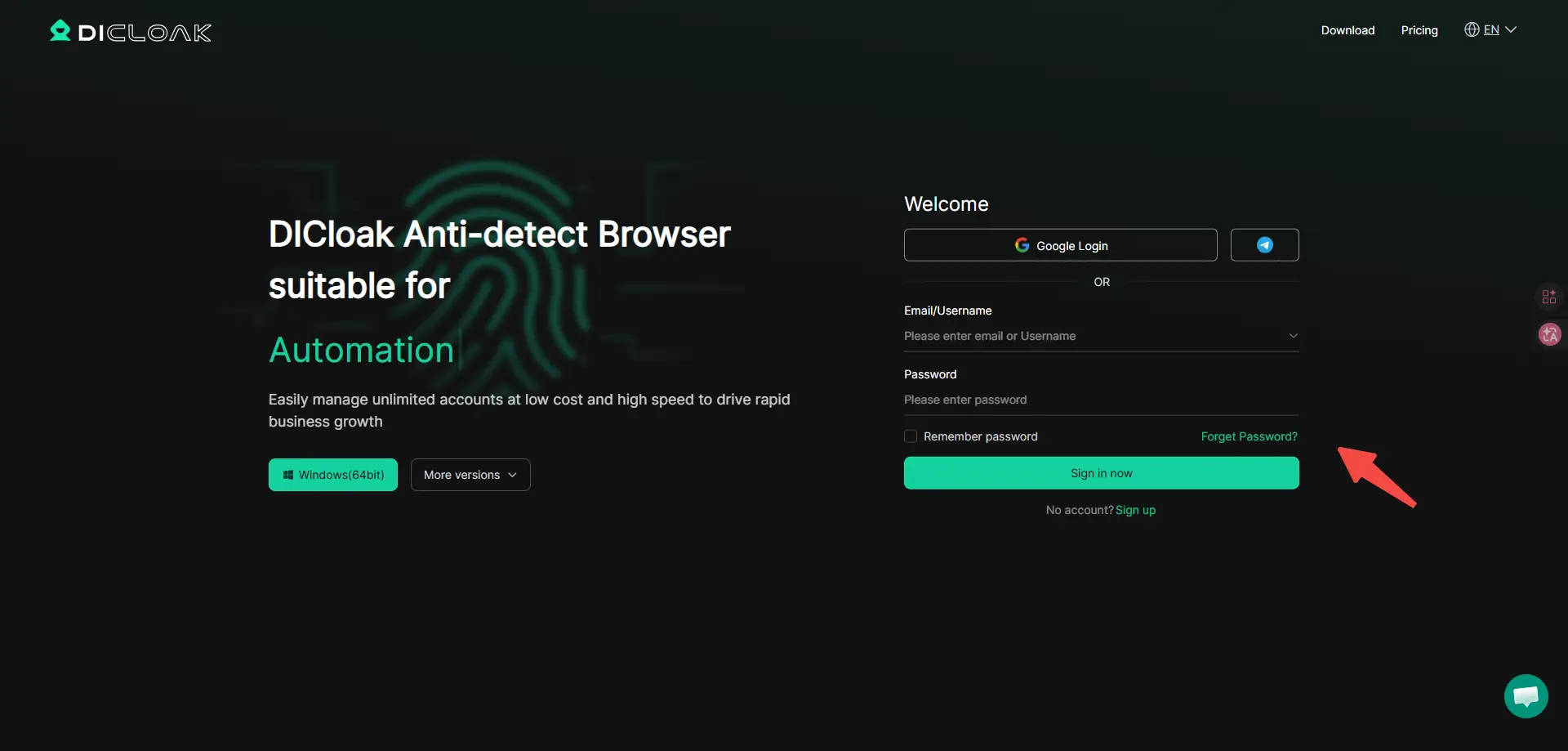
- Register on the official website.
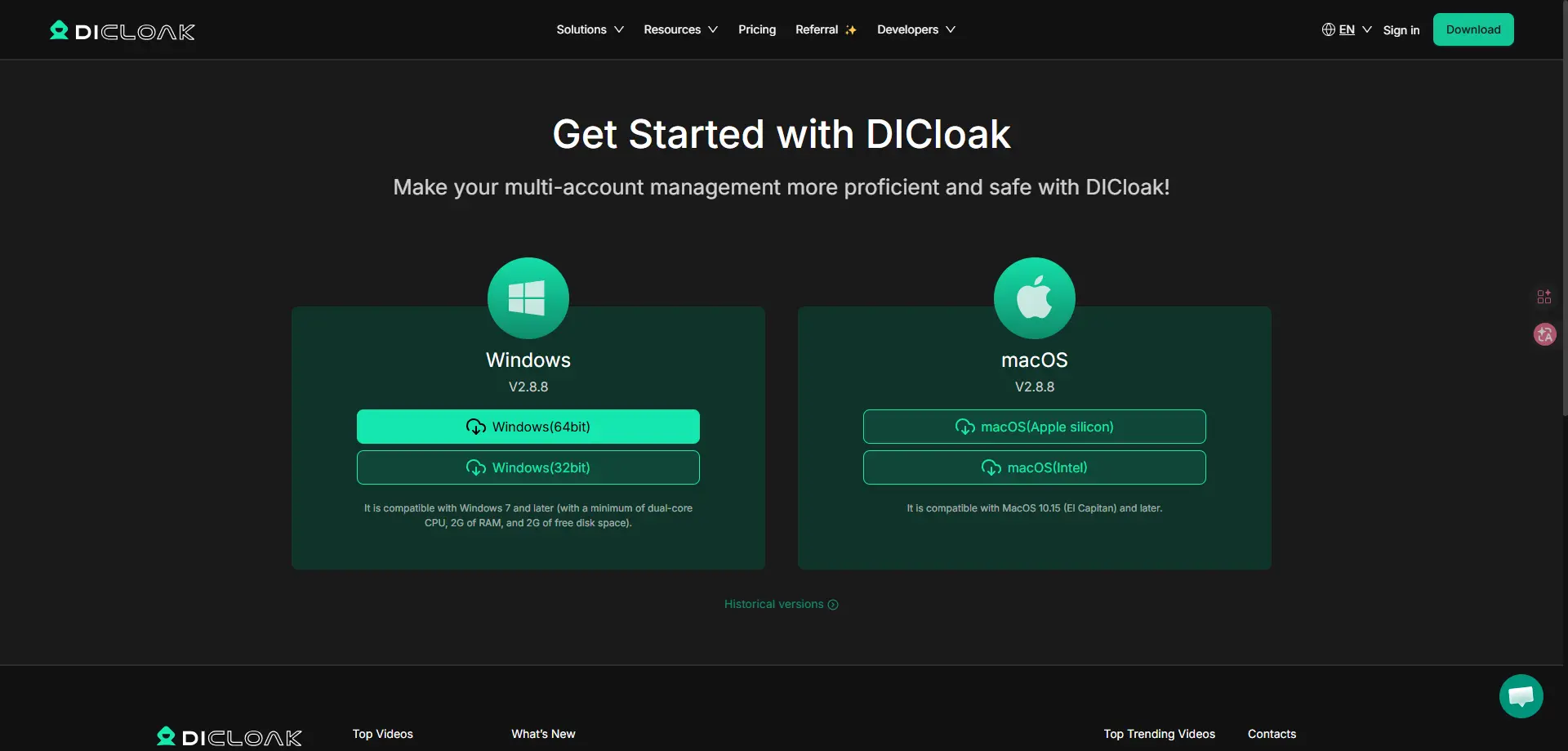
- Download and install the browser.
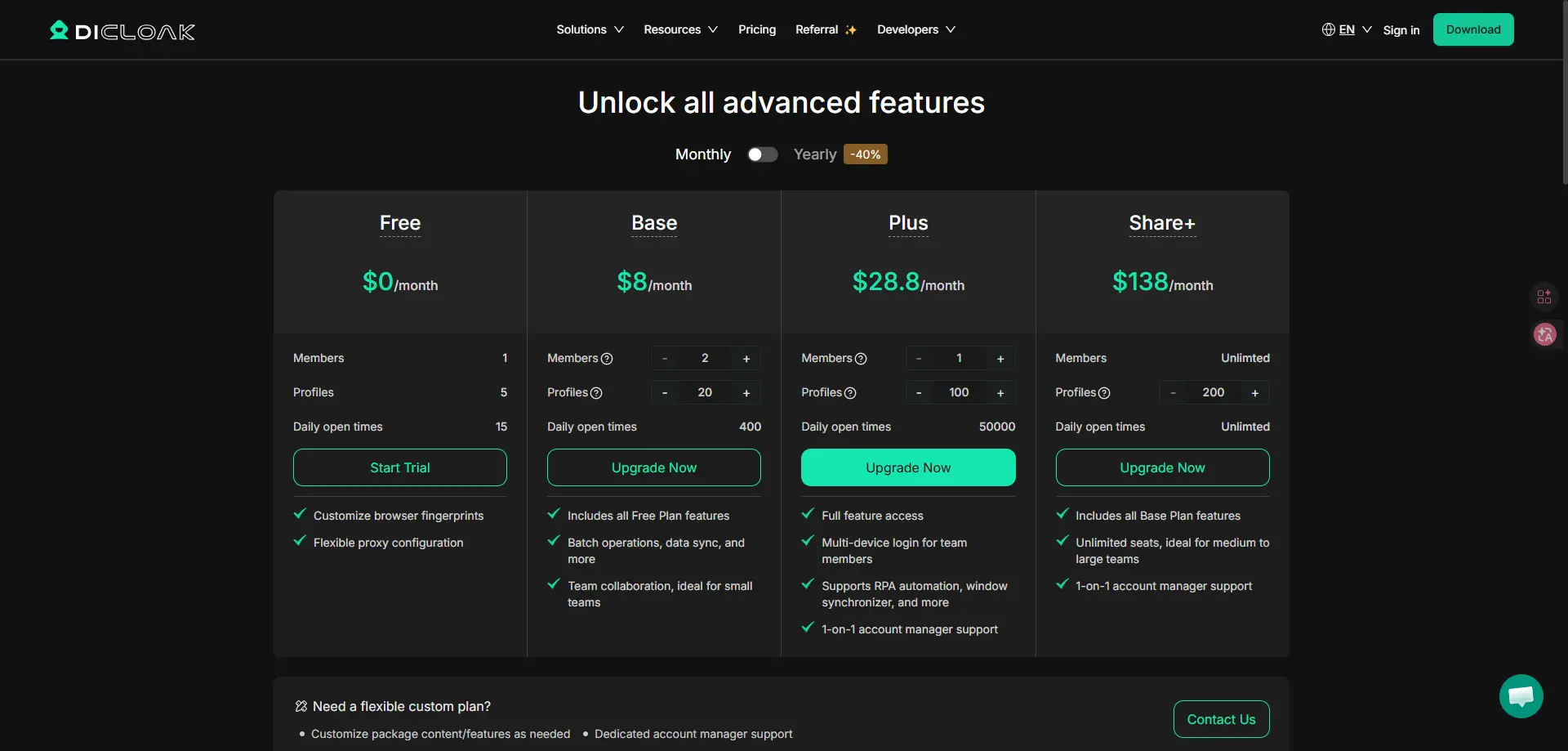
- Purchase the subscription plan by following the guide and you can select the best suits your need.
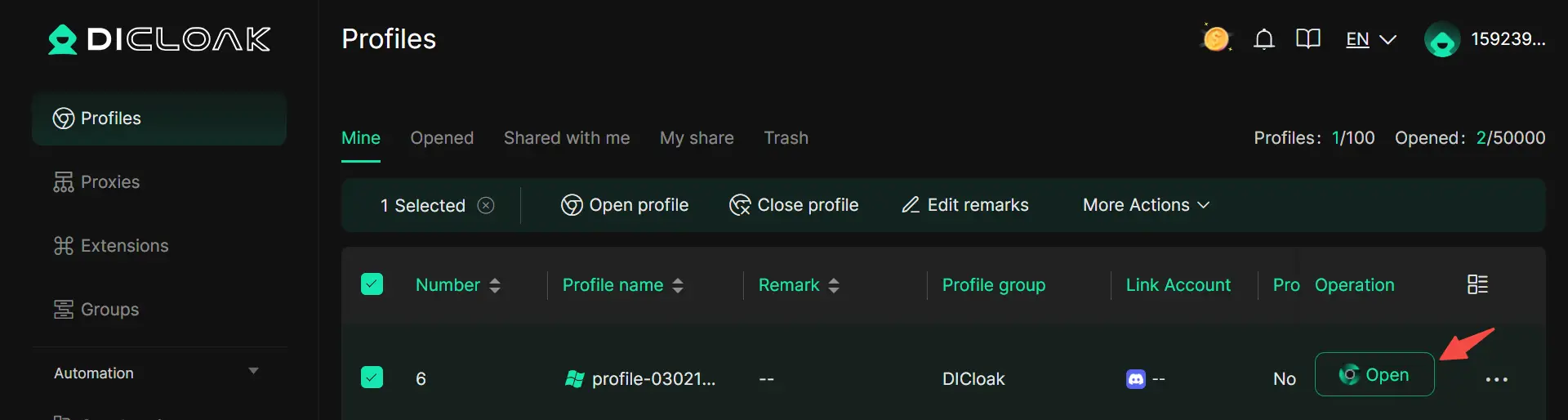
- After installation, you can see a clean dashboard with a Create profile button. Click it to create a unique browser profile. Complete the General part for easy reference.
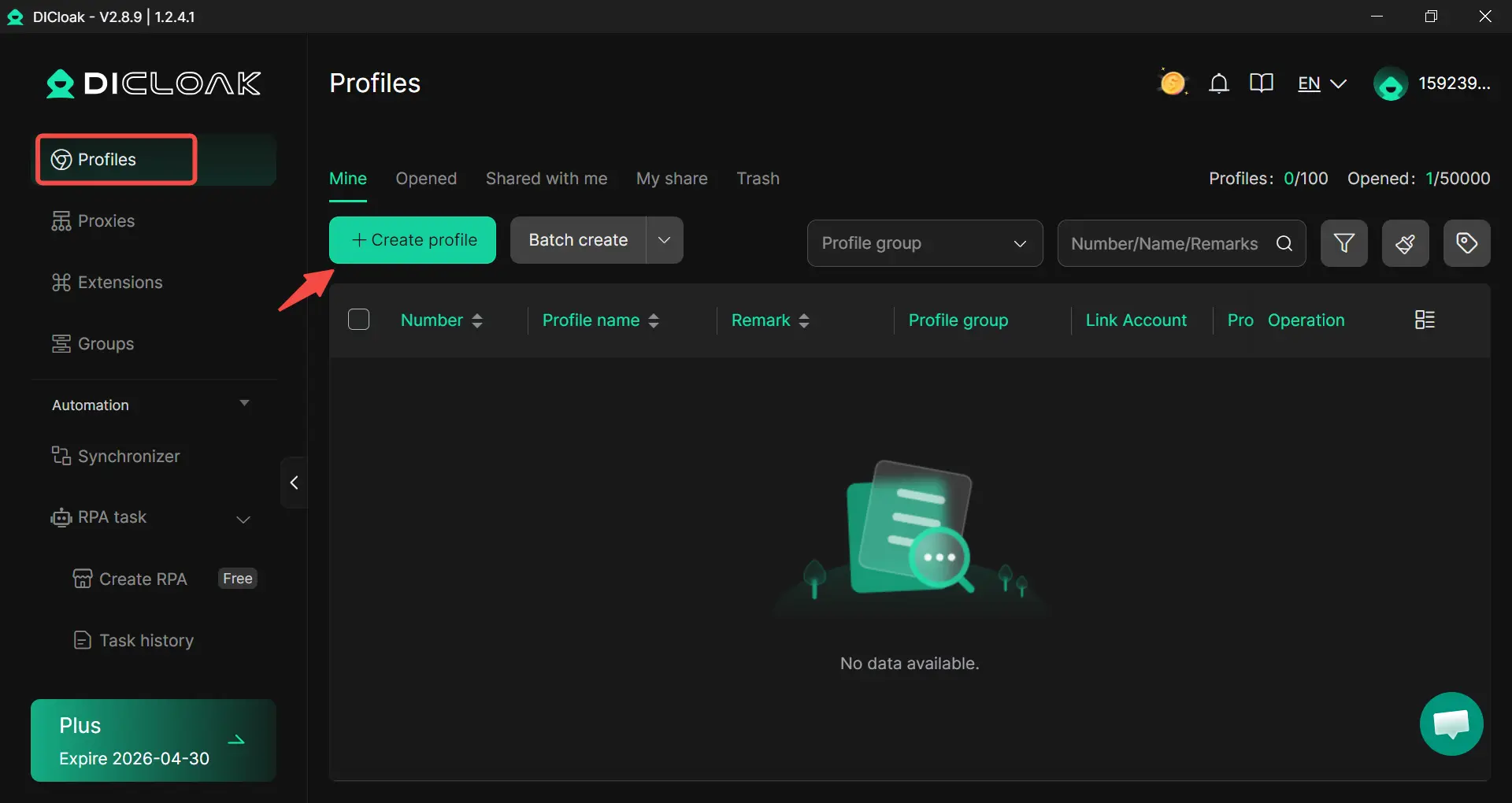
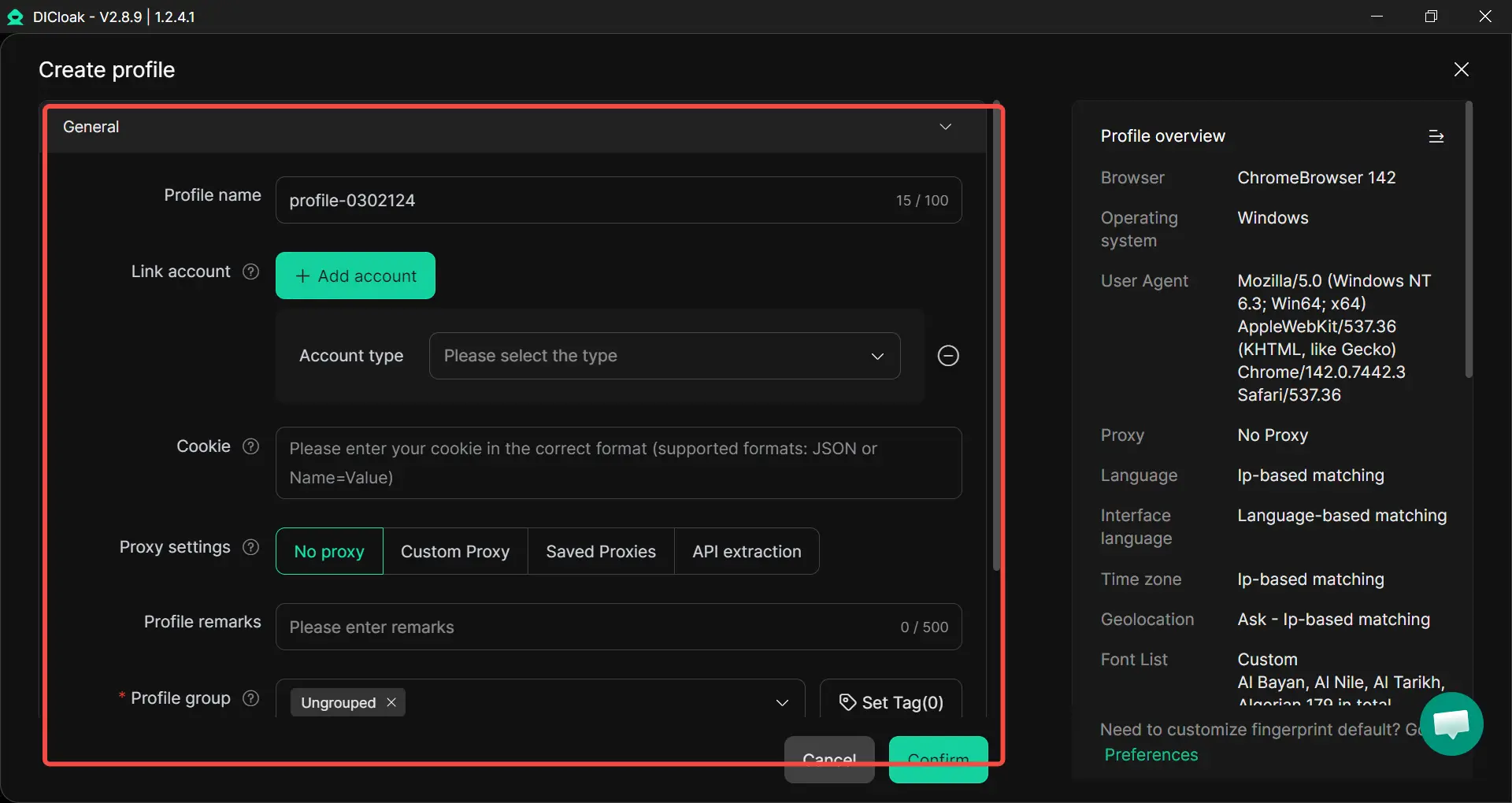
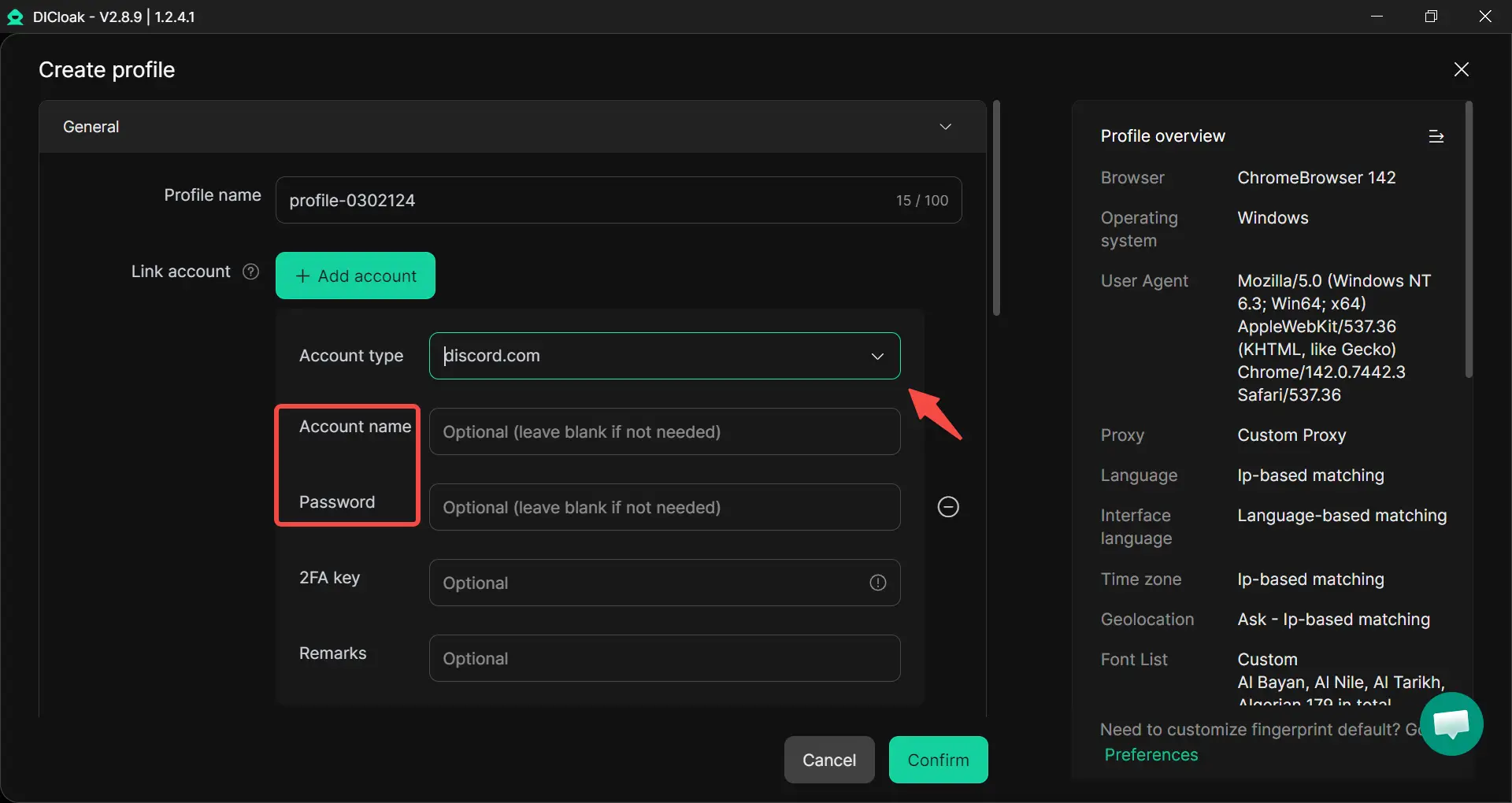
- Choose the Discord account and complete the Account name and Password (if you have one).
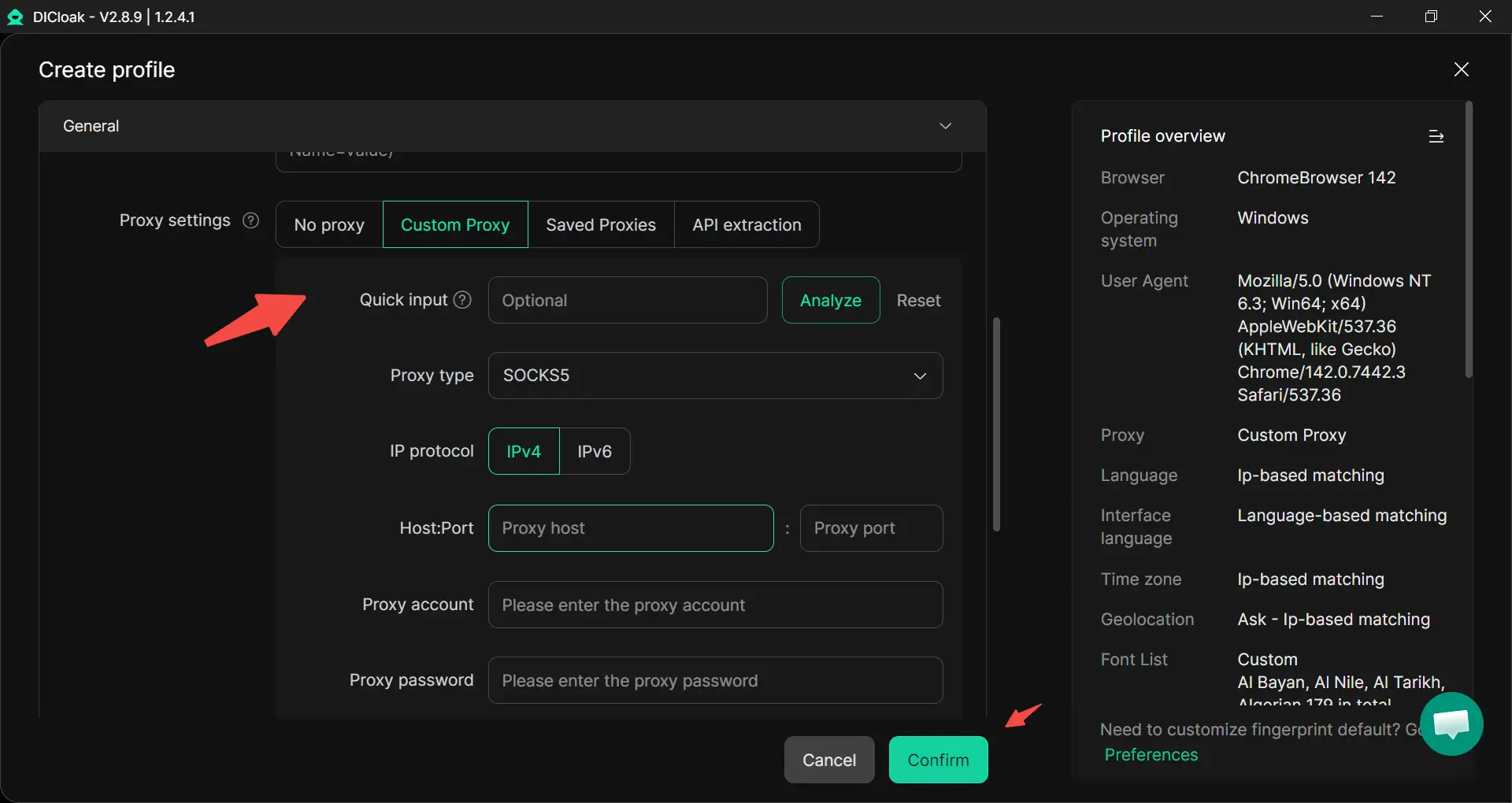
- Setting up the proxy server (this hides your real IP). Pick a proxy from a location where Discord isn't blocked. Paste the proxy details into the fields. Click Confirm to save the profile. You'll see it appear on your dashboard.
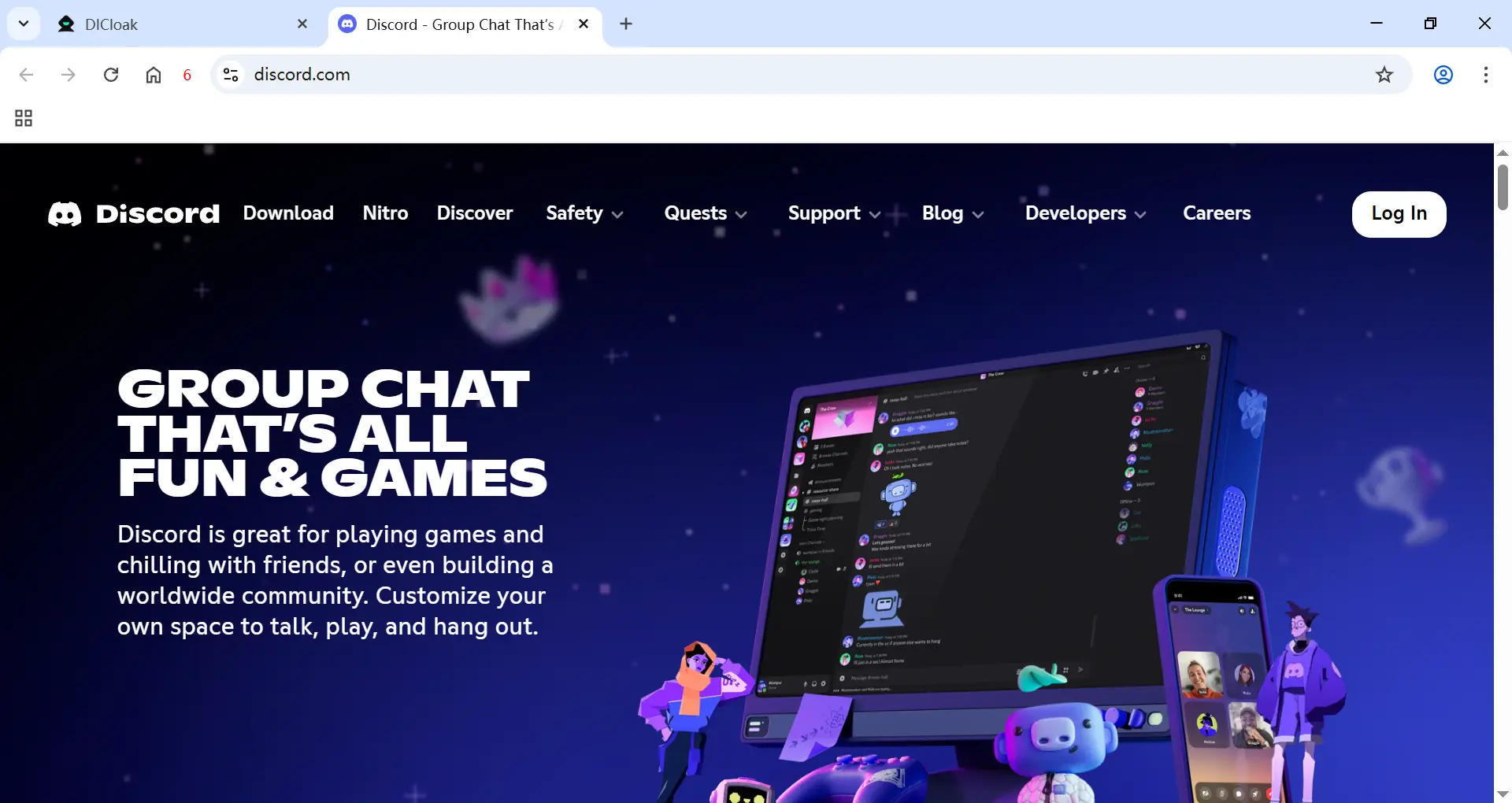
- Click Open on your new profile. DICloak will launch a new browser window. In this new browser, it'll go to Discord in seconds if the profile works. You'll now have unblocked Discord access. Try log in and start using it!
How to Choose the Best Way to Get Discord Unblocked?
Choose a method to get Discord unblocked based on your level Discord is blocked, and what your goal is.
| Task |
Recommended method |
Reason |
| Bypassing a local Discord block (school, work) |
Mobile hotspots |
The fastest and simplest option. |
| Bypassing a regional Discord block |
Proxy server |
Effectively changes your IP address and provides fast speed. |
| Bypassing strict, multi-layer restrictions, multi-accounting on Discord, maximum anonymity and privacy |
DICloak anti-detect browser (without proxy) |
Creates a unique fingerprint and reliably bypasses complex filters. |
If you work with multiple Discord accounts and need a stable and safe solution, an anti-detect browser is the right choice.
What to Do When You Fail to Unblock Discord?
Even after trying several methods, Discord can still fail to load in some cases. When that happens, the goal is to determine whether the issue is related to Discord itself, your network, or your browser profile settings. Here’s a simple checklist you can follow.
Step-by-step troubleshooting guide:
- Check Discord’s server status: Confirm that Discord isn’t experiencing an outage by visiting its official status page.
- Restart your modem or router: A quick restart can clear temporary connection issues and refresh your IP address.
- Temporarily disable firewall or antivirus software: Security tools may block Discord traffic. Disable them briefly to test, then turn them back on.
- Review router and network restrictions: Log into your router or network admin panel to see if Discord domains or related ports are blocked.
- Test a different proxy profile: If you are using a proxy, switch to another profile or IP location to rule out instability or IP restrictions.
- Contact your ISP or network administrator: If the restriction is enforced at the provider or organization level, you may need clarification or approval to restore access.
By checking each layer—server status, network, and profile settings—you can usually identify the root cause and choose the most appropriate solution.
Is It Safe and Legal to Unblock Discord?
Before you try to get discord unblocked, it is important to understand both safety and legal risks. The answer depends on where you are and who controls the network.
In many countries, using a proxy or switching networks is not illegal by itself. However, your actions on Discord must still follow local laws and Discord’s Community Guidelines. For example, creating new accounts to avoid a ban or sending spam can lead to permanent account removal. Even if you succeed in getting discord unblocked, breaking platform rules can still result in restrictions.
School and Workplace Policies
Many schools and companies block Discord to reduce distractions or protect internal systems. Their Acceptable Use Policies often state that bypassing filters is not allowed. If a student forces discord unblocked access on a managed Chromebook, the school may apply disciplinary action. In workplaces, bypassing filters can violate IT security rules.
If you are unsure, asking the administrator for permission is often the safest option.
Regional and Network Restrictions
In some regions, Discord may be limited due to regulatory decisions or network-level filtering. In these cases, the block is not related to your fingerprint or account behavior. Changing a browser profile’s settings alone may not restore access if the restriction is applied at the network level.
Account Safety and Profile Consistency
Sometimes users think Discord is blocked, but the issue is actually account security. Discord may request extra verification if it detects unusual login patterns, such as frequent IP changes or switching between different browser profiles for the same account.
For example, logging in from school in the morning and then from another country later that day can trigger a security check. To reduce this risk, try to use the same browser profile consistently for the same account and avoid sudden location changes.
A Common Confusion: Network Block vs. User Block
Some users searching for discord unblocked actually mean something different. They may be asking How to unblock Someone on Discord, which is not related to network restrictions.
If you blocked a person and want to reverse it:
- Open User Settings
- Go to Privacy & Safety
- Find Blocked Users
- Click Unblock
This restores communication between users. It does not affect network access.
Best Practices for Safe Usage After Getting Discord Unblocked
Getting discord unblocked is only the first step. What you do after access is restored matters just as much. Many accounts run into problems because users move too fast or ignore basic safety habits. Here are practical ways to use Discord safely after you regain access.
Move Slowly After Access Is Restored
When Discord becomes available again, avoid sudden high activity.
For example:
- Do not join 10 servers at once.
- Do not send many friend requests in minutes.
- Do not post links repeatedly in new servers.
Keep One Account Per Profile
If you are using browser-based tools, always keep one Discord account per browser profile. Logging into multiple accounts inside the same profile can mix cookies and session data. This may cause login conflicts or extra verification checks. Keeping accounts separated helps maintain cleaner sessions and fewer interruptions. This is especially important for users managing more than one community or support account.
Avoid Suspicious IP Switching
If you are using a proxy or switching networks, avoid changing IP locations too often in one day. For example, logging in from a school network in the morning and then from another country later that same afternoon may trigger a security alert. Even if you successfully get discord unblocked, sudden location jumps can lead to email verification or temporary locks.
Protect Your Account With Basic Security Settings
Once access is restored:
- Turn on Two-Factor Authentication (2FA)
- Confirm your email address
- Avoid sharing your login information
Conclusion
Getting Discord unblocked is not the same for everyone. If you just need quick access for a casual chat, switching to a mobile hotspot or using the web version of Discord may be enough. For simple network filters, proxy might help in some situations. However, if you are facing stricter restrictions tied to repeated browser signals or session overlap, you can use DICloak to create separate browser profiles. With DICloak, you set up isolated profiles and add your own proxies if needed. Each profile runs independently, which helps reduce conflicts between accounts and browser sessions. The key is to choose the method that fits your situation. Whether you change networks, adjust settings, or organize your browser profile with DICloak, the goal is the same—restore access safely and get back to using Discord without unnecessary issues.
Frequently Asked Questions (FAQs)
What does discord unblocked really mean?
“Discord unblocked” means you can access and use Discord without restrictions. This usually happens after fixing a network block, DNS filter, or device-level restriction. If Discord was blocked on school or work Wi-Fi, restoring access may require changing networks or adjusting settings.
Why is Discord blocked on school or work Wi-Fi?
Schools and workplaces often block Discord to reduce distractions or protect network security. If you are searching for discord unblocked for school, the restriction is usually set by a firewall or content filter. In some cases, asking the IT administrator for permission is the safest solution.
Why is Discord blocked in my region or network?
Discord can be blocked for a few common reasons: your school, university, or workplace may restrict chat apps to reduce distractions and save bandwidth; some regions limit access due to local rules; Discord may restrict certain accounts or IP addresses after rule violations; and some internet providers or network admins use DNS filtering, which can prevent Discord from loading even when your connection seems fine.
How to unblock Someone on Discord?
On desktop, open Discord and click the User Settings gear icon in the bottom left corner. From the menu, go to Privacy & Safety and scroll down until you see the Blocked Users section. Find the person you want to unblock and click Unblock, then confirm your choice.
On mobile, open the Discord app and tap your profile icon at the bottom of the screen. Tap the Settings icon, go to Privacy & Safety, and select Blocked Users. Choose the person you want to unblock, tap Unblock, and confirm to remove the block.
Why does Discord still not work after trying different methods?
If Discord still does not load after trying proxy, DNS changes, or hotspots, the issue may be device-based or region-based. Managed devices like school Chromebooks may have administrator-level restrictions. In those cases, restoring discord unblocked access may require official approval or using a personal device and network.
 Web Proxy Tools
 Free Tools
 Cookie Plugin
 UA Generator
 MAC Address Generator
 IP Generator
 IP Address List
 2FA Code Generator
 World Clock
 Anonymous Check
 WebRTC Leak Test
 UUID Generator
 Free Web Proxy Site
 Proxy Checker
 FB Ad Checker
 AI Web Scraping
 Free SMM Tools
 Twitter Shadowban Checker
 Instagram Name Checker
 UTM Generator
 Username Generator
 AI Hashtag Generator
 LinkedIn Headline Generator
 Social Media Image Resizer