Snapchat problems always seem to happen at the worst time. Messages won’t send, Stories won’t load, or the app suddenly refuses to open. The first question most users ask is simple: is Snapchat down, or is something wrong on my phone?
In reality, Snapchat outages are less common than people think. Many issues that feel like a global shutdown are actually caused by local network problems, app bugs, or account restrictions. That confusion is why searches like is Snapchat down right now spike every time the app slows down.
This guide helps you get clear answers fast. You’ll learn how to tell whether Snapchat is truly down, why the app might not be working for you, and what steps actually fix the problem. Whether you’re a casual user or managing Snapchat accounts for work, this article walks you through what’s happening and what to do next—without technical jargon or guesswork.
Is Snapchat Down? Understanding Snapchat’s Current Status
When Snapchat suddenly stops working, many users ask the same question: is Snapchat down, or is the problem only on their phone? This section helps you understand Snapchat’s current status in a clear way. We look at recent real outages and also what users are reporting right now. This makes it easier to tell the difference between a global problem and a local issue.
Overview of Recent Outages
In most cases, Snapchat runs normally. Right now, major outage tracking sites do not show a large global failure. This means Snapchat’s core servers are online for most users. If you are asking is Snapchat down right now, the answer for most regions is no.
Still, real outages have happened before. A clear example was in October 2025. On that day, Snapchat went down for many users around the world. The issue was linked to Amazon Web Services (AWS), which Snapchat uses for cloud infrastructure. When AWS had a technical failure, Snapchat could not load messages, Snaps failed to send, and many users could not log in at all.
This type of event explains why a single cloud issue can affect many apps at the same time. When something like this happens, users all over the world start searching is Snapchat down, because the problem is not limited to one country or one device.
User Reports and Feedback
User reports are another key signal. Platforms like Downdetector collect real-time feedback from people who experience problems. When report numbers rise far above normal levels, it often points to a real outage.
Recent user reports show smaller issues instead of a full shutdown. Some users mention login errors. Others report that messages load slowly or that videos do not play. These reports appear in different locations and at different times, which usually means the service itself is still running.
This is why many people ask is Snapchat down right now, even when the servers are fine. In many cases, the issue comes from weak internet, an outdated app version, or a temporary device glitch. User feedback helps highlight these patterns and shows that not every problem means Snapchat is fully down.

Why Snapchat Might Not Be Working Even If You Think “is Snapchat down”
If you are asking is Snapchat down, but outage sites show no major problems, the issue is often local. In many cases, Snapchat is working for others, but not on your device. This usually points to a network issue, an app problem, or a restriction on your account. Knowing the difference helps you fix the problem faster.
Local Network Issues
A weak or unstable internet connection is one of the most common reasons Snapchat fails to load. For example, Snaps may stay stuck on “sending,” chats may not refresh, or stories may never load. This can happen on public Wi-Fi, office networks, or school networks that limit certain connections.
DNS errors or firewall rules can also block Snapchat from connecting to its servers. In these cases, switching from Wi-Fi to mobile data, or restarting your router, often fixes the problem. Many users search is Snapchat down right now when the real issue is only their network.
Device or App Problems
Problems with the app itself are another frequent cause. A corrupted cache can slow Snapchat down or cause it to crash when opening the camera or chats. An outdated app version may also stop working after Snapchat releases a backend update.
Some users notice login errors, freezing screens, or sudden crashes after a phone system update. This usually means the app and the device system are not fully compatible yet. Clearing the app cache, updating Snapchat, or restarting the phone often solves these issues within minutes.
Account-Specific Restrictions
Sometimes Snapchat works fine, but your account does not. Temporary limits can happen after unusual activity, such as many login attempts, rapid friend requests, or using third-party tools. When this happens, Snapchat may block logins or limit features for security reasons.
In these cases, the app may open, but messages fail to send, or login attempts show an error message. Following Snapchat’s on-screen security steps and waiting for the restriction period to end is usually required to restore full access.
How to Quickly Confirm “is Snapchat down” Before You Troubleshoot
Is Snapchat down right now? When Snapchat does not work as expected, the first thing to do is check whether the problem is global or only affecting you. A quick check of are Snapchat servers down can save time and help you avoid fixing things that are not broken on your device.
Before restarting your phone or changing settings, it is smart to confirm the server status. If Snapchat is down for many users at the same time, the best option is often to wait.
Way 1: Use Outage Monitoring Sites
Outage monitoring sites are one of the fastest ways to check if Snapchat is down. Popular tools like Downdetector and IsItDownRightNow collect real-time reports from users around the world.
These platforms usually show a live graph. If you see a sudden spike in reports far above the normal level, it often means Snapchat is having a real outage. Large red areas on the map also suggest many users in the same region are affected at once.
If the report level looks normal or only slightly higher than usual, the issue is likely not a platform-wide problem. In that case, Snapchat is probably working for most users, and the issue may be local.
Way 2: Check Social Media Reactions
Social media gives fast and honest feedback from real users. On X (formerly Twitter), search for phrases like “Snapchat down” or “is Snapchat down right now”. If Snapchat is having a major outage, you will often see many posts within minutes.
Reddit is another helpful source. Users often share screenshots, error messages, and details about what is not working. Reading these posts can help you see patterns, such as login failures or messages not sending.
If many users report the same problem at the same time, it is a strong sign that Snapchat itself is down. If complaints are rare or very different from your issue, the problem is more likely tied to your device, network, or account.
What to Do Next If “is Snapchat down” Isn’t the Real Problem
If you already checked server status and it looks like Snapchat is not down, the next step is to troubleshoot on your side. Many people still search is Snapchat down right now because the app feels broken. But in most cases, a few simple fixes bring it back fast. Start with the common fixes first. Then move to the specific problem you are seeing.
Common Fixes for Snapchat Issues
Restarting the app or device
Close Snapchat fully, not just minimize it. Open it again. If it still won’t load, restart your phone. This clears small glitches and resets background processes. It often fixes freezes, slow loading, and buttons that stop responding.
Checking network connections
Snapchat needs a stable connection to load chats, Stories, and Snaps. If things are stuck on “Loading” or “Sending,” test your internet:
- Switch between Wi-Fi and mobile data
- Open a website or another app to confirm your internet is working
- Toggle airplane mode on and off to refresh the signal
If Snapchat works on one network but not the other, the issue is likely your connection, not a global outage.
Clearing the app cache
Cache problems can cause lag, crashes, or feeds that never load. Clearing cache removes temporary files but keeps your account and memories safe.
- Android: Settings → Apps → Snapchat → Storage → Clear Cache
- iOS: Snapchat → Profile → Settings → Clear Cache → Confirm After clearing, reopen Snapchat and let it reload fresh data.
Updating the app to the latest version
An outdated Snapchat version can crash more often or fail to load features. Go to the App Store or Google Play Store and install any updates. Updates often fix bugs and improve stability.
Addressing Specific Problems
If the basic steps above did not fix it, target the exact issue you have. These are common situations that make users think is Snapchat down, even when the servers are fine.
Solutions for login issues (basic)
If you can’t log in:
- Double-check your username and password
- Use “Forgot Password” if you’re not sure
- Make sure your internet connection is stable
A login error can feel like an outage, but it is often account or connection related.
Login issues: verification code failed / unable to receive SMS
If Snapchat asks for a code and it won’t arrive, try this order:
- Check your signal and try again on a different network (Wi-Fi vs mobile data)
- Confirm your number is entered correctly (country code + phone number)
- Check if your phone blocks unknown messages or sends them to spam
- Restart your phone to reset temporary SMS network issues
- Try email-based verification if Snapchat offers it
- If it still fails, contact Snapchat Support and explain that codes do not arrive
This problem is common during weak signal periods. It can make you ask is Snapchat down right now, but it is usually an SMS delivery or verification issue.
Tips for resolving app crashes or freezes
If Snapchat crashes, freezes, or closes by itself, it may be caused by bugs, an old version, or low memory. Try:
- Update Snapchat to the latest version
- Clear the app cache to remove corrupted temporary files
- Restart your phone to refresh system resources
- Close other apps running in the background to free memory
- If crashes keep happening, uninstall and reinstall Snapchat
A good sign it worked: the camera opens smoothly and chats and Stories load without getting stuck.
Steps to fix feed loading problems
If your feed is blank, Stories won’t load, or chats stay stuck:
- Check your internet first
- Clear the cache
- Log out and log back in to refresh your session
- Restart the app after logging in
If outage sites show normal activity and these steps help, Snapchat likely wasn’t down. It was a local loading issue.
Managing Multiple Snapchat Accounts More Safely with DICloak After Downtime Checks
After checking whether Snapchat is down and fixing local issues, some users still face repeated login errors, temporary restrictions, or unexpected account limits. This often happens when managing multiple Snapchat accounts for brands, campaigns, or client work. Even when Snapchat is fully online, account activity patterns can trigger extra checks or false suspensions.
In these cases, using a dedicated multi-account profile can help reduce conflicts and keep daily operations stable. With DICloak, users can manage multiple Snapchat accounts in isolated browser profiles, instead of running everything in one shared environment.
When managing several Snapchat accounts, browser profiles often become linked. This can lead to verification issues or sudden access limits. With DICloak, users can create separate browser profiles for each Snapchat account. Each profile runs in its own isolated profile with independent settings, helping accounts stay separate and reducing cross-account risk.
This setup is useful for:
- Social media managers handling multiple brand accounts
- Affiliate or traffic teams running campaign accounts
- Businesses managing customer or regional Snapchat profiles
If one account has a temporary issue, other profiles remain unaffected.
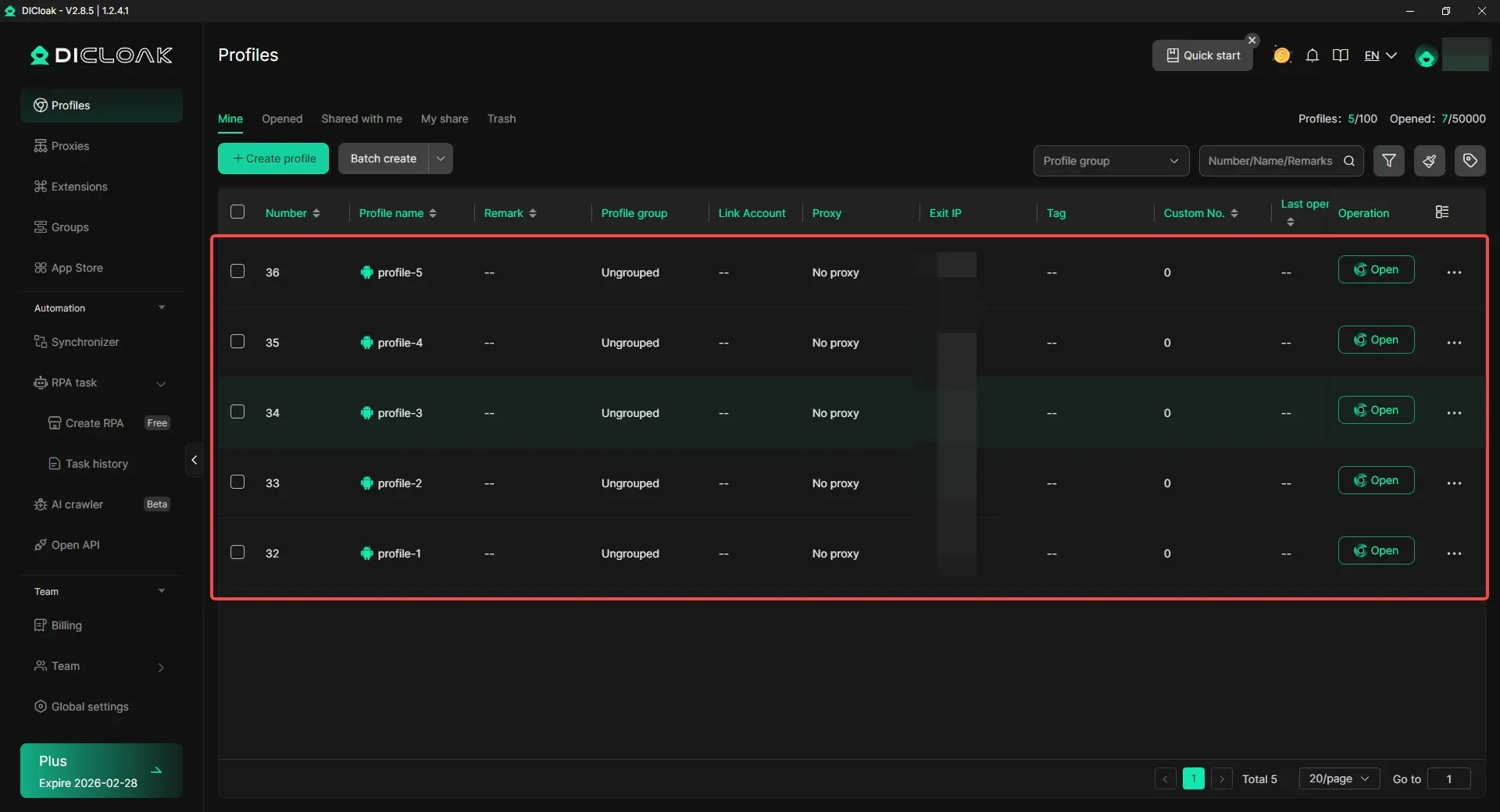
Snapchat checks more than just login details. Device signals, browser fingerprints, and IP patterns also matter. Using DICloak, users can assign custom fingerprints and configure individual proxy connections for each profile. This helps keep account behavior consistent and avoids conflicts caused by shared IPs or identical profiles. For teams running accounts at scale, bulk proxy assignment and profile management save time while keeping setups clean and organized.
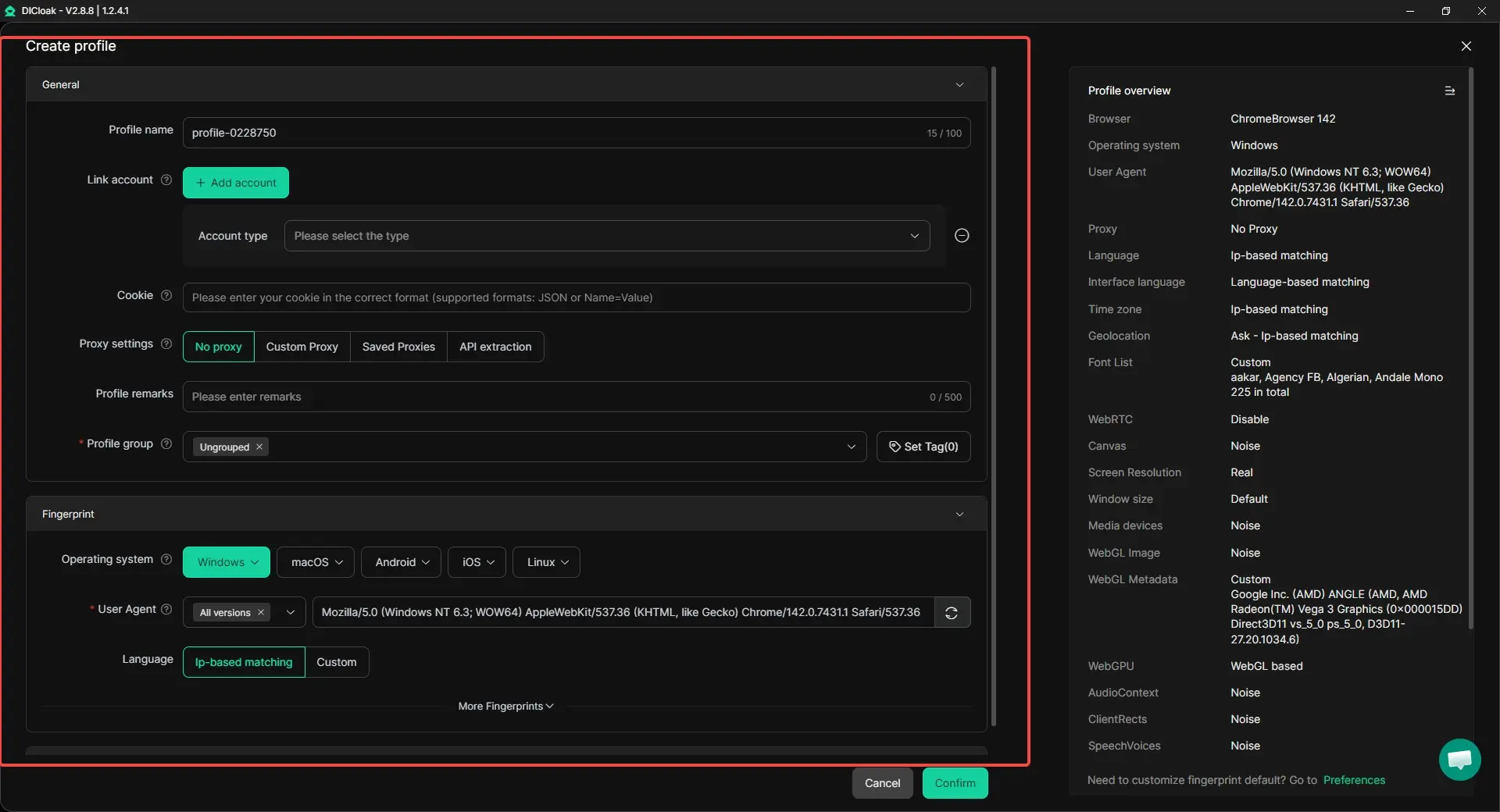
Simulate Mobile Profiles for Snapchat Workflows
Since Snapchat is mainly used on mobile, desktop environments can sometimes feel inconsistent. With DICloak, users can simulate mobile operating systems such as Android or iOS within browser profiles. This makes testing, posting, and managing Snapchat content more aligned with real mobile usage, especially for campaign reviews or account checks.
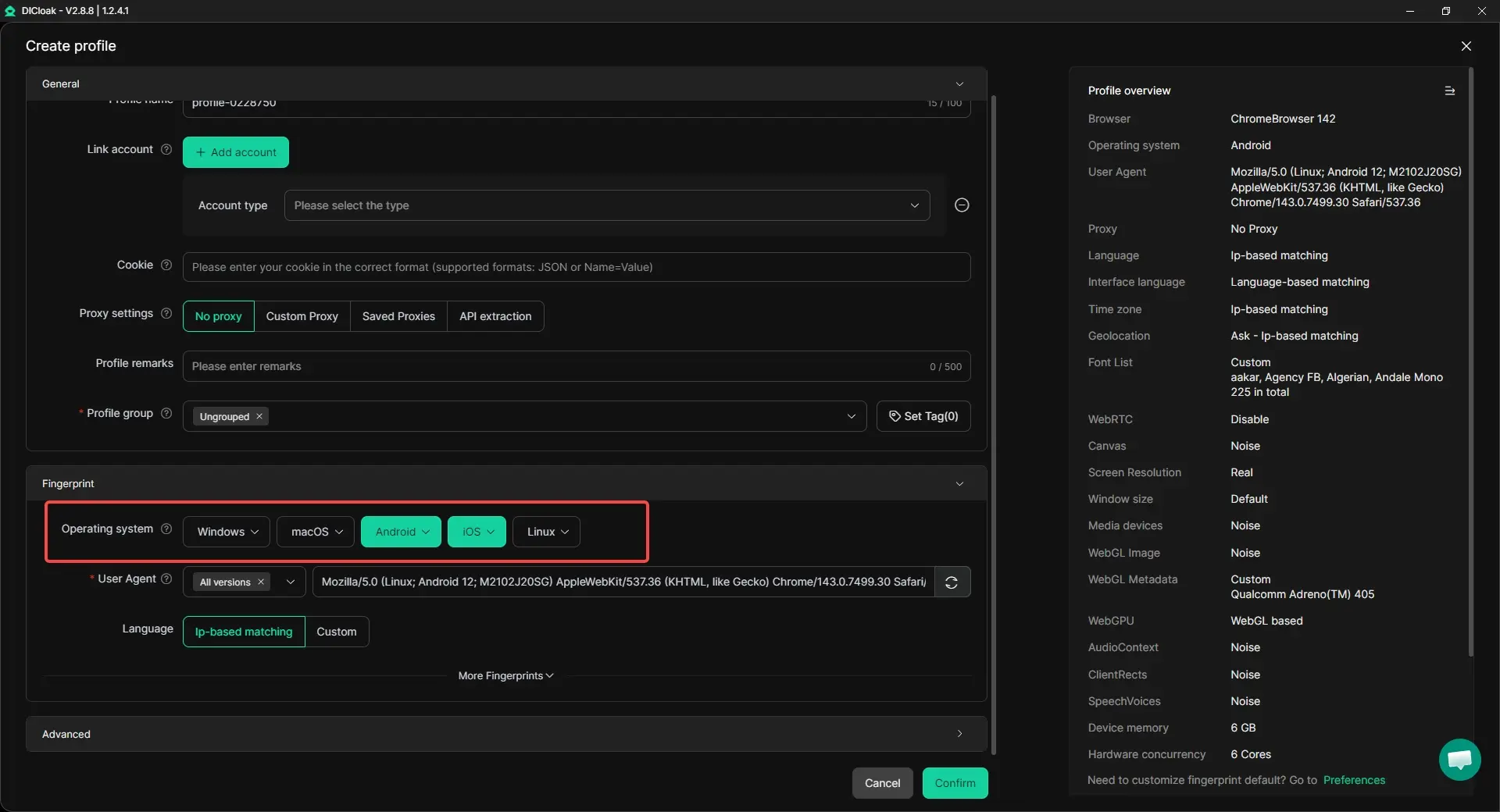
Automate Repetitive Tasks with RPA and Synchronizer
Managing many accounts often means repeating the same actions again and again. With built-in RPA automation, users can automate routine steps like browing, likes or comments, reducing manual work and human error. For actions that need to be done across many accounts at once, the Synchronizer allows the same operation to run in multiple profiles at the same time. This is helpful for campaign preparation, account reviews, or workflow testing, while still keeping each account isolated.
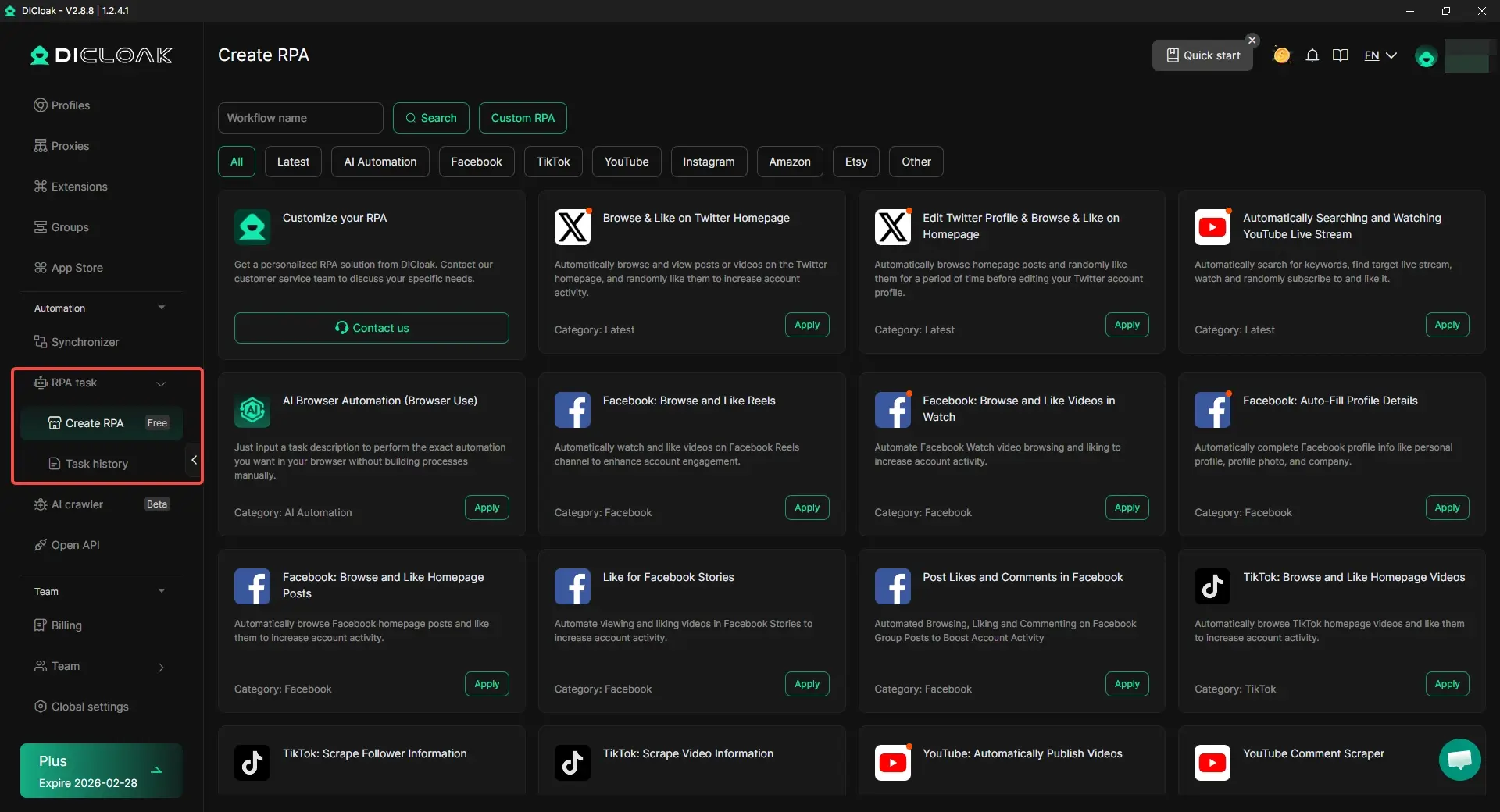
Support Team Collaboration Without Account Overlap
For teams, DICloak also supports profile sharing, permission control, and operation logs. This allows team members to work on assigned accounts without exposing full access or mixing environments. It helps teams stay organized and compliant while scaling Snapchat operations safely.

When Snapchat is not down, but problems keep happening, the cause is often environmental rather than technical. Using isolated profiles, custom environments, and controlled automation helps users maintain stable access, reduce false flags, and keep Snapchat operations running smoothly—even during busy campaign periods.
Conclusion
When Snapchat stops working, it’s normal to ask is Snapchat down or is Snapchat down right now. But a global outage is only one reason. Often, the problem is on your side, like a weak connection, an app glitch, a full cache, or an outdated version.
Start by checking reliable status tools and user reports to see if it’s a wider issue. If Snapchat is not down, simple steps like restarting, switching networks, clearing cache, and updating the app usually fix it. For ongoing login errors, crashes, or feed loading issues, targeted fixes help you get back in faster.
If you manage multiple Snapchat accounts for work, keeping each account in its own clean, isolated setup can also reduce conflicts and surprise restrictions, so your daily operations stay steady even when Snapchat has hiccups.
FAQs About “Is Snapchat Down”
Is Snapchat down right now or is it just my phone?
This is the most common question users ask. To find out, check outage monitoring sites and recent user reports first. If many users report the same problem at the same time, Snapchat may be down. If reports look normal, the issue is likely related to your network, device, or app settings.
Why does Snapchat feel down even when servers are online?
Snapchat can feel broken even when it is not down. Weak internet connections, outdated app versions, corrupted cache files, or temporary account checks can all cause loading failures, login errors, or crashes. These local issues often create the same symptoms as a real outage.
How long does a Snapchat outage usually last?
When Snapchat is down due to server or cloud issues, outages are usually resolved within a few hours. In larger incidents involving cloud providers, recovery may take longer. Snapchat often restores service gradually, so some users may regain access before others.
What should I do first when I think Snapchat is down?
Start by checking reliable outage tracking tools and recent social media reports. This helps confirm whether Snapchat is down globally. If not, try basic fixes such as restarting the app, checking your internet connection, clearing the cache, or updating Snapchat.
Can managing multiple Snapchat accounts cause issues that look like Snapchat is down?
Yes. Managing multiple accounts in the same environment can trigger access limits, verification problems, or temporary restrictions. These issues can make Snapchat appear down even when it is working. Using isolated account environments helps reduce conflicts and keeps access stable.
 Web Proxy Tools
 Free Tools
 Cookie Plugin
 UA Generator
 MAC Address Generator
 IP Generator
 IP Address List
 2FA Code Generator
 World Clock
 Anonymous Check
 WebRTC Leak Test
 UUID Generator
 Free Web Proxy Site
 Proxy Checker
 FB Ad Checker
 AI Web Scraping
 Free SMM Tools
 Twitter Shadowban Checker
 Instagram Name Checker
 UTM Generator
 Username Generator
 AI Hashtag Generator
 LinkedIn Headline Generator
 Social Media Image Resizer