Platforms that connect us seamlessly are more valuable than ever in 2026. Building on its milestone of over 1 billion monthly active users, Telegram has firmly established itself as far more than a messaging app. It's a comprehensive ecosystem for communities, a suite of business tools with bots and payments, and a hub for real-time interaction.
With so much happening across channels and groups, being confined to a mobile screen can limit your potential. How do you efficiently manage a thriving community, seamlessly share large project files from your desktop, or craft detailed messages without constant device-switching?
The solution is both powerful and elegantly simple: Telegram Web. By visiting web.telegram.org in your browser, you unlock instant, synchronized access to your entire Telegram world on your computer. It erases the barrier between your phone and your workstation, transforming your browser into a seamless command center for communication and collaboration.
Let’s explore how this official web version is the key to a more streamlined, productive, and connected workflow in the year ahead.
What is Telegram Web?
Telegram Web is the official way to use Telegram directly in your web browser. It's not a separate app you need to download. You simply go to web.telegram.org on your computer, scan a QR code with your phone, and you're in . Your entire chat history, contacts, and files sync instantly.
Think of it like this: Your phone is your personal Telegram device. Telegram Web is your command center on the bigger screen. It's perfect for when you need to type a long message, share a file from your desktop, or manage a busy group chat while working on other tasks.
Overview of Telegram's Features and Benefits
Telegram is much more than just texting. It's a full platform built for speed, security, and scale. Here’s a look at what makes it so powerful, especially for getting things done:
- Cloud-Based & Syncs Everywhere: All your messages and media are stored securely in the cloud. This means you can start a chat on your phone and continue it seamlessly on Telegram Web without any hassle . You never lose your data.
- Share Big Files with Ease: Need to send a video, presentation, or a batch of photos? Telegram lets you send files up to 2GB each . This is a game-changer for collaborators and content creators who often work with large media.
- Powerful Groups and Channels: You can create groups for team projects or communities with up to 200,000 members . Channels allow you to broadcast news, updates, or content to an unlimited number of subscribers. For example, a company like In Ovations Holdings, Inc. uses Telegram channels to share real-time market insights with partners securely .
- Bots for Automation: Bots are like helpful robots inside Telegram. They can automate customer service, send news alerts, collect feedback, or even process orders. This turns Telegram into a low-cost tool for business communication and marketing .
- Focus on Privacy: Telegram offers features like Secret Chats with end-to-end encryption and messages that can self-destruct. This commitment to security is why many professionals and businesses trust it for sensitive discussions .
By combining these features with the convenience of Telegram Web, you unlock a highly efficient way to communicate and collaborate from any computer.
How to Access Telegram Web (web.telegram.org): QR Code vs Phone Number
Now that you know the benefits of using Telegram Web, let's get you started. Accessing your chats on a computer is straightforward. You can log in using your phone in seconds or with just your phone number. This guide will walk you through both methods and help you solve common problems.
Step-by-Step Guide: How to Log In to Telegram Web Securely
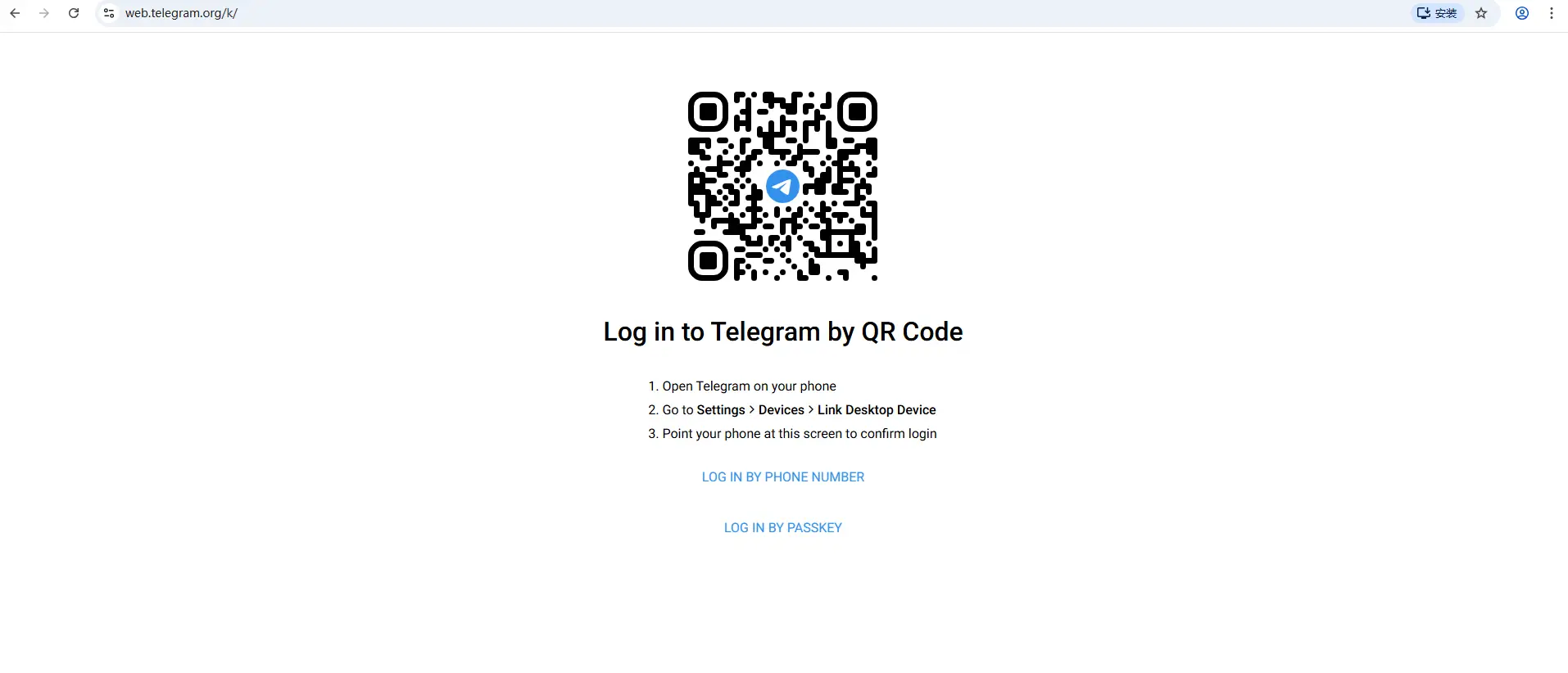
To begin, open any modern web browser on your computer, like Chrome, Firefox, or Safari. In the address bar, type the official website: web.telegram.org and press Enter . You will see the login screen. Here, you have two easy options to access your account.
Logging in via QR Code (The Fastest Method)
This is the quickest and most popular way to log in. It uses your phone to instantly authorize the session on your computer.
- On your computer, go to web.telegram.org. A large QR code will appear on the screen .
- On your phone, open the Telegram app. Go to Settings, then tap on Devices .
- Select the option that says "Link Desktop Device" or "Scan QR Code" .
- Point your phone's camera at the QR code on your computer screen. The app will scan it automatically.
- That's it! Your Telegram Web interface will load immediately in the browser, showing all your chats .
This method is very secure and doesn't require you to type any passwords or codes. It's perfect for quickly logging in on your own computer.
Logging in Using a Phone Number
Don't have your phone with you? You can log in using just your registered phone number.
- On the web.telegram.org login page, look for and click the link that says "Log in by phone number" .
- Select your country from the list and enter your phone number, then click "Next" .
- Telegram will send a one-time login code. This code will usually appear as a notification _within your Telegram app_on your phone, not via SMS .
- Enter that 5-digit code on the website .
- If you have Two-Step Verification enabled for extra security, you will be asked to enter your password next .
- Once verified, you will be logged in and can start chatting.
How to Manage Multiple Telegram Accounts on Telegram Web
You've explored the clean interface of Telegram Web, but what if you need to handle more than one account? Maybe you have a work account and a personal one. Managing them separately can make your life much easier. Let's look at how you can work with multiple accounts on your computer and why it's so useful.
How to Switch Between Accounts
Here's something important to know: the Telegram Web interface in a single browser tab is designed for one account at a time . Unlike the mobile or desktop app, you can't simply click a button inside the web app to switch to a different profile.
But don't worry! There's a very simple and effective workaround. You can use your browser's ability to open multiple tabs or windows.
- Open your main web browser (like Chrome, Firefox, or Edge).
- Go to web.telegram.org and log into your first account.
- Open a new tab in the same browser.
- Go to web.telegram.org again in this new tab.
- Log in with your second phone number and account details.
Now you have two separate Telegram Web sessions running side-by-side! You can easily click between the two browser tabs to check your different chats. This method works for a third or even fourth account too—just keep opening new tabs .
For example, Sarah uses this trick every day. She has one tab open for her personal chats with friends and family. Right next to it, she has another tab for her freelance project management group. She never mixes up the conversations.
Benefits of Multi-Account Functionality
Why go through the trouble of managing multiple accounts? The benefits are clear and can help you stay organized and focused.
- Keep Work and Life Separate: This is the most common reason. You can have one account for your job, clients, and coworkers. Your other account is just for friends, family, and hobbies. This way, you won't accidentally send a funny meme to your boss or a work document to your mom.
- Manage Different Projects or Businesses: If you're running a small business, a community group, or a side project, a dedicated Telegram account helps keep everything tidy. You can have specific channels and groups for each project without them getting mixed together .
- Better Privacy and Control: You might want to join some public channels or large groups but don't want to use your main, personal phone number. A separate account lets you participate while keeping your primary identity private .
- Focus and Reduced Stress: When all your notifications come to one place, it's easy to feel overwhelmed. By separating accounts, you can choose when to check your "work" tab and when to relax in your "personal" tab. You can even set different notification sounds for each browser tab.
For Power Users and Professionals: If you need to manage many accounts securely and efficiently—like for social media management, customer support, or running multiple communities—manually switching between dozens of browser tabs becomes messy. A professional tool like DICloak is designed for this. It lets you create completely separate, secure browsing environments for each Telegram account on one computer. This keeps your profiles isolated, organized, and safe from being linked together, which is essential for professional use .
Using multiple accounts on Telegram Web might require a simple browser trick, but the payoff in organization and peace of mind is huge.
Telegram Web Security and Privacy Explained
Managing multiple accounts on Telegram Web is convenient, but it's natural to wonder: is it safe? How does Telegram protect your conversations? Let's talk about security and privacy. Understanding these features helps you use the platform with confidence.
Understanding Data Encryption
Think of encryption as a secret code that scrambles your messages. Telegram uses two main types of codes for different situations .
First, there are Cloud Chats. These are your regular chats with friends, family, and groups. They are encrypted when traveling between your device and Telegram's servers. This means if someone tries to intercept your message on a public WiFi, they can't read it. The convenience is that these chats sync across all your devices—your phone, tablet, and Telegram Web on your computer. However, because they are stored in Telegram's cloud to enable this syncing, Telegram holds the keys to decode them .
For the highest level of privacy, you use Secret Chats. These chats use "end-to-end" encryption. This means the secret code is only known by you and the person you're talking to. Not even Telegram can read these messages. They never touch Telegram's servers and only exist on the two devices in the conversation. A key feature here is the self-destruct timer. You can set messages to automatically disappear after they are read, from both devices .
Important Note: On Telegram Web, you can read existing Secret Chats started on your phone, but you cannot start a new Secret Chat from the web browser . For the most sensitive conversations, it's best to use the Telegram mobile app.
Privacy Settings and User Control
Telegram gives you powerful tools to control who sees your information. Here’s how to adjust these settings on web.telegram.org:
- Control Your Visibility: Click the menu (☰) > Settings > Privacy and Security. Here, you can hide your phone number so only your contacts can see it . You can also set your "Last Seen & Online" status to "Nobody" so people don't know when you're active .
- Manage Your Profile: In the same menu, you can decide who can see your profile photo and who can call you. You can limit these to "My Contacts" .
- Stay in Control of Groups: Prevent strangers from adding you to random groups. Under Privacy and Security, find the "Groups and Channels" setting and change it to "My Contacts" .
- Protect Your Messages: When someone forwards your message, it can include a link back to your profile. You can disable this under the "Forwarded Messages" setting to stay more private in large groups .
Common Telegram Web Problems and Practical Fixes
Let's address some frequent worries with simple, actionable advice.
- Q: Can my Telegram account be hacked?
- A: While Telegram's encryption is strong, accounts are sometimes compromised through tricks aimed at you, not the app. The most common method is phishing. For example, you might get a message pretending to be "Telegram Support" saying you won a prize and need to verify your account on a fake website. Never enter your login code or password on any site except the official web.telegram.org .
- Q: What's the single best thing I can do to protect my account?
- A: Enable Two-Step Verification (2FA). Go to Settings > Privacy and Security > Two-Step Verification. This adds a password you create. Now, even if someone gets the SMS code sent to your phone, they can't log in without your extra password. It's your strongest shield against account theft .
- Q: Is it safe to use Telegram Web on a public computer?
- A: Be very careful. Always remember to log out completely when you're done. A better practice is to avoid using public computers for your main account. If you need to manage a secondary or work account from a shared device, using a professional privacy tool like DICloak can help by creating a separate, isolated session that doesn't mix with your personal data or leave traces on the public machine.
- Q: What should I do if I lose my phone?
- A: Don't panic. If you have Two-Step Verification enabled, your account is safe. You can remotely log out of all other active sessions. Go to Settings > Privacy and Security > Active Sessions on Telegram Web (if you're still logged in) or from another device, and terminate any session you don't recognize .
By understanding these basics and taking a few minutes to adjust your settings, you can make your experience on Telegram Web both powerful and private.
Telegram Web vs Telegram Desktop App : What’s the Difference?
Now that you know how to keep your Telegram Web account secure, let's talk about solving common problems. Even the best apps can have a bad day. Knowing how to fix small issues quickly will save you time and frustration. Here are the most common problems users face and how to solve them.
Common Problems Users Face
Most issues with Telegram Web fall into a few simple categories. Let's look at what they are and why they happen.
- The App is "Connecting..." Forever: This is one of the most common sights. Your Telegram Web tab just shows "Connecting..." and never loads your chats. This usually means there's a problem with your internet connection or your browser . It can also happen if Telegram's servers are having a temporary issue .
- Messages Won't Send or Are Very Slow: You type a message and hit send, but nothing happens, or it takes 10-15 seconds to go through. This was a known issue for some users in 2025, especially on the web and desktop versions . It's often a sign of a slow network or a temporary server slowdown.
- Links or Media Won't Open: You click a link someone sent you, but nothing happens. Or, a photo or video won't load. This can be caused by a glitch in the app, an outdated browser, or your security settings blocking certain content .
- Notifications Don't Work: You don't get any sound or pop-up on your computer when a new message arrives. This is usually because your browser's notification permissions for web.telegram.org are turned off, or your computer is in "Do Not Disturb" mode .
- "This Channel Cannot Be Displayed" Error: You try to open a channel, but you see this message. This is often because of content filters in your Telegram settings or regional restrictions .
Solutions for Message Syncing Challenges
When your messages don't sync properly between your phone and Telegram Web, it can be confusing. Here’s how to fix it.
- Check the Obvious First: Always start by refreshing the Telegram Web page in your browser. A simple refresh (press F5 or click the reload button) fixes many temporary glitches.
- Check Your Internet on Both Devices: Make sure both your computer (where Telegram Web is open) and your phone have a strong, stable internet connection. Try loading a different website to test.
- Clear Your Browser's Cache: Old, stored data in your browser can cause problems. Go to your browser's settings, find the option to clear browsing data, and select "Cached images and files" for the web.telegram.org site . Then, log in again.
- Check for Server Issues: If your internet is fine, the problem might be on Telegram's end. You can visit a website like Downdetector to see if other users are reporting problems with Telegram at the same time .
- Log Out and Log Back In: Sometimes, the session gets stuck. Click on your profile picture in Telegram Web, select "Log Out," and then log back in with your QR code or phone number. This creates a fresh connection.
QR Code Scanning Issues
Logging in with a QR code is fast, but sometimes it doesn't work. Here’s what to do.
- "Camera Can't See the QR Code": Make sure your phone's camera is pointing directly at the QR code on your computer screen. Ensure there is enough light in the room. Clean your phone's camera lens if it's dirty.
- "QR Code Expired": The QR code on web.telegram.org refreshes every few minutes for security. If you take too long to scan it, it will expire. Simply refresh the web.telegram.org page to get a new, fresh QR code and try again.
- App Says "Linking Failed": First, make sure you are using the official Telegram app on your phone. Open the app, go to Settings > Devices, and tap "Link Desktop Device." If it still fails, restart the Telegram app on your phone and try again.
- General Connection Problem: If scanning consistently fails, the issue might be a broader connection problem. Follow the steps in the "Message Syncing" section above to check your internet and clear your browser cache.
Pro Tip for a Smooth Experience: Many sync and loading issues can be caused by conflicts with other browser extensions or outdated browser software. For users who rely heavily on Telegram Web for work with multiple accounts, using a dedicated, clean browser profile can prevent these conflicts. A tool like DICloak helps professionals create isolated browser profiles for different tasks, ensuring that your Telegram sessions run smoothly without interference from other plugins or cached data.
Remember, most problems have a simple fix. Start with the basic steps like refreshing and checking your connection, and you'll usually be back to chatting in no time.
Comparison with Other Versions of Telegram
Now that you know how to fix common problems, you might wonder: is Telegram Web the best choice for you? Telegram also offers a Desktop App for your computer. They let you do similar things, but in different ways. Let's compare them to help you decide which one fits your life better.
Telegram Web vs. Telegram Desktop App
Think of Telegram Web as a quick visit through your browser. The Telegram Desktop App is like moving in and setting up a home on your computer. The table below shows how they are different.
| Feature |
Telegram Web |
Telegram Desktop App |
| How to Start |
No installation. Open your browser and go to web.telegram.org. |
Download and install the app on your computer from Telegram's website. |
| Key Features |
Send messages, share files, use groups and bots. Cannot make voice/video calls or start new Secret Chats. |
Full features. Can make voice and video calls. Supports end-to-end encrypted Secret Chats. |
| Performance |
Runs in your browser. Can be slower if you have many tabs open or a slow internet connection. |
Runs as its own program. Usually faster and smoother, especially for large groups and files. |
| Best For |
Quick, temporary access. Perfect for using on a public, school, or office computer where you can't install apps. |
Daily, serious use. Best for people who use Telegram every day for work, community management, or long chats. |
| Notifications |
Shows browser notifications. Stops if you close the browser tab. |
Shows system notifications on your computer. Keeps working even when the app is minimized. |
| Updates |
Always the latest version. Updates automatically. |
You need to download and install updates yourself, or turn on auto-update. |
Can You Log into Multiple Telegram Accounts Using One Browser?
This is a common question for users who need to manage more than one Telegram account. The simple answer is: yes, but the standard method is limited.
If you are already logged into Telegram Web in your main browser and open a new tab to web.telegram.org, it will automatically use the same session. The first tab might even show a warning that it's inactive. This means you are still stuck with just one account per browser.
A popular workaround is to use your browser's private or incognito window. This lets you log into a second account. But that's usually the limit—you only get two accounts (one normal window, one private window). You could install multiple different browsers (like Chrome, Firefox, and Edge), but this quickly becomes messy and hard to manage.
For casual use with one or two accounts, these tricks might be enough. But for professional or advanced needs, they fall short.
The Professional Solution: Manage Multiple Accounts with One Tool
If your work requires managing several Telegram accounts—for different clients, communities, or projects—you need a better system. Manually switching between browsers or windows is slow, unorganized, and insecure.
This is where a dedicated tool like DICloak changes everything. As a professional anti-detect browser, DICloak is designed specifically for secure multi-account management.
How DICloak Helps Isolate and Manage Telegram Web Accounts Securely
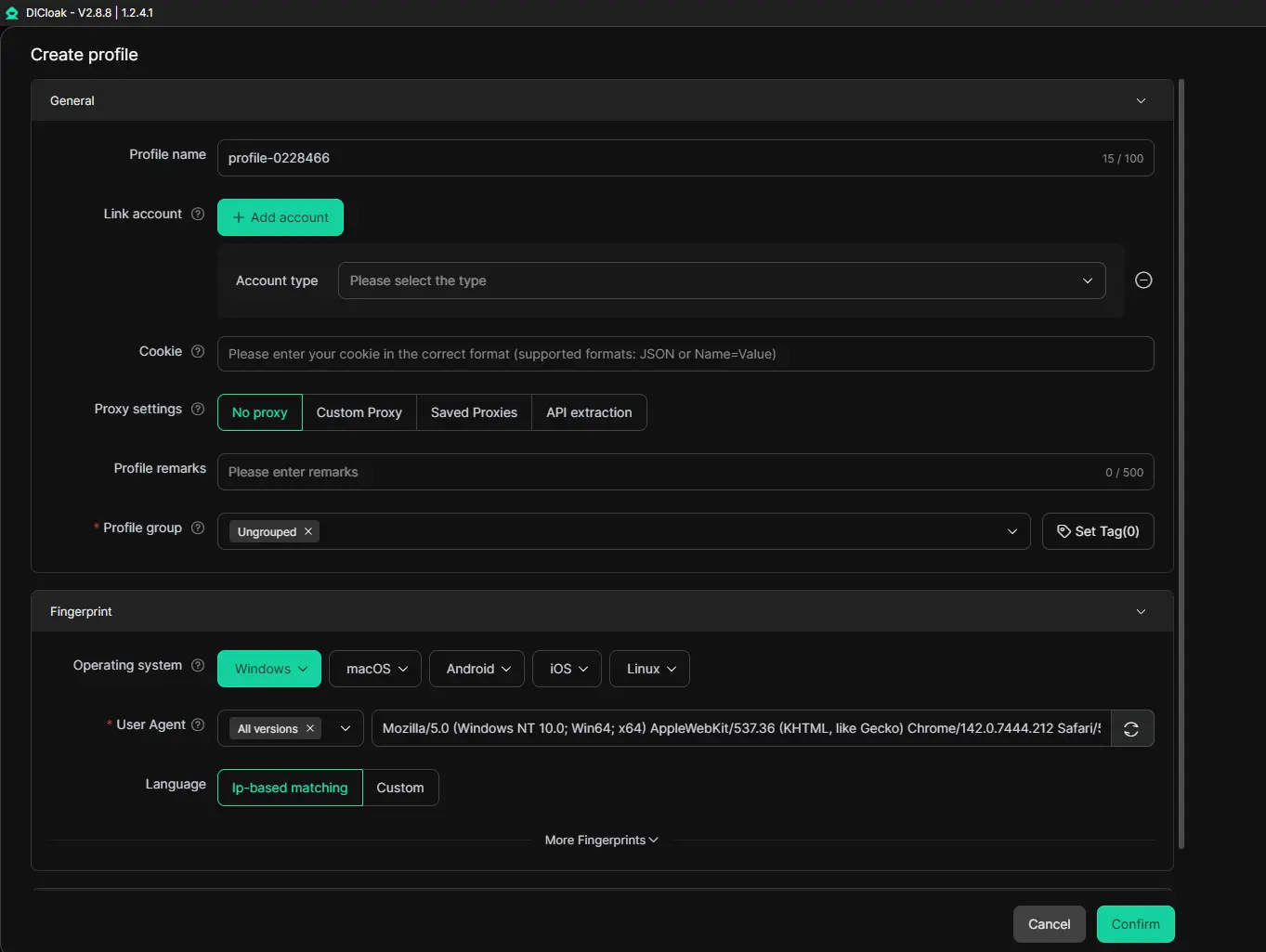
Instead of relying on your main browser, DICloak lets you create multiple, completely separate virtual browser profiles. Each profile is an isolated environment with its own unique digital fingerprint, cookies, cache, and local storage.
To Telegram Web, each of these DICloak profiles looks like a totally different computer. This allows you to:
- Open many Telegram accounts at once. You can have a separate DICloak profile for each of your Telegram accounts. Log into web.telegram.org in each profile, and they will all stay active simultaneously in different tabs within the DICloak application.
- Switch accounts instantly without logging out. Your sessions are saved in their isolated profiles. You can jump from your work account to your personal account to a client's account with one click, without any risk of mixing data or getting logged out.
- Keep everything secure and organized. Your accounts remain fully separated. There is no risk of data leaks between profiles, and you can easily keep track of which profile belongs to which task.
Another major advantage of antidetect browsers is that, when combined with a proxy, they allow you to use Telegram Web smoothly even if access is restricted. DICloak features a built-in proxy marketplace, offering IP addresses from trusted providers. This means you can pair each virtual profile with a reliable proxy, ensuring secure, uninterrupted access to Telegram Web even if certain connections are blocked.
With these capabilities, DICloak transforms multi-account management into a seamless and scalable workflow, making it an ideal solution for professionals, affiliate marketers, or any users who need to handle multiple Telegram accounts simultaneously.
Telegram Web FAQs: Security, Multi-Device Use, and Password Recovery
After comparing the different versions, you might still have some specific questions. Let's answer the most common ones users have about Telegram Web.
Is Telegram Web Secure?
This is a very important question. The short answer is: Yes, Telegram Web is secure for everyday use, but you need to use its security features correctly.
Think of Telegram Web like a secure room in a library. The room itself is safe, but you need to lock the door when you leave. Telegram Web uses strong encryption to protect your messages as they travel between your browser and Telegram's servers . This means hackers can't easily read them if they intercept the data.
However, for the highest level of privacy, you need to know its limits. Telegram Web does not support "Secret Chats," which are special conversations with end-to-end encryption that even Telegram can't read . Those are only available on mobile and desktop apps.
Here’s how to make your Telegram Web experience as secure as possible:
- Always Log Out on Public Computers: When you finish using Telegram Web on a library or cafe computer, click your profile picture and select "Log Out." This is like locking the door to that secure room.
- Enable Two-Step Verification: This adds a second password to your account. Even if someone gets the SMS code sent to your phone, they can't log in without this extra password you create . You set this up in the Telegram app on your phone under Settings > Privacy and Security.
- Check Active Sessions: Regularly check where your account is logged in. In the Telegram app, go to Settings > Devices (or Active Sessions). If you see a device or location you don't recognize, you can log it out immediately .
For professionals managing sensitive communications across multiple accounts, using a dedicated, secure browser profile is key. A tool like DICloak allows you to create separate, isolated work spaces for each Telegram Web session. This prevents data from one account from mixing with another and adds an extra layer of security, especially when handling different clients or projects.
Can I Use Telegram Web on Multiple Devices?
Yes, absolutely! One of the best things about Telegram is its flexibility. You can use Telegram Web on your work computer while also being logged into the Telegram app on your phone and the Desktop App on your home laptop—all at the same time .
All your regular chats, groups, and channels will sync instantly across all these devices because they are stored in Telegram's cloud . For example, you can start a conversation on your phone during your commute, continue it on web.telegram.org at the office, and then check for new messages on your tablet at home.
There is a limit: you can be logged into up to three mobile devices (phones or tablets) at once, but you can have any number of desktop or web sessions active simultaneously . Each new login will send a notification to your other devices, so you'll always know where your account is being used.
What to Do If I Forget My Password?
First, it's important to know which password you've forgotten. Telegram has two main types:
- Your account password (also called Two-Step Verification password).
- Your phone's lock screen password .
If you forget your Two-Step Verification password, don't panic. Telegram has a recovery process .
If you set up a recovery email:
This is the easiest way. When you try to log in and can't remember your 2FA password, tap "Forgot password?" on the login screen. Telegram will send a reset link to your recovery email. Click that link, and you can set a brand new password without losing any of your data .
If you did NOT set a recovery email:
The process is more difficult because Telegram cannot bypass your own security. After several failed login attempts, the app will offer you an option to reset your account after a waiting period (usually 7 days) . Important: Choosing this option will let you back into your account, but it will permanently delete all your cloud chats and data that were protected by that old password . Your phone number and account will remain, but it will be like starting fresh.
The best advice is to be prepared. When you enable Two-Step Verification, always add a recovery email that you check regularly. Write down your password in a safe place or use a trusted password manager. Taking these simple steps when you set up your account can save you from a lot of stress later.
Conclusion
In summary, Telegram Web at web.telegram.org is your ticket to instant, flexible messaging from any computer. It delivers almost all the core features of the app right inside your browser, with the major advantage of needing no installation. It’s the perfect tool for quick access, seamless chat syncing, and typing comfort.
For the highest level of privacy with end-to-end encrypted Secret Chats and voice calls, the official Telegram Desktop app is the more feature-rich choice. Yet, for everyday convenience and universal access, Telegram Web is unmatched.
Ultimately, the most powerful setup combines the best of both worlds. You can use the Desktop app for primary, secure communication, and use Telegram Web for quick, on-the-go access. And for managing several accounts—be it for work, community, or personal use—pairing Telegram Web with a professional tool like DICloak transforms a complex task into a smooth, secure, and scalable workflow. This combination gives you the freedom to communicate effectively from anywhere, with all your accounts organized and protected.
We encourage you to visit web.telegram.org and experience this convenience for yourself. Explore its features, strengthen your account security, and discover how it can simplify your digital communication.
 Web Proxy Tools
 Free Tools
 Cookie Plugin
 UA Generator
 MAC Address Generator
 IP Generator
 IP Address List
 2FA Code Generator
 World Clock
 Anonymous Check
 WebRTC Leak Test
 UUID Generator
 Free Web Proxy Site
 Proxy Checker
 FB Ad Checker
 AI Web Scraping
 Free SMM Tools
 Twitter Shadowban Checker
 Instagram Name Checker
 UTM Generator
 Username Generator
 AI Hashtag Generator
 LinkedIn Headline Generator
 Social Media Image Resizer