Getting banned from ChatGPT catches most people off guard, one day your account works, next day you’re locked out with no warning or real explanation. The first question that pops up is simple: after chatgpt ban can i open a new account or am I blocked for good? Most users try to register again, but the rules, checks, and hidden triggers behind OpenAI’s bans aren’t easy to figure out.
It feels like a straightforward fix, just sign up with a new email or number. But the reality is, ChatGPT’s systems track more than just your login. Device fingerprints, browser profiles, and even cookies can link you back to your old, banned account. People who think swapping SIM cards or resetting devices is enough often find themselves blocked again within minutes.
The real question isn’t just “can I make a new ChatGPT account after being banned”, it’s whether you can avoid getting flagged again by the system. The risks are higher if you skip key steps or miss the small details that connect your new account to your old one. Most guides skip over the technical side, but missing one step can send you right back to the ban screen.
If you want to know what actually works, what fails, and how to avoid the obvious traps, start with the basics: how ChatGPT detects repeat signups after a ban.
What Actually Happens When Your ChatGPT Account Gets Banned
Getting banned from ChatGPT doesn’t just lock you out of your account, it cuts off everything tied to your profile, device, and payment. If you’re wondering “after chatgpt ban can i open a new account,” the real impact goes deeper than a single login. Here’s what changes the moment the ban hits.
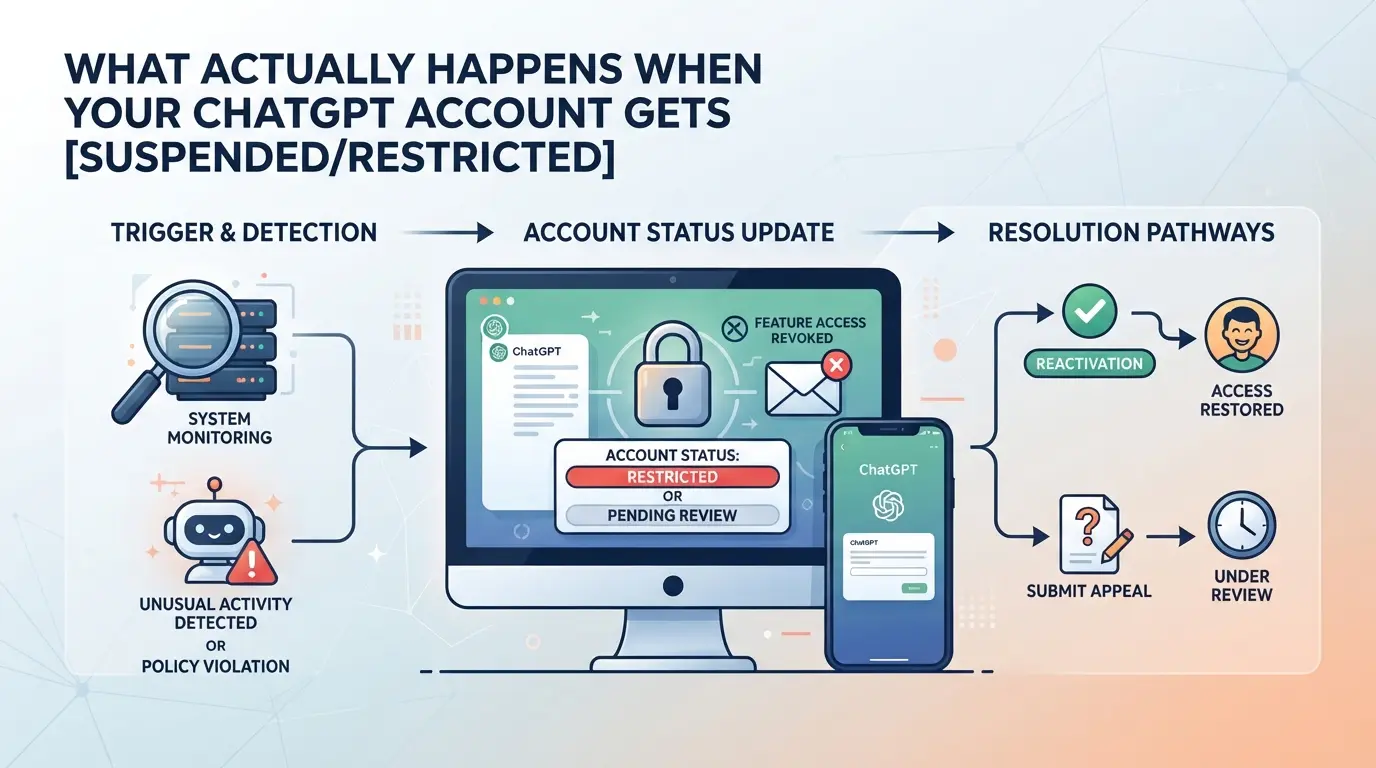
Immediate Effects of a Ban: What You Lose Access To
You lose login access right away, no chats, no API, no premium features. Any subscription gets frozen, and past conversations become unrecoverable. Payment details and saved prompts are out of reach. If you run a business workflow through ChatGPT, expect full disruption.
How ChatGPT Bans Are Enforced Technically
A ChatGPT ban isn’t just an account-level block. The system tags your user profile, but also fingerprints your device, browser, and network. That means even if you try to sign up again with a new email or phone, the backend checks for patterns it’s seen before. For example, if your browser cookies, local storage, hardware ID, or IP match what’s tied to your banned account, you’ll often get flagged instantly. The toughest part is that even wiping your device or using a fresh browser doesn’t always break these links, hidden identifiers and cross-site tracking can still give you away.
The failure mode is obvious: people create a new account, get through registration, then see a ban notice before even finishing onboarding. Sometimes, it’s a shadowban, you can log in, but features are restricted and messages never get delivered. In edge cases, bans cascade across multiple devices if you’ve ever logged in from them, making recovery much harder.
Types of Bans: Temporary, Permanent, and Shadowbans
- Temporary bans trigger a lockout for hours or days, if your account unlocks, you’ll see restored features.
- Permanent bans show “account disabled” with no way to appeal; all access stays blocked.
- Shadowbans let you log in, but new chats go nowhere and premium tools remain hidden; you won’t get error messages, but nothing works.
Knowing which ban you’re facing changes how you plan your next steps. If you’re stuck with a permanent or shadowban, just switching credentials usually isn’t enough, most repeat attempts fail because the system spots reused fingerprints or patterns. This sets up the next section: why opening a new account rarely gets past ChatGPT’s filters.
Why Most Attempts to Open a New ChatGPT Account After a Ban Fail
Trying to open a new ChatGPT account right after a ban almost always fails because OpenAI tracks far more than just your login details. Even if you change your email or use a new phone number, invisible signals often connect your new attempt to your banned identity.
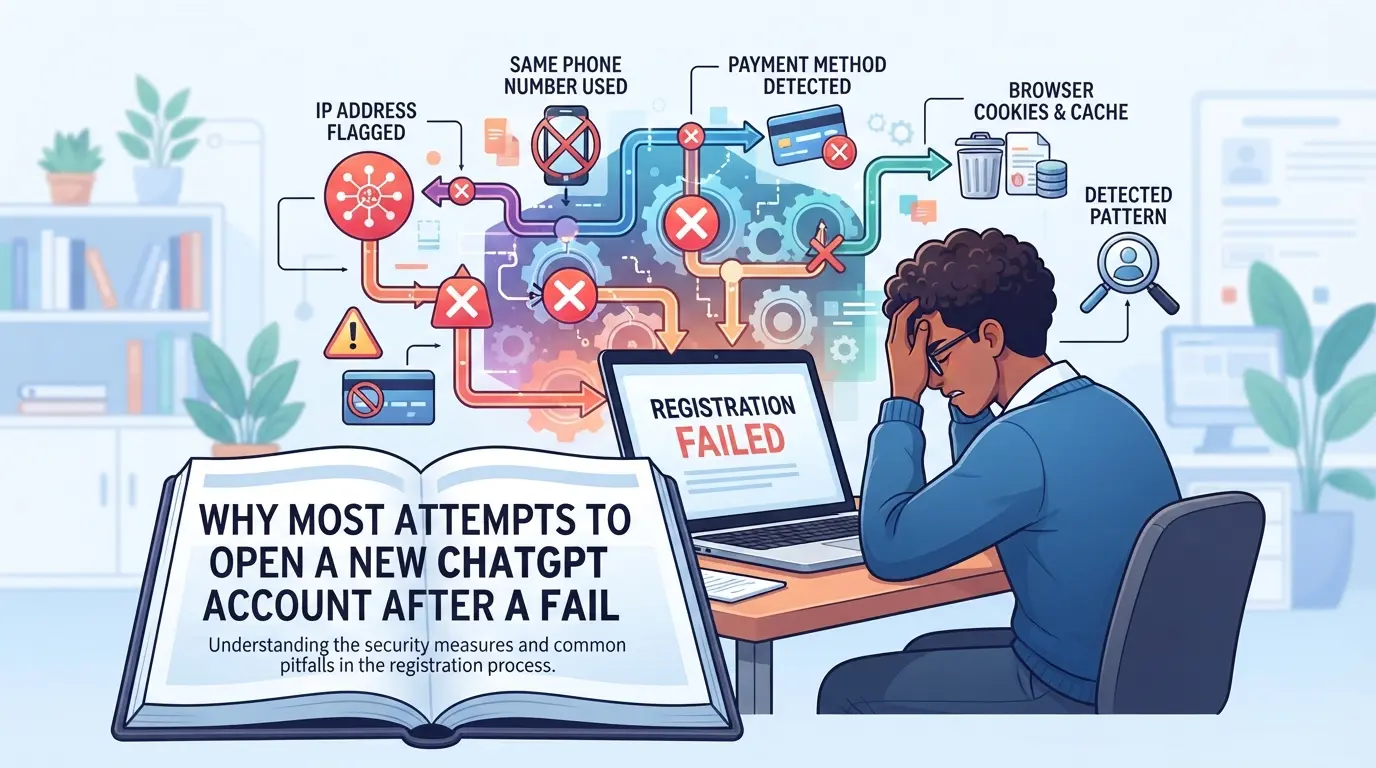
How ChatGPT Detects Repeat Registrations
Behind the signup page, ChatGPT logs device fingerprints (like browser type, fonts, and hardware info) and IP or network patterns. These signals link new accounts to old bans, sometimes before you finish registration.
Common Mistakes That Trigger Instant Bans
Most people who get banned try to come back fast. They grab a new email or phone, maybe clear their cookies, and jump right back in. But these quick fixes rarely fool the system. If you register with a device, browser, or network that looks even 70% like your last session, you risk getting flagged right away. For example, someone resets their phone but forgets their home Wi-Fi leaves the same IP trail. Or they use a new browser but leave the same device fingerprint, like screen size, system fonts, or even timezone, unchanged. ChatGPT’s ban system isn’t fooled by surface-level changes. They compare dozens of data points: your browser profile, location patterns, and even how you move through the site. If enough pieces match a banned account, your new signup can get blocked in seconds, sometimes before you even confirm your email. The real trap: users who think they’ve “started fresh” but miss one technical detail end up locked out again and often lose the chance to retry with the same device or network for weeks.
Why Some Users Get Away With It (And Most Don’t)
- Their device or network info is genuinely unique (not just reset)
- ChatGPT’s detection sometimes lags or misses a signal, pure luck
- New techniques work for a short time until detection rules catch up
The gap closes fast. What works for one person today can fail for dozens tomorrow. Most repeat bans happen because detection adapts to common tricks faster than users expect.Missing any technical signal is enough to connect your attempt back to a banned account. Before trying again, you need to know which details matter, and what you can really change, so you don’t waste your one shot just to end up blocked right away.
What to Check Before Trying to Open a New ChatGPT Account
Trying to open a new ChatGPT account right after a ban often fails because the system can spot your old traces. Skipping even one key detail will usually link your new account back to the banned one.
Checklist: Signals That Link You to a Previous Ban
Before you do anything, check these points. Missing even one can get your new account flagged:
- Browser fingerprint: ChatGPT logs details like installed fonts, plugins, and even screen resolution.
- Cookies: Any leftover data from a banned session can trigger an instant block.
- IP address and network: Shared or recycled IPs, even with a new device, can link accounts.
- Device identifiers: Operating system version, hardware ID, and timezone settings often match across attempts.
What You Must Change to Reduce Detection Risk
Just clearing cookies or switching browsers is not enough. You need to break every link to your old account.
- Use a truly fresh browser profile, no leftover history, cookies, or extensions.
- Connect through a new proxy or IP address that hasn’t been used with ChatGPT before.
- Register with unique details: new email, phone, and do not reuse any information from a banned account.
If you miss even one of these steps, your new signup can fail instantly or get banned within hours. Most failed attempts happen because users forget about hidden browser data or reuse an IP address flagged from a past ban.
The next step is to see what a full clean attempt looks like, and where most people trip up in practice.
Step-by-Step: How Some Users Try to Open a New ChatGPT Account After a Ban
Most people follow the same steps after a ChatGPT ban: wipe traces, switch networks, register again, and hope they’re not flagged. The failure rate is high because one missed detail can link everything back. Here’s what actually happens.
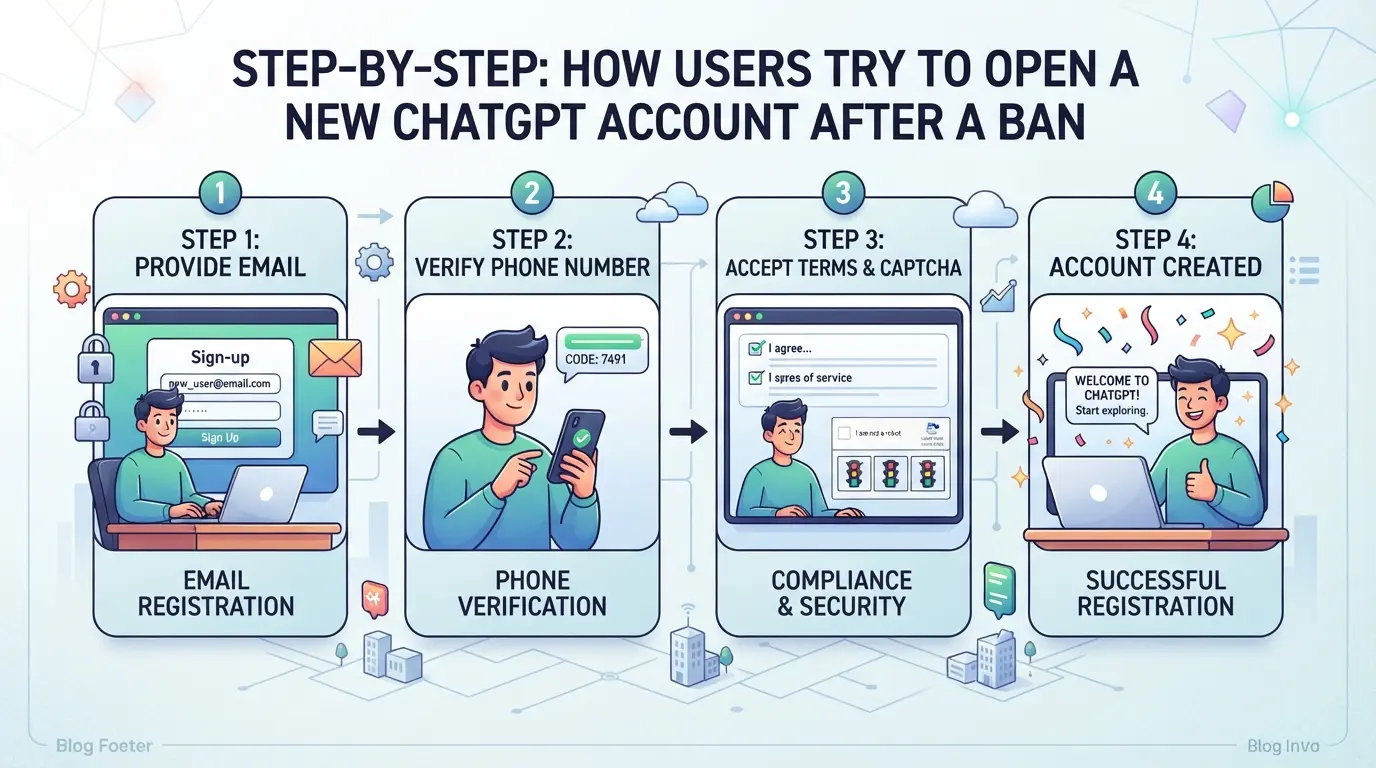
Step 1: Preparing a Clean Environment
- Clear all cookies, cache, and browsing history, any leftover data can trigger detection.
- Start a fresh browser profile or use a portable browser. Old profiles carry hidden identifiers.
- Check for browser extensions or autofill data that might connect to previous logins. Remove anything that looks familiar.
A quick reset isn’t enough. ChatGPT’s fingerprinting often survives past simple cookie deletion.
Step 2: Setting Up a New IP or Proxy
- Switch to a different network exit, not just toggling WiFi. Many use residential proxies for variety.
- Test for IP leaks. Run a public IP check; if your real address shows up, you’re exposed.
- Keep the IP stable during registration. Changing mid-process can trigger automated bans.
Most failed attempts start here, platforms flag inconsistent IPs, reused proxy addresses, or sudden region jumps.
Step 3: Registering With New Details
- Use a unique email and phone number never tied to a previous account.
- Avoid recycled credentials, even old passwords. ChatGPT cross-checks for overlap.
- Double-check registration fields for autofill errors, one reused value can ruin the setup.
If the system sees familiar data, it blocks you before you finish.
Step 4: First Login and Early Usage Patterns
- Log in slowly. Rapid, scripted actions or copying old behaviors make you look suspicious.
- Avoid using the same device or browser settings as before.
- Don’t rush to import old data or contacts, platforms monitor patterns and connections.
Even with a clean environment, most bans happen again within hours if early usage matches old habits. The next section covers why fresh setups still fail.
Why Even a Fresh Browser and Proxy Might Not Be Enough
Even after switching browsers and proxies, many users see their new ChatGPT account banned almost instantly. The reason is simple, OpenAI’s detection tracks far more than just your IP or browser version.
Advanced Fingerprinting: Beyond Cookies and IP
Platforms grab canvas, WebGL, and hardware details as soon as you land on the signup page. If your device fingerprint matches patterns from a banned account, your attempt is flagged. Changing only cookies and IP leaves invisible traces that can trigger another restriction. Time zone and language mismatches also get logged; if your setup looks off, you risk a review.
Even if your device looks clean, your activity can betray you. Platforms track how fast you navigate, which pages you hit, and how you use the service.
- Sudden changes, like signing up and hitting the API hard, raise a red flag.
- The safer move: mimic normal user behavior, avoid rushing through setup, and don’t automate signups.
Linkage Through Shared Devices or Networks
Using the same phone, tablet, or WiFi as your banned account creates hidden links. Shared device identifiers and network metadata are enough to connect the dots. If your new account gets flagged, you’ll often see a ban message within hours, sometimes before you even finish setup. The safest approach is to avoid overlapping devices or networks entirely.
How to Separate Multiple Platform Accounts Using Isolated Browser Profiles and Proxies in DICloak
If you’re asking “after ChatGPT ban can I open a new account” and don’t want the new one linked to your old session, browser profile isolation is the first thing to set up. Teams handling multiple platform accounts often miss that even one shared browser fingerprint or cookie can connect their new login to a banned profile. The risk isn’t just about IP, it’s how browser storage and fingerprint data stack up across sessions.
Creating Isolated Browser Profiles and Customizing Fingerprints
Operators can create a new browser profile in DICloak for each platform account they plan to use. Each profile stores its own cookies and session data, so nothing leaks between accounts. Where needed, you can set fingerprint signals, like operating system, time zone, language, or screen size, at the profile level. Matching these settings to the intended account context supports cleaner separation in daily use. The scope here stays within browser and fingerprint signals; it does not change platform tracking or account status.

User-Provided Proxy Configuration for Assigned Profiles
Each DICloak profile can use its own proxy settings, letting operators assign a different HTTP, HTTPS, or SOCKS5 proxy per account workflow. After entering proxy details, you can test the connection inside the profile to verify the exit IP and region match your needs before logging in. The proxy you pick and how you use it is fully up to you, DICloak only stores and applies your settings. No proxy comes bundled and nothing here changes the way the platform itself tracks or reviews account access.

Small mistakes, like reusing a browser profile or mixing up proxy details, often lead to quick bans, which the next section covers.
Common Mistakes That Still Get New Accounts Banned After a ChatGPT Ban
Most people who try to open a new ChatGPT account after a ban get flagged again for repeating hidden mistakes. Even after switching browsers or using proxies, missing a single link between your old and new setup is enough to trigger another block.
Reusing Device or Network Resources
Logging in on the same phone, laptop, or home Wi-Fi, even after a reset, often ties your new signup to the old ban. Cloud servers or cheap VPS setups can cause the same issue, since many users share the same device IDs or public IPs. Changing only the account details isn’t enough.
Inconsistent Fingerprint or Proxy Settings
Mismatch between your IP address, browser fingerprint, and system settings is a fast way to get flagged.
- Registering from a US IP but your device clock shows Asia, or your browser language is Russian, sets off alarms.
- Keep all details, IP, time zone, and language, consistent and believable for the region you claim.
Suspicious Registration or Usage Patterns
Bulk signups from one location or repeating the same registration steps too quickly can look automated. Copy-pasting verification codes or using the same password format for every new account only adds to the risk. Slow down, randomize your process, and avoid patterns bots would use.
When Opening a New Account Isn’t Worth the Risk: Alternatives and Safer Strategies
Repeating new registrations after a ChatGPT ban often leads straight back to another ban, sometimes within hours. Before you try again, compare your options side by side.
Appealing the Ban vs. Registering Again
| Option |
Success Rate |
Timeframe |
When It Works Best |
| Appeal the Ban |
Low-Medium |
1-5 days |
Clear mistake, no major violations |
| Register New Account |
Very Low |
Minutes-Hours |
New device, proxy, and unique info |
Trying to open a new account rarely works unless every fingerprint and identity detail is unique, most users miss at least one link.
Using Team or Business Accounts
Team or business accounts offer managed access, spreading risk and reducing single-user bans. But if devices or networks overlap, everyone can get flagged at once.
Long-Term Multi-Account Management Best Practices
Keep each account on its own device or profile. Document who uses which account and track changes. Mixing access or skipping audit trails almost always leads to repeat bans.
Frequently Asked Questions About after chatgpt ban can i open a new account
After a ChatGPT ban, is it legal to open a new account?
Whether you can legally open a new ChatGPT account after a ban depends on the platform's terms and your local laws. Most platforms, like OpenAI, do not allow banned users to simply register again. If you try, you may break their rules, which can lead to further bans or even legal action in some cases.
How does ChatGPT detect if I try to register again after a ban?
ChatGPT uses different tools to spot people trying to come back after a ban. It checks device information, IP addresses, browser fingerprints, and patterns in how you use the service. Even if you change your email, these methods can link your new account to your old, banned one.
Can I use a proxy to avoid detection when creating a new ChatGPT account?
A proxy changes your IP address, which may help you look like a new user. However, ChatGPT also looks at device fingerprints and browser data. So, just using a proxy is not enough to keep your new account safe from being detected and banned again.
What is the safest way to manage multiple ChatGPT accounts after a ban?
If you want to use more than one ChatGPT account after being banned, keep each account fully separated. Use unique browser profiles, different proxies for each account, and never use shared devices. This helps reduce the chances that ChatGPT will link accounts and ban you again.
Should I appeal my ChatGPT ban or just create a new account?
Appealing your ban is usually safer and a better long-term solution than making new accounts. If you explain your case and fix any issues, you might get your original account back. Repeatedly making new accounts often leads to quick bans and may get you permanently blocked from the service.
If you’re considering setting up a new account after a ban, it’s important to carefully review the platform’s policies to avoid repeating mistakes. Taking steps to protect your privacy and access, such as using secure tools, can help you stay connected without risking another ban. Try DICloak For Free
 Web Proxy Tools
 Free Tools
 Cookie Plugin
 UA Generator
 MAC Address Generator
 IP Generator
 IP Address List
 2FA Code Generator
 World Clock
 Anonymous Check
 WebRTC Leak Test
 UUID Generator
 Free Web Proxy Site
 Proxy Checker
 FB Ad Checker
 AI Web Scraping
 Free SMM Tools
 Twitter Shadowban Checker
 Instagram Name Checker
 UTM Generator
 Username Generator
 AI Hashtag Generator
 LinkedIn Headline Generator
 Social Media Image Resizer