Managing ten Facebook Pages doesn't mean you need ten separate Facebook logins. A freelancer might handle several Pages through Meta Business Suite, while an agency working with multiple client accounts may spend hours switching sessions, checking campaigns, and keeping everything organized. As the workload grows, it's easy to start wondering whether a regular browser is still enough.
So, do you really need an antidetect browser to manage multiple Facebook accounts? It depends on how many separate login sessions you use, how your team works, and what your current tools can handle. This guide explains how Facebook identifies account activity, compares different ways to manage multiple accounts, and shows when an antidetect browser is worth using.
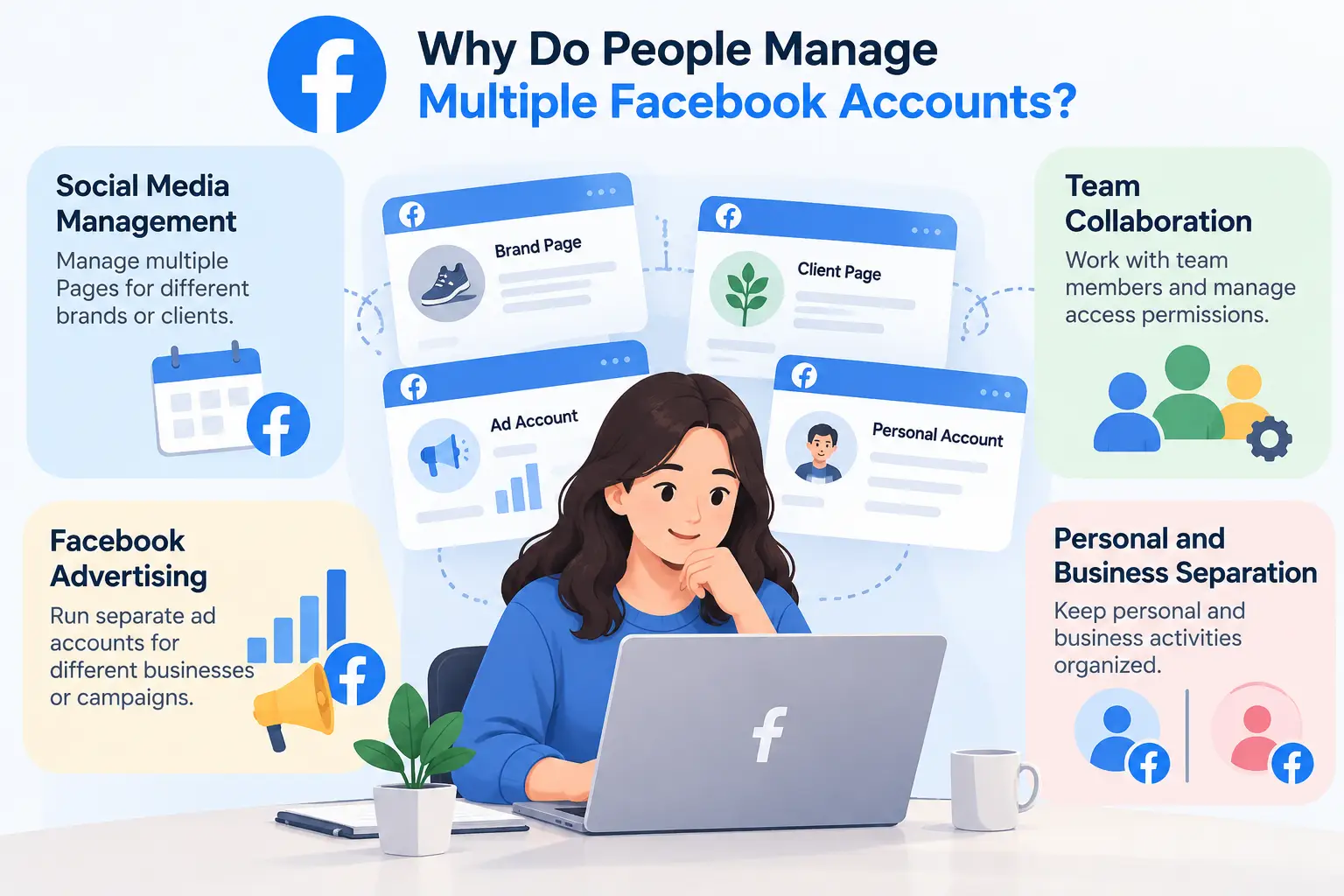
People manage multiple Facebook accounts or business assets to run different brands, manage advertising campaigns, or keep personal and business activities separate. This is especially common among social media managers, advertisers, and agencies that handle several projects at once. Some of the most common reasons include:
- Social media management: Agencies and freelancers often manage Facebook Pages for several brands or clients. Their daily work includes publishing posts, replying to comments, checking messages, and tracking engagement across different Pages.
- Facebook advertising: Advertisers may manage separate ad accounts for different businesses or campaigns. Each client has its own budget, audience, and campaign goals, so keeping advertising tasks organized helps reduce mistakes.
- Team collaboration: Marketing teams often have several people working on different Facebook Pages or ad accounts. They need clear access permissions and a way to manage each person's responsibilities without sharing unnecessary account access.
- Personal and business separation: Business owners and freelancers may use Facebook for both personal activities and professional tasks. Keeping these activities organized makes it easier to focus on work without mixing up accounts or projects.
With more freelancers managing social media for clients and businesses running multiple brands, handling several Facebook Pages and ad accounts from one computer has become pretty common. It's convenient, but switching between accounts all day can get messy, especially when several people are involved. Most users simply want to keep their work organized, save time, and manage their accounts without unnecessary hassle.
How Does Facebook Detect Related Accounts and Suspicious Activity?
Facebook uses a mix of browser information, IP addresses, and account activity to recognize users and identify suspicious behavior. When you manage multiple Facebook accounts on one device, some of these signals may overlap. Understanding how they work can help you choose the right way to manage your accounts.
Browser Fingerprints, Cookies, and Device Information
Every time you visit Facebook, your browser shares certain details about your device and software. Together, these details can form a browser fingerprint that helps websites recognize a browser. Common fingerprint signals include:
- Browser and operating system: Your browser type, version, and operating system.
- Language and time zone: Your browser's preferred language and time zone settings.
- Screen and hardware details: Information such as screen resolution, graphics capabilities, and installed fonts.
Cookies work differently. They help Facebook remember your login session and preferences, even after you close the browser. Separate Chrome Profiles can keep cookies and login sessions apart, but they may still share much of the same device information. This is why separating cookies and managing browser fingerprints are not the same thing.
IP Addresses and Network Changes
Facebook can also see the IP address used to access an account, which provides information about the network and its approximate location. If you regularly manage Facebook accounts from different locations, sudden changes in login activity may lead to additional security checks.
For example, signing in from your office and then from another country shortly afterward might trigger a login verification request. However, several people using the same office IP address is normal and does not automatically mean their accounts are suspicious. A proxy can change the public IP address used for a connection, but it does not automatically separate cookies or change your browser fingerprint.
Account Behavior, Login Activity, and Policy Violations
Facebook looks at more than technical information. Account activity, such as repeated spam messages, fake engagement, unusual login attempts, or ads that violate Meta's policies, can also lead to reviews or restrictions.
For advertisers and social media managers, this means that changing an IP address or browser fingerprint will not solve every account problem. If a Facebook ad account is restricted because of a policy violation, the issue needs to be addressed through Meta's review process. Keeping browser sessions separate can help with account management, but what you do on those accounts still matters. The right management method should address your actual workflow rather than just change how your browser appears.
What Are the Best Ways to Manage Multiple Facebook Accounts?
There are several ways to manage multiple Facebook accounts, from Facebook's built-in tools to Chrome Profiles and antidetect browsers. Some work well for personal use or a few business accounts, while others are better suited for agencies and teams handling many login sessions. The best choice depends on how many separate logins you need and how you manage them.
Use Facebook's Built-In Tools and Meta Business Suite
Facebook allows eligible users to switch between additional personal profiles without logging out. For business use, Meta Business Suite and Business Portfolio let you manage Facebook Pages, ad accounts, and access permissions from one place.
For example, a freelancer managing five clients' Facebook Pages can usually work through authorized access rather than logging into five separate personal accounts. This makes Meta's built-in tools a practical choice for creators, small businesses, and agencies that mainly need to manage Pages, ads, and client permissions.
Manage Separate Logins with Chrome Browser Profiles
Chrome Profiles offer a simple, free way to manage different Facebook logins on one computer. Each profile keeps its own cookies, browsing history, saved passwords, and login sessions, so you don't have to sign out every time you switch accounts.
This works well if you only have a few separate logins to manage. However, Chrome Profiles don't offer dedicated browser fingerprint management or built-in team permissions for controlling access to individual profiles. As more accounts and team members are added, keeping everything organized can become difficult.
Use an Antidetect Browser for More Complex Workflows
An antidetect browser is worth considering when you need more control over multiple Facebook login sessions. Unlike regular browsers, it lets you manage separate browser Profiles with their own cookies and configurable fingerprints, often with support for individual proxy settings and team access controls.
For example, an agency handling several client projects may need to keep login sessions organized and control which team members can access them. With an antidetect browser like DICloak, teams can create separate browser Profiles, configure proxies for individual Profiles when needed, and assign Profile access permissions to members. This makes it easier to manage complex workflows without constantly switching between browsers or losing track of client sessions.
Incognito mode can be useful for a quick login, but it doesn't provide the same persistent sessions as separate browser Profiles. Similarly, using a proxy alone changes your network connection without separating cookies or login data. Neither offers the same Profile organization and team access controls as a dedicated multi-account browser.
Here's how the three main options compare:
| Method |
Best For |
Main Limitation |
| Meta Business Suite |
Managing Pages, ad accounts, and client access |
Does not provide separate browser fingerprint settings |
| Chrome Profiles |
A few separate Facebook logins |
Limited centralized management and team access controls |
| Antidetect Browser |
Multiple independent sessions and team workflows |
Requires additional setup and may involve subscription costs |
If you're only managing a few Facebook Pages, there's usually no reason to pay for another browser. But when separate login sessions, proxy settings, and team access become harder to manage, an antidetect browser may be a better fit.
If you manage several Facebook logins, keeping each session organized can save you from constantly switching accounts. With DICloak Antidetect Browser, you can create separate browser profiles, configure proxies, synchronizer supported actions across windows, and manage team access. Here's how to get started.
Create Browser Profiles and Configure Fingerprints
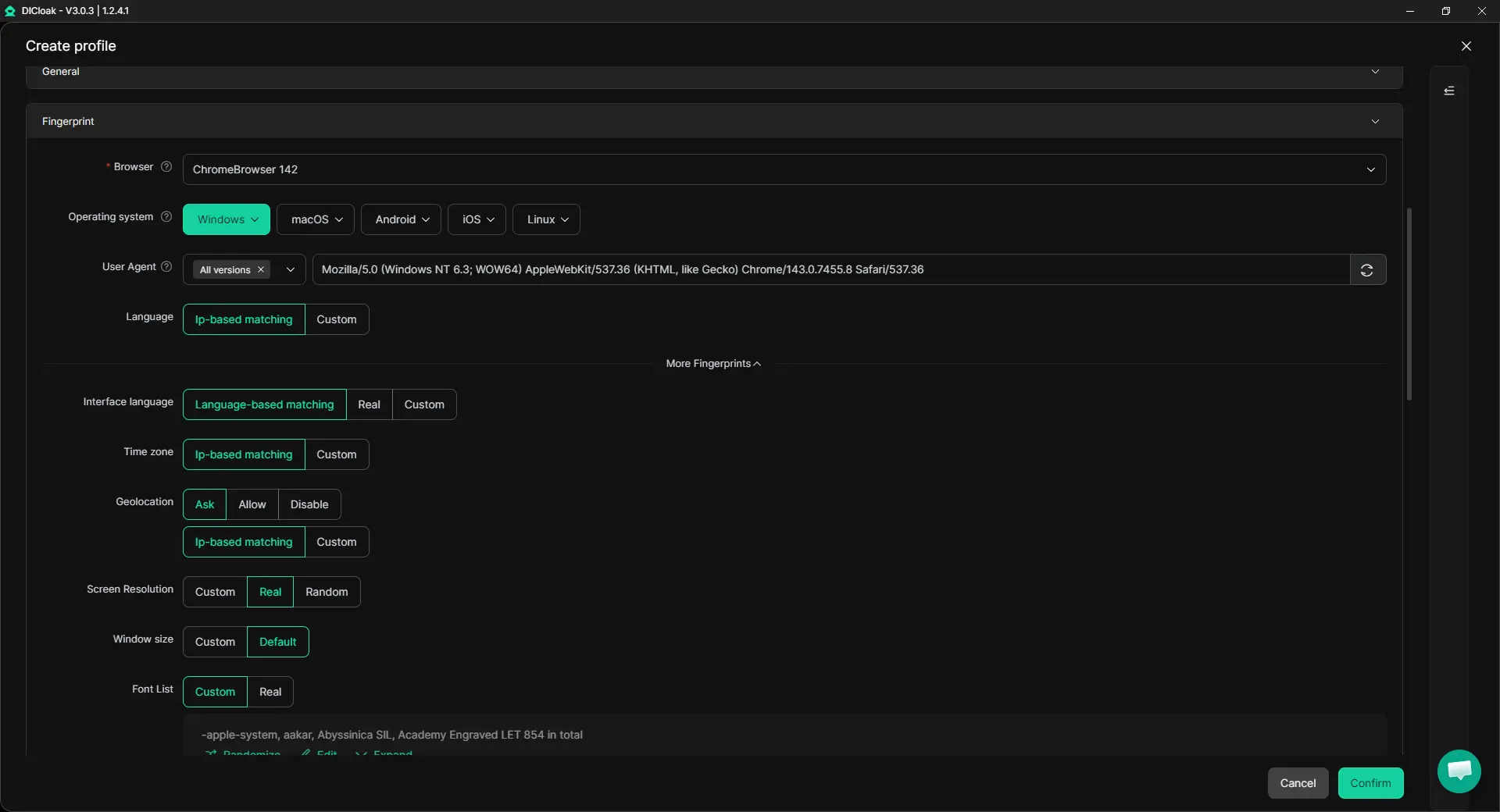
Open DICloak and go to Profiles → Create Profile. Give each Profile a clear name based on its Facebook login or client project. Under Fingerprint Settings, you can configure the browser version, operating system, language, time zone, and other fingerprint details. Each Profile keeps its own cookies and login session, so you can reopen it without repeatedly signing in. Once the settings are ready, launch the Profile and log in to your Facebook account.
Configure Your Own Proxies
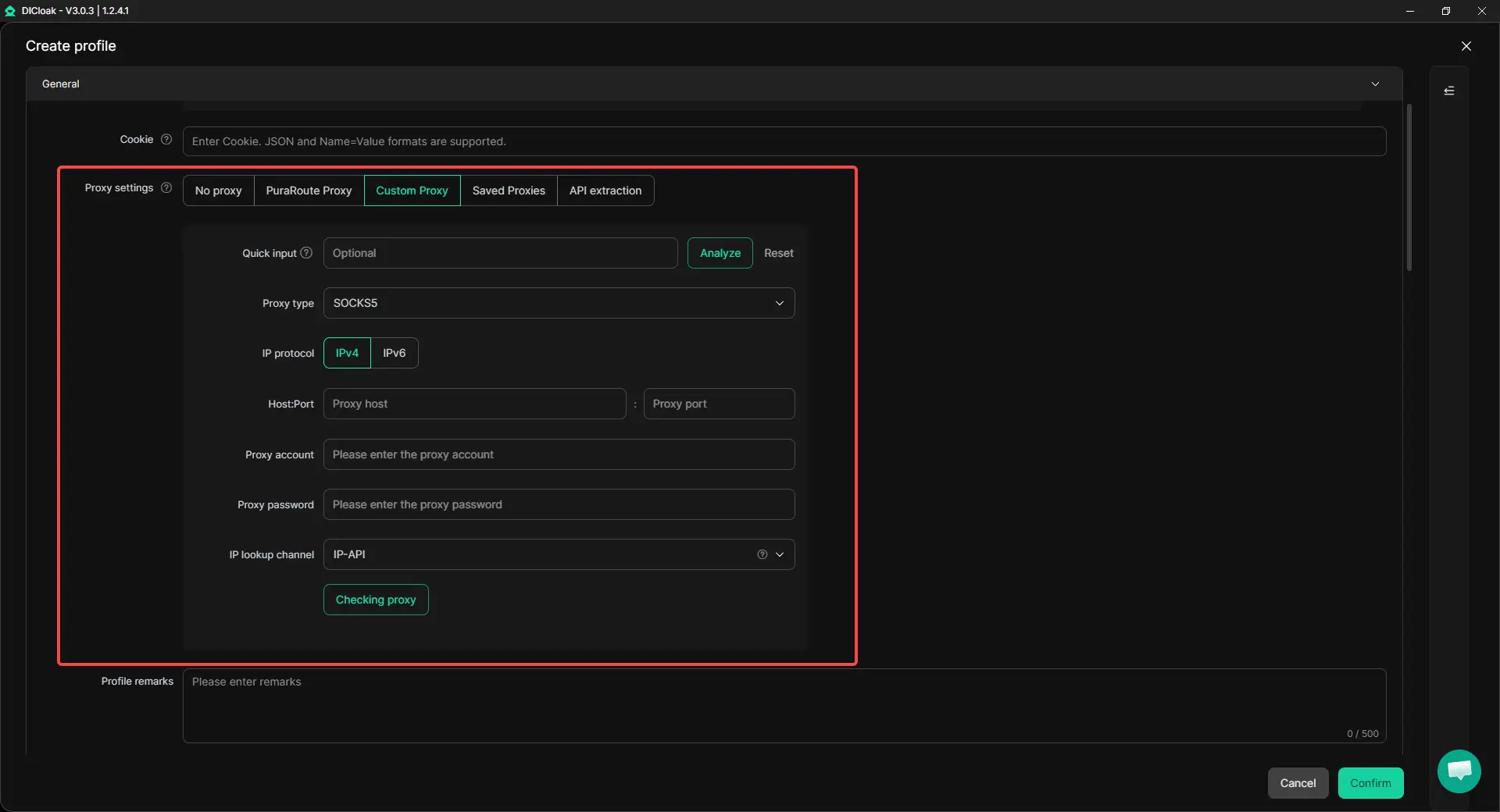
If your Facebook workflows need different network connections, you can assign your own proxies to individual Profiles. Go to Proxies → Create Proxy, enter the proxy details from your provider, and test the connection. Then, open the relevant Profile's Proxy Settings and select the saved proxy. This lets you manage network connections for different Profiles without changing your computer's main network settings.
Use Synchronizer to Handle Repetitive Tasks
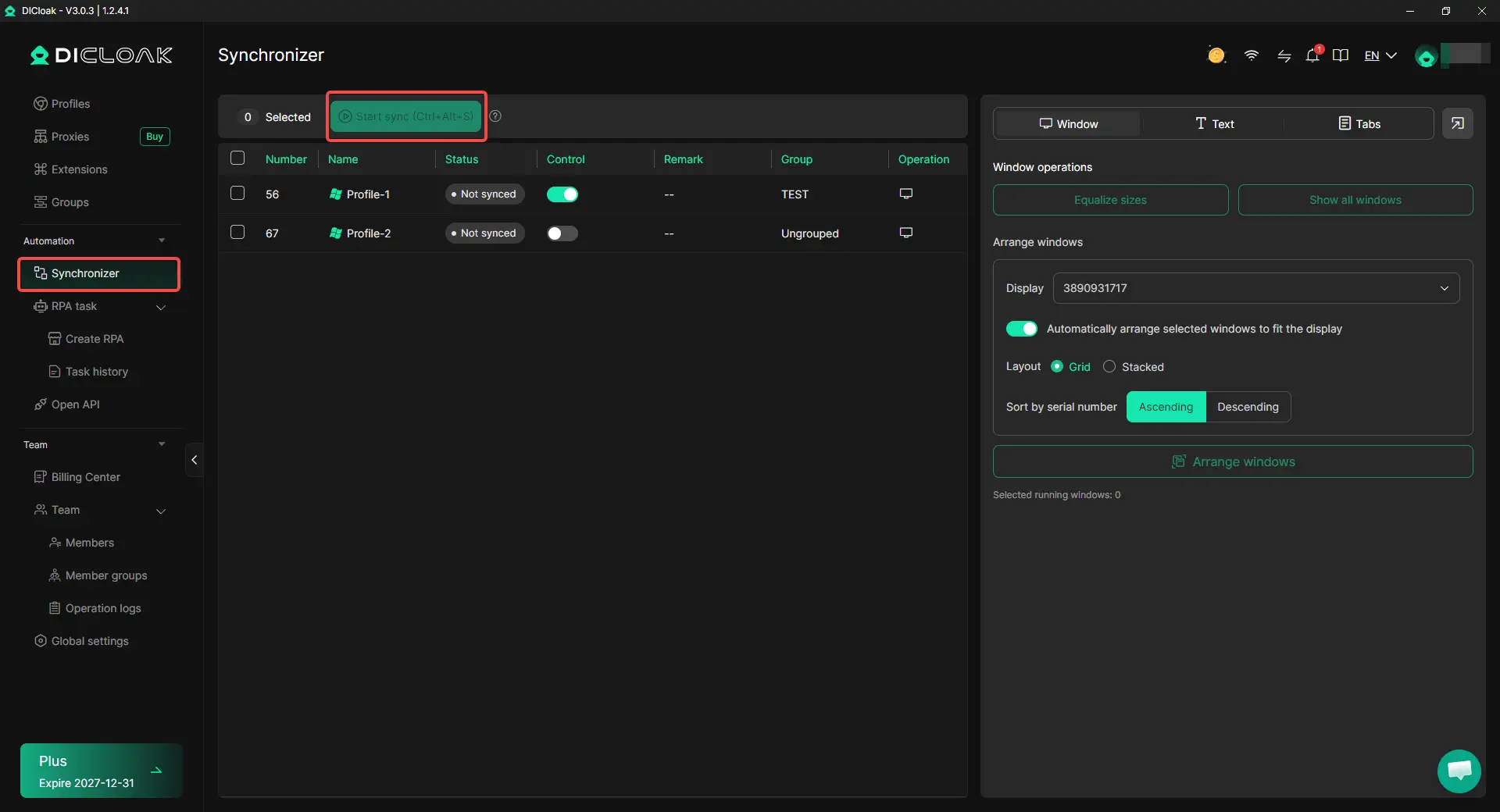
When you need to perform similar actions across several browser windows, opening and clicking through each one can take time. With DICloak's Synchronizer, you can repeat supported actions such as mouse clicks, typing, and scrolling across selected Profiles. To use it, enable Remote Inspector in Global Settings and open the Profiles you want to control. Then go to Synchronizer, select the windows, choose a main control window, and click Start Sync. This works well for routine navigation, while client-specific actions should still be handled individually.
Manage Team Members and Profile Permissions
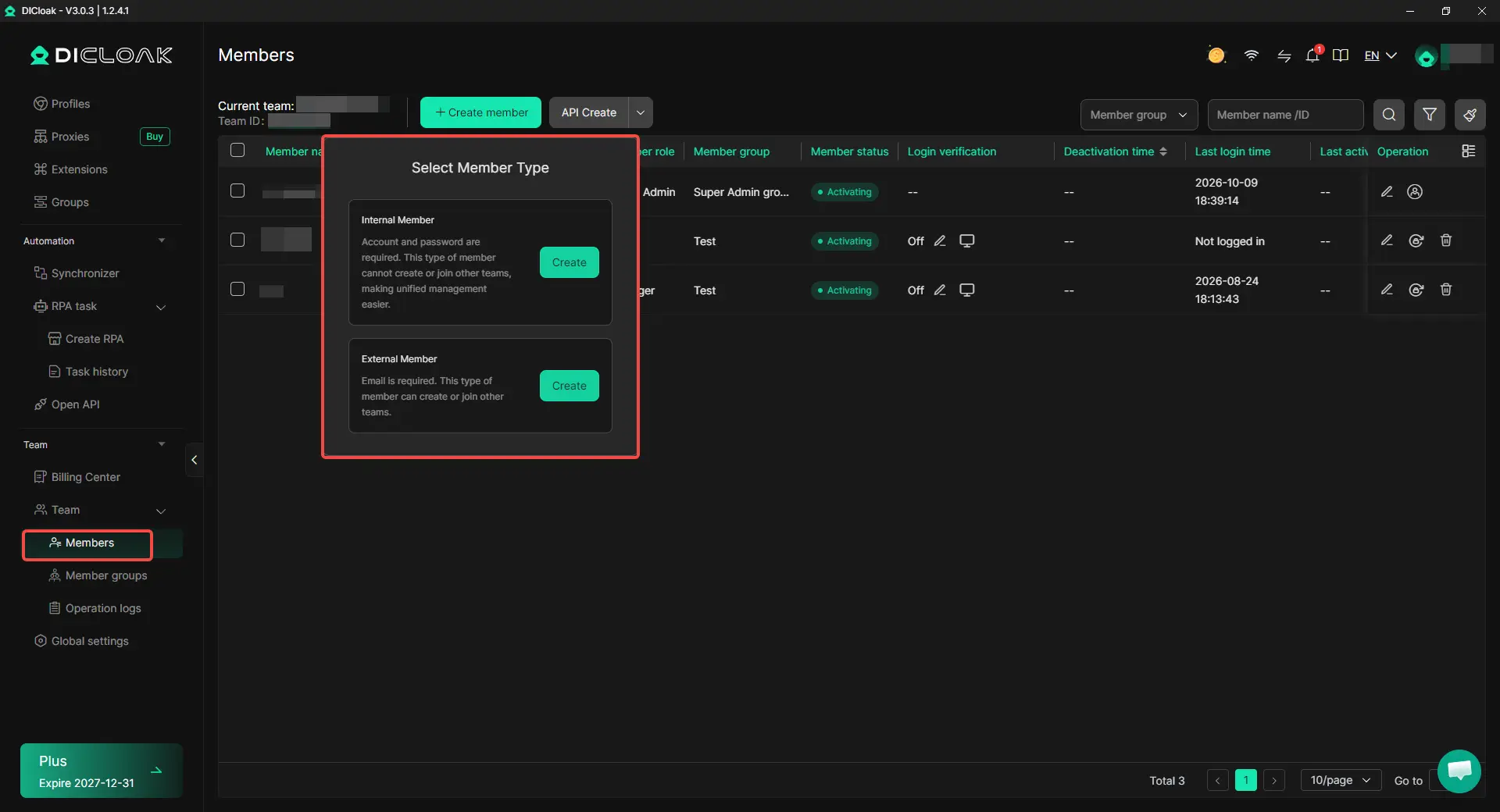
For agencies, not every employee needs access to every client's browser Profiles. With DICloak, you can organize Profiles into Profile Groups and assign specific groups to members through Team → Members. You can also configure Member Groups under Team → Groups to control which features and operations each member can access. This allows teammates to work with their assigned Profiles while admins keep control over team permissions, making client projects easier to manage as your team grows.
What Should You Watch Out for When Managing Multiple Facebook Accounts?
Managing multiple Facebook accounts takes more than keeping browser sessions separate. You also need to follow Facebook's rules, keep account settings organized, and control who can access each client's work. A few simple habits can save you from login problems, mix-ups, and unnecessary security risks.
Follow Facebook's Account and Business Access Rules
Facebook allows businesses to manage multiple Pages and ad accounts, but that doesn't mean you can create unlimited personal accounts under fake identities. If you're managing Facebook assets for clients, use Meta Business Suite or Business Portfolio to get proper access instead of sharing personal login details.
Keep Browser Sessions and Proxy Settings Organized
When you're switching between several Facebook logins, it's easy to open the wrong browser Profile or lose track of which proxy belongs to which account. Give each Profile a clear name, keep its login data separate, and check the proxy settings before opening it. There's also no need to keep changing IP addresses without a reason, as unexpected location changes can lead to extra login checks.
Protect Login Credentials and Team Access
If several people manage the same client projects, giving everyone full access creates unnecessary risks. Assign only the permissions each person needs, enable two-factor authentication, and remove access when a project ends or someone leaves the team. With DICloak, you can use Profile Groups and team permissions to control which browser Profiles members can access, while keeping Meta's business permissions managed separately. This makes team handovers easier without losing control of who can access each client's work.
Frequently Asked Questions About Using an Antidetect Browser for Multiple Facebook Accounts
Can I Stay Logged In to Multiple Facebook Accounts on One Computer?
Yes. You can keep multiple Facebook accounts signed in at the same time by using separate browser Profiles. Each Profile stores its own cookies and login sessions, so you don't need to log out whenever you switch accounts. This is especially useful for social media managers and agencies that handle several authorized Facebook logins throughout the day.
Will Facebook Ask Me to Verify My Account Every Time I Open a Browser Profile?
Not necessarily. An antidetect browser can save your cookies and login session, allowing you to reopen a Profile without signing in again each time. However, Facebook may still request verification if your session expires or it notices unusual login activity. Keeping your recovery email and two-factor authentication methods available can help you handle these checks.
Can Multiple Team Members Use the Same Browser Profile at Once?
Yes, some antidetect browsers support this feature. With DICloak, the Multiple Sessions feature allows authorized team members to open the same browser Profile from different devices. This can help teams share a workflow, but members should coordinate their actions to avoid conflicting changes. For Facebook business assets, each member should still have the appropriate Meta permissions.
Do I Need to Buy Proxies Separately When Using an Antidetect Browser?
It depends on the browser and your network requirements. Some antidetect browsers let you add proxies. With an antidetect browser like DICloak, you can configure your own proxies for individual Profiles. If your current connection meets your needs, you don't have to buy proxies just to manage separate browser sessions.
Can I Access My Facebook Browser Profiles from Another Computer?
Yes, if your antidetect browser supports cross-device data synchronization. With DICloak, you can sync selected browser data, including cookies and local storage, across devices. This makes it easier to continue working with your Profiles when changing computers or handing over tasks to teammates. However, Facebook may still request login verification, so it's worth testing the synced session before relying on it for daily work.
Conclusion
Managing multiple Facebook accounts doesn't always mean you need an antidetect browser. For personal use or a few business Pages, Facebook's built-in tools and Chrome Profiles may be enough. However, if you're managing several independent logins, running campaigns for different clients, or working with a team, an antidetect browser can make daily account management easier. With an antidetect browser like DICloak, you can keep browser Profiles separate, configure proxies when needed, and manage team access in one place. The best way to manage multiple Facebook accounts depends on your workflow, the number of separate login sessions, and how much control your team needs.
 Web Proxy Tools
 Free Tools
 Cookie Plugin
 UA Generator
 MAC Address Generator
 IP Generator
 IP Address List
 2FA Code Generator
 World Clock
 Anonymous Check
 WebRTC Leak Test
 UUID Generator
 Free Web Proxy Site
 Proxy Checker
 FB Ad Checker
 AI Web Scraping
 Free SMM Tools
 Twitter Shadowban Checker
 Instagram Name Checker
 UTM Generator
 Username Generator
 AI Hashtag Generator
 LinkedIn Headline Generator
 Social Media Image Resizer











-5.png?x-oss-process=image/interlace,1/format,webp/quality,q_75)