Trying to figure out how to close Amazon account usually starts with a simple goal, stop orders, erase stored info, or just delete amazon account for good. But getting through Amazon’s shutdown steps isn’t as clear as hitting “Deactivate.” You’ll face confusing menus, re-authentication prompts, and a final warning that the action is permanent. If you miss a step, you might leave old logins or payment info exposed, or find out later that some Amazon services remain active under the same email.
Plenty of people expect closing an account will instantly wipe everything. In reality, Amazon holds onto some data even after closure for legal and transaction reasons. That catches users off guard, especially if you have open orders, unused gift balances, or connected third-party logins.
The real headache comes when you run more than one account, using the same device, address, or payment method. Shutting down a single login can trigger reviews or bans on others if you’re not careful. Even a forgotten browser cookie or linked phone number can tie accounts together, making a clean break much harder than it should be.
Before you start the step-by-step process, it’s worth checking what actually happens to your purchases, subscriptions, and personal data after closure. Here’s what to look for first.
What You Should Know Before Closing Your Amazon Account
Closing your Amazon account isn’t just about losing access, it means cutting yourself off from every service, order, and digital item tied to that login. If you expect a simple reset, you’ll get locked out of more than you think, with no way back.
How Closing Affects Linked Accounts and Devices
Closing your account instantly ends access to Amazon Prime, Kindle books, Audible audiobooks, and Alexa devices. Any saved payment methods and unused gift balances are wiped. You can’t transfer these to a new account or recover them after closure.
Which Data and Services Will You Lose?
When you close your Amazon account, you lose all order history, downloadable invoices, and access to purchased digital content. For example, if you’ve bought Kindle books or movies, these disappear, even if you downloaded them. Subscriptions like Prime Video, Amazon Music, or Audible are also canceled, with no refunds for unused days. If you used your Amazon login for third-party apps or stores, those connections break too. The real catch is that receipts and invoices won’t be available later, so if you need proof of purchase for returns or taxes, download everything before closing. Many users only realize this when they try to return a product or access digital files weeks later and find nothing left.
When Closing Is Irreversible, and What That Means
- Once closed, you can’t reopen or reactivate the same account.
- Any email, phone, or card used will be blocked for new signups.
- You lose the ability to contact Amazon about lost orders, warranties, or disputes.
There’s no grace period or backup, once you hit confirm, the break is permanent.
If you’re still unsure, the next step is to check exactly what’s tied to your account and make sure you have copies or backups of anything important before starting the closure process.
What to Check and Prepare Before Closing Your Amazon Account
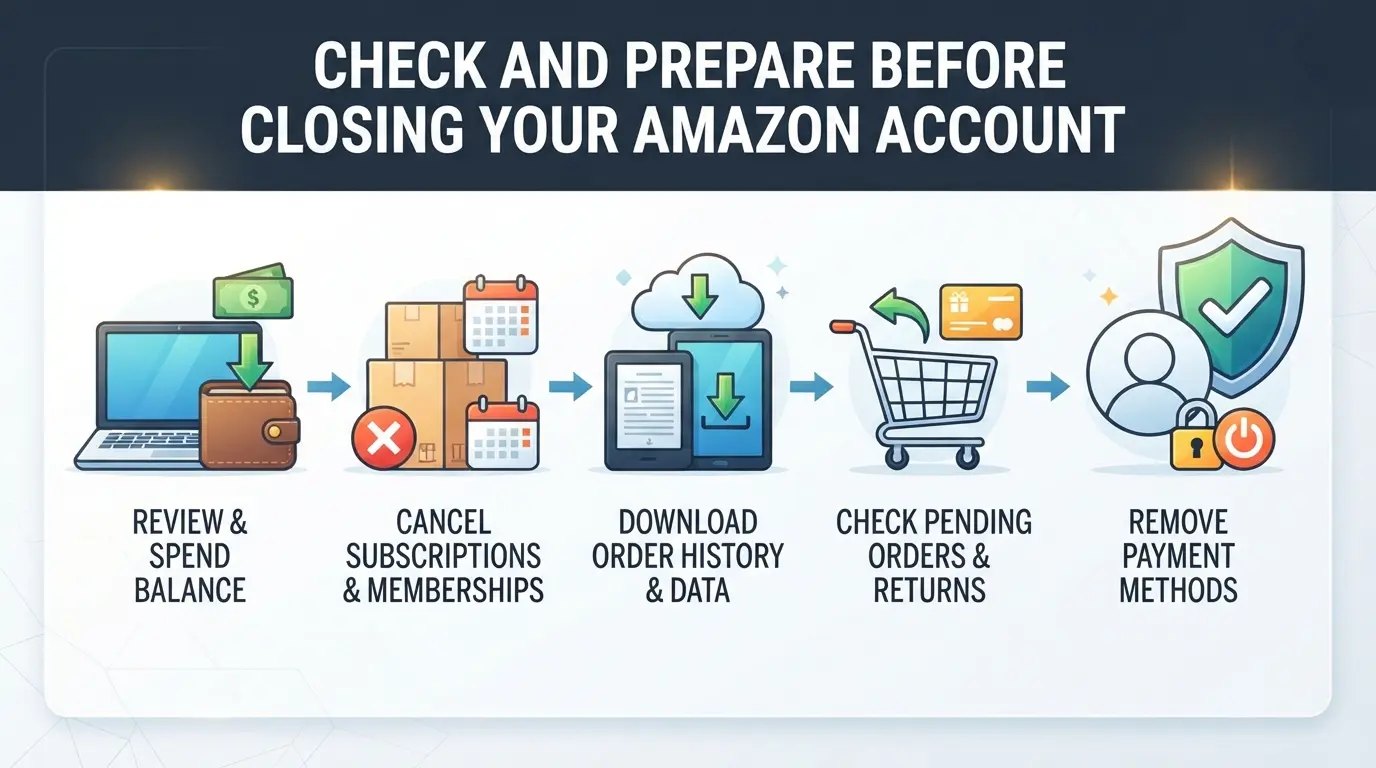
If you skip the prep work, closing your Amazon account can easily wipe out access to invoices, refund options, and digital content you might need later. Before starting the actual process, work through these checks, missing even one can leave you locked out of money, records, or other accounts for good.
Download Your Order History and Invoices
Download your complete order history and invoices before submitting a closure request. Amazon deletes this data from your access once the account is gone. If you ever need receipts for returns, tax records, or proof of purchase after closing, there’s no way to get them back. Use the "Order History Reports" tool in your account settings, export both recent and older orders, since some purchases can only be found by year. This step takes five minutes but can save you hours if you need documentation for a warranty claim or audit.
Redeem Gift Cards and Use Remaining Balances
- Check your account for unused gift card balances and promotional credits.
- Spend or transfer any remaining Amazon Cash balance.
- Withdraw funds from your Amazon Payments account if you used it for sales or Marketplace activity.
Cancel Subscriptions and Digital Content
Active subscriptions like Prime, Kindle Unlimited, or Audible will not carry over to a new account. Cancel these first to avoid future charges, and make sure to download any purchased eBooks, audiobooks, or music files. After closure, you can’t redownload or access this content.
Resolve Open Orders, Returns, and Disputes
Pending orders, returns, or unresolved A-to-z Guarantee claims will block account closure. Double-check your order list for anything open. If you see any, cancel or complete them first, otherwise, Amazon won’t let you proceed.
Disconnect Linked Accounts and Devices
Leaving devices or third-party logins tied to your old Amazon account is a common mistake. These links can cause issues with access, billing, or data privacy after closure. Fix them up front to avoid headaches later.
- Deregister Alexa, Fire TV, and Kindle devices from your account dashboard.
- Remove Amazon as a login option from other apps or sites using "Login with Amazon."
- Unlink smart home integrations and voice services that use your Amazon credentials.
Once you’ve checked off these steps, you’re ready to move on to the actual closure request. The next section walks through the process, so you can close your Amazon account permanently and avoid getting stuck mid-way.
How to Close Your Amazon Account: Step-by-Step Process for 2026
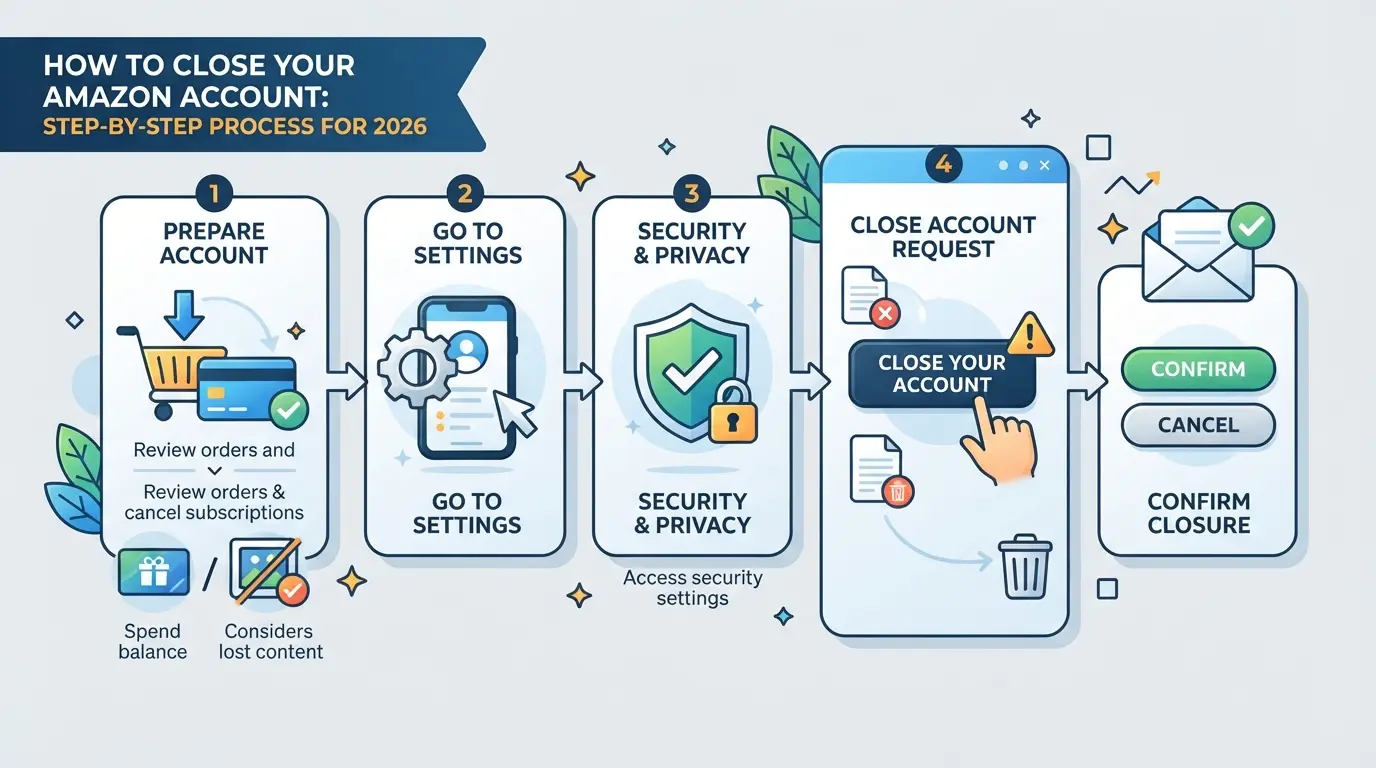
Closing your Amazon account in 2026 is fully self-serve, no more emailing support or waiting days for a manual review. But you need to follow each step in sequence, or your request may bounce back. Here’s a clear walkthrough showing exactly where the process breaks if you miss a detail.
Accessing the Amazon Account Closure Page
- Log in to your Amazon account on a desktop browser. Mobile browsers sometimes hide closure options or redirect to help pages.
- Go to “Your Account,” then find “Data and Privacy.” Click “Close Your Amazon Account” at the bottom, Amazon changes this location often, so search if you can’t see it.
- If you’re logged out or hit a dead link, clear browser cache and cookies, and try again. Expired sessions or device fingerprint mismatches will block access.
Verifying Your Identity and Reviewing Warnings
- Enter your password again or complete two-factor authentication, Amazon forces this even if you just logged in.
- Read the warnings on the screen. You’ll see a checklist of what you lose: order history, digital content, Prime benefits, and more. There’s no “undo” after this point.
- If the warning screen doesn’t load, your profile may have a lock, old payment issues or open investigations can stall the process for days.
Submitting the Closure Request and What Happens Next
- Click “Yes, close my account” to submit the request. Amazon sends a confirmation email within 2-5 minutes.
- Open that email and click the confirmation link. If you skip this, the closure fails silently and your account stays open.
- After clicking the link, Amazon puts your account in “pending closure” for 24-48 hours. You can’t log in or place orders during this period.
How to Check If Your Account Has Been Closed
- Try logging in after 48 hours. If you see “account does not exist,” the closure finished.
- If you still reach your dashboard or get password reset prompts, the request stalled, usually due to unresolved orders, gift balances, or linked devices.
- Use a different device or clear all cookies to avoid session cache errors that make it look like your account is still active.
What to Do If You Change Your Mind
- If you act before clicking the email confirmation link, you can cancel by simply ignoring the email, your account stays live.
- If you already clicked “confirm” but are inside the 48-hour pending window, contact Amazon support by chat or phone. They can sometimes halt the process, but this is not guaranteed.
- After the account is fully deleted, reactivation is impossible. You’ll need to start a new account and use a new email address and phone number.
Closing out an Amazon account can look simple, but small missteps, like missing the confirmation email or not clearing gift balances, frequently leave people locked out or with data still lingering. The next section breaks down common mistakes and risks so you know what to avoid.
Common Mistakes and Risks When Closing an Amazon Account
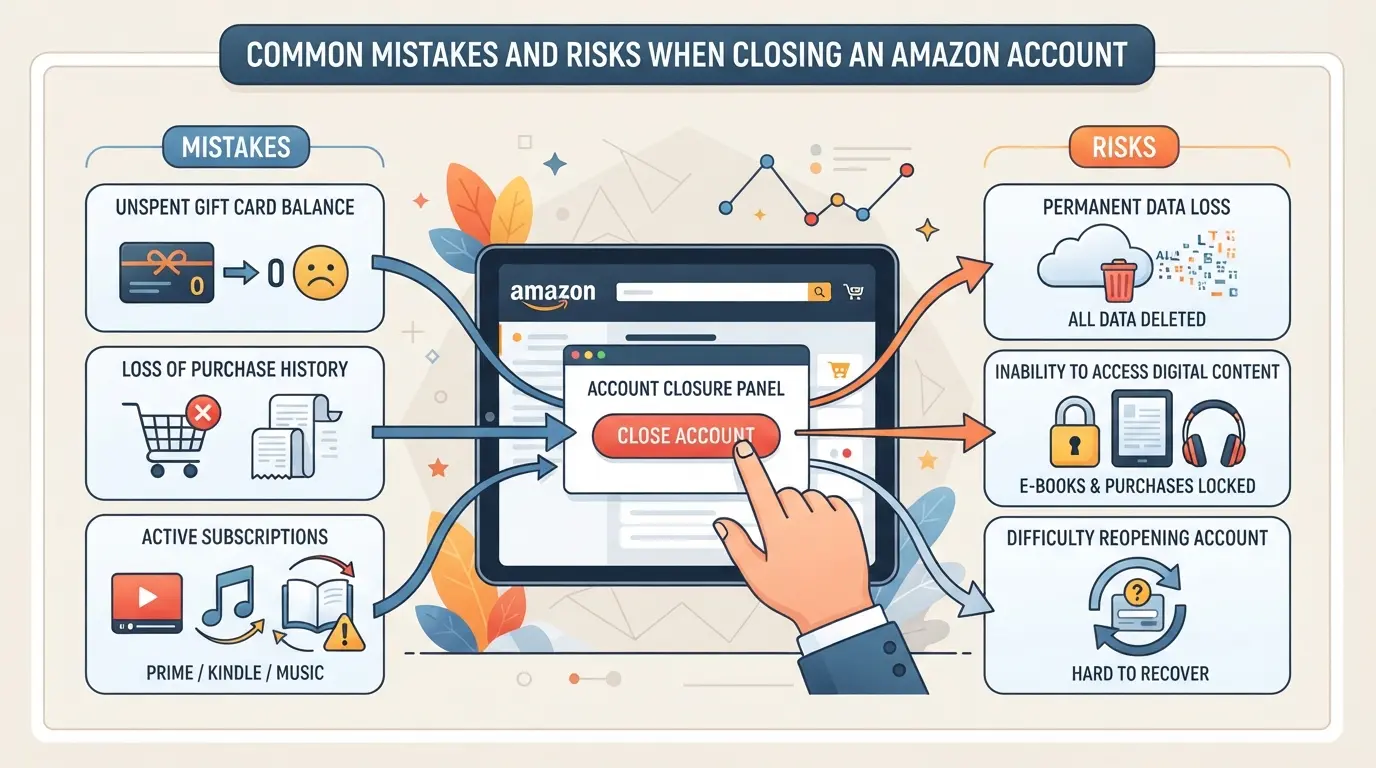
Even after following each step, closing your Amazon account can still cause headaches if you miss certain details. Here’s what trips people up the most, and how to avoid getting stuck with long-term problems.
Forgetting to Save Important Data or Receipts
Once your account is closed, you lose access to order history and invoices. If you ever need proof for a warranty claim or a return, you’re out of luck, download those files before submitting the closure request.
Overlooking Linked Services and Subscriptions
It’s easy to forget that closing your account also affects subscriptions and connected apps.
- Digital books, music, and videos tied to your login are gone for good.
- Ongoing subscriptions may still charge you if not canceled separately, end them first for a clean break.
Closing the Wrong Account in Multi-Account Setups
Mistakes happen fast when you manage several Amazon logins. Deleting a business, seller, or shared team account by accident disrupts workflows and may cut off others’ access. Double-check which profile you’re closing.
Not Resolving Pending Orders or Disputes
If you try to close your account with open orders or active disputes, Amazon may block refunds or returns. Check for any unresolved issues in your order dashboard and finish them before you start the closure process.
Assuming Account Closure Is Instantly Reversible
Amazon account closure is permanent, support rarely reactivates closed accounts. If you change your mind after closure, you’ll need to start from scratch with a new profile and lose all previous data.
How E-Commerce Teams Can Manage Multiple Amazon Accounts More Safely with DICloak
Teams handling more than one Amazon account often run into issues with browser storage, shared device fingerprints, or messy team handoffs. After seeing how easy it is for cross-account data to trigger problems when trying to close or keep accounts compliant, it makes sense to use a workflow built for true separation and control. Here’s how teams can set up safer, more organized multi-account operations using DICloak.
Separating Amazon Accounts with Profile Isolation and Fingerprint Configuration
Operators can create a separate browser profile in DICloak for every Amazon account. Each profile holds its own browser storage, session data, and fingerprint settings, like operating system, screen size, and language. That means logging into different accounts doesn’t mix cookies or device signals. This separation is especially important when one account needs to be closed, since leftover data from other sessions can cause unexpected connections on Amazon’s side. The scope is limited to browser-profile storage and fingerprint configuration; it does not change anything inside Amazon itself.

Assigning User-Owned Proxies to Each Amazon Account Profile
Operators can assign their own proxy to each DICloak profile, setting up a distinct network connection for every Amazon account. Before opening a session, you can test the proxy and check the detected location, which helps keep network traces from overlapping. The choice, quality, and compliance of proxies stay with the operator, DICloak only stores and applies the settings per profile. This setup keeps the network path for each account predictable and separate.

Controlling Team Access and Permissions for Amazon Account Profiles
Admins can assign clear permissions so team members only see or use the Amazon account profiles they’re responsible for. Limiting access this way means fewer mix-ups and tighter control during handoffs, especially when someone leaves or a profile needs to be closed. These controls work at the DICloak level and don’t replace Amazon’s own user roles or permissions.

With these controls in place, teams can handle account closure and day-to-day work without the cross-account risks that come from shared logins or browser clutter.
What to Do After Closing Your Amazon Account: Next Steps and Safer Alternatives
How to Confirm Your Account Is Fully Closed
Log out everywhere, then try signing in, if Amazon says your account doesn’t exist, closure went through. Still see access? Contact Amazon support to double-check; sometimes closure requests stall or partial access lingers.
Handling Lingering Issues: Orders, Refunds, and Data
If you need invoices, order history, or have a pending refund after closing, use Amazon’s help chat and reference your old account details. Amazon may keep some transaction data for legal reasons, so deleted accounts can’t always erase your purchase trail. If something’s missing, ask support for a manual record.
Safer Alternatives: Deactivation, Pausing, or Restricting Access
- Pause your account to stop orders but keep your data.
- Remove payment info and log out to “soft” deactivate.
- Set up parental controls or access restrictions for shared logins.
Sometimes, temporary steps work better than deleting your account, especially if you just need a break or want to avoid linking issues with other Amazon accounts.
When Closing Your Amazon Account Is Not the Best Solution
Sometimes, closing your Amazon account creates bigger problems than it fixes, especially if you rely on it for business, tax records, or warranty claims.
When Account Closure Causes More Harm Than Good
| Scenario |
What You Lose |
Safer Option |
| Seller or business account |
Store history, ratings, payouts |
Restrict access |
| Linked tax/warranty records |
Proof for audits or returns |
Deactivate, not delete |
| Shared device or payment info |
Other accounts may get flagged |
Separate profiles |
Losing access to seller tools or tax records by closing your account is often much harder to undo than dealing with day-to-day account headaches.
Alternatives for Sellers, Teams, and Power Users
Transferring ownership, limiting account permissions, or using separate browser profiles keeps your business and personal records safe. These steps let you sidestep most closure pitfalls without risking service loss or account linkages.
Frequently Asked Questions About how to close amazon account
Can I reopen my Amazon account after closing it?
Once you close amazon account permanently, you usually cannot reopen it. Amazon’s policy treats account deletion as final. In rare cases, you may contact customer support, but most closed accounts stay closed. If you want to shop again, you’ll likely need to create a new account with a different email address.
How long does it take for an Amazon account to be permanently closed?
After you submit a request to delete amazon account, Amazon typically takes a few days to process it. You’ll get a confirmation email, and your account is usually closed within 12 to 48 hours after confirmation. During this time, you won’t be able to access your orders or content.
Will closing my Amazon account delete my order history and digital content?
Yes, closing your account erases your order history, saved addresses, and payment information. You also lose access to all digital content, including eBooks, music, and videos. Once the account is deleted, none of this data can be restored, so be sure to download or save anything important first.
What happens to my Amazon Prime membership if I close my account?
Your Amazon Prime membership, along with any unused benefits, ends immediately when you close your account. You lose access to Prime Video, free shipping, and other perks. Amazon does not transfer memberships to other accounts, and any remaining subscription time is usually not refunded.
Is it safer to deactivate or pause my Amazon account instead of closing it?
Deactivating or pausing your account is not an option Amazon offers. The only way to stop using your account is to close it permanently. If you just want a break, consider logging out and removing payment methods instead of going through the full closure process.
Once your account is closed, consider reviewing any services or subscriptions that might have been linked to it to ensure a smooth transition. If privacy and secure communication are important for you moving forward, exploring alternative tools can be a valuable next step. Try DICloak For Free
 Web Proxy Tools
 Free Tools
 Cookie Plugin
 UA Generator
 MAC Address Generator
 IP Generator
 IP Address List
 2FA Code Generator
 World Clock
 Anonymous Check
 WebRTC Leak Test
 UUID Generator
 Free Web Proxy Site
 Proxy Checker
 FB Ad Checker
 AI Web Scraping
 Free SMM Tools
 Twitter Shadowban Checker
 Instagram Name Checker
 UTM Generator
 Username Generator
 AI Hashtag Generator
 LinkedIn Headline Generator
 Social Media Image Resizer