LinkedIn has more than 1.2 billion members worldwide, so it has become a key place for recruiting, B2B sales, client outreach, and personal branding. That also explains why more users now need to manage multiple LinkedIn accounts for work. But managing multiple LinkedIn accounts is not as simple as using different emails. LinkedIn is built around real professional identity, so account details, login environments, and outreach behavior can all make accounts look connected. This guide explains when multiple accounts make sense, what can link them together, and how to manage them more cleanly in 2026.
Do You Really Need Multiple LinkedIn Accounts?
You don't always need multiple LinkedIn accounts. LinkedIn is built around real professional identity, so one person should usually use one personal profile, while brands and companies should use LinkedIn Pages, admin roles, or business tools when they need a separate presence.
Many people create extra accounts too early because they want to separate outreach, recruiting, or business roles. But if a Company Page or admin role can handle the task, it keeps the setup simpler and avoids unnecessary account risk. Extra personal profiles for the same person can create policy and trust problems, especially when they look duplicated, weak, or mainly built for outreach.
| Situation |
Better Option |
| Building your own professional network |
One personal LinkedIn profile |
| Posting for a company brand |
LinkedIn Company Page |
| Managing several business brands |
Multiple Pages or admin access |
| Running outreach for different clients |
Separate account workflows may be needed |
| Managing LinkedIn accounts as a team |
Separate workspaces and access rules are needed |
How Can LinkedIn Tell That Multiple Accounts Are Connected?
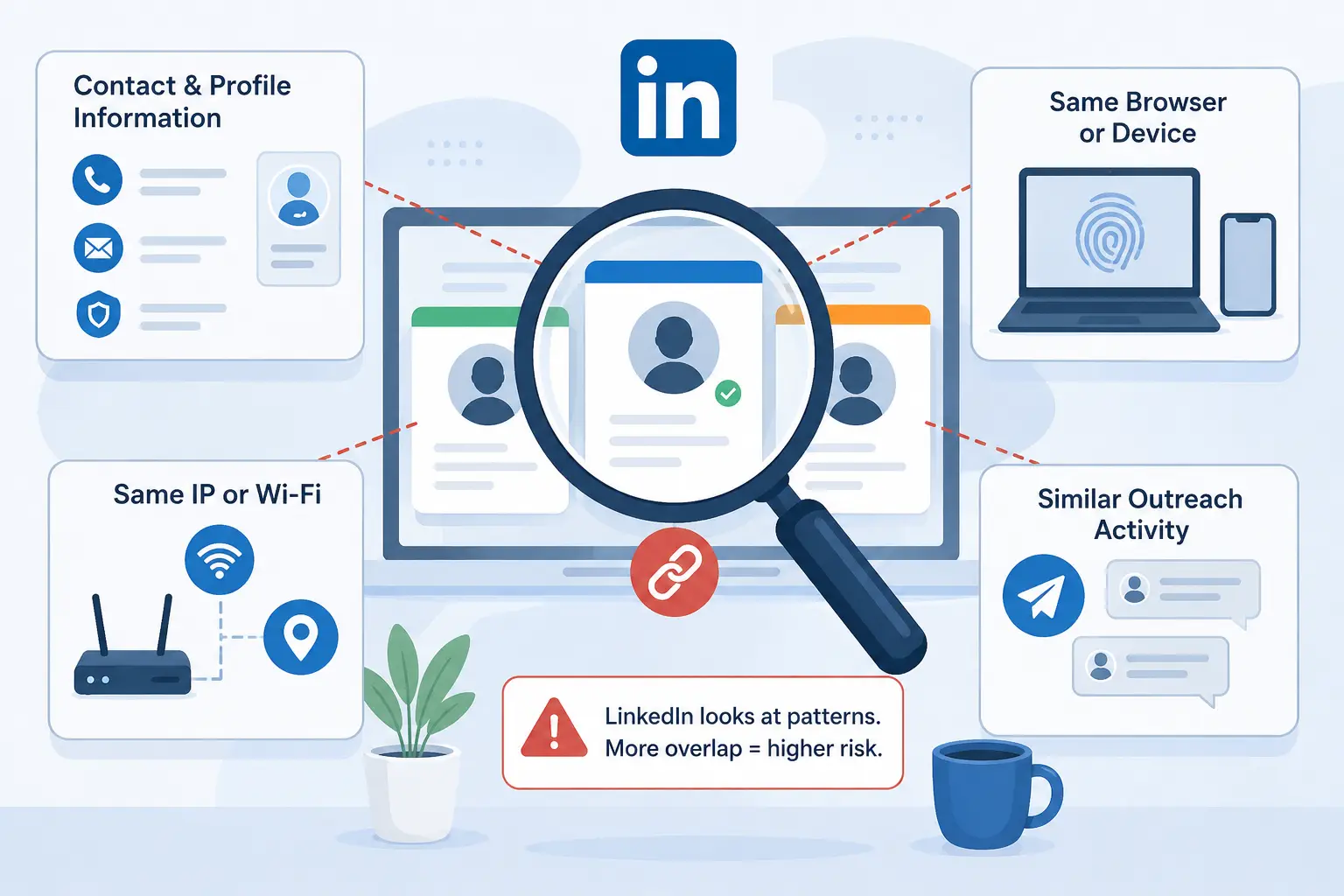
LinkedIn usually does not connect accounts based on one single factor. It looks at overlap across account details, browser use, network patterns, and daily activity. The more overlap two accounts share, the easier they may look connected.
Can LinkedIn Link Accounts Through Contact and Profile Information?
Yes. Shared phone numbers, recovery emails, or verification details can directly connect accounts. Using a different login email is not enough if the recovery information or profile details still overlap. Profile similarity can also matter. If several accounts use similar names, job history, profile photos, skills, or company descriptions, they may look like duplicate or related profiles instead of separate professionals.
Can LinkedIn Link Accounts From the Same Browser or Device?
Yes. A browser can carry cookies, session data, device details, and browser settings. If several LinkedIn accounts are used from the same browser or device every day, they may start to look related. Incognito mode is not a full fix. It may reduce saved cookies, but it does not make your device look completely different. For daily account work, using one normal browser for everything can quickly become messy.
Does Using the Same IP or Wi-Fi Matter?
Using the same IP or Wi-Fi can matter, but it is usually not the only issue. Many real teams use LinkedIn from the same office network, so shared Wi-Fi alone does not always mean accounts are linked. The risk grows when the same network is combined with other overlaps, such as shared recovery details, the same browser setup, or similar outreach behavior.
Can Similar Outreach Activity Make Accounts Look Related?
Yes. If several accounts send the same connection requests, contact the same audience, or reuse the same message templates, they may look coordinated. This is common in lead generation and recruiting. Each account should have its own purpose, audience, and message style instead of copying the same workflow everywhere.
What Are the Practical Ways to Manage Multiple LinkedIn Accounts?
There is no single way to manage multiple LinkedIn accounts. The right setup depends on how often you switch accounts, how many accounts you manage, and whether you work alone or as part of a team.
Logging In and Out Works Only for Rare Use
The simplest method is logging out of one account and into another. This works if you only need a second account occasionally, such as checking a client profile or helping a colleague. The problem starts when switching becomes part of your daily routine. Constantly entering passwords, completing verification requests, and remembering which account is active quickly becomes frustrating. Once you manage several accounts every day, this approach becomes difficult to maintain.
Different Browsers or Chrome Profiles Can Help, But Only to a Point
Many users create separate Chrome profiles or use different browsers for different LinkedIn accounts. This helps separate cookies, browsing history, and login sessions, making account switching easier. For a small number of accounts, this can be a practical solution. However, browser profiles alone do not solve every problem. As more accounts are added, it becomes harder to organize access, track ownership, and keep account environments consistent across devices.
Proxies Alone Do Not Separate the Whole Login Environment
Some users focus only on changing IP addresses by using proxies. While a proxy changes where traffic appears to come from, it does not separate browser sessions, cookies, or account data. A proxy can be useful as part of a larger setup, but it should not be viewed as a complete account management solution. Multiple LinkedIn accounts can still look closely related if they share the same browser profile and activity patterns.
Separate Devices Are Clean, But Hard to Scale
Using a different computer or phone for each account creates clear separation. Many users see this as the most straightforward way to keep accounts independent. The downside is cost and complexity. Managing a few devices may be realistic, but managing ten or twenty quickly becomes difficult. Keeping track of logins, updates, and account ownership across many devices often creates more work than expected.
Separate Browser Profile Environments Are Better for Daily Account Work
For users who manage multiple LinkedIn accounts regularly, separate browser profile environments are often easier to organize than constantly switching accounts or maintaining multiple devices. Instead of mixing everything in one browser, each account gets its own workspace with its own login session and settings. This makes account management more structured and reduces the chance of accidentally using the wrong account.
This is why many agencies, recruiters, and outreach teams use an antidetect browser such as DICloak. Separate browser profiles allow each LinkedIn account to stay in its own environment, while user-configured proxies can be assigned to different profiles when needed. The goal is not to create more accounts but to manage existing accounts in a cleaner and more organized way.
| Method |
Best For |
Main Limitation |
| Log in and out |
Occasional account switching |
Becomes tedious over time |
| Different browsers or Chrome profiles |
Small-scale account management |
Harder to manage as accounts grow |
| Proxies only |
IP separation |
Does not separate browser profiles |
| Separate devices |
Strong account separation |
Expensive and difficult to scale |
| Separate browser profile environments |
Daily multi-account work |
Requires setup and organization |
How to Manage Multiple LinkedIn Accounts With DICloak
You can manage multiple LinkedIn accounts more cleanly with DICloak by giving each account its own browser profile, proxy setup, synced data, and team access rules. This keeps daily work organized without forcing your team to log in and out from the same browser all day.
Create One Browser Profile for Each LinkedIn Account
With DICloak, each LinkedIn account can run in its own browser profile. This helps keep cookies, login sessions, and account workspaces separate. For an agency, this means one client account does not get mixed with another. The team can open the right profile for the right LinkedIn account instead of switching accounts in the same browser window.
Match Each Profile With a Stable Proxy and Region
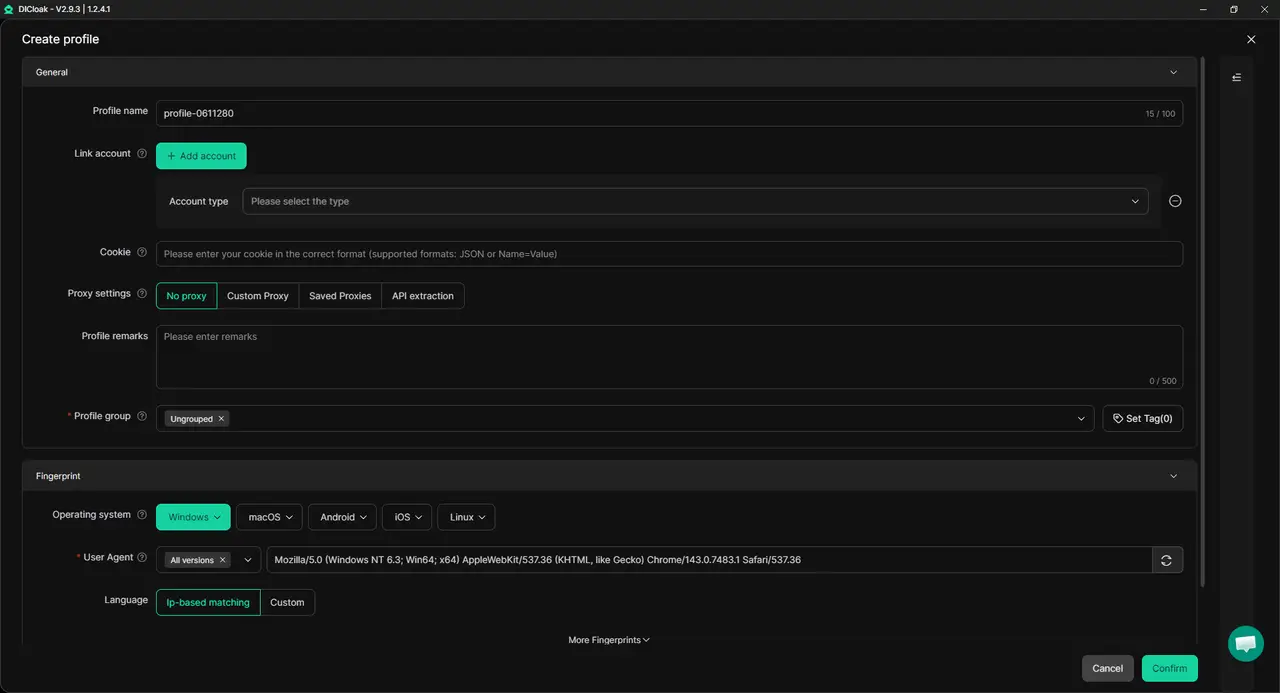
Each LinkedIn profile should have a steady login setup. With DICloak, users can add their own proxy to each browser profile and keep the account's region more consistent. A proxy alone is not the full setup. It works better when paired with a separate browser profile and a clear daily workflow.
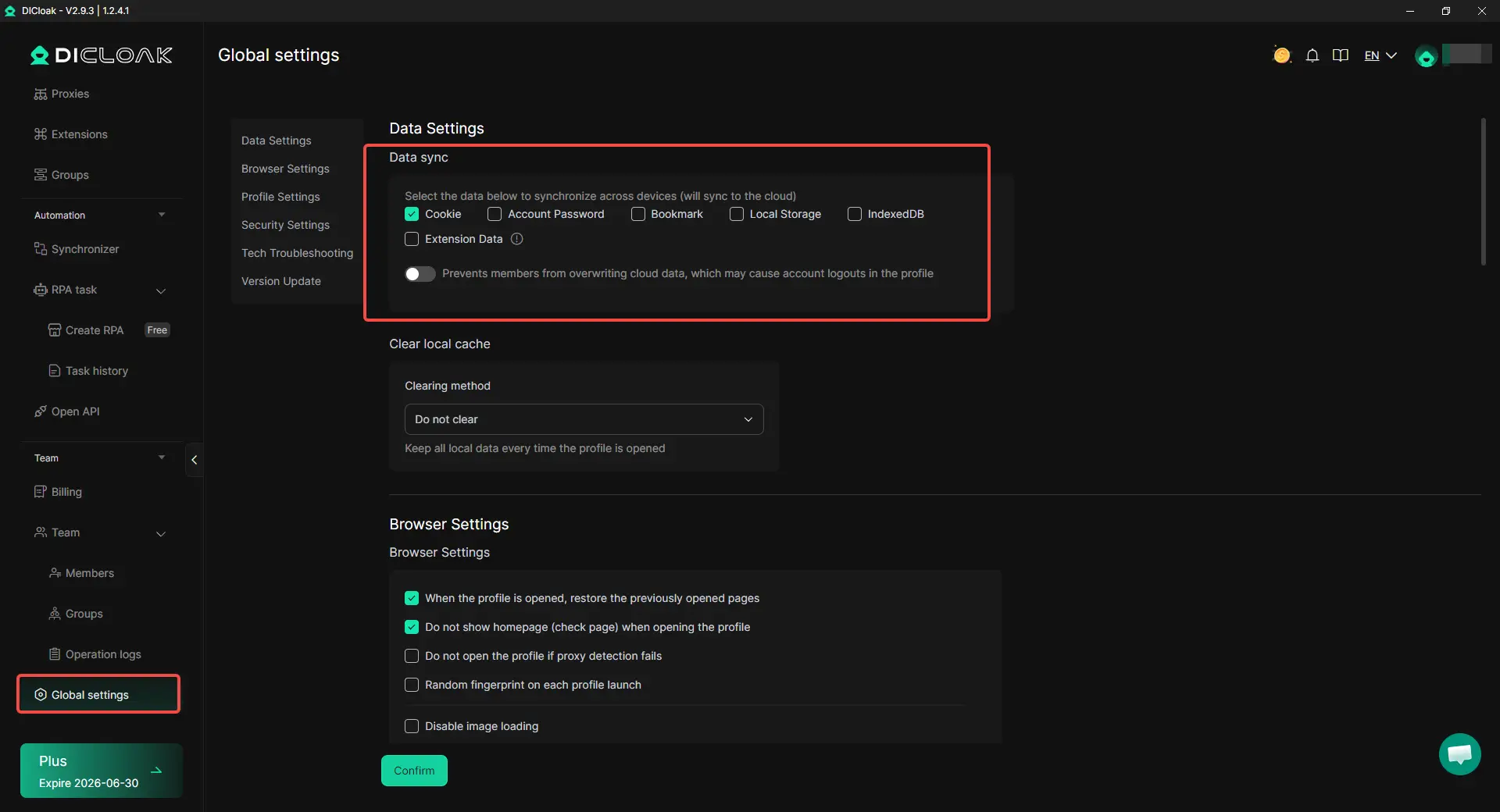
Keep Cookies and Profile Data Synced Across Team Devices
When several team members work on the same LinkedIn profile, missing cookies or profile data can lead to repeated logins. With DICloak data sync, cookies, local storage, and profile data can stay more consistent across approved devices. This is useful when one person handles outreach, another checks replies, and a manager reviews the account later.
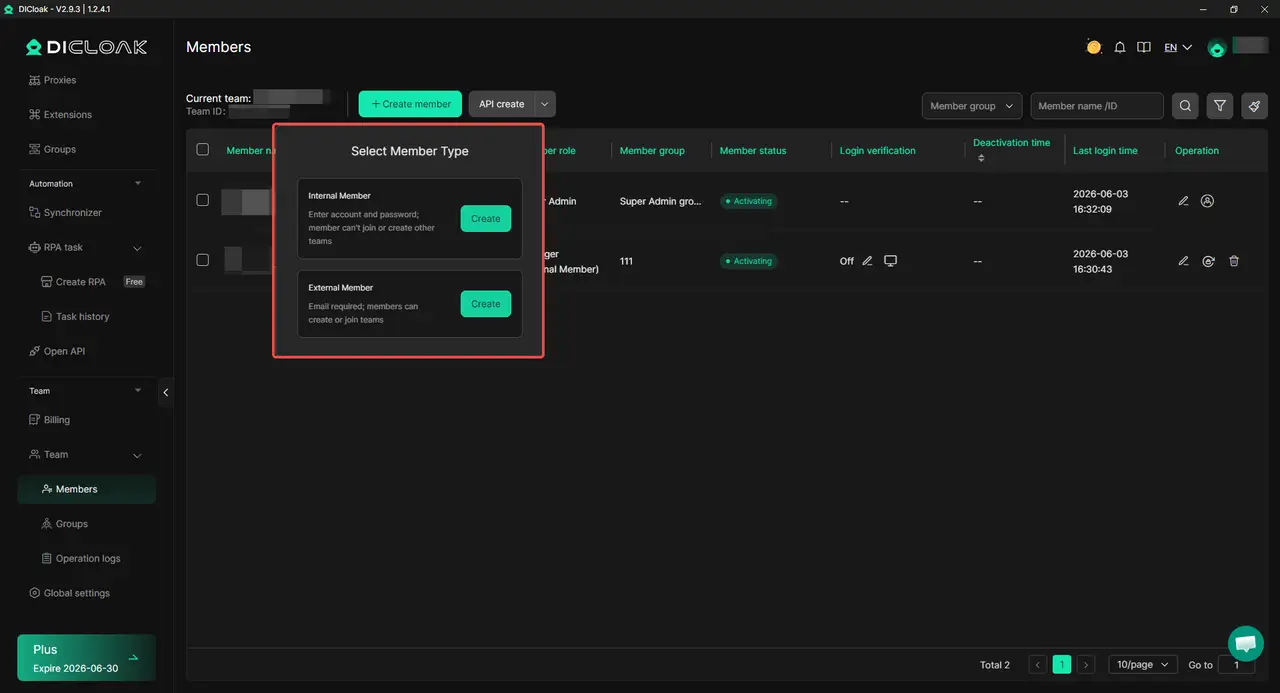
Use Team Permissions and Operation Logs to Keep Access Clear
With DICloak, teams can decide who can access each LinkedIn profile. This helps avoid casual password sharing and keeps client accounts better organized. Operation logs also help teams review who opened or changed a profile. If something goes wrong, the team has a clearer place to start checking.
What Should You Avoid When Managing Multiple LinkedIn Accounts?
Managing multiple LinkedIn accounts is not only about separating accounts. It is also about avoiding habits that make accounts look unnatural, poorly maintained, or difficult to trust.
Do Not Grow Every New Account Too Fast
A new LinkedIn account needs time to build a normal activity history. Sending large numbers of connection requests or messages immediately after creating an account can attract extra review. Start slowly. Complete the profile, connect with relevant people, engage with content, and build activity gradually before increasing outreach.
Do Not Depend on Automation or Browser Extensions Without Review
Not every LinkedIn tool works the same way. Some browser extensions and automation tools can perform actions that users forget are running in the background. Before using any tool, understand what it actually does. If several LinkedIn accounts are running identical actions, messages, or connection sequences, the activity can become difficult to explain as normal independent use.
Do Not Use Fake or Weak Professional Identities
LinkedIn is built around professional identity. Profiles with incomplete information, copied work history, stock photos, or unrealistic career details often create trust issues. If an account represents a recruiter, founder, salesperson, or consultant, the profile should clearly reflect that role. Strong and believable profiles are easier to manage than accounts that look temporary or artificial.
Do Not Ignore Early Limits or Verification Prompts
Verification requests, login reviews, or unexpected activity limits should not be ignored. These signals do not always mean an account is in trouble, but they are worth checking before continuing normal activity. If you manage several LinkedIn accounts, review recent changes, login environments, and account activity when these warnings appear. With DICloak, operation logs can help teams review recent profile access and identify changes that may have happened before the warning appeared.
What Should You Do If One LinkedIn Account Gets Restricted?
If one LinkedIn account gets restricted, do not immediately create a new account or change everything at once. First understand what happened, then check whether the issue affects only one account or a broader workflow.
Read the Restriction Message Before Taking Action
Not every restriction means the same thing. Some restrictions are related to profile information, identity verification, account security, or unusual activity. Others may be linked to content, outreach activity, or the use of automation tools. Before making changes, read the message carefully and identify what LinkedIn is asking you to do. The next step depends on the type of restriction.
Check Whether Other Accounts Show the Same Problem
If you manage multiple LinkedIn accounts, check whether only one account is affected. A single restricted account often points to an account-specific issue, such as profile information or recent activity. If several accounts start showing similar warnings, verification requests, or limits at the same time, review the accounts as a group. Look for shared login environments, recent workflow changes, or activity patterns that may overlap.
Stop Risky Activity and Review Recent Changes
Before continuing outreach or account growth, pause activities that may have contributed to the restriction. Review what changed during the last few days. A useful checklist includes:
- New browser extensions or tools
- Large increases in connection requests or messages
- New devices or login locations
- Changes to profile information
- New team members accessing the account
If you manage accounts with DICloak, operation logs can help review recent profile access and identify who opened or modified a profile before the restriction appeared.
Appeal or Verify Your Identity Through LinkedIn's Official Process
If LinkedIn asks for identity verification, follow the instructions provided during account recovery. In some cases, LinkedIn may ask users to verify their identity through Persona using a government-issued ID. If you believe the restriction was made in error, use LinkedIn's appeal process and provide accurate information. Restrictions related to identity, profile information, security concerns, or policy reviews often require verification before access can be restored. The most important mistake to avoid is creating additional accounts while a restriction is still being reviewed. Solving the original issue is usually more effective than trying to replace the account.
Frequently Asked Questions About Managing Multiple LinkedIn Accounts
Can I manage multiple LinkedIn accounts without getting them linked?
Yes, but the accounts need to stay clearly separated in both setup and daily use. LinkedIn may look at account details, browser sessions, device patterns, network use, and outreach behavior together. Different emails help, but they are not enough if the same phone number, browser session, or message pattern is reused across accounts.
Is using a different email enough for each LinkedIn account?
No, using a different email is only one part of account separation. Accounts can still look connected if they share recovery details, phone numbers, verification records, browser data, or similar profile information. For LinkedIn, identity and activity matter just as much as the login email.
Can LinkedIn link accounts if they use the same Wi-Fi?
Using the same Wi-Fi alone does not always mean LinkedIn accounts are linked. Many real teams work from the same office network. The risk grows when the same Wi-Fi is combined with other shared signals, such as the same device, same browser session, same recovery details, or repeated outreach behavior.
What is the safest setup for managing client LinkedIn accounts?
The safest setup is to give each client account its own clear workspace, login routine, and access rule. For teams, this often means using separate browser profiles, stable user-configured proxies, and clear member permissions. With an antidetect browser like DICloak, each LinkedIn account can stay in a separate browser profile, while teams can control who can access each profile.
Should I use automation when managing multiple LinkedIn accounts?
Be careful with automation on LinkedIn. Tools that send repeated connection requests, messages, or profile views can make accounts look unnatural, especially when several accounts follow the same pattern. If you manage multiple LinkedIn accounts, focus on separate workflows, real profiles, and human review instead of relying on bulk actions.
Conclusion
Managing multiple LinkedIn accounts without getting them linked is less about finding a single trick and more about keeping clear separation across account details, login environments, and daily activity. Different emails alone are not enough. LinkedIn can look at recovery information, browser usage, network patterns, and outreach behavior together, which is why many account issues come from overlapping workflows rather than one specific action.
For most users, the best approach is to use LinkedIn's official options whenever possible and only manage multiple accounts when there is a legitimate business need. When separate accounts are necessary, each account should have its own purpose, login environment, and operating routine. Tools such as DICloak Antidetect Browser can help teams organize separate browser profiles, user-configured proxies, and account access more clearly, making multi-account management easier to control as the number of accounts grows.
 Web Proxy Tools
 Free Tools
 Cookie Plugin
 UA Generator
 MAC Address Generator
 IP Generator
 IP Address List
 2FA Code Generator
 World Clock
 Anonymous Check
 WebRTC Leak Test
 UUID Generator
 Free Web Proxy Site
 Proxy Checker
 FB Ad Checker
 AI Web Scraping
 Free SMM Tools
 Twitter Shadowban Checker
 Instagram Name Checker
 UTM Generator
 Username Generator
 AI Hashtag Generator
 LinkedIn Headline Generator
 Social Media Image Resizer