People searching for automatic follow on Twitter usually want a faster way to find and follow relevant accounts. These tools can reduce repetitive work, but they do not turn every follow into a valuable follower.
The outcome depends on three things: the target list, the Twitter auto follow tool, and the quality of your profile. This guide explains how to find better targets, compare different tool types, test a small workflow, and expand it across multiple X accounts when the process starts producing useful results.
What Does Automatic Follow on Twitter Actually Do?
The phrase automatic follow Twitter usually refers to tools that process selected X accounts without requiring you to open every profile and click Follow manually.
Automatic Follow, Auto Follow-Back, and Follow/Unfollow
These features serve different purposes:
- Automatic follow processes accounts from a prepared list, search result, competitor audience, or keyword filter.
- Auto follow-back follows users who already follow your account.
- Follow/unfollow follows selected accounts and later removes users who did not follow back.
List-based automation gives users more control because the targets are reviewed before the tool starts.
Where Automatic Following Saves Time
A marketer may collect 200 users who recently replied to posts from competing email marketing tools. Opening each profile, clicking Follow, and recording the result manually takes time.
A Twitter auto follow tool can process the list and record completed, skipped, or failed actions.
The source list still matters. A competitor’s full follower list may contain abandoned accounts, bots, giveaway users, and people who followed years ago. Users who posted or replied recently are often more useful targets.
What Still Needs Manual Review
Search filters can group very different accounts together:
- An active marketing director
- An employee with no buying influence
- A business account inactive for two years
- A relevant creator in the wrong market
- A bot using niche keywords in its Bio
High-value prospects also need closer review. Their role, recent posts, location, and audience may show that a thoughtful Reply is more useful than an automated Follow.
Automatic following speeds up execution, but audience judgment still determines the result.
Build a Target List Worth Automating
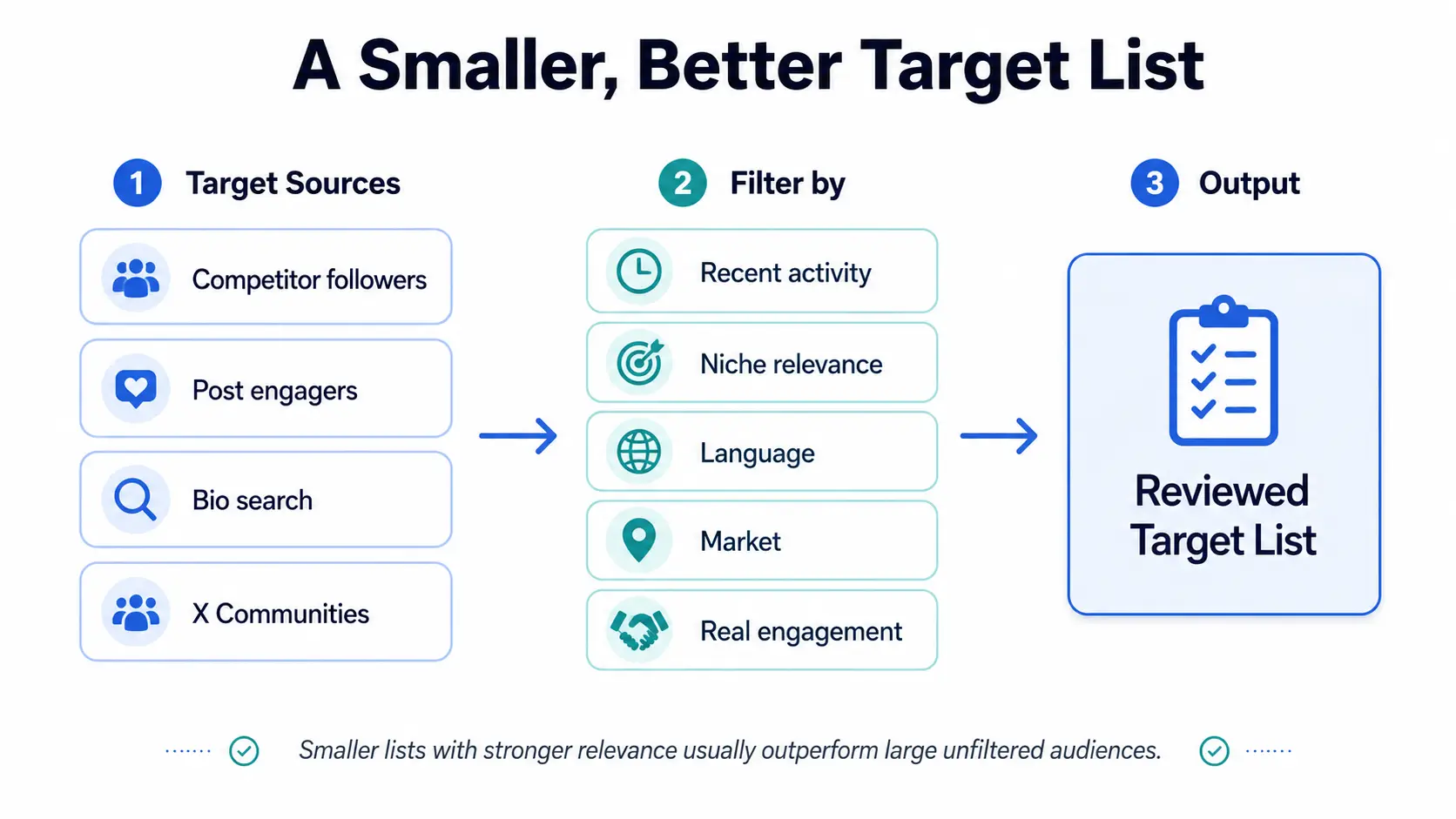
A strong automatic follow Twitter workflow starts with the target list, not the tool. If the list is filled with inactive, unrelated, or low-intent accounts, faster execution only produces more weak profile visits.
Compare the Main Target Sources
Different sources produce different types of users:
| Target source |
Main advantage |
Common weakness |
| Competitor followers |
Large and easy to collect |
May include old, inactive, or low-interest accounts |
| Users engaging with competitor posts |
Recent activity shows stronger interest |
Smaller lists that need regular updates |
| Bio and keyword search |
Useful for roles, locations, and niche terms |
Keywords may be outdated or misleading |
| X Communities |
Strong topic relevance |
Limited audience size |
| Existing engaged followers |
Closest match to your proven audience |
Requires an existing follower base |
Tip: A user who replied to a relevant post last week is always a stronger target than someone who followed a competitor three years ago and went dormant.
Filter Out Low-Value Accounts
Before adding an account to the list, check:
- Recent posting activity
- Bio and content relevance
- Language and target market
- Real replies or discussions
- Repeated promotional or copied posts
- Follow-for-follow behavior
- Clear interest in the problem your account covers
For example, a search for “email marketer” may return an active agency owner, an inactive account, a job seeker, and a bot repeating marketing terms. All match the keyword, but only some fit the campaign.
Avoid rigid filters based only on follower count or the follower-to-following ratio. A small consultant with 800 relevant followers may be more valuable than a broad creator with 100,000 unrelated followers.
Prepare the Profile Before Starting
Every Follow sends a potential visitor to your profile. Before starting the list, make sure that visitor can quickly understand:
- Who the account is for
- What topics it covers
- Why the content is useful
- What they should read first
- Where they can learn more
Check the Bio, Pinned Post, recent content, profile image, and link. A strong target list cannot help much when the profile looks inactive or covers several unrelated topics.
The path is simple:
Follow notification → Profile visit → Content check → Follow decision
The best target list is not the largest one. It is the list with the clearest relevance and recent activity.
Choose an Automatic Follow Tool That Fits the Workflow
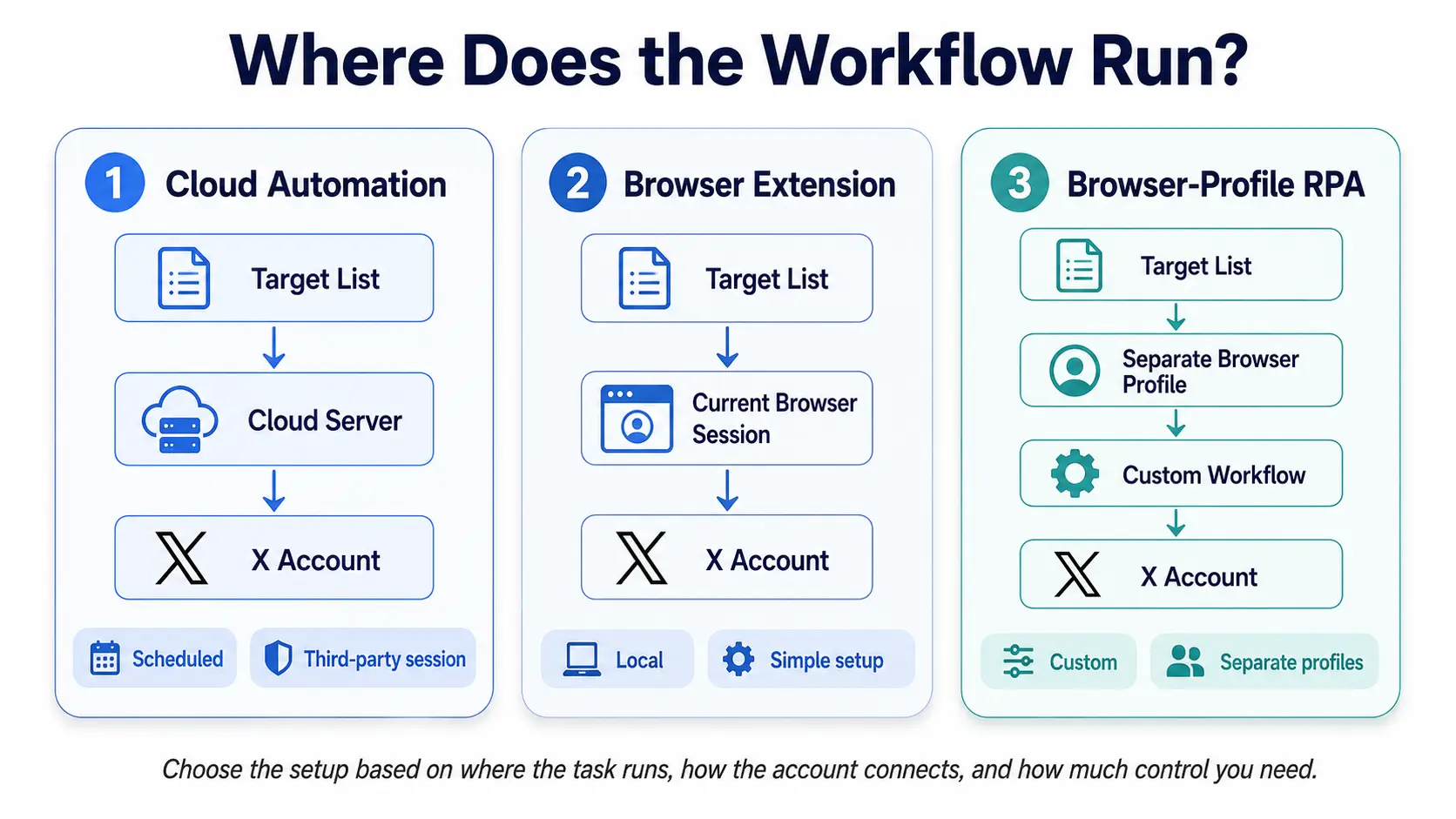
A Twitter auto follow tool should match your target source, account setup, and required level of control. The main difference is not how many accounts a tool can follow, but where the task runs and how much control you keep.
Compare Tool Types and Examples
| Tool |
Type |
Best for |
Main limitation |
| PhantomBuster |
Cloud automation |
Scheduled processing of prepared profile lists |
Requires session access through a third-party cloud service |
| GoLess |
Browser extension workflow |
Single-account users working from a spreadsheet or prepared list |
Depends on the local browser and X page structure |
| DICloak |
Browser-profile RPA |
Custom workflows that may later be used across separate account profiles |
Requires the workflow to be built and tested first |
Cloud tools are useful when tasks need to continue without keeping the local browser open. Browser extensions are easier for small, visible tasks inside the current session. Browser-profile RPA offers more control over custom steps and account separation, but it takes more setup.
Choose Based on the Workflow You Already Have
Before selecting a tool, check:
- Target source: Do you already have a reviewed list, or must the tool find users?
- Account access: Will the tool use a browser session, session cookie, extension, or API?
- Task control: Can you pause, skip duplicates, and review failed actions?
- Run location: Does the task run locally, in the cloud, or inside a browser profile?
- Scale: Is the workflow for one account or several separate account sessions?
A creator processing one small list may only need a browser extension. A cloud tool fits scheduled list processing. Browser-profile RPA becomes relevant when the workflow needs custom steps or separate account environments.
Choose the tool based on control, access, and workflow fit—not on the largest promised follow volume.
How to Set Up and Test an Automatic Follow Workflow
Test the selected tool and target source on a small, reviewed list before expanding the workflow. This reveals whether the process works correctly and attracts the intended audience.
Start With One Goal and One Target Source
Set one clear goal, such as reaching niche creators, local customers, or users who recently engaged with a competitor.
Test only one source at a time. Mixing competitor followers, Bio searches, and Community members makes it difficult to compare their performance.
Run a Small Test
Record the profiles processed, completed actions, failures, duplicates, and follow-backs. Do not run several tools on the same account at once.
Pause the workflow if X requests verification, follow actions stop working, sessions expire repeatedly, or the tool starts processing the same profiles again.
Measure Audience Quality
Do not judge the test only by its Twitter follow-back rate. Track:
- Target relevance
- Engagement after follow-back
- Profile link clicks
- Follower retention
- Spam and unrelated account share
These metrics show whether the workflow is building a useful audience rather than only completing actions.
Diagnose and Adjust the Workflow
Poor results usually point to one of three areas:
- Target issue: The list is broad, outdated, or inactive.
- Profile issue: The Bio, Pinned Post, or recent content lacks a clear reason to follow.
- Tool issue: The workflow skips targets, repeats actions, or breaks after an X interface update.
Change one variable at a time before increasing the list size.
Use automatic unfollow Twitter features only for clear cleanup cases, such as spam, inactive accounts, or accidental follows. A user who does not follow back may still be a valuable prospect, creator, or industry source.
How to Scale a Proven Workflow Across Multiple X Accounts
Once a workflow works on one account, the next challenge is keeping sessions, target lists, proxies, and team access separate across multiple X accounts.
Separate Each Account With a Browser Profile
Managing several accounts in one normal browser can cause:
- Session mix-ups
- Repeated target lists
- Wrong proxy assignments
- Unclear account access
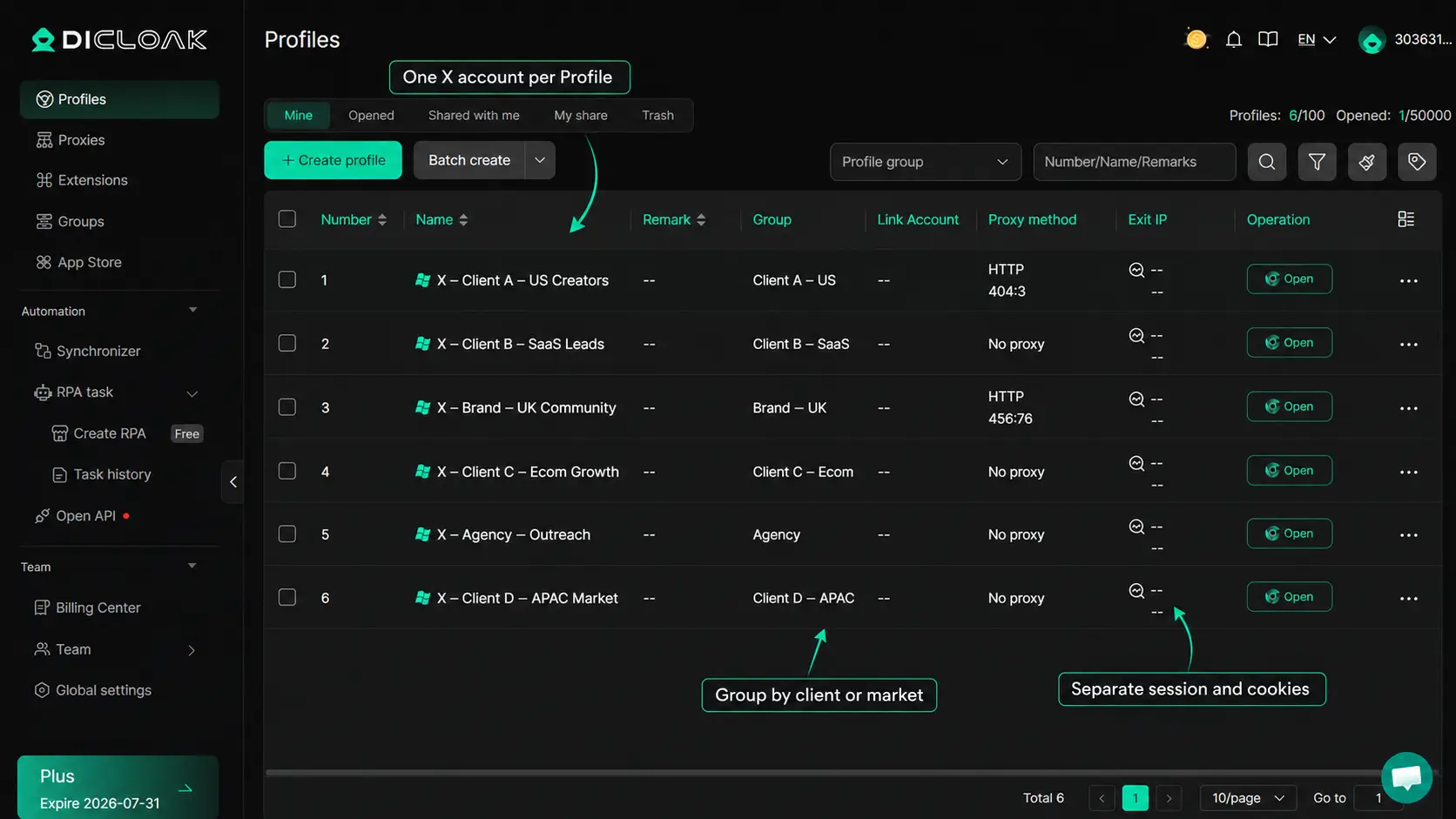
You can create one browser profile in DICloak for each authorized X account. Each profile keeps its own cookies, login session, fingerprint settings, proxy configuration, and remarks. You can also group profiles by client, market, or project.
Use clear names such as:
- X – Client A – US Creators
- X – Client B – SaaS Leads
- X – Brand – UK Community
This structure helps match each account with the correct proxy, target list, and project notes.
Import Tested Steps as a Custom RPA Workflow
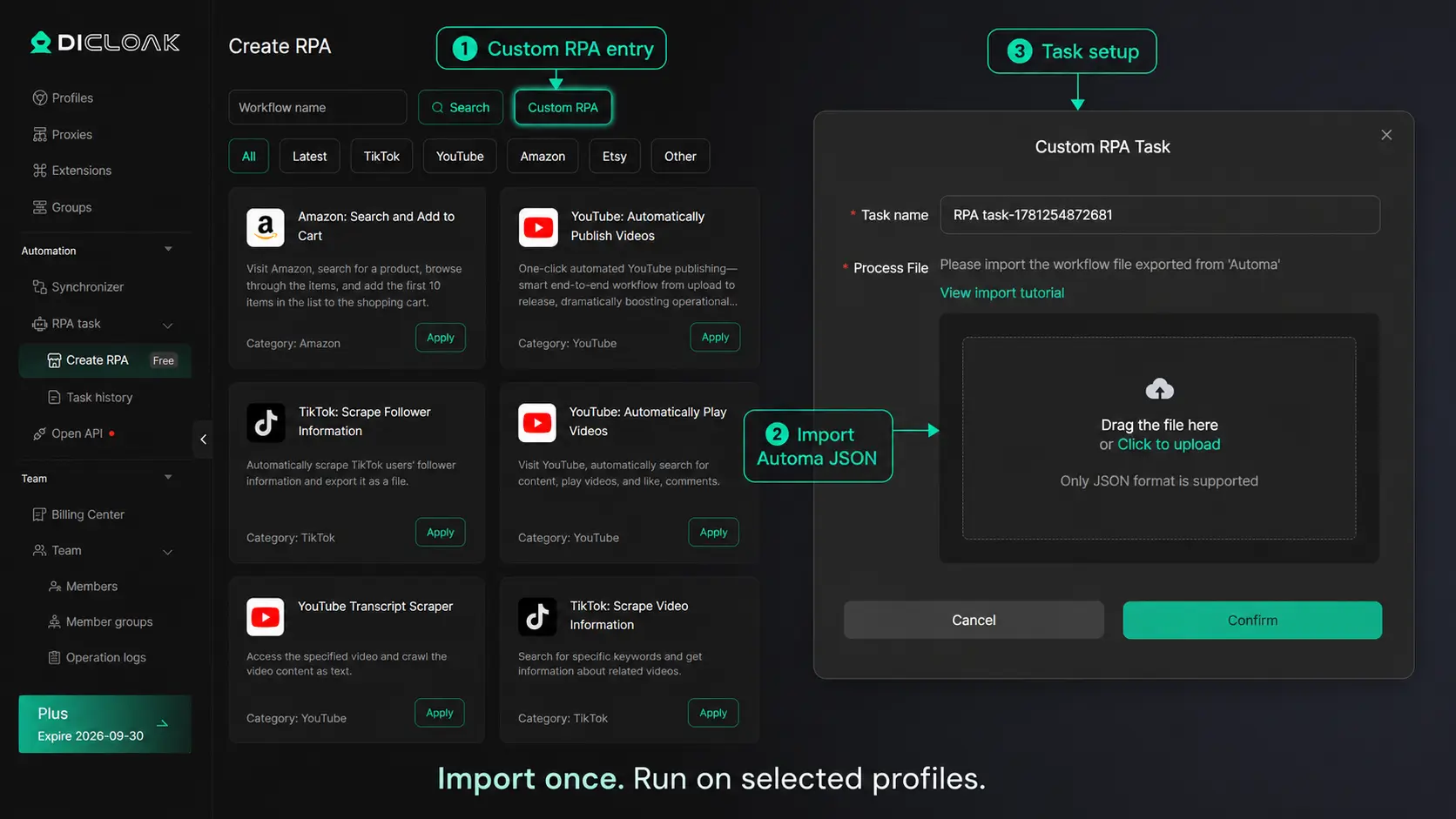
After testing the process manually, design the workflow in Automa and export it as a JSON file. You can then import it into DICloak as a Custom RPA workflow and choose which browser profiles should run the task.
The workflow may be designed to:
- Open the target page
- Read a reviewed account list
- Visit each X profile
- Validate or skip selected targets
- Run the planned browser steps
Features such as duplicate handling or target validation depend on how the Automa workflow is designed. After the task runs, use its status and task records to check whether each selected profile completed the process correctly.
Test the workflow on a small number of profiles first. Fix page errors and list-handling issues before using it across more accounts. RPA and multi-profile automation are supported parts of the product’s broader workflow tools.
Control Account Access With Profile Groups
For agency or team use, share only the browser profiles each member needs. Profile groups and member permissions can separate access by client, market, or project.
You can use them to manage:
- Assigned client profiles
- Member access
- Profile sharing
- Access removal after a project
Campaign ownership and workflow responsibility should still be recorded through your internal task system or profile remarks. They are team processes, not separate product permission settings.
Scale only after the single-account workflow produces useful results. Then use separate profiles, tested RPA steps, and controlled access to keep multi-account management organized.
FAQ about automatic follow Twitter
Is Automatic Follow Allowed on Twitter/X?
X currently states that automated proactive following and automated unfollowing are not allowed. Its automation rules also prohibit bulk, aggressive, or indiscriminate automated follow activity. Account owners remain responsible for actions taken by connected tools.
What Is the Daily Follow Limit on X?
The current technical limit is 400 follows per day. Once an account follows 5,000 users, additional follows may also depend on its follower-to-following ratio. The 400 limit is a technical ceiling, not a recommended target for automatic follow Twitter workflows.
What Is the Difference Between Automatic Follow and Auto Follow-Back?
Automatic follow targets users who do not yet follow your account. Auto follow-back responds to existing followers. The first supports audience discovery, while the second manages incoming follower relationships.
Which Twitter Auto Follow Tool Is Best for Beginners?
A browser extension is usually the simplest option for one account and a short, reviewed list. Cloud tools suit scheduled processing, while Custom RPA offers more control over browser steps and separate account profiles. Choose based on account access, task visibility, and workflow complexity rather than promised follow volume.
Can Proxies or Browser Fingerprints Prevent Account Restrictions?
No. Proxies and browser fingerprints can help keep account environments separate, but they do not change X’s follow rules or protect an account from restrictions caused by its behavior. X may limit accounts that follow too quickly, reach technical limits, or violate its rules.
Automatic follow Twitter works best as a structured audience-discovery process, not a shortcut to inflate follower numbers. The target list determines who sees the profile, while the profile and content determine who follows back and stays engaged.
Start with one account, one target source, and a small test. Choose a tool that gives you enough control over account access, task execution, and results. Once the workflow proves useful, separate browser profiles, Custom RPA, and clear team permissions can make it easier to manage across multiple X accounts without mixing sessions or responsibilities.Try DICloak for Free.
 Web Proxy Tools
 Free Tools
 Cookie Plugin
 UA Generator
 MAC Address Generator
 IP Generator
 IP Address List
 2FA Code Generator
 World Clock
 Anonymous Check
 WebRTC Leak Test
 UUID Generator
 Free Web Proxy Site
 Proxy Checker
 FB Ad Checker
 AI Web Scraping
 Free SMM Tools
 Twitter Shadowban Checker
 Instagram Name Checker
 UTM Generator
 Username Generator
 AI Hashtag Generator
 LinkedIn Headline Generator
 Social Media Image Resizer