In 2026, scaling LinkedIn outreach is no longer a matter of simple tactics but of sophisticated risk management. While the platform imposes strict growth ceilings—like capping connection requests at 100 per week—the professional solution lies in operationalizing a multi-account strategy without exposing your digital assets to catastrophic bans. For marketers, agencies, and sales teams, the conflict is clear: you must scale to grow, but doing so improperly means risking the very accounts your business depends on.
This guide moves beyond temporary tricks to deliver an authoritative framework for how to safely and effectively run multiple LinkedIn accounts. By combining professional-grade tools with intelligent strategies, you can mitigate existential risk, optimize for scalability, and turn a high-stakes challenge into a secure, efficient, and powerful growth engine.
Why You Need to Run Multiple LinkedIn Accounts
For high-growth professionals, managing multiple LinkedIn accounts is not about circumventing rules for the sake of it; it is a core business strategy. In a digital ecosystem defined by platform-imposed limits, leveraging several profiles is essential for segmenting audiences, maintaining brand integrity for clients, and operationalizing outreach at a scale that matches ambitious business goals. It's the key to unlocking growth that a single account simply cannot deliver.
For Social Media Managers and Marketers
Marketers are tasked with maintaining distinct brand voices and engaging niche audiences. Using separate, dedicated accounts allows them to execute hyper-targeted content strategies, ensuring messaging for a B2B SaaS client never bleeds into the campaign for a D2C wellness brand. This segmentation is critical for preserving brand integrity and maximizing the ROI of each engagement.
For Marketing and Digital Agencies
An agency's reputation is built on delivering secure, scalable, and isolated results for each client. Multi-account management is the operational backbone that makes this possible. It allows agencies to manage separate content calendars, ad campaigns, and lead-generation funnels without cross-contaminating data or compromising client security, thereby ensuring both compliance and performance.
For Sales Teams and Lead Generation
For sales teams, LinkedIn's connection limits are a direct bottleneck to pipeline growth. By strategically using multiple accounts, a sales team can multiply its outreach capacity, allowing them to engage more prospects in less time. This directly shortens the sales cycle, accelerates pipeline growth, and ensures a consistent flow of high-quality leads.
For Founders and Business Owners
Founders must often communicate with diverse stakeholder groups—from investors and partners to early adopters and enterprise clients. A network of profiles representing different facets of the business (e.g., a corporate brand page, a personal thought leadership profile, a product-specific account) allows them to build a multi-faceted, authentic presence and de-risk their outreach by targeting each segment with tailored messaging.
While the strategic imperative for multiple accounts is undeniable, executing this strategy requires a professional approach to mitigate the significant risks involved in maintaining asset integrity.
The Inescapable Risk: Understanding LinkedIn's Stance on Multiple Accounts
Ignoring LinkedIn's rules is the fastest way to lose valuable business assets—your networks, your credibility, and your revenue streams. A professional approach to multi-account management begins with acknowledging the platform's policies and understanding the sophisticated technology it uses to enforce them. Only by understanding these risks can you build a strategy to effectively mitigate them.
LinkedIn's official policy is direct, and the consequences of violating its User Agreement are severe:
- LinkedIn's User Agreement: The platform's policy explicitly allows only one personal account per individual, which must feature their real name.
- Prohibition on Using Others' Profiles: LinkedIn also prohibits using clients' and colleagues' profiles, a common but risky practice that violates its terms of service.
- Risk of Suspension: If LinkedIn detects multiple accounts linked to a single user, it is highly probable that all associated accounts—including your main, established profile—will be suspended or permanently banned.
How LinkedIn's Detection System Works
LinkedIn identifies users by analyzing their digital identity, also known as a browser fingerprint. This is a unique collection of data points that your browser shares, creating a detailed and identifiable signature. LinkedIn's algorithm tracks these characteristics to link accounts, including:
- IP Address and Location (Pinpoints your physical connection and can link accounts used from the same office or home).
- Device and Operating System (Identifies the specific computer model, OS, and version, which are often consistent across sessions).
- Browser Configuration and Fonts (Reveals your browser type, version, installed extensions, language settings, and unique font library).
- Cookies and Browsing History (Stores session data that allows LinkedIn to recognize a returning "device" even if the user has logged out).
Simple workarounds are no match for this level of sophisticated detection, making professional-grade tools an absolute necessity for safely managing multiple accounts.
Common (But Flawed) Methods to Run Multiple LinkedIn Accounts
Many professionals attempt seemingly logical workarounds that ultimately fail because they only address the symptoms of detection, not the underlying disease. These methods provide a false sense of security while leaving your accounts exposed to the core issue: the comprehensive digital fingerprint.
Logging In and Out Manually
This method involves signing out of one account and into another in the same browser. It is notoriously inefficient due to constant credential entry and 2FA challenges.
- Why It Fails: This technique treats a minor symptom (the active login session) while completely ignoring the disease. It does nothing to hide the fact that all activity originates from the same device with the same digital fingerprint, which LinkedIn's systems can easily trace and link.
Using Separate Devices or Chrome Profiles
The logic here is to isolate accounts by using different physical devices or separate Chrome user profiles, which maintain their own cookies and cache.
- Why It Fails: While this isolates cookies, the underlying device fingerprint can remain identical or highly similar across profiles on the same machine. LinkedIn is sophisticated enough to see past the separate cache and identify the shared hardware and software signature. At scale, purchasing a separate physical device for every account is financially and operationally unsustainable.
Relying on Basic Proxies
These tools are designed to mask a user's IP address, making it appear as though they are connecting from a different location.
- Why It Fails: These tools treat a single symptom—the IP address—while ignoring the underlying disease: the comprehensive digital fingerprint. It's like changing your car's license plate but leaving the unique vehicle identification number, make, model, and custom paint job for LinkedIn's algorithms to see. Your true digital identity remains completely exposed.
These amateur methods are unreliable and unsustainable. To operationalize a multi-account strategy safely, you need a professional-grade tool designed specifically for this challenge.
The Professional Solution: How to Securely Run Multiple LinkedIn Accounts
The definitive solution for managing multiple LinkedIn accounts is not a "trick," but a professional technology known as an antidetect browser. This software is engineered to create secure, distinct, and authentic digital identities, allowing you to operate multiple accounts in a way that aligns with the platform's technical expectations for separate, unique users.
An antidetect browser works by creating completely isolated virtual browser profiles. Each profile, or "profile," functions as a new, unique device from a technical standpoint, ensuring activity from one LinkedIn account can never be linked to another.
Core Technology of Antidetect Browsers
This technology is effective because it provides control over every element of the digital fingerprint, making each profile appear completely authentic and independent.
- Unique Digital Fingerprints: For every profile you create, the browser generates a unique and authentic fingerprint. It spoofs dozens of parameters—from browser type and screen resolution to fonts and WebGL data—making each profile appear to LinkedIn as a distinct, real device.
- Complete Session Isolation: The cookies, cache, and browsing history for each profile are stored in a separate, sandboxed profile. This is critical for preventing cross-contamination between accounts and guarantees that data from one session cannot be used to identify another.
- Proxy Integration: Antidetect browsers are designed for seamless integration with proxies, allowing you to assign a unique IP address to each profile. This ensures no two accounts share the same IP—a major red flag for any platform.
- Cloud Synchronization: Professional-grade tools securely store your sessions in the cloud, allowing you to pause work on one computer and resume on another without triggering security alerts or 2FA prompts, as LinkedIn continues to recognize it as the same trusted device.
As the industry standard for scalable multi-account management, antidetect browsers provide the robust infrastructure required to grow your business on LinkedIn without mitigating existential risk.
While several antidetect browsers exist, DICloak provides a unique combination of enterprise-grade security, usability, and advanced features specifically tailored for professionals. It moves beyond basic protection to offer a suite of tools designed to solve the most pressing operational challenges of multi-account management.
- Protected Fingerprinting: This directly solves the core problem of detection. DICloak generates a unique digital identity for every account by spoofing critical elements like IP address, geo-location, WebGL, and canvas, ensuring each profile appears to LinkedIn as a completely separate and legitimate user.
- Effortless Team Collaboration: Eliminate the security risks and workflow bottlenecks of sharing passwords and 2FA codes. DICloak allows you to grant permission-based access to team members, ensuring brand consistency and operational security when managing client accounts—a direct solution to the inefficiency of manual logins.
- Advanced Automation with Synchronizer: Address the need for operational efficiency at scale. The Synchronizer feature streamlines repetitive tasks by syncing actions across multiple windows simultaneously, boosting productivity for posting content or engaging with contacts across several accounts at once.
- Seamless Cloud Synchronization: Your profiles and data are synced securely across devices, allowing you and your team to access your LinkedIn accounts from anywhere without interrupting workflows or triggering security flags—solving the 2FA and re-verification headaches.
- Unrivaled Security: Protect your most valuable digital assets. With core features like advanced data encryption and anti-scraping technology, DICloak ensures your sensitive account information and client data remain private and secure.
DICloak provides the ideal foundation for building a professional and sustainable multi-account strategy on LinkedIn.
Step-by-Step Guide: How to Set Up and Run Multiple LinkedIn Accounts with DICloak
Proper setup is essential for operationalizing your multi-account strategy securely. Following this structured process ensures each of your LinkedIn accounts is established within a clean, isolated, and efficient environment from the start.
Step 1: Download and Register Your DICloak Account
First, navigate to the official DICloak website, download the software for your OS (MacOS or Windows), and sign up. DICloak offers a free plan available for life, allowing you to start without any initial investment.
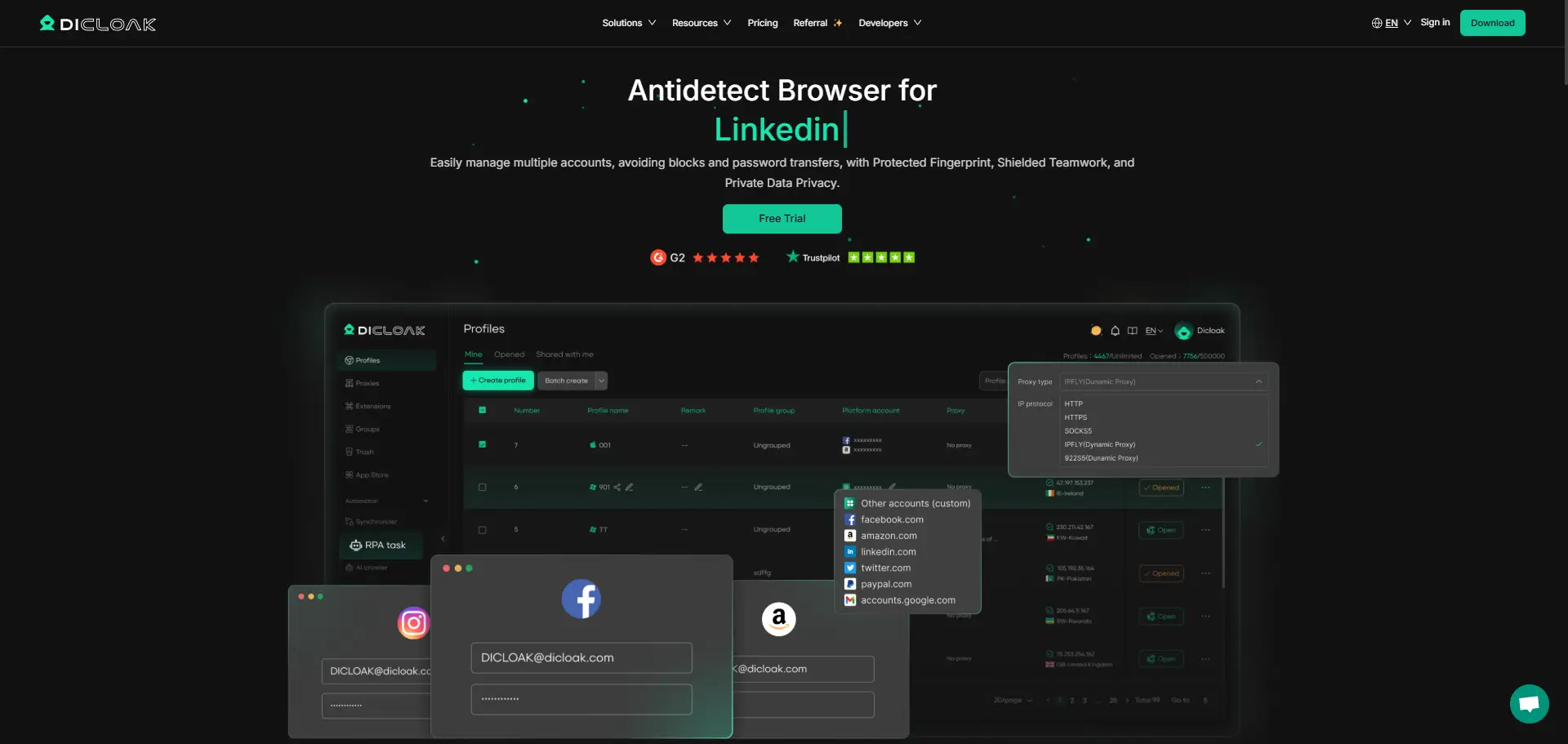
From the DICloak dashboard, create an isolated browser "profile" for your first LinkedIn account. Click the "Create an profile" button to generate a new virtual profile, which will automatically be assigned a unique digital fingerprint.
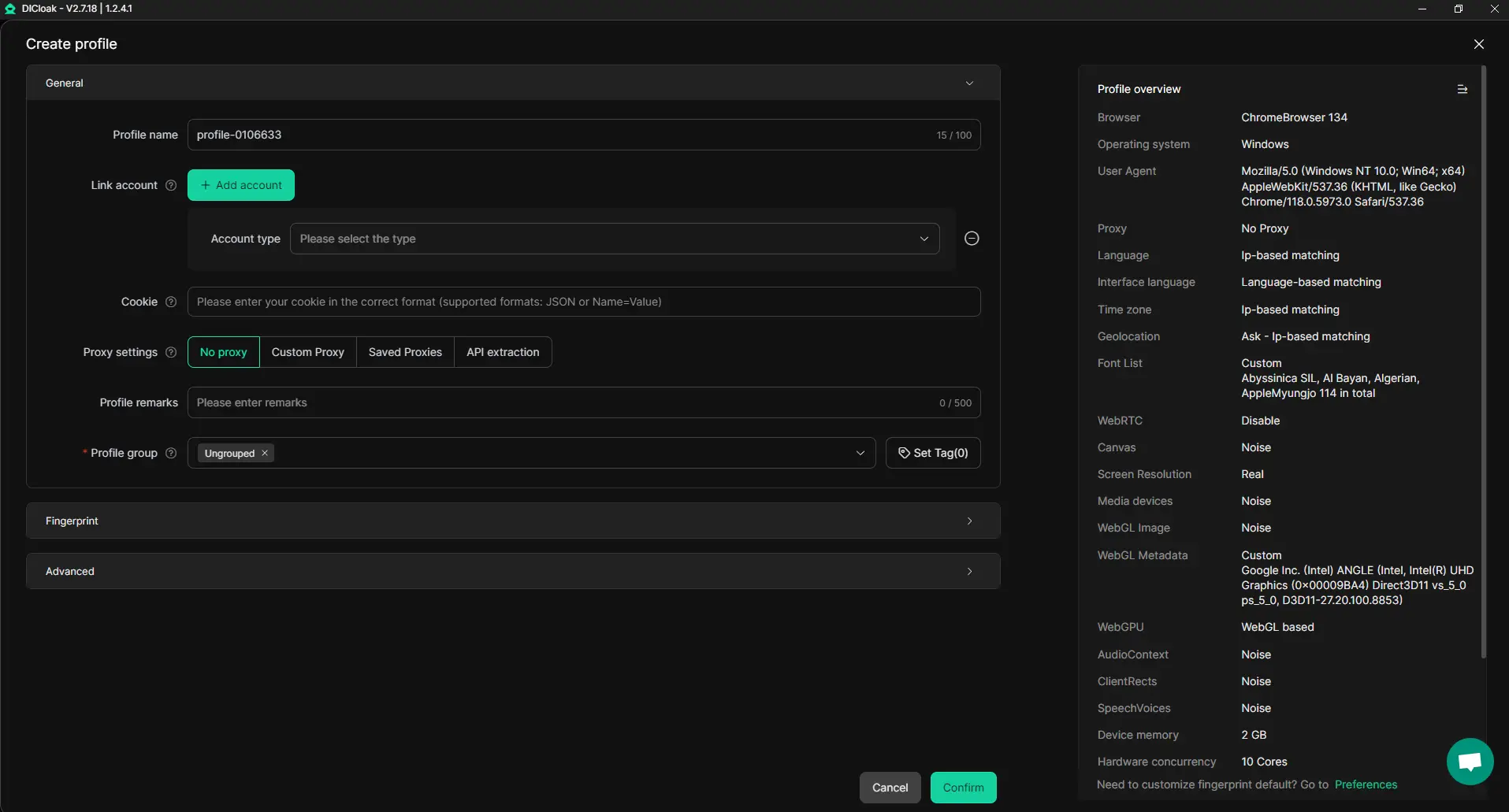
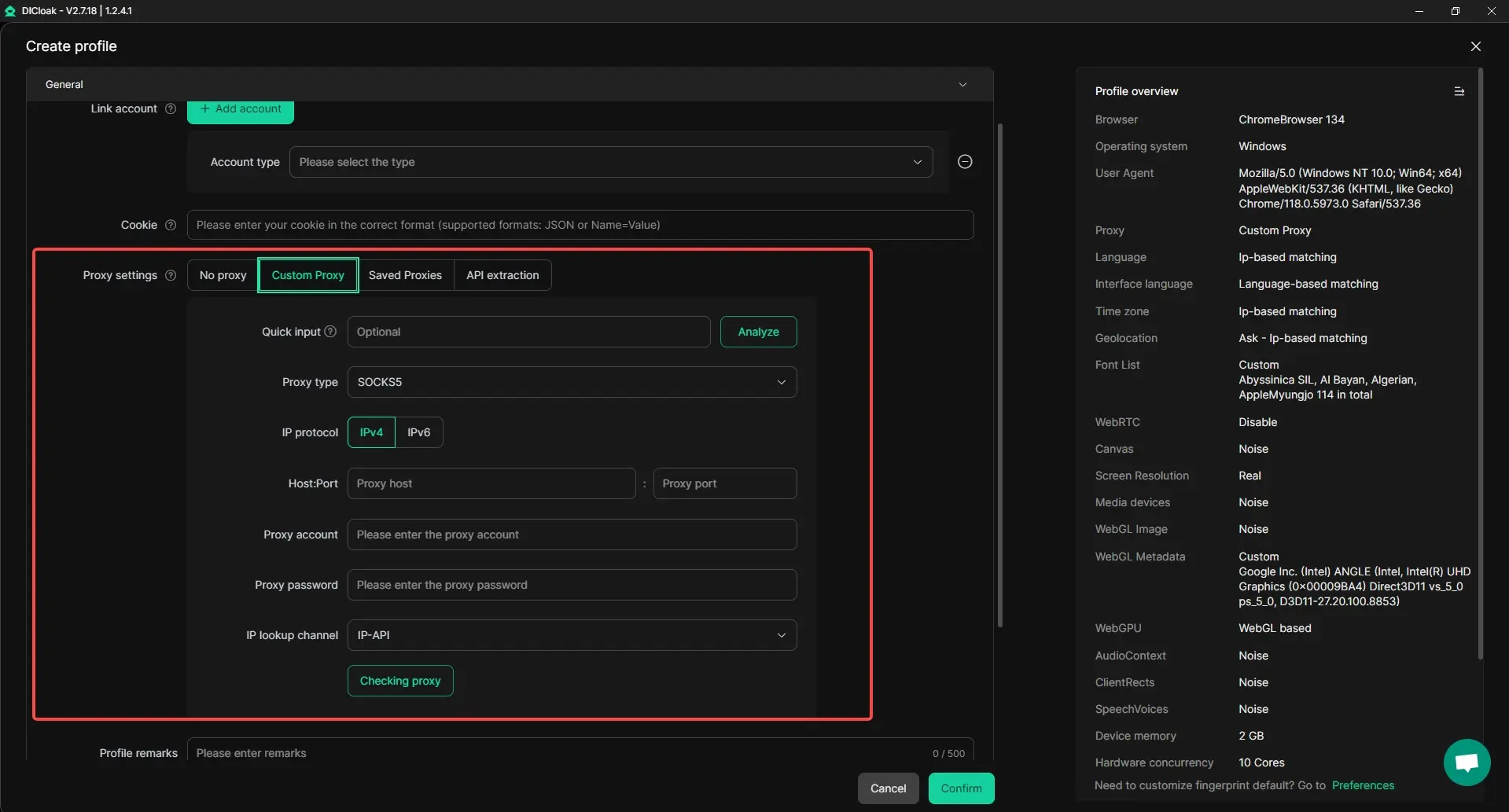
Step 3: Configure Your Profile with a Proxy
This is a critical step for maintaining asset integrity. Assign a unique proxy to each profile to ensure every account has a distinct IP address. In the profile settings, connect a third-party proxy (high-quality residential proxy recommended) and use the built-in tool to test the IP connection status.
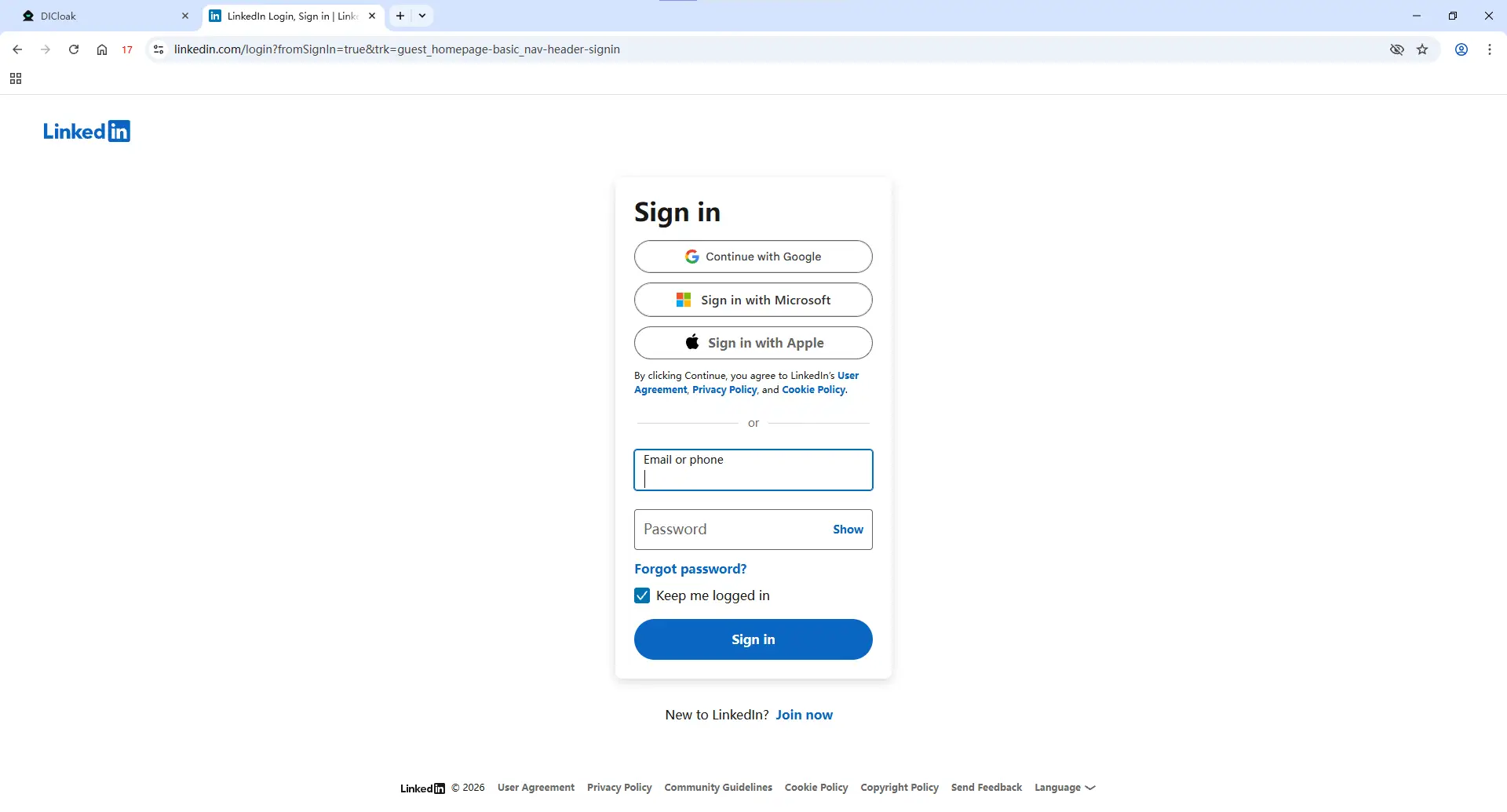
Step 4: Launch the Profile and Log In to LinkedIn
Click the "Open it" button to launch a new, completely isolated browser window. Within this window, navigate to LinkedIn and log in to your first account. DICloak will securely save the browser session, so you won't need to re-enter credentials or 2FA codes for subsequent uses.
Step 5: Repeat for All Additional Accounts
To manage additional accounts, repeat steps 2-4 for every LinkedIn profile. Remember the golden rule: every new profile must be assigned its own unique proxy. This guarantees zero technical overlap between your accounts.
Essential Best Practices to Run Multiple LinkedIn Accounts Safely
Even with a powerful tool like DICloak, user behavior is critical for long-term success. These best practices form the strategic layer on top of the technical solution, ensuring your accounts appear natural, authentic, and valuable to the LinkedIn community.
- One Account, One Proxy: This is the cardinal rule. Always assign one unique, high-quality residential proxy to each DICloak profile. Never run multiple LinkedIn accounts on the same IP address, as this is the most common and easily detectable mistake.
- Optimize and Personalize Each Profile: Ensure every LinkedIn profile is fully completed and customized for its specific target persona. A high-quality photo, a compelling headline, and detailed experience make a profile look authentic and trustworthy, reducing suspicion.
- Maintain Human-Like Activity: Avoid aggressive automation or spammy behavior. LinkedIn's algorithms are designed to detect bot-like activity. Stagger connection requests, personalize messages, and engage in genuine conversations to fly under the radar.
- Create Individualized Content Strategies: Reinforce the unique identity of each profile by maintaining a separate content calendar. The posts, articles, and comments from one account should be tailored to its specific audience, distinct from the activity on your other profiles.
- Gradually Warm Up New Accounts: If creating new accounts, start with minimal activity and slowly increase it over several weeks. This mimics the natural growth pattern of a genuine user and helps you avoid triggering automated security alerts.
Combining these strategic practices with the technical security of DICloak creates a comprehensive and sustainable methodology for multi-account management.
Frequently Asked Questions (FAQs)
Here are answers to some common questions about running multiple LinkedIn accounts.
Is it possible to have two LinkedIn accounts with different emails?
While technically possible, it violates LinkedIn's user agreement, which states one personal account per individual. If you manage multiple accounts for legitimate business reasons, you must use a tool like the DICloak antidetect browser to isolate each account's digital fingerprint and prevent them from being linked and banned.
How can I run two different LinkedIn accounts from the same laptop or phone?
The safest method is to use an antidetect browser like DICloak. You create a separate, isolated browser profile for each LinkedIn account. Each profile has a unique digital identity, making it appear to LinkedIn as if it's being accessed from a completely different device.
Can two people on my team use the same LinkedIn account at the same time?
Yes, this is possible and safe if you use a tool like DICloak. Its team collaboration features allow you to share a browser profile securely. Your team member can access the account without needing to log in again or trigger 2FA prompts, as LinkedIn will see it as the same trusted device session.
How do I manage multiple LinkedIn accounts without getting banned?
The key is to avoid detection by ensuring each account has a unique digital fingerprint and IP address. Use an antidetect browser like DICloak to create isolated browsing profiles, and assign a dedicated residential proxy to each account. Additionally, avoid automation that violates LinkedIn's terms and maintain natural, human-like activity on each profile.
Why do my new LinkedIn accounts keep getting banned or restricted?
New accounts often get banned if they are created from an IP address or digital fingerprint that LinkedIn has already flagged as suspicious. This can happen if you have unstable network connections or have had previous accounts restricted. To avoid this, always create new accounts inside a clean browser profile in DICloak with a fresh, high-quality proxy.
Conclusion
While LinkedIn’s policies present a formidable challenge, operationalizing a multi-account strategy is a necessary component of modern business growth. Attempting to scale outreach with flawed workarounds like manual logins is no longer just ineffective—it's a direct threat to your digital assets.
The professional solution is clear: by combining the powerful technology of the DICloak antidetect browser with smart, human-centric best practices, you can confidently and safely run multiple LinkedIn accounts. This approach transforms a high-risk gamble into a secure, scalable, and highly effective business process designed for long-term success.
To scale your LinkedIn outreach without fear of getting banned, try DICloak's free plan and experience secure multi-account management firsthand.
 Web Proxy Tools
 Free Tools
 Cookie Plugin
 UA Generator
 MAC Address Generator
 IP Generator
 IP Address List
 2FA Code Generator
 World Clock
 Anonymous Check
 WebRTC Leak Test
 UUID Generator
 Free Web Proxy Site
 Proxy Checker
 FB Ad Checker
 AI Web Scraping
 Free SMM Tools
 Twitter Shadowban Checker
 Instagram Name Checker
 UTM Generator
 Username Generator
 AI Hashtag Generator
 LinkedIn Headline Generator
 Social Media Image Resizer