Sharing an ElevenLabs account is not just about letting another teammate generate audio. The same Workspace may contain cloned Voices, Studio Projects, Agents, API access, and a shared credit pool. As of July 2026, one ElevenLabs resource can be shared with up to 100 users, groups, or Service Accounts, while the Scale and Business plans include 3 and 10 Workspace seats. These limits make access planning more important than simply passing one login around the team.
This guide explains what ElevenLabs allows, how seats and roles affect what teammates can use or change, and when to choose a Workspace, separate accounts, a password manager, or a controlled browser Profile. When an authorized team must keep using one existing company account, a dedicated Profile with DICloak can reduce direct password sharing, while ElevenLabs permissions still control access inside the platform.
Can You Share an ElevenLabs Account with Your Team?
Yes. ElevenLabs lets teams add members through a Workspace when the subscription includes multiple seats. Each teammate uses their own account, so the team can collaborate without passing around the account owner’s login details.
This setup fits real production work because team members often need different resources. A voice producer may need to use and edit a Voice, while a video editor may only need a Studio Project. A client or manager may only need access to review the final output. Through a Workspace, the owner can share selected Voices, Projects, Agents, and other resources instead of opening the entire account to everyone.
ElevenLabs’ team model is based on member access and resource sharing rather than several people using the same personal login. Simply hiding the password does not create separate ElevenLabs identities or permissions. When several people work through one login, their activity, credit use, and account changes remain tied to the same identity, making responsibility harder to track.
For most teams, adding individual Workspace members should be the first option. Whether this is available depends on the current plan, included seats, and Workspace settings. Before choosing another sharing method, check what your subscription supports and review the latest account access rules.
How Do ElevenLabs Pricing, Seats, and Team Permissions Work?
ElevenLabs separates team access into two layers: a seat controls which products a member can use and how they consume credits, while a resource role controls what they can do with a specific Voice, Project, Agent, or file. Buying a higher plan may add Full Seats, but it does not give every teammate a separate credit balance.
Which Plans Support the Team Access You Need?
ElevenLabs currently offers Full Seats and Basic Seats. Full Seats provide full access to ElevenCreative, ElevenAgents, and ElevenAPI. Basic Seats are aimed at teammates who mainly use Agents or the API, or who need limited creative generation.
The plan choice matters most when several people need full creative access:
| Plan |
Included Full Seats |
Included Basic Seats |
What it means for a team |
| Free through Pro |
1 |
20 |
One main creative user, plus members with more limited access |
| Scale |
3 |
20 |
Suitable for a small team with several active creators |
| Business |
10 |
20 |
Better for a larger production team |
| Enterprise |
Negotiated |
Contract-based |
Designed for teams that need more seats and custom controls |
Scale is currently listed at $299 per month with three Workspace Seats, while Business is $990 per month with ten. Standard plans do not support buying extra Full Seats separately; teams that need more must upgrade, free an existing Full Seat, or discuss additional seats under an Enterprise plan.
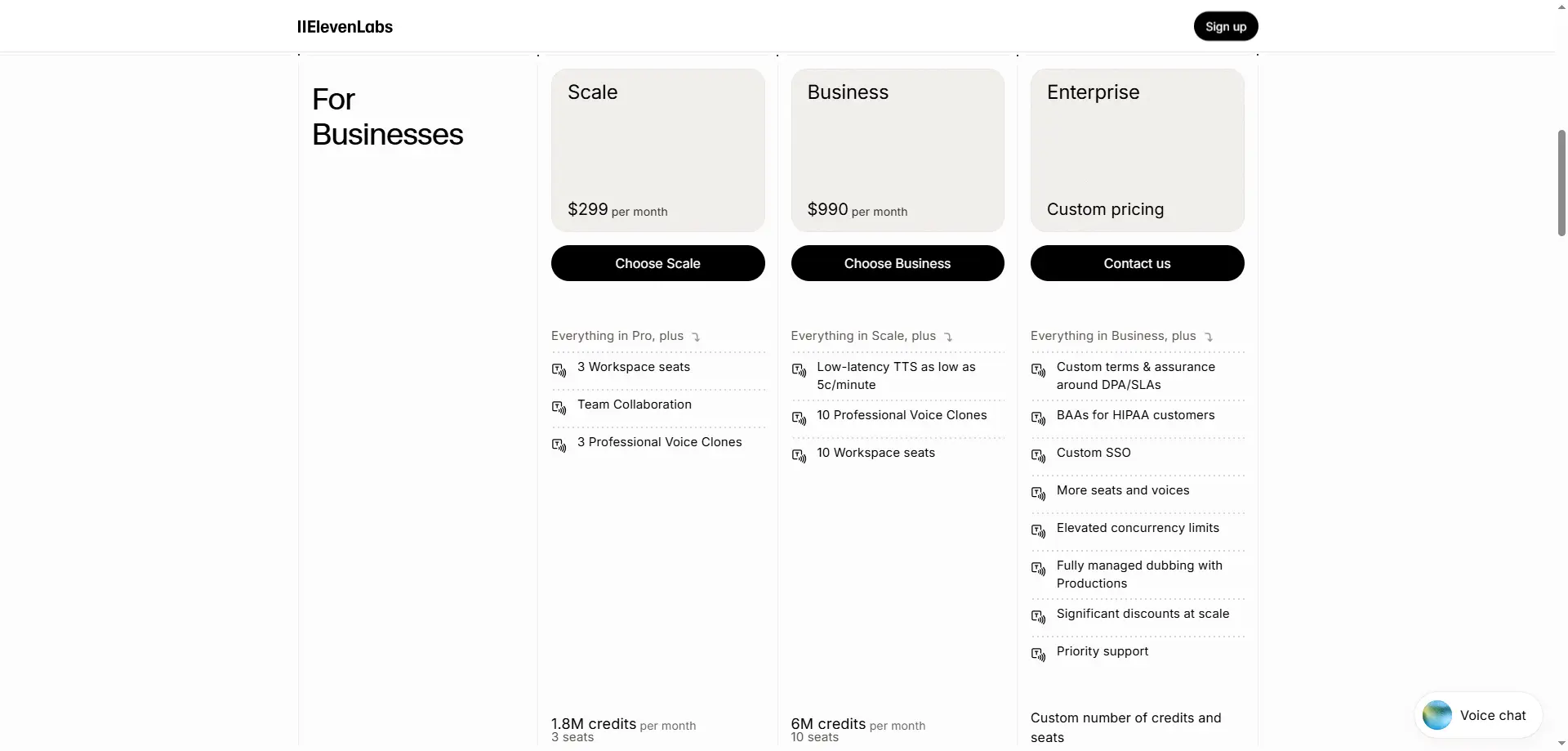
A Basic Seat is not a separate low-cost subscription. The member uses the same Workspace credit pool and does not receive extra credits. Basic Seat members can use ElevenAgents and ElevenAPI, browse shared assets, and generate up to 50,000 credits of ElevenCreative content per billing period from that shared pool.
For example, inviting ten Basic Seat members does not add 500,000 credits to the account. If several editors generate audio, images, or videos, their work still reduces the credits available to the rest of the Workspace. Teams should upgrade to more Full Seats only when several members truly need regular ElevenCreative access, not simply because they need to review or use one shared asset.
What Can a Teammate See, Use, Edit, or Delete?
A seat and a permission role solve different problems. The seat controls product access, while the role controls access to a particular resource. A Viewer may still use a Voice to generate text-to-speech content or listen to audio in a Studio Project. It should not be treated as a role that can never consume credits or use an asset.
Admin access should also be limited. A resource Admin can delete the resource and change its sharing permissions, while a Workspace Admin has Admin access across all resources in the Workspace. Giving a temporary editor Workspace Admin access creates far more control than most production tasks require.
| Role |
What the member can do |
Suitable use |
| Viewer |
Discover, view, and use the resource |
Client review or limited use |
| Editor |
Use and edit the resource |
Voice production or project editing |
| Admin |
Edit, delete, and manage sharing |
Resource owner or team lead |
| Workspace Admin |
Manage members and hold Admin access across Workspace resources |
Workspace owner or trusted administrator |
What Are the Best Ways to Share ElevenLabs Access?
The best method depends on whether teammates need shared resources, independent production, or access to one existing login. For most long-term teams, an ElevenLabs Workspace should be the first choice because each member uses a separate identity and receives only the access needed for their work.
| Access method |
Best for |
Main advantage |
Main limitation |
| ElevenLabs Workspace |
Long-term team collaboration |
Individual identities and resource permissions |
Depends on available seats and plan limits |
| Separate ElevenLabs accounts |
Independent creators or departments |
Separate billing, credits, and ownership |
Voices and Projects may become fragmented |
| Password manager |
Small, trusted teams with occasional access |
Avoids sending credentials through chat or email |
Members still use one identity and may see the password |
| Controlled browser Profile |
Authorized access to one existing company account |
Shares a saved login session without directly sending the password |
Does not create separate ElevenLabs roles |
| Remote desktop |
Rare or closely supervised access |
Keeps the account on one controlled device |
Slow and difficult for regular team collaboration |
Add Members Through an ElevenLabs Workspace
A Workspace is the strongest option when the current plan includes enough seats and the team needs to share Voices, Studio Projects, Agents, or other resources. Each teammate signs in with their own account, so the owner can add, change, or remove access without changing the main login details.
This setup works well for a regular production team. A voice producer can edit a shared Voice, a video editor can work on a Studio Project, and a client reviewer can receive more limited access. Developers can also use separate API credentials or Service Accounts instead of relying on the account owner’s login.
Workspace access is especially useful when several people need to work at the same time. It separates member identities and supports resource roles, making it easier to control who can view, use, edit, delete, or share each asset.
Give Each Person a Separate ElevenLabs Account
Separate accounts make sense when each person creates their own content and does not need access to existing team Voices, Projects, or Agents. This approach gives each member control over their own subscription, credits, files, and API access.
The main problem is asset fragmentation. A Voice created in one account may not be available to another editor, and client Projects may become spread across several personal subscriptions. The team may also pay for the same features or unused credits more than once.
Separate accounts are better for independent work than shared production. They are less suitable when several people must continue working on the same Voice, Agent, or Studio Project.
Share Access Through a Password Manager
A team password manager can share ElevenLabs login credentials without placing them in email, chat, or a shared document. It may be enough for a small, trusted team that only needs occasional access to the same account.
However, a password manager does not create separate ElevenLabs identities or resource permissions. Everyone still works under one login, so credit use, project changes, and account actions remain tied to the same identity. Depending on the password manager and its settings, members may also be able to reveal, copy, or export the stored password.
A password manager is better than sending credentials through a message, but it is not ideal for regular production work. Teams that need separate roles should use a Workspace, while teams that need the existing login session without exposing the password may need a controlled browser Profile.
Share an Existing Login Through a Controlled Browser Profile
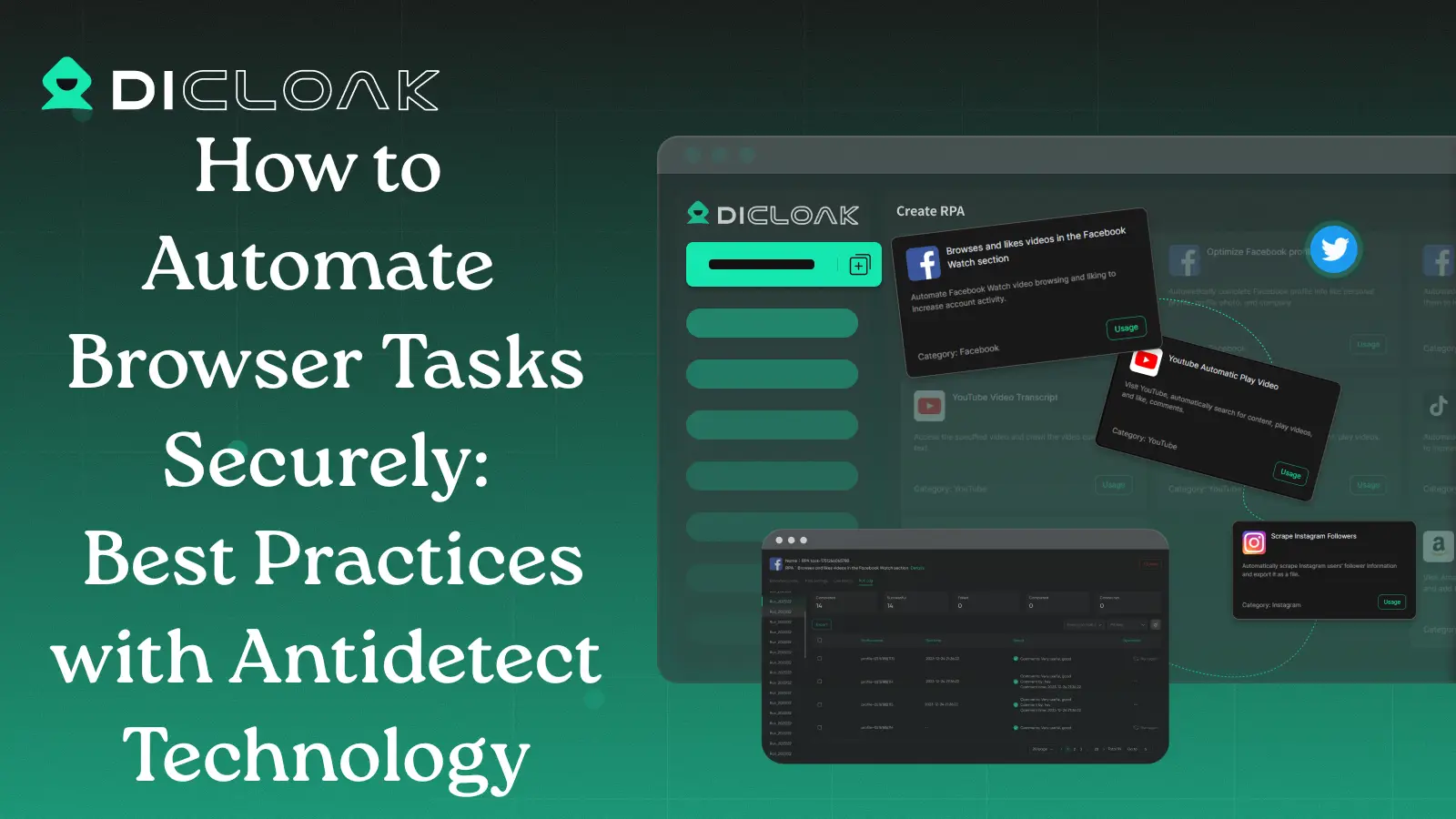
A controlled browser Profile may be useful when an authorized team must work inside one existing company account that already contains important Voices, Projects, Agents, or production history. It reduces the need to send the password directly. For example, an agency may need to give a temporary editor access to a client account during an active project. With an antidetect browser like DICloak, the owner can keep the logged-in session inside a dedicated browser Profile, share that Profile with selected members, limit team access, and review operation logs.
This method controls access at the browser level. It does not give each user a separate ElevenLabs identity, credit balance, or resource role. The team should therefore use it only for company-owned accounts, authorized members, and work that cannot be handled through Workspace access or separate accounts.
Remote desktop access is another option when the account must remain on one company device. It gives the owner close control, but it can slow daily work and becomes difficult when several people need access. Once a team decides that an existing login must be shared, the next step is to create a dedicated ElevenLabs Profile and assign access without sending the password.
How to Share an ElevenLabs Account with DICloak Without Sharing the Password
When an authorized team must use one existing ElevenLabs login, the account owner can keep the signed-in session inside a dedicated browser Profile and share that Profile with selected members. This reduces direct password sharing.
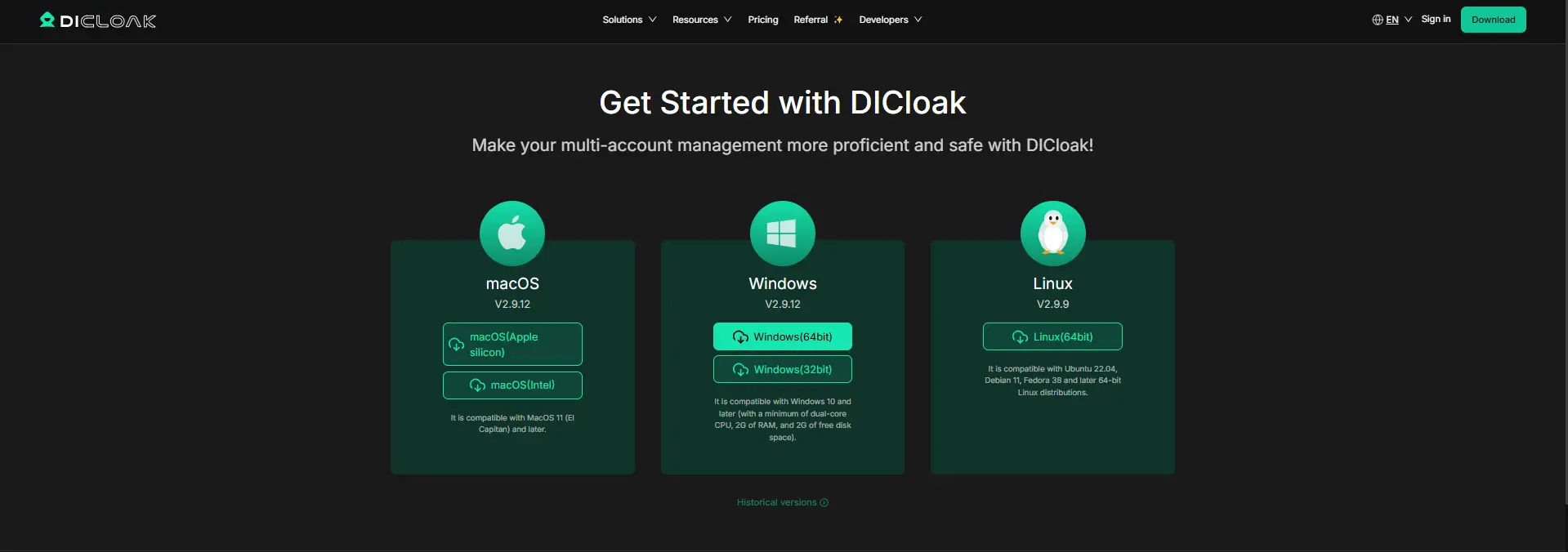
1. Install DICloak and Choose a Plan
Download the application, create an account, and choose a plan based on the number of members and Profiles you need. Each teammate should use a separate DICloak account instead of sharing the administrator login.
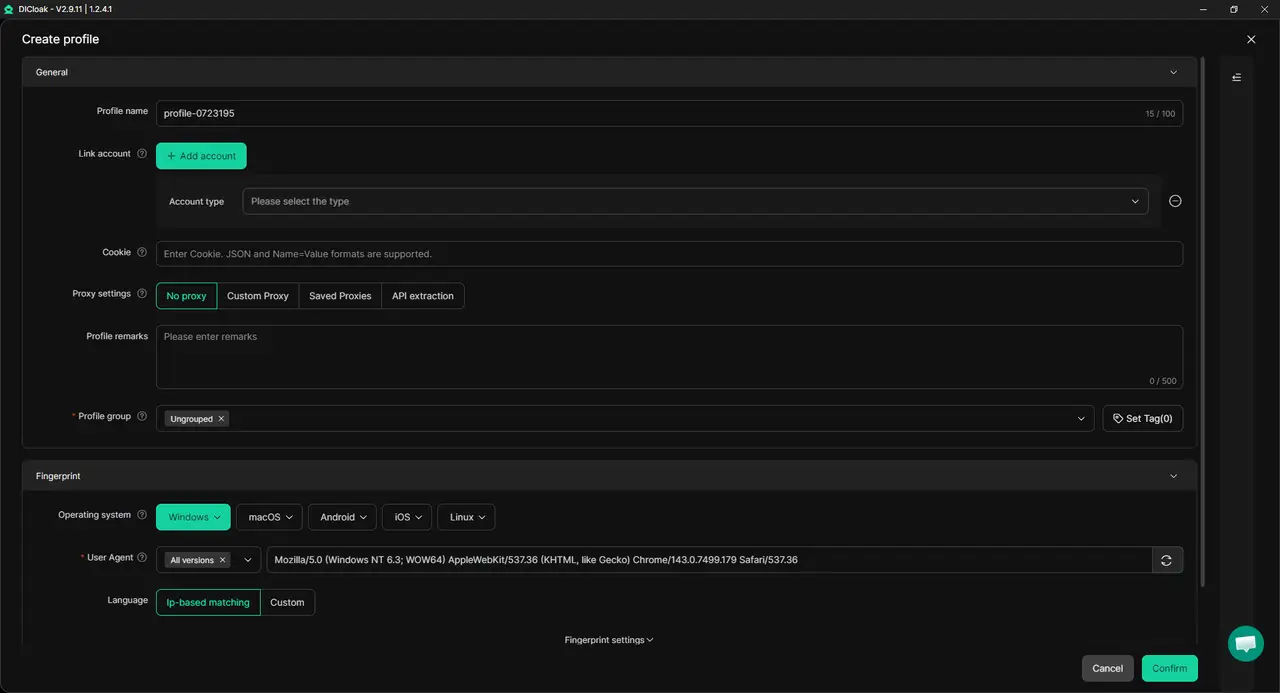
2. Create a Dedicated ElevenLabs Profile
Create one Profile only for ElevenLabs and use a clear name, such as ElevenLabs – Client A or ElevenLabs – Voice Team. This keeps its cookies and sessions separate from personal accounts and other client work. Keep the Profile settings stable. Add your own proxy only when the workflow requires a specific network or region.
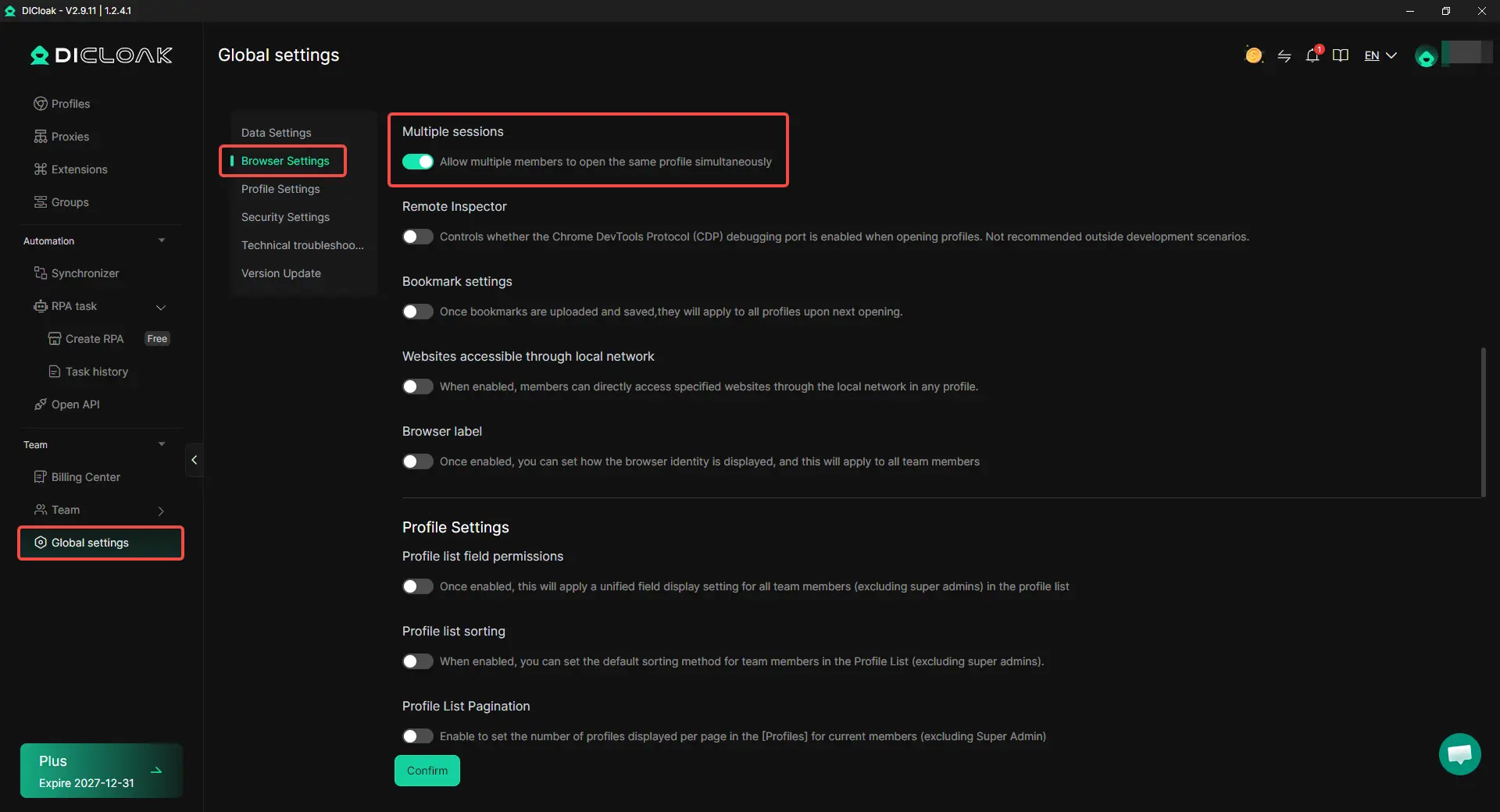
3. Sign In and Set the Session Rules
The account owner should sign in to ElevenLabs and complete any required verification. Assigned members can then open the saved session without receiving the password. Keep Multiple sessions disabled when members can work one after another. Enable it only when parallel access is necessary, since simultaneous editing or generation may cause duplicate work or credit conflicts.
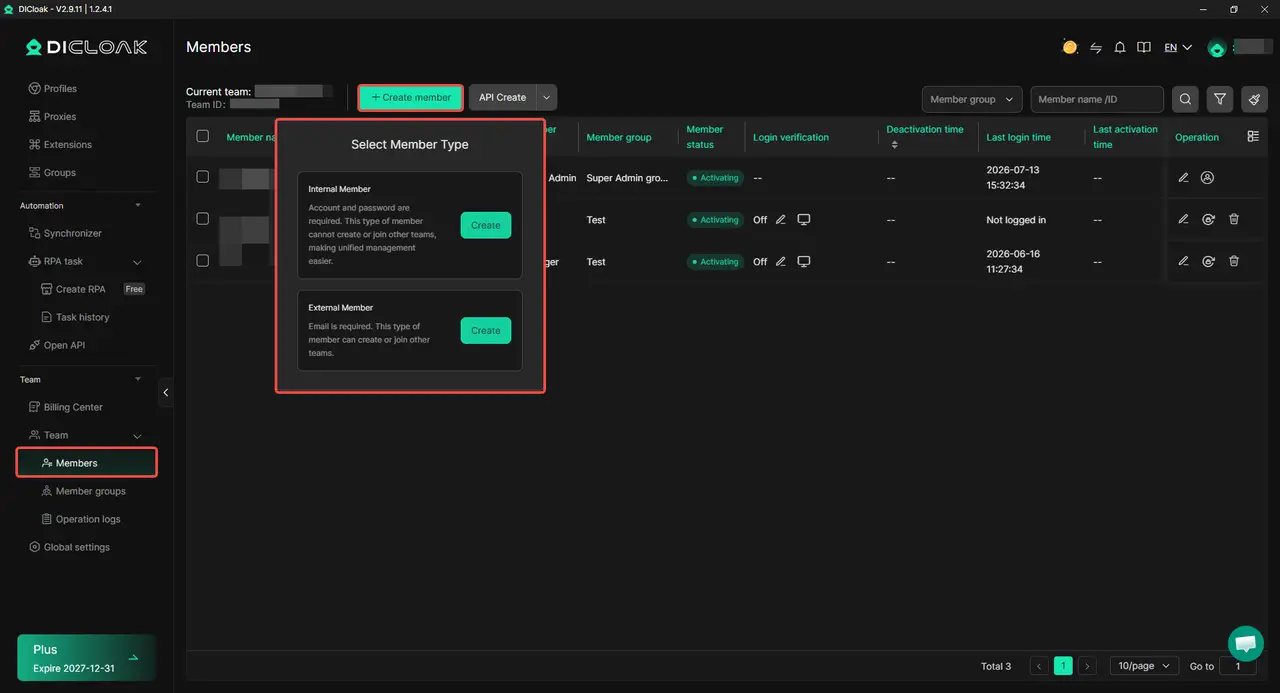
4. Share the Profile with Selected Members
Use profile sharing and team permissions to assign the ElevenLabs Profile only to the people who need it. A temporary editor should not receive access to unrelated client profiles or team settings. This controls who can open the browser session, but it does not create separate ElevenLabs roles, credits, or resource permissions.
5. Review and Remove Access
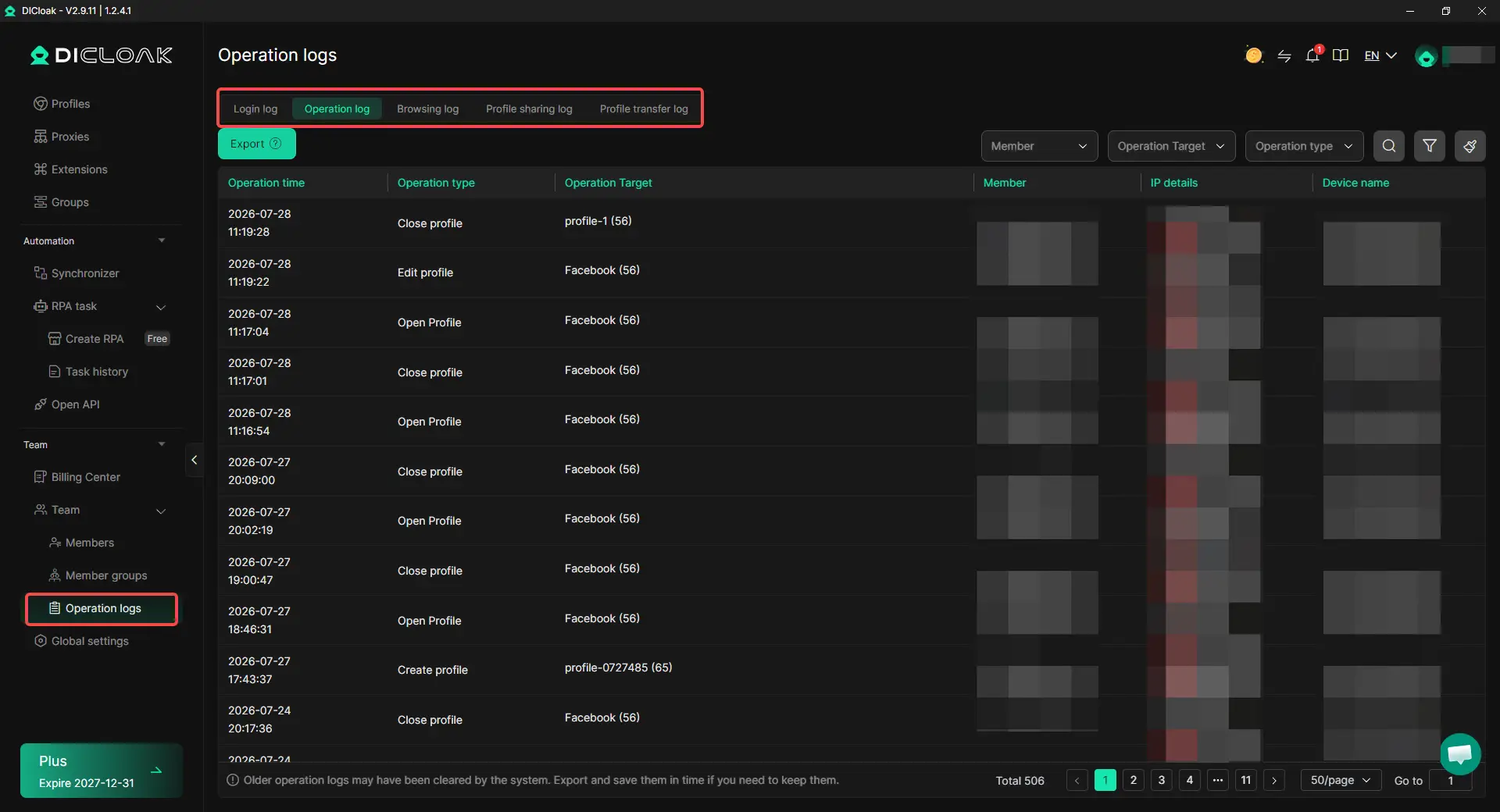
Use operation logs to check who opened the Profile and when. Remove the Profile assignment when a project ends or a member changes roles. Also review any ElevenLabs Workspace roles, shared resources, Service Accounts, and API keys. Access is not fully removed until every active entry point has been closed.
Add Extra Controls to a Shared ElevenLabs Account with DICloak
A shared login may contain more than the Voice or Project a teammate needs. With DICloak, the account owner can add browser-level controls to reduce access to passwords, billing details, API settings, and unrelated pages.
- Hide the password: Store the ElevenLabs login in the built-in password manager so assigned members can sign in without viewing the raw password.
- Restrict website access: Allow access only to approved ElevenLabs pages and block unrelated websites inside the Profile.
- Limit browser changes: Prevent members from opening developer tools or installing unapproved extensions that could expose cookies or session data.
- Hide sensitive page elements: Use Web Element Hider to conceal areas such as billing, subscription details, API settings, or account controls that the member does not need.
What Should Teams Know Before Using or Sharing ElevenLabs?
Before adding a teammate, decide what they need, what they can change, and when their access should end. Broad permissions may feel easier, but they make Voices, credits, Projects, and API access harder to control.
- Control shared Voices and credits. A Voice may be a valuable brand, client, or creator asset. Letting someone use it should not automatically let them edit, delete, or share it. A Viewer may still be able to generate audio, so assign access based on the task. For large generation jobs, name one owner and agree on the expected credit use first.
- Keep API access separate. Developers and automated workflows rarely need the main account login. Use separate API keys or Service Accounts for production, testing, and temporary projects. Give each credential access only to the required Voices, Agents, or Knowledge Bases, then revoke it when the work ends.
- Limit temporary access. Set the resource scope, permission level, and end date before inviting a freelancer or client reviewer. Core Voices and Agents should usually be created by long-term internal members. When a project ends, remove the member and review Workspace roles, shared resources, Service Accounts, and API keys.
Frequently Asked Questions About Sharing an ElevenLabs Account
Can multiple people use one ElevenLabs account at the same time?
ElevenLabs Workspace members can work under separate identities, which is the better setup for regular team collaboration. Several people using one shared login may create editing conflicts, unclear credit use, and actions that cannot be linked to a specific ElevenLabs user. If an authorized team must use one existing login, avoid concurrent access unless the workflow clearly requires it.
Can I share only one ElevenLabs Voice or Studio Project?
Yes. ElevenLabs supports resource-level sharing, so you can give a user, group, or Service Account access to a specific Voice, Project, Agent, folder, or other supported resource. This is usually better than opening the whole account because a video editor may need one Studio Project while a voice producer may only need a Voice and Pronunciation Dictionary.
Can an ElevenLabs Viewer generate audio and use shared credits?
A Viewer may still be able to use a shared resource, such as generating text-to-speech audio with a Voice. Viewer access should therefore not be treated as fully read-only. Workspace members also use the shared credit pool, so adding teammates does not give each person a separate balance.
Does a developer need the main ElevenLabs login or API key?
Usually not. Developers and automated workflows should use a separate API key or Service Account with access only to the required Voices, Agents, Knowledge Bases, or endpoints. Separate credentials make it easier to set usage limits and remove access without changing the account owner’s login or disrupting other integrations.
What can I do if my ElevenLabs plan does not include enough team seats?
First compare upgrading the Workspace with giving independent users separate ElevenLabs accounts. If an authorized team must continue using one company-owned login and its existing resources, a controlled browser Profile with DICloak Antidetect Browser can share the saved session without directly sending the password.
Conclusion
Sharing an ElevenLabs account with a team should start with the official Workspace, seat, and resource permission options. Each member should receive only the access needed for specific Voices, Projects, Agents, files, or API workflows. Teams should also check how credits are shared, what Viewer, Editor, Admin, and Workspace Admin can do, and how access will be removed when a project ends. When a company-owned account must be used by authorized members, a dedicated browser Profile with DICloak can share the saved session without directly sending the password. The safest way to share ElevenLabs is to control each person’s resources, actions, and access period, not simply hide the main account password.
 Web Proxy Tools
 Free Tools
 Cookie Plugin
 UA Generator
 MAC Address Generator
 IP Generator
 IP Address List
 2FA Code Generator
 World Clock
 Anonymous Check
 WebRTC Leak Test
 UUID Generator
 Free Web Proxy Site
 Proxy Checker
 FB Ad Checker
 AI Web Scraping
 Free SMM Tools
 Twitter Shadowban Checker
 Instagram Name Checker
 UTM Generator
 Username Generator
 AI Hashtag Generator
 LinkedIn Headline Generator
 Social Media Image Resizer