You launch a campaign, set your budget, and bids start flying, yet the results barely match your targeting, or your costs creep up without a clear reason. For anyone managing digital ads, the question isn’t just how to buy placements, but how to make sense of the dozens of steps that happen between budget and results. That’s where what is programmatic advertising becomes a daily decision, not just a definition.
Most guides make programmatic advertising sound automatic and simple. In reality, the “programmatic” part hides a web of real-time auctions, data signals, and algorithmic choices, any of which can quietly drain your budget or expose you to fraud, if you’re not careful. The pitch is efficiency, but the risk is losing track of where your ads appear, or how your budget is really being spent.
If you’ve tried to track conversions across multiple ad platforms, or worried about why your click-through rate dropped after a platform update, you know that “programmatic ad buying explained” isn’t just theory. The real challenge is understanding how these automated systems actually buy and place your ads, what levers you can control, and where the biggest risks hide. Programmatic advertising definition alone doesn’t help when you’re troubleshooting why your campaign underperformed or got flagged.
To get past the jargon and see how programmatic really works, start with the core process, how buying, targeting, and bidding actually happen behind the scenes.
What Problem Does Programmatic Advertising Actually Solve?
Manual ad buying made sense when you only ran a few campaigns, but digital ad markets move too fast for human hands now. The real pain programmatic advertising solves is the bottleneck of speed, scale, and targeting, manual buying just can’t keep up.
Manual Media Buying: Where Traditional Digital Ads Fall Short
Before automation, running a digital ad campaign meant slow, manual steps that didn’t scale. Problems showed up fast:
- Each placement required back-and-forth negotiation, wasting hours per ad slot.
- Audience targeting was blunt: you bought from whole sites or broad categories, not user-level signals.
- Campaign adjustments happened in days, not minutes; if performance dropped, you burned more budget before reacting.
Even when teams tried to coordinate across platforms, the manual process meant mistakes slipped through. You might overpay for inventory or miss out on the best audience segments entirely.
The Need for Automation and Real-Time Decisions
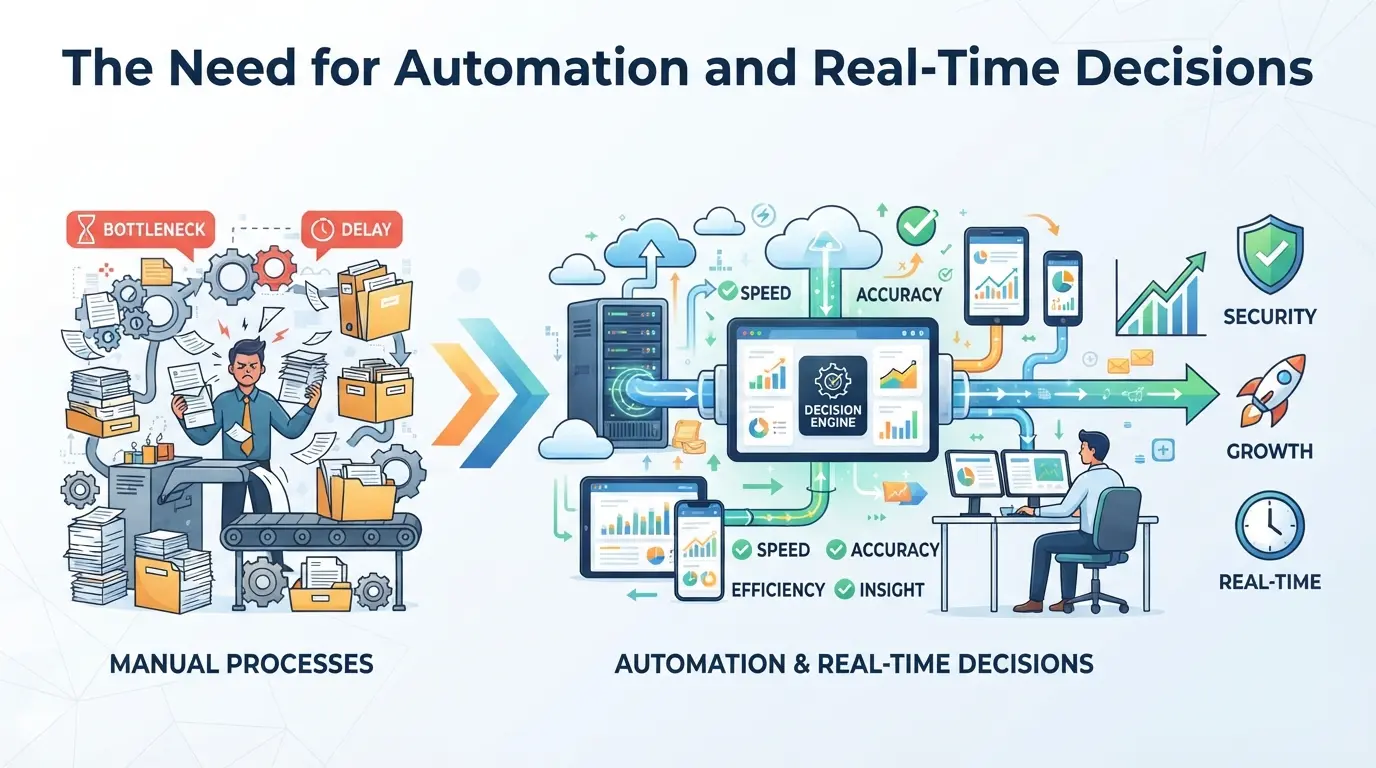
What changed wasn’t just the volume of ads, but the demand for smarter, faster decisions. Imagine launching a global campaign, hundreds of audience slices, thousands of possible placements, and budgets that shift daily. No human team can manually review, negotiate, and improve every slot in real time. That’s where programmatic comes in: automated platforms use algorithms to bid, buy, and place ads across exchanges in milliseconds, based on live data.
But here’s where the tradeoffs get real. Automation means you trust the system to buy on your behalf, but if you don’t set clear parameters, things can go sideways. For example, if your targeting is too loose, your ads might appear on low-quality sites or reach irrelevant users, draining your budget with little return. On the other hand, if your rules are too strict, you’ll miss out on new audiences or pay more for narrow segments. Some teams find that after switching to programmatic, their clickthrough rate drops or their brand appears next to unwanted content, because they didn’t fully control the algorithm’s decisions. The speed is an advantage, but without the right checks, it’s easy to lose track of spend or watch performance tank overnight.
That’s why the push for real-time, automated ad buying happened: not just to save time, but to unlock targeting and optimization that manual teams simply can’t match. The next step is to break down what is programmatic advertising in practice, how it actually works, and what that means for your campaigns.
What Is Programmatic Advertising? The 2026 Definition and Key Concepts
Programmatic advertising means using automated software to buy and place ads in real time, often through online auctions. Instead of calling sales reps or signing direct deals, you set your campaign rules, machines handle the bidding and placement in milliseconds. This system is now the main engine behind most digital ad buying, from social feeds to banner ads on news sites.
How Programmatic Ad Buying Works in 2026
Real-time auctions and automated bidding have replaced most manual buying. Advertisers set budgets and targeting; algorithms bid for each ad impression as users load pages or apps. This process relies on several key players:
- Advertisers: Set campaign goals and budgets.
- Publishers: Offer ad space on their sites or apps.
- Demand-side platforms (DSPs), supply-side platforms (SSPs), and ad exchanges: DSPs help advertisers bid; SSPs help publishers sell; ad exchanges connect the two.
Without these layers, it’s nearly impossible to reach millions of users at scale or adapt bids based on live performance.
Main Types of Programmatic Deals
Not every programmatic buy runs through the same kind of auction. The most common form is the open auction, also called real-time bidding (RTB). Here, any advertiser can bid on every available impression, and the highest bid usually wins. This system favors reach and speed, but you rarely know exactly where your ads will appear, brand safety and fraud are real concerns.
Private marketplaces (PMPs) offer more control. Publishers invite select advertisers to bid on premium inventory, often with stricter requirements. This can mean better placements but often at higher cost and with more negotiation. Programmatic guaranteed and preferred deals skip the auction for some or all impressions. You agree on price and volume in advance, locking in delivery but giving up the flexibility to back out if performance drops.
Take an example: if you’re running a campaign for a new product launch, open auctions might get you massive reach quickly, but your ads could show up on sites that don’t fit your brand. A PMP or guaranteed deal costs more, but you know the placements. The main tradeoff is between control and scale, chasing both at once can lead to wasted spend or campaign drift.
If you don’t know which type of deal you’re using, or why your campaign switched from one to another, errors can creep in fast. The next section digs into what can go wrong, and why even experienced buyers run into trouble with programmatic systems.
What Can Go Wrong? Common Risks and Mistakes in Programmatic Advertising
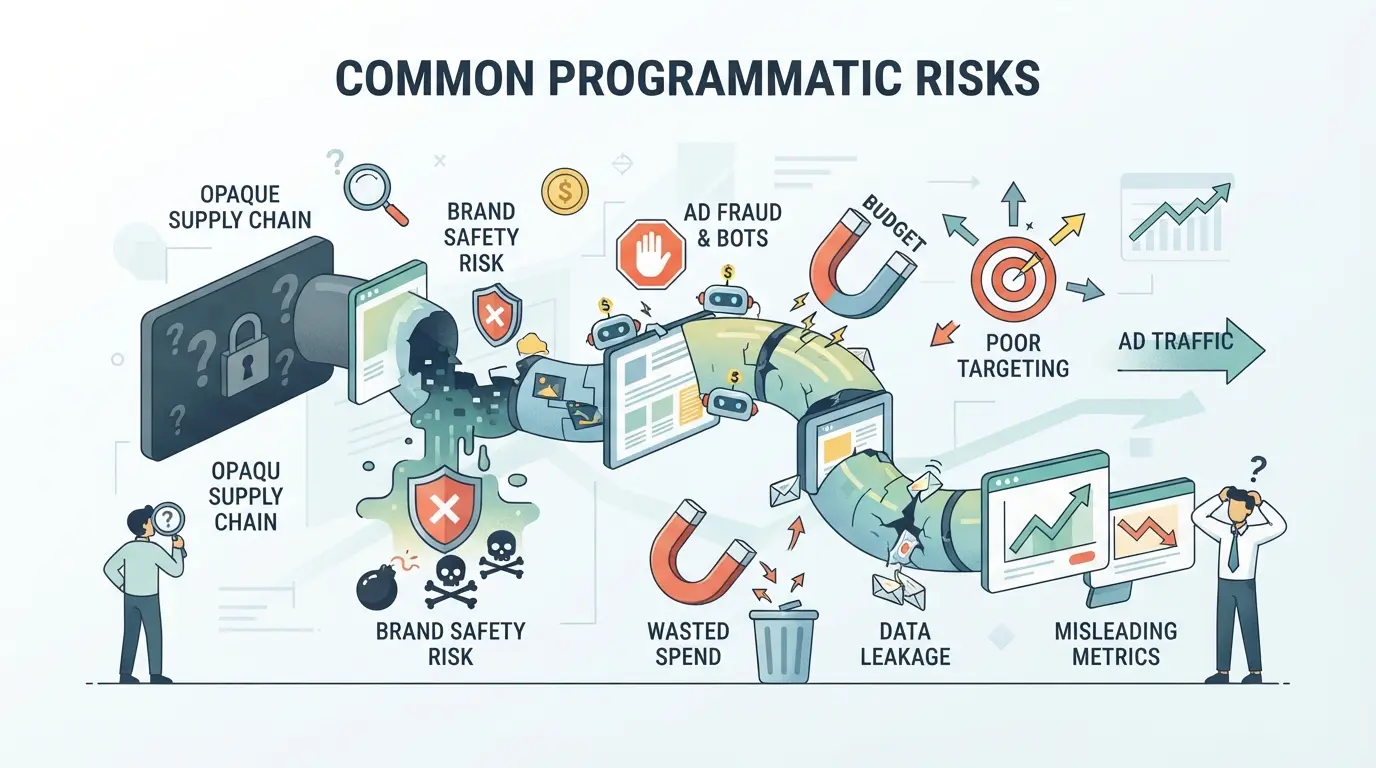
When programmatic ad buying explained in theory meets real-world campaigns, the biggest risks are wasted spend, fraud, and brand safety failures. Most costly problems trace back to blind spots in setup or weak controls.
Ad Fraud and Invalid Traffic: How Bots and Fake Impressions Drain Budgets
Fake clicks and impressions can eat up your budget without reaching real people. Watch out for sudden spikes in clicks, traffic from odd countries, or sites with no real audience. Set up regular auditing and use fraud detection tools, missing this step often means you’re paying for traffic that never converts.
Poor Targeting and Overlapping Audiences
If audience segments overlap or targeting rules are too broad, your ads reach the same users too often, or hit people who never convert. Frequency capping errors are common, especially when running across several platforms at once.
Warning: Overlapping segments and weak caps push costs up and conversions down.
- What can go wrong: Impressions get wasted, users see the same ad ten times, and budgets drain with no lift in sales.
- Safer move: Map your audiences, set strict frequency caps, and double-check for overlap, especially after importing lists or copying campaigns between channels.
Brand Safety and Ad Placement Issues
Your ad can end up on low-quality or unsafe sites if you don’t use strict blocklists or allowlists. That means a brand ad might show next to fake news, mature content, or irrelevant material. Actively manage site lists and review placements, unchecked, you risk damage that can take months to undo.
How Does a Programmatic Campaign Actually Run? Step-by-Step Workflow for 2026
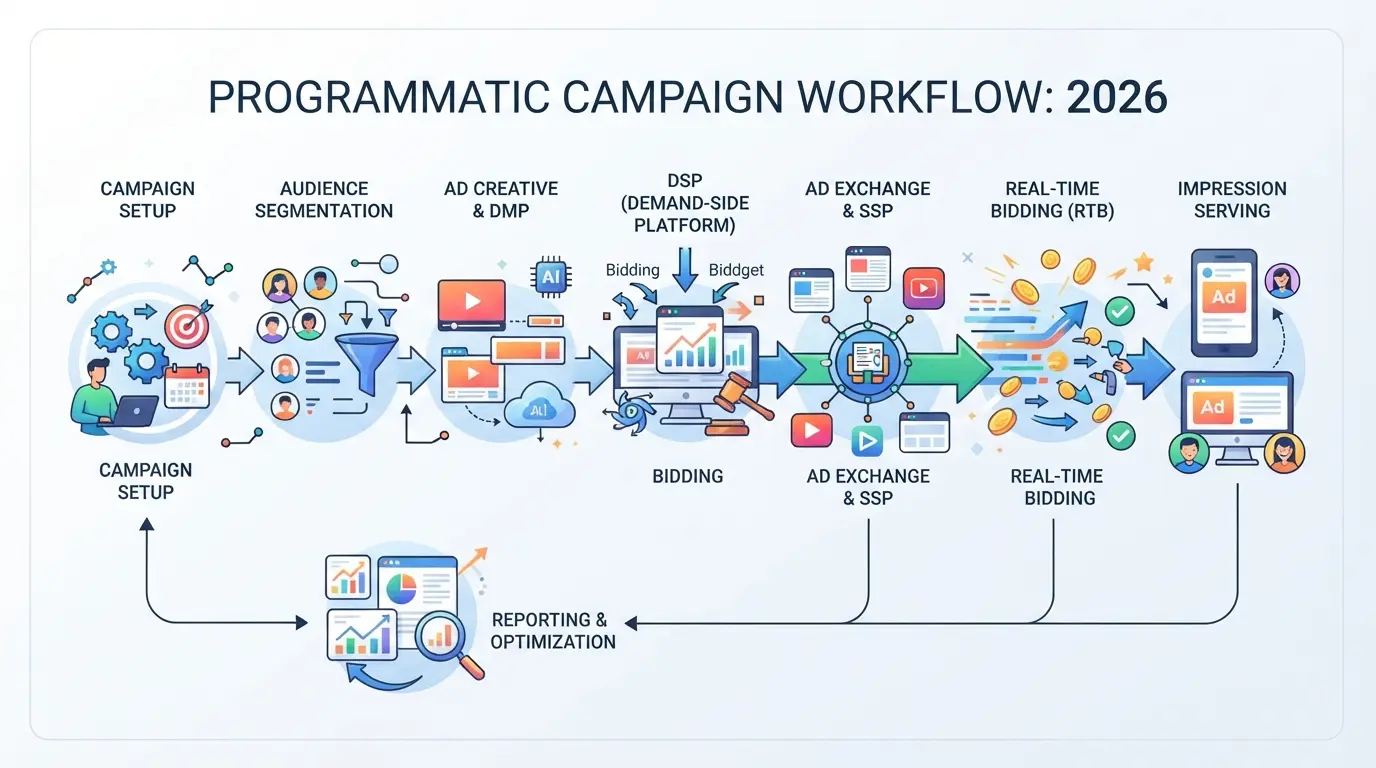
You don’t get clean results from programmatic ad buying by just uploading a banner and hitting “launch.” Real-world campaigns follow a set workflow, miss a step, and you either waste budget, hit targeting issues, or lose track of performance. Here’s the process, stripped down to what actually matters in 2026.
Step 1: Define Goals and Target Audience
- Write down one clear campaign goal, lead gen, sales, or awareness.
- Build or import audience segments (retargeting, lookalike, or custom lists).
- Double-check your audience rules. If your segment is too broad, you’ll burn through budget fast with little effect.
Step 2: Choose Platforms and Set Budgets
- Pick demand-side platforms (DSPs) that reach your audience, don’t just default to the biggest name.
- Select inventory sources (web, mobile, connected TV).
- Set daily and total spend limits, set a hard cap to avoid runaway costs.
- Define bidding rules (manual or automated). If your CPMs spike unexpectedly, revisit bid settings before letting the algorithm run wild.
Step 3: Build Creatives and Launch
- Upload all ad formats you want to test (banners, video, native).
- Assign each creative to specific audience segments.
- Set frequency caps, without these, your ads can follow the same user too aggressively and drive up negative feedback.
- Launch the campaign. If assets fail to upload, check file specs and platform guidelines.
Step 4: Monitor, improve, and Avoid Pitfalls
- Check KPIs (CTR, CPA, viewability) daily, don’t rely on weekly reviews.
- Adjust targeting, creative, or bids at the first sign of underperformance.
- Watch for signs of fraud or bot activity, sudden spikes in traffic from one region often mean trouble. The biggest waste happens when you “set and forget”, dead spend piles up fastest when no one’s watching the numbers.
Managing Multiple Ad Platform Accounts in DICloak: Browser Profile, Proxy, and Team Controls
Running programmatic campaigns across more than one ad platform often means juggling separate account logins, browser sessions, and team members who need just enough access, but not too much. While “what is programmatic advertising” covers the technology, most teams hit real trouble when their workflows overlap, accounts mix browser data, or someone makes a change in the wrong place. If you operate more than one ad account for campaigns, using DICloak to separate browser sessions, assign proxies, and lock down team access helps keep campaign management organized and reduces the chance of errors and leaks. The scope here covers browser profile and team-access controls only; it does not alter the ad platforms themselves.
Isolate Each Ad Account with Separate Browser Profiles and Fingerprint Settings
Operators can create a dedicated DICloak browser profile for each ad platform account, keeping sessions, cookies, and storage apart. For each profile, it’s possible to configure browser-identification signals, such as User Agent, time zone, and language settings, to match the expected environment. For example, if one operator manages both Google Ads and Facebook Ads accounts, setting up a separate profile for each keeps their sessions and storage from ever mixing. The fingerprint settings are editable per profile, supporting teams who need to match specific device or network setups for different clients, but the effect is limited to the browser layer. 
User-Provided Proxy Configuration for Assigned Profiles
Some workflows require accounts to appear from different network locations, or to avoid IP overlap. Users can assign their own proxy to each DICloak profile, choosing HTTP, HTTPS, or SOCKS5 as needed. For example, a team might assign a SOCKS5 proxy with a US exit for one client and an HTTP proxy with a UK exit for another, verifying each with the built-in connectivity check before use. Operators are responsible for proxy quality, legality, and location; DICloak only stores and applies the user’s proxy settings per profile. 
Control Team Access and Permissions for Account Security
Managing multiple accounts with a team increases the risk of accidental changes and data exposure. In DICloak, admins can organize users into groups and limit each member’s access to only the profiles and functions they need. For example, a junior campaign manager might get access to view and open profiles for two clients, but not see sensitive fields or edit settings. These controls cover only browser profiles and DICloak workspace actions, they do not replace platform-level permissions or change ad account security inside the ad platform. 
With these controls in place, teams can keep programmatic ad workflows cleaner as campaign volume grows, making it easier to track results and spot issues, which ties directly into the next step: measuring what actually works.
How to Measure Programmatic Advertising Success: KPIs and Optimization in 2026
Tracking the right metrics shows whether your programmatic campaigns actually drive results or just spend budget. Skip the vanity stats, focus on what ties spend to revenue.
Essential KPIs for Programmatic Campaigns
Impressions and clicks set the stage, but smart campaigns watch click-through rate (CTR), cost per acquisition (CPA), return on ad spend (ROAS), conversion rate, and viewability. If you don’t tie these to real conversions, you’re just guessing at impact. When a campaign shows high clicks but poor CPA or ROAS, you’re buying attention, not results.
How to Analyze and improve Results
Once you see the numbers, act fast. Small changes can swing outcomes.
- Run A/B tests on creative or targeting, stop what underperforms within days, not weeks.
- Shift budget to channels or segments with the highest ROAS, not just the lowest CPA.
- Watch for drops in viewability or CTR after changes, revert quickly if performance tanks.
When Does Programmatic Advertising Make Sense, and When Not to Use It
If you’re wondering whether programmatic is right for your campaign, start by matching your goals to the strengths of each approach, automation isn’t always the best fit.
Best Use Cases for Programmatic in 2026
| Scenario |
Programmatic Advantage |
Manual/Direct Limitation |
| Running ads across many channels |
Quick scaling, unified reporting |
Tedious setup, hard to sync data |
| Data-driven targeting or retargeting |
Real-time audience changes |
Slow to update, rigid segments |
| Testing hundreds of creatives or offers |
Automated split-testing |
Manual tweaks take days |
Programmatic works best when you need scale, lots of data, and rapid adjustments, trying to manage all this by hand usually means wasted hours and missed signals.
When Direct or Manual Buying Is Still Better
Direct or manual buying still wins for premium placements, like homepage takeovers, event sponsorships, or when you need strict control, some publishers only sell this way. If you want a guaranteed ad spot during a specific show or on a niche site, skip the algorithm and talk to a human.
If your campaign depends on exclusive inventory or brand safety above all, direct deals are safer than letting an algorithm chase impressions. For most everyday campaigns, though, programmatic is the faster, more flexible option, just don’t expect it to replace every direct buy, especially for high-stakes or highly curated media.
Frequently Asked Questions About what is programmatic advertising
What is the difference between programmatic advertising and display advertising?
Programmatic advertising is an automated, real-time buying process that uses data to target audiences. Display advertising refers to visual ads like banners, which can be bought manually or programmatically. Programmatic covers many formats and uses algorithms for efficiency, while display is just one type of ad that may not use automation or data-driven targeting.
How do I avoid ad fraud in programmatic campaigns?
To avoid ad fraud, use trusted demand-side platforms and verify their anti-fraud measures. Monitor your campaign’s traffic for suspicious spikes or unusual locations. Set up blocklists to exclude risky sites, and use third-party anti-fraud tools that detect bots and invalid clicks, helping protect your ad spend and campaign results.
Can small businesses use programmatic advertising effectively?
Yes, small businesses can benefit from programmatic ad buying. Start with clear goals and a modest budget. Focus on a well-defined target audience and use simple measurement tools to track performance. Many platforms offer easy-to-use dashboards and minimum spend options, making programmatic accessible even for companies with limited resources.
Is programmatic advertising only for display ads?
No, programmatic advertising now includes a wide range of formats. In addition to display ads, it covers video ads, native ads that blend with content, audio ads on streaming platforms, connected TV (CTV), and even in-game advertising. This flexibility lets marketers reach audiences on many different devices and channels.
Do I need a big team to run programmatic ads?
You don’t need a large team to manage programmatic campaigns. Many small businesses or agencies handle campaigns with a few people. Modern ad platforms offer user-friendly tools, automated optimizations, and clear reporting. With a focused workflow and the right software, efficient programmatic ad buying is possible for teams of any size.
As digital marketing strategies evolve, evaluating whether automated ad buying aligns with your business goals is a practical step forward. Consider testing tools that make this process more efficient and transparent to see firsthand how they can impact your campaigns. Try DICloak For Free
 Web Proxy Tools
 Free Tools
 Cookie Plugin
 UA Generator
 MAC Address Generator
 IP Generator
 IP Address List
 2FA Code Generator
 World Clock
 Anonymous Check
 WebRTC Leak Test
 UUID Generator
 Free Web Proxy Site
 Proxy Checker
 FB Ad Checker
 AI Web Scraping
 Free SMM Tools
 Twitter Shadowban Checker
 Instagram Name Checker
 UTM Generator
 Username Generator
 AI Hashtag Generator
 LinkedIn Headline Generator
 Social Media Image Resizer