TikTok comment bots get a lot of attention because they promise faster replies and more activity. For some users, they look like an easy way to save time and stay active in the comment section. But not every bot works the same way, and not every use is safe. Some tools may help with simple comment management, while others can create spam, fake engagement, or account risks. In this guide, you will learn what TikTok comment bots are, how they work, what risks they bring, and what safer alternatives users can consider.
What Are TikTok Comment Bots
TikTok comment bots are tools that automate comments on TikTok. They can post replies, send preset messages, or react to comment activity without manual typing. Some TikTok comment bot tools are used for simple support, like answering common questions faster. Others are used to post large numbers of repeated comments, which can look spammy.
The difference is important. For example, a small shop may use comment automation to reply “Link in bio” or “Please check your inbox” when many users ask the same thing. But if a tool posts the same comment under many videos just to create fake activity, that is no longer normal engagement. So when people talk about TikTok comment bots, they may mean either a helpful comment automation tool or a risky spam tool.
Why TikTok Comment Bots Are Popular for Content Growth
Many people look at TikTok comment bots because comments can help a post feel active very fast. TikTok’s ad guidance also frames community interaction as a way to build stronger connections, which is why brands and creators care so much about comment activity in the first place. But popularity does not always mean safety or long-term value. Artificial engagement can create trust and policy problems if it turns into spam or fake influence.
How automated commenting increases visibility
Automated commenting is popular because it can keep a page active without waiting for a team member to reply one by one. For example, if a seller gets the same question under many videos, a tool may help send a fast reply like “check your inbox” or “see the link in bio.” This can make the account look more responsive and keep conversations moving.
Why manual engagement can limit growth potential
Manual engagement takes time, and that becomes hard when comments come in all day. A small team may miss questions, reply too late, or stop engaging during busy hours. That is one reason some creators and brands start looking at comment automation instead of doing every reply by hand.
Common misconceptions about TikTok comment bots
A common mistake is thinking all TikTok comment bot tools help real growth. They do not. Some only create the appearance of activity, and fake social media indicators used for commercial gain can create legal and credibility risks. In the U.S., the FTC’s rule that took effect on October 21, 2024 targets fake reviews and fake indicators of social media influence. So more comments do not always mean better engagement, especially if the comments are repetitive, low-quality, or misleading.

Risks of Using TikTok Comment Bots: What You Need to Know
Many TikTok comment bot tools look helpful at first. They promise faster replies, more activity, and better reach. But the risks are real. TikTok says it does not allow fake engagement or services that artificially increase engagement, so the wrong kind of comment automation can create platform and trust problems.
Can bots lead to account bans or restrictions?
Yes, they can. If a bot is used to mass-post comments, create fake interaction, or push spam-like activity, it can cross the line from normal automation into artificial engagement. That matters because TikTok publicly says fake engagement is not allowed.
How to identify unsafe or poorly designed bots
Unsafe tools often rely on repeated comments, weak targeting, and low-quality automation that makes behavior look unnatural. A safer way to judge a tool is to ask what it actually does: does it help manage real replies, or does it try to manufacture attention? If the main value is “more comments fast,” that is usually a warning sign based on TikTok’s position on artificial engagement.
What happens if bots misuse your TikTok account data
This is another major risk. TikTok says third-party apps can request access to parts of your account information, and users should avoid linking their TikTok account with unknown third-party apps. TikTok also recommends reviewing connected apps regularly and removing ones you no longer use. In other words, if a poorly designed bot gets account access, the problem is not just spammy comments. It can also involve unnecessary access to your TikTok data and account permissions.
How to Choose the Right TikTok Comment Bot for Your Needs
Not all TikTok comment bot tools work the same way. Some are built for simple comment management. Others are made for spammy mass posting. That is why the right choice is not just about speed. It is about safety, control, and whether the tool supports real engagement instead of fake activity. TikTok has publicly said it acts against fake engagement and deceptive behavior.
Features to prioritize for safe and effective use
Start with safety features. A better TikTok comment bot should give you clear controls, limited permissions, and simple review settings. If a tool asks for broad account access, hides how it works, or pushes bulk comment actions, that is a bad sign. TikTok also tells users to be careful with unknown third-party apps and to review app permissions regularly.
Comparing free vs. paid TikTok comment bots
Free tools may look tempting, but they often come with more risk. Some offer weak support, fewer controls, and less transparency about how your account data is handled. Paid tools are not automatically safe, but they usually offer better settings, better support, and clearer product information. The key question is not “free or paid.” It is whether the tool helps manage real replies in a controlled way or tries to create fake engagement. TikTok’s public statements make that difference important.
How to evaluate user reviews and ratings
Do not trust ratings at first glance. Look for reviews that explain real use cases, limits, and results in plain language. Be careful with reviews that sound repeated, vague, or too perfect. That matters because the FTC’s consumer review rule, which took effect on October 21, 2024, targets fake or deceptive reviews and testimonials. So when checking a TikTok comment bot, strong reviews only matter if they look real and specific.
Step-by-Step Guide to Setting Up a TikTok Comment Bot
If you want to use a TikTok comment bot, start slow. A bad setup can look fake fast. TikTok says it does not allow spam, fake engagement, or the use of automation to run accounts in bulk. It also says content, comments, and account activity can be removed or restricted when they break its rules. So the goal is not to flood posts with automated TikTok comments. The goal is to build a careful setup that feels controlled, relevant, and low risk.
Preparing your TikTok account for automation tools
Before you connect any TikTok automation tool, clean up your account first. Use a real profile photo, write a normal bio, verify your email and phone if possible, and make sure your account already has some real activity. A brand-new account with zero trust signals is more likely to run into trouble.
It is also smart to review your comment style before turning on a TikTok comment bot. Keep your comment goals clear. Do you want to reply to followers, answer questions, or leave simple comments under niche videos? Pick one job first. Do not try to do everything at once. A small test is safer and easier to manage.
Another good step is to prepare a comment list that sounds human. Write short comments in different tones. Some can ask a question. Some can react to the video. Some can add a useful thought. Avoid repeating the same line again and again.
Configuring bot settings for optimal performance
When you start the TikTok bot setup, use low numbers. Begin with a small daily limit, longer delays between actions, and narrow targeting. For example, focus only on videos in one niche, one hashtag group, or one creator type.
Your settings should also match normal user behavior. Add random gaps between comments. Use different comment templates. Skip some videos instead of commenting on every post. If the tool allows filters, only comment on videos that fit your topic. This makes your comment automation for TikTok look more natural and more useful to real viewers.
You should also protect quality. Set rules to avoid comments on sensitive, negative, or off-topic content. A good TikTok comment bot is not just about volume. It is about control. Fewer comments with better relevance usually work better than a large number of weak comments.
Testing and troubleshooting your bot setup
After setup, test your TikTok comment bot in a small trial. Run it on one account first. Watch what happens in a day or two. Check whether comments are posting correctly, whether they stay visible, and whether engagement feels normal. Look for warning signs like missing comments, login checks, action blocks, or sudden drops in reach.
If something feels off, stop the bot and review the settings. In many cases, the problem is simple. The speed may be too high. The comment text may be too repetitive. The targeting may be too broad. Fix one issue at a time, then test again. This makes troubleshooting easier.
The safest mindset is to treat a TikTok comment bot like a support tool, not a growth shortcut. Keep manual review in the process. Update your comment templates often. Remove weak replies. Watch platform changes. TikTok regularly updates how it detects spam, fake engagement, and violative activity, so a setup that looks fine today may need adjustment later. Careful testing and slow changes give you a much better chance of keeping your TikTok comment bot setup stable over time.
How Often Should You Use TikTok Comment Bots Without Risk
There is no truly risk-free schedule for a TikTok comment bot. TikTok says it does not allow spam, fake engagement, or the use of automation to register or operate accounts in bulk. It also says attempts to artificially boost content through fake engagement, including bot networks, are prohibited. That means the safest approach is not heavy use. It is light, careful, and limited use, with real human review mixed in.
Recommended frequency for safe bot usage
If someone still chooses to use a TikTok comment bot, the safest pattern is a slow one. Start with a very small number of comments each day. Keep long gaps between actions. Do not comment on every video you see. Do not run the bot all day. A low-volume test is much safer than trying to push fast growth.
A good rule is to act more like a normal user. Spread comments out across the day. Use different comment styles. Focus on one niche at a time. This lowers the chance that your automated TikTok comments look repetitive or unnatural. Since TikTok actively removes fake accounts, spam activity, and fake engagement at scale, aggressive use gives you more chances to get flagged.
Signs of overuse and how to avoid detection
Overuse usually shows up before a full restriction happens. Your comments may stop appearing. Reach may drop. You may get login checks, action limits, or other warning signals. If comments start disappearing or performance changes suddenly, that is a sign to slow down or stop.
The easiest way to avoid detection is to avoid obvious patterns. Do not post the same line again and again. Do not comment on too many videos in a short time. Do not target random content that has nothing to do with your niche. TikTok says it looks for spam, platform manipulation, and fake engagement, so behavior that looks forced or mass-produced is more likely to create trouble.
Balancing bot activity with manual engagement
The best way to reduce risk is to keep manual engagement at the center. A TikTok automation tool should never do all the work. Real replies, real posting, real viewing time, and real back-and-forth with followers make the account look more natural and more trustworthy.
This also improves quality. A bot can help with simple tasks, but manual engagement helps you notice tone, context, and timing. That matters because TikTok also gives creators tools to filter unwanted comments and strengthens enforcement against low-quality or bot-like activity. In simple terms, if your account behaves like a real person most of the time, it is less likely to stand out than an account that relies too much on a TikTok comment bot.
Real Scenarios Where TikTok Comment Bots Work Best
A TikTok comment bot works best in narrow, controlled situations. It does not work best when it tries to comment everywhere.
Engaging with viral TikTok trends and challenges
One useful scenario is fast-moving trends. When a challenge, sound, or meme starts to grow, timing matters. A TikTok comment bot can help a team leave simple, relevant comments early, while the trend is still fresh. This only works when the comments match the topic and feel natural. A random or repeated line can look like spam very quickly.
Building rapport with niche communities
Another strong use case is niche community engagement. A TikTok comment bot tends to perform better in a small topic area than in broad mass outreach. For example, it may work better in communities built around beauty tips, sneaker reselling, study advice, gaming clips, or local food content. In these spaces, people often use similar words, jokes, and questions, so it is easier to prepare comments that fit the conversation.
There is also a practical reason for this. Research on TikTok shows that engagement and amplification can become strongly aligned with user interests, especially after repeated interaction. That suggests focused activity inside one niche is more likely to look coherent than wide, scattered activity across unrelated content. In simple terms, a TikTok automation tool looks less unnatural when it stays in one lane.
Replying to comments to maintain authenticity
The safest and most useful scenario is often replying to comments that already exist. This is where a TikTok comment bot can support authenticity instead of replacing it. For example, it can help surface common questions, prepare draft replies, or handle simple first responses like “link in bio,” “part 2 is up,” or “thanks for watching.” Then a real person can review or adjust the reply before it goes live.
This approach fits the platform better because TikTok is investing in creator tools that help manage comments and inbox activity, while also filtering offensive or unwanted replies. It is also more natural than dropping comments on large numbers of unrelated videos. When the bot is used to support ongoing conversation under your own content, it usually feels more relevant, more useful, and less risky.
Alternatives to TikTok Comment Bots for Organic Growth
TikTok already gives creators tools to manage comments, check performance, and grow reach in a more natural way. Its Creator Tools include analytics, comment management, Promote, Creator Search Insights, and comment insights.
How to use TikTok’s native tools effectively
Start with the tools inside TikTok before adding outside automation. Creator Tools can help you upload, schedule, edit posts, view analytics, manage and interact with comments, and use Promote to grow your audience.
A simple workflow works well here. Check your analytics, find videos with strong watch time or saves, then make more content on the same topic. Use comment management to spot repeated questions. If many people ask the same thing, turn that into a new video or answer it in the comments. This is slower than a TikTok comment bot, but it is often more useful because the engagement comes from real interest, not forced activity.
Strategies for manual engagement that drive results
Manual engagement still matters because it helps your account sound real. Reply to comments early after posting. Leave thoughtful comments in your niche instead of generic one-line replies. Ask simple questions in captions, so people have a reason to answer. Then use those replies to guide your next video. This kind of feedback loop is hard for automated TikTok comments to copy well.
Combining bots with organic methods for balanced growth
If someone still uses a TikTok automation tool, it should play a very small support role. It should not replace real interaction. A better balance is to let organic methods lead. Use TikTok’s native analytics, comment tools, and search insights to decide what to post and what to reply to. Then keep any automation limited to light workflow support, such as organizing common reply ideas for review, instead of posting large numbers of comments automatically.
Enhance TikTok Engagement Safely with DICloak Antidetect Browser
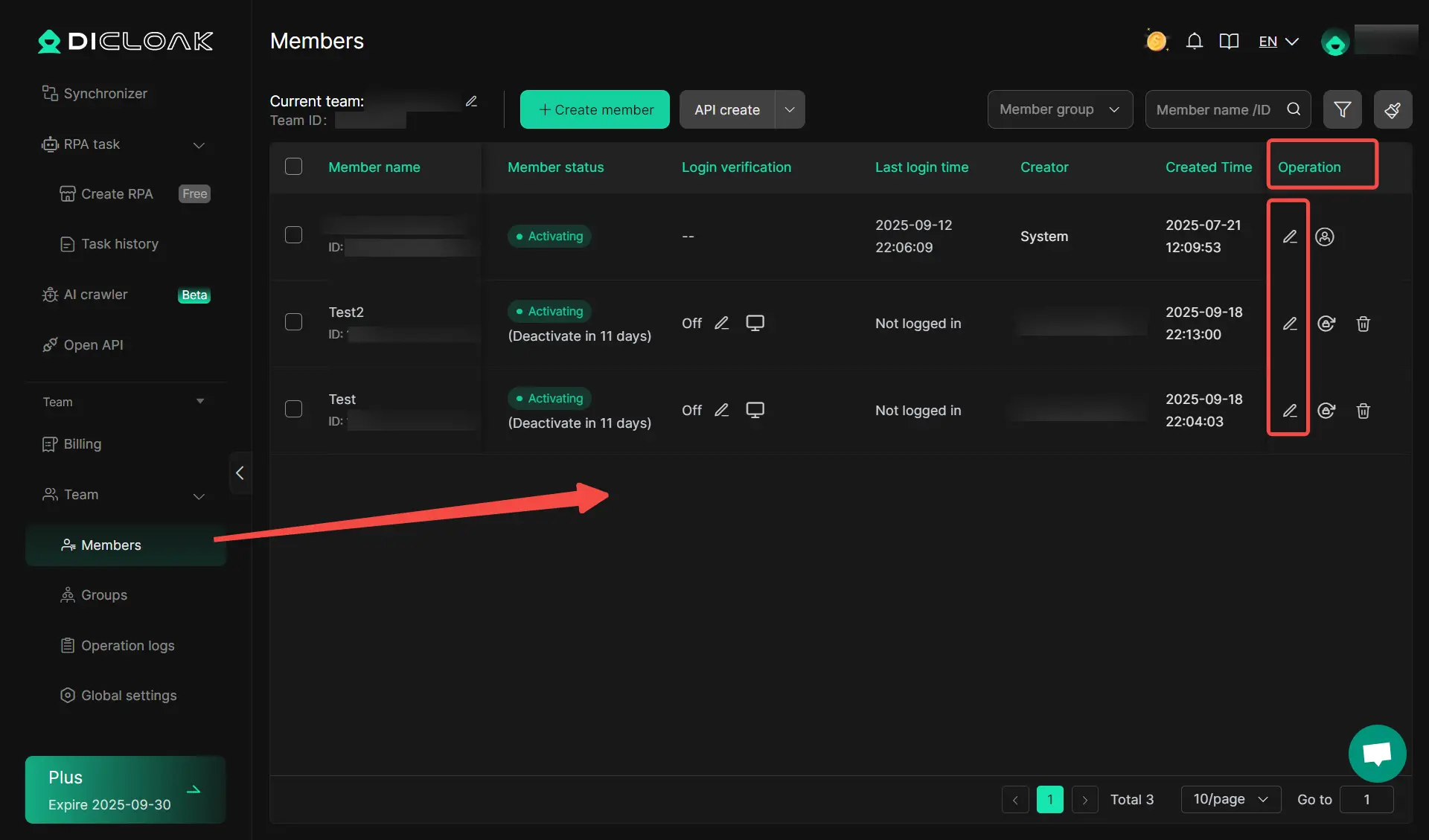
For users who manage multiple TikTok account, staying organized matters just as much as getting more engagement. DICloak can help users build a cleaner workflow for account management, daily actions, and team tasks.
Secure multi-account management for TikTok automation
Users who run several TikTok accounts often need a more stable way to switch between them. DICloak lets users create isolated browser profiles for different accounts, so each profile keeps its own cookies, login state, and local data. This setup helps users avoid the usual mess that happens when many accounts are managed in one browser.
Users can also organize profiles by group, import profiles in bulk, and configure proxies to each profile when needed. That makes daily work easier for users who handle account warming, content operations, or campaign testing across multiple TikTok accounts.
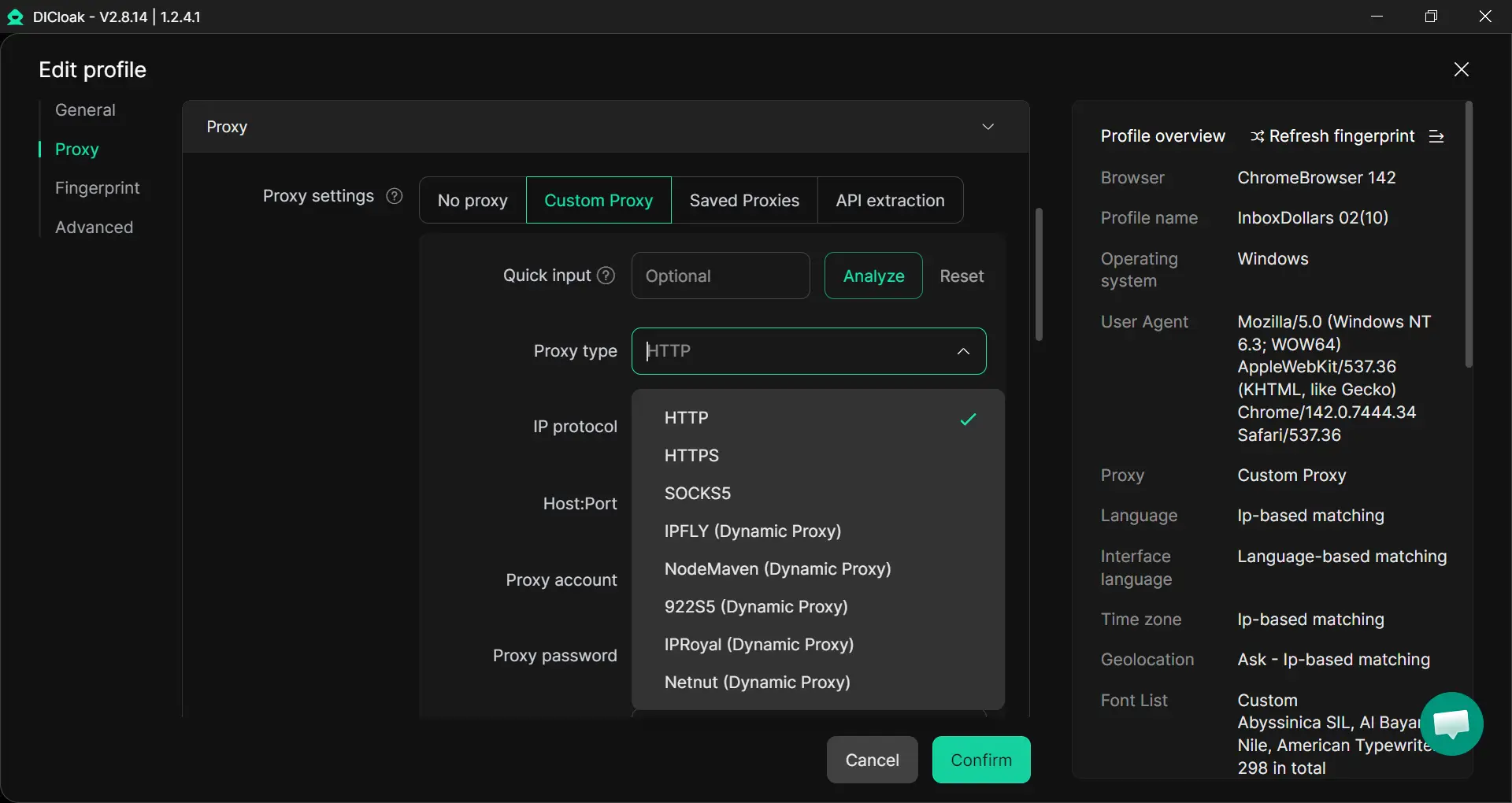
For managing teams, users can also share profiles, set permissions, and keep operations more structured.
Automating comments with built-in RPA tools
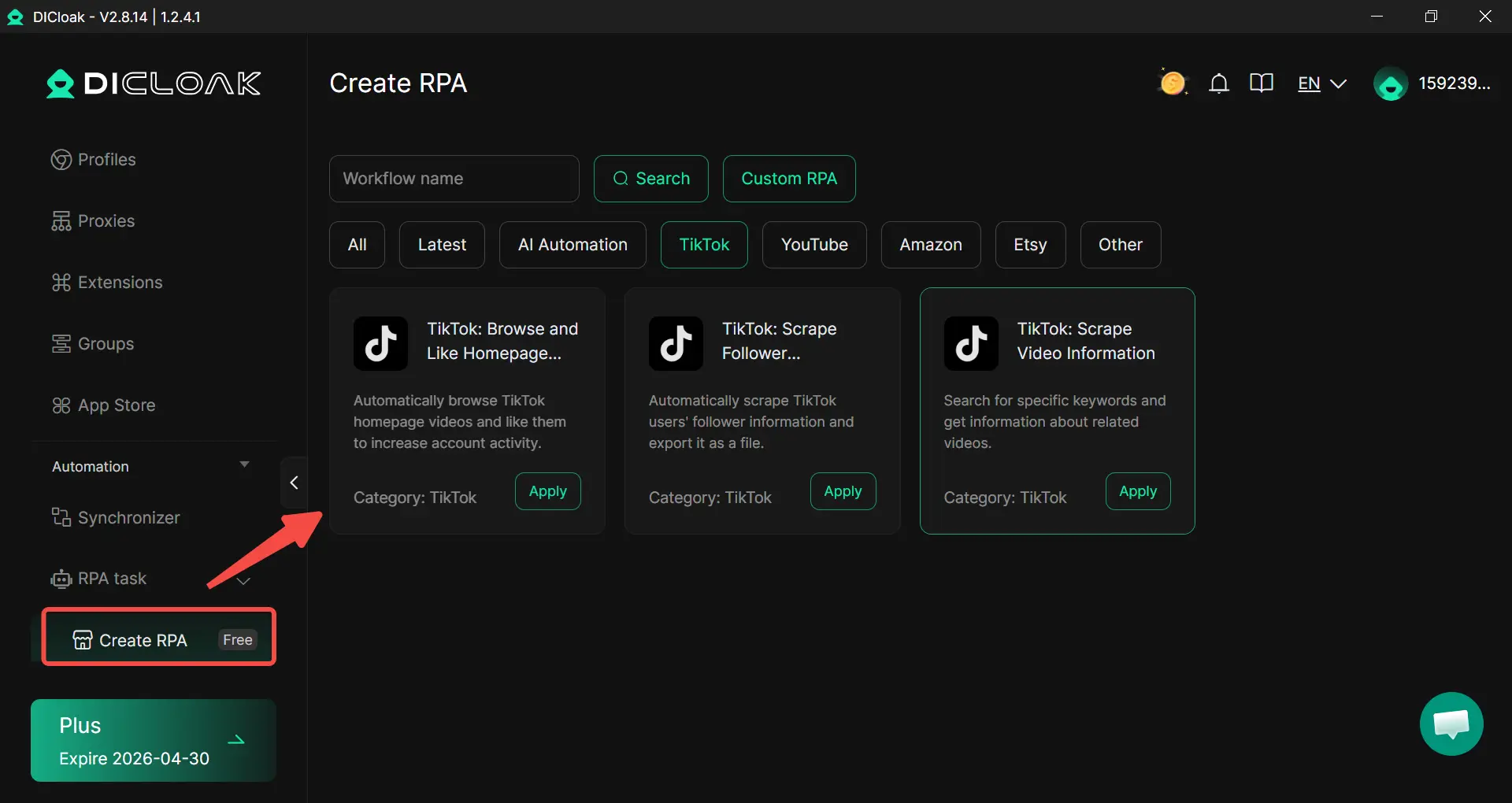
Users who want to save time on repetitive work can use DICloak’s built-in RPA tools. This can help users handle repetitive engagement support work more efficiently, especially when they manage many accounts or large volumes of daily tasks. For TikTok workflows, users can use RPA to reduce manual steps, keep actions more consistent, and spend more time on content quality and audience strategy.
Protecting account data with unique browser fingerprints
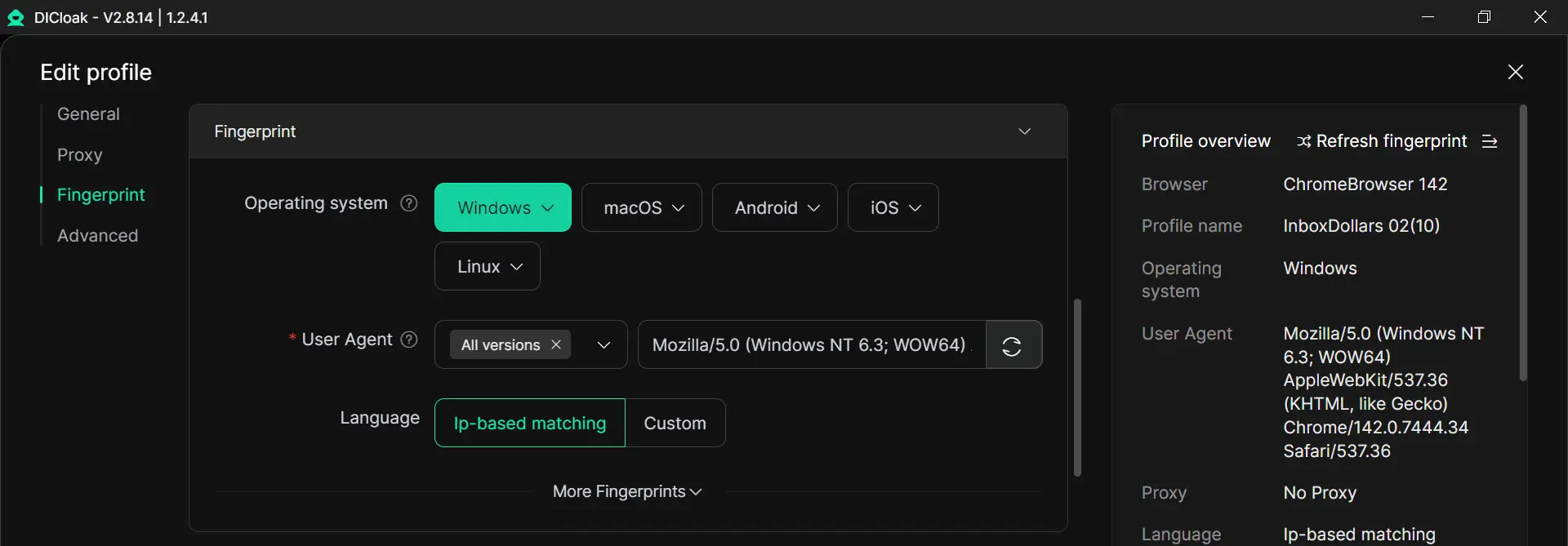
Users also need to protect account data while managing TikTok activity. DICloak gives each browser profile its own fingerprint settings and isolated profiles. For users who manage multiple TikTok accounts, unique browser fingerprints and isolated profiles create a more controlled setup for long-term account management.
FAQs
Are TikTok comment bots legal to use?
That depends on what the bot does and where you are, but platform safety is the bigger issue here. TikTok publicly says it does not allow spam, fake engagement, or the use of automation to register or operate accounts in bulk. It also says it does not allow services or instructions that artificially increase engagement. So even if a tool is not illegal in a general legal sense, using it can still violate TikTok’s rules and put your account at risk.
Do TikTok comment bots require my password?
Some do, but that is a major risk sign. TikTok says it does not share your TikTok password with third-party apps when you connect through its supported app connection flow. It also recommends avoiding unknown third-party apps and reviewing connected apps regularly. In practice, a safer tool should use an official connection method when available, not ask users to hand over raw login credentials without clear reason.
How can I tell if TikTok comment bot is safe for my account?
No bot is completely safe for a TikTok account if it creates spammy or fake-looking activity. Still, users can look for some basic signs. A safer tool should be clear about what permissions it wants, explain how data is handled, avoid asking for unnecessary access, and make it easy to disconnect. TikTok also tells users to avoid unknown third-party apps and remove apps they no longer trust or use. If a tool promises instant viral growth, pushes high-volume fake engagement, or hides how it works, that is a bad sign.
Can TikTok comment bots help me go viral on TikTok?
They may increase activity numbers for a short time, but they are not a reliable way to go viral. TikTok says fake engagement and engagement manipulation are prohibited, and it actively removes fake accounts, fake likes, fake follows, and other deceptive behavior at very large scale. That means a bot may create more risk than real growth. In most cases, better content, better timing, and real audience response are much more dependable than bot-driven engagement.
What should I do if TikTok comment bot stops working?
First, stop using it for a moment and check whether the issue is technical or account-related. Review your connected apps, remove access for tools you do not trust, and look at your TikTok security settings. If you think an app is misusing your data or creating spam, TikTok says you can remove access and report the service. If the account shows warning signs, users should switch back to manual activity and review whether the bot’s behavior may have crossed into spam or fake engagement.
Conclusion
TikTok comment bots can look useful, but they are not a simple growth shortcut. Used the wrong way, they can create spam, weak engagement, and account safety problems. Used carefully, some tools may only help with basic support work, but real growth still comes from good content, smart timing, and real interaction. For most users, the best approach is to stay careful, keep manual engagement at the center, and choose tools that support control, safety, and long-term account health.
 Web Proxy Tools
 Free Tools
 Cookie Plugin
 UA Generator
 MAC Address Generator
 IP Generator
 IP Address List
 2FA Code Generator
 World Clock
 Anonymous Check
 WebRTC Leak Test
 UUID Generator
 Free Web Proxy Site
 Proxy Checker
 FB Ad Checker
 AI Web Scraping
 Free SMM Tools
 Twitter Shadowban Checker
 Instagram Name Checker
 UTM Generator
 Username Generator
 AI Hashtag Generator
 LinkedIn Headline Generator
 Social Media Image Resizer