TikTok has become a powerhouse for content creators, businesses, and influencers alike, but managing multiple TikTok accounts can be a challenge. Whether you’re trying to separate your personal content from your business or looking to target different audiences with unique content, having multiple accounts can give you more control over your TikTok strategy. But can you really manage them without running into issues? The answer is yes — and this guide is here to show you exactly how.
If you're wondering how to create multiple TikTok accounts, keep them safe, and grow them without getting flagged or banned, you’re in the right place. Managing multiple TikTok accounts isn’t just about switching between profiles. It’s about understanding TikTok’s rules, staying organized, and using the right tools to make the process seamless. With the right approach, you can take your TikTok presence to the next level — whether you're an influencer, small business owner, or marketing professional.
In this guide, we’ll walk you through everything you need to know: from setting up accounts safely to boosting engagement without violating TikTok’s policies. We’ll also explore how powerful tools like DICloak can make managing multiple accounts easier and more efficient. Ready to take control of your TikTok accounts and boost your social media game? Let’s dive in!
Understanding TikTok’s Policies: Can You Have Multiple TikTok Accounts?
TikTok allows users to have multiple accounts, but they must follow certain rules to ensure compliance. So, can you have multiple TikTok accounts? The answer is yes, but it’s important to understand the platform’s guidelines to avoid any issues. Violating TikTok’s policies can result in serious consequences, including the suspension of accounts. In this section, we’ll explore the risks associated with managing multiple accounts and why it’s essential to follow TikTok’s rules.
What TikTok Says About Multiple Accounts
TikTok allows users to have up to three accounts on a single device, but each account must have a unique email or phone number. For businesses or social media managers handling multiple accounts, TikTok provides tools like TikTok Business Center to manage them more efficiently. These tools ensure accounts remain compliant with TikTok’s rules.
Risks of Violating TikTok’s Policies
Now, let’s address the important question: Can you have multiple TikTok accounts safely? While it’s allowed, there are significant risks if you don’t follow TikTok’s guidelines. TikTok tracks user activity closely, and violating TikTok’s policies can lead to serious consequences.
TikTok tracks activity using signals such as:
- IP addresses: TikTok detects if multiple accounts are running from the same network. This helps the platform prevent users from managing several accounts from a single location in an unusual manner.
- Device IDs: TikTok can identify how many profiles are active on the same device. If it detects abnormal activity across multiple accounts on the same phone, it may raise a red flag.
- Browser fingerprints: TikTok tracks login patterns by identifying if users access different accounts from the same browser, which can signal suspicious behavior.
- Login patterns: TikTok looks for patterns of accounts switching in and out too often, which could suggest automation or malicious activity.
These tracking methods are in place to detect potential abuse, and violating TikTok’s policies can lead to serious risks, including:
- Shadowbans: If TikTok detects unusual activity, your content may disappear from the For You Page, drastically reducing engagement and visibility.
- Temporary suspensions: If the platform notices suspicious behavior, it may temporarily block your ability to log into one or more of your accounts for a set period of time, sometimes up to weeks.
- Permanent bans: In extreme cases, TikTok may permanently erase accounts, and the linked device could be blocked from creating new accounts.
Therefore, while having multiple TikTok accounts is allowed, it’s essential to follow TikTok’s guidelines to avoid penalties. By understanding how TikTok tracks account activity and adhering to its rules, you can safely manage multiple accounts without risking suspension or bans.

Reasons to Have Multiple TikTok Accounts
Managing multiple TikTok accounts can offer significant benefits for various users, from influencers to businesses. Here are key reasons to consider:
- Personal vs. Business Accounts: Separate accounts for personal and business content help maintain a clear content strategy and prevent confusion among followers. For instance, influencers may use one account for casual videos and another for brand promotions.
- Targeting Different Audiences: Multiple accounts allow you to target different audiences or niches, such as fitness or tech enthusiasts, and create tailored content for each group.
- Content Strategy: Multiple accounts enable diverse content strategies, such as posting casual videos on one account and more professional content on another, while also experimenting with posting frequencies.
- For Agencies and Businesses: Agencies managing multiple clients or businesses running both organic and paid content can benefit from keeping accounts separate. It helps with branding, analytics, and preventing confusion within the algorithm.
In short, having multiple TikTok accounts can improve engagement, content organization, and growth across various niches.
How to Make Multiple TikTok Accounts Without Getting Flagged
If you're wondering can you have multiple TikTok accounts without running into trouble, the answer is yes — as long as you follow the right steps. TikTok allows users to create multiple accounts, but these must comply with the platform’s rules. In this section, we’ll guide you through the safe process of creating and managing multiple accounts without getting flagged by TikTok.
Step 1: Decide Why You Need Multiple TikTok Accounts
Before you start creating additional TikTok accounts, it's essential to understand why you need them. Each account should have a specific purpose, whether it’s personal or business-related. Here are a few scenarios where having multiple accounts makes sense:
- Personal vs. Business Use: If you want to separate casual, personal content from professional or branded posts, it’s a good idea to create two accounts.
- Managing Client Accounts: Agencies that handle multiple TikTok clients often create a separate profile for each client, each with its own branding and strategy.
- Targeting Different Audiences: If you’re aiming to create niche-based content, such as one account for travel content and another for tech reviews, separate accounts will help you better target each audience.
Deciding on your reason first helps ensure each account stays focused and follows TikTok’s guidelines.
Step 2: Gather Unique Contact Information for Each TikTok Account
TikTok requires each account to be linked with a unique email address or phone number. You cannot use the same email or phone number for multiple TikTok accounts. This is a crucial step in creating multiple TikTok accounts without being flagged.
Here’s how to handle this requirement:
- Use Different Emails and Phone Numbers: If you plan to create several accounts, make sure each one has a distinct email or phone number. Gmail or Outlook email accounts are ideal for this.
- Avoid Using Fake Phone Numbers: While virtual phone numbers (e.g., from Google Voice or TextNow) can sometimes work, TikTok may ask for verification, and these numbers can fail. It’s better to use real phone numbers to ensure access to your accounts.
- Temporary Emails: If you don’t have enough phone numbers, you can use temporary emails from services like Gmail or Outlook. But again, ensure the email is valid for verification.
Step 3: Create the First TikTok Account
Creating a TikTok account is simple. Here’s a step-by-step guide to get your first account up and running:
- Download the TikTok App: Go to the App Store or Google Play to download the app. Alternatively, you can visit the TikTok login page to sign up.
- Open the App and Sign Up: Tap on Log in or Sign Up on the main screen.
- Choose a Sign‑Up Method: You can sign up using your phone number, email, or social media accounts like Facebook, Google, or Apple.
- Enter Your Birthdate: TikTok requires users to be at least 13 years old. Enter your birthdate to proceed.
- Provide Your Email/Phone Number: Ensure this contact is different from the one used for any other TikTok accounts.
- Create a Strong Password: Choose a password that is both secure and easy for you to remember.
- Pick a Unique Username: Select a username that is different from your other accounts. This will help maintain separation between your accounts. Try to avoid using the same or similar names to keep things clear.
- Verify Your Account: TikTok may send a verification code to your email or phone number. Enter the code to complete your account setup.
- Set Up Your Profile: Add a profile picture and bio if you like. This helps personalize your account.
- Start Exploring: Once your profile is set, you can start exploring TikTok and post your first video when you're ready.
By following these steps, you’ll have successfully created your first TikTok account. Repeat this process for each account you want to add, making sure to keep track of the contact details and usernames for each one.
Step 4: Using Different Devices vs. App Cloning
When managing multiple TikTok accounts, you’ll want to avoid suspicious activity that could lead to accounts being flagged or suspended. Here are two methods for managing multiple accounts without triggering issues:
- Use Different Devices: If possible, use separate devices (smartphones or tablets) for each account. This keeps each profile distinct and reduces the risk of TikTok detecting unusual behavior.
- App Cloning: If you don’t have multiple devices, you can use app cloning tools to create multiple instances of the TikTok app on your phone. Apps like Parallel Space or Dual Apps allow you to run different accounts simultaneously without constantly logging in and out. However, be cautious with this method, as TikTok may still track your behavior and flag accounts if it notices unusual patterns.
Both methods help you manage multiple TikTok accounts without getting flagged, as long as you follow the platform’s guidelines.
In conclusion, can you have multiple TikTok accounts? Yes, with the right steps. By deciding on the purpose of each account, gathering unique contact information, following the creation process carefully, and choosing the right method for managing multiple accounts, you can safely enjoy running multiple TikTok profiles.
Managing Multiple TikTok Accounts After Understanding Can You Have Multiple TikTok Accounts
Now that you know can you have multiple TikTok accounts and how to set them up safely, the next step is managing them well. Having more than one account can be very helpful, but only if you handle them with care. In this section, we cover how to switch between accounts, clear best practices to keep them safe, and tools that make managing multiple accounts easier.
Switching Between Accounts on the Same Device
If you’re using multiple TikTok accounts on the same phone or tablet, TikTok makes it easy to switch without logging out. TikTok’s built‑in account switcher lets you flip between profiles in just a few taps. Here's how:
- Open the TikTok app and go to your Profile page.
- Tap your username near the top of the screen.
- Select the account you want to use, or choose Add account to log in to another one.
- When you want to change again, just repeat these steps.
For example, a small business owner might keep a personal account for fun videos and a brand account for products. With this switcher feature, they can post from either without signing out every time. It saves time and keeps your workflow smooth.
Most users can add about 3–5 accounts on one device using this method before running into limits. If you hit limits or get frequent login prompts, consider less frequent switching or move some accounts to another device to stay within TikTok’s acceptable use patterns.
Best Practices for Account Management
Managing multiple TikTok accounts well depends on good habits. Here are practical tips that work well for anyone handling more than one profile:
Keep Each Account Organized
Give each account a clear purpose. For example, one can be for personal life, one for business, and another for a niche topic like travel or tech. Clear organization helps you focus content and stay consistent.
Avoid Fast Switching
Switching too often between accounts on the same device can make TikTok’s system nervous. This might trigger security checks or verification prompts, especially if all accounts share the same IP and device identity.
Use Unique Contact Info
Each account must have its own email or phone number — this helps TikTok treat each profile as separate and reduces the risk of issues later.
Monitor Notifications
Set up notifications for each account thoughtfully. For business accounts, you might want alerts for comments and messages. Meanwhile, personal accounts can have fewer alerts — this keeps you from feeling overwhelmed.
Track Performance Per Account
Look at analytics separately for each account. What works on one profile might not work on another. Use TikTok’s native analytics or third‑party tools to monitor growth, view trends, and adjust content strategies.
When content is consistent and each account has a clear reason for existing, managing multiple TikTok accounts feels more natural and less stressful.
Tools and Apps to Help Manage Multiple Accounts
Beyond TikTok’s built‑in switcher, there are general tools designed to help you manage multiple accounts more easily and professionally:
- Social Media Dashboards (e.g., Metricool): Tools like Metricool let you view all your TikTok accounts from one place. You can schedule posts, check analytics, and respond to comments without logging in and out over and over.
- Device Profiles and Isolation Tools: For users with many accounts, tools that create isolated environments (like browser profiles or account management platforms) can help you keep account identities separate and reduce detection risk.
- Business Management Tools: TikTok Business Center is a TikTok‑official solution for agencies and teams. It lets multiple people work on accounts without sharing passwords, making teamwork easier and safer.
For example, a marketing team managing multiple TikTok accounts for clients might use a platform like Metricool to plan posts and measure results without juggling multiple phone logins. This saves time and keeps content quality high.
Managing many accounts doesn’t have to be chaotic. With the right approach — switching wisely, following best practices, and using these general tools — you can keep your profiles organized and performing well while you grow your presence on TikTok.
Risks and Challenges of Managing Multiple TikTok Accounts
Now that you know can you have multiple TikTok accounts and how to create and manage them safely, it’s also important to understand the risks and challenges that come with running more than one profile. Multiple accounts can help you grow, but they can also run into problems if you’re not careful. Below, we explain what shadowbans and suspensions are, common pitfalls users make, and the ethical side of managing multiple accounts.
Understanding Shadowbans and Account Suspensions
Managing multiple TikTok accounts can lead to issues like shadowbans, where TikTok limits your content’s reach without warning. This results in fewer views, likes, and shares, even though your account is still active. Shadowbans often occur due to spam-like behavior or unusual login patterns and can last a week or two, slowing your growth. In more severe cases, TikTok may suspend your account, preventing posting or commenting. Suspensions usually happen after repeated violations of community guidelines across accounts, and you may need to appeal to regain access.
Common Mistakes to Avoid
Managing multiple TikTok accounts without problems means avoiding certain mistakes. Here are key errors many users make:
- Posting identical content across accounts. If TikTok sees the exact same videos or captions on two accounts, the system may treat this as duplicate or spam content.
- Rapidly switching or logging in and out. Constant switching can look like automated behavior to TikTok and may increase the risk of shadowbans.
- Reusing contact info or fake numbers. If accounts share the same email, phone number, or suspicious contact info, it may link the accounts in TikTok’s system, increasing the chance of penalties.
- Not Properly Separating Accounts on One Device. Managing many accounts on one device without proper separation can link accounts and cause shadowbans.
A creators shows that people managing many profiles from one device without proper separation often saw multiple accounts hit with shadowbans, even when they hadn’t broken content rules. This usually happened when TikTok’s algorithm linked them due to shared login patterns or device signals.
In summary, while can you have multiple TikTok accounts is a yes, running them responsibly matters a lot. Understanding shadowbans and suspensions, avoiding common errors, and following ethical practices help protect your accounts and maintain good standing on the platform. The more considerate you are in how you manage your profiles, the better your overall experience and long‑term growth will be.
Best Practices for Success in Understanding Can You Have Multiple TikTok Accounts
To make multiple TikTok accounts successful, it’s crucial to have a clear content strategy, track performance, and engage your audience effectively:
- Develop a Unique Content Strategy: Each account should have a clear purpose. For example, one account could focus on fashion tips while another shares daily life clips. Stay on top of trends, use relevant sounds, and create content that appeals to each audience.
- Track Analytics and Performance: Use TikTok’s analytics tools to measure engagement, views, and comments. Regularly analyze performance to optimize your content and posting times, making data-driven decisions to improve results.
- Engage with Your Audience: Respond to comments, ask questions, and use features like duets or polls to foster interaction. Tailor content to each audience’s preferences, whether they enjoy quick challenges or educational tips.
By following these practices, you can grow each account, engage your followers, and keep content fresh and effective.
Managing Multiple TikTok Accounts with DICloak Browser
When it comes to managing multiple TikTok accounts, staying secure and organized is crucial, especially for social media marketers, influencers, or businesses handling several profiles. Maintaining separate accounts that are active and compliant with TikTok’s rules can be challenging, but this is where DICloak stands out as a premium tool for handling this task.
DICloak is is a sophisticated, advanced tool designed to help you safely manage multiple social media accounts, including TikTok, by providing unique fingerprints and isolated browser profiles for each account. This ensures that your accounts are secure, independent, and free from the risk of being flagged or banned. With DICloak, you can run multiple TikTok accounts on a single device without conflicts, making it easier to maintain smooth operations across all platforms.

Key Features of DICloak for Managing TikTok Accounts
- Secure Each Account with Unique Fingerprints: With DICloak, each TikTok account gets its own unique fingerprint, ensuring that TikTok treats them as separate users. This prevents detection and minimizes the risk of being flagged for suspicious activity. By maintaining distinct identities for each account, you can avoid the common issue of accounts being linked together, which can lead to penalties.
- Run Multiple Accounts on One Device: One of the biggest challenges when managing multiple TikTok accounts is preventing conflicts. DICloak’s technology allows you to run multiple accounts on one device without any conflicts. This means you can handle your personal, business, and niche-based TikTok accounts all in one place, without worrying about them interfering with each other. This makes it easier to manage your profiles without constantly switching devices or logging in and out.
- Maintain Natural, Consistent Activity Across Accounts: With DICloak, you can keep natural, consistent activity across your TikTok profiles. This is key to growing your accounts while staying in TikTok’s good graces. Whether you are posting, commenting, or engaging with followers, DICloak’s features allow you to manage all accounts seamlessly without raising any flags for suspicious behavior.
Boost Your TikTok Growth with DICloak’s Integrated FansAI Feature
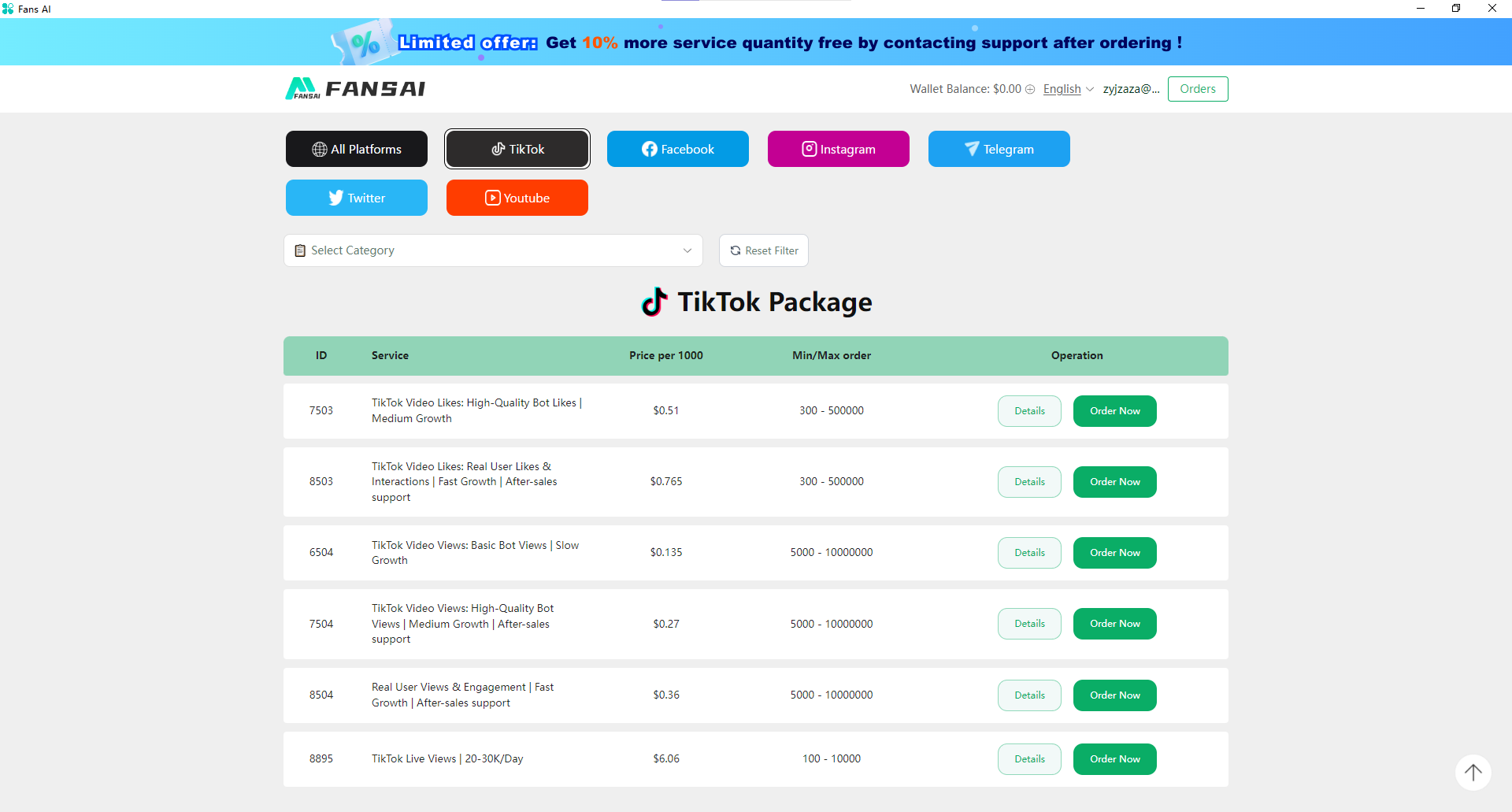
When managing multiple TikTok accounts, boosting your followers, likes, and views can take a lot of time and effort. Thankfully, DICloak provides a powerful integration with FansAI, an automated growth tool that makes it easier to expand your TikTok presence without manual effort.
FansAI works seamlessly alongside DICloak to run targeted ads that help grow your TikTok followers, likes, and views. The tool operates automatically, saving you time while increasing engagement on your TikTok profiles. With real-time data tracking, FansAI provides valuable insights into performance, allowing you to adjust your growth strategy accordingly. By using DICloak’s unique features, including secure account management and activity isolation, combined with FansAI’s automated advertising capabilities, you can focus on content creation while the system works behind the scenes to grow your TikTok presence.
Whether you're a small business owner, influencer, or marketer managing multiple TikTok accounts, this integration helps you achieve faster growth without risking account flags or bans. Start using DICloak with FansAI today to boost your TikTok marketing efforts effortlessly!
Automation Tools to Save Time
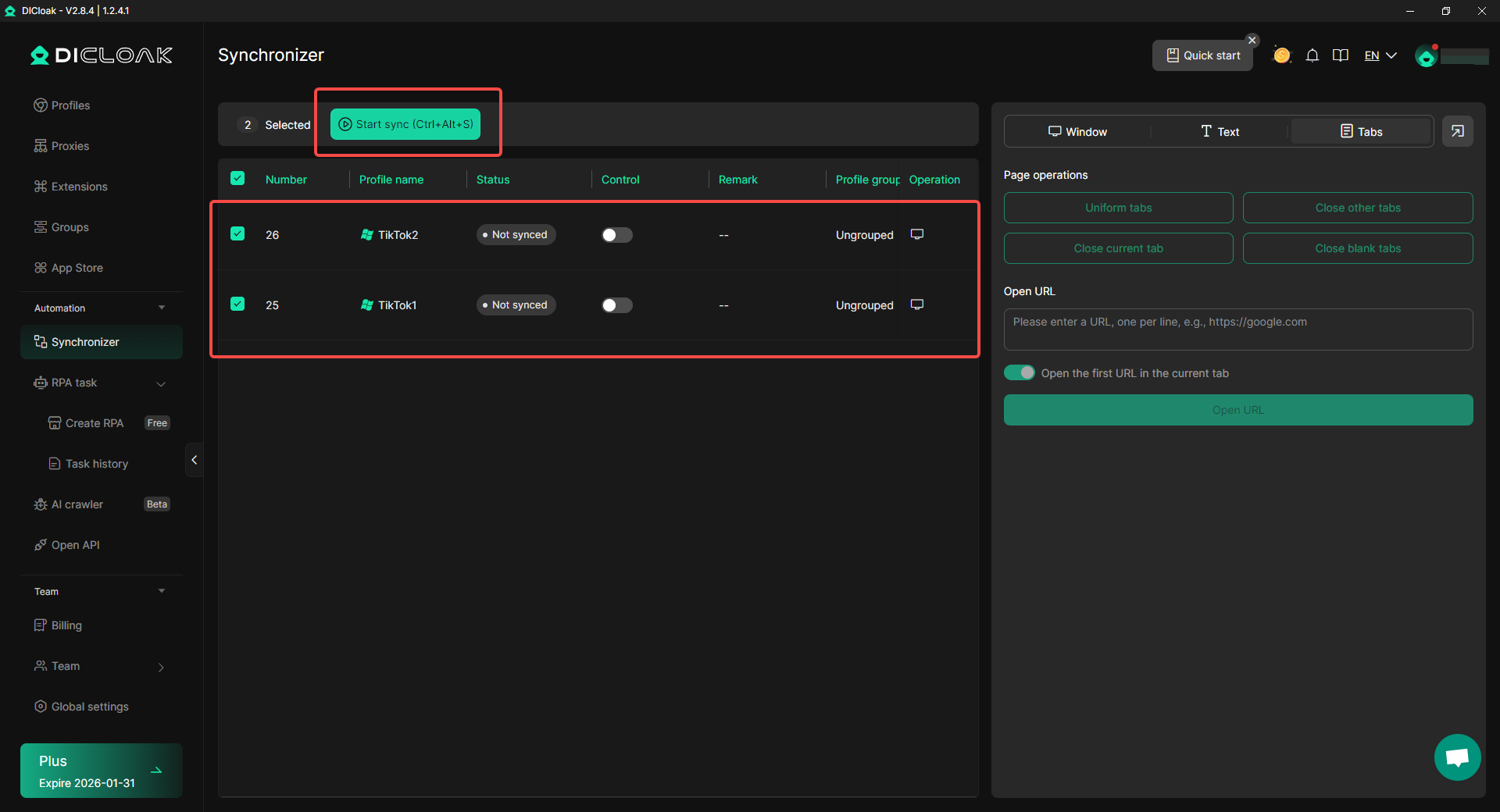
For users who handle multiple TikTok accounts, DICloak comes equipped with automation tools that can help you save time while keeping your accounts active. Features like the Synchronizer allow you to automatically like, comment, and follow across multiple profiles simultaneously. This mimics real user behavior, helping that your engagement looks natural while reducing repetitive tasks.
Additionally, with DICloak's RPA (Robotic Process Automation), users can manage multiple TikTok accounts. It includes features such as browsing and liking homepage videos to keep accounts active, as well as scraping follower and video information to automatically gather data and track trends, helping to boost engagement and refine content strategy.
These built‑in tools help you manage multiple TikTok accounts effectively and efficiently, enabling you to keep all your profiles active without doing the same task multiple times. This is especially helpful for businesses or social media managers with numerous accounts to handle.
Take Full Control Over Your TikTok Accounts
With DICloak, managing multiple TikTok accounts becomes easier, safer, and more efficient. From unique fingerprinting to automated engagement, DICloak gives you the tools to streamline your workflow and grow your presence across all your TikTok accounts. Whether you're running accounts for personal use, business purposes, or niche interests, DICloak provides a secure and smooth solution for managing multiple TikTok profiles. Start using DICloak today and see how it can help you manage your multiple TikTok accounts with ease!
Conclusion: Mastering Multiple TikTok Accounts
Managing multiple TikTok accounts is not only possible, but it can also be a smart strategy for influencers, businesses, and marketers who want to target different audiences or maintain clear boundaries between personal and professional content. Throughout this guide, we've explored how to set up and manage multiple TikTok accounts efficiently, while also ensuring that each account stays safe, active, and in compliance with TikTok’s rules.
From understanding TikTok’s policies to adopting best practices for account management, you now know how to handle multiple accounts without risking penalties like shadowbans or suspensions. It’s essential to keep each account unique by using separate contact information, creating distinct content for each profile, and regularly engaging with your audience. With the right tools, such as DICloak, you can streamline account management, automate tasks, and boost engagement while maintaining security and consistency across all profiles.
As the social media landscape continues to evolve, having a solid plan for managing multiple TikTok accounts will keep you ahead of the curve. By following the steps outlined in this guide, you’ll be well-equipped to grow your TikTok presence, avoid common mistakes, and make the most of the opportunities that come with managing several profiles. Whether you’re a content creator, a business, or a social media manager, mastering the art of managing multiple accounts can lead to greater success and engagement on TikTok.
Frequently Asked Questions (FAQs)
Can You Have Multiple TikTok Accounts on One Device?
Yes, can you have multiple TikTok accounts on a single device? TikTok allows you to manage multiple accounts on one device. You can switch between up to three accounts using the built‑in account switcher without logging out each time. For more than three accounts, you may need to use different devices or browser profiles.
How Can You Create Multiple TikTok Accounts?
To set up multiple TikTok accounts, simply follow the account creation process for each new profile. Make sure each account is linked to a unique email or phone number, and avoid sharing the same contact details across accounts. You can also use the account switcher on one device or app cloning to manage them more efficiently.
Can You Get Banned for Having Multiple TikTok Accounts?
Can you have multiple TikTok accounts without facing a ban? While TikTok allows multiple accounts, using them irresponsibly can lead to risks like shadowbans or suspensions. Violating TikTok’s guidelines or running suspicious behavior (e.g., frequent account switching or using duplicate content) may cause account penalties.
What Are the Best Practices for Managing Multiple TikTok Accounts?
The best practices for managing multiple TikTok accounts include using unique contact information for each account, tracking performance and analytics separately, and engaging consistently with each account's audience. It's also important to separate personal and business accounts to maintain a clear content strategy for each.
How Can DICloak Help Manage Multiple TikTok Accounts?
DICloak helps you manage multiple TikTok accounts by providing unique fingerprints and isolated browser profiles for each account. This ensures account safety, reduces the risk of bans, and lets you run multiple accounts smoothly on a single device. It also includes automation tools like FansAI to grow your accounts faster.
 Web Proxy Tools
 Free Tools
 Cookie Plugin
 UA Generator
 MAC Address Generator
 IP Generator
 IP Address List
 2FA Code Generator
 World Clock
 Anonymous Check
 WebRTC Leak Test
 UUID Generator
 Free Web Proxy Site
 Proxy Checker
 FB Ad Checker
 AI Web Scraping
 Free SMM Tools
 Twitter Shadowban Checker
 Instagram Name Checker
 UTM Generator
 Username Generator
 AI Hashtag Generator
 LinkedIn Headline Generator
 Social Media Image Resizer