Losing access to your WhatsApp account can lock you out of critical messages, group chats, and business contacts in seconds. Maybe your phone was stolen, your SIM got deactivated, or someone hijacked your number. The usual recovery prompts don't always work, especially if you can't receive SMS codes or your backup email is out of date.
Trying to restore access can get messy fast. Entering the wrong code too many times leads to longer wait periods. If someone else has already started the recovery process, you risk losing control entirely. WhatsApp support isn't known for quick responses, so missing one detail can leave you waiting days, not hours.
The real challenge isn't just to recover whatsapp account, it's making sure you don't get locked out again right after. You need to know which recovery options actually work in 2026, which ones are dead ends, and what steps you can take to protect your account for the long term. Small mistakes, like skipping two-step verification or using an expired phone number, are what trip up most people.
If you want to get back into your WhatsApp, avoid permanent lockout, and set up real protection, start by confirming your current recovery options.
What Causes WhatsApp Account Loss or Lockout in 2026?
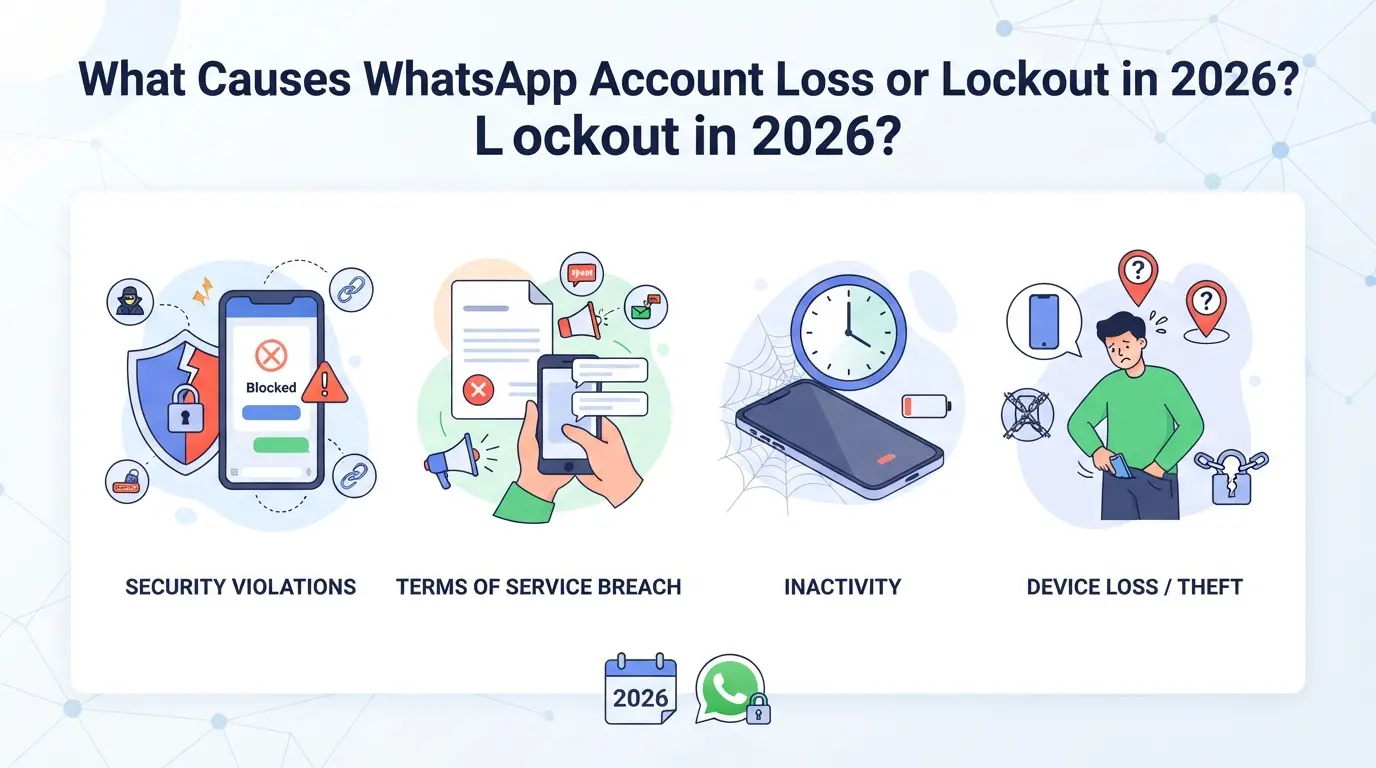
Most people lose access to WhatsApp because of phone number problems, weak security, or policy violations. Each cause has its own warning signs and risks, knowing which one matches your situation is the fastest way to figure out what to do next.
SIM Card Issues and Number Changes
Losing your SIM card or switching to a new phone number without updating WhatsApp will block you from receiving login codes. If someone else gets your old number, they can register it on their own device.
Account Hacking and Unauthorized Access
In 2026, phishing links and fake support messages are the most common ways people lose their WhatsApp accounts to hackers. Attackers trick users into sharing codes or clicking on links that give up access. Two-step verification helps, but many people still use weak PINs or forget to set up this extra layer.
Picture this: You get a message from "WhatsApp Support" saying your account will be suspended unless you verify your identity. The link looks real. You tap it, enter your code, and suddenly you’re logged out from all devices. Now, the attacker controls your account, changes the recovery email, and sets a new PIN. Even if you try to restore whatsapp account right away, recovery becomes much harder, especially if your old SIM is gone or the hacker has started their own recovery process. The worst part: if you reuse your number on other services, a hacker can use information from those platforms to reset your WhatsApp again later.
Device Problems and App Errors
If your phone gets wiped or stolen, you lose direct access to WhatsApp. Sometimes, after a factory reset, WhatsApp won’t restore your chat history, even if you have a backup, because your Google Drive or iCloud credentials don’t match, or the backup itself is corrupt. App crashes and storage issues can also wipe your session, forcing you to reverify your number.
WhatsApp Policy Violations and Bans
- Too many group joins or mass messaging can trigger automated bans.
- Using unofficial apps or modified clients often leads to instant lockout.
- Multiple failed login attempts or suspicious activity flags your account for review.
Bans can be appealed, but appeals are slow, sometimes taking over a week. If you ignore warning messages or skip the in-app appeal, you risk a permanent ban.
It’s easy to think your situation is unique, but most lockouts fall into these patterns. Before you try to get back into WhatsApp, confirm which of these problems actually caused your loss of access. This step saves you from wasting days on the wrong recovery method.
What to Check Before Starting WhatsApp Account Recovery
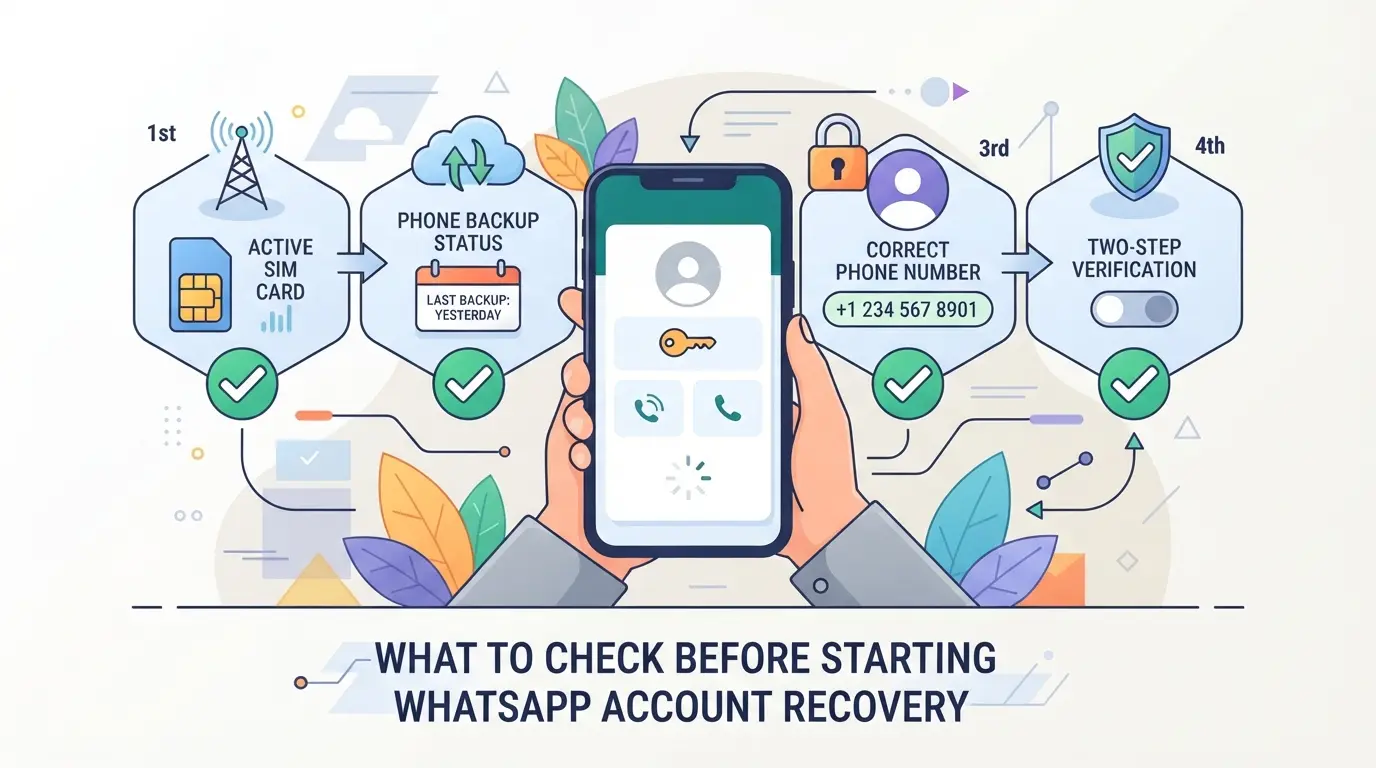
Before you try to get your WhatsApp back, confirm these basics, missing even one can block you from recovering your account at all. Most failed recovery attempts start because people assume they have what they need, then find out too late that something’s changed or expired.
Do You Still Have Access to Your Phone Number?
If your SIM is active, incoming calls and texts should work right now. Test by calling your number from another phone, if it rings and receives SMS, you’re set. If the number is lost, expired, or reassigned, contact your mobile provider for options. Sometimes, carriers can reissue a number within 30 days of deactivation, but after that, you’ll need to prove ownership or switch to backup channels. Skipping this check means any login code or verification message will go nowhere, and someone else could complete recovery if your old number is recycled.
Is Two-Step Verification Enabled?
- Find your 6-digit PIN: Check saved notes or email for WhatsApp setup confirmations.
- Forgotten your PIN? Use the “Forgot PIN” link, WhatsApp will send a reset to your recovery email if you set one up.
- No recovery email set? You may have to wait 7 days before trying again.
Do You Have a Recent Backup?
Open WhatsApp’s settings and check your last backup date, on Android, look under Google Drive; on iOS, check iCloud. If it’s more than a few days old, you risk losing recent chats and media. WhatsApp only restores messages and media saved in the backup, settings, call history, and group invites aren’t included.
Are You Using the Official WhatsApp App?
Third-party apps or modified versions can block recovery or trigger security checks. If you’re not on the official app, uninstall any clones and download WhatsApp from Google Play or the App Store.
- Uninstall all unofficial or modified WhatsApp apps before recovery.
- Reinstall only the official WhatsApp app from the official app store.
- Avoid using multiple WhatsApp apps on the same device during recovery.
Skipping these checks is the fastest way to make your situation worse. If you try to restore your account without a working phone number or get stuck on two-step verification, WhatsApp’s system will keep you locked out, sometimes for days. Once you’ve confirmed these details, you’re ready for the actual step-by-step recovery process.
Step-by-Step: How to Recover Your WhatsApp Account Safely
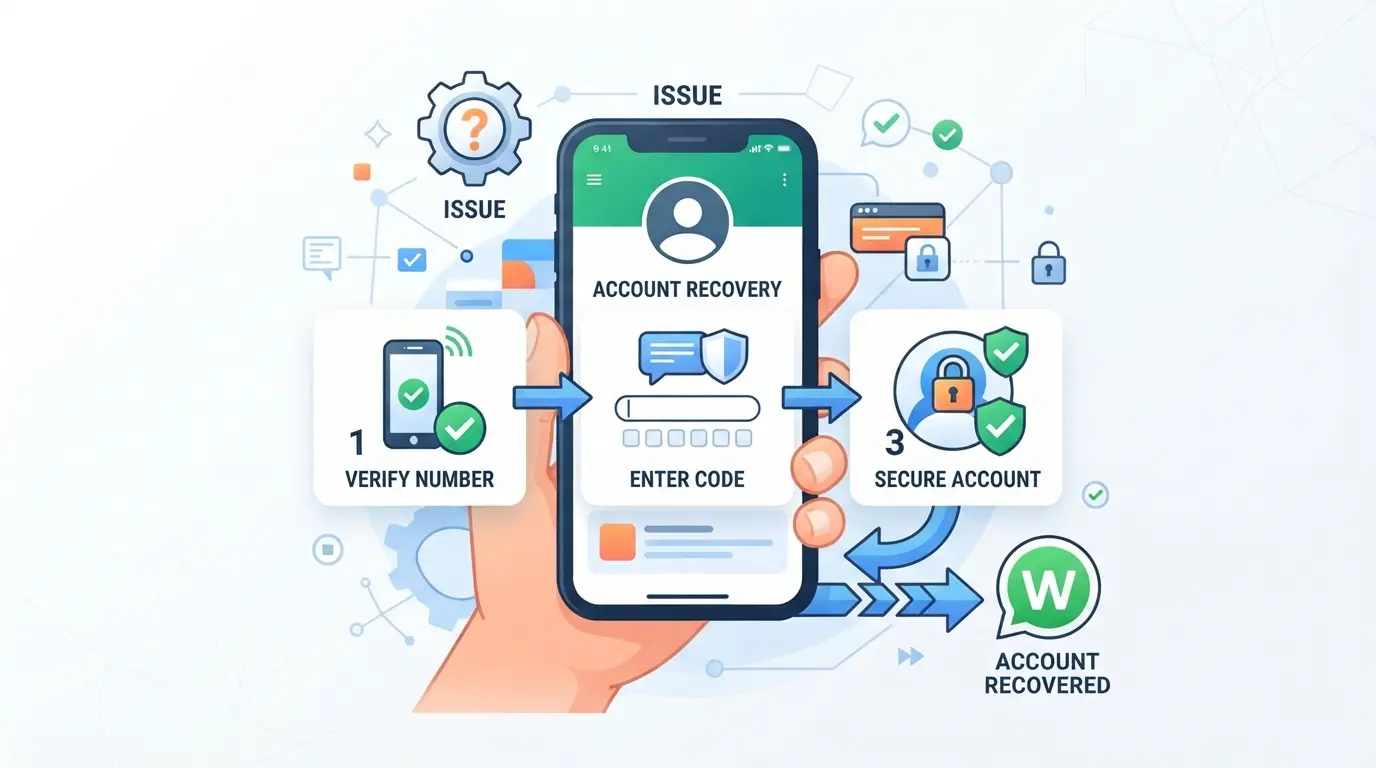
If you want a working WhatsApp account again, you need to use the exact recovery route that fits your situation, guessing or repeating steps from last year often leads to a locked account or wasted time. Here’s the clear 2026 process, broken down by case.
If You Still Have Your Phone and Number
- Uninstall WhatsApp, then reinstall it from the official app store, this wipes any corrupt app data.
- Enter your phone number and follow the on-screen SMS code prompt. If you don’t get the code, check if your SIM is active and not blocked.
- After verification, WhatsApp will prompt to restore from backup (Google Drive for Android, iCloud for iPhone). Tap “Restore” if you want your chat history back. If your backup is more than 7 days old, some messages may be missing.
If Your Phone or SIM Is Lost or Stolen
- Call your mobile provider and have them suspend or transfer your number, this is urgent. If someone else activates WhatsApp with your SIM, they can lock you out.
- Use a new SIM with your old number, install WhatsApp, and verify. If you can’t regain control, email support@whatsapp.com and request account deactivation. Delays here often result in permanent loss.
- Once you recover the number, re-activate WhatsApp as in the first scenario.
If Your Account Was Hacked or Compromised
- If you see login attempts or messages you didn’t send, act fast, open WhatsApp and try to verify your number on your own device. You’ll get a new SMS code.
- If the hacker set up two-step verification, use your own six-digit PIN. If you don’t know it, you’ll need to wait 7 days before you can reverify.
- Once back in, turn on two-step verification and update your PIN to one only you know.
- Report the incident to WhatsApp using in-app support, this can help flag the attacker’s device if abuse continues.
If You Can't Access Your Old Number
- Try to regain your old SIM by contacting your provider. If that’s not possible, open WhatsApp, tap “Change Number,” and follow the prompts with your new number.
- If you can’t receive any verification codes, email support@whatsapp.com. Include your full phone number (with country code), last known device, and a brief explanation.
- Be ready for slow replies, WhatsApp support can take several days. If you don’t respond to their follow-up quickly, your case may be closed.
The next part covers the mistakes that get people stuck in endless recovery loops, and exactly how to avoid them.
Common Mistakes That Can Block WhatsApp Account Recovery
A single mistake during recovery can turn a temporary lockout into a permanent loss. If you want to get your WhatsApp back, focus on these common errors that block account recovery, and know how to sidestep each one.
Entering the Wrong Number or Country Code
Rushing here is the classic way to stall recovery. Always re-check the full phone number and country code before hitting submit. Many users lose days because they enter a US number with the UK code or drop a digit without noticing.
Repeated Failed Verification Attempts
Getting the code wrong too many times triggers a longer lockout.
- Your wait time resets to hours or even days if you keep trying and failing.
- The safer move: Stop after 2-3 failed attempts, wait at least 30 minutes, and try again with clear eyes and a fresh code.
Using Unofficial Tools or Services
Trusting third-party “WhatsApp recovery” sites is a fast way to lose control for good. Scammers often promise to restore your account, then steal your info or lock you out completely. Always use only official WhatsApp recovery steps.
Ignoring Two-Step Verification Prompts
Skipping or forgetting your two-step PIN makes you an easy target for lockout. If you don’t remember your PIN, use the “Forgot PIN?” link during recovery, otherwise, you’ll get blocked after too many failed tries.
Miss one of these details, and you risk permanent loss. Next, lock down your account so you don't have to repeat recovery at all.
How to Protect Your WhatsApp Account from Future Loss or Hacking
If you don’t want to recover your WhatsApp account twice, the fixes that matter are all about locking down your access and closing the loopholes hackers still target.
Enable and Manage Two-Step Verification
Set a strong PIN that no one can guess, even if they know your birthday. Update your recovery email right away, and check it’s not an old address you can’t access. If you forget this PIN, you could lose access again, so save it somewhere safe.
Regularly Update Your Backup Settings
- Check your backup schedule, daily or weekly is much safer than monthly.
- Confirm backups are going to the right Google Drive or iCloud account.
- Verify backup status after big changes, like switching phones or numbers.
Recognize and Avoid Phishing Attempts
Ignore any message asking for codes or private info, even if it looks official. Always check that support contacts come from verified WhatsApp sources, scammers often copy real names and logos.
Keep Your Device and App Secure
- Set device lock (PIN, Face ID, or fingerprint).
- Update WhatsApp as soon as new versions release.
- Remove unknown devices from your account’s active sessions.
How Social Media Teams Can Manage Multiple WhatsApp Accounts More Safely with DICloak
For teams running several WhatsApp accounts, the biggest risk isn’t just losing access, it’s getting accounts tangled together by accident. When browser sessions, device signals, or network settings overlap, problems like forced verification or sudden lockouts get much more likely. DICloak doesn’t recover WhatsApp accounts for you, but it gives operators a way to organize each account’s working environment, so a mistake in one doesn’t pull down the rest.
Isolating WhatsApp Accounts with Separate Browser Profiles and Fingerprint Settings
A social media manager juggling five WhatsApp business accounts can set up a separate browser profile for each one in DICloak. Each profile stores its own cookies, cache, and fingerprint settings, things like operating system, time zone, and screen details, which means logins and session data never mix across accounts. This keeps workflows neat and reduces the chance that an error in one profile affects the others. The scope is limited to browser-profile setup and fingerprint configuration; it doesn’t touch WhatsApp’s actual recovery or message data. 
User-Provided Proxy Configuration for Assigned Profiles
Operators can assign a user-chosen proxy to each WhatsApp browser profile in DICloak and test the connection before launching a session. This lets teams control the network path each account uses, which is handy if different accounts need to look like they’re in different regions or offices. Every proxy is managed and tested by the operator, DICloak only stores and applies the settings. 
Setting up this separation makes it much easier to keep accounts organized before reaching out to WhatsApp support if a lockout ever happens.
When to Contact WhatsApp Support and What to Expect
If you’ve tried every standard way to recover your WhatsApp account and still can’t get in, it’s time to escalate, some situations need support, not more retries.
Situations Where Support Is Needed
- Lost access to both your phone and the number
- Account banned or flagged as permanently disabled
- Two-step verification reset fails and you see a “wait” message for days
How to Submit a Support Request
Use the in-app “Contact Us” or email support@whatsapp.com. Include your phone number with country code, the error you see, and any proof of ownership. Don’t expect a fast answer, response times often run 48–72 hours, and follow-ups may take longer if your first message is missing details.
What to Do If Recovery Fails: Alternatives and Last Resorts
If WhatsApp recovery and support both fail, you’re out of standard options, what you do next can put your data or identity at risk if you’re not careful.
Risks of Third-Party Recovery Services
Most “account recovery” services you find online are scams or phishing setups. If someone asks for payment or remote access, that’s a red flag, handing over your info here usually leads to data theft or permanent loss.
Starting Fresh: Creating a New WhatsApp Account
Creating a new account is the only safe fallback, but you lose all past chats and group memberships.
- What can go wrong: Scammers may offer fake “restore whatsapp account” services if you post your loss publicly.
- Safer move: Set up your new account with two-step verification and tell trusted contacts you’ve switched, so no one falls for impersonation.
Frequently Asked Questions About recover whatsapp account
Can I recover my WhatsApp account without my old phone number?
Yes, you can recover your WhatsApp account if you lost your old number. Start by registering WhatsApp with your new phone number. Let your contacts know about the change. If you need old account data, contact WhatsApp Support and provide proof of identity. They may help transfer your account if you can verify ownership.
How long does WhatsApp account recovery usually take?
Automated recovery, like entering a verification code, usually takes just minutes. If you need help from WhatsApp Support, manual recovery can take from a few hours to a few days. Delays may happen if you can’t verify your identity quickly or if support is handling many requests.
Will my chat history and media be restored after recovery?
Chat history and media are restored only if you have a recent backup on Google Drive (Android) or iCloud (iPhone). If you reinstall WhatsApp and restore from backup, your messages and media come back. Without a backup, your previous chats and files are lost and cannot be recovered.
What should I do if my WhatsApp account was hacked?
Act fast. Log out of all devices and reverify your phone number on WhatsApp. Turn on two-step verification for extra security. If you can’t access your account, contact WhatsApp Support and explain the situation. Tell your contacts you were hacked to prevent further misuse.
Is it safe to use third-party tools to recover my WhatsApp account?
No, it’s not safe to use unofficial tools or websites to recover WhatsApp account access. These can steal your data or infect your device with malware. Always use the official WhatsApp app and support channels to stay safe and protect your information.
If your usual recovery methods aren't working, consider exploring alternative security tools that can help safeguard your digital presence and simplify the process. Taking proactive steps now can make any future account issues much easier to resolve. Try DICloak For Free
 Web Proxy Tools
 Free Tools
 Cookie Plugin
 UA Generator
 MAC Address Generator
 IP Generator
 IP Address List
 2FA Code Generator
 World Clock
 Anonymous Check
 WebRTC Leak Test
 UUID Generator
 Free Web Proxy Site
 Proxy Checker
 FB Ad Checker
 AI Web Scraping
 Free SMM Tools
 Twitter Shadowban Checker
 Instagram Name Checker
 UTM Generator
 Username Generator
 AI Hashtag Generator
 LinkedIn Headline Generator
 Social Media Image Resizer