Sharing one HeyGen login may look like the easiest way to keep video work moving when scriptwriters, editors, translators, and clients all touch the same project. But HeyGen's Business plan currently starts at $149 per month for the first seat, with additional seats at $20 per month, while its 1,500 monthly credits are shared across the Workspace and do not increase when more seats are added. Teams therefore need to think about both access costs and credit use before giving every collaborator a full seat.
The best way to share a HeyGen account with your team without sharing passwords is to match access to the task. A client may only need a video link, a regular editor may need Workspace and project access, while an authorized team member may need a shared signed-in session. This guide explains HeyGen pricing and policy, compares the main sharing methods, and shows how to manage passwords, projects, credits, and access removal.
Why Do Teams Want to Share a HeyGen Account?
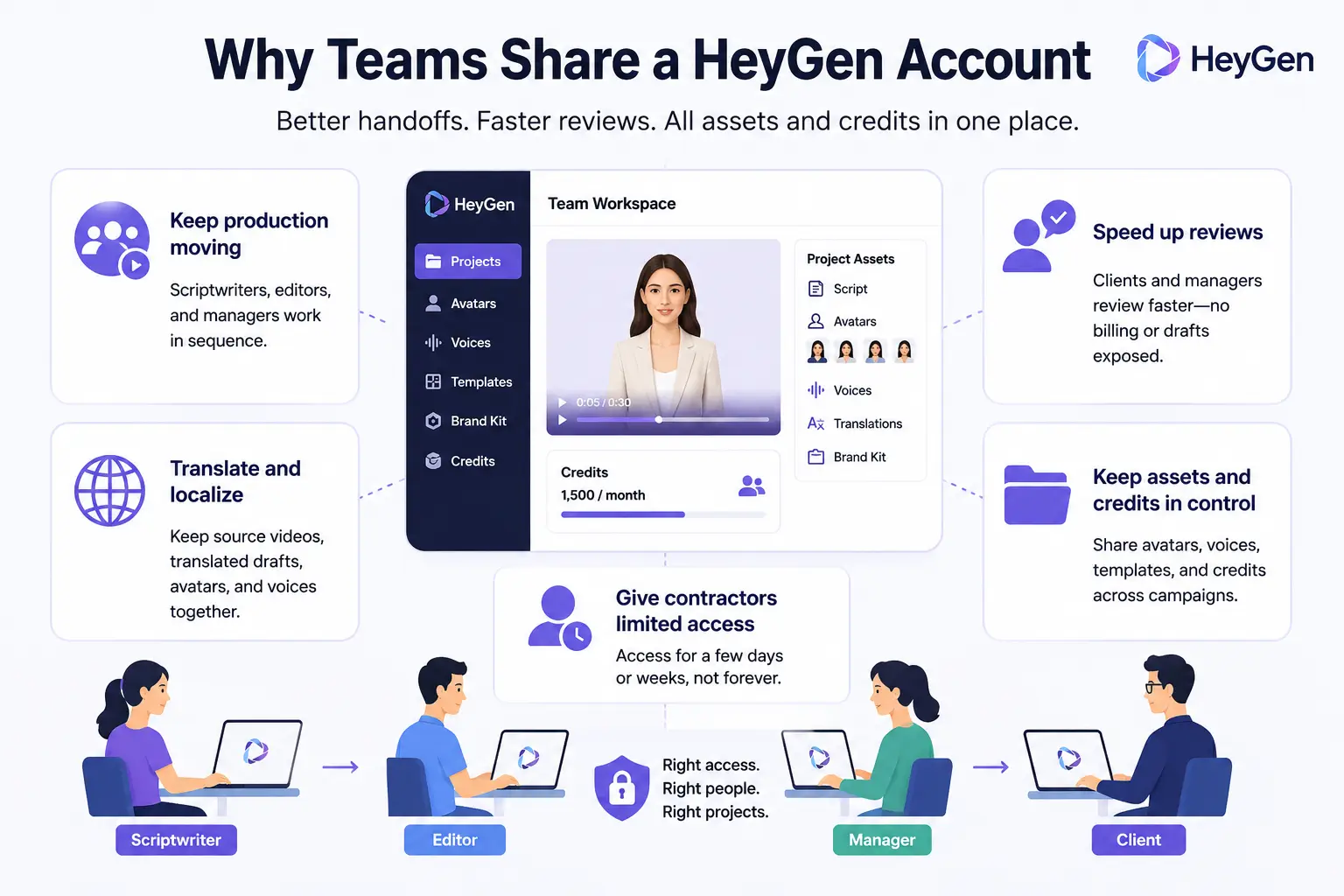
Teams usually want to share HeyGen because video production involves several people, not because everyone needs full control of the account. A well-managed sharing setup can improve handoffs, speed up reviews, and keep important assets in one place without sending the same HeyGen login to every team member.
Here are the main benefits of shared HeyGen access:
- Keep video production moving. A scriptwriter may prepare the copy, an editor builds the video, and a manager approves the final version. Shared access reduces the need for the account owner to upload files, enter verification codes, or move every project between team members.
- Speed up client and manager reviews. Clients and supervisors often need to check captions, brand details, and the final video before publishing. Giving them the right level of access can shorten approval time without exposing billing settings, unrelated drafts, or the full account.
- Support translation and localization work. One team member may create the original video, while another uses HeyGen video translate to prepare content for different markets. Keeping the source video, translated drafts, avatars, and voices together makes the process easier to manage.
- Keep shared assets and credits under company control. Teams may use the same custom avatars, brand voices, templates, and credit pool across several campaigns. A central setup reduces duplicate work and makes it easier to see which projects are using company resources.
- Give contractors access to a limited project. A freelance editor or localization specialist may only need HeyGen for a few days or weeks. The team should be able to provide the access needed for that project without giving the contractor a permanent password.
Can You Share a HeyGen Account, and How Much Does Team Access Cost?
Yes. HeyGen allows a business to authorize its employees, affiliates, and contractors to use the service on its behalf, but it does not allow access to be handed to unrelated third parties. The account owner also remains responsible for account activity and security, so authorized use does not make unrestricted password sharing a good team setup.
How HeyGen Pricing Works for Team Access
The Business plan is HeyGen's main self-serve option for teams. It starts at $149 per month for the first seat, while each additional seat costs $20 per month. The plan includes 1,500 monthly credits, but added seats do not add more credits because all members use the same Workspace credit pool.
| Plan |
Starting monthly price |
Intended use |
Team-sharing consideration |
| Creator |
$29 |
Individual creators |
No added team seats |
| Pro |
$49 |
Individuals with higher video needs |
Not designed for team collaboration |
| Business |
$149 |
Teams and businesses |
Extra seats cost $20 each |
Adding seats gives more people their own HeyGen login and Workspace access, but it does not increase the team's generation capacity. This matters when an editor, localization specialist, and manager all work from the same credit pool. Teams should plan who can generate final videos instead of assuming that every paid seat comes with a separate credit allowance.
Even a Viewer who cannot create new content uses a Workspace seat. For this reason, paying for a full seat may make sense for a manager who reviews videos every week, but not for a client who only needs to watch one final draft. One-time reviewers may be better served by a video sharing option rather than permanent Workspace membership.
What Does HeyGen's Account Policy Allow?
HeyGen's terms permit employees, affiliates, and contractors to use the service for the business that owns the account. They do not support giving account access to unrelated people, such as strangers joining a paid account-sharing group. The business remains responsible for all activity under the account, including actions taken by authorized team members.
This means a freelance video editor working on a company campaign may qualify as an authorized contractor, while selling access to an unrelated user is a different situation. However, authorization alone does not mean every person should receive the owner's password or full account access. The better choice is to match the sharing method to what the person needs to review, edit, create, or manage.
What Are the Best Ways to Share a HeyGen Account Without Sharing Passwords?
The best method depends on what each person needs to do. Use a video link for occasional review, a HeyGen Workspace for regular collaboration, and an antidetect browser only when an authorized team member needs access to an existing HeyGen session.
Share a Video Link for Review and Approval
A video link is usually enough when a client or manager only needs to watch the result, check captions, leave feedback, or approve the final version. The reviewer does not need access to the full HeyGen account. This method keeps drafts, avatars, voices, credits, and account settings private. Paying for a permanent Workspace seat may not make sense when an external client only needs to review one finished video.
Invite Regular Collaborators to a HeyGen Workspace
A Workspace is the better choice for employees who regularly create, edit, translate, or manage videos. Each member uses their own HeyGen login, while the administrator assigns a role and controls which folders or projects they can access.
Roles and project permissions solve different problems. A role controls what a member can do, while folder and project settings control what they can see. For example, a localization specialist may need editing access to one HeyGen video translate project without seeing every client folder in the Workspace.
Workspace access may require a paid seat, including for some review-only roles. Teams should reserve seats for people who work in HeyGen often instead of adding every occasional reviewer as a permanent member.
Use an Antidetect Browser to Share an Authorized HeyGen Session
Sometimes an employee or contractor needs to continue work in an existing HeyGen account, but the owner does not want to send the password through email, Slack, or another chat tool. In this case, an antidetect browser can provide access to a saved HeyGen session through a dedicated browser Profile.
Using DICloak Antidetect Browser, the account owner can sign in first and share the Profile with approved team members. Team permissions control who can open the Profile, while operation logs help the administrator review its use and remove access after the project ends.
This method may give the member access to more account data than a video link or limited project permission. It should only be used when the task truly requires the existing HeyGen session. It does not replace HeyGen Workspace seats, pricing rules, or account policies.
| Sharing method |
Best for |
Access provided |
Main limitation |
| Video share link |
Clients and occasional reviewers |
One finished video |
No project editing |
| HeyGen Workspace |
Regular creators and editors |
Assigned Workspace content |
A paid seat may be required |
| Antidetect browser |
Authorized access to an existing session |
The HeyGen session saved in a browser Profile |
Does not replace HeyGen rules |
How to Share a HeyGen Account with Your Team Using DICloak
When an authorized team must use one existing HeyGen login, the account owner can keep the signed-in session inside a dedicated browser Profile and share that Profile with selected members using DICloak. This reduces direct password sharing and makes access easier to remove after a project ends.
1. Install DICloak and Choose a Team Plan
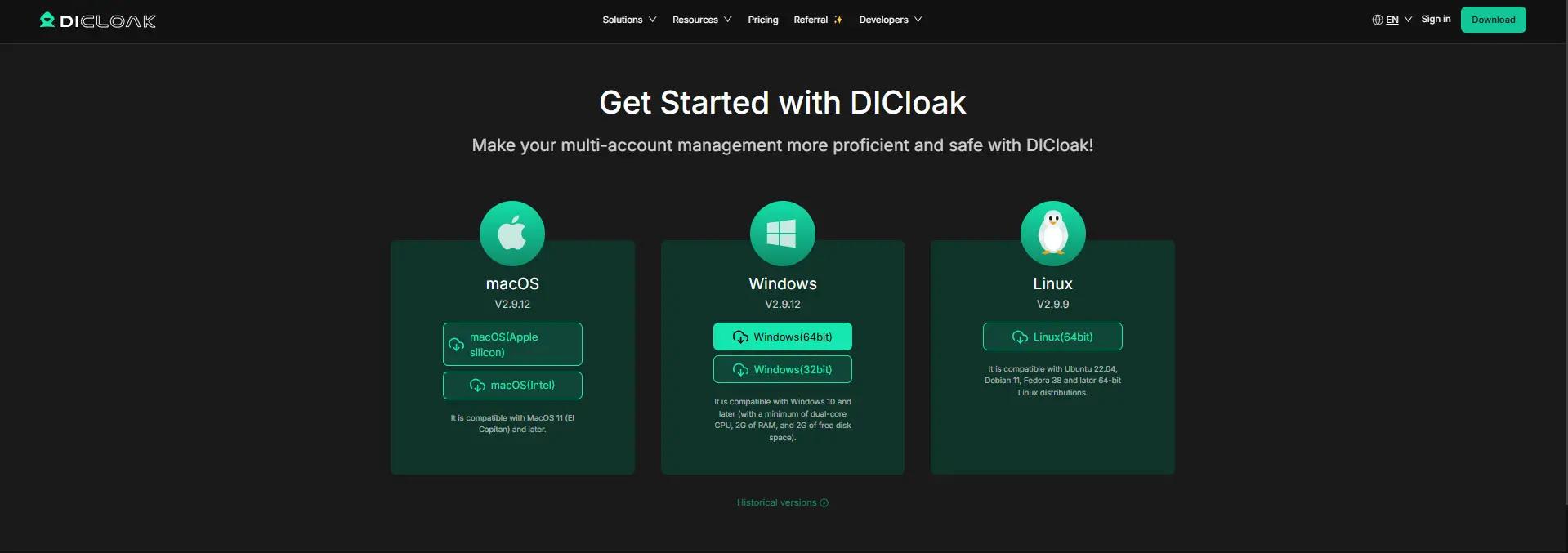
Download the application, create an account, and choose a plan based on the number of members and browser Profiles your team needs. Each teammate should use a separate DICloak account instead of sharing the administrator login. This gives the account owner more control over who can open the HeyGen Profile.
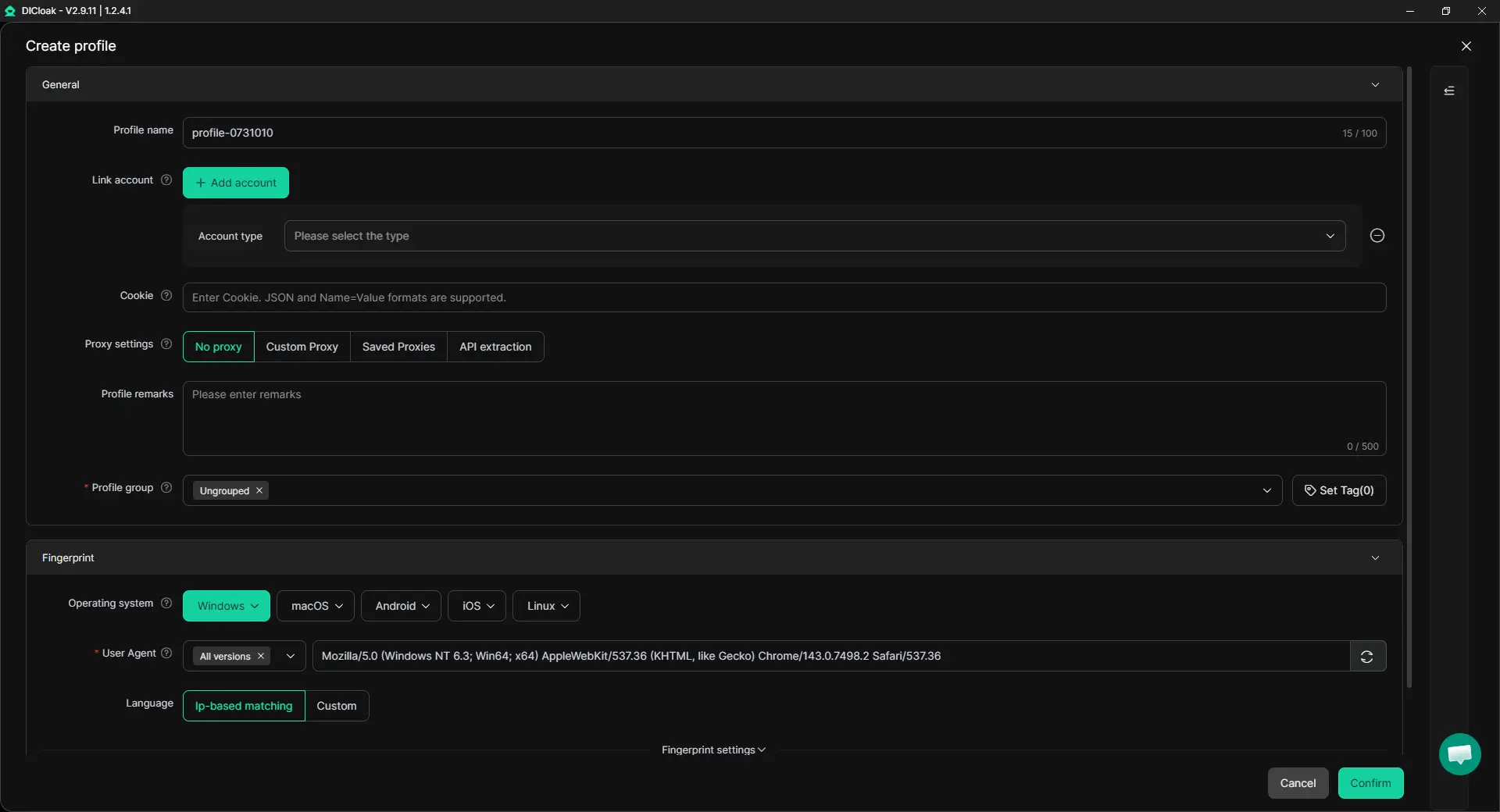
2. Create a Dedicated HeyGen Browser Profile
Create one browser Profile for the authorized HeyGen account and give it a clear name, such as HeyGen – Client A. This keeps its cookies and session data separate from personal accounts and other client work. You can also add your own proxy when the workflow requires a specific network or region.
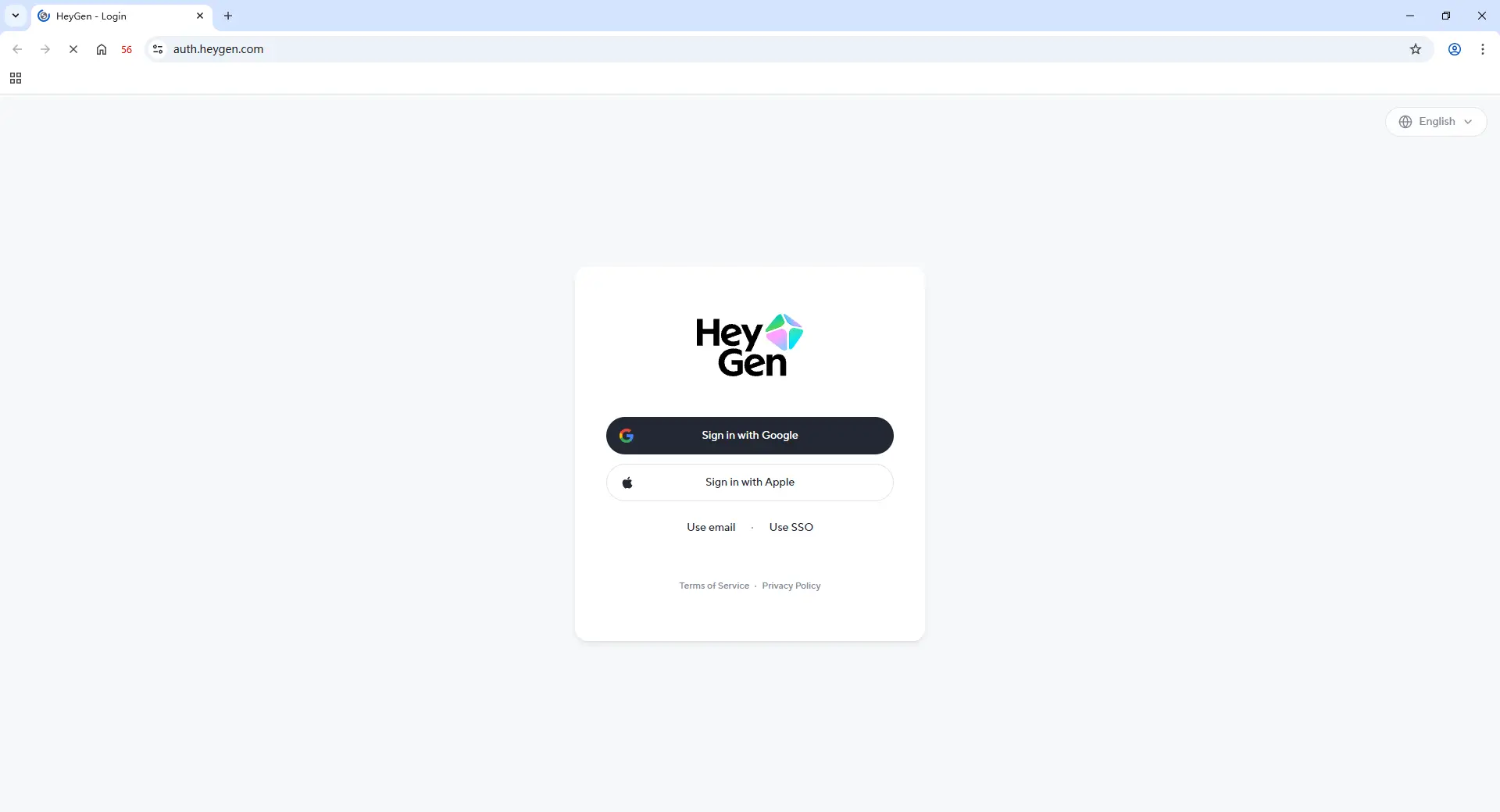
3. Sign In and Set Clear Session Rules
The HeyGen account owner should open the new Profile, sign in, and complete any required verification. Approved members can then open the saved session without receiving the raw HeyGen password. Enable Multiple sessions if several members need to open the Profile at once.
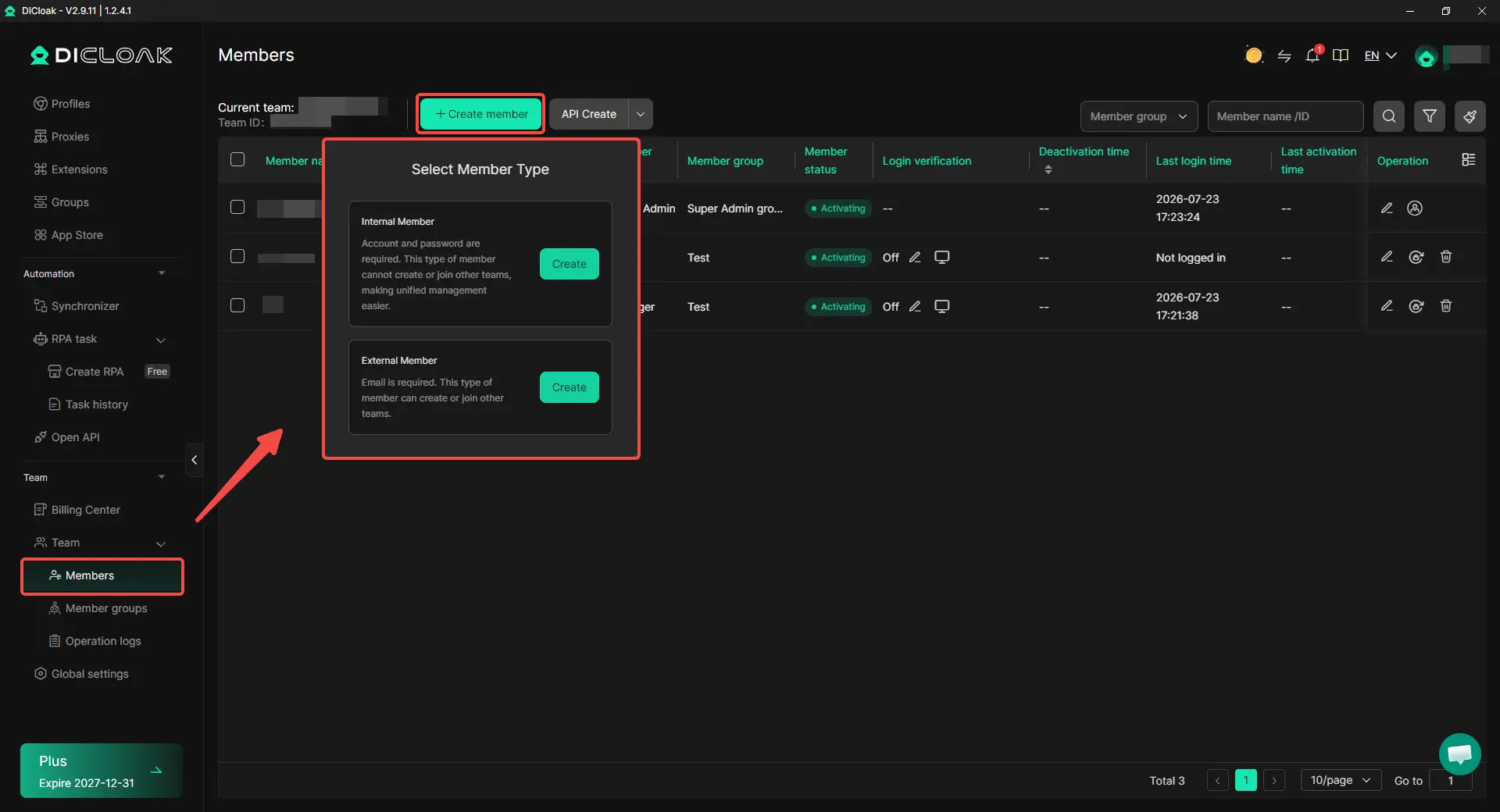
4. Share the Profile Only with Selected Members
Use profile sharing and team permissions to assign the HeyGen Profile only to people who need it. A temporary video editor should not receive access to unrelated client Profiles or administrator settings. Remove the assignment when the project ends or the member changes roles.
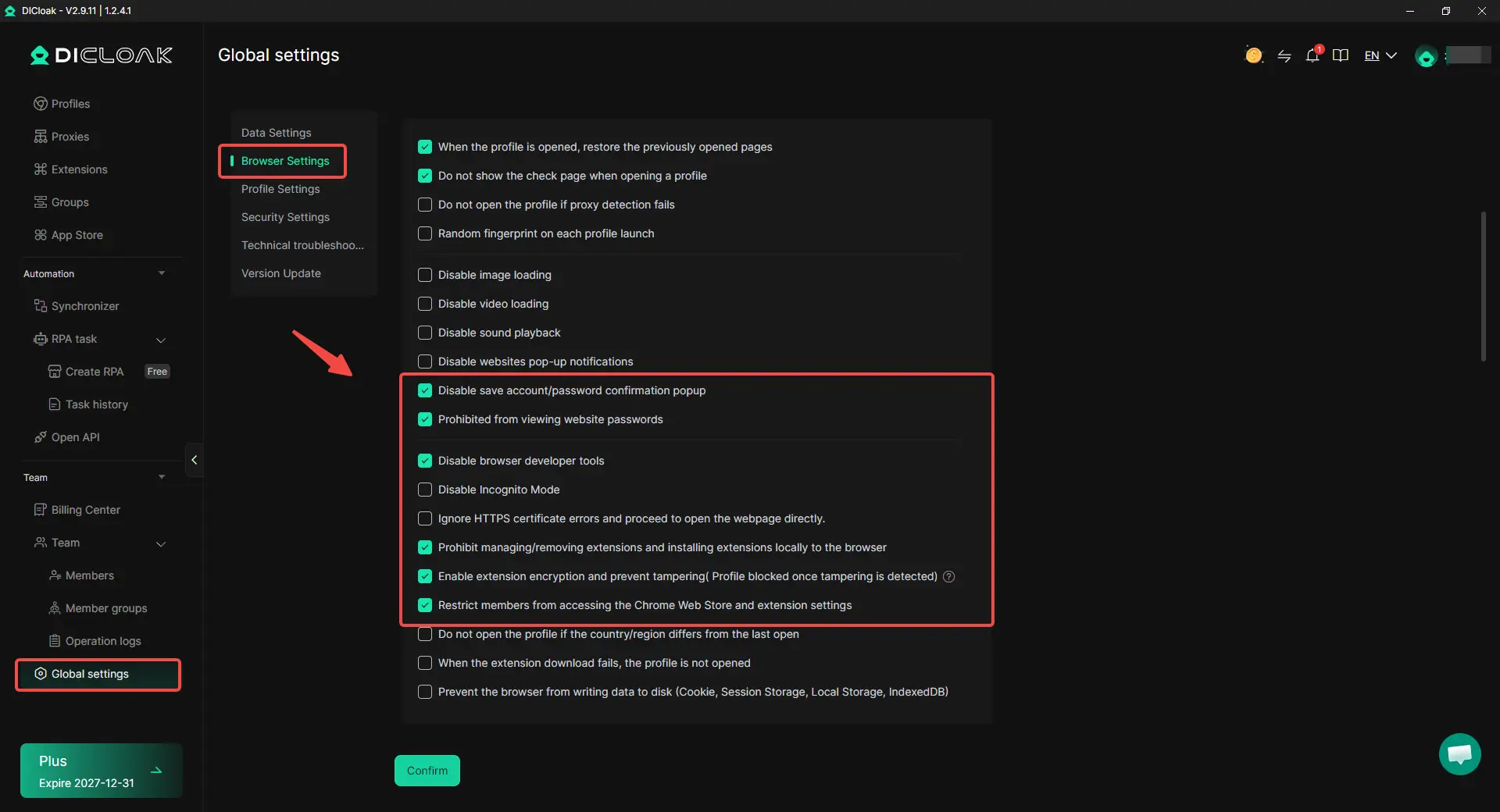
5. Protect the Password and Sensitive Account Areas
A saved session may contain more access than a teammate needs for one project. Using DICloak, the account owner can add browser-level controls that reduce exposure to the login password and unrelated account areas:
- Hide the password. Save the HeyGen login in the built-in password manager so approved members can use the account without viewing or copying the raw password.
- Restrict website access. Allow the Profile to open only approved HeyGen pages when a member does not need access to other websites or account areas.
- Hide sensitive page elements. Conceal sections such as billing, subscription details, or account controls when they are not required for the assigned task.
6. Review and Remove Access After the Project
When an employee leaves, a contractor finishes the job, or a client project closes, remove the member from the shared Profile. Review any remaining HeyGen Workspace access, project permissions, invitation links, and saved sessions as well. Access is not fully removed until every active entry point has been closed.
What Should Teams Check When Sharing a HeyGen Account?
Teams should check project access, credit use, editing handoffs, and offboarding before work starts. Most shared-account problems come from unclear responsibility, not from the sharing method itself.
- Keep client projects and brand assets separate. A contractor working on Client A should not automatically see Client B's drafts, avatars, voices, or campaign files. Use separate folders or workspaces where available, and give each member access only to the content needed for their task.
- Choose who can use shared credits. Several members may create drafts, but one person should approve the final generation. This reduces duplicate versions, unplanned tests, and confusion about which project used the available credits.
- Set a clear editing handoff. Decide who is editing the video now, when the next person can take over, and who publishes the final version. When several people open the same project without a handoff rule, they may repeat work or make changes to an outdated draft.
- Remove access when the work ends. Take former employees and contractors out of the workspace, revoke project permissions, and disable old invitation links. If the password was ever shared directly, update it and review any saved login sessions.
A strong team setup gives each person enough access to complete the task and removes that access when it is no longer needed. Once these rules are clear, teams can handle most questions about reviewers, credits, and shared editing more easily.
Frequently Asked Questions About Sharing a HeyGen Account
1. Can multiple people use the same HeyGen login?
Several authorized team members may need access to the same HeyGen work, but sharing one email and password is not the best setup. Regular collaborators should use their own HeyGen login through a Workspace when possible, while clients who only review videos may only need a share link. This keeps account access closer to each person's actual task.
2. Can I share a HeyGen account without sharing the password?
Yes. You can invite members to a HeyGen Workspace, share a finished video through a link, or provide access to an existing signed-in session. When an authorized employee or contractor must use that session, an antidetect browser like DICloak can store it in a dedicated browser Profile and share the Profile with selected members without showing them the raw password.
3. Does adding a HeyGen team member provide more credits?
Not always. Team seats and video generation credits may be handled separately, so adding another member does not necessarily increase the available credit pool. Check the current HeyGen pricing and credit rules before adding editors, translators, or reviewers, and decide who can approve the final generation to reduce duplicate credit use.
4. Can a client review a HeyGen video without a paid seat?
A client who only needs to watch or approve a finished video may not need permanent Workspace access. A video share link is often the simpler option because it does not expose drafts, avatars, voices, credits, or unrelated client projects. A paid seat is more suitable when the client needs regular access to shared content or collaboration features.
5. What should you do when a contractor no longer needs HeyGen access?
Remove the contractor from the HeyGen Workspace, revoke project and folder permissions, and disable any invitation links that are no longer needed. When access was provided through a shared browser Profile, remove the Profile assignment and review recent operation records. Change the HeyGen password if it was ever shared directly, since removing one access method may not close every active session.
Conclusion
Sharing a HeyGen account with your team without sharing passwords starts with choosing the right access method. Clients and occasional reviewers may only need a video link, regular creators can use HeyGen Workspace roles and project permissions, and authorized team members who need an existing session can use a dedicated browser Profile with DICloak Antidetect Browser. Teams should also check HeyGen pricing, shared credits, editing handoffs, and access removal before adding members. The best HeyGen sharing setup gives each person only the access needed for their task, protects the main login, and removes that access when the work ends.
 Web Proxy Tools
 Free Tools
 Cookie Plugin
 UA Generator
 MAC Address Generator
 IP Generator
 IP Address List
 2FA Code Generator
 World Clock
 Anonymous Check
 WebRTC Leak Test
 UUID Generator
 Free Web Proxy Site
 Proxy Checker
 FB Ad Checker
 AI Web Scraping
 Free SMM Tools
 Twitter Shadowban Checker
 Instagram Name Checker
 UTM Generator
 Username Generator
 AI Hashtag Generator
 LinkedIn Headline Generator
 Social Media Image Resizer