Getting verified on YouTube is a big goal for many creators. That small checkmark next to a channel name helps viewers know they are watching the real creator or brand. But getting a YouTube verification badge takes more than reaching a certain number of subscribers. You also need to meet YouTube's rules and show that your channel is authentic.
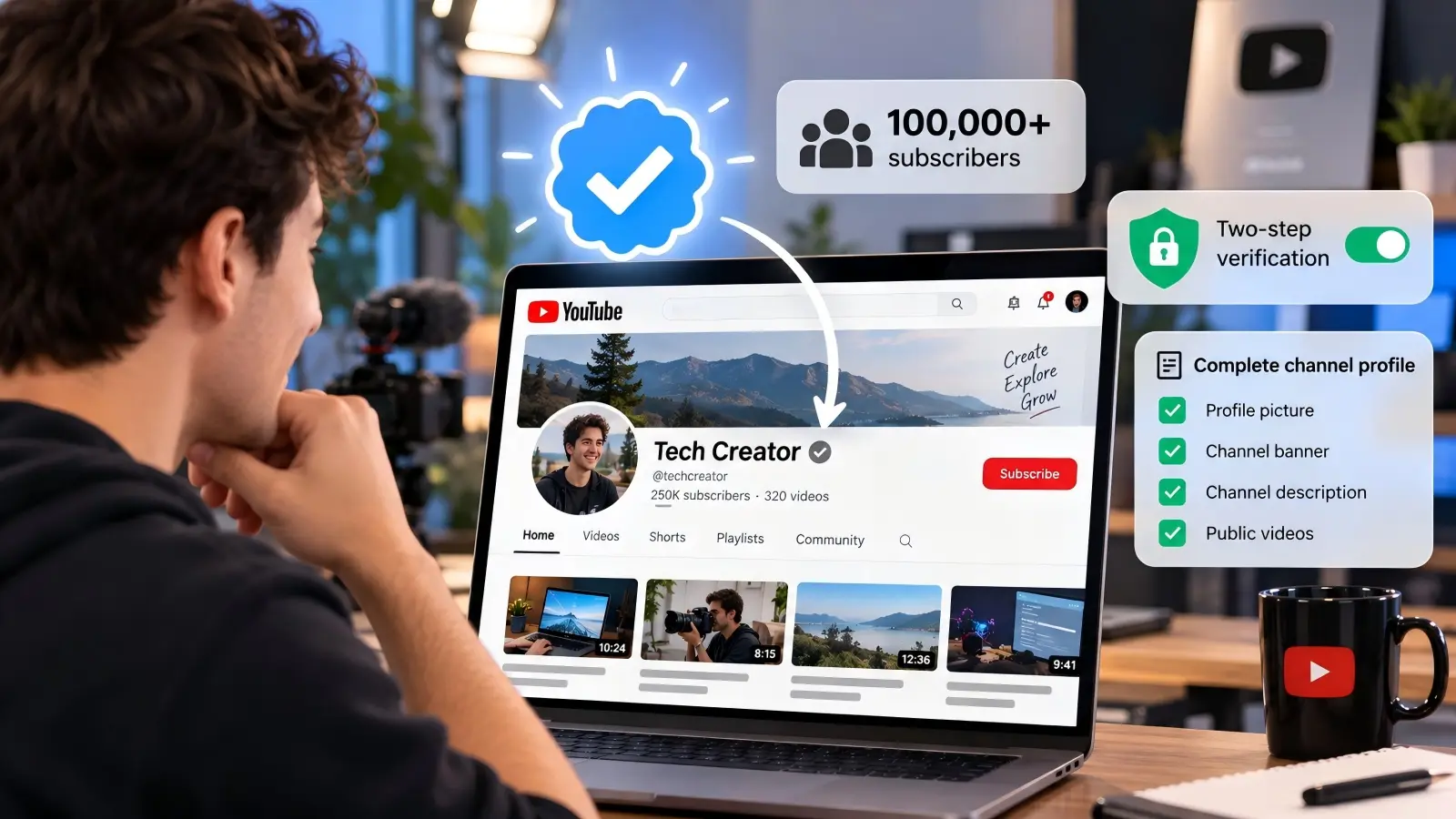
In 2026, YouTube generally requires at least 100,000 subscribers, two-step verification, and a complete channel profile before you can apply. YouTube may also verify some well-known channels with fewer subscribers. However, these exceptions are not available through the regular application process.
This guide explains how to get verified on YouTube in 2026, including the requirements, application steps, common mistakes, and ways to protect your channel. You will also learn what smaller creators can do before reaching 100,000 subscribers and how to manage multiple YouTube accounts more safely.
Steps to Apply for YouTube Verification in 2026
Applying for YouTube verification is fairly simple once your channel meets the requirements. The most important part is making sure your channel is ready before you open the application. YouTube checks several details, so it helps to review everything in advance. Here is how to apply for a YouTube verification badge in 2026 using the current official process.
How to check if your channel meets verification requirements
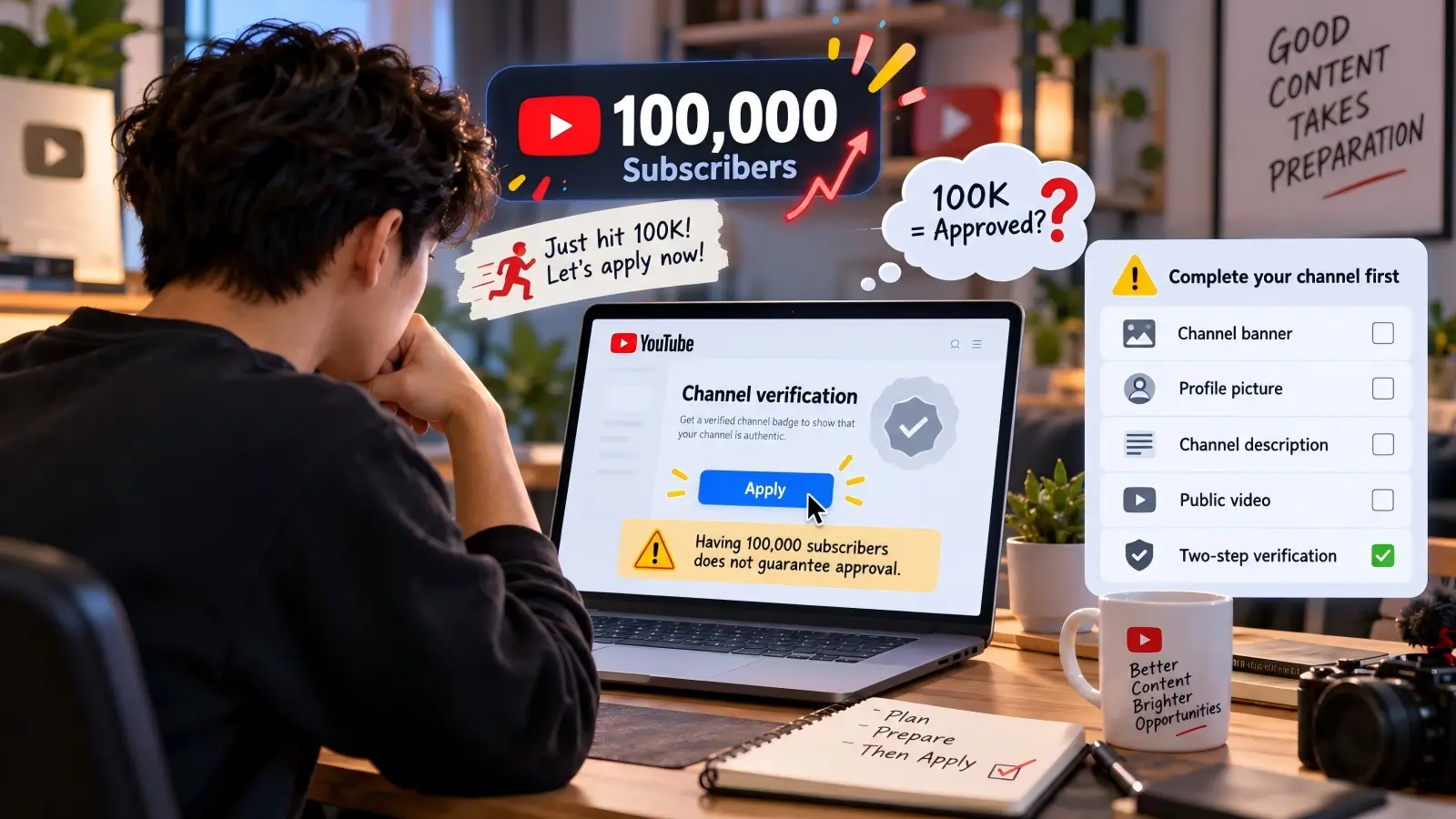
Start by checking your subscriber count and channel settings. YouTube requires at least 100,000 subscribers for a standard verification request. Your Google Account must also have two-step verification enabled. Finally, your public channel needs to have a complete profile with the required information.
Use this checklist before applying:
- 100,000 subscribers: Check your current count in YouTube Studio.
- Two-step verification: Turn on 2-Step Verification in your Google Account's security settings.
- Profile picture: Add a clear photo or official brand logo.
- Channel banner: Use a banner that represents your content or business.
- Channel description: Explain who you are and what your videos cover.
- Public content: Make sure your channel has at least one public video and remains active.
- Authentic identity: Check that your channel does not copy or pretend to represent someone else.
For example, if your channel has 105,000 subscribers but your Google Account does not have two-step verification turned on, you must fix that before applying. The same applies if your channel is missing a required profile image or description. Meeting all these conditions allows you to apply, but YouTube still needs to review and approve your channel.
Where to find the verification application in YouTube Studio
You can submit your verification request directly through YouTube Studio on a computer. Only the channel's owner or a manager can submit the application. Make sure you are signed in to the correct YouTube channel, especially if you manage more than one.
Follow these steps:
- Open YouTube Studio and sign in to your eligible channel.
- Click Settings in the left menu.
- Select Channel.
- Open the Verified badge tab.
- Click Apply when the application option appears.
- Follow the instructions shown on the screen to submit your request.
If you cannot find the Verified badge tab, your channel may not yet meet the subscriber requirement. If you have 100,000 subscribers but are missing two-step verification or required profile details, YouTube may show options to complete those steps first. If you recently reached 100,000 subscribers, the system may take a few days to update your eligibility.
What information you need to submit during the process
YouTube already has important information about your channel, including its subscriber count and profile details. During verification, it reviews whether your channel represents the real person, business, or organization it claims to represent. You may also be asked to provide additional information or documents to support your identity.
For example, a company applying for verification should make sure its channel name, logo, and description match its public business identity. If YouTube asks for more information, the company should provide accurate details through the official process. An individual creator should likewise make sure the channel clearly represents their own work and identity.
Do not assume that every applicant must upload a passport, business license, or other document. YouTube does not list one fixed set of documents for every channel badge application. The information requested can depend on the channel and what YouTube needs to confirm. Follow the instructions in your application rather than sending personal documents to an unverified third party.
How long it takes to get a decision after applying
YouTube does not publish a fixed approval time for channel verification badge requests. The review can depend on the information YouTube needs to check. Some creators may receive an answer sooner than others, so there is no guaranteed number of days.
While your request is being reviewed, keep your channel active and avoid making unnecessary changes to its identity. Check the email linked to your YouTube account and watch for any messages asking for more information. You should also keep your account secure and continue following YouTube's rules.
If you do not receive a decision quickly, avoid submitting repeated requests or paying someone who promises faster approval. The safest approach is to follow the official application instructions and wait for YouTube's response. Remember that the few days needed to update your subscriber eligibility are not the same as the time required to review your application.
How to Get Verified on YouTube Without 100,000 Subscribers
Not every verified YouTube channel has 100,000 subscribers. YouTube sometimes verifies channels with smaller audiences when the creator or organization is already well-known outside the platform. However, this is an exception rather than a standard application path. If your channel is still growing, it is important to understand what these exceptions mean and what you can realistically do.
What alternative criteria YouTube considers for smaller channels
YouTube states that it may proactively verify channels with fewer than 100,000 subscribers if they are well-known outside YouTube. This means the platform can recognize a creator or organization even when its YouTube audience is relatively small. However, having an official business or an active social media account does not automatically qualify you for an exception.
For example, imagine a published author who has appeared on national television and written several popular books. The author might have a small YouTube channel because most readers follow their work elsewhere. That established public identity could make the channel relevant to YouTube's exception process, although approval is not guaranteed.
YouTube does not offer a normal application form for channels below 100,000 subscribers to request this exception. Smaller creators should not expect an individual review simply because they have a professional website or strong audience engagement. If the channel is not proactively verified, the regular path is to grow toward the subscriber requirement.
How niche content can improve your chances of verification
Creating content for a specific audience can help you build a recognizable identity. For example, a channel that teaches advanced photography may become well-known among professional photographers even if it has fewer subscribers than a general entertainment channel. A clear niche can also make it easier for viewers to understand what your channel offers.
Suppose a wildlife researcher runs a channel with 18,000 subscribers. The researcher regularly publishes educational videos, contributes to respected research projects, and appears in public interviews. These activities may help establish their identity outside YouTube. However, there is no official rule that niche expertise alone qualifies a channel for early verification.
If you create niche content, focus on building an accurate public profile and a useful collection of videos. Share your work through relevant professional communities and maintain consistent branding. This can support your reputation and audience growth, but it should not be treated as a guaranteed way around the 100,000-subscriber rule.
Examples of successful channels verified under exceptions
YouTube confirms that some channels with fewer than 100,000 subscribers may receive proactive verification. However, its current public verification policy does not provide a list of named channels approved through this exception. A channel displaying a badge today is not proof that it received an exception, since it may have qualified under older rules or reached the standard threshold in the past.
The following examples illustrate situations where an exception might be relevant. They are hypothetical examples, not confirmed approval cases.
| Channel example |
Subscriber count |
Outside recognition |
What it means |
| Established news organization |
35,000 |
Recognized news outlet with an official website |
May have a strong public identity |
| Professional musician |
48,000 |
Known for music releases and public performances |
Could be recognizable outside YouTube |
| University research channel |
22,000 |
Official channel linked to a recognized institution |
Has an identity that can be checked |
| Local gaming creator |
15,000 |
Mainly known through their YouTube content |
Niche popularity alone does not establish eligibility |
These examples show why subscriber count is not the only factor behind every existing verification badge. Still, none of these channel types is automatically entitled to verification. For most smaller creators, building an authentic and active channel remains the most practical next step.
Mistakes to Avoid When Applying for YouTube Verification
Many verification problems can be avoided before the application begins. Some creators focus so much on reaching 100,000 subscribers that they forget to review their channel settings or public identity. Others misunderstand the difference between being eligible to apply and being approved. Taking time to check these details can make the process easier and help prevent unnecessary delays.
Why rushing the application can lead to rejection
Submitting a verification request as soon as you reach 100,000 subscribers may seem exciting. However, reaching the milestone does not mean your channel is ready for review. Missing profile details or disabled two-step verification can stop you from applying, while unclear branding may create questions during the authenticity review.
Imagine a creator who reaches 100,000 subscribers after one viral video. The creator immediately tries to apply but has not added a banner or completed the channel description. Instead of submitting an incomplete request, the creator should finish those requirements first. YouTube's current application process may direct eligible creators to complete the missing steps before they can select Apply.
Before opening the application, review your public channel as if you were visiting it for the first time. Can viewers understand who you are and what your videos cover? Does your branding match your actual identity? These checks will not guarantee approval, but they can help you avoid simple mistakes.
Misconceptions about subscriber count and verification
The biggest misunderstanding is that verification happens automatically at 100,000 subscribers. In reality, reaching that number makes a channel eligible for the standard application process. YouTube still reviews the channel before issuing a badge. You also need to meet the additional account security and profile requirements.
Another mistake is confusing the verification badge with YouTube Creator Awards. The Silver Creator Award is associated with the 100,000-subscriber milestone, but it has its own eligibility review. Getting a Creator Award and receiving a verification badge are separate matters.
Creators should also avoid services that sell subscribers or promise guaranteed verification. Artificially growing your audience does not establish an authentic channel identity and may violate YouTube's rules. A real audience, clear branding, and accurate channel information are better foundations for long-term growth.
How incomplete profiles hurt your chances
A complete YouTube profile helps viewers recognize your channel and understand its purpose. YouTube also makes profile completeness part of its verification requirements. Missing a required banner, profile picture, description, or public video can prevent an otherwise eligible creator from submitting an application.
For example, a technology company might publish hundreds of helpful software tutorials but leave its channel description empty. New viewers may struggle to tell whether the channel is official. Adding a clear description, a suitable company logo, and matching branding makes the channel easier to understand.
When updating your profile, avoid adding long descriptions filled with repeated keywords. Explain who runs the channel, what viewers can expect, and how the content helps them. A short, clear description written for real people is more useful than a large block of unrelated search terms.
How Verified Channels Can Maximize Their Benefits
Receiving a YouTube verification badge is an important step, but it is not the end of your work as a creator. The badge helps confirm your identity, while your videos, communication, and behavior shape how people see your channel. Creators who use verification as part of a wider content strategy may get more value from it. Here are three practical ways to make the most of your verified status.
How to use your badge to build trust with your audience
A verification badge helps viewers identify your official channel, especially when other accounts have similar names. This can be useful for creators who sell products, share educational content, or communicate with customers. However, the badge does not mean YouTube approves every statement or product featured in your videos.
For example, a verified fitness creator might discover that another account is using a similar name and profile picture. Viewers could become confused about which account is real. The creator can direct people to the official channel and explain where to find genuine announcements. If the other account is impersonating the creator, it can be reported to YouTube.
You can also build trust by responding to questions, correcting mistakes, and keeping important information current. When viewers see that your channel is both verified and helpful, they have more reasons to return. The badge supports your identity, but your actions build your reputation.
Leveraging verification for brand partnerships and collaborations
Brands often want to know whether they are speaking with the real owner of a YouTube channel. A verification badge can make that easier, especially when a creator has a public profile across several platforms. However, verification does not prove that a creator has strong engagement, reliable content, or a suitable audience for a campaign.
Imagine a technology creator discussing a sponsored video with a software company. The company may check the creator's channel, subscriber count, recent videos, and audience engagement before agreeing to work together. A verification badge helps confirm the channel's identity, but the company will still need to evaluate the creator's content and performance.
Verified creators should prepare clear business contact information and a simple media kit. Include your main content topics, audience information, and examples of previous work when available. Also, take care when opening sponsorship emails or files, since fake brand offers are a common security risk for creators. YouTube recommends checking whether potential sponsors are legitimate before responding to suspicious offers.
Why consistent content matters even after verification
Verification does not replace the need to publish useful videos. Your subscribers still expect content that matches the reason they followed you. If your videos suddenly change direction or become less helpful, the badge will not stop viewers from losing interest.
For example, a channel known for simple cooking lessons may publish one detailed recipe every week. That schedule gives subscribers a clear idea of what to expect. If the creator later starts posting unrelated promotional videos every day, regular viewers may become less interested.
You do not need to upload every day to maintain a successful channel. Instead, choose a schedule you can manage while keeping your content useful and accurate. Review your YouTube Analytics to understand which topics work well, and use that information to improve future videos.
Manage YouTube Channels More Efficiently with DICloak Antidetect Browser
Getting YouTube verification is only one part of managing a successful channel. If you run several channels or work with a team, keeping accounts organized and secure can become a challenge. Switching between accounts, sharing login details, and tracking team activities can also take up valuable time. DICloak Antidetect Browser helps simplify these tasks with separate browser Profiles, flexible security settings, and team management tools.
Keep Multiple YouTube Accounts Organized with Separate Browser Profiles
Managing several YouTube channels in one browser can lead to mistakes, such as uploading content to the wrong account or mixing up login sessions. DICloak lets you create a separate browser Profile for each YouTube channel, with its own cookies, browser data, and fingerprint settings. You can also configure a proxy for each Profile when needed, making it easier to manage different accounts in an organized way.
For example, an agency managing five YouTube channels can assign each one a dedicated Profile in DICloak. Team members can open the correct Profile without repeatedly signing in and out of different accounts. This helps keep daily channel management organized while reducing accidental account mix-ups.

Protect YouTube Accounts with Browser Security Controls
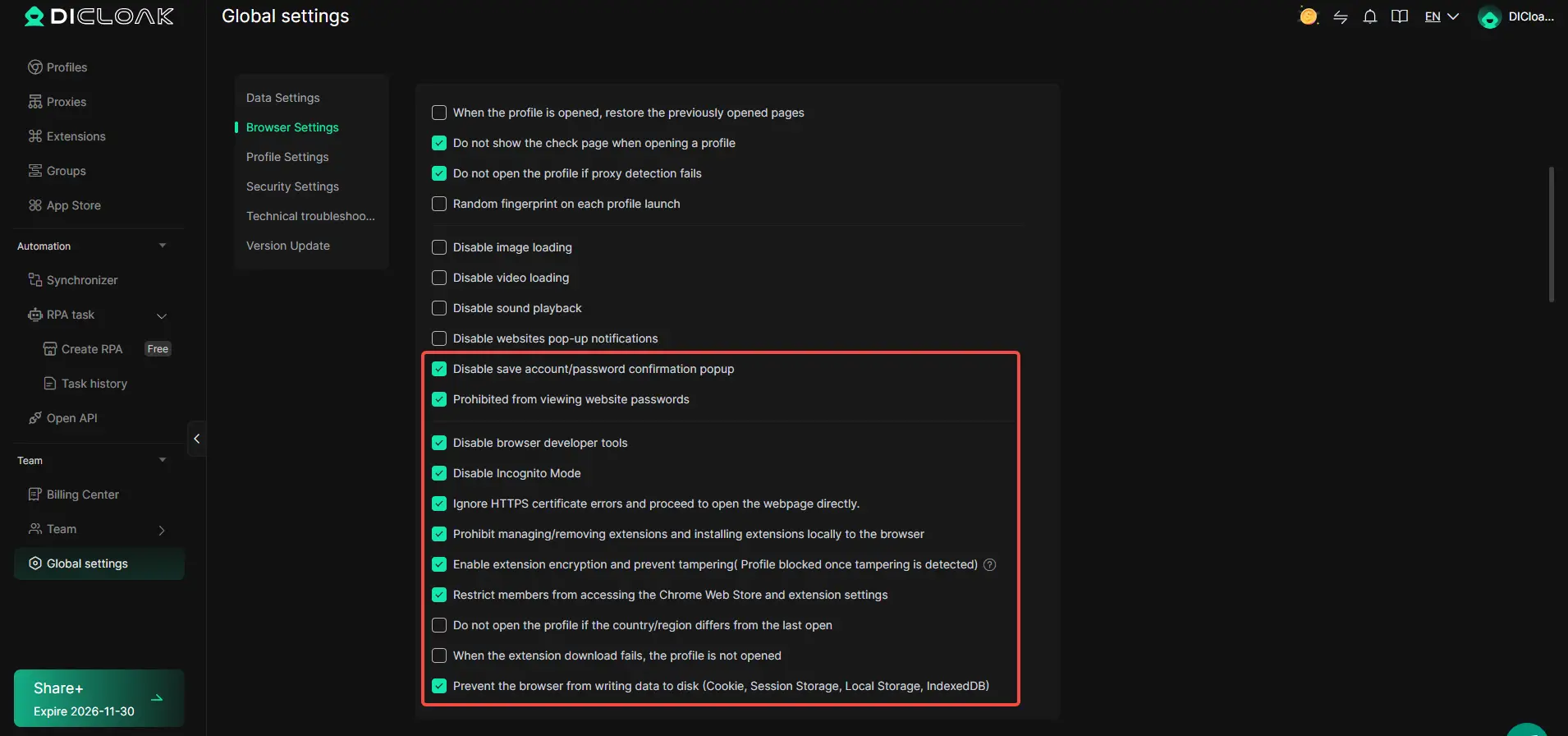
Losing access to a YouTube channel can be especially frustrating after earning a verification badge. DICloak provides browser security settings that help teams protect shared accounts. Administrators can restrict access to saved passwords, disable browser developer tools, and prevent members from changing or removing browser extensions. These controls help reduce the risk of accidental changes or unwanted access to sensitive browser information.
For example, a YouTube agency can allow an editor to use an assigned browser Profile without giving them permission to view saved website passwords. Administrators can also enable extension encryption and related protection settings to limit unauthorized changes. These features add browser-level controls, while Google two-step verification and YouTube's official channel permissions remain essential for account security.
Simplify YouTube Team Management with Permissions and Activity Logs
When several people manage the same YouTube channel, knowing who has access and what they can do becomes important. DICloak allows administrators to organize members into groups and assign specific permissions, such as opening Profiles without editing their settings. Its Operation Logs also provide records of team logins, browsing activity, Profile sharing, and transfers, helping managers review account-related activities.
For example, a YouTube marketing agency can give video editors access to assigned Profiles while keeping Profile management permissions limited to administrators. If a team member reports an unexpected change, managers can review the available activity logs to investigate. This makes collaboration easier to oversee, especially when preparing channel information or managing several verified YouTube accounts.

FAQ about YouTube verification
Can I reapply for YouTube verification if my request is denied?
Yes, you may be able to reapply for YouTube verification after a rejection. First, check why your application was denied and fix any issues with your channel's identity or profile. Follow the instructions in YouTube's decision notice before submitting another request.
Does YouTube verification improve search rankings?
No. YouTube verification does not directly improve search rankings, video recommendations, or views. The badge only confirms your channel's identity. Your content quality, relevance, and viewer engagement still matter most for growth.
What happens if my YouTube verification account gets hacked?
If your verified YouTube channel is hacked, recover your Google Account immediately. Change your password, enable two-step verification, and remove unauthorized access. You can also use YouTube's official hacked channel recovery process to restore your account.
Can I transfer YouTube verification to another channel?
No. YouTube verification cannot be transferred directly to another channel. Each channel must qualify for verification on its own. Changing your verified channel's name also removes the badge, so you would need to apply again.
Is YouTube verification available for business accounts?
Yes. Businesses and organizations can apply for YouTube verification. Their channels generally need at least 100,000 subscribers, two-step verification, and a complete public profile. YouTube must also confirm that the channel represents the real business.
Conclusion
Getting YouTube verification in 2026 starts with understanding what the badge means. It confirms that a channel represents an authentic creator, brand, or organization. For most creators, the standard application requires 100,000 subscribers, two-step verification, and a complete public channel. Even after meeting these requirements, YouTube must review and approve the request.
If your channel has fewer than 100,000 subscribers, focus on growing a real audience and building a recognizable identity. YouTube may proactively verify some well-known channels, but there is no guaranteed shortcut. Keep your content useful, follow platform rules, and protect your account as your audience grows.
For creators and agencies managing several YouTube channels, DICloak Antidetect Browser can help organize separate browser Profiles and manage team access. It will not guarantee YouTube verification, but it can make multi-account management more organized and reduce avoidable workflow mistakes. Combined with clear branding, strong account security, and consistent content, these habits can help you manage your channels more confidently
 Web Proxy Tools
 Free Tools
 Cookie Plugin
 UA Generator
 MAC Address Generator
 IP Generator
 IP Address List
 2FA Code Generator
 World Clock
 Anonymous Check
 WebRTC Leak Test
 UUID Generator
 Free Web Proxy Site
 Proxy Checker
 FB Ad Checker
 AI Web Scraping
 Free SMM Tools
 Twitter Shadowban Checker
 Instagram Name Checker
 UTM Generator
 Username Generator
 AI Hashtag Generator
 LinkedIn Headline Generator
 Social Media Image Resizer