As TikTok evolves into a primary platform for long-form content (up to 10 minutes) and high-bitrate video, the shift from mobile-only usage to professional desktop workflows has become a strategic necessity. For creators and operations specialists in 2026, the desktop browser is no longer a secondary access point; it is the essential hub for managing massive 2GB file uploads and high-precision metadata. Mastering the TikTok web login is the first step toward migrating away from the limitations of mobile interfaces and toward a secure, scalable professional environment.
Why Are Creators Switching to TikTok Web Login in 2026?
The modern social media landscape demands a level of precision and data depth that mobile applications cannot provide. Professionals are increasingly leveraging the web version to bypass the friction of mobile file management.
Better Content Management and Editing Workflow
The web interface allows for a direct pipeline from professional editing suites like Adobe Premiere or CapCut Desktop to the platform. By uploading from a PC or Mac, creators avoid the compression issues and transfer delays inherent in mobile workflows. Additionally, the desktop interface provides the physical screen real estate necessary to manage the expanded 2,200-character caption limit, facilitating better SEO and audience engagement.
Accessing Detailed Analytics and Creator Tools
While the mobile app offers basic metrics, the desktop dashboard provides a granular view of algorithmic performance. Security researchers and ops specialists prefer this view for its clear visualization of follower growth trends, retention rates, and post-performance heatmaps. This data density allows for more sophisticated auditing of account health.
The Advantage of Video Scheduling
Native video scheduling is a cornerstone of professional operations. Available to Business and Creator accounts via the web portal, this feature allows teams to queue content for optimal time slots without manual intervention. This reduces "active session" time, which can be a security benefit by limiting the frequency of manual logins on mobile devices.
How Do I Log In to TikTok via Web Browser?
Navigating the TikTok web portal requires attention to technical detail to avoid triggering anti-bot mitigation measures.
Accessing the Official TikTok Portal
Access the platform exclusively via tiktok.com. As a security researcher, I must emphasize the risks of third-party "viewers" or phishing mirrors. Ensure you are utilizing a stable, non-compromised connection. Before attempting a login, disable aggressive script blockers or VPN extensions that may interfere with TikTok’s proprietary authentication scripts.
Navigating the Desktop Interface
The login prompt is located in the upper-right corner. The 2026 desktop UI is a horizontal optimization of the mobile experience. While the "For You" feed remains central, the left-hand navigation rail provides streamlined access to Following, Friends, and the Explore tab, allowing for more efficient community management than the swipe-heavy mobile app.
QR Code vs. Email Login: Which TikTok Web Method Is Safest?
From a digital security standpoint, the method of authentication determines your vulnerability to credential theft and session hijacking.
The QR Code Fast-Track
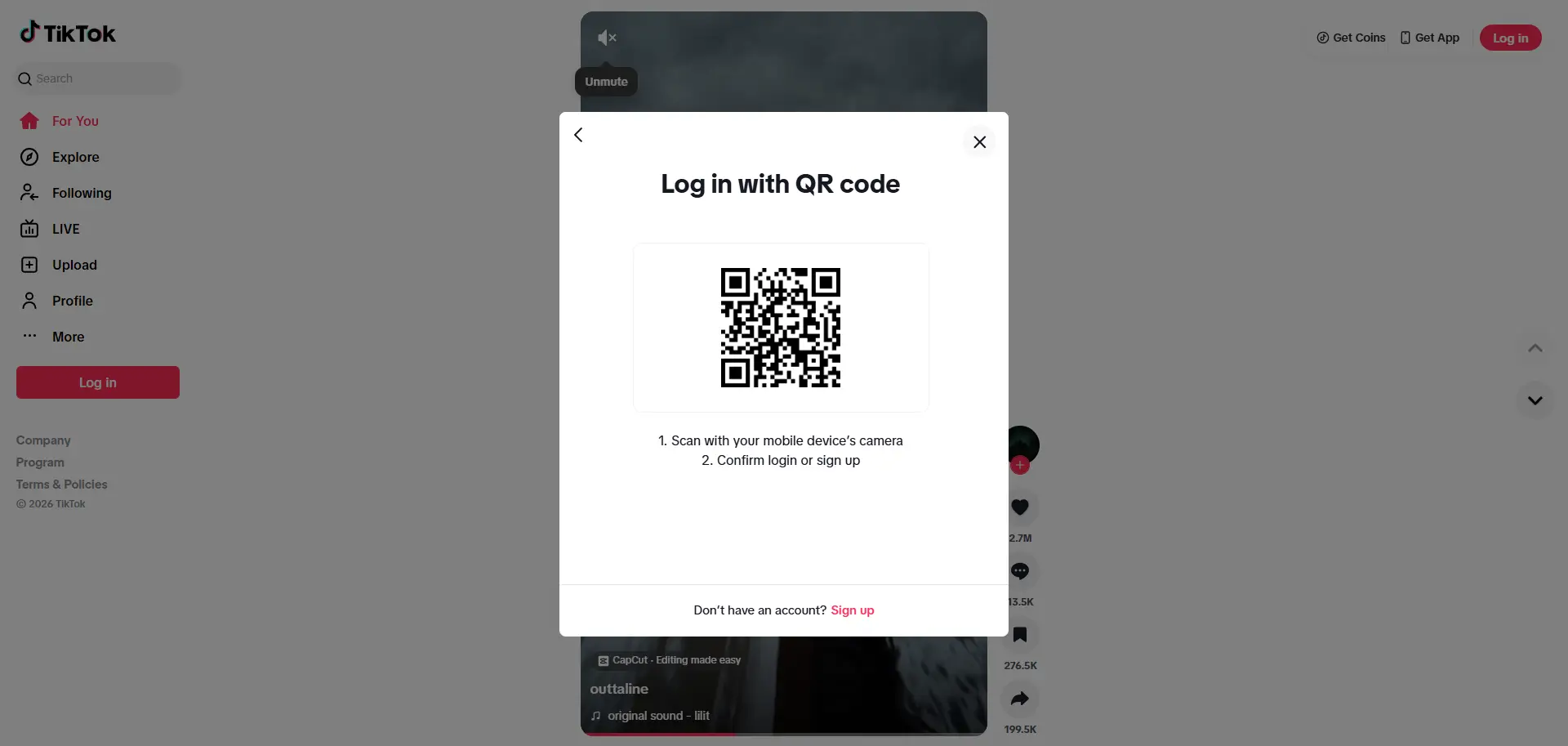
The QR code method is the gold standard for personal hardware. By navigating to Profile > Settings > Scan QR on your mobile app, you establish a secure handshake between devices. This bypasses the keyboard entirely, reducing the risk of local keyloggers capturing your password.
Standard Email and Username Credentials
The traditional login flow requires absolute precision. Even minor discrepancies in character casing can trigger "account not found" errors or, worse, algorithmic flagging for suspicious activity. When using this method, ensure your browser is not auto-filling outdated session data which can lead to login loops.
Third-Party Authentications (Google, Apple, Facebook)
TikTok supports OAuth 2.0 via Google, Apple, and Facebook. While convenient, switching between these methods frequently can trigger a "suspicious login" prompt. If your operations require multiple team members to access an account, third-party logins can become a liability due to cross-platform security triggers.
Why Can’t I Log In to My TikTok Account on PC?
Technical friction often stems from session token conflicts or aggressive security filters.
Solving the "Login Loop" and CAPTCHA Failures
If you are trapped in a refresh loop or the CAPTCHA fails to render, you are likely facing a session token conflict. This occurs when local storage is corrupted or the platform's anti-bot system has flagged your environment. The primary fix is a deep purge of browser cookies and cache to reset the digital handshake.
Handling Two-Factor Authentication (2FA) Delays
When 2FA codes fail to arrive, follow this protocol:
- Wait a full 30 seconds before re-requesting to avoid "spam" flagging.
- Check for server-side latency in your email's spam filter.
- Ensure your browser session has not timed out, as a stale session will reject an otherwise valid 2FA code.
Browser Compatibility and Extension Interference
Chrome, Edge, and Safari are the recommended environments. However, ad-blockers, aggressive VPN extensions, and header-modifying plugins often break the proprietary scripts required for a successful login. If issues persist, disable all extensions to identify the culprit.
How Do I Upload and Schedule Videos on TikTok Web?
The desktop uploader is a high-capacity tool designed for professional distribution.
Upload Specifications and File Handling
The 2026 web uploader supports the following technical parameters:
- Formats: .mp4 or .mov.
- File Size: Maximum 2GB.
- Duration: Up to 10 minutes.
- Resolution: 1080p and 4K optimizations.
Managing Metadata and Privacy Settings
Desktop access allows for high-precision metadata entry. Use your keyboard and mouse to curate hashtags, @mentions, and privacy levels. Note that while the browser handles standard uploads and scheduling, TikTok Live Studio remains a distinct software download required for professional-grade streaming, offering features the browser-based "Go Live" option lacks.
Is It Risky to Manage Multiple TikTok Logins on One Browser?
For professional social media managers, managing multiple accounts in a single browser window is an operational hazard.
How TikTok Tracks Your Browser Environment
TikTok utilizes advanced browser fingerprinting. This goes beyond cookies and IP addresses; the platform analyzes WebGL parameters, Canvas rendering, User Agent strings, and hardware identifiers. If multiple accounts share a single digital fingerprint, the platform’s security system may link them, leading to shadowbans or mass suspensions.
The Danger of Frequent Account Switching
Frequent logging in and out within the same cookie container creates "bot-like" behavior patterns. This triggers algorithmic flagging, leading to increased CAPTCHA frequency, persistent 2FA loops, and eventual session locks as TikTok attempts to mitigate perceived automated activity.
How Can I Switch Between Multiple TikTok Accounts Without Getting Flagged?
Scalability requires strict environmental isolation.
Utilizing Native Browser Profiles
A basic defense involves using separate browser profiles (e.g., Chrome or Edge profiles). Each profile operates as a separate cookie container. By dedicating one profile to one TikTok account, you prevent basic data crossover and session token conflicts.
Incognito mode is insufficient for professional security. While it clears cookies upon closing, it does nothing to mask your IP address or hardware fingerprint. TikTok’s security layers can still identify that multiple accounts are originating from the same device, rendering this method useless against advanced anti-bot mitigation.
When people ask how many tiktok accounts can you make in a day, the real challenge is often not only the number of accounts, but how those accounts are managed afterward. Once multiple TikTok accounts need to be maintained at the same time, many users look for a setup that keeps each account environment more clearly separated and easier to manage.
- Profile isolation: Users can create separate browser profiles for different TikTok accounts, keeping cookies, local storage, and profile settings apart instead of mixing everything in one browser session. This can make daily account handling cleaner and easier to organize.

- Custom proxy configuration: Users can assign a separate proxy to each profile, which gives them a clearer way to manage different TikTok account environments instead of switching one shared connection back and forth.

- Team and batch management: When the number of TikTok accounts grows, users can assign profiles to team members, manage permissions, and apply batch actions across multiple profiles. This makes it easier to organize account access and reduce repeated setup work.

Frequently Asked Questions About TikTok Web Login
Can I use TikTok without the mobile app?
Yes. In 2026, the web portal provides 1:1 functionality for browsing, engagement, and content distribution, though specific mobile-only AR filters may still be restricted.
Why does TikTok keep logging me out on my browser?
This is typically a result of session token expiration or security settings that clear cookies on exit. Using a dedicated isolation tool can maintain persistent sessions.
Is it possible to go Live from TikTok Web?
Basic live functionality is available on the web, but professional streamers should use TikTok Live Studio for advanced hardware integration and scene management.
Can I use TikTok Web on a tablet?
Yes, but you must enable "Desktop Site" in your mobile browser settings to access the full creator dashboard and scheduling tools.
How many accounts can I safely log into on one PC?
Technically, only one account per browser profile or dedicated session is safe. You should never log into more than one account in a single cookie container to avoid algorithmic flagging.
Moving Forward with TikTok Desktop
The TikTok web login is the gateway to professional-grade content operations. By moving to the desktop, you gain the precision required for long-form video management and the depth of data needed for growth. However, as you scale, the risk of session conflicts and fingerprint flagging increases. Prioritizing security through session isolation and dedicated environments is the only way to ensure long-term, uninterrupted account health in the 2026 ecosystem.
 Web Proxy Tools
 Free Tools
 Cookie Plugin
 UA Generator
 MAC Address Generator
 IP Generator
 IP Address List
 2FA Code Generator
 World Clock
 Anonymous Check
 WebRTC Leak Test
 UUID Generator
 Free Web Proxy Site
 Proxy Checker
 FB Ad Checker
 AI Web Scraping
 Free SMM Tools
 Twitter Shadowban Checker
 Instagram Name Checker
 UTM Generator
 Username Generator
 AI Hashtag Generator
 LinkedIn Headline Generator
 Social Media Image Resizer