When someone opens your Instagram profile, they quickly decide whether the account is relevant to them. Your bio has very little space to shape that decision, so clear wording matters more than clever phrases, decorative symbols, or a long list of interests.
The simplest way to understand how to write a bio for Instagram is to answer three questions: Who are you? What will visitors gain from following you? What should they do next? These questions also help you decide what to put in an Instagram bio and what to leave out.
This guide shows you how to write each part of your bio. It also covers templates, original examples, search optimization, AI assistance, common mistakes, and long-term updates. The goal is not to create the most creative bio. It is to help the right visitor understand your account and take the next step.
How to Write a Bio for Instagram Step by Step
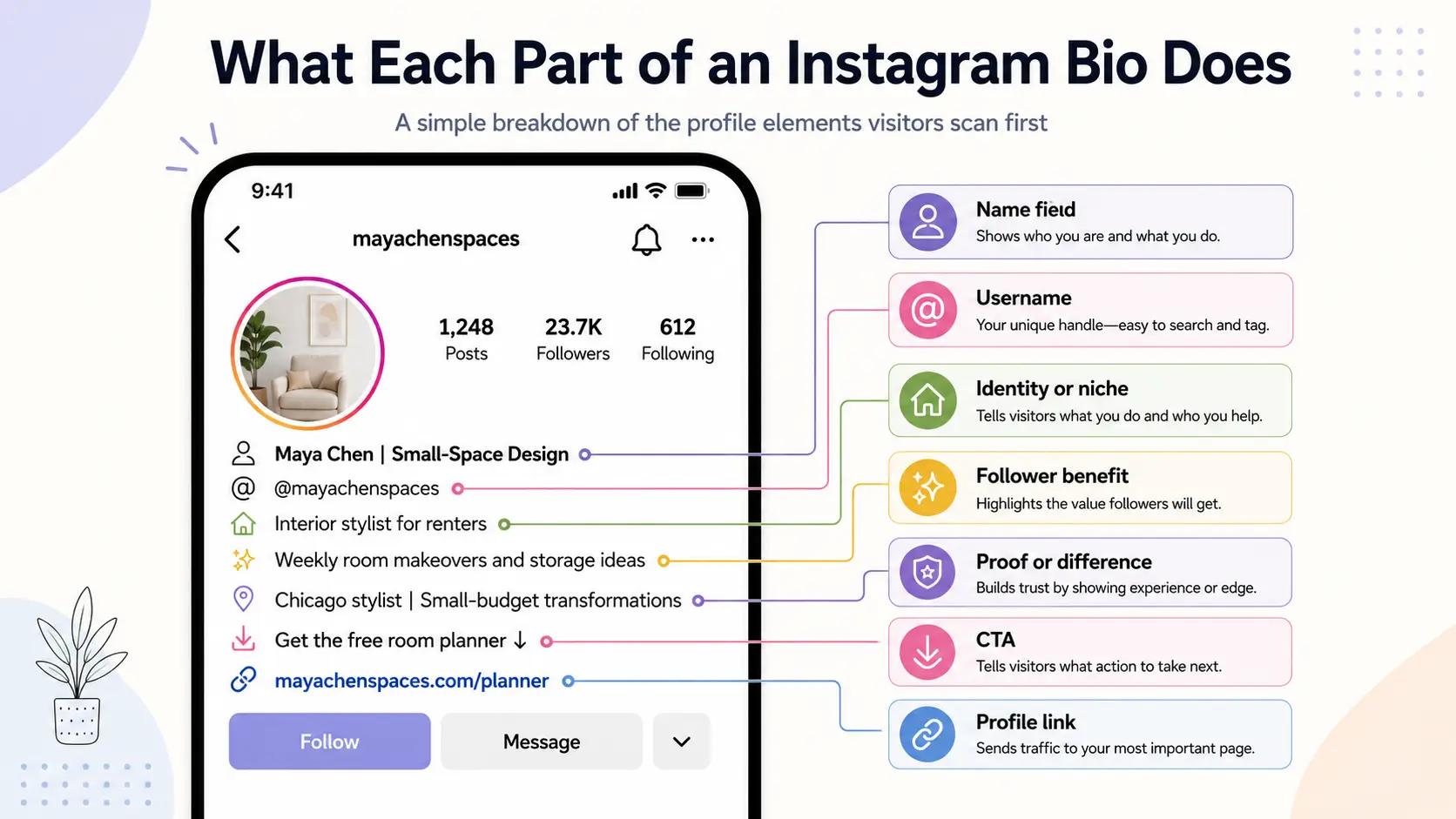
Learning how to write a bio for Instagram starts with one clear account goal and ends with one clear next action. This is how to make a good Instagram bio: make every line support the same purpose.
Step 1: Decide What You Want Visitors to Do
Your bio should support one primary outcome. Decide what matters most before you start writing, so the rest of the bio has a clear direction.
Your goal may be to gain followers, sell a product, book a service, drive website visits, receive messages, promote a download, or grow a community. You may want several of these results, but they should not all have equal priority. When too many outcomes compete for attention, the bio becomes harder to organize.
For example, a fitness coach launching a meal-planning guide may choose downloads as the main goal. The bio can then focus on the guide rather than promoting consultations, private messages, and a paid community.
Choose the result that matters most right now. Other actions can still appear elsewhere on the profile.
Step 2: Define Who Your Instagram Bio Is For
Write the bio for the visitor you most want to reach. Think about what that person needs, what interests them, why they would open your profile, and what would make them stay.
A simple description is enough, such as “new freelance designers looking for client advice” or “local parents searching for weekend activities.” This gives you a clear point of view when choosing your words.
Compare “content for anyone who wants to grow” with “simple marketing lessons for solo shop owners.” The first could apply to almost anyone. The second gives a specific group a reason to keep reading.
When you write for everyone, you often use vague phrases that connect with no one. A defined visitor helps you make sharper choices without making the bio feel narrow or unfriendly.
Step 3: Explain Who You Are and What You Offer
Visitors should quickly understand the account’s identity and main topic. State your role, niche, product, service, or content area in plain language.
The right wording depends on the account type. A personal account may name a role, interest, or specialty. A creator account may state its content niche. A business account may explain what it sells or provides. At this stage, focus on what the account does.
Weak: “Helping you live your best life.”
Clearer: “Budget meal prep for busy families.”
The clearer version names the topic and the people it serves. It does not rely on a broad promise that could describe hundreds of accounts.
Use words your intended visitor already understands. Avoid labels that sound impressive but do not explain the account, such as “visionary,” “dream builder,” or “digital innovator.” Clear identity should come before clever wording.
Step 4: Give People a Reason to Follow You
Describing the account tells visitors what it is. A follower benefit tells them what they can expect to gain from it.
That benefit may be useful information, practical advice, entertainment, support, inspiration, product updates, or a regular content type. Make it specific enough that visitors can picture what will appear in their feed.
Before: “Home organization content.”
After: “Weekly room resets and storage ideas for small homes.”
The first version only names the topic. The second explains the useful content followers will receive. It also makes a realistic promise instead of suggesting that every visitor will become perfectly organized.
Choose one main benefit rather than listing every possible reason to follow. A clear expectation makes the account easier to understand and gives the right visitors a stronger reason to stay.
Step 5: Add Proof, Personality, or a Key Difference
Most bios need only one strong detail that builds trust or makes the account memorable. Choose the detail that matters most for your account.
A service provider may use relevant experience or a credential. A local business may include its location. A creator may show a clear specialty or recognizable personality. A brand may highlight a practical difference, while a results-based account may mention one specific outcome it has achieved.
For example: “Small wedding cakes for celebrations under 50 guests.”
This line shows a clear specialty without filling the bio with broad claims. It also helps the right customer quickly understand whether the service fits their needs.
Only use proof you can support. Avoid inflated numbers, vague claims such as “industry-leading expert,” or results that cannot be checked. One credible detail is more useful than several impressive-sounding statements.
Step 6: Write a Clear Call to Action
A call to action tells visitors what to do next. It should match the primary goal you chose in Step 1 and point toward the link or contact option on the profile.
Useful CTAs include “Shop the collection,” “Book a consultation,” “Download the guide,” “Watch the full tutorial,” “Send a message,” and “Join the community.” Choose the wording that describes the next step most clearly.
Weak: “Click below for more.”
Improved: “Download the free pricing checklist.”
The improved version tells visitors what they will get and gives them a clear reason to click. It also creates a direct connection between the bio and the destination.
Use one main CTA instead of several competing commands. The next step should be obvious as soon as visitors finish reading the bio.
Step 7: Shorten and Format Your Instagram Bio
Instagram currently limits the bio field to 150 characters, so your final draft must be short and easy to scan. Formatting should make the message clearer, not decorate every line.
Start by removing filler words, repeated ideas, empty adjectives, and labels the profile already makes clear. Replace phrases like “We are a company that creates” with direct wording, such as “Handmade travel bags.” Keep only the strongest identity, benefit, proof, and action.
Use line breaks to separate ideas when they improve readability. Emojis and symbols can guide the eye, but each one should have a purpose. Avoid random capitalization or full lines written in capital letters. Special Unicode fonts may look distinctive, but they can be harder to read and may cause accessibility problems for some visitors.
Use these Instagram bio tips as a final editing checklist:
- Is the account’s purpose clear?
- Is the follower benefit specific?
- Is there one main action?
- Can you remove another word?
- Is every line easy to scan?
Instagram Bio Templates and Examples
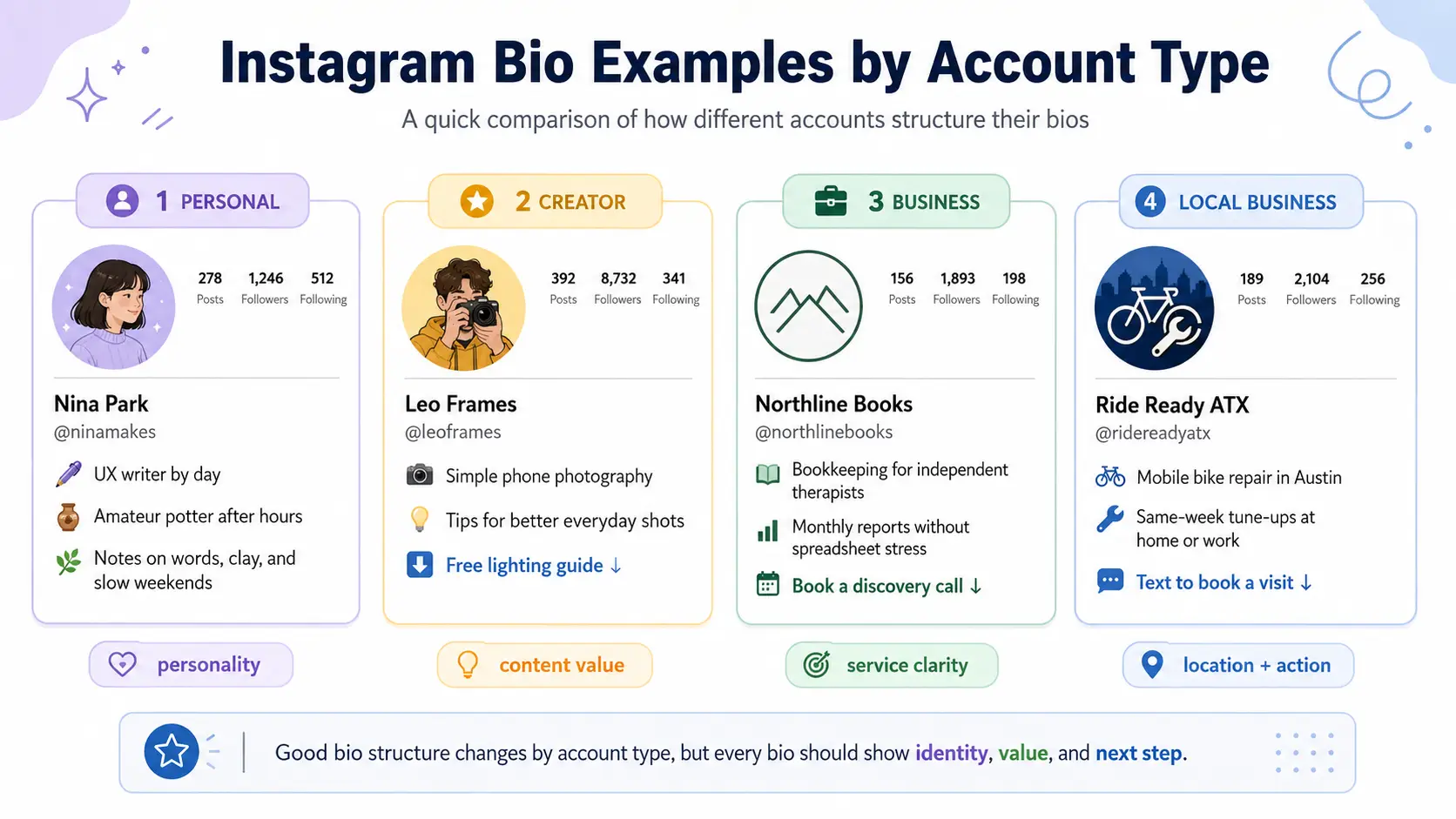
The best Instagram bio templates give you a structure, not a finished identity. Adapt each one to your audience, offer, personality, and main goal. The Instagram bio examples below are original and fit the current limit, but you should not copy them word for word. Use them as Instagram bio ideas for building a version that sounds like you.
Personal Instagram Bio Template and Example
Formula:
[Role or identity] | [Main interests or project]
[What you share] + [One personal detail]
Example:
UX writer by day | Amateur potter after hours
Notes on words, clay, and slow weekends
Why it works:
A personal Instagram bio should sound like a person, not a sales page. This example gives visitors a quick sense of the person’s work, hobby, and posting style. The phrase “slow weekends” adds warmth without trying too hard. It also leaves out a CTA because the account does not need one.
Instagram Bio Template for Creators
Formula:
[Content niche] for [audience or situation]
[Proof or useful difference]
[CTA + resource or next step]
Example:
Simple phone photography for everyday life
7 years behind the camera
Get the free lighting guide ↓
Why it works:
An Instagram bio for creators should show what the audience will learn or enjoy. This one promises practical photography guidance without broad claims. The experience line adds trust, while the final line points visitors to a resource that matches the content. The tone feels useful and direct rather than polished or inspirational.
Instagram Bio Template for Business Accounts
Formula:
[Service] for [type of client]
[Main benefit or difference]
[Booking or contact CTA]
Example:
Bookkeeping for independent therapists
Monthly reports without the spreadsheet stress
Book a discovery call ↓
Why it works:
A strong Instagram bio for business states the service and the client in the first line. The second line explains the practical difference without using empty claims. The CTA suits a small service business because visitors may need to discuss their needs before buying. Every line supports the same customer journey.
Instagram Bio Template for Ecommerce Brands
Formula:
[Product category] for [need or preference]
[Product difference] + [offer or shipping detail]
[Shopping CTA with a reason to click]
Example:
Sleepwear made for hot sleepers
Lightweight bamboo blends + free U.S. shipping over $75
Find your cooler set ↓
Why it works:
The opening line names both the product and the problem it addresses. The next line adds a material detail and a practical shipping offer without using fake urgency. “Find your cooler set” gives the shopping action a purpose, so it feels more inviting than a plain command to shop.
Instagram Bio Template for Local Businesses
Formula:
[Service] in [city or service area]
[Useful specialty or convenience]
[Booking, calling, messaging, or visit CTA]
Example:
Mobile bike repair across Austin
Same-week tune-ups at your home or office
Text to book a visit ↓
Why it works:
Location matters here because the service is limited to one area. It also makes the service area easy for nearby customers to understand. The bio explains the main convenience: customers do not need to take their bikes to a shop. “Same-week” sets a useful expectation without making an extreme promise. The message CTA fits a mobile service and makes the next step easy.
How to Optimize Your Instagram Bio for Search
Good instagram bio seo starts with useful profile information, not repeated search terms. A well-organized name, bio, and location can give visitors and Instagram more context about your topic or service. When people ask how to optimize instagram bio content, the practical answer is to describe the account in words people understand and may search for.
Use a Relevant Keyword in Your Instagram Name Field
Your username, Name field, and bio text serve different purposes. Your username is the unique @handle that identifies the account. The Name field is a separate public label on your profile. The bio gives you space to describe the account in more detail.
The Name field can combine your name or brand with a useful category, profession, service, or topic. Choose a term that describes what people may actually search for.
Weak:
Maya Rose
Improved:
Maya Rose | Austin Wedding Photographer
The improved version still identifies the person, but it also explains her service and location. Someone seeing the profile in search can understand its purpose before opening it. Adding the term does not guarantee a higher position, but it can make the account more relevant to a matching search.
Add Keywords Naturally to Your Instagram Bio
One or two useful instagram bio keywords are usually enough. They may appear in your service description, content niche, product category, or audience description.
Natural:
Plant-based recipes for busy students
Overloaded:
Vegan recipes | plant-based recipes | healthy vegan meals | easy vegan food
The natural version tells visitors what the account covers and who it serves. The overloaded version repeats several phrases with almost the same meaning. That wastes space and makes the bio harder to read.
A keyword should clarify the account for real people. It should not look as though it was added only for a search system. Use the term once where it fits best, then let the rest of the bio explain the account in normal language.
Add Location Details When Local Search Matters
Add a location when visitors need to know whether the business serves their area. This is useful for local service providers, restaurants, salons, real estate professionals, physical stores, and event businesses.
You can place a city, region, neighborhood, or service area in the Name field or bio text. Professional accounts can also display directions through their contact information when that option is set up.
Example:
Portland dog grooming | Gentle care for senior dogs
The city helps nearby pet owners confirm that the service is available to them. It also prevents visitors outside the service area from wasting time.
An online-only business, global creator, or account without a fixed service area may not need a location. Adding a city does not guarantee local visibility. Its main job is to help nearby visitors judge whether the account is useful to them.
Should You Use Hashtags in Your Instagram Bio?
Most accounts do not need several broad hashtags in their bio. Hashtags can currently be clickable, but clicking one may take visitors away from your profile and open the related hashtag page.
A hashtag has a real purpose when it supports a branded community, campaign, event, or user-generated content collection.
Useful:
Share your workspace with #DeskResetChallenge
Unnecessary:
#business #success #marketing #entrepreneur
The useful example gives customers a reason to use the tag and groups related posts around one campaign. The unnecessary example uses broad terms that add little information about the account. They also take up limited space and may distract visitors from the main action.
Treat hashtags as an optional navigation or campaign tool, not a required search tactic.
How to Use AI to Write an Instagram Bio
AI can speed up brainstorming, but its output depends on the details you provide. An AI Instagram bio generator should give you starting options, not a final bio to publish without review. The strongest results come from useful account information, firm limits, and instructions that push the writing beyond generic phrases.
What Information to Include in an AI Prompt
Vague input produces vague bios. Give AI enough detail to understand the account and the result you need.
Include the account type, target audience, main content or offer, visitor benefit, tone, useful proof or difference, optional keyword, desired CTA, and current character limit. These details guide both the content and the writing style.
Weak input:
“Write a good Instagram bio for my page.”
Improved input:
“Write a friendly bio for a podcast editor serving independent business podcasters. Mention faster weekly production, eight years of audio experience, and a CTA to request a sample edit. Keep it within 150 characters.”
The improved input gives AI real material to work with. It also sets boundaries, which reduces vague claims and unrelated wording.
A Prompt for Generating Instagram Bio Ideas
Ask for several different directions instead of three small variations of the same sentence. You can use this prompt to generate Instagram bio ideas while keeping control over the message. Instagram’s official help guidance confirms that profile bios can contain up to 150 characters.
Write three clearly different Instagram bio options using the details below: Account type: [account type] Audience: [target audience] Main topic, product, or service: [main focus] Visitor benefit: [what visitors gain] Tone: [tone of voice] Proof or key difference: [useful detail] Keyword: [optional keyword] CTA: [desired next action] Keep each option within 150 characters. Use simple, natural language. Avoid clichés, unsupported claims, and repeated keywords. Make each option take a different angle. After each bio, explain its angle in one short sentence.
Replace every placeholder before using the prompt. Leaving several fields blank will usually produce less useful results.
How to Improve a Generic AI-Generated Bio
AI drafts often sound polished but interchangeable. Improve them by replacing broad language with real details from the account.
Weak AI-style bio:
“Transforming ideas into unforgettable experiences. Discover what is possible and start your journey today.”
Improved bio:
“Custom escape-room puzzles for parties and team events
Games built around your group
Plan your challenge ↓.
The vague identity became a real service. “Unforgettable experiences” became a product designed around the customer’s group. Empty words such as “transforming,” “discover,” and “journey” were removed. The new CTA also tells visitors what they can plan instead of asking them to take an unclear next step.
Use AI to explore wording, then check every claim and rewrite anything that feels distant from your normal voice. The final bio should sound like the account owner, not like an AI writing sample.
Common Instagram Bio Mistakes to Avoid
Most weak Instagram bios fail because they are vague, overloaded, or disconnected from the account’s purpose. Small wording, formatting, and maintenance problems can make it harder for visitors to understand who the account is for and why they should stay.
Describing Yourself Without Giving People a Reason to Follow
A title or interest alone does not give visitors a strong reason to follow. “Fitness coach” explains your role, but it does not show what people will gain from your content. A stronger version would be: “Simple strength workouts for busy beginners.” Keep the identity, but connect it to a useful topic, result, or content promise.
Trying to Say Too Much to Too Many People
A bio becomes difficult to understand when it lists every service, interest, offer, and audience. Broad wording can also make the account feel relevant to everyone but useful to no one. Instead of “Marketing, design, business tips, mindset, and lifestyle,” focus on one audience and one main value, such as “Practical content systems for solo business owners.”
Using Generic or Distracting Wording
Clichés and heavy decoration use space without explaining the account. A phrase like “Turning passion into purpose” sounds polished but says little about what visitors will find. Several emojis, broad hashtags, or decorative Unicode fonts can make the message even harder to scan. Replace vague language with a concrete description, and use visual elements only when they improve readability.
Letting Your CTA, Link, or Profile Details Go Out of Date
Your bio loses value when its message no longer matches the profile. For example, “Download the holiday gift guide” is confusing if the link now opens a general product page. Old locations, job titles, campaign dates, and unavailable services create the same problem. Check that your wording, link, offer, and contact details still support the account’s current goal.
How to Review and Update Your Instagram Bio
A bio should change when the account’s goal, audience, offer, or destination changes. Regular reviews help you keep the message accurate without rewriting it every week.
When Should You Change Your Instagram Bio?
You should update Instagram bio content when it no longer reflects what the account currently offers. Common reasons include a new product launch, a seasonal campaign, an updated service, a different target audience, a changed location, a new role, or a replacement website link.
You can also adjust the bio when the account’s positioning changes. For example, a general fitness creator may later focus only on strength training for beginners.
Avoid changing the core message for every small content trend. Frequent changes can make the account feel inconsistent. Update the bio when the change affects what visitors need to understand or do.
How to Tell Whether Your Instagram Bio Is Working
Judge the bio by the main goal you chose when writing it. If the goal is to attract followers, compare profile visits with new follows. If the goal is to generate leads, watch website clicks, messages, consultation requests, or downloads.
Look for patterns rather than one-day changes. A campaign, viral post, or seasonal offer may temporarily affect the numbers.
The bio is also not the only factor. Content quality, audience fit, the offer, and the linked page all affect what visitors do next. Use performance signals to find possible problems, then check whether the bio still explains the account and supports the intended action.
How to Keep Bios Consistent Across Multiple Instagram Accounts
Consistency does not mean copying the same bio across every account. It means keeping the same brand direction while adapting the language, link, location, offer, and CTA to each account’s audience.
This becomes more important when creators, brands, ecommerce businesses, regional teams, or social media teams manage multiple Instagram accounts. Keep a simple record for each one:
- Target audience
- Main keyword
- Current bio
- Profile link
- Call to action
- Account owner
- Last update date
This makes it easier to find outdated links, mixed campaign messages, or bios that no longer match the account.
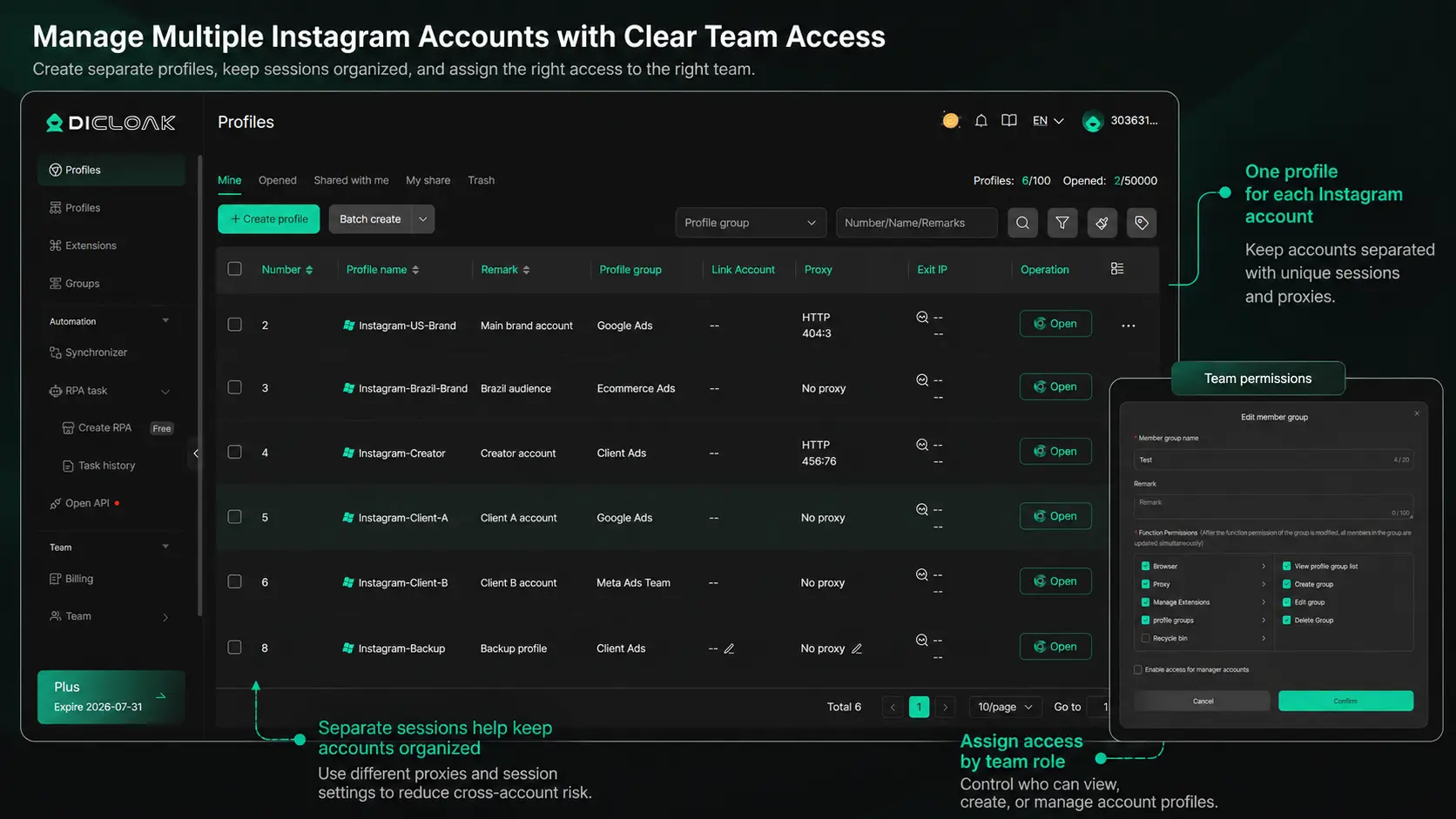
You should also keep the login workflow organized. With DICloak, you can place each Instagram account in a separate browser profile with its own cookies, session, and login state. This reduces the chance of opening the wrong account or adding one brand’s link to another profile.
When several people manage the accounts, you can assign specific profiles to the members responsible for them. Each person accesses only the assigned accounts, which creates clearer ownership and makes access easier to adjust when roles change.
Frequently Asked Questions About How to Write a Bio for Instagram
What should I include in my Instagram bio?
Include who you are, what you share or offer, and what visitors should do next. You can also add one useful detail, such as your specialty, experience, location, or personality. Keep only the information that supports your main profile goal.
What is the Instagram bio character limit?
Instagram bios are limited to 150 characters, including spaces, emojis, and punctuation. Use short phrases and remove repeated ideas. Your bio does not need to explain everything. It only needs to help the right visitor understand your account.
How often should I update my Instagram bio?
Update your bio when your offer, audience, role, location, campaign, or main link changes. You do not need to rewrite it every week. Review it regularly to ensure the information still matches what visitors find on your profile.
Can I use special fonts in my Instagram bio?
You can paste Unicode characters that look like special fonts, but use them carefully. Decorative text may be harder to read and may not display well for every user. Standard text is usually the better choice for important details, keywords, and calls to action.
How do I make my Instagram bio more engaging?
Use specific language instead of broad claims. Tell visitors what they will gain from following you, include one detail that sets the account apart, and finish with a clear next step. Emojis and personality can help, but they should not hide the main message.
Learning how to write a bio for Instagram comes down to three things: explain who you are, show what visitors will gain, and give them one clear next step. Keep the wording specific, remove anything that does not support your goal, and update the bio when your offer or audience changes.Managing several Instagram accounts as a team? Keep each account, session, and team responsibility organized with DICloak. Try DICloak for Free.
 Web Proxy Tools
 Free Tools
 Cookie Plugin
 UA Generator
 MAC Address Generator
 IP Generator
 IP Address List
 2FA Code Generator
 World Clock
 Anonymous Check
 WebRTC Leak Test
 UUID Generator
 Free Web Proxy Site
 Proxy Checker
 FB Ad Checker
 AI Web Scraping
 Free SMM Tools
 Twitter Shadowban Checker
 Instagram Name Checker
 UTM Generator
 Username Generator
 AI Hashtag Generator
 LinkedIn Headline Generator
 Social Media Image Resizer