Instagram is no longer just a place for sharing photos. By 2025, the platform had grown to nearly 3 billion monthly active users, making it one of the largest social networks in the world. As more businesses, creators, agencies, and online sellers build their presence on Instagram, managing multiple accounts has become a normal part of daily work.
The challenge is not creating multiple accounts. The challenge is keeping them organized without making them look like one connected operation. A personal account, a brand page, and a client account may all belong to the same person, but they should not all be managed the same way. In this guide, you'll learn how Instagram may connect accounts, when multi-account management starts becoming risky, and the most practical ways to keep accounts separated as you grow.
Yes, Instagram allows users to create and manage multiple accounts. Many creators, brands, agencies, and online sellers use separate accounts for different projects. In the Instagram, you can usually stay logged into up to five accounts on one device. You can own or manage more accounts, but more accounts need clearer separation.
Some users have reported that when one Instagram account on the same device was suspended, their other accounts also received checks or suspensions. This does not prove every account on one device will be linked, but it shows why many users avoid running important accounts in the same environment. If you manage client accounts, store accounts, or several brand pages, separate logins and work environments are safer than simple account switching.
What Signals Can Make Instagram Accounts Look Connected?
Instagram may connect accounts when they share the same login details, browser sessions, device signals, IP patterns, or repeated actions. One shared signal may not cause a problem, but several shared signals together can make different accounts look like one connected group.
Shared Login and Recovery Information
Login and recovery details are strong account-linking signals because they point directly to account ownership. If several Instagram accounts use the same email, phone number, recovery method, or Accounts Center setup, they are not fully separate. This is different from sharing a niche or posting similar content. Recovery details are tied to access and identity.
This becomes a real problem for agencies, e-commerce teams, and creators managing several brand pages. Using one phone number for every account may feel easier, but it creates a messy setup when one account needs verification. A safer workflow is to give each important account its own email, recovery option, and clear login record.
Shared Browsers, Devices, and Sessions
Accounts can also look connected when they are opened in the same browser, app, or device every day. Browsers store cookies, cache, login sessions, and other local data. Phones and apps also create a long-term device history.
This is why simple account switching is fine for small personal use, but weaker for serious multi-account work. If five accounts always use the same browser session, they do not have much separation. A cleaner setup is to give each important account its own browser profile, so cookies and sessions do not mix.
Shared IP Addresses and Locations
IP address is not the only signal, but it still matters. If many accounts log in from the same IP all the time, or jump between countries too quickly, the login pattern can look unusual. The risk is higher when the account region, language, timezone, and IP location do not match.
A stable setup is usually better than a setup that changes every day. For example, a US-focused account should not look like it logs in from the US in the morning, Brazil in the afternoon, and Indonesia at night. If proxies are used, each account should have a clear and consistent proxy setup.
Similar Activity Patterns Across Accounts
Instagram may also look at how accounts behave. If many accounts post the same caption, follow the same users, send similar messages, or repeat actions at the same time, they may look coordinated. This can create risk even when the emails and IPs are different.
The safest daily workflow is not just technical separation. Each account should have its own content plan, posting rhythm, and activity pattern. Real accounts do not usually act like copies of each other, so multi-account management should not look copied either.
| Signal |
Risk Level |
Why It Matters |
| Same phone number or recovery details |
High |
It directly connects account ownership and recovery paths. |
| Same browser session or app environment |
High |
Cookies, sessions, and local data can overlap. |
| Same device every day |
Medium to high |
Device history can make accounts look related. |
| Same IP address |
Medium |
It becomes riskier when combined with other shared signals. |
| Same content or action pattern |
Medium |
Repeated behavior can make accounts look coordinated. |
| Same niche or similar branding |
Low |
This is normal if the accounts have different setups and behavior. |
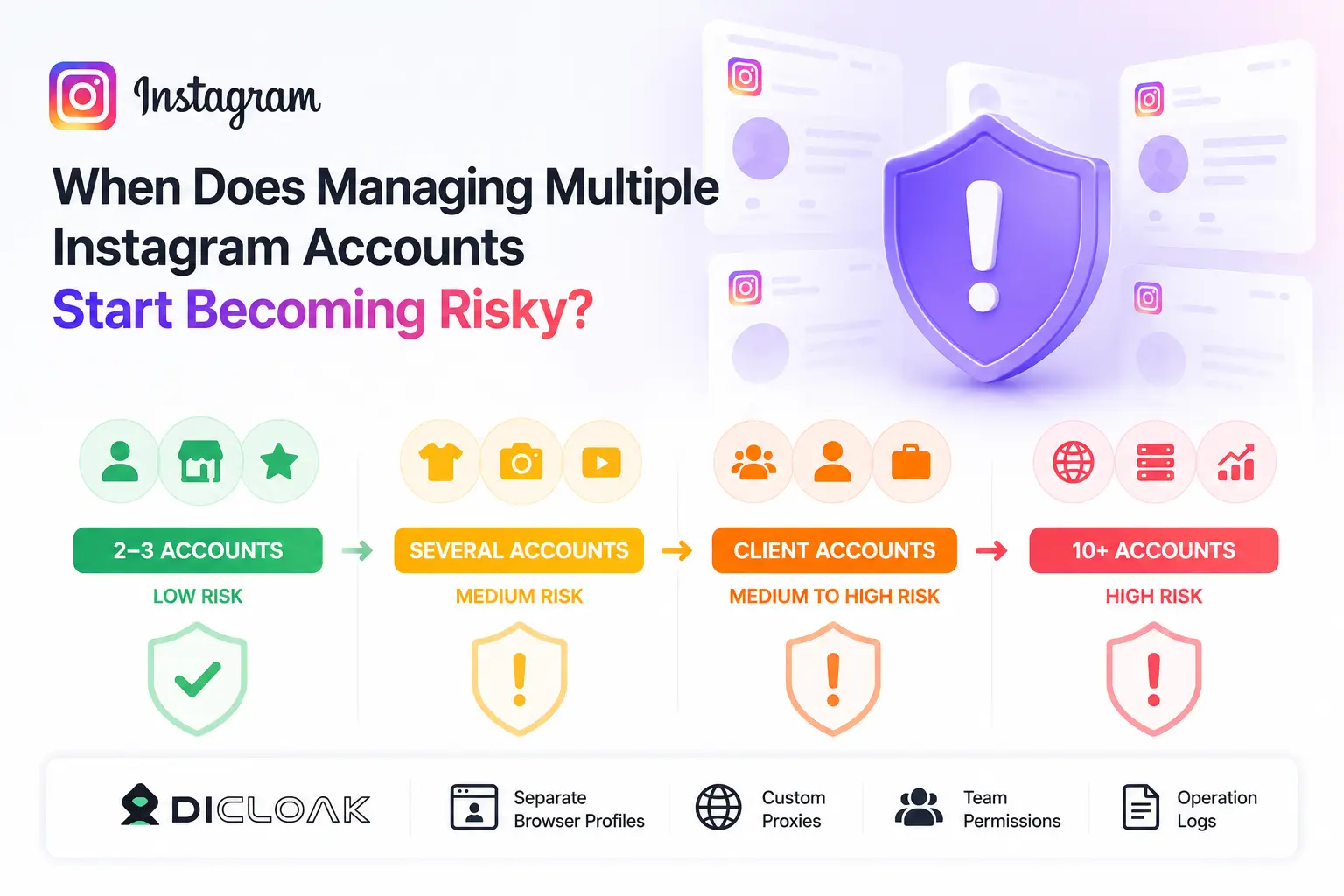
When Does Managing Multiple Instagram Accounts Start Becoming Risky?
Managing multiple Instagram accounts becomes risky when accounts share the same device, browser session, IP pattern, recovery details, or team workflow. The risk is usually low for a few normal accounts, but it grows quickly as more accounts are added or managed by a team.
- 2–3 Personal or Business Accounts: Low risk if accounts are used normally. One person may have a personal, business, and creator account. Built-in switcher is often enough. Risk grows if accounts post the same content or follow the same people aggressively.
- Several Brands or Content Pages: Medium risk. Shared devices, posting schedules, or editing styles make accounts appear related. Assign each account its own login and work routine. Avoid posting identical actions at the same time.
- Client Accounts as an Agency: Medium to high risk. Client accounts should not mix with personal or other client accounts. Clear owner, login environment, recovery record, and access permissions are necessary. Shared passwords or random device logins increase errors and security checks.
- Scaling Beyond 10 Accounts: High risk. Tracking logins, proxies, regions, and activity becomes difficult. Structured profile management is required. Using separate browser profiles, user-configured proxies, team permissions, and operation logs helps keep each account organized and reduces accidental linking. Tools like DICloak can assist by isolating accounts in separate profiles and controlling access.
What Are the Most Practical Ways to Manage Multiple Instagram Accounts?
The best way to manage multiple Instagram accounts depends on your scale. A small creator may only need Instagram's built-in switcher, while an agency or e-commerce team needs cleaner separation for logins, browser sessions, proxies, and team access.
Using Instagram's Built-In Account Switcher for Small Setups
Instagram's built-in account switcher is the easiest option for a few accounts. It works well if you manage a personal account, a small business page, and maybe one creator or brand account. You can switch fast without logging out each time.
The downside is that these accounts still share the same app and device environment. That may be fine for casual use. But if one account is for a client, one is for a store, and one is for testing content, the shared setup can become messy.
Using Social Media Management Tools for Scheduling and Reporting
Social media management tools are useful when your main problem is content planning. They help teams schedule posts, review calendars, manage inboxes, and check reports from one place. This is helpful for agencies that need approval workflows or regular content reports.
These tools do not fully solve account-linking risk. They usually help with publishing and reporting, not with browser cookies, device signals, proxy setup, or login separation. If your biggest problem is safe login management, an SMM tool alone is not enough.
Using Separate Browser Profiles for Cleaner Login Environments
Separate browser profiles are better when you need each Instagram account to have its own login space. A browser profile can keep cookies, sessions, and account data away from other profiles. This makes it easier to avoid opening the wrong account or mixing client work with personal work.
For larger setups, an antidetect browser can make this system easier to manage. For example, DICloak lets users create separate browser profiles and configure their own proxies for different profiles. This is useful when each Instagram account needs a stable environment instead of being opened from the same browser every day.
Comparing Native App, SMM Tools, and Isolated Browser Profiles
Each method solves a different problem. The built-in switcher is for simple access, SMM tools are for content workflow, and isolated browser profiles are for cleaner login environments. Many teams use more than one method because scheduling and account separation are not the same job.
| Method |
Best For |
What It Helps With |
Main Limitation |
| Instagram built-in switcher |
1–3 personal or small business accounts |
Fast account switching |
Accounts still share the same app and device environment |
| Social media management tools |
Content teams and agencies |
Scheduling, inbox, reports, approvals |
Does not fully separate login sessions or device signals |
| Separate browser profiles |
Brands, agencies, e-commerce teams |
Cleaner cookies, sessions, and account separation |
Needs careful naming, proxy setup, and account records |
| Antidetect browser setup |
Larger or team-based multi-account work |
Separate profiles, user-configured proxies, and organized access |
Still requires normal account behavior and clean operations |
How to Manage Multiple Instagram Accounts With DICloak
If you manage multiple Instagram accounts, the goal is not to make them look hidden. The goal is to keep each account organized, consistent, and separate from others. DICloak can help by giving each account its own browser profile, login environment, and access controls.
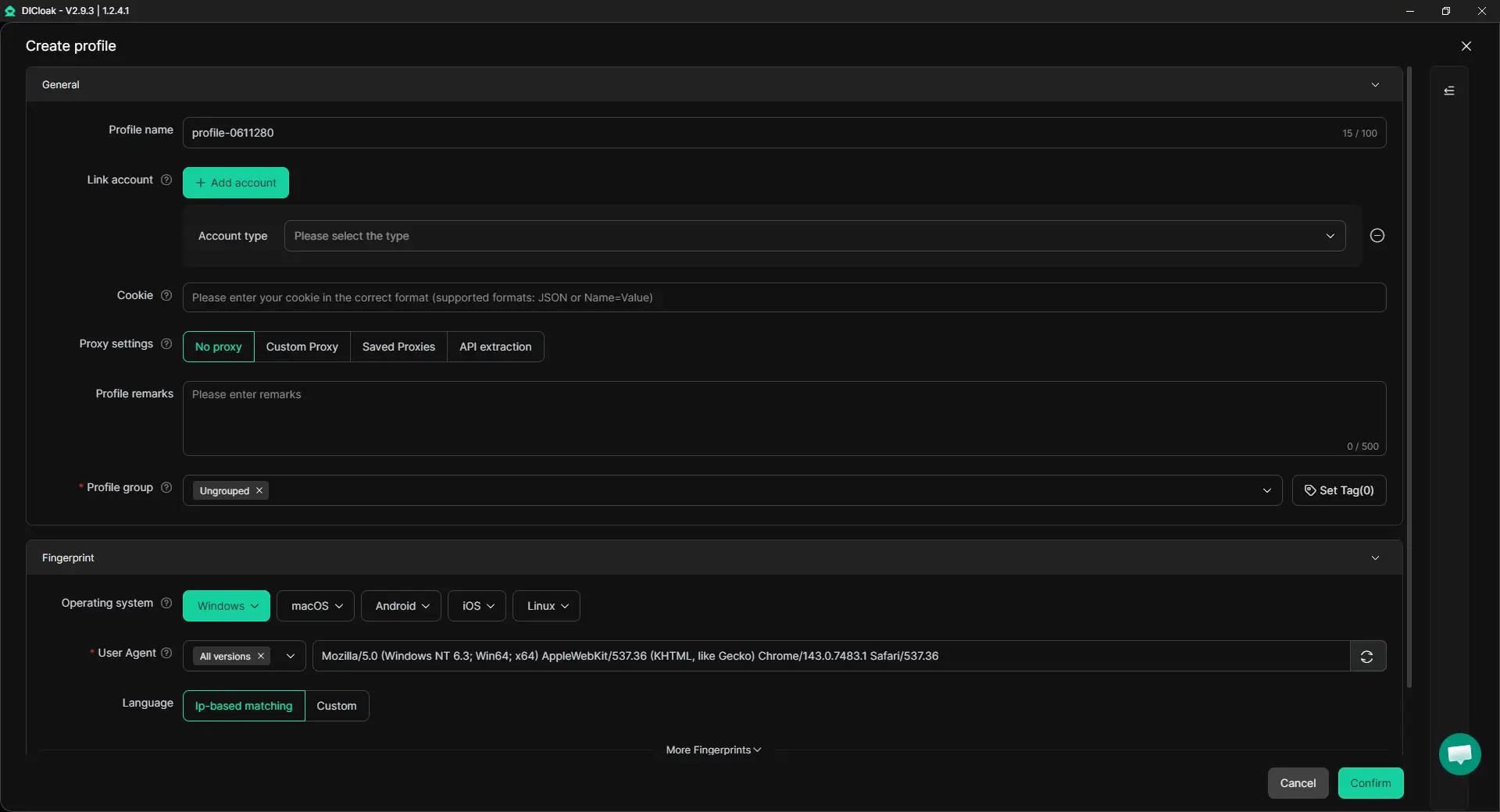
1. Create One Browser Profile for Each Instagram Account
Start by creating a separate browser profile for every Instagram account. This keeps cookies, login sessions, and browser data from mixing together. If you manage client accounts, use clear profile names so you always know which profile belongs to which account.
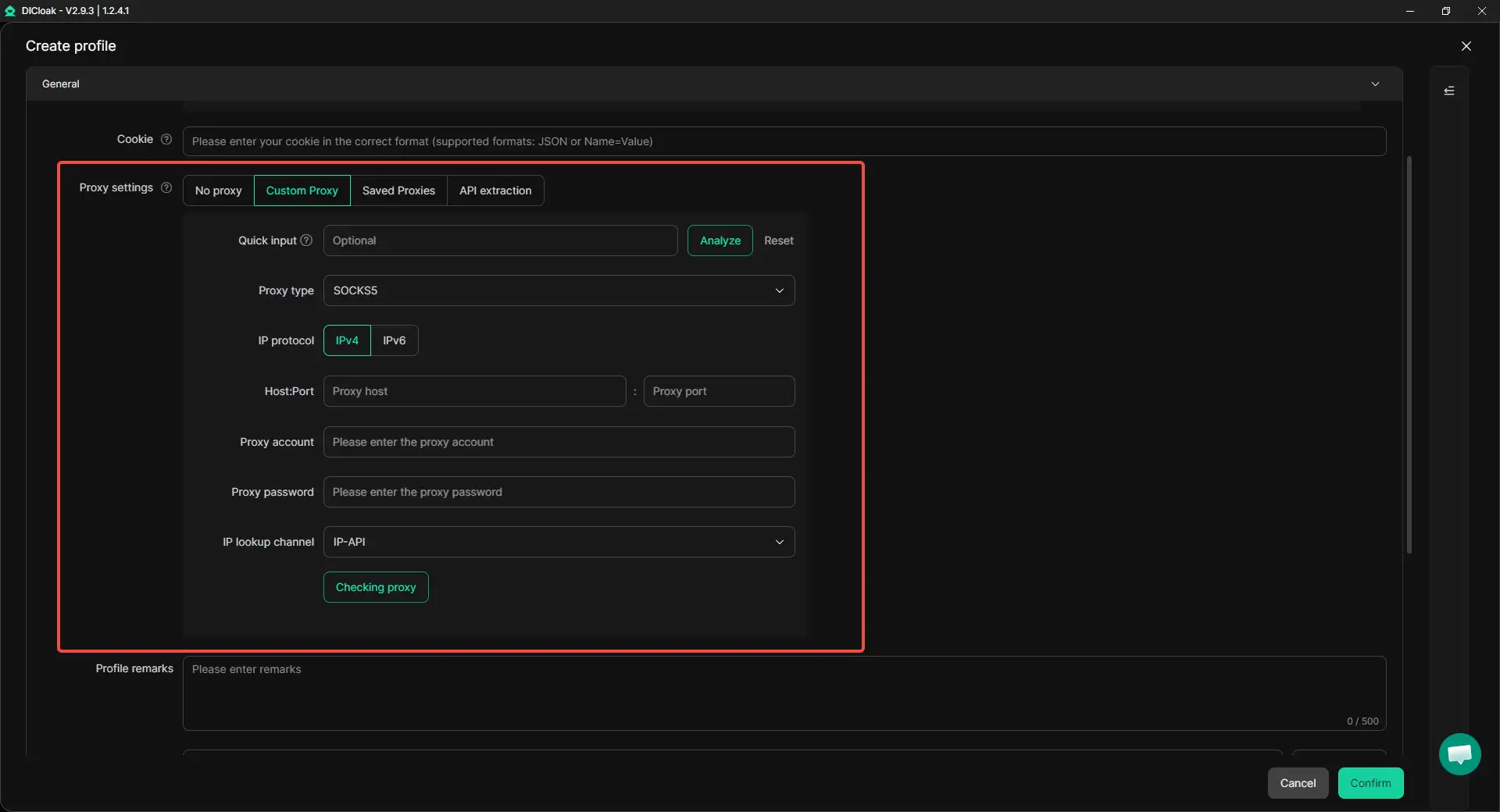
2. Match Each Profile With a Stable Proxy and Account Region
Each account should use a consistent login environment. If an account is mainly operated in the US, its proxy, timezone, and language settings should stay reasonably aligned. DICloak allows users to configure different proxies for different browser profiles, making it easier to keep account environments organized.
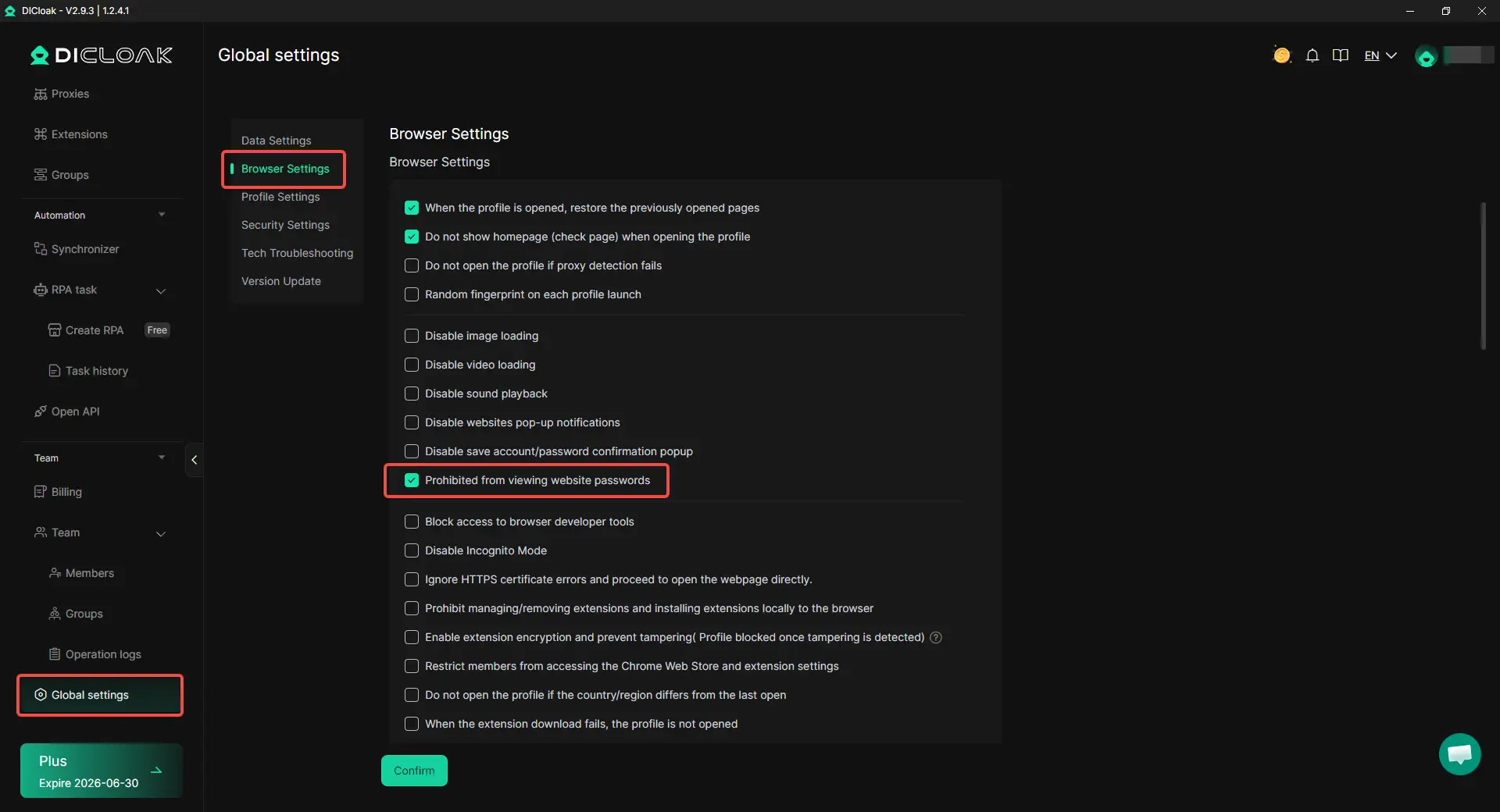
3. Set Team Permissions and Hide Saved Passwords
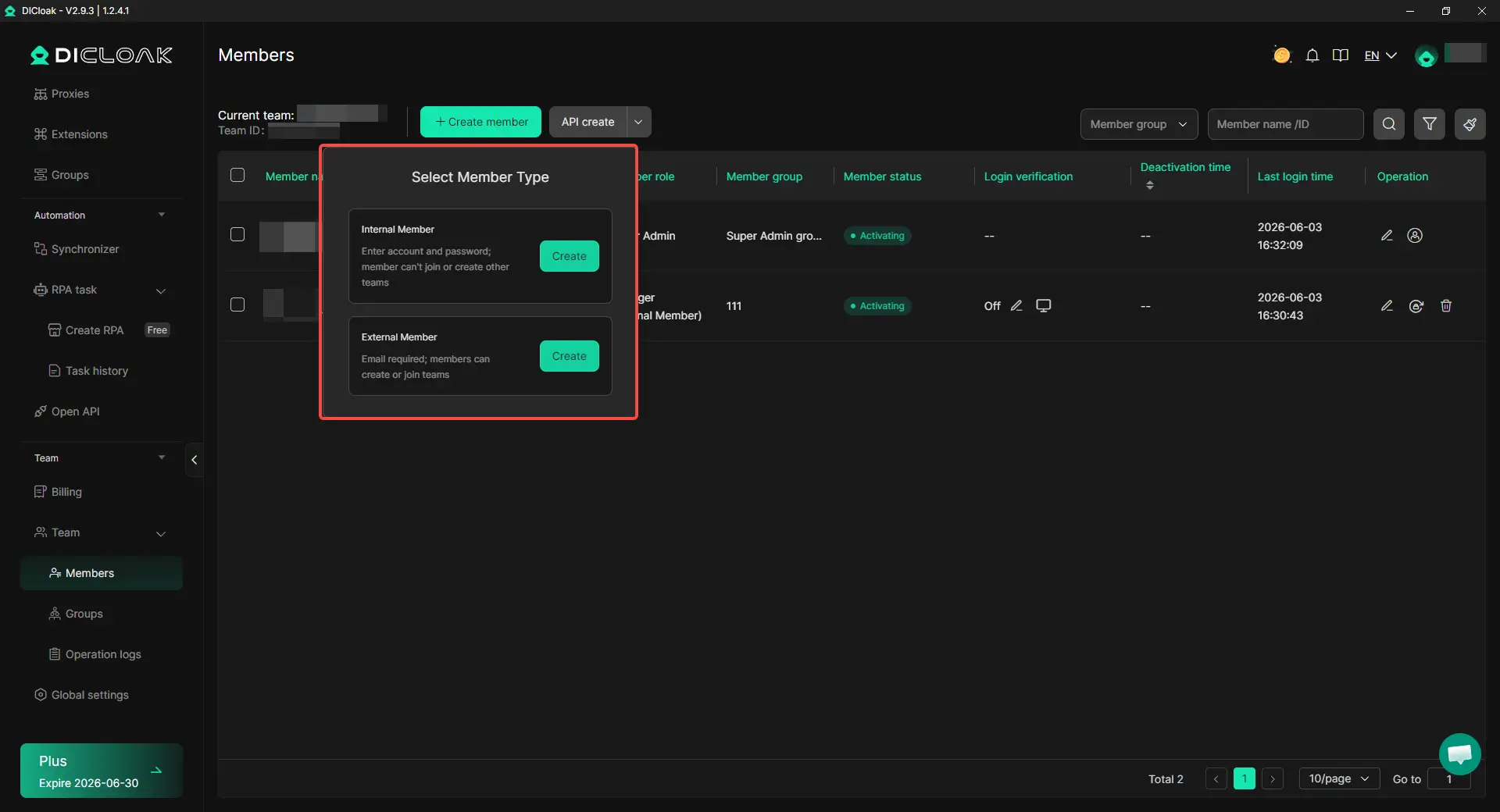
If several team members manage Instagram accounts, do not give everyone full access by default. In DICloak, admins can assign members only the profiles they need and enable Prohibit Viewing Website Account Passwords so members can use assigned profiles without seeing saved website account passwords.
4. Assign Profiles Based on Team Responsibilities
When multiple people manage accounts, make sure each member only works with the profiles they are responsible for. Team permissions can be configured so client accounts, internal accounts, and personal accounts remain separated. This helps reduce mistakes, such as posting from the wrong account, and makes it easier to track who is responsible for each profile.
5. Use Operation Logs to Review Access and Changes
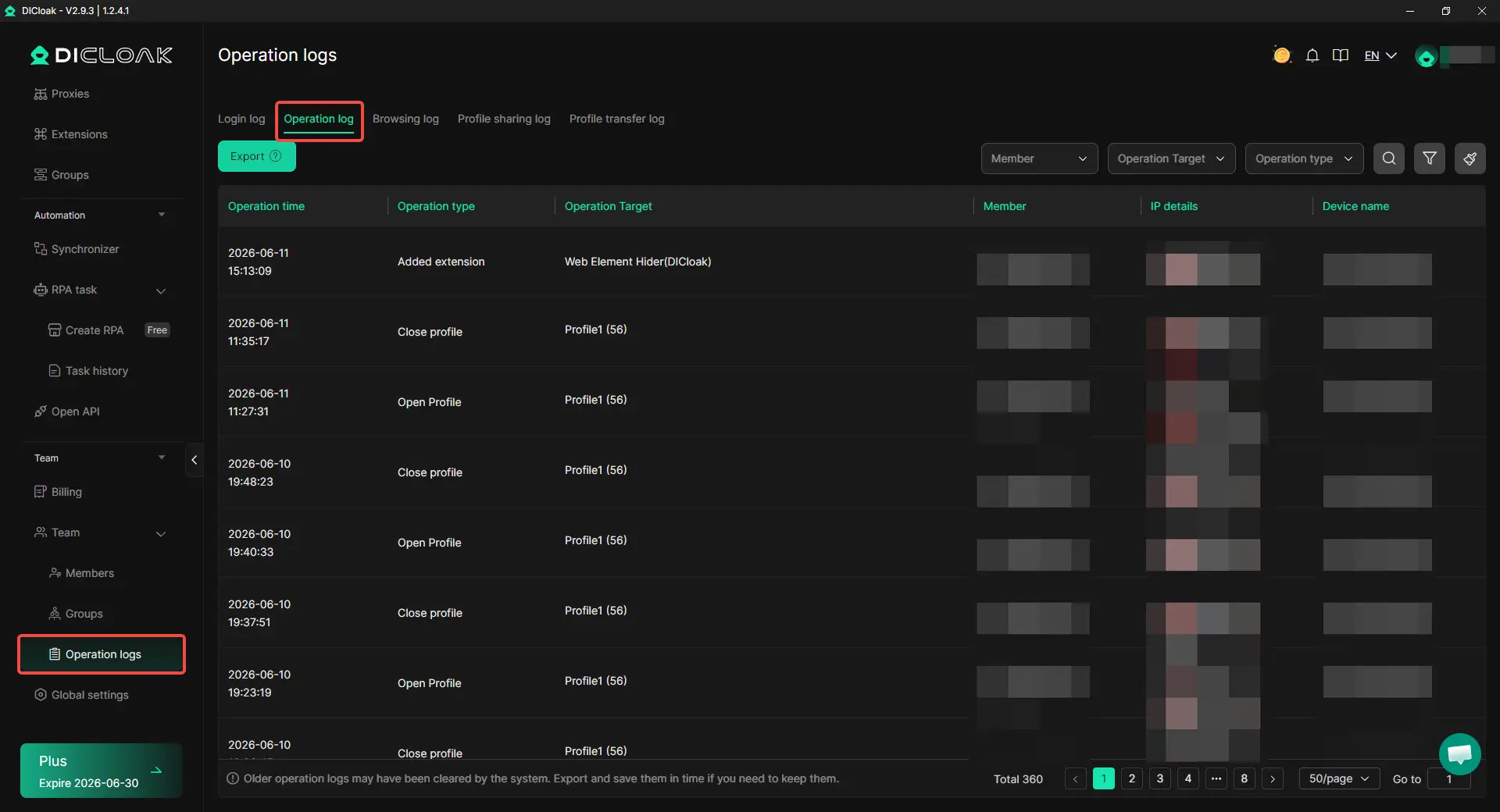
As the number of accounts grows, it becomes harder to remember who opened a profile or changed a setting. Operation logs provide a record of profile activity, which can help teams investigate mistakes, access issues, or unexpected account changes.
6. Use Synchronizer for Safe Repetitive Checks
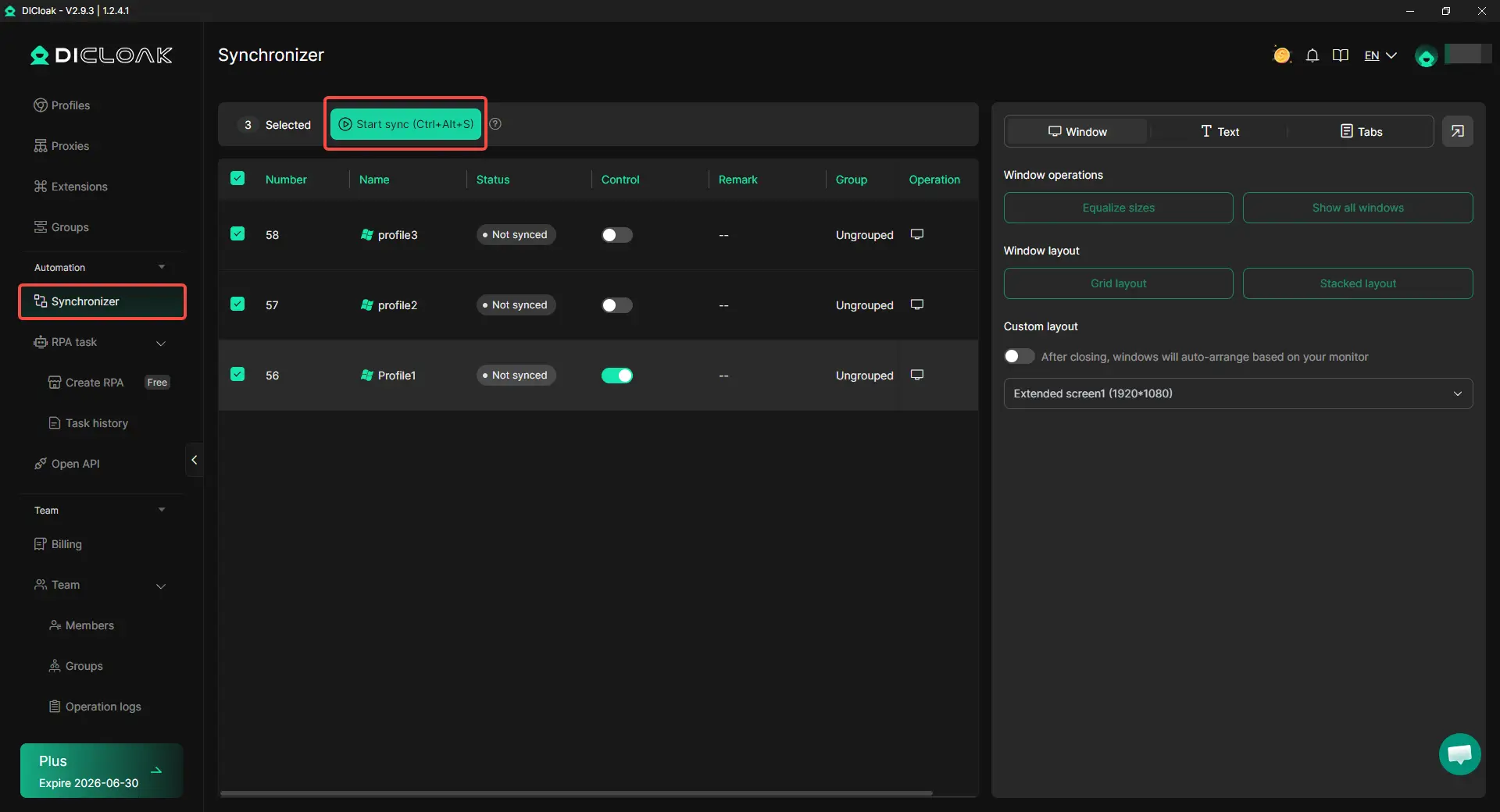
Some tasks need to be repeated across multiple profiles. For example, a team may want to verify that accounts can log in normally or check profile settings after an update. In these situations, a synchronizer can save time. It is best used for routine checks and workflow tasks rather than large-scale engagement actions.
What Else Can Reduce the Chances of Instagram Account Linking?
Cleaner account setup is only part of the work. Your daily actions also matter. To reduce the chances of Instagram account linking, avoid creating accounts too fast, warm them up slowly, keep activity natural, and make each account feel like a real separate profile.
- Avoid creating many accounts at once: Creating several Instagram accounts from the same device or network in a short time can make the setup look unnatural. If you need multiple accounts for brands, stores, or clients, create them in stages. Give each account time to complete basic setup before adding more activity.
- Warm up new accounts before heavy activity: A new account should not start with heavy posting, mass following, or frequent DMs on the first day. Start with basic profile setup, a few normal posts, light browsing, and small engagement. Increase activity over days or weeks, not in one sudden push.
- Keep posting times and actions natural: Accounts that act at the same time every day can look too coordinated. Try not to post, follow, comment, or send messages across many accounts in the same short window. Each account should have its own schedule based on its audience, region, and content plan.
- Avoid copying the same content across every account: Reusing the same caption, image, hashtag set, or comment pattern across many accounts can make them look connected. If several accounts belong to different brands or niches, adjust the wording, visuals, posting time, and call to action. Similar accounts can share a strategy, but they should not look like clones.
Frequently Asked Questions About Managing Multiple Instagram Accounts
Can one restricted Instagram account affect my other accounts?
It can happen in some cases, especially when multiple accounts share the same login environment, recovery details, device history, or team workflow. Many users report that when one account runs into verification requests, restrictions, or security checks, other accounts managed from the same setup may also receive additional scrutiny. This does not mean every account will be affected, but keeping accounts separated reduces the chance of one issue creating problems elsewhere.
Does Instagram link accounts even if they use different emails?
Yes, different emails alone do not guarantee account separation. Instagram can also look at other signals, such as browser sessions, devices, IP patterns, recovery information, and account behavior. Two accounts with different emails can still appear related if they are managed in exactly the same environment. This is why many professionals focus on both account details and account environments.
Is Instagram's account switcher safe for business use?
For a small setup, usually yes. If you manage a personal account, a business page, and a creator profile, the built-in account switcher is often the simplest option. The challenge starts when you add client accounts, multiple brands, or larger teams. At that point, many users move to separate browser profiles or an antidetect browser like DICloak to keep accounts more organized.
Do I need a different proxy for every Instagram account?
Not always. If you only manage a few personal or business accounts, a separate proxy for every account may not be necessary. However, when managing many accounts, especially for different brands, clients, or regions, using separate proxies helps create more consistent account environments. The goal is not to constantly change locations but to keep each account's setup stable over time.
What is the safest way for a team to manage client Instagram accounts?
The safest approach is to keep client accounts separate from internal accounts and personal accounts. Each account should have clear ownership, access rules, and login records. Many teams use separate browser profiles, role-based permissions, and activity tracking to reduce mistakes. An antidetect browser like DICloak can help by allowing teams to share profile access without exposing website account passwords and by providing operation logs to review account activity.
Conclusion
Managing multiple Instagram accounts without getting them linked comes down to separation and consistency. Each account should have its own login details, environment, and activity pattern. A few personal or business accounts can often be managed through Instagram's built-in account switcher. As the number of accounts grows, it becomes more important to separate browser sessions, proxies, and team access. Accounts that share the same recovery information, devices, IP patterns, or repetitive behavior are more likely to appear connected. Keeping clear boundaries between accounts makes management easier and can help reduce account-linking risks over time.
 Web Proxy Tools
 Free Tools
 Cookie Plugin
 UA Generator
 MAC Address Generator
 IP Generator
 IP Address List
 2FA Code Generator
 World Clock
 Anonymous Check
 WebRTC Leak Test
 UUID Generator
 Free Web Proxy Site
 Proxy Checker
 FB Ad Checker
 AI Web Scraping
 Free SMM Tools
 Twitter Shadowban Checker
 Instagram Name Checker
 UTM Generator
 Username Generator
 AI Hashtag Generator
 LinkedIn Headline Generator
 Social Media Image Resizer