A business owner on Reddit described getting locked out of one of her brands after adding just a few too many profiles, she thought Instagram would let her run unlimited accounts if she used different emails, but the platform stopped her at five and started showing warning messages. Cases like this are common. Instagram’s official Help Center, for example, confirms that you can only manage up to five accounts from a single app and device, even if you create more using separate sign-ups. Try to push past this Instagram account limit, by juggling more logins, using the same phone, or switching devices too quickly, and you risk getting flagged for suspicious activity, or even losing all your linked profiles.
So, how many instagram accounts can i have in practice without risking bans or lockouts? Most users hit a wall at five, but teams, agencies, and creators often need more for clients, testing, or campaigns. That’s where safe multi-account management comes in. This guide breaks down the real limits (and why they matter), explains how Instagram detects risky behavior, and shows proven ways to handle multiple Instagram accounts without raising red flags. If you want fewer headaches and longer account life, these details will save you trouble, especially as platforms get stricter. Here’s what to check before adding your next profile.
What Is the Maximum Number of Instagram Accounts You Can Have?
Instagram sets clear limits on how many accounts you can create and link to your device or contact info. Ignoring these limits often leads to blocks, missing notifications, or even account bans. If you’re searching "how many instagram accounts can i have" because you manage brands, run social campaigns, or split work and personal profiles, knowing the real rules makes all the difference.
Instagram's Official Account Creation Limits
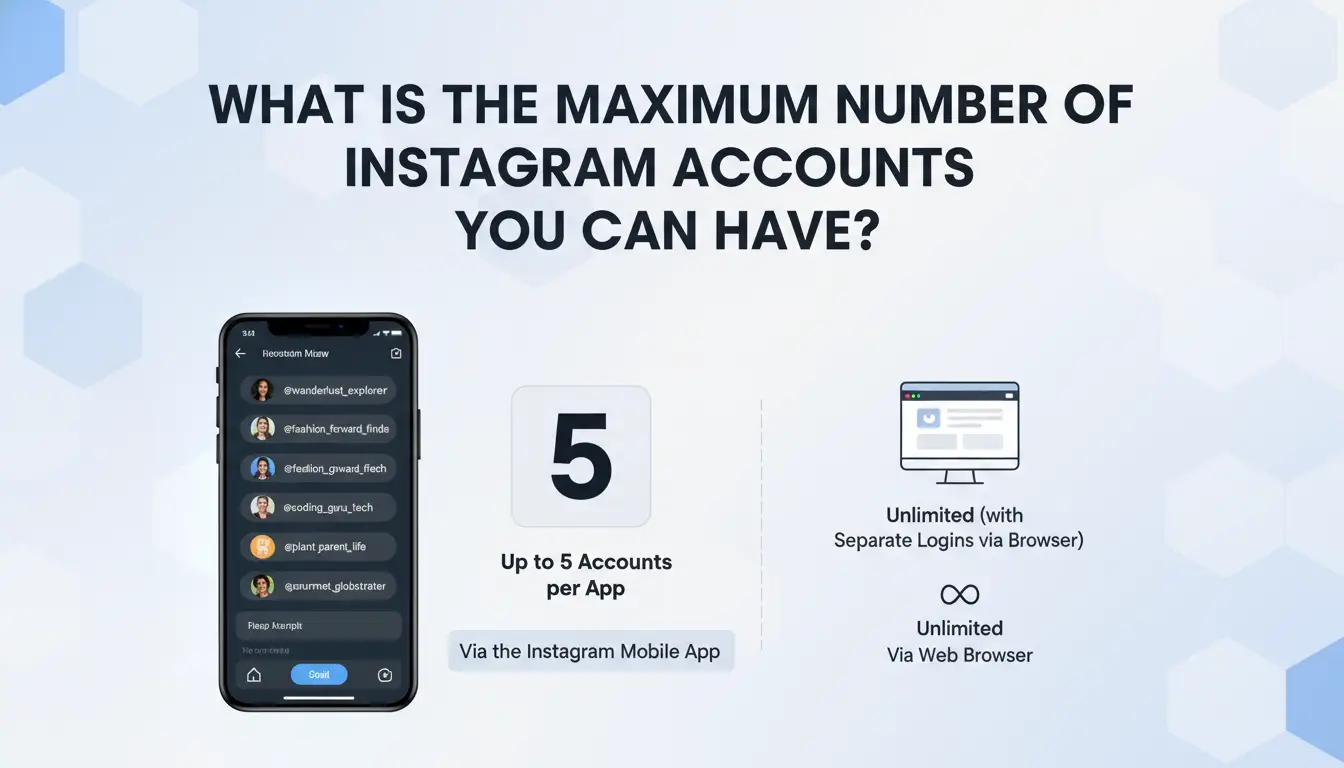
Instagram allows you to create up to five accounts per device using the app. These can be linked to a single email or phone number, but once you hit five, you'll see errors when trying to add more. Each account still needs a unique username, and if you try to use the same phone or email beyond five, Instagram will usually block the action. If you need to manage more than five, you’ll need extra phone numbers, emails, or use the web version, but each method has its own risks and friction.
How Many Accounts Can Be Managed in the Instagram App
Inside the official app, you can stay logged in to five accounts at the same time and switch between them without logging out. This is the hard session limit, any more, and you’ll have to log out of one to add another. The app’s "Add Account" feature makes switching easy, but pushing beyond five can trigger security checks or lockouts. Handling multiple Instagram accounts for business often means juggling devices or using browser tools to avoid running into these caps.
Differences Between Personal, Business, and Creator Accounts
Account type, personal, business, or creator, does not change the five-account limit per device or session. All types count toward your maximum. Business users sometimes use Facebook’s Business Suite to organize multiple Instagram accounts, but even there, the five-per-device login cap applies. For agencies or teams, using a tool like DICloak lets you safely manage more accounts by isolating browser profiles and keeping fingerprints separate.
The real trap is thinking you can bypass limits without risk, Instagram watches for patterns that look automated or suspicious, not just the raw account count.
Why Do People Need Multiple Instagram Accounts, and What Are the Risks?
Many users hit a hard stop when asking, how many instagram accounts can i have on one device or under a single login. Instagram’s official limit is five per app, but real-world needs often go beyond that, especially for creators, teams, and anyone juggling business with personal life. If you push the limits, you face real risks that can cost you all your accounts, not just the newest one you add.
Common Reasons for Running Multiple Accounts
It’s rare today for one Instagram profile to cover all your needs. People often split accounts to keep personal photos separate from business, or to run niche projects, like a photography page, a fan account, or a small business storefront. Agencies and freelancers may handle profiles for several clients. Even creators need “burner” accounts for testing growth tactics or new content ideas. Each extra profile helps manage a different part of life or work, but stacking them can get tricky.
Risks of Managing Several Accounts
Running multiple Instagram accounts on the same device means Instagram can spot patterns. Log in too fast, switch between profiles often, or use the same phone number or email, and the platform may link your accounts. This can trigger shadowbans, temporary blocks, or worse, a permanent ban across all profiles. Instagram’s anti-spam systems track shared IP addresses, device fingerprints, and login habits. If one account breaks the rules, others linked to it may get flagged too. Losing access to all profiles at once is a real risk if you ignore these warning signs.
When Running Multiple Accounts Becomes a Problem
You’ll notice trouble if posts stop reaching followers, comments vanish, or you can’t log in. These are clear signs your accounts are being flagged or limited. If you ignore Instagram’s rules, like spamming, using fake info, or automating actions, you risk mass lockouts. Once banned, you may not get any account back. Before adding more, rethink how many instagram accounts can i have safely, and look for safer ways to manage them, like using separate devices or isolated browser profiles.
What Happens If You Exceed Instagram's Account Limits?
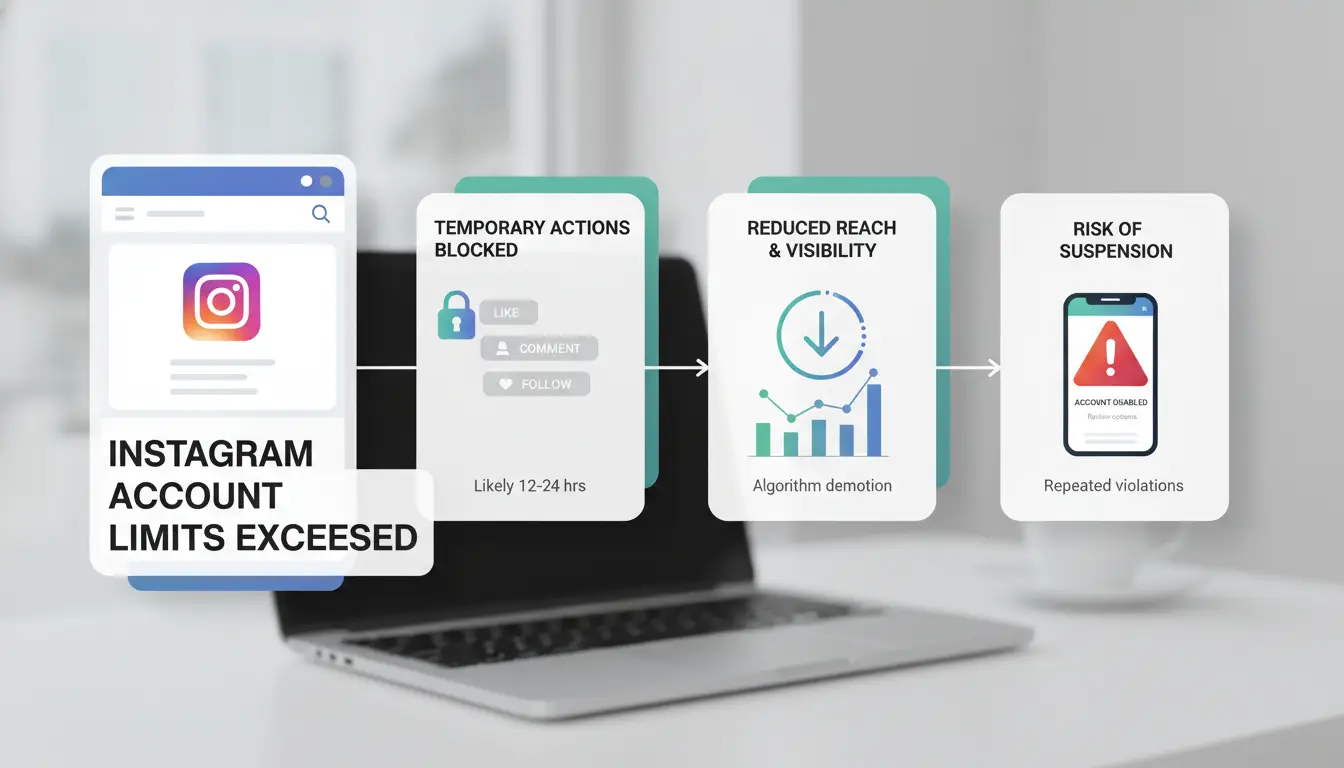
Trying to run more Instagram accounts than the platform allows can lead to instant problems, sometimes before you even finish setup. If you’ve ever Googled “how many instagram accounts can i have” and tried to push past five per device, you’ve likely seen warnings or lockouts. Here’s how Instagram enforces its limits, what to do if you hit a wall, and why risky workarounds often end badly.
How Instagram Detects and Restricts Multiple Accounts
Instagram uses device fingerprinting, IP tracking, and phone verification to spot users creating or managing too many accounts. If you try to add a sixth profile on one phone or browser, Instagram may block the action or push a security check. Even switching devices or using new SIM cards can trigger alerts. Their systems look for patterns, like repeated logins, linked emails, or logins from the same IP, and flag them as suspicious. Instagram’s help page covers these controls, but real-world limits often feel tighter than the rules suggest.
What to Do If You Hit the Limit
If you try to add more accounts and see errors like “Too many accounts” or “Try again later,” you’ve hit the Instagram account limit. Don’t keep forcing new profiles, this usually makes things worse. Instead, remove accounts you don’t need, or log out fully and clear app data before trying again. For teams or agencies, consider using tools built for managing multiple Instagram accounts. You can use DICloak to create isolated browser profiles, which helps spread risk and avoid device bans.
Risks of Circumventing Instagram's Limits
Trying to bypass limits with cheap emulators, browser plugins, or “account farming” services often backfires. Instagram bans linked accounts if it detects unnatural patterns, shared device fingerprints, or recycled phone numbers. Losing all your profiles at once is a real risk when pushing past the allowed number without precautions. Safer options involve real device separation, unique proxies, and not sharing recovery emails or numbers across accounts. For most, staying inside the official limits is the best way to keep accounts alive.
How to Safely Create and Manage Multiple Instagram Accounts
Many people wonder, how many instagram accounts can i have before things get risky. Instagram lets you add up to five accounts in one app, but long-term safety depends less on the number and more on how you create and manage them. Here’s how to avoid the common traps that get users restricted or banned.
Best Practices for Account Creation
Start each new Instagram profile with a unique email and, if possible, a unique phone number. Avoid using the same recovery info across several accounts. Mixing them makes it easy for Instagram to spot links between profiles.
Don’t rush account creation. If you register multiple accounts quickly from the same device, you’ll trigger Instagram’s automated checks. Always space out new signups by at least a few days. Avoid using obvious name or password patterns that look like bulk registrations.
For teams or agencies, consider running each new account from a different IP address using separate browser profiles. Tools like DICloak let you set up isolated environments, each with its own fingerprint and proxy, so accounts don’t “see” each other. This greatly reduces your risk of detection when handling more than the basic Instagram account limit.
How to Switch and Operate Multiple Accounts in the App
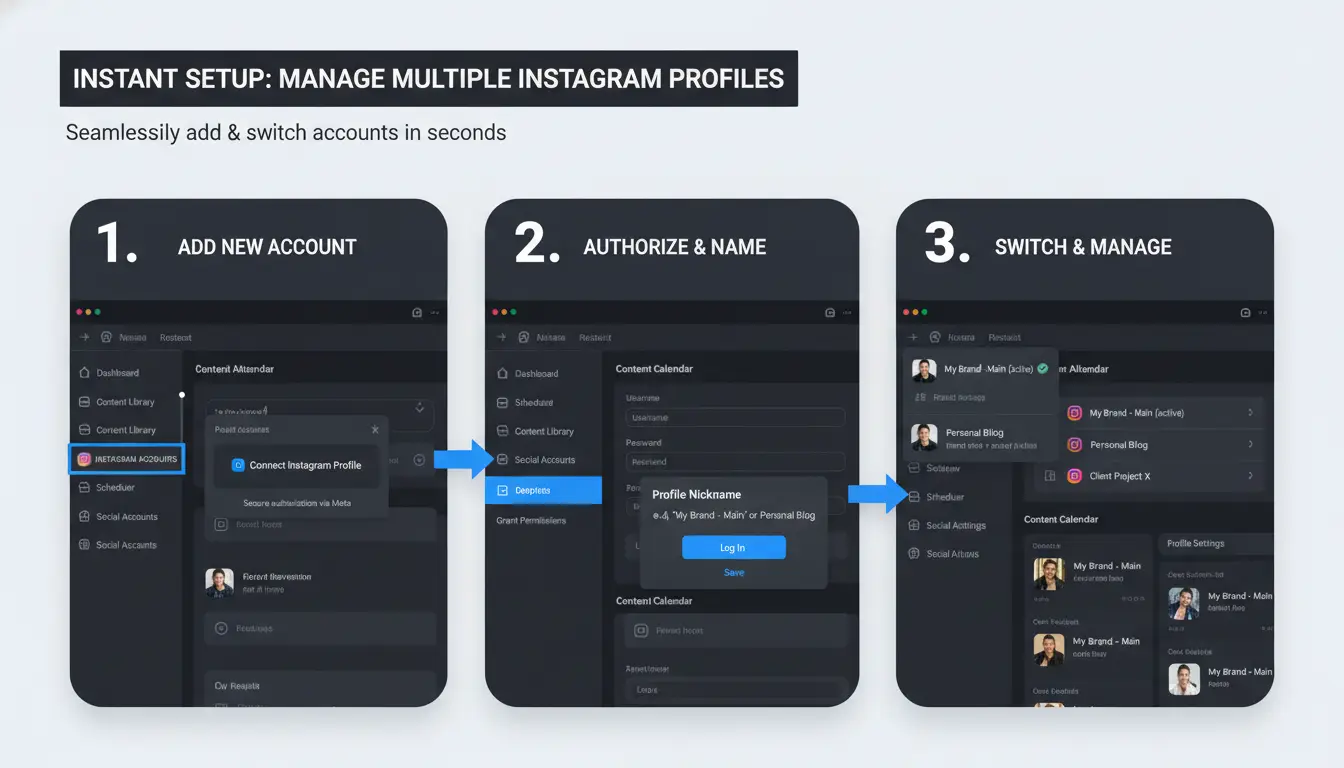
You can add accounts in the Instagram app by going to your profile, tapping your username at the top, and selecting “Add Account.” Switch between them from the same menu.
Operate each account as if it’s a real person. Avoid liking, following, or posting too fast after switching. Rapid actions make Instagram think you’re automating or spamming. Spread out your activity on each profile to look natural.
Common Mistakes That Lead to Account Restrictions
Reusing the same device or IP for all accounts is a common mistake. Instagram’s systems track this and may connect your profiles, leading to bans if one account is flagged.
Automated tools that post, like, or follow for you can leave patterns. These patterns often trigger spam filters, especially when actions are repeated across multiple Instagram accounts. Stick to manual actions or use safe automation tools only with strict limits.
When people ask “how many instagram accounts can i have,” the real answer is: as many as you can manage safely, if you avoid shortcuts and follow these steps.
How to Avoid Account Linking, Bans, and Detection When Managing Many Instagram Accounts
Running multiple Instagram accounts on one device sounds simple, but Instagram works hard to spot connections. If you push past the usual Instagram account limit, five per device, without careful prep, you risk having all your profiles linked or banned. Here’s how Instagram catches users running too many accounts, and what you can do to keep each profile safe and separate.
Why Instagram Links Accounts and How It Detects Patterns
Instagram connects accounts by looking for patterns. It watches device fingerprints, cookies, and your behavior, like logging in and out of many accounts too quickly. Sharing the same IP address or device info is a big red flag. For example, if you run six or more accounts on the same phone or browser without isolation, Instagram will notice. Even liking posts or following too fast across accounts can get your profiles linked. The more accounts you run, the stricter Instagram’s detection.
How to Use Proxies and Separate Environments for Each Account
Keeping accounts safe means making them look unrelated. Use proxies to give each account a unique IP address. Set up a different browser profile or user environment for every account, never share cookies, cache, or device settings. Cheap proxies or sloppy setup can backfire, making Instagram link your accounts faster. Always double-check which IP and device each account uses before logging in.
If you skip these steps, you might lose all your accounts in one sweep. Clean separation is the only way to avoid bans when working with multiple Instagram accounts.
When a Dedicated Multi-Account Browser Makes Sense
Juggling more than five accounts gets risky fast. Manual setups break down as numbers grow. You can use a dedicated multi-account browser like DICloak to create separate, fingerprint-isolated profiles for every Instagram login. This tool helps agencies, teams, and anyone managing client accounts avoid links and bans. For most users, the answer to “how many instagram accounts can i have?” is five, but with the right tools, you can safely handle more.
How DICloak Helps Social Media Marketers Manage Multiple Instagram Accounts Securely
Isolated Browser Profiles and Custom Fingerprints
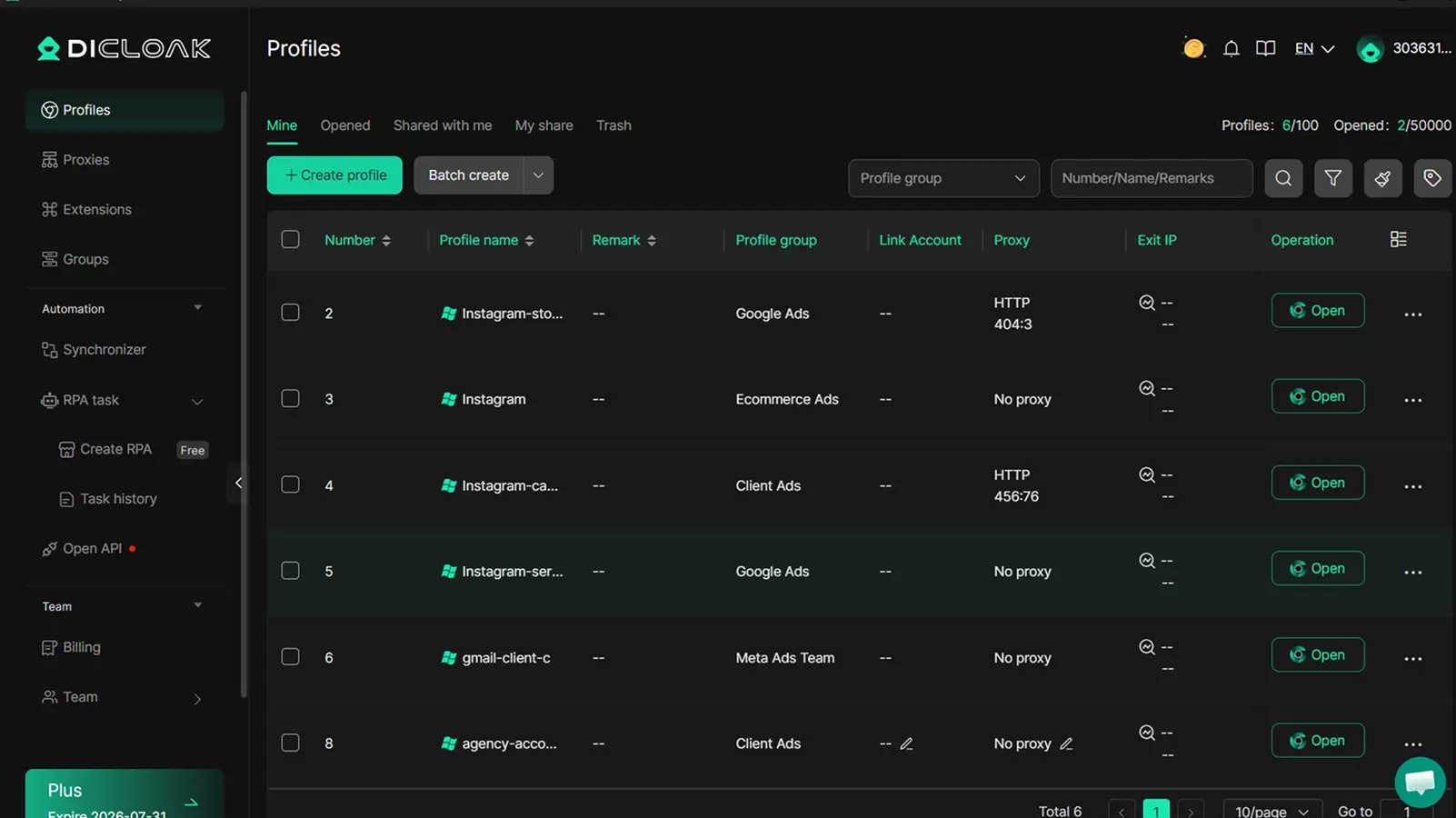
Handling more than five Instagram accounts on one device often triggers platform limits. Instagram tracks logins, browser fingerprints, and IP addresses to spot unusual patterns. Tools like DICloak let you run each account in its own isolated browser profile, with a unique fingerprint and custom proxy. This setup blocks Instagram from linking your profiles, even if you manage dozens. For marketers asking "how many instagram accounts can i have," this approach lets you safely work well beyond Instagram’s soft limits.
Team Collaboration, Automation, and Bulk Operations
Sharing logins or switching devices is one of the fastest ways to get multiple Instagram accounts banned. With DICloak, teams assign access by member, so each person uses a separate environment. Built-in automation tools help schedule posts, handle messaging, and reduce manual errors, which keeps large account sets running smoothly and safely.
Scaling Up: When You Need to Manage Dozens or Hundreds of Accounts
When your operation grows, DICloak supports unlimited isolated profiles. Agencies and social media teams can manage hundreds of accounts, automate repetitive tasks, and share workflows without exposing account links or risking bans. The real advantage is staying invisible to Instagram’s detection systems, even as you scale up.
When Should You Rethink Running Multiple Instagram Accounts?
Running more than a few Instagram accounts can sound smart, until the cracks show. Not every brand or creator wins by adding more profiles. If you’re asking, how many instagram accounts can I have safely, it’s time to check for warning signs and rethink your approach before you risk bans, wasted effort, or burnout. Here’s how to spot trouble and what to do instead.
Signs You’re Overextending or Risking Bans
Instagram starts showing clear warning signals when you cross the safe line. If you get frequent login challenges, sudden logouts, or “suspicious activity” alerts, your setup is too risky. These often mean you’re switching between too many accounts on one device or your activity looks automated. Even if Instagram’s official limit is five accounts per app, that’s not a guaranteed safe number.
Operational headaches hit fast as well, missed DMs, mixed-up posts, or team members making mistakes. If you’re spending more time fixing problems than growing accounts, you’ve likely gone too far. The risk isn’t just bans. It’s lost opportunities and wasted hours.
When Organic Growth or Fewer Accounts Is a Better Strategy
Sometimes, cutting back does more for your brand than juggling extra profiles. If your main account gets better engagement than the side accounts combined, focus your energy there. Quality wins over quantity, Instagram’s algorithm rewards real interaction, not just more posts. Instead of managing multiple Instagram accounts, try growing one strong profile or use features like Reels and collaborations to reach new audiences.
Alternatives include partnering with other creators, running cross-promotions, or even using Meta’s account center to link business assets instead of making more logins.
How to Transition or Consolidate Accounts Safely
If you’re ready to scale back, do it with care. Tell your followers where to find your main updates so you don’t lose your audience. Use Instagram’s account switching and linking tools to merge content or guide users to the right place. When closing profiles, log out fully and check for any linked services before deleting. If you need to hand over an account, update contact info and passwords before transfer. Rushing this step often leads to security problems or accidental loss of control.
FAQ: Managing Multiple Instagram Accounts in 2024
How many Instagram accounts can I have on one phone?
Instagram lets you add up to five accounts per device with simple app switching. Trying to run more at once, especially with the same phone number, email, or device, often causes login issues or flags your profiles. People who manage more, like agencies or growth teams, usually separate accounts across different phones or use a browser profile tool for better safety.
What is the Instagram account limit for one person?
The official limit is five per app, but you can create more with unique emails and numbers. If you push past that, Instagram may block logins or freeze accounts, especially if you often switch between profiles.
How to manage multiple Instagram accounts safely?
Change up your device, IP address, and browser fingerprint for each account. Avoid rapid switching or linking too many profiles to the same details. For handling several accounts, you can use DICloak to keep each account isolated, this lowers the risk of bans or mass lockouts.
Frequently Asked Questions
Can I have more than five Instagram accounts on one device?
Instagram’s app lets you add up to five accounts to one device. If you need more, log out and log in as needed, or use a second device. Some users also use third-party tools to manage more accounts, but you must follow Instagram’s rules. Searching “how many instagram accounts can i have” often brings up these workarounds.
Is it safe to use the same phone number or email for multiple Instagram accounts?
Instagram prefers each account to have its own email or phone number. If you use the same contact, accounts can get linked, making recovery harder if you’re locked out. For best results, use different emails or phone numbers and keep your account info secure to avoid confusion or security problems.
Will Instagram ban me for managing several accounts?
Managing several accounts is allowed if you follow Instagram’s rules. Avoid spammy behavior, like posting the same content everywhere or creating fake accounts. If Instagram thinks you’re breaking rules or using bots, you could get banned. Always use real information and stay within the official Instagram account limit.
Can I share Instagram accounts with a team or agency safely?
Yes, but use secure tools like Meta Business Suite or Instagram’s account sharing features. Don’t share your password through texts or emails. Set up two-factor authentication and assign roles to team members. This helps protect your brand and answers the question of how to manage multiple Instagram accounts safely.
What should I do if Instagram restricts or disables one of my accounts?
First, check your email for a message from Instagram with details. Follow their instructions to appeal or verify your account. To prevent future issues, follow the rules, avoid suspicious actions, and keep your contact info updated. If you’re wondering, “how many instagram accounts can I have safely?”, always stick to the limits and guidelines.
Managing multiple Instagram accounts is straightforward, with Instagram allowing you to add and switch between up to five accounts on one device. For those needing more accounts for business or personal use, tools and strategies are available to help organize and protect your profiles efficiently. Try DICloak For Free
 Web Proxy Tools
 Free Tools
 Cookie Plugin
 UA Generator
 MAC Address Generator
 IP Generator
 IP Address List
 2FA Code Generator
 World Clock
 Anonymous Check
 WebRTC Leak Test
 UUID Generator
 Free Web Proxy Site
 Proxy Checker
 FB Ad Checker
 AI Web Scraping
 Free SMM Tools
 Twitter Shadowban Checker
 Instagram Name Checker
 UTM Generator
 Username Generator
 AI Hashtag Generator
 LinkedIn Headline Generator
 Social Media Image Resizer