Why Temporary Emails Are a Must-Have in 2026's Digital Landscape
The digital ecosystem of 2026 is radically different from the internet of a decade ago. As tracking technologies become more sophisticated and data brokerage becomes a multi-billion dollar industry, the humble email address has transformed from a simple communication tool into a unique digital identifier—a "fingerprint" that marketers, hackers, and algorithms use to build comprehensive profiles of your online existence.
For users of anti-detect browsers like DICloak, maintaining anonymity is paramount. You already use sophisticated tools to mask your browser fingerprint, spoof your canvas data, and rotate your proxies. However, if you register for twenty different accounts using the same personal email provider, or low-quality disposable emails that are blacklisted instantly, your entire anonymity strategy crumbles. In 2026, a robust temporary email strategy is not just a convenience; it is the second layer of defense in your privacy architecture.
The Explosion of Online Privacy Threats and Spam Worldwide
The volume of spam and phishing attacks has reached unprecedented levels. AI-driven bots can now scrape email addresses from forums, leak databases, and social platforms with terrifying speed. Once your primary email enters a spam list, it is nearly impossible to remove. Beyond annoyance, this poses a security risk. Phishing attempts are no longer obvious Nigerian Prince scams; they are hyper-targeted "spear-phishing" attacks crafted using data aggregated from your online footprint.
By using a service like Boomlify, you sever the link between your identity and the services you use. If a platform gets breached, your disposable email is the only thing exposed—an email that leads nowhere and holds no personal data.
Evolving Needs for Disposable Emails in a Connected World
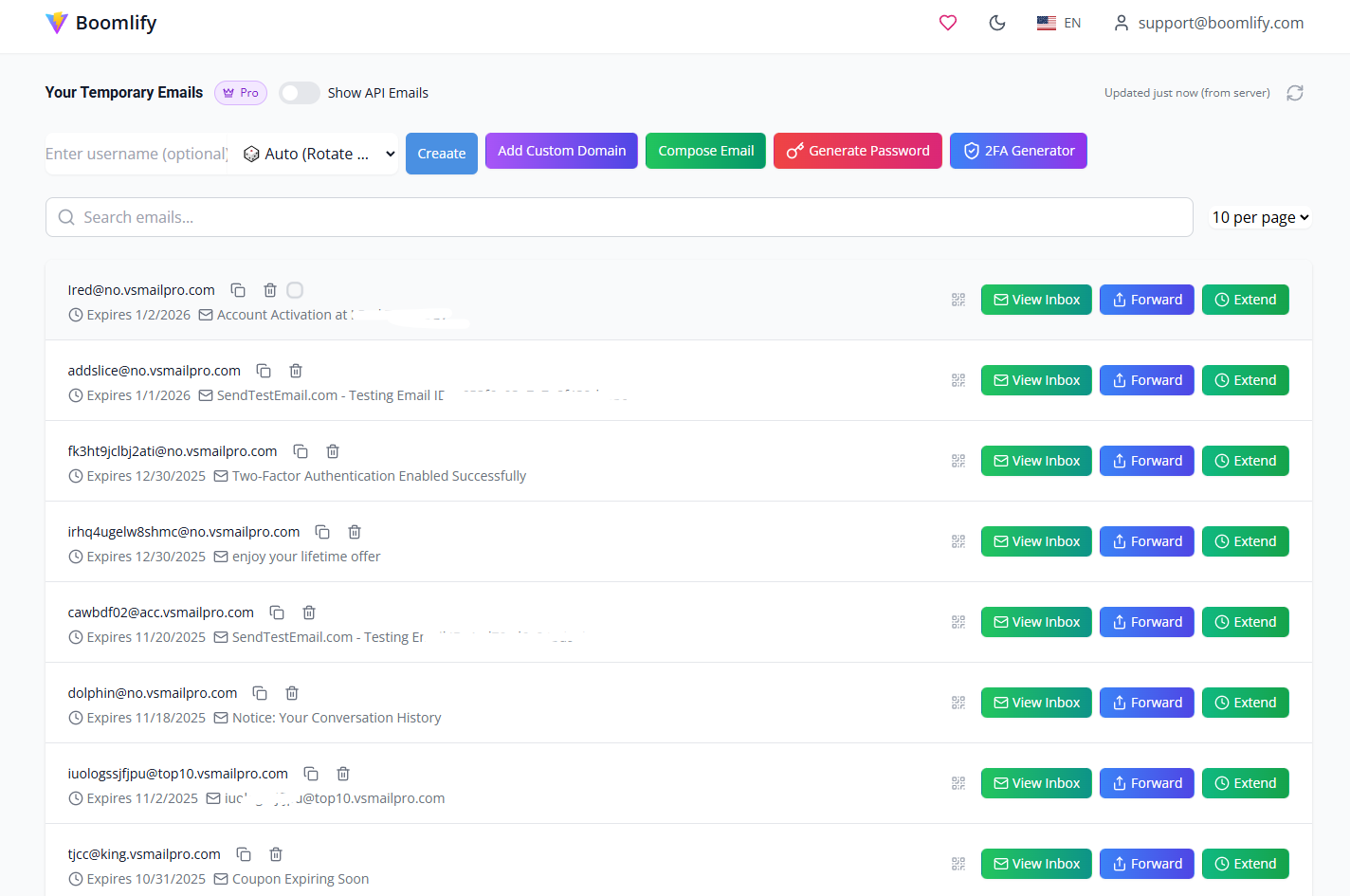
Historically, "temp mail" meant a shady inbox that lasted 10 minutes and then vanished. That model is obsolete. In 2026, users need "persistent" disposable emails. Why? Because modern platforms—from SaaS tools to social media giants—require re-verification. If you create an account for a marketing campaign or an affiliate profile and the platform asks for a verification code 30 days later, a 10-minute email renders that account dead.
Users now demand disposable emails that act like real emails: they need to receive attachments, forward messages to secure channels like Telegram, and exist for months or even years if necessary, all while remaining untraceable.
Benefits of Using Temp Mail Services for Everyday Privacy Protection
1. Zero Spam in Primary Inbox: Keep your Gmail or Outlook strictly for banking and family.
2. Safe Testing: Developers can test sign-up flows without cluttering databases with real user data.
3. Multi-Accounting: For affiliate marketers and social media managers using DICloak, distinct temp emails for every profile prevent account association (linking).
4. Security: If a temp mail is compromised, you simply delete it. There is no password recovery risk associated with your main identity.
The Shift to Advanced Disposable Email Solutions in 2026
The market has bifurcated into two categories: the old-school "burner" sites and the new-generation "Email-as-a-Service" platforms. The former are being aggressively blacklisted by websites. The latter, led by innovators like Boomlify, use premium domains and advanced routing to bypass detection.
Limitations of Basic Temp Mail Services and Why You Need More
Basic temp mail services (the "free 10-minute" sites) suffer from critical flaws:
- Public Domains: Everyone uses the same @sharklasers.com style domains, which are universally blocked by Facebook, Google, and Amazon.
- No Privacy: Many free sites have public inboxes where anyone who guesses the alias can read your mail.
- Zero Retention: Once the browser tab closes, the email is gone forever.
- Lack of API: You cannot automate account creation with basic sites.
Boomlify's Innovative Approach to Revolutionizing Temp Mail
Boomlify has redefined the sector by treating temporary email as a professional tool. It acknowledges that valid users—developers, QA testers, and privacy advocates—need reliability. Boomlify introduces the concept of "Smart Disposable Email." This includes features like 2FA management, cloud synchronization across devices, and the ability to extend the life of an email indefinitely. It is not just about hiding; it is about managing digital identities efficiently.
Introducing Boomlify: The Ultimate Temp Mail Service for Global Users
Boomlify is a modern temporary email service designed to revolutionize how individuals, developers, and teams manage their inboxes. Whether you are signing up for online services without exposing your personal email, verifying accounts anonymously via DICloak, or integrating email automation into your applications, Boomlify offers a robust, user-friendly platform.
A Comprehensive Overview of Boomlify's Core Mission and Vision
Founded on principles of transparency, flexibility, and privacy protection, Boomlify empowers users to create instant disposable email addresses that can be used and discarded without leaving a trace. Unlike competitors that monetize user data, Boomlify monetizes through premium features and API access, aligning their financial incentives with your privacy.
Standout Features That Set Boomlify Apart in the Temp Mail Market
- No Registration Required: You can generate a temp email instantly.
- Smart Inbox Preview: Glance at message contents without fully opening mailboxes, reducing the risk of triggering tracking pixels.
- Centralized Dashboard: Manage hundreds of temp emails from one place—perfect for multi-accounting.
- Cross-Device Sync: Start a verification on your desktop via DICloak and receive the code on your mobile.
- Cloud 2FA Manager: A unique feature that captures and stores 2FA codes, syncing them to the cloud for easy access.
- Gmail-Based Temp Emails: Support for high-trust domains to bypass strict filters.
Temp mail by Boomlify Pricing Breakdown: Flexible Plans for Every Budget and Need in 2026
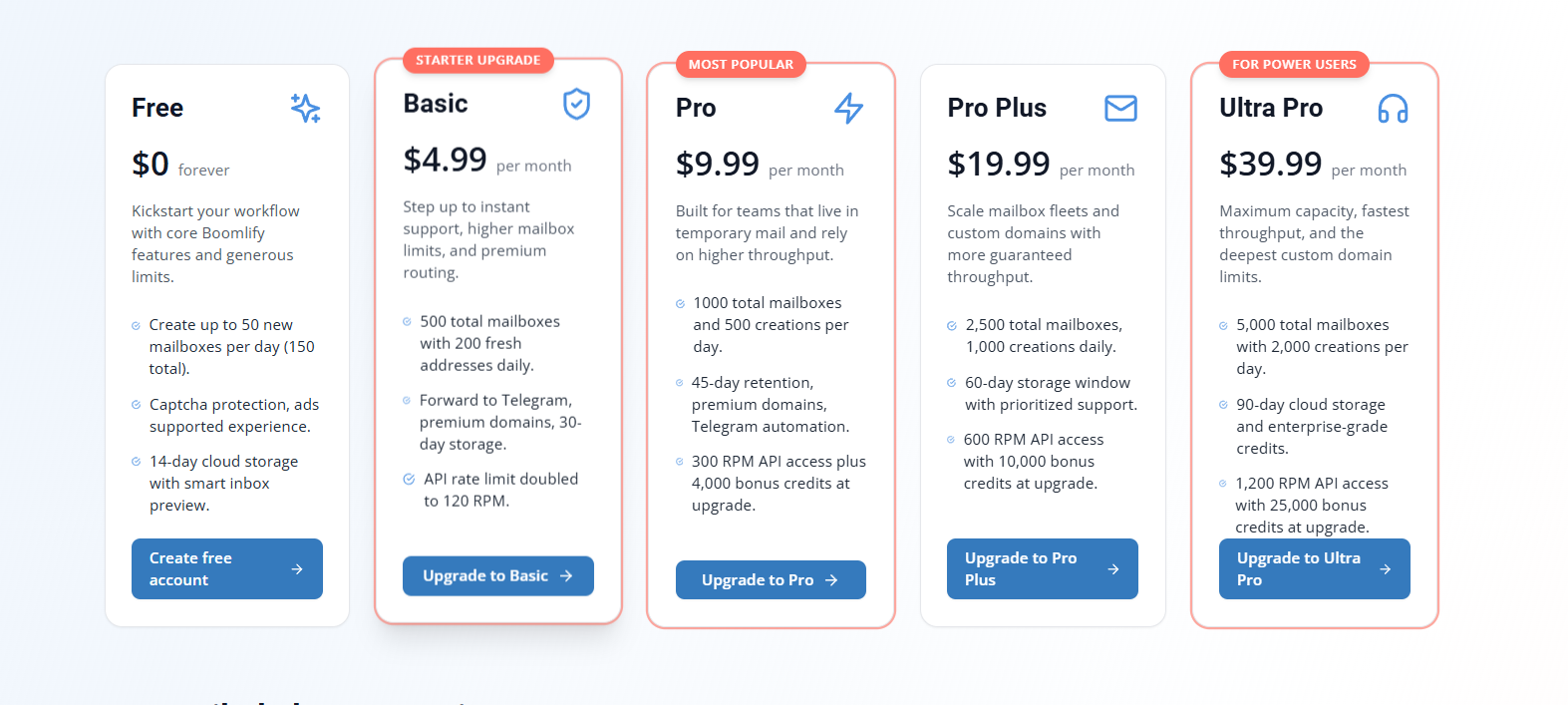
Boomlify uses a hybrid pricing model: Subscription Plans (for features like ad removal, storage, and domain slots) and TEMP MAIL API Credits (for high-volume automation).
Free Plan: Dive into Temp Mail Without Any Cost
Perfect for casual users testing the waters.
- Cost: $0 Forever.
- Ads: Yes.
- Mailbox Capacity: 150 total mailboxes.
- Daily Limit: Create up to 50 emails per day.
- Storage: Emails stored for 14 days.
- Custom Domains: Add up to 2 custom domains.
- API: 60 RPM (Requests Per Minute) with 50 free daily credits.
Basic Plan at $4.99/Month: Ad-Free Essentials for Everyday Use
The entry point for serious privacy users.
- Ads: Completely Ad-free experience.
- Telegram Forwarding: Yes (Receive OTPs directly to Telegram—a massive time saver).
- Mailbox Capacity: 500 total.
- Storage: 30 days on cloud.
- API Bonus: 1,500 credits included at upgrade.
- Custom Domains: 3 slots.
Pro Plan at $9.99/Month: Balanced Power for Developers and Pros
Boomlify’s most popular plan for freelancers and power users.
- Mailbox Capacity: 1,000 total.
- Daily Limit: Create 500 emails per day.
- Storage: 45 days.
- API Speed: 300 RPM.
- API Bonus: 4,000 credits included.
- Telegram Forwarding: Yes.
Pro Plus Plan at $19.99/Month: High-Capacity for Growing Needs
Designed for affiliate marketers managing multiple campaigns.
- Mailbox Capacity: 2,500 total.
- Daily Limit: 1,000 emails per day.
- Storage: 60 days.
- API Speed: 600 RPM.
- API Bonus: 10,000 credits included.
- Custom Domains: 10 slots.
Ultra Pro Plan at $39.99/Month: Enterprise-Grade Features for Demanding Users
For heavy automation and agency-level usage.
- Mailbox Capacity: 5,000 total.
- Daily Limit: 2,000 emails per day.
- Storage: 90 days.
- API Speed: 1,200 RPM.
- API Bonus: 25,000 credits included.
- Custom Domains: 20 slots.
Unlimited Plan at $69.99/Month: No Boundaries for Ultimate Control
The ultimate solution for enterprise data scraping and massive account generation.
- Mailbox Capacity: Unlimited.
- Daily Limit: Unlimited.
- Storage: 365 days (1 year).
- API Speed: Unlimited.
- Custom Domains: Unlimited.
API Credit System: Pay Only for What You Create
Boomlify separates the API cost from the subscription to keep it affordable. Reading emails, listing mailboxes, and deleting them is free. You only pay to create the address.
- Exchange Rate: $1 USD = 1,000 Credits.
- 10-Minute Mail: 1 Credit.
- 1-Hour Mail: 2 Credits.
- 1-Day Mail: 3 Credits.
- Permanent Mail: 15 Credits.
This system is incredibly cost-effective for developers. Even free users get 50 credits daily to test endpoints.
Deep Dive into Boomlify's Features: Tailored for Global Audiences
Customization and Personalization Options for Worldwide Users
Boomlify isn't just about random strings of characters. You can bring your own Custom Domains. This is crucial for DICloak users running B2B outreach or managing reputable accounts. If you own marketing-agency.com, you can hook it into Boomlify and generate support@marketing-agency.com on the fly via API, managing all replies in the Boomlify dashboard.
Management Tools for Efficient Temp Mail Handling
The Centralized Dashboard is a game-changer. Unlike other sites where you lose the email once you navigate away, Boomlify saves your active mailboxes. You can toggle between them, extend their duration, and even search through them. For an anti-detect browser user, this mimics the "Profile Management" experience—organized, persistent, and accessible.
Notification and Accessibility Features for On-the-Go Users
- Telegram Forwarding: available on Basic plans and up. This allows you to verify accounts without even opening the Boomlify dashboard. The code comes straight to your phone.
- Chrome Extension: Generate email credentials directly inside the browser window where you are working.
Security and Privacy Enhancements in Boomlify
- 2FA Manager: Boomlify allows you to save 2FA secrets. It generates OTPs and syncs them via the cloud (limits apply based on plan) or stores them locally (unlimited).
- Password Generator: A built-in tool creates strong passwords and saves them in a local vault, ensuring you never reuse credentials across your multi-account setup.
- CAPTCHA Protection: Prevents bot abuse of the free tiers, ensuring the IP reputation of Boomlify's domains remains high for legitimate users.
Developer and Automation Perks for Tech-Savvy Audiences
The Boomlify API is robust. It supports custom domain integration, smart caching, and rate limits that scale with your plan.
- Documentation: Detailed docs with examples in Python, JavaScript, and PHP.
- Control: API users can toggle an "API Mode" in the dashboard to visually manage mailboxes created via code.
- Cost Efficiency: You don't pay per API call, only per mailbox creation.
Upcoming Innovations: What's Next for Boomlify in 2026
Boomlify has an aggressive roadmap. Coming soon features include:
- Temp Phone Numbers: The missing piece of the puzzle for total verification automation.
- Send-to-All: The ability to compose emails and blast them to a contact list from your temp addresses.
Boomlify vs. Top Competitors: In-Depth Global Comparisons for 2026
Boomlify vs. Guerrilla Mail: Longevity and Features Head-to-Head
- Guerrilla Mail: A veteran, but outdated. Emails last only 1 hour. The UI is clunky, and domains are often flagged.
- Boomlify: Offers flexible durations (up to permanent). The UI is modern, mobile-responsive, and ad-free on paid plans.
- Verdict: Use Guerrilla for a quick, one-off download. Use Boomlify for accounts you need to keep.
Boomlify vs. 10 Minute Mail: Flexibility Beyond Short Timers
- 10 Minute Mail: strictly adheres to the 10-minute timer (with extensions). If you forget to extend, the data is lost forever.
- Boomlify: Default durations are longer, and the recovery window is better. Plus, Boomlify allows you to bring custom domains, which 10 Minute Mail does not.
Boomlify vs. SimpleLogin: Affordable Privacy Alternatives
- SimpleLogin: Excellent for alias forwarding, but geared more towards personal privacy enthusiasts (ProtonMail ecosystem). It requires more setup.
- Boomlify: Faster to deploy. No registration needed for the free tier. Better suited for high-volume creation/deletion cycles used in automation.
Boomlify vs. Temp Mail Services (General): Standing Out in a Crowded Market
Most general temp mail sites are identical clones loaded with intrusive ads and malware risks. Boomlify distinguishes itself with Premium Domains. While generic sites use low-reputation domains, Boomlify rotates premium domains that look like legitimate businesses, ensuring high deliverability rates for OTPs.
Boomlify vs. Mailinator: Developer-Focused Showdown
- Mailinator: Famous for public inboxes. Great for QA, but terrible for privacy. Anyone can read mailinator.com/bob.
- Boomlify: Private by default. Only you have access to your generated inbox. Boomlify's API is also more granular for individual user management compared to Mailinator's public architecture.
Boomlify vs. Burner Mail: Value in Privacy and Customization
- Burner Mail: Focuses on forwarding to your real email.
- Boomlify: Focuses on a standalone inbox experience. This is safer for anti-detect browser users because it creates a total air-gap between the disposable identity and your real identity.
Overall Verdict: Why Boomlify Wins as the Best Temp Mail Service in 2026
Boomlify wins on versatility. It is simple enough for a grandma to use for a coupon code, but powerful enough for a developer to run a 5,000-account scraping operation. The inclusion of Telegram forwarding and the Credit-based API model makes it financially superior for scale.
Who Should Use Boomlify? Tailored Recommendations for 2026
For Casual Users Prioritizing Privacy in Daily Online Activities
If you are tired of newsletters clogging your Gmail, use Boomlify's Free or Basic plan. The Chrome extension makes it a one-click process to shield your identity.
For Developers and Automators Building Worldwide Apps
If you are building bots, scrapers, or testing authentication flows, Boomlify’s API is your best friend. The 50 free daily credits let you develop without cost, and the RPM limits on the Pro tiers (up to 1,200 RPM) ensure your bots never hit a bottleneck.
For Businesses and Teams Needing Enterprise-Level Temp Mail
Marketing teams running cold outreach or managing social media profiles for clients need distinct digital fingerprints. Boomlify’s Pro Plus and Ultra Pro plans allow teams to manage thousands of inboxes with custom domains, ensuring client data remains segmented and secure.
For Privacy Enthusiasts and Power Users Seeking Advanced Tools
If you use DICloak or Tor, you understand the value of hygiene. Boomlify’s local password vault and 2FA manager ensure that your security practice is hermetic. You aren't just hiding your IP; you are securing your credentials.
Getting Started with Boomlify: Step-by-Step Guide for Global Users
Easy Signup and Instant Access from Anywhere in the World
1. Visit Boomlify.com: No VPN required.
2. Instant Generation: A temp mail is waiting for you immediately on the homepage.
3. Account Creation (Optional): Click "Sign Up" to unlock the dashboard, save your emails, and access the API keys.
Maximizing Boomlify's Features for Your Needs
1. Set Up Forwarding: Go to Settings and link your Telegram. This is the ultimate convenience hack.
2. Add a Custom Domain: If you are on a Basic plan, add your domain to improve trust scores on websites that block standard temp mail domains.
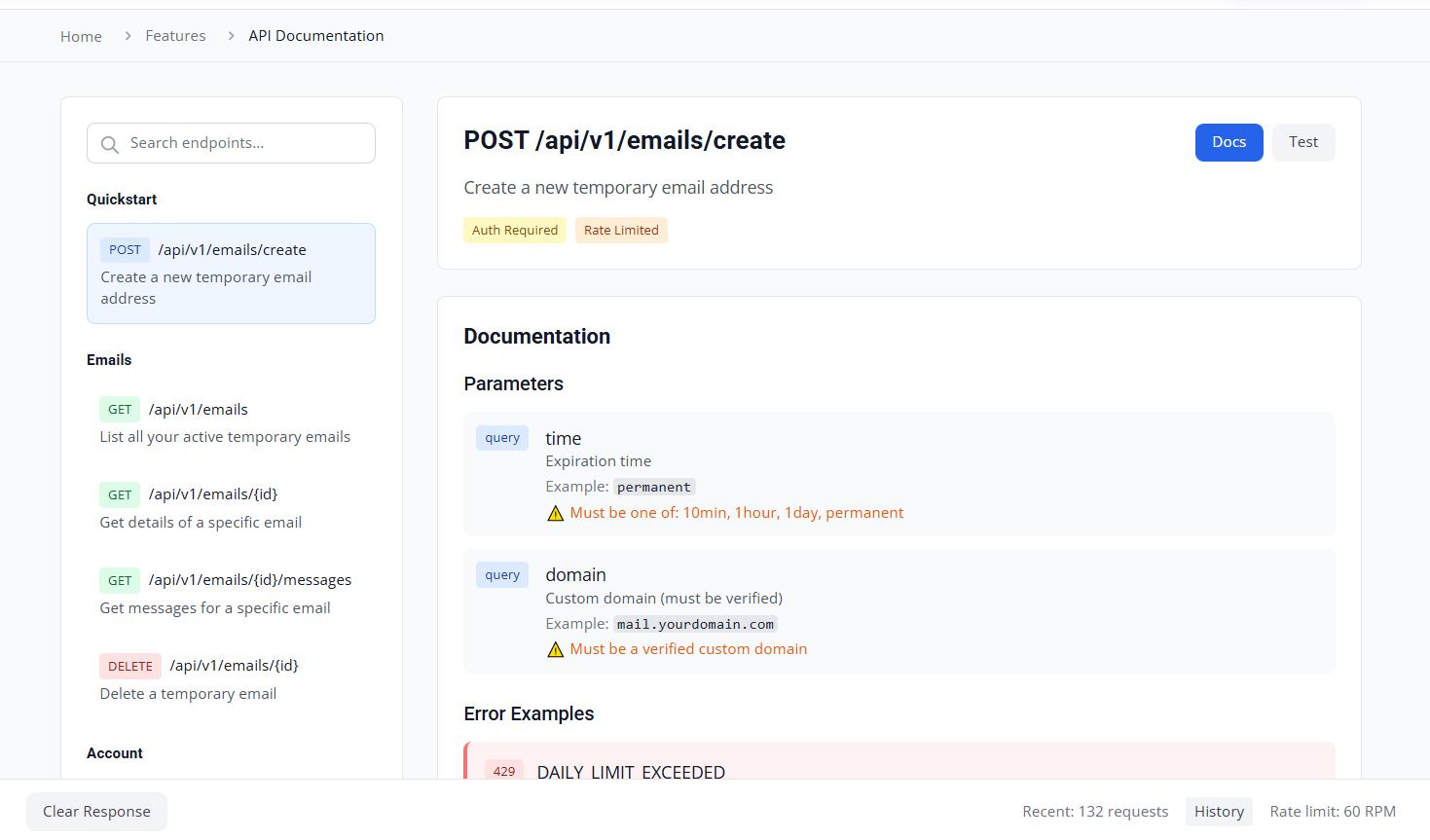
3. API Integration: Navigate to the API docs. Copy the sample Python or JS code to integrate mailbox creation into your existing scripts.
Troubleshooting Common Issues and Getting Support
- Email not arriving? Click the "Refresh" button on the smart inbox.
- Domain blocked? Create a new email; Boomlify rotates domains frequently.
- Need help? Paid plans get Instant Support. Free users have access to support with a slight delay.
Common Questions About Boomlify Temp Mail Answered in 2026
Pricing and Plan-Related FAQs for Budget-Conscious Users
- Do API credits expire? No. Credits you buy are yours forever.
- Is the Free plan really free? Yes, forever. You get 50 creations daily and 14-day storage.
- Can I upgrade/downgrade? Yes, plans are flexible.
Feature-Specific Questions from Worldwide Audiences
- Can I send emails? Currently, you can compose internal replies. "Send to all" (sending to external addresses) is coming soon.
- Does it support attachments? Yes, all plans support cloud attachments.
Comparison and Alternatives FAQs
- Is it better than Gmail aliases? Yes, because Gmail aliases (myname+spam@gmail.com) still reveal your real email address. Boomlify creates a completely separate identity.
Advanced Usage and Customization Queries
- How many custom domains can I add? It ranges from 2 on the Free plan to Unlimited on the top tier.
- What is the API Rate Limit? It scales from 60 RPM (Free) to Unlimited.
Final Thoughts: Elevate Your Privacy with Boomlify in 2026
Summarizing Boomlify's Edge in the Temp Mail World
In the arms race between privacy and data tracking, Boomlify provides the shield you need. It combines the ease of use of a simple website with the raw power of an enterprise API. For users of DICloak, it is the logical extension of your browser privacy toolkit. It provides the "Identity Masking" to go along with your "Browser Fingerprint Masking."
We Tested Boomlify: Here’s What We Found After a Full Review
Don't let your personal data be the price of admission for the internet. Take control of your inbox. Whether you need one email for a coupon or ten thousand for an automation project, Boomlify is ready.
Visit Boomlify.com today to claim your free credits, explore the API, and experience the cleanest, fastest, and most secure temporary email service of 2026. Combine it with DICloak for the ultimate privacy setup.
 Web Proxy Tools
 Free Tools
 Cookie Plugin
 UA Generator
 MAC Address Generator
 IP Generator
 IP Address List
 2FA Code Generator
 World Clock
 Anonymous Check
 WebRTC Leak Test
 UUID Generator
 Free Web Proxy Site
 Proxy Checker
 FB Ad Checker
 AI Web Scraping
 Free SMM Tools
 Twitter Shadowban Checker
 Instagram Name Checker
 UTM Generator
 Username Generator
 AI Hashtag Generator
 LinkedIn Headline Generator
 Social Media Image Resizer