Every device that connects to the internet has a hidden identifier called a MAC address. Most users never notice it, but networks rely on this address to recognize and communicate with devices. In many situations, this identifier stays the same for the entire life of the device. While this makes networking simple, it can also create privacy concerns, especially when the same device connects to public Wi-Fi networks again and again.
This is where a MAC address changer becomes useful. By learning how to change MAC address, users can control how their device appears to networks and reduce the chance of being tracked through a fixed hardware identifier. For privacy-focused users, developers, and network professionals, this small change can make a big difference in how devices interact with modern networks.
In this guide, you will learn what MAC addresses are, why they matter for networking and privacy, and how a MAC address changer works. We will also explore practical methods for changing MAC addresses on different operating systems, tools that simplify the process, and tips for avoiding common errors. By the end of this article, you will have a clear understanding of how to manage your device identity and improve your online privacy.
Understanding MAC Addresses
Before using a MAC address changer, it is helpful to understand what a MAC address is and why networks rely on it. Many users search how to change MAC address because they want better privacy or need to solve a network problem. Knowing how MAC addresses work makes it easier to understand how a MAC address changer can help manage device identity.
What is a MAC Address?
A MAC address (Media Access Control address) is a unique identifier assigned to every device that connects to a network. Devices such as laptops, smartphones, routers, and printers all have their own MAC address. It works like a name tag for your device on a network.
A MAC address usually contains 12 letters and numbers, grouped in pairs. One example is 08:00:27:14:A7:F1. The first part identifies the device manufacturer, while the second part identifies the specific device. This address is built into the hardware and normally does not change.
When a device connects to Wi-Fi, the router reads the MAC address to know where to send data. For instance, if several devices share the same home network, the router uses MAC addresses to deliver the correct data to the correct device.
Because this address identifies the device, some users use a MAC address changer to temporarily display a different MAC address. Many people learn how to change MAC address to improve privacy or avoid device-based restrictions.
Importance of MAC Addresses in Networking
MAC addresses are essential for communication inside local networks. Routers and switches use them to deliver data to the correct device.
For example, in an office network, when someone sends a file to a printer, the switch checks the destination MAC address and forwards the data only to that printer. Other devices ignore the packet because the address does not match.
MAC addresses are also used for security and access control. Some networks use MAC filtering to allow only approved devices to connect. However, this can also create privacy concerns, especially on public Wi-Fi where device identifiers may be logged.
Static vs. Dynamic MAC Addresses
There are two common types of MAC addresses: static and dynamic.
- A static MAC address is the permanent address assigned by the manufacturer. It usually stays the same throughout the life of the device.
- A dynamic or randomized MAC address is generated by software. Some modern systems use temporary MAC addresses when connecting to Wi-Fi to reduce tracking.
For example, a traveler who connects to public Wi-Fi in airports or hotels may prefer using a MAC address changer. By learning how to change MAC address, the device can appear with a different identifier each time it connects, helping improve privacy on shared networks.
What Is a MAC Address Changer?
After understanding what a MAC address is, the next step is learning what a MAC address changer does. Since a MAC address works like a device’s identity on a network, some users may want to modify how that identity appears when the device connects to Wi-Fi or Ethernet.
A MAC address changer is a software tool or system feature that allows a device to show a different MAC address to the network. The original hardware address stored in the network card usually stays the same. Instead, the operating system temporarily reports another address when the device connects to a network. This process is commonly called MAC spoofing.
When a device connects to a router, the network reads the MAC address to identify that device. A MAC address changer lets the system replace the visible address before the connection starts. As a result, the network sees the new address instead of the original hardware identifier.
Many operating systems already support this function. For instance, Windows users can adjust the MAC address through network adapter settings, while Linux users often use terminal commands to modify it. Because of this, many people search how to change MAC address when they want to manage how their device appears on a network.
It is important to note that a MAC address changer usually does not permanently change the hardware MAC address. In most cases, the change only affects the current network session. When the system restarts or the settings are reset, the device can return to its original MAC address.
Why Your MAC Address Can Become a Privacy Risk
Now that you understand what a MAC address changer does, it is also important to understand why many users care about changing their MAC address in the first place. A MAC address helps networks identify devices, but that same feature can also create privacy concerns. Because the address is tied to a specific device, it can sometimes be used to observe or track user behavior on networks.
Why Your MAC Address Can Become a Privacy Risk
Now that you understand what a MAC address changer does, it is also important to understand why many users choose to change their MAC address. A MAC address helps networks identify devices, but because it usually stays the same, it can also create privacy concerns. If the same identifier appears repeatedly, networks may recognize or track the device over time.
- Public Visibility of MAC Addresses: When a device connects to a network, its MAC address is visible to routers and network systems. For example, a café Wi-Fi router logs the MAC address of connected devices. If the same device reconnects later, the network can recognize it. This is why some users learn how to change MAC address before connecting to public networks.
- Device Tracking in Public Spaces: Places like shopping malls or airports sometimes analyze Wi-Fi signals to estimate visitor traffic. If the same smartphone appears several times, the system may estimate how long the visitor stayed. A MAC address changer helps prevent the device from appearing with the same identifier every time.
- Silent Data Collection: Many networks automatically record connection logs for monitoring. These logs may include MAC addresses and connection times. Over time, this data can show patterns about when a device connects to a network.
- Risk of Data Misuse: If network logs are exposed or misused, they may reveal device identifiers that connected to the network. Using a MAC address changer reduces the chance that the same identifier appears repeatedly in these logs.
- Privacy Issues on Older Android Versions: Older Android systems sometimes broadcast the real MAC address while scanning for Wi-Fi networks. This allowed nearby tracking systems to detect devices even when they were not connected.
- Browsers and Device-Level Identifiers: Websites may collect other device details such as operating system, screen size, and browser settings. When combined with MAC address data, these details can create a stronger device profile.
- Easier Device Tracking Across Networks: If the same device connects to multiple public networks using the same MAC address, those networks may recognize the device across locations. A MAC address changer helps break this pattern.
- Device Fingerprinting Risks: Modern tracking systems may combine MAC addresses with browser data to create device fingerprints. Changing the MAC address removes one part of this identification process.
- Reduced Privacy on Public WiFi: Public Wi-Fi networks often record device connections to manage bandwidth or monitor usage. Learning how to change MAC address can help reduce how often the same device identifier appears on these networks.
Common Reasons to Use a MAC Address Changer
After understanding the privacy risks of MAC addresses, it becomes clear why many users use a MAC address changer. Because a MAC address identifies a device on a network, changing it can help users control how their device appears online. Many people search how to change MAC address to improve privacy, bypass certain restrictions, or test network systems.
Enhancing Privacy and Security
One common reason to use a MAC address changer is to protect privacy. If a device always connects to public Wi-Fi with the same MAC address, the network may recognize it over time. For example, someone who often works from cafés may connect to the same Wi-Fi regularly. If the laptop uses the same MAC address each time, the network could log those visits. Changing the MAC address helps prevent the device from being easily recognized across sessions.
Bypassing Network Restrictions
Some networks limit access based on device identifiers. Hotels, universities, or home routers may allow only certain MAC addresses to connect. For instance, a hotel Wi-Fi plan may allow only one registered device. If a user wants to connect another device, changing the MAC address can allow the network to recognize it as a different device.
Applications in Testing and Development
A MAC address changer is also useful for IT professionals and developers. Network engineers often simulate multiple devices connecting to a system to test network performance or security rules.
Instead of using many physical devices, they can assign different MAC addresses to one computer. Learning how to change MAC address helps them test how networks detect and manage device connections.
Methods for Changing Your MAC Address
After learning why people use a MAC address changer, the next step is understanding how to change MAC address on different devices. The exact steps depend on your operating system. Some systems allow you to modify the MAC address through network settings, while others require terminal commands or built-in privacy features.
Below are practical methods for common devices. These examples help users understand how a MAC address changer works in real situations.
Changing MAC Address on Windows
Windows allows users to change the MAC address through network adapter settings. Many MAC address changer tools for Windows also automate these steps.
Step-by-Step Instructions
- Open Control Panel and search for Network Connections.
- Click View Network Connections to see all network adapters.
- Find the adapter you are currently using. Active connections often show a green icon.
- Right-click the adapter and select Properties.
- Click Configure, then open the Advanced tab.
- Find Network Address or Locally Administered Address in the list.
- Enter a new MAC address using 12 characters with no colons or dashes. Example format:
A1B2C3D4E5F6
- Click OK and reconnect to the network.
Many users learn how to change MAC address on Windows when testing network access or reconnecting to a network that limits devices.
Advanced method using Registry
If the adapter does not show the Network Address option, some advanced users modify the Windows Registry.
- Press Windows key + R, type regedit, and open Registry Editor.
- Navigate to:
HKEY_LOCAL_MACHINE → SYSTEM → CurrentControlSet → Control → Class
- Locate the folder:
{4d36e972-e325-11ce-bfc1-08002be10318}
- Open the numbered folders (0000, 0001, etc.) until you find your adapter.
- Create a new String Value called NetworkAddress.
- Enter a 12-character MAC address.
- Restart the computer.
After rebooting, run ipconfig /all in Command Prompt to confirm the new address.
Changing MAC Address on MACOS
MAC computers allow MAC address changes through Terminal, which works like a built-in MAC address changer tool.
Step-by-Step Instructions
- First check your current MAC address. Hold the Option key and click the Wi-Fi icon in the menu bar. The address will appear in the list.
- Open Terminal Finder → Applications → Utilities → Terminal.
- Disable the Wi-Fi interface
sudo ifconfig en0 down
- Set a new MAC address
sudo ifconfig en0 ether A1:B2:C3:D4:E5:F6
- Enable the interface again
sudo ifconfig en0 up
- Check the new address by holding Option and clicking the Wi-Fi icon again.
Some users also generate a random MAC address using commands like: openssl rand -hex 6
This method is often used by developers who want to test how networks respond to different devices.
Changing MAC Address on Linux
Linux systems provide flexible networking tools, so many professionals use Linux as a MAC address changer environment.
Step-by-Step Instructions
- Open the Terminal.
- Disable the network interface
sudo ip link set dev wlan0 down
- Change the MAC address
sudo ip link set dev wlan0 address 00:11:22:33:44:55
- Enable the interface again
sudo ip link set dev wlan0 up
Many Linux users install the MACchanger utility. This tool can automatically generate random MAC addresses with a single command. Security researchers often use it when testing network detection systems.
Changing MAC Address on Android
Changing the MAC address on Android depends on whether the device is rooted.
Non-Rooted Devices Most modern Android versions include MAC address randomization for Wi-Fi networks. This feature automatically creates a temporary MAC address for each network connection. Users can enable it in the Wi-Fi privacy settings.
Rooted Devices Rooted devices allow deeper control. After rooting the phone, users can install a MAC address changer app such as:
- ChameleMAC
- BusyBox tools
- Terminal Emulator utilities
These apps allow users to enter a new MAC address or generate a random one. The format usually looks like 00:11:22:33:44:55.
However, rooting can disable security protections and may affect banking apps or device warranties, so it should be done carefully.
Changing MAC Address on iOS
Apple devices do not allow users to manually change the hardware MAC address. However, iPhones include a built-in privacy feature that works like a MAC address changer.
Since iOS 14, Apple introduced Private Wi-Fi Address. This feature automatically generates a randomized MAC address for each network.
To enable it:
- Open Settings.
- Tap Wi-Fi.
- Tap the information icon (ⓘ) next to a network.
- Turn on Private Wi-Fi Address.
Once enabled, the iPhone reconnects to the network using a randomized MAC address. This helps reduce device tracking on public networks like cafés, airports, and hotels.
Understanding how to change MAC address across different platforms helps users choose the right method for their device. Whether using built-in settings, terminal commands, or a dedicated MAC address changer, these tools give users greater control over how their devices appear on modern networks.
Tools and Software for MAC Address Changing
After learning the manual methods, many users prefer tools that make the process easier. A dedicated MAC address changer provides a simple interface to generate and apply a new MAC address without editing system settings or using complex commands.
Recommended Third-Party Applications
Several tools are widely used as a MAC address changer. One popular option is Technitium MAC Address Changer, a free Windows tool that allows users to modify the MAC address of a network adapter with just a few clicks. It scans available adapters, lets users enter a custom MAC address or generate a random one, and applies the change instantly. It can also restart the network adapter so the new address becomes active right away.
Linux users often use MACchanger, a command-line tool that can assign custom or random MAC addresses. System administrators and security researchers frequently use it when testing network behavior or simulating multiple devices.
Automation Tools for Non-Technical Users
Some MAC address changer tools focus on simplicity and automation. Tools like Technitium MAC Address Changer provide graphical interfaces where users can select an adapter, generate a new MAC address, and apply it in seconds.
For example, someone who often connects to public Wi-Fi can quickly switch MAC addresses without typing commands. These automation tools make MAC address management much easier, even for users without technical experience.
Troubleshooting Common Issues
Even when using a MAC address changer, some users may face small technical problems. These issues are usually related to system permissions, incorrect MAC address format, or network adapter limitations. Knowing how to fix them can help the process run smoothly.
Common Errors When Changing MAC Addresses
One common problem is the “Access Denied” or “Permission Denied” error. This often happens when the user tries to change the MAC address without administrator rights. Most operating systems protect network settings, so changes must be made with elevated permissions.
Another issue appears when the network adapter does not support MAC address modification. Some drivers block changes, so even if a user enters a new address, the system keeps the original one.
Users may also enter an invalid MAC address format. A correct address must contain 12 hexadecimal characters using numbers and letters from A to F. For example, many tools such as Technitium MAC Address Changer will reject the change if the format is incorrect.
Solutions and Tips for Troubleshooting
Most problems can be solved with simple steps.
- Always run the MAC address changer with administrator privileges. This allows the program to modify network settings.
- Restart the network adapter after applying the change. Tools like Technitium MAC Address Changer often do this automatically to activate the new MAC address.
- Check that the MAC address format is correct and update your network adapter driver if needed.
In many cases, these quick checks help users apply the new MAC address successfully.
Changing Your MAC Address with DICloak for Advanced Privacy and Device Control
Learning how to change MAC address is a helpful step for protecting device identity on a network. However, modern websites often rely on more than just MAC addresses. They analyze browser fingerprints, IP addresses, device configuration, and activity patterns to identify users.
Because of this, many professionals prefer tools that allow them to manage multiple device identifiers at the same time. Instead of changing only one network value manually, users can create a complete browser profile where several identifiers are controlled together.
One practical way to do this is by using an antidetect browser like DICloak, which allows users to customize device fingerprints, configure proxies, and isolate browser profiles for safer operations.
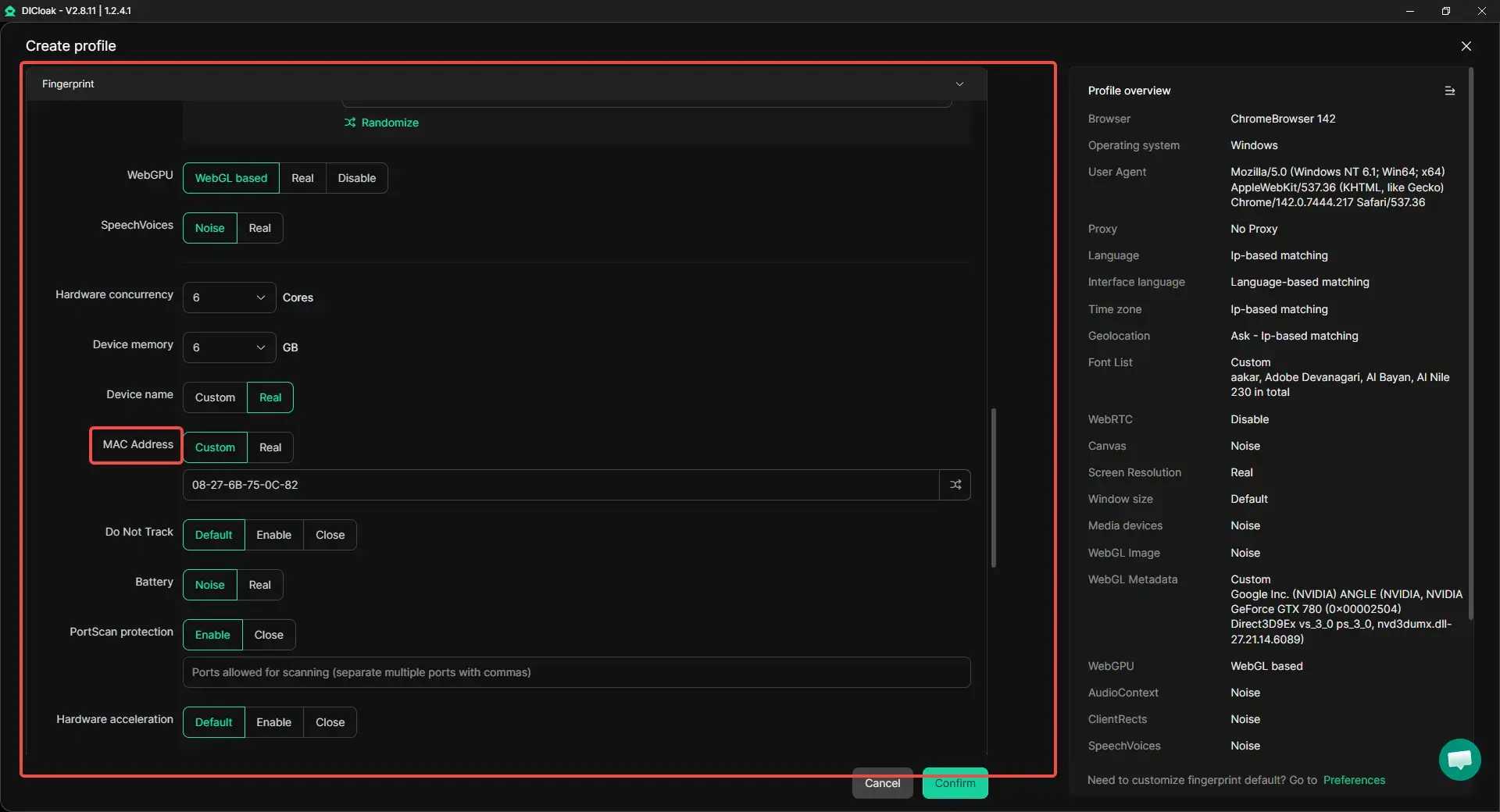
Change MAC Address Easily with DICloak Fingerprint Settings
Manually editing network settings every time you want to change a MAC address can be slow and technical. With a browser profile like DICloak, users can adjust device identifiers directly inside the fingerprint configuration panel.
When creating a browser profile, users can customize several device parameters, including:
- operating system
- device type
- browser version
- timezone and language
- hardware configuration
- MAC address
This means users can change MAC address directly inside the browser profile without modifying the system registry or running terminal commands. Each profile can have its own MAC value, allowing the browser profile to appear as a completely different device. For example, a social media marketer managing several accounts may assign a unique MAC address to each browser profile. This helps reduce the chance that platforms connect those accounts to the same device.
At the same time, the fingerprint configuration allows other identifiers to be adjusted together. This provides stronger protection than changing a single network value alone. Instead of only using a basic MAC address changer, users can create a full device identity simulation.
Flexible Proxy Configuration for Network Identity
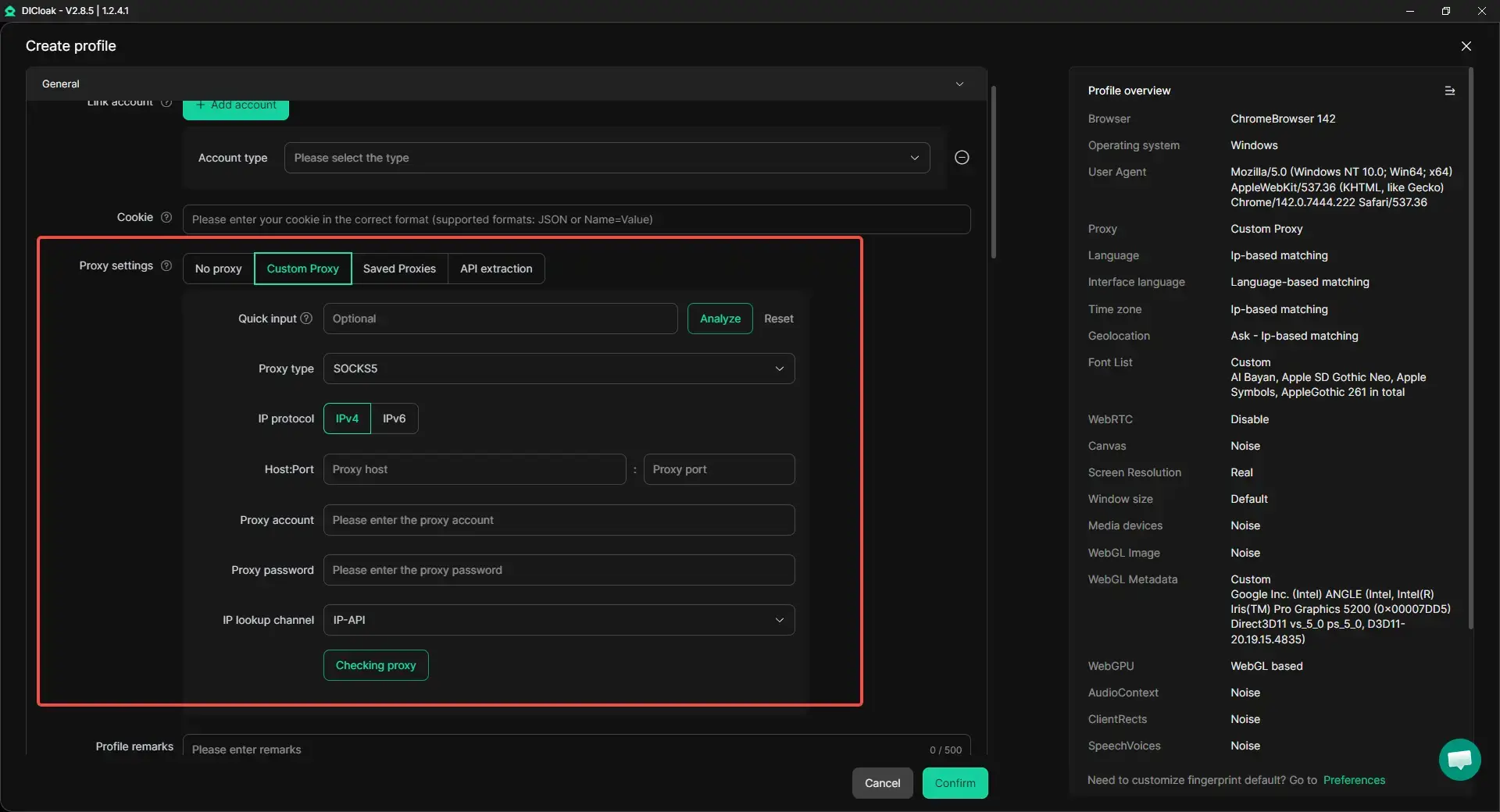
In addition to device identifiers, network identity also plays a major role in online tracking. Many platforms monitor IP addresses along with device fingerprints.
Within a browser profile like DICloak, each profile can connect through its own proxy configuration. Users can integrate popular proxy protocols such as:
This allows every profile to run with a separate IP address and network route. For instance, an affiliate marketer running campaigns in different regions may assign a different proxy location to each browser profile. One profile may appear to connect from the United States, while another may appear to connect from Europe or Asia.
When combined with a customized MAC address, this setup creates a more realistic and independent browsing environment.
Manage Separate Device Environments with Isolated Profiles
Another important feature is browser profile isolation. Each browser profile works like a separate device with its own cookies, storage, fingerprints, and network settings.
For example, a small marketing team managing multiple social media accounts may run each account inside its own isolated browser profile. Each profile has its own MAC address, proxy connection, and device fingerprint.
This helps:
- prevent accounts from being linked together
- reduce the risk of platform bans
- keep workflows organized
Instead of buying multiple computers, users can manage hundreds or even thousands of isolated profiles on one device. Automation tools such as bulk operations, profile sharing, and RPA workflows can further simplify large-scale operations.
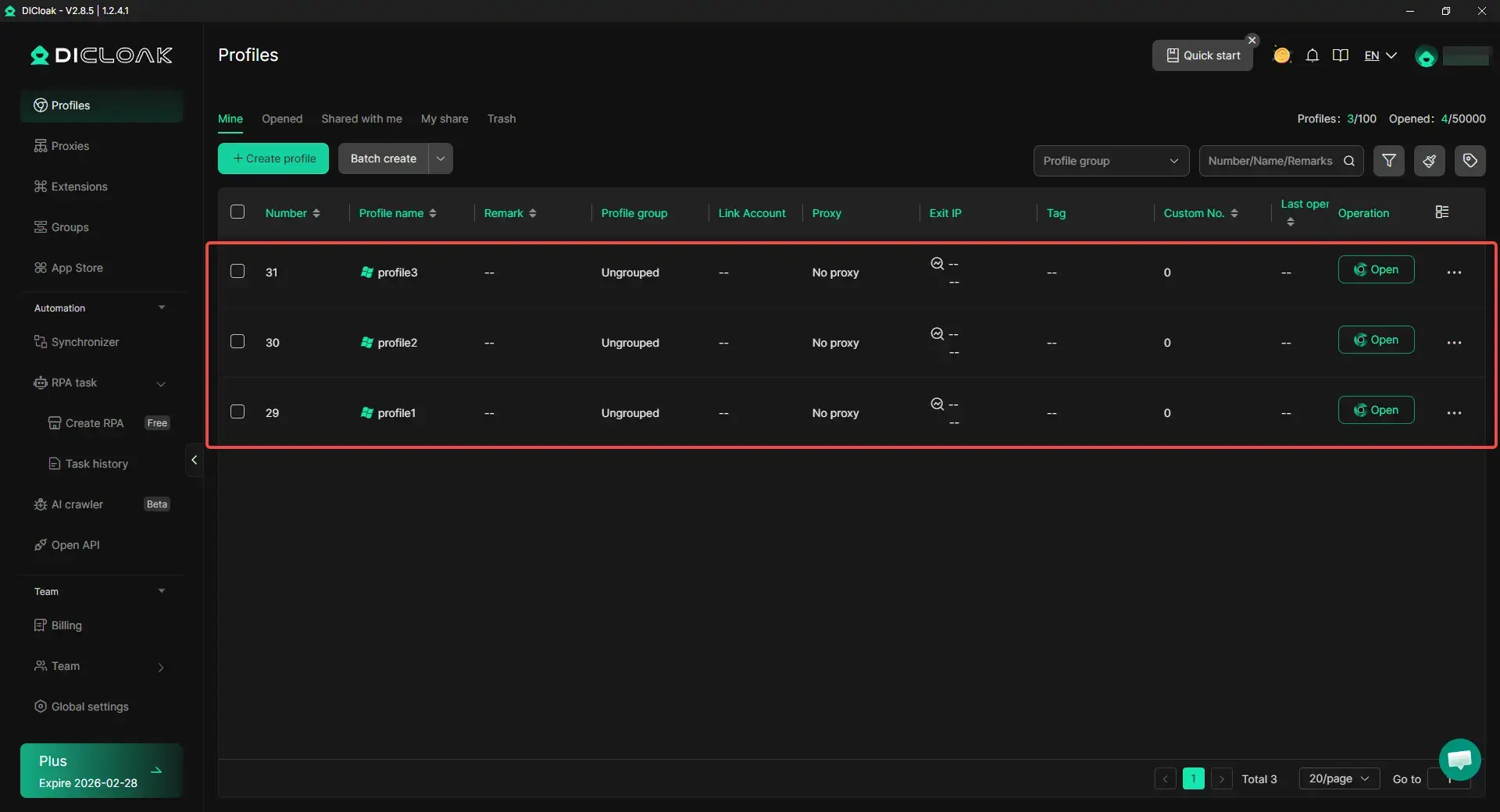
By combining MAC address customization, proxy configuration, and isolated browser profiles, users gain a much stronger level of identity control than a basic MAC address changer alone.
Conclusion
A MAC address changer helps users control how their devices appear on a network. Every internet-connected device has a MAC address that acts as a unique identifier. While this is important for network communication, it can also create privacy risks because the same identifier may appear every time the device connects to a network.
Learning how to change MAC address allows users to temporarily modify this identifier without altering the hardware itself. This can help improve privacy on public Wi-Fi, support network testing, or provide more flexibility when managing devices and connections.
In this guide, we explained how MAC addresses work, why they can become a privacy concern, and how a MAC address changer can help solve these issues. We also explored different methods for changing MAC addresses across major operating systems and introduced tools that make the process easier for both beginners and professionals.
Understanding how to use a MAC address changer gives users more control over their device identity and helps create a safer and more flexible networking experience.
Frequently Asked Questions About MAC Address Changers
Is using a MAC address changer legal?
In most countries, using a MAC address changer is legal because it simply changes how a device identifies itself on a network. However, using it to bypass security systems or access networks without permission may violate laws or service rules.
Can a MAC address changer improve online privacy?
Yes. A MAC address changer can help protect privacy on local networks or public Wi-Fi by preventing the same device identifier from appearing repeatedly. However, websites may still track users through IP addresses, cookies, or browser fingerprints.
Will a MAC address changer permanently change my MAC address?
Usually not. Most MAC address changer tools modify the MAC address temporarily. The device typically returns to its original hardware MAC address after a restart unless the change is applied again.
Why do people search how to change MAC address?
People search how to change MAC address for several reasons, such as improving privacy, reconnecting to restricted networks, or testing network systems during development.
What is the easiest way to use a MAC address changer?
The easiest way is to use a software tool with a simple interface. These tools allow users to generate and apply a new MAC address quickly without using complex commands.
 Web Proxy Tools
 Free Tools
 Cookie Plugin
 UA Generator
 MAC Address Generator
 IP Generator
 IP Address List
 2FA Code Generator
 World Clock
 Anonymous Check
 WebRTC Leak Test
 UUID Generator
 Free Web Proxy Site
 Proxy Checker
 FB Ad Checker
 AI Web Scraping
 Free SMM Tools
 Twitter Shadowban Checker
 Instagram Name Checker
 UTM Generator
 Username Generator
 AI Hashtag Generator
 LinkedIn Headline Generator
 Social Media Image Resizer