Many advertisers search for where to buy Google Ads accounts because they want to start campaigns faster or manage ads for different brands. Some look for aged accounts, agency accounts, or Google Ads accounts with billing history.
But buying an account is risky. A cheap account may have old policy issues, unclear ownership, or failed advertiser verification. Google says accounts can be suspended for policy violations, billing problems, suspicious payment activity, or unpaid balances.
This guide explains how to buy Google Ads accounts safely, what to check before payment, which red flags to avoid, and how to manage purchased accounts more carefully in 2026.
What to Know Before Buying Google Ads Accounts
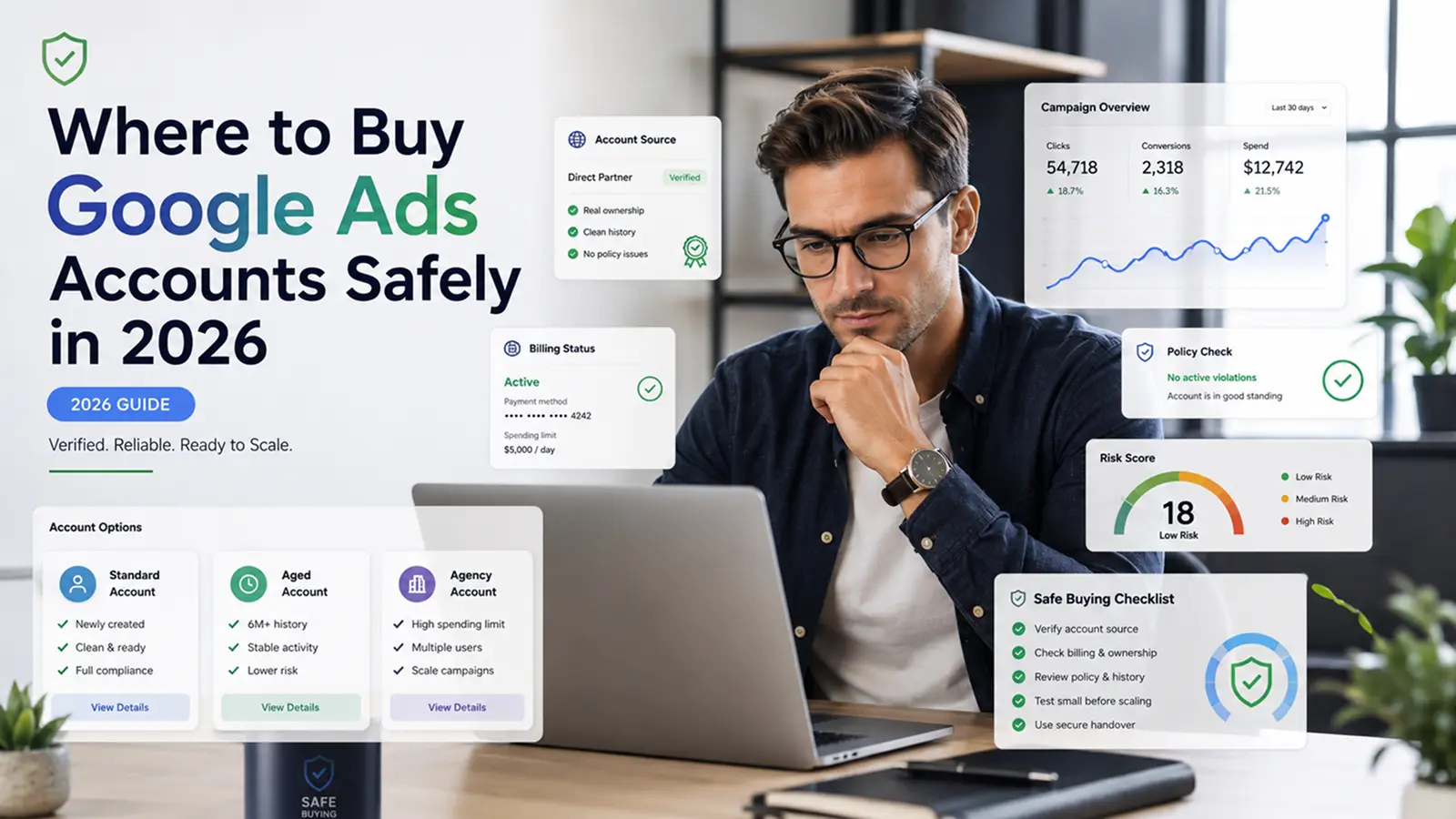
Before you buy Google Ads accounts, you need to know one thing first: the account is only part of the risk. Google also checks billing behavior, advertiser identity, ad content, landing pages, and policy history. A seller may call an account “aged” or “stable,” but those words mean little without proof.
Why some Google Ads accounts get flagged or suspended
Some accounts get flagged because of suspicious payment activity, unpaid balances, chargebacks, or policy violations. Google says accounts may be suspended for billing issues, promotional code abuse, suspicious payments, or actions that put users or Google at risk.
For example, a buyer may receive an old account and add a new card, new domain, and new campaign on the same day. That fast change can create risk, especially if the account history is unclear.
Why seller claims need careful verification
Many sellers use strong words like “high trust,” “verified,” or “ready to scale.” Do not trust those claims alone. Ask for proof of account access, billing status, past policy issues, advertiser verification status, and ownership details. Google may pause accounts during advertiser verification if risk signals or complaints appear.
Common red flags to avoid when purchasing accounts
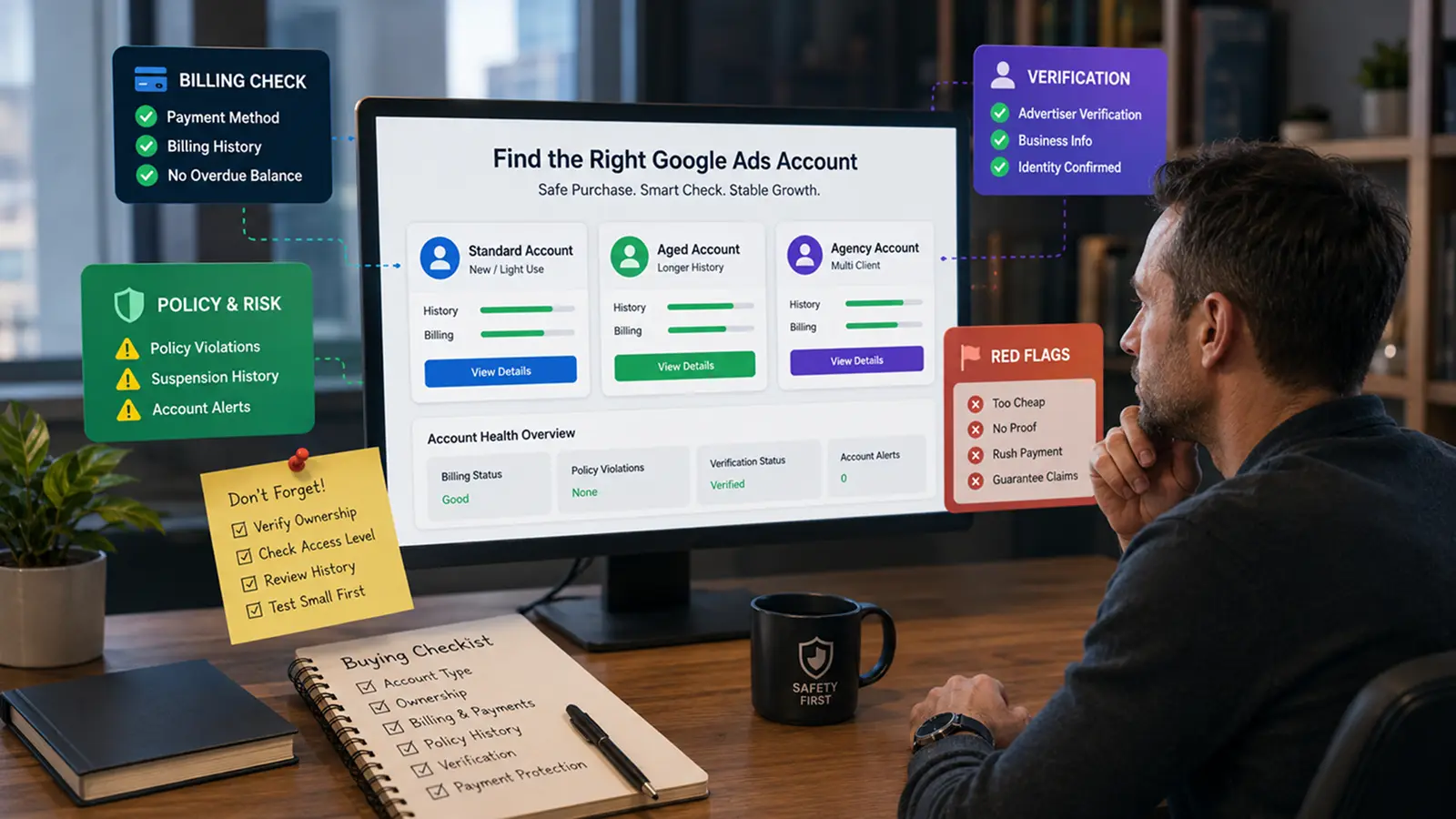
Be careful with sellers who offer very cheap accounts, refuse to show proof, rush payment, or promise “no suspension.” A safer seller should explain what is included and what is not. When you look at Google Ads accounts for sale, avoid any offer that sounds too perfect or hides the account’s real history.
Types of Google Ads Accounts and How to Choose the Right One
After checking seller claims, you also need to know what type of account is being offered. When people search for Google Ads accounts for sale, they may see standard accounts, aged accounts, agency accounts, or rented accounts. These names sound simple, but each type has different risks.
Standard, aged, agency, and rented accounts
A standard account is usually made for one business or advertiser. It may be new or lightly used. Aged Google Ads accounts may look more stable because they have more history, but age alone does not prove quality. Some sellers also offer agency or rented accounts with billing support or campaign support, but you may not fully own the account.
Personal vs. agency accounts
A personal account may work for one business, one brand, or one local campaign. An agency account may be better for teams that handle several clients or regions. Google also offers Manager Accounts, which let users manage multiple Google Ads accounts from one dashboard, control access, and view reports across accounts.
How to assess account quality and history
When checking Google Ads account quality, look beyond age and price. Review ownership, billing status, access level, linked websites, past disapprovals, advertiser verification, and account alerts. A reliable account should have clean payment records, normal campaign history, and no hidden policy issues.
What to Check Before Paying for a Google Ads Account
Once you find an account that seems to fit your needs, do not rush to pay. Before you buy Google Ads accounts, check whether the account can really be used by your business. A low price is not helpful if you cannot control access, pass verification, or run ads without issues.
How to check account ownership and access
First, check who controls the account. Ask whether you will get admin access, billing access, and full control over users. Google Ads has different access levels, and some manager accounts can also manage campaigns, users, and linked products if they have ownership.
For example, if a seller only gives you login details but keeps the main owner access, you may lose control later. That is risky for any business.
What proof to ask for before payment
Ask for proof before payment. Useful proof may include recent account screenshots, billing status, advertiser verification status, past campaign history, and any account alerts. If the seller claims the account is “verified” or “ready to run,” ask for clear evidence.
This is an important part of how to verify Google Ads account before buying. Google says accounts may be paused during advertiser verification, and missing a verification deadline can also pause an account.
Why payment protection cannot remove platform risk
Secure payment can help reduce seller scam risk, but it cannot protect the account from Google Ads rules. Google says account suspensions can happen because of suspicious payment activity, unpaid balances, or policy issues.
Risks and Mistakes to Avoid When Buying Google Ads Accounts
Even after checking ownership and proof, you still need to understand the real risks. When you buy Google Ads accounts, you are also taking on the account’s past billing behavior, policy history, and trust signals. This is why a clean-looking account can still run into problems later.
Potential issues with account suspensions
A purchased account may get suspended if Google detects suspicious payment activity, unpaid balances, chargebacks, promotional code abuse, or serious policy violations. For example, if you add a new card, new website, new country, and new campaign on the same day, the account may look very different from its past use.
How to protect your business from scams
Scam risk is common with Google Ads accounts for sale. Some sellers may offer cheap accounts, fake screenshots, or “guaranteed no suspension” promises. A safer approach is to test a small order first, use protected payment methods, and avoid sellers who refuse to show clear account proof.
Common mistakes that increase policy and billing risk
The biggest mistakes are rushing the purchase, trusting “aged account” claims too easily, and ignoring Google Ads policies. A pre-owned account is not automatically safer. If it later runs a new niche, new domain, or new payment method too quickly, the risk can increase.
How Much Do Google Ads Accounts Cost in 2026?
After looking at the risks, price is the next question. Many people want to know the real Google Ads account price before they buy Google Ads accounts. The truth is simple: there is no fixed price. The cost depends on account type, history, access, region, billing setup, and seller support.
What factors influence Google Ads account price
A new or basic account may cost less. Aged Google Ads accounts or agency accounts may cost more because sellers often claim they have stronger history, higher limits, or better support. But these claims need proof. Google says accounts can still be suspended for billing issues, suspicious payment activity, policy violations, or unpaid balances.
How to decide if a price is fair
A fair price should match what you actually receive. For example, an account with admin access, clean billing, clear ownership, and normal campaign history may be worth more than a cheap account with only login details. If a seller charges a high price but cannot show proof, the price is not fair.
Cheap accounts vs. premium agency accounts
Cheap Google Ads accounts for sale can look attractive, but they often carry more risk. Premium agency or rented accounts may include support, billing help, or account management, but they still do not remove platform risk. Some agency account sellers promote higher spend capacity and support, but advertisers still need to follow Google Ads policies.
How to Manage a Purchased Google Ads Account More Safely
After paying for an account, the real work starts. A higher Google Ads account price does not mean the account will stay safe by itself. If you want to manage Google Ads accounts more safely, you need to make slow, careful changes and keep the account details clean.
Setting up account access and billing carefully
Start with access and billing. Make sure the right people have the right account roles. Google Ads has different access levels, and account owners can control who can view, edit, or manage billing. This matters if a team or agency will use the account.
For example, do not add a new card, new domain, new user, and new campaign all at once. Make one change at a time, then watch for account alerts.
Best practices for maintaining account health
Good Google Ads account health depends on normal use. Keep billing details accurate. Avoid unpaid balances, chargebacks, and suspicious payment changes. Google says accounts may be suspended for suspicious payment activity, unpaid balances, promotional code abuse, or policy actions that put users or Google at risk.
Also check your landing page before launching ads. A clean account can still run into trouble if the website has misleading claims, broken pages, or policy-sensitive offers.
Why Google Ads Manager Account may be safer for teams
If several people manage ads, a Google Ads Manager Account may be safer than sharing one login. It lets teams manage multiple accounts from one place and control access by user role. This helps reduce password sharing and makes account work easier to track.
After you buy or rent Google Ads accounts, daily management matters a lot. An antidetect browser can help keep different account environments separate when you need to manage several ad accounts on one device. If several accounts are opened in the same normal browser, cookies, sessions, and browser signals can get mixed. This may make account work harder to control.
You can use DICloak to create a separate browser profile for each Google Ads account. Each profile keeps its own cookies, login session, and browser fingerprint. You can also configure a custom proxy for different profiles, which helps each account keep a more consistent access environment.
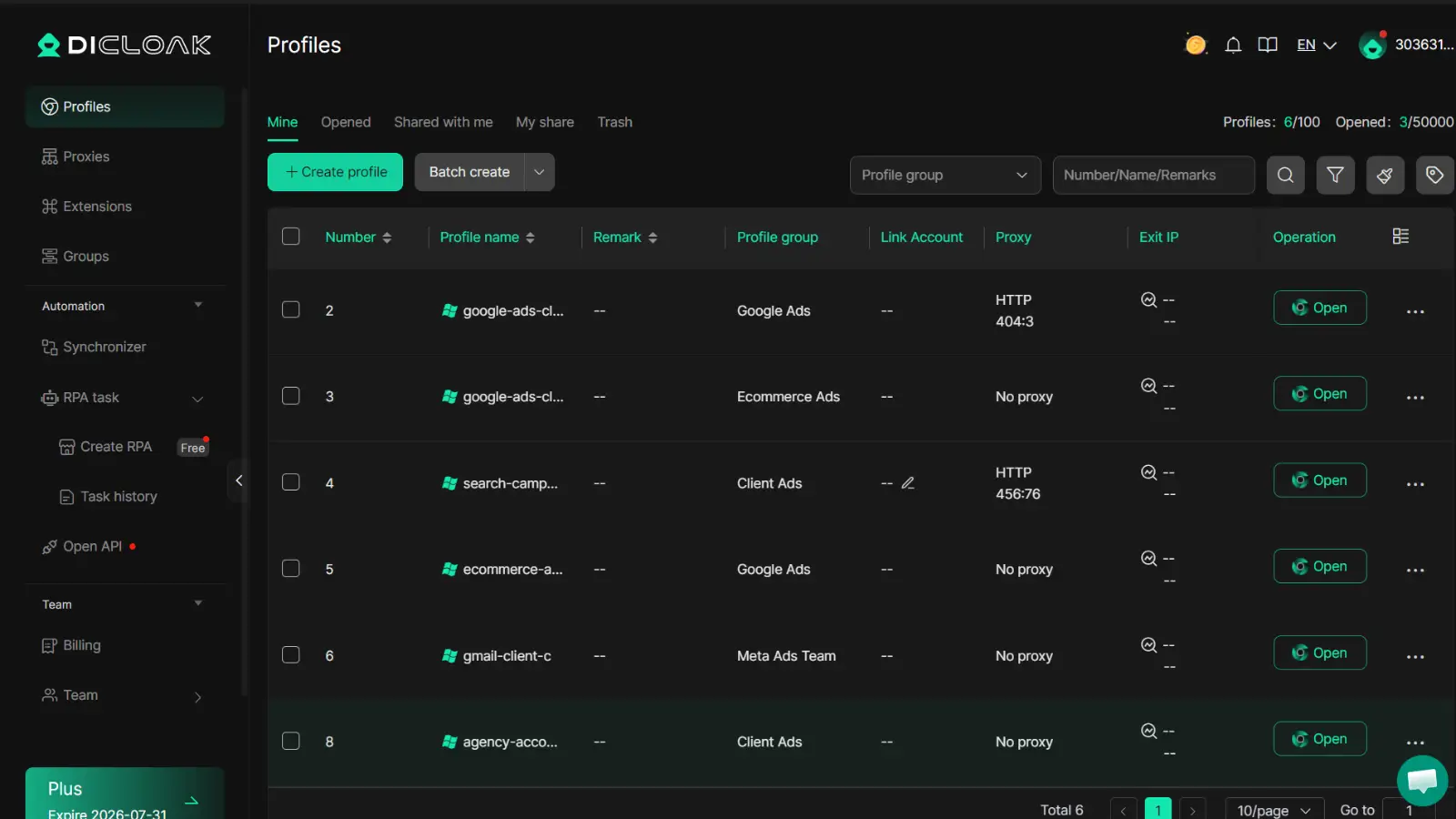
Manage different ad accounts in separate browser profiles
You can place each ad account in its own DICloak profile. This is useful for agencies that manage different clients, regions, or campaigns on one device.
Configure custom proxies for more consistent account environments
You can set a custom proxy for each profile based on the account’s region or work needs. This helps avoid sudden environment changes.
Use automation carefully for routine account workflows
You can use DICloak’s automation tools for simple tasks, such as opening pages or checking account status. Just avoid using automation for fake traffic, spam, or policy-risk actions.
Frequently Asked Questions About Buying Google Ads Accounts
Is it safe to buy google ads accounts?
It can be risky. A purchased account may have old policy issues, billing problems, or unclear ownership, so you should check the account history before paying.
Can I use a purchased Google Ads account for any niche?
No. Some niches have stricter Google Ads rules. Before using a purchased account, make sure your ads, landing page, and business offer follow Google Ads policies.
How much does it cost to buy google ads accounts in 2026?
There is no fixed price. The cost depends on account age, type, billing history, region, access level, and seller support.
What should I do if a purchased Google Ads account gets suspended?
Check the suspension reason first. Then review billing, advertiser verification, ad content, and landing pages before sending an appeal.
What is a safer alternative to buying Google Ads accounts?
A safer option is to create your own Google Ads account or work with a verified agency. This gives you clearer ownership, cleaner billing, and better long-term control.
Managing Google Ads accounts safely helps advertisers reduce account confusion, protect access, and keep each campaign environment more organized. By checking account history, understanding policy risks, and using the right tools, you can build a cleaner Google Ads workflow in 2026. Try DICloak For Free.
 Web Proxy Tools
 Free Tools
 Cookie Plugin
 UA Generator
 MAC Address Generator
 IP Generator
 IP Address List
 2FA Code Generator
 World Clock
 Anonymous Check
 WebRTC Leak Test
 UUID Generator
 Free Web Proxy Site
 Proxy Checker
 FB Ad Checker
 AI Web Scraping
 Free SMM Tools
 Twitter Shadowban Checker
 Instagram Name Checker
 UTM Generator
 Username Generator
 AI Hashtag Generator
 LinkedIn Headline Generator
 Social Media Image Resizer