As your marketing strategies grow or your client base expands, managing multiple Google Ads accounts can quickly become a challenging task. The constant need to log in and out of different accounts, navigate through various campaigns, and adjust budgets can lead to inefficiencies and errors. Not only does this waste precious time, but it also increases the chances of costly mistakes.
However, there are smarter ways to streamline the management of multiple Google Ads accounts. In this article, we will explore two effective solutions for managing multiple Google Ads accounts. We'll discuss Google's built-in tool as well as a more secure alternative, helping you determine which option best suits your needs while safeguarding your advertising investments.
Why Do Marketers and Agencies Need to Manage Multiple Google Ads Accounts?
Marketers and agencies often need to manage multiple Google Ads accounts for various strategic and practical reasons. Managing multiple accounts provides flexibility, control, and helps mitigate risks associated with running complex advertising campaigns. Below are some of the key reasons why managing multiple accounts is essential:
1. Creating Reserve Accounts for Backup
One of the most common reasons for managing multiple Google Ads accounts is to create backup or reserve accounts. This is a smart strategy in case your primary account faces suspension or other issues that could disrupt your advertising campaigns. Having reserve accounts ready ensures that your business or clients' advertising efforts can continue without significant interruptions, minimizing any potential downtime.
2. Minimizing Account-wide Risks
Managing multiple accounts also allows you to reduce the risks that come with a single account. For example, a single ad disapproval or policy violation can sometimes affect the entire account, leading to campaign shutdowns or even account suspension. By separating campaigns into different accounts, you can isolate potential issues and prevent one minor problem from impacting all of your ads and campaigns. This segmentation helps safeguard your advertising efforts and improves overall stability.
3. Managing Multiple Clients with Tailored Strategies
For agencies and freelancers managing multiple Google Ads accounts for various clients, it is crucial to keep accounts separate. Each client typically has distinct goals, budgets, and target audiences, and keeping these accounts isolated allows for the creation of tailored strategies for each client. Separate accounts make it easier to manage different advertising approaches, track performance, and maintain clear reporting. This approach ensures that each campaign is optimized to meet the specific objectives and requirements of each client, leading to more effective and targeted results.
Managing multiple Google Ads accounts enhances flexibility and control, helping to mitigate risks, isolate issues, and tailor strategies for different clients. This approach ensures smoother campaigns and protects advertising revenue.
Manage Multiple Google Ads Accounts with Google's MCC
The first method for managing multiple Google Ads accounts is through Google's own solution, the Google Ads Manager Account (MCC). While it's a robust and efficient tool, there are significant risks that you need to be aware of.
What Is a Google Ads Manager Account (MCC)?
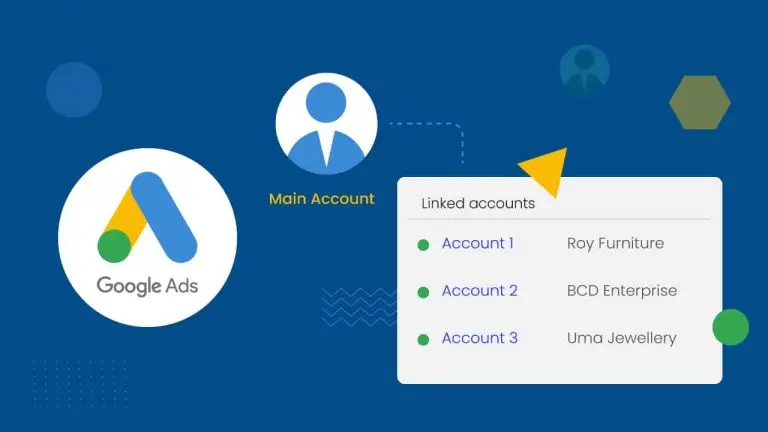
A Google Ads Manager Account (formerly known as My Client Center or MCC) is Google’s dedicated platform for agencies, brand managers, and advertisers. This centralized dashboard allows users to efficiently manage multiple Google Ads accounts, view them all in one place, and make changes seamlessly.
Limits and Risks of Using MCC
An MCC can link up to 85,000 total accounts, including active accounts, manager accounts, and even canceled accounts. However, the number of active accounts you can manage is dependent on your average monthly ad spend over the past year.
Despite its power, using an MCC comes with notable risks. One major risk is that Google may suspend your account for creating multiple accounts if it believes you're attempting to gain an "unfair advantage." For example, managing ads for the same website through multiple accounts could lead to suspension. If your MCC account gets suspended, you could lose access to all linked accounts, which could be disastrous, especially for agencies or businesses managing several projects.
While MCC offers a convenient way to manage multiple Google Ads accounts, it's important to navigate these potential risks carefully to avoid disruptions in your advertising campaigns.
Manage Multiple Google Ads Accounts Safely with an Antidetect Browser
For those who need a higher level of security and separation, a multi-accounting browser offers a safer and more flexible alternative.
What is an Antidetect Browser?
An antidetect browser, like DICloak, is a specialized tool designed to help you manage multiple Google Ads accounts (or other online accounts) safely. It creates a unique, isolated environment for each account, preventing websites from detecting that multiple profiles are being accessed from the same device.
The antidetect browser works by masking key elements of your digital fingerprint, including your IP address, geo-location, cookies, WebGL, WebGPU, and canvas data. By doing so, it ensures that each account is seen as a separate user, preventing platforms like Google from linking them together. This isolation is critical because, without it, accounts might be connected through shared fingerprint data, putting them all at risk if one account is flagged.
To further secure each profile, you can assign a unique proxy for every account. This ensures that each browser profile operates independently, further reducing the risk of linking accounts. Using an antidetect browser with isolated profiles and individual proxies is a powerful way to securely manage multiple Google Ads accounts without risking the suspension of your entire account network.
Why choose DICloak Antidetect Browsers for your business?
⚡The DICloak Antidetect Browser has become a global favorite for its unparalleled ability to efficiently and securely manage multiple accounts. Designed for professionals in social media management, and more, DICloak offers powerful features like RPA automation, bulk operations, and a synchronizer. Additionally, it allows you to customize fingerprints and integrate proxies for each profile, ensuring top-level security and operational efficiency. It’s the ultimate tool for seamless, secure, and scalable operations.

What Makes DICloak Stand Out?
✅ Manage 1,000+ Accounts on One Device: Stop wasting money on extra hardware! DICloak allows you to manage multiple accounts on a single device, cutting costs and boosting efficiency.
✅ Guaranteed Account Safety, No Ban Risks: Every account gets its own isolated browser profile with custom fingerprints and IPs, drastically reducing the risk of bans. Your accounts, your control!
✅ Flexible Proxy Configuration for Maximum Performance: Seamlessly integrate with all major proxy protocols (HTTP/HTTPS, SOCKS5) and manage your proxy pool with bulk operations. No more struggling with IP management—DICloak has you covered.
✅ Streamlined Team Collaboration for Better Results: Easily manage your team with advanced tools like profile sharing, permission settings, data isolation, and operation logs. Your team works smarter, not harder.
✅ Automate the Grind with RPA: DICloak's built-in RPA saves you hours of manual work. Automate repetitive tasks, streamline workflows, and focus on what really matters—growing your business.
✅ Powerful Bulk Tools to Scale Your Operations: Create, import, and launch multiple browser profiles in one click. DICloak makes scaling your business as easy as it gets.
✅ Compatible with All Major Operating Systems: Based on the Chrome core, DICloak supports simulating Windows, Mac, iOS, Android, and Linux operating systems. No matter what platform you need, DICloak has you covered.
🔗 Ready to Get Started?
Visit the DICloak website to explore more details and choose the plan that’s right for you. Start for free today and experience the power of secure, efficient, and scalable multi-account management!
Google Ads MCC vs. Multi-Accounting Browser
To help you decide which tool is right for you, here is a direct comparison between a Google Ads MCC and a multi-accounting browser.
| Feature |
Google Ads MCC |
Multi-Accounting Browser (like DICloak) |
| Account Limits |
Active account limit depends on monthly ad spend; capped at 85,000 total connected accounts. |
Supports a virtually unlimited number of active or canceled accounts without restriction. |
| Security |
Poses a single point of failure; an MCC suspension can lock you out of all linked accounts. |
Provides total account isolation; if one account is banned, the others remain safe and accessible. |
| Customization |
Offers a functional but rigid interface with no options for rearranging the layout or workflow. |
Features a fully customizable workspace where you can add, remove, and rearrange fields. |
| User Experience |
Features a complex, often overwhelming interface that may require external guidance. |
Provides an intuitive, minimalistic interface designed for ease of use. |
Conclusion
When it comes to managing multiple Google Ads accounts, the method you select plays a crucial role in both your security and efficiency. While Google's MCC (Manager Account) offers a centralized solution, its risk of all-or-nothing suspension makes it a risky option, especially for businesses heavily dependent on advertising revenue.
Choosing a multi-accounting browser like DICloak is more than just a convenience; it's a strategic decision to protect your advertising revenue streams from catastrophic suspensions. With DICloak, you can isolate each account, ensuring that a single violation doesn't jeopardize your entire portfolio. This tool is a cost-effective, secure, and user-friendly solution for anyone serious about scaling their advertising operations safely while managing multiple Google Ads accounts.
Frequently Asked Questions (FAQs)
1.Can you have multiple Google Ads accounts?
Yes, you can have multiple Google Ads accounts. Google doesn't impose a strict limit on the number of accounts an individual can create. However, a management tool like Google's MCC (Manager Account) can connect up to 85,000 accounts. Properly managing multiple Google Ads accounts requires using the right tools and adhering to best practices to avoid policy violations.
2.Can having multiple Google Ads accounts get you banned?
Yes, your accounts can be banned if Google believes they were created to circumvent its rules or gain an unfair advantage. To avoid this risk, using a multi-accounting browser like DICloak can isolate each account, preventing them from being linked and reducing the likelihood of suspension.
3.How do you manage two or more Google Ads accounts on one desktop?
The safest and most efficient way to manage multiple Google Ads accounts on a single desktop is to use a multi-accounting browser like DICloak. This tool allows you to create a unique browser profile for each account, keeping their data separate and improving security. This setup lets you seamlessly switch between accounts from one interface.
4.What is a common mistake advertisers make when managing multiple Google Ads accounts?
A common mistake is failing to keep accounts completely separate. Using shared details like payment methods, website URLs, or contact information across different accounts can trigger Google's circumventing systems policy, potentially leading to the suspension of all associated accounts.
5.Is it against Google policy to run the same ads from different accounts?
It depends. While Google has relaxed some rules around "double serving," using multiple accounts to run identical ads targeting the same market in an attempt to dominate search results is still considered a policy violation and can result in account suspension.
 Web Proxy Tools
 Free Tools
 Cookie Plugin
 UA Generator
 MAC Address Generator
 IP Generator
 IP Address List
 2FA Code Generator
 World Clock
 Anonymous Check
 WebRTC Leak Test
 UUID Generator
 Free Web Proxy Site
 Proxy Checker
 FB Ad Checker
 AI Web Scraping
 Free SMM Tools
 Twitter Shadowban Checker
 Instagram Name Checker
 UTM Generator
 Username Generator
 AI Hashtag Generator
 LinkedIn Headline Generator
 Social Media Image Resizer