Telegram is one of the most popular messaging apps today, offering a wide range of channels and groups for almost every interest. But with so many options, it can be tricky to find the right ones. In this guide, we’ll help you understand Telegram channels and groups, and show you how to easily search for and join the best ones.
Understanding Telegram Channels and Groups
When it comes to navigating Telegram channel search, it's important to understand the core concepts behind Telegram channels and Telegram groups. These two features are central to Telegram’s user experience, and knowing the differences will help you find the best channels and groups for your interests.
What is a Telegram Channel?
A Telegram channel is essentially a broadcast tool used by one person or a small group of people to send messages to a large audience. Unlike groups, only admins can post content on a channel, while subscribers can only read messages and interact through reactions or comments (if enabled). Channels are great for businesses, public figures, or content creators who want to send updates to many people at once without allowing everyone to post content.
For example, many popular news outlets and content creators use channels to keep their audience up-to-date with the latest posts, videos, and announcements. You might follow a cooking channel that shares daily recipes, or a tech news channel that delivers breaking news updates.
What is a Telegram Group?
On the other hand, a Telegram group is designed for more interactive communication. In a group, all members can send messages, share media, and interact with one another. Groups are commonly used for discussions, collaborations, or community building. The admin(s) can control permissions to manage the group’s size and prevent spam or unwanted posts.
For instance, you might join a study group where members help each other with homework, or a fitness group where people share workout tips. Groups are ideal for creating a sense of community where everyone’s voice is heard.
Key Differences Between Channels and Groups
While both channels and groups allow you to interact with others, their purpose and features differ significantly:
- Purpose: Channels are primarily used for one-way communication (from admins to subscribers), whereas groups are meant for two-way communication (members can engage with each other).
- Control: In a channel, only the admins have posting privileges. In a group, any member can post, unless the admin has set restrictions.
- Audience Size: Channels can have an unlimited number of subscribers, while groups are often capped at a certain number of members (though supergroups can accommodate thousands).
Types of Telegram Channels and Groups
Understanding the types of channels and groups you can join is key to effectively searching for the right ones on Telegram.
Public vs. Private Channels
- Public Channels: These are open to anyone. Anyone can search for a public Telegram channel using the Telegram search function and join with a click. Public channels are usually easier to discover because they can be indexed by search engines.
- Private Channels: These require an invite from an admin to join. Private channels are not visible in search results, so finding them depends on receiving a direct invitation.
Small vs. Large Groups
- Small Groups: These groups usually focus on niche topics and have fewer members, making them ideal for more personal interactions. You may join a small hobbyist group where the conversation is intimate and everyone knows each other.
- Large Groups: These are often broader in scope, with many members and high-volume discussions. While you can learn a lot from a larger group, the conversation might move quickly and can be harder to follow. These are common in global forums, large interest groups, or fan clubs.
Methods for Effective Telegram Channel Search
Now that you understand the basics of Telegram channels and groups, it's time to dive into how you can effectively search for Telegram channels that match your interests. With so many options available, it’s essential to use the right methods to quickly find the best channels and groups for you.
Utilizing Telegram’s Built-in Search Feature
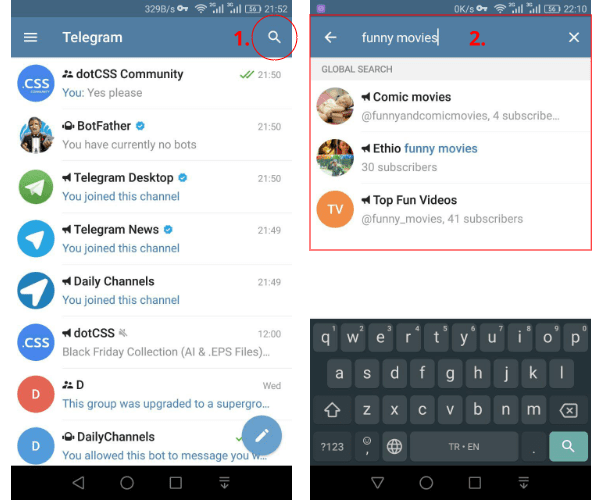
Telegram has a powerful built-in search function that makes it easy to find channels, groups, and messages. Here's how to use it effectively:
1.Open Telegram and go to the search bar at the top of your screen.
2.Type a keyword related to the topic you're interested in, like "fitness" or "technology."
3.Browse through the results and look for channels and groups that match your interests.
4.If you're looking for a public channel, simply tap on it to join. For private channels, you’ll need an invite link from an admin.
This method is great for discovering channels directly within Telegram, and it works well for niche topics. However, you might also want to explore other options to find even more channels.
Exploring Online Directories and Bots for Channel Discovery
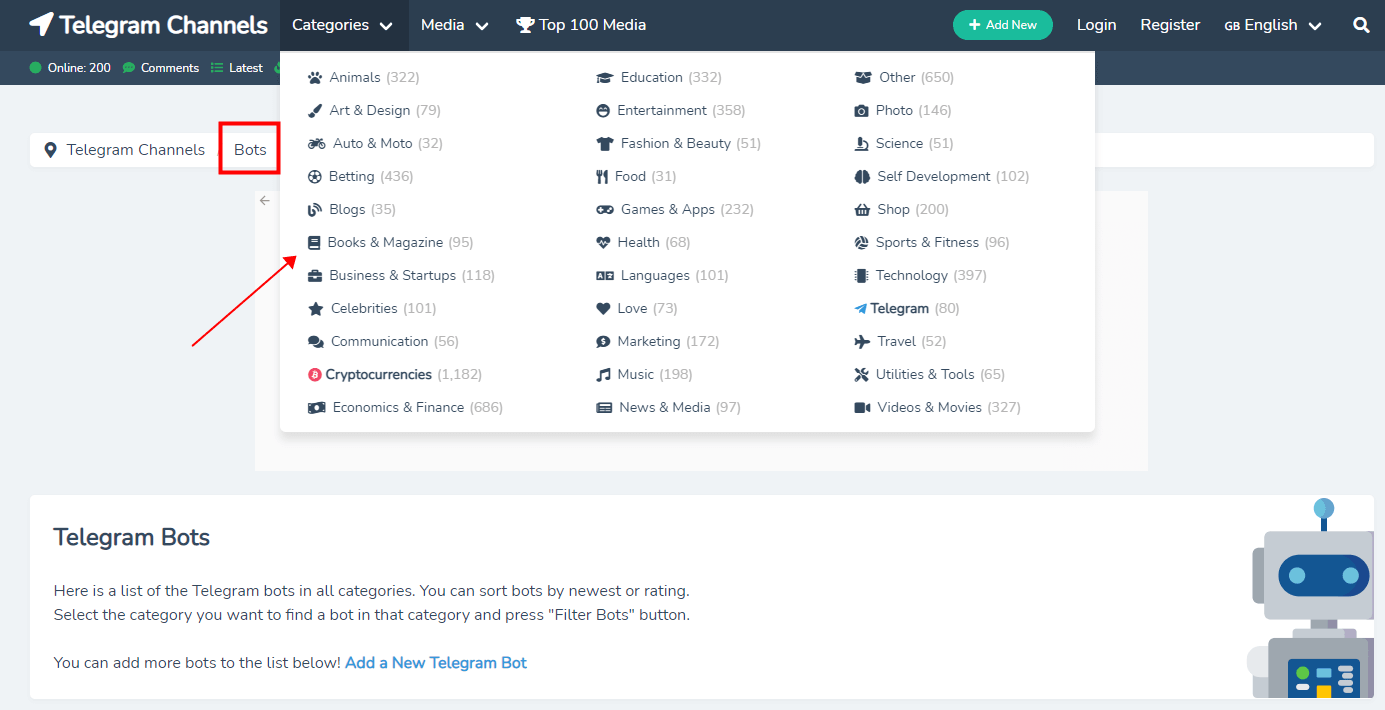
Another excellent way to find Telegram channels is through online directories and bots specifically designed for channel discovery. These resources collect and categorize channels by topics, making your search much easier.
- Telegram Channels: A popular online directory where you can browse thousands of channels in categories like news, entertainment, or education.
- TLGram: A Telegram bot that suggests channels based on your interests. After adding it to your contacts, simply message it with your topic of interest, and it will provide a list of relevant channels.
These directories and bots save you time by organizing channels based on what you're looking for, so you can easily browse through the most relevant options.
Leveraging Search Engines for Telegram Channel Search
Sometimes, using search engines like Google can help you find Telegram channels that aren't easily visible in Telegram’s search feature. Many websites and forums publish lists of the best Telegram channels, and they’re often indexed by search engines.
Here’s how you can use Google to your advantage:
- Search with keywords: Type something like “best Telegram channels for fitness” or “Telegram channels for tech news” into Google.
- Browse through listicles and blog posts that often feature curated lists of active and popular Telegram channels.
- Visit dedicated websites: Sites like "Best Telegram Channels" and "Telegram Directory" often provide links to top-rated channels.
This method is helpful when you're searching for well-known channels or looking for suggestions from other users. It's also a good way to discover channels that may not show up in Telegram’s internal search.
Evaluating the Quality of Telegram Channels
Once you’ve discovered some Telegram channels through various search methods, it’s important to assess their quality before joining. Not all channels are created equal, so knowing what to look for can help you find channels that are both credible and valuable. Here are some key factors to consider when evaluating Telegram channels.
Assessing Credibility and Engagement
The first step in evaluating a channel is looking at its credibility and engagement levels. This will help you determine whether the channel is trustworthy and active.
- Member Counts: A large number of members doesn’t always guarantee quality, but it can indicate that the channel has a broad appeal. For example, a tech news channel with thousands of members is likely to provide reliable information. Smaller channels can be just as valuable, especially if they focus on niche topics with highly engaged members.
- Activity Levels: Check how often content is posted and the level of interaction in the channel. A channel with frequent updates and discussions shows it’s active. For instance, if you join a fitness channel and notice daily workout tips and active conversations among members, it's likely a good, engaged community.
By assessing member counts and activity levels, you can identify channels that are both credible and engaging, which enhances your experience.
Ensuring Safety and Privacy
When joining any Telegram channel, it's essential to consider your safety and privacy. While Telegram is known for its security features, it’s still important to protect your information and avoid scams or spammy content.
Avoiding Scams and Spammy Content
When navigating Telegram channels, it’s important to stay cautious of scams and spammy content. Be wary of channels that promote “too good to be true” deals or frequently send irrelevant ads. Look for verified channels with a blue checkmark, which are typically more reliable. If a channel constantly reposts content from other sources without adding anything original, it might not be the best choice. Also, check the channel's description and activity levels to ensure it’s active and trustworthy.
Tips for Protecting Your Information
To protect your personal data, avoid sharing sensitive information like your address, phone number, or bank details in any channel, even if the source seems trustworthy. Always verify the legitimacy of the channel by checking the admins and their credentials. Enabling two-factor authentication for your Telegram account adds an extra layer of security, ensuring only you can access your profile.
To further safeguard your account and ensure your privacy while browsing Telegram, you can use tools like DICloak, an antidetect browser. DICloak helps mask your online presence, preventing tracking and protecting your data while you interact with different channels. By using such tools, you reduce the risk of exposing your personal information to potential threats and scams.
To stay safe, always do a quick background check before joining a channel and avoid channels that exhibit shady behavior or make unrealistic promises.
⚡The DICloak Antidetect Browser has become a global favorite for its unparalleled ability to efficiently and securely manage multiple accounts. Designed for professionals in social media management, and more, DICloak offers powerful features like RPA automation, bulk operations, and a synchronizer. Additionally, it allows you to customize fingerprints and integrate proxies for each profile, ensuring top-level security and operational efficiency. It’s the ultimate tool for seamless, secure, and scalable operations.

What Makes DICloak Stand Out?
✅ Manage 1,000+ Accounts on One Device: Stop wasting money on extra hardware! DICloak allows you to manage multiple accounts on a single device, cutting costs and boosting efficiency.
✅ Guaranteed Account Safety, No Ban Risks: Every account gets its own isolated browser profile with custom fingerprints and IPs, drastically reducing the risk of bans. Your accounts, your control!
✅ Flexible Proxy Configuration for Maximum Performance: Seamlessly integrate with all major proxy protocols (HTTP/HTTPS, SOCKS5) and manage your proxy pool with bulk operations. No more struggling with IP management—DICloak has you covered.
✅ Streamlined Team Collaboration for Better Results: Easily manage your team with advanced tools like profile sharing, permission settings, data isolation, and operation logs. Your team works smarter, not harder.
✅ Automate the Grind with RPA: DICloak's built-in RPA saves you hours of manual work. Automate repetitive tasks, streamline workflows, and focus on what really matters—growing your business.
✅ Powerful Bulk Tools to Scale Your Operations: Create, import, and launch multiple browser profiles in one click. DICloak makes scaling your business as easy as it gets.
✅ Compatible with All Major Operating Systems: Based on the Chrome core, DICloak supports simulating Windows, Mac, iOS, Android, and Linux operating systems. No matter what platform you need, DICloak has you covered.
🔗 Ready to Get Started?
Visit the DICloak website to explore more details and choose the plan that’s right for you. Start for free today and experience the power of secure, efficient, and scalable multi-account management!
Best Practices for Effective Telegram Channel Search
To make the most of your Telegram channel search, it’s important to use the right strategies and regularly manage your subscriptions. This will help you discover the best channels and keep your experience organized and relevant.
Keyword Strategies for Better Results
When searching for Telegram channels, using the right keywords can make all the difference in finding what you're looking for. Here’s how to refine your search to get the best results:
- Using Specific Keywords: Be as specific as possible when typing in the search bar. Instead of just searching for "news," try something more focused like "technology news" or "global tech updates." This narrows down the results and helps you find more relevant channels.
- Using Hashtags: Many channels use hashtags to categorize content. For example, a fitness channel might use hashtags like #workouttips or #fitlife. By searching for these hashtags, you can quickly find channels that cover specific topics you're interested in.
By combining specific keywords with relevant hashtags, you can optimize your Telegram channel search and quickly discover channels that fit your needs.
Regular Maintenance of Your Channel Subscriptions
Once you start following multiple channels, it’s important to keep your channel list organized. Over time, you may find that some channels no longer align with your interests, or they become inactive. Here's how to maintain a clean and efficient channel list:
- Cleaning Up Your Channel List: Regularly review the channels you’re subscribed to. If a channel has stopped posting or isn't delivering the value it once did, consider unsubscribing. This will help you keep your feed relevant and free of spammy content.
- Organizing Your Channels: Telegram allows you to organize your channels into folders. If you follow many channels, consider creating folders like “News,” “Tech,” or “Fitness” to categorize them. This will make it easier to find the content you want and stay on top of the channels that matter most.
For instance, if you're subscribed to several news channels and fitness channels, organizing them into separate folders will ensure you never miss important updates while keeping your experience streamlined and focused.
Common Problems and Solutions in Telegram Channel Search
Even with the best search strategies, you may encounter some challenges when searching for Telegram channels. Whether it's dealing with irrelevant results or navigating spam, knowing how to troubleshoot and find quality channels will improve your experience. Below are common problems and practical solutions to help you get the most out of your Telegram channel search.
Addressing Search Issues and Irrelevant Results
It’s common to come across irrelevant or confusing results during a Telegram channel search. These issues can make it harder to find the channels that truly interest you. Here’s how to troubleshoot:
- Use More Specific Keywords: If you’re seeing unrelated results, try adding more specific terms to your search. For example, instead of searching for “news,” search for “tech news” or “global news updates.” The more focused your search, the more likely you are to find relevant channels.
- Refine Your Search Using Filters: Some search results may include channels that are inactive or outdated. You can avoid this by looking for channels with recent activity. Check the posting history of channels—active ones are updated regularly.
- Check the Channel Description: If you're unsure about a channel's relevance, read its description. Most channels have a brief bio that tells you what topics they cover. This can help you quickly determine if the channel is right for you.
By adjusting your keywords and refining your search, you can significantly reduce the number of irrelevant results and find channels that match your interests.
Navigating Spam and Duplicate Channels
Spam and duplicate channels can clutter your Telegram channel search, making it hard to find the high-quality content you want. Here’s how to identify and avoid these channels:
- Look for Verified Channels: Some channels have a blue checkmark next to their name, indicating that they are verified by Telegram. These channels are more likely to be authentic and trustworthy. For instance, a verified tech channel will provide reliable updates, while an unverified one might share clickbait or spam.
- Watch Out for Duplicate Content: Some channels may post the same content as others, especially if they’re reposting news from other sources. To avoid this, check if the channel is regularly posting original content. A quality channel will have fresh, unique posts and discussions.
- Use Your Network: If you’re unsure about a channel, ask others in your network or community. Many active Telegram users share recommendations, and their feedback can help you avoid spammy or low-quality channels.
By following these strategies, you can easily spot and avoid spam and duplicate channels, ensuring that you only subscribe to channels that offer value.
Conclusion
Mastering Telegram channel search is key to discovering high-quality content that aligns with your interests. By using specific keywords, exploring directories, and avoiding spam, you can easily find relevant channels that offer value. Whether you're seeking the latest tech updates, fitness tips, or niche hobbies, these strategies save you time and connect you with the right communities. Don’t be afraid to explore new channels and engage with their content—Telegram has something for everyone, and by staying active, you’ll continue to expand your knowledge and network.
 Web Proxy Tools
 Free Tools
 Cookie Plugin
 UA Generator
 MAC Address Generator
 IP Generator
 IP Address List
 2FA Code Generator
 World Clock
 Anonymous Check
 WebRTC Leak Test
 UUID Generator
 Free Web Proxy Site
 Proxy Checker
 FB Ad Checker
 AI Web Scraping
 Free SMM Tools
 Twitter Shadowban Checker
 Instagram Name Checker
 UTM Generator
 Username Generator
 AI Hashtag Generator
 LinkedIn Headline Generator
 Social Media Image Resizer