New Google Ads accounts now enter a stricter review environment. In 2024, Google blocked or removed 5.1 billion ads and suspended 39.2 million advertiser accounts. In 2025, blocked or removed ads rose to over 8.3 billion, while suspended accounts fell to 24.9 million. This suggests Google is catching more risky ads earlier and applying account enforcement more selectively.
For new advertisers, the first few days still matter. A fresh payment method, new landing page, changing login signals, and sudden ad spend can all make an account look risky. A safer warm-up should combine clean business details, stable browser and proxy settings, a trustworthy landing page, clear ads, and slow budget growth. An antidetect browser like DICloak can support this process by keeping profiles, cookies, sessions, and proxy settings separate, so the warm-up environment stays consistent while the account builds early history.
Can You Warm Up a New Google Ads Account Safely with an Antidetect Browser?
Yes, an antidetect browser can help, but it is not the whole warm-up strategy. It mainly helps keep the login environment stable, so one Google Ads account is not opened from mixed cookies, changing sessions, or random browser setups. A safe warm-up still depends on the full account setup. Your business details, payment method, website, landing page, and first campaign should all look consistent. If the ad is unclear, the landing page looks weak, or billing details do not match, the account can still face review. The best use of an antidetect browser is simple: keep one account in one separate browser profile with a steady proxy and browser setup.
Why Do New Google Ads Accounts Get Suspended So Early?
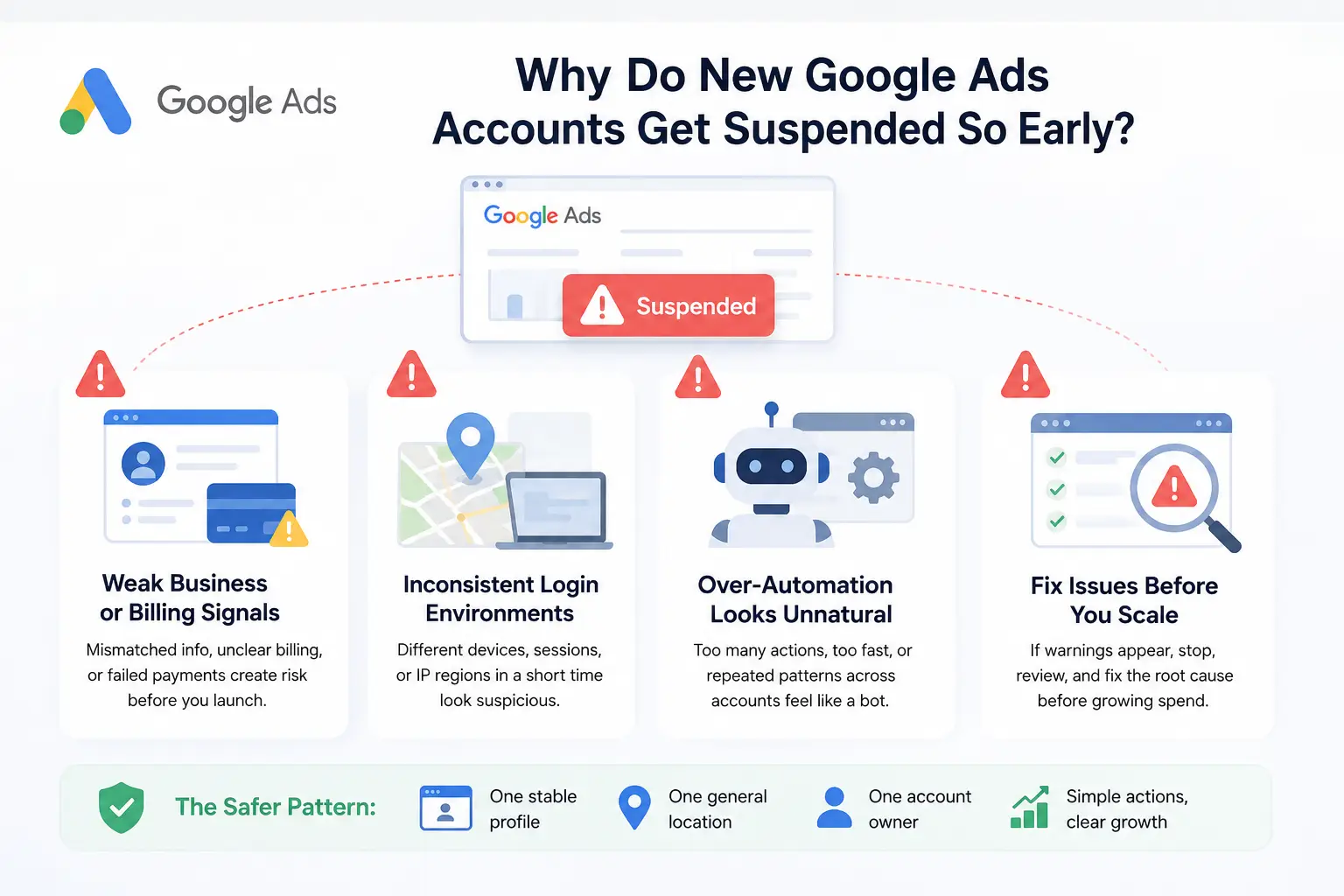
New Google Ads accounts often get suspended early because several risk signals appear at the same time. A stable browser profile can help with login consistency, but it cannot fix weak business details, unclear billing, poor landing pages, risky ad claims, or sudden budget behavior.
A clean browser profile cannot fix weak business or billing signals
A new account needs to look like a real advertiser from the start. If the business name, payment method, website, and contact details do not match, the account may look unfinished or hard to trust. This can happen when a team rushes setup, uses a random card, or sends traffic to a page with little company information.
Billing signals are especially sensitive for new accounts. A failed payment, mismatched billing name, or unclear business address can create problems before the first campaign has enough history. Browser warm-up does not solve that kind of issue. The account setup, payment details, and website should all tell the same story.
Inconsistent login environments can make a new account look risky
Login behavior also matters during warm-up. If a new Google Ads account is opened from different devices, browser sessions, or IP regions in a short time, the access pattern can look messy. This is why one account should stay in one stable browser profile during the early stage.
This does not mean the browser profile is the only thing that matters. It simply reduces one common source of confusion. The safer pattern is boring and consistent: same profile, same general location, same account owner, and no random switching between work devices.
Over-automation can create unnatural account behavior
Automation can save time, but heavy automation on a new account can look unnatural. A fresh account that browses too many sites, creates campaigns too quickly, or repeats the same actions across several accounts may create a pattern that feels less human. Warm-up should look like a careful advertiser preparing to launch, not a script trying to build history overnight.
A better approach is to keep early actions simple. Check the account, review settings, prepare tracking, visit the landing page, and launch one clear campaign when the setup is ready. If warnings, disapprovals, or payment alerts appear, stop scaling and fix the real issue first.
What Should You Prepare Before the First Google Ads Campaign?
Before the first Google Ads campaign, prepare the account like a real business launch, not just an ad test. Your business details, payment method, website, landing page, and offer should look consistent before you spend money.
- Make business, payment, and website details consistent. The business name in the account should match the name users see on the website. The payment method should also make sense for that business or account owner. If a new account uses one country, a payment method from another country, and a landing page with no clear contact details, the setup can look rushed or unclear.
- Check whether the landing page looks ready for real customers. The page should clearly show what is being offered, who is behind it, and what happens after the user clicks. A privacy policy, contact method, refund or service terms, and clear pricing can make the page feel more complete. The ad and landing page should also match closely.
- Remove risky redirects, broken links, and unclear claims. Click through the page like a customer before launch. Check that buttons work, forms submit correctly, images load, and mobile pages do not break. Avoid strange redirect chains, auto-downloads, blocked content, or strong claims that the page cannot support.
To warm up Google Ads accounts with DICloak Antidetect Browser, keep each account in a separate browser profile, use a stable proxy setup, and limit team access to the right people. This helps the account keep a cleaner login pattern during the early stage.
- Use separate profiles to keep cookies and sessions isolated. Each Google Ads account should stay in its own browser profile, with its own cookies, cache, and login session. This reduces the chance of one account mixing with another account on the same work device. For teams that manage several accounts, this is often the most basic but most important setup.
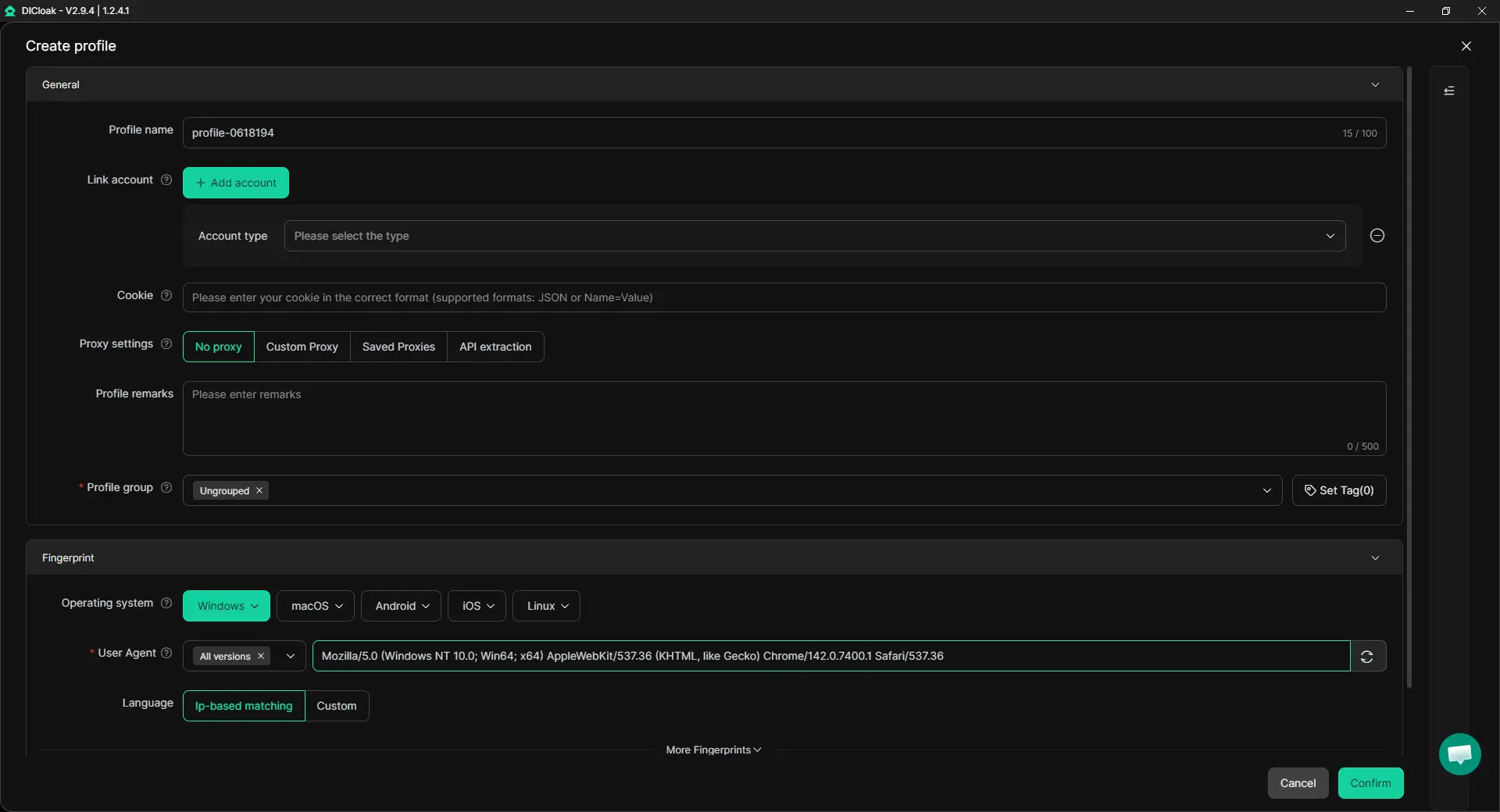
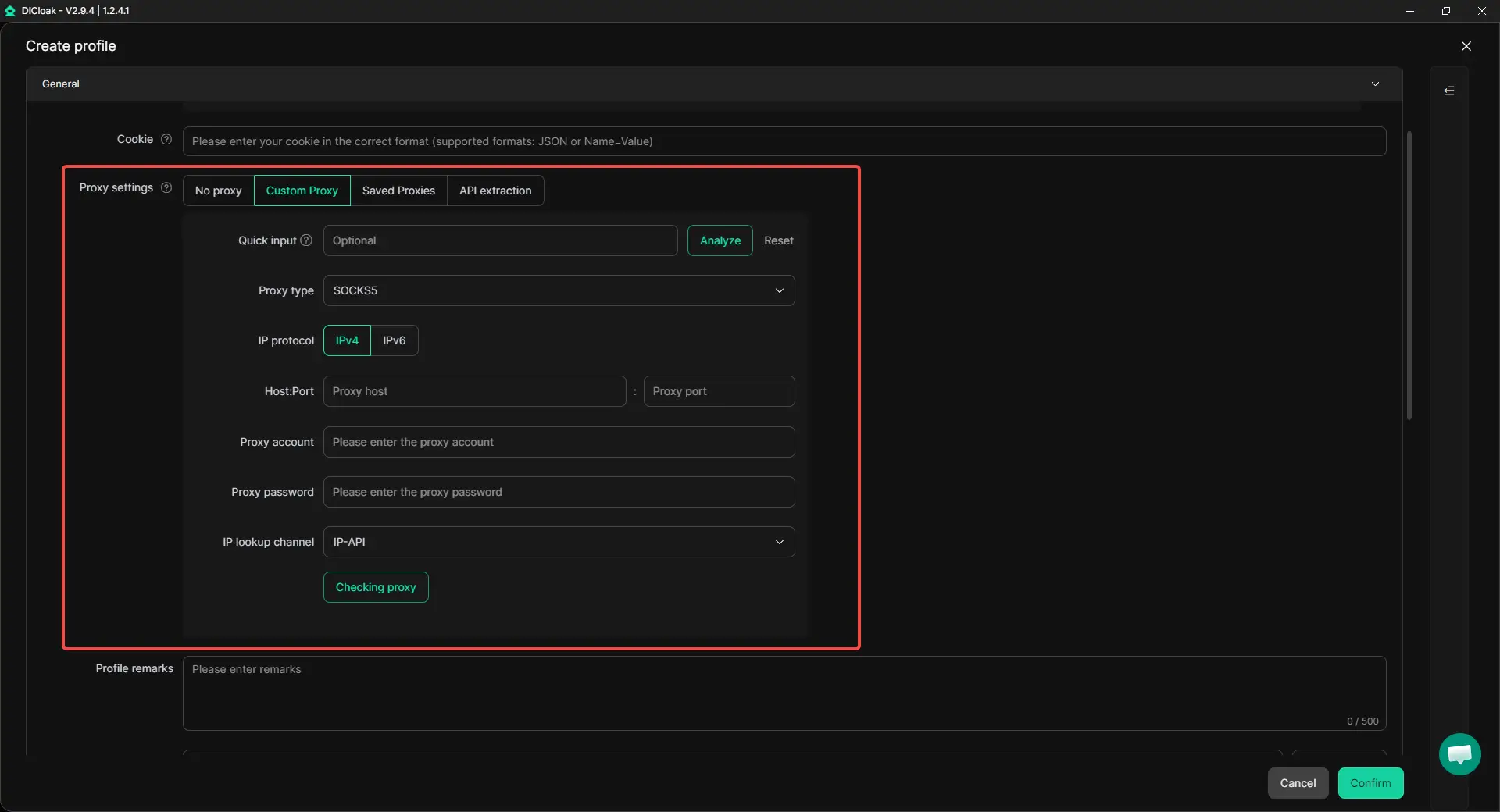
- Set a custom proxy for each account profile. The proxy location should make sense for the account market, website language, and business setup. Changing proxies too often can make the login pattern look messy, so the goal is not constant switching. A steady proxy setup is usually safer than a random one.
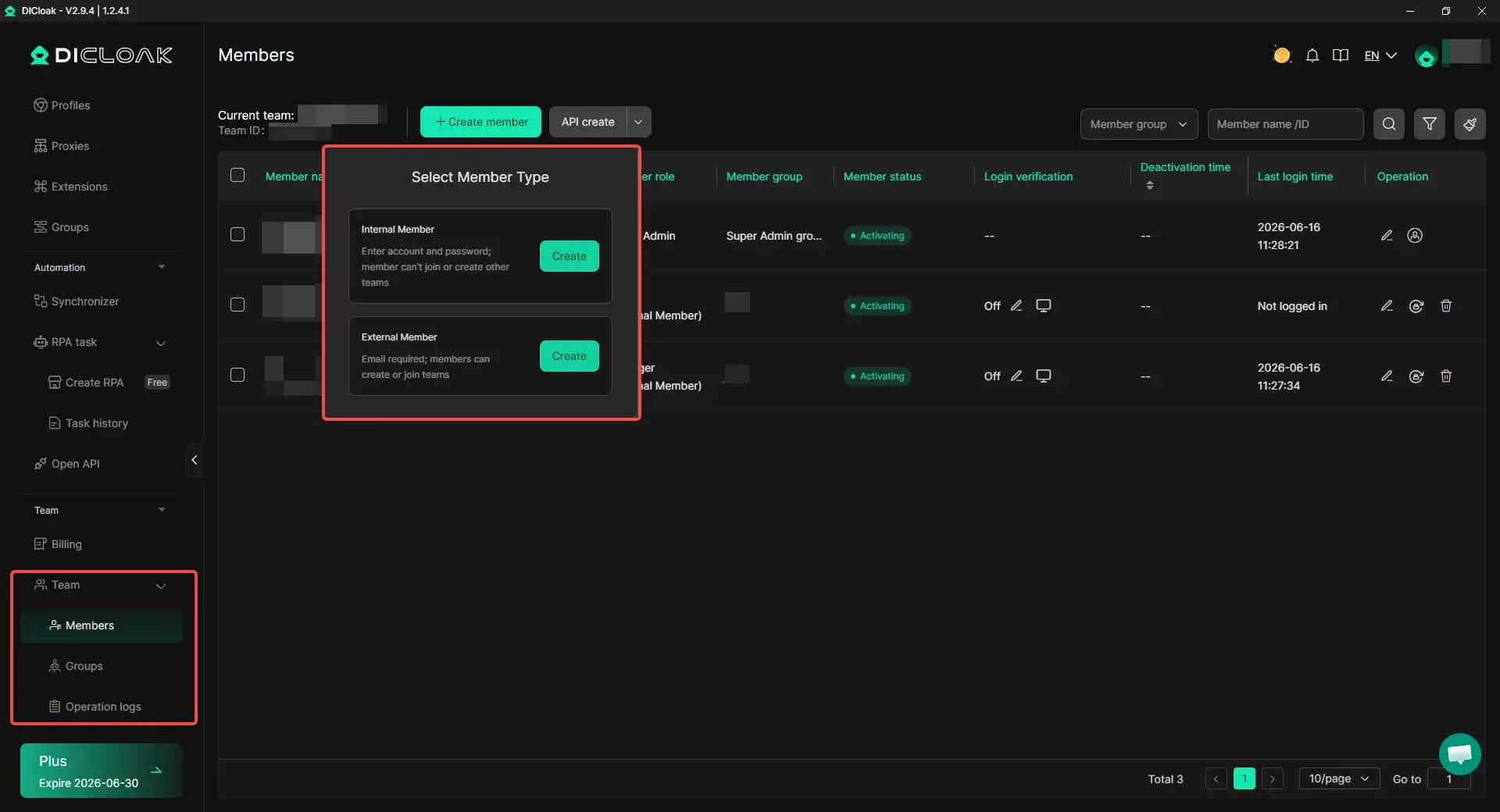
- Use team permissions when more than one person manages the account. Not every team member needs full access to every Google Ads profile. With team permissions, each person can work only on the accounts they need. This lowers the risk of wrong-account logins, accidental changes, or several people opening the same account in a disorganized way.
What Should You Do in the First 7–14 Days of Warm-Up?
In the first 7–14 days, keep the new Google Ads account activity slow, normal, and easy to explain. Do not rush from account creation to high spend before the account, website, tracking, and first campaign are ready.
Build normal account activity before launching ads
Before launching ads, use the account like a real advertiser preparing a campaign. Check the account settings, review billing details, visit your own website, test the landing page, and make sure tracking is set up correctly. This creates a cleaner start than opening the account once and immediately pushing traffic.
You do not need to force heavy browsing or repeat actions all day. That can look unnatural, especially if the account is new. The goal is simple activity with a clear purpose. A few careful checks are better than a fake-looking warm-up routine.
Start with a simple, compliant Search campaign
For the first campaign, keep the setup simple. A basic Search campaign with clear keywords, clear ad copy, and a small budget is usually easier to review than a complex setup with many ad groups, aggressive claims, or sensitive offers. The first campaign should help the account build clean history, not test every idea at once.
Avoid launching with high-risk angles. Do not start with unclear discounts, strong promises, restricted products, or landing pages that need extra explanation. If the offer is hard for a normal user to understand, it may also be harder for review systems to understand.
Send traffic to a page that matches the ad exactly
The first landing page should match the ad as closely as possible. If the ad talks about one product, send users to that product page or a focused landing page, not a broad homepage. If the ad mentions pricing, a trial, shipping, or a service promise, the page should show the same idea clearly.
This is where many new advertisers create risk without noticing it. They write a strong ad, but the page is vague, unfinished, or slightly different from the offer. During warm-up, simple matching is safer than clever messaging. A new account needs a clean first record before it starts testing more complex campaigns.
How Fast Should You Scale a New Google Ads Account?
Scale a new Google Ads account slowly, only after delivery, billing, and policy status look stable. A fast budget jump can create risk because the account has not built enough normal history yet.
Increase spend only after delivery, billing, and policy status stay stable
Do not raise the budget just because the first few clicks look good. First, check whether the ads are approved, the campaign is serving normally, and the payment method has no issues. Also check whether the landing page still matches the ad after any edits.
For a new account, small increases are easier to manage than big jumps. You can raise spend step by step after several clean days of delivery. The exact pace depends on your niche, offer, and account quality, so avoid treating any fixed number as a rule for every account.
Slow down when you see disapprovals, limited serving, or payment alerts
If the account shows disapproved ads, limited serving, verification requests, or payment alerts, stop scaling. These signs usually mean the account needs review before more money is added. Increasing budget during this stage can make a small issue harder to fix.
This is also when teams should avoid launching many new campaigns at once. More campaigns create more ads, more landing pages, and more chances for mismatch. A slower pace gives you time to understand whether the issue comes from the ad, the page, billing, or the account setup.
Fix the root problem before creating more campaigns
If a new account has a problem, do not try to cover it with more activity. Fix the weak part first. That may mean rewriting unclear ad copy, improving the landing page, checking payment details, or waiting for verification to finish.
A safe scale-up is not only about spending more slowly. It is about knowing when to pause. A new Google Ads account should grow only after the basic signals stay clean, because warm-up works best when the account has nothing obvious to explain.
FAQ About Warming Up New Google Ads Accounts Safely with Antidetect Browsers
How long does it take to warm up a new Google Ads account?
A new Google Ads account usually needs a gradual launch period instead of one rushed setup day. Many advertisers use the first 7–14 days to prepare the account, check billing, test the landing page, and launch a simple first campaign. The full warm-up may take longer if the niche is sensitive, the website is new, or the account receives policy warnings.
Can an antidetect browser prevent Google Ads suspension?
No, an antidetect browser cannot prevent Google Ads suspension by itself. It can help keep browser profiles, cookies, sessions, and proxy settings separate, which supports a cleaner login environment. But account safety still depends on clear business details, valid billing, compliant ads, and a trustworthy landing page.
Can I use the same proxy for multiple Google Ads accounts?
It is usually better to avoid using the same proxy for several unrelated Google Ads accounts. A separate and stable proxy setup makes more sense when accounts belong to different clients, markets, or businesses. With an antidetect browser like DICloak, each profile can use its own proxy configuration, which helps keep account access more organized.
What should I do if my new Google Ads account gets suspended during warm-up?
Stop creating new campaigns or increasing spending until you understand the reason. Check the suspension notice, billing status, ad claims, landing page, redirects, and business details first. A new browser profile will not fix an unresolved policy, payment, or verification issue.
Is account warming only about cookies and browsing history?
No, Google Ads account warming is not only about cookies or browsing history. A safe warm-up also includes consistent account information, a working website, a clear first campaign, stable login behavior, and slow budget growth. Cookies and browser profiles can support consistency, but they are only one part of the full setup.
Conclusion
Warming up a new Google Ads account safely in 2026 is not just about using an antidetect browser. A safer setup depends on consistent business details, valid billing, a trustworthy landing page, stable login behavior, and slow campaign scaling. An antidetect browser like DICloak can help keep profiles, cookies, sessions, and proxy settings separate.
The safest way to warm up a new Google Ads account is to launch like a real advertiser: prepare the account first, start with a simple compliant campaign, send traffic to a matching landing page, and increase budget only after delivery, billing, and policy status stay stable.
 Web Proxy Tools
 Free Tools
 Cookie Plugin
 UA Generator
 MAC Address Generator
 IP Generator
 IP Address List
 2FA Code Generator
 World Clock
 Anonymous Check
 WebRTC Leak Test
 UUID Generator
 Free Web Proxy Site
 Proxy Checker
 FB Ad Checker
 AI Web Scraping
 Free SMM Tools
 Twitter Shadowban Checker
 Instagram Name Checker
 UTM Generator
 Username Generator
 AI Hashtag Generator
 LinkedIn Headline Generator
 Social Media Image Resizer