Imagine waking up, grabbing your phone, and seeing a bright red warning on your screen. This is the moment you realize your x account suspended. It is a scary feeling. One minute you are talking to friends, and the next, you are locked out of your digital life. Essentially, a suspension means X (formerly Twitter) has stopped you from using your account. You cannot post, like, or follow anyone until the problem is fixed.
In 2026, the rules are tighter than ever. Many users feel their x account suspended for no reason, which causes a lot of frustration. For example, consider a small business owner named Leo. He shared a post about his new tech project last week. Suddenly, his account went dark. Leo felt his x account suspended for no reason, but it turned out the platform's new AI misidentified his post as "spam activity."
Whether it is a short 12-hour lock or a permanent ban, having your x account suspended can happen to anyone. It often happens because the system thinks you are a bot, or because of a small mistake in a post. Understanding what this suspension is—and that it is often just an automated error—is the first step to getting your voice back.
This guide is here to help you navigate this digital maze. We will explain exactly why these suspensions happen and, more importantly, how you can fix them. From filing a professional appeal to using advanced tools like DICloak to protect your future accounts, we have the answers you need. You don't have to stay locked out forever. Let’s look at the steps you can take today to get your account back and keep it safe for the long run.
Why is Your X Account Suspended?
Finding out your account is gone is frustrating, but it usually happens for a few specific reasons. In 2026, X uses a very powerful AI to scan millions of posts every second. Sometimes this AI is helpful, but other times it makes mistakes.
Spam and Bot-Like Behavior
This is the number one reason for a suspension. X wants to keep the platform "real." If you follow 200 people in one hour or send the same message to 50 different users, the system will flag you as a bot.
Even if you are a real person, acting too fast can get your x account suspended. For example, a gamer named Chloe once spent an afternoon retweeting every giveaway she saw. Because she did this so quickly without writing her own posts, X thought she was a "spam bot" and locked her out. To the AI, her account looked like it was being used to manipulate the system.
Security Risks and Hacking
X might suspend you to actually protect you.If the system sees someone logging in from a city you have never visited, it might get worried.
Imagine you live in Chicago, but suddenly someone logs into your account from a server in another country. X will think your account was hacked. They will trigger an x account suspended status to stop the hacker from posting. In these cases, you usually just need to verify your phone number or change your password to get back in.
Inauthentic Behavior
In 2026, many users feel their x account suspended for no reason. This often falls under a label called "Inauthentic Behavior." This is a broad term the AI uses when it doesn't trust your profile details or your connection.
A common case is when a user has an unverified email or a "blank" profile with no photo. If that user then posts a link to a website, the AI might think the account is "fake." This is why it often feels like your x account suspended for no reason—you were just being private, but the computer saw it as a red flag.
New 2026 Rules: AI and Paid Content
X has recently added strict rules about AI-generated content and paid ads. Starting in March 2026, if you post AI-generated videos of world events without a clear label, you can be suspended from the revenue program or the platform entirely.
Also, if you are a "KOL" (Key Opinion Leader) and you promote a product without using the "Paid Partnership" tag, your account is at high risk. X is now much more serious about transparency. If you "hide" an ad, the system may flag you for a permanent ban.
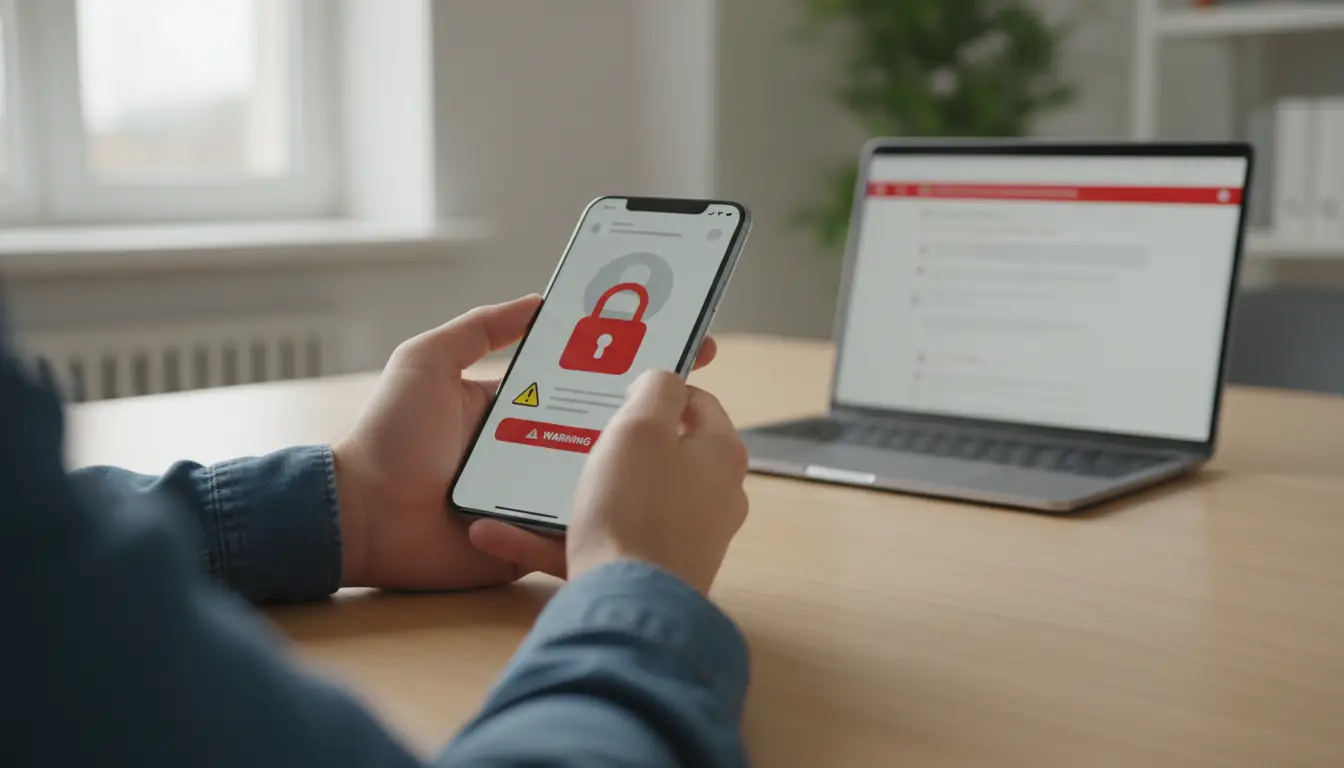
How to Find Out Why Your X Account Was Suspended?
When your screen says "Account suspended," the first thing you probably ask is, "Why?" X doesn't always make it easy to find the answer. However, in 2026, there are three main places where you can find clues. You need to be a bit of a detective to solve this mystery.
Check Your Email Inbox (and Spam Folder)
The most important step is to check the email connected to your X account. X usually sends an automated message the moment your x account suspended. This email will often name a specific rule, like "Spam" or "Safety."
For example, a travel blogger named Mark recently found his x account suspended for no reason. At first, he was angry. But then he checked his spam folder and found an email from X. It said his account was flagged for "Security Risks" because he logged in from three different countries in one week while traveling. The email explained that X locked the account to stop a potential hacker.
Read the Login Message Carefully
When you try to log in, X will show a pop-up message. Do not just click "OK" and close it! Read the specific words.
- If it shows a countdown timer: This is a "temporary" lock. It usually means you posted too many things too fast.
- If it says "Your account is permanently suspended": This is more serious. It means the system thinks you broke a major rule multiple times.
- If it asks for a phone number: This is just a "verification check." X wants to make sure you are a real human and not a bot.
Look for "Community Notes" Warnings
In 2026, X uses Community Notes to fact-check posts. If you post a video or a news story that many people flag as "fake," you might get a warning notification before the suspension.
Imagine you shared a cool video of a sunset that turned out to be made by AI. If you didn't label it as "AI-generated," X might have sent you a warning first. If you missed that warning and kept posting similar videos, that could be why your x account suspended. Looking back at your "Notifications" tab can sometimes show you where the trouble started.
What are the Consequences of Having Your X Account Suspended?
When your x account suspended, the penalty can range from a small "slap on the wrist" to losing everything forever. X (Twitter) usually picks a punishment that fits how much they think you broke the rules. Here is a breakdown of the consequences, starting from the most minor to the most severe.
Read-Only Mode
This is the lightest penalty. X puts you in a "read-only" state. You can still log in and read your timeline. You can even read your direct messages. However, you cannot post, retweet, like, or send messages.
Think of it like being in a library where you have to be quiet. This usually lasts between 12 hours and 7 days. Most people feel their x account suspended for no reason in this stage because it often happens after a small argument or for posting too many links at once. Once the timer ends, your account goes back to normal automatically.
Temporary Lock
A temporary lock is more serious. X might hide your profile from the public. Your friends will see a notice saying your account is unavailable. This often happens if X thinks you were hacked or if you used a new device from a different country.
To fix this, you usually have to "prove" you are the real owner. X will ask you to verify your phone number or email address. For example, a travel blogger named Leo had his x account suspended while he was in Japan. Because his phone was off, he couldn't get the code. He had to wait until he got home to unlock his profile.
Limited Reach and Shadowbanning
Sometimes, X doesn't stop you from posting, but they hide your posts from everyone else. This is called a "shadowban." You might notice that your likes and retweets suddenly drop to zero.
This happens if the AI thinks your content is "low quality" or "spammy." Even if you feel your x account suspended for no reason, the system is working in the background to limit who can see you. Your posts won't show up in search results, making it very hard to grow your audience or talk to your customers.
Permanent Suspension
This is the most severe consequence. If you reach this stage, X has decided to ban you forever. You cannot log in, and your entire history of posts and photos is hidden from the world.
In 2026, a permanent x account suspended status is very hard to fix. If you try to make a new account using the same phone or laptop, X’s AI will often recognize you and ban the new account instantly. This is why it is so important to appeal the right way. If you don't, you lose your digital identity, your followers, and any money you were making from the platform.

Steps to Unsuspend Your X Account
If you find yourself locked out, don’t panic. Getting your voice back is a process that requires patience and the right steps. In 2026, X has moved toward more automated systems, but there are still clear paths to recovery. Follow these steps to get your x account suspended status removed.
Step 1: Complete the Identity Check
Sometimes, your x account suspended for a very simple reason: X isn't sure you are a real person. If you see a button that says "Start" or "Verify" when you log in, click it immediately.
- Phone Verification: X will send a code to your phone. Enter it to prove you own the account.
- Email Confirmation: Check your inbox for a link.
- CAPTCHA Tests: You might have to solve a quick puzzle (like picking out all the cars in a photo). Often, completing these simple tasks will unlock your account in seconds.
Step 2: File an Official Appeal
If there is no "Start" button and your account is still dark, you need to file an official appeal. This is the only way to get a human to look at your case.
- Log in to your suspended account.
- Open a new tab and go to the X Help Center Appeal Form.
- Describe the problem: Be honest and polite. If you truly feel your x account suspended for no reason, say something like: "I believe my account was flagged by mistake. I follow all community rules and do not use automation. Please review my recent activity."
- Submit and Wait: In 2026, it usually takes 3 to 7 days to get a response. Do not send ten appeals in one day, as this can actually slow down the process.
Step 3: The Last Resort Methods for 2026
If your appeal is rejected or you get no response for weeks, you may need to try more advanced steps.
- The Legal Route: Some users in 2026 have found success by sending a "Formal Demand" letter to X’s legal department via certified mail. This is especially helpful if you are a paying X Premium subscriber, as you have a contract with the platform.
- App Store Feedback: Believe it or not, leaving a polite review on the Google Play Store or Apple App Store saying you are a real user stuck in an automated loop can sometimes get a support agent's attention.
- The DSA (For EU Users): If you live in Europe, you can cite the Digital Services Act. This law says platforms must give you a clear reason for a ban and a fair way to fight it.
Step 4: Clean Up Your Profile
Once you get back in, do a "security sweep." Delete any old posts that might have caused trouble. Check your "Connected Apps" in your settings and remove any third-party tools you don't recognize. This prevents you from having your x account suspended all over again next week.
Can I create a new one after my X account is permanently suspended?
The short answer is: Technically, yes, but X’s rules strictly forbid it. If you simply try to open a new account using your old phone or laptop, X will likely find you and shut you down again within minutes. This is called "ban evasion."
In 2026, X's AI is incredibly good at connecting the dots. Even if you feel your x account suspended for no reason, the system will still treat you as a "banned user" if it recognizes your digital fingerprint.
How X Detects Ban Evaders
X doesn't just look at your name. Their system scans for several hidden clues to see if a new account belongs to a previously suspended person:
- Device Fingerprinting: Every phone and computer has a unique ID based on its hardware and screen settings.
- IP Address: If you log in from the same home Wi-Fi where your x account suspended, X knows.
- Phone and Email: Using the same phone number for Two-Factor Authentication (2FA) is a 100% giveaway.
- Behavioral Patterns: If you immediately follow all the same people you followed before, the AI will flag you.
How to Prevent Twitter Account Suspensions?
Keeping your account safe is much easier than trying to fix an x account suspended status later. Whether you use X for fun or for a large business, you need to understand how to stay under the platform’s "radar." X uses smart AI to watch every user, so acting like a real person is your best defense.
Simple Tips for Regular Users
If you are a normal user, the goal is to show X that you are a helpful human, not a noisy bot.
- Keep a Human Pace: Do not follow hundreds of people in one day. If you like 50 posts in two minutes, the system might flag you. Slow down and act naturally.
- Complete Your Profile: Accounts with no photo or bio often get an x account suspended for no reason. Add a real profile picture and a clear bio to build trust.
- Label AI Content: In 2026, if you post a video made by AI, you must use the AI Disclosure tag. If you skip this, X might block you from making money or suspend your account.
- Verify Your Identity: Add a phone number to your settings. This anchors your account and makes it much harder for the system to lock you out.
Professional Strategy: Managing Multiple Accounts for Business
If you are running a large business, like a marketing agency or a global brand, having just one account is not enough. You might need 10, 20, or even 50 accounts to reach different audiences. However, if X sees one person controlling all these profiles from one laptop, they will trigger an x account suspended notice for all of them at once.
Using a Residential Proxy is one of the solutions. These proxies give you a "real" address from a real home in any city you choose. By giving each account its own unique IP, it looks much more legitimate to the system. However, a proxy only hides your location—it doesn't hide your computer.
Multiple physical devices
Even if you use a proxy and change from Chrome to Firefox, X can still see your CPU, your RAM, and even your screen resolution. Some people try to solve this by buying many physical phones or laptops. But this is very expensive! A decent smartphone costs at least $100, and a laptop can be $500 or more. If you need 20 accounts, you would have to spend thousands of dollars on hardware, and managing all those devices would be a messy, slow process.
Use Antidect browsers
If you manage more than one account (for example, a personal one and a business one), do not log in and out of them in the same browser window. You can try antidect browsers like DICloak to avoid cross-linking, which is cheaper and more effective. It offers:
- Virtual Fingerprints: In DICloak, you can create a unique profile for every account. Each profile has its own fingerprint, so X thinks every account is on a completely different computer.
- Easy Proxy Setup: You can easily add your own proxies (which you buy separately) to each DICloak profile.
- Cost-Effective Growth: You get the safety of having 20 different devices, but you only have to use your one current laptop.
The number of X accounts you can run simultaneously depends only on the limitations of your hardware and subscription plan. For example, if you manage 100 distinct, undetectable X accounts, you just need to pay $207.36 per year. We trust you’ll agree that’s far better than spending as much on just 10 old smartphones, not to mention proxy costs.
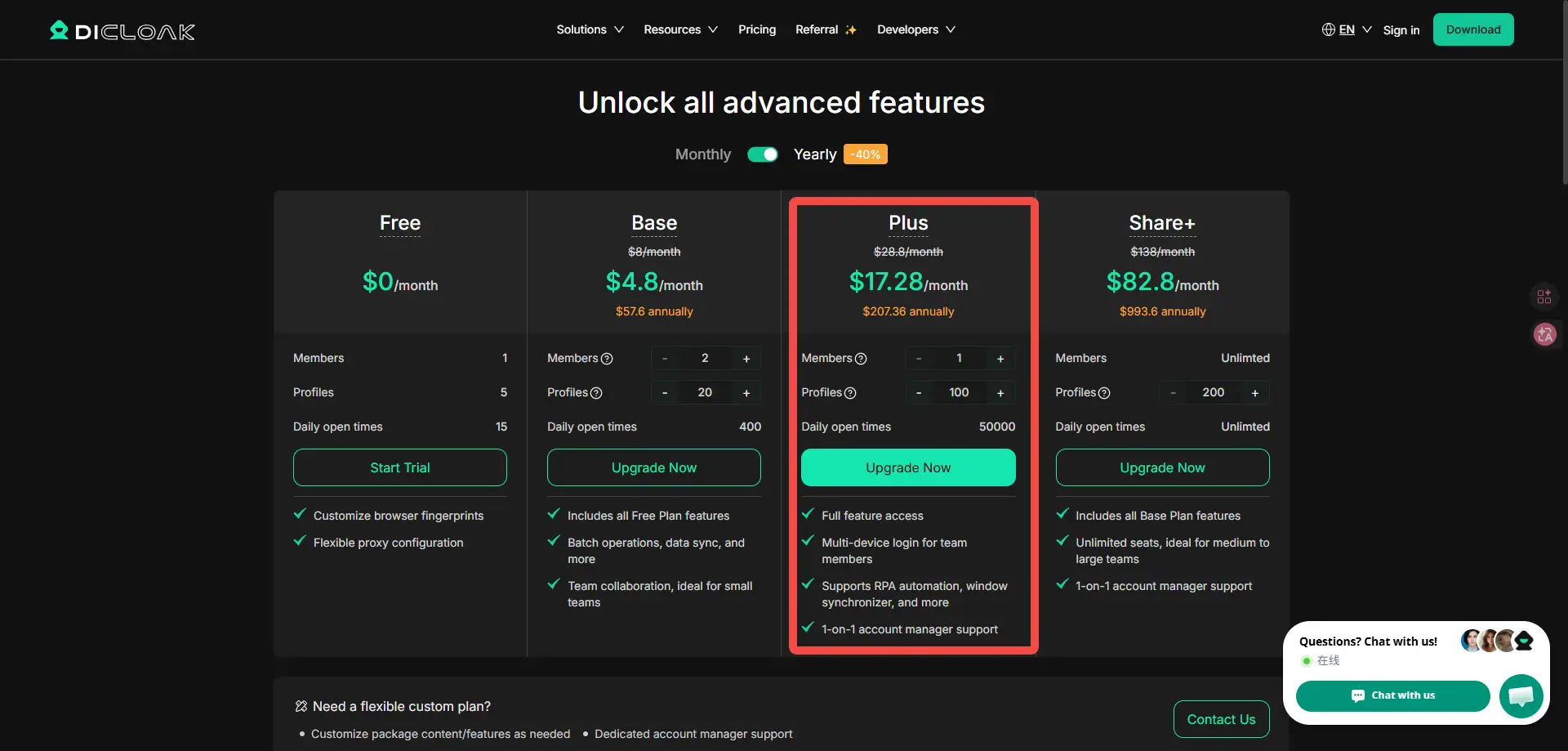
How to Manage Multiple X Accounts with DICloak?
Visit the homepage first and either sign up for or log into an active DICloak account. New users can take advantage of free trial (5 profiles) to see the impact that operating as many X accounts as they need without fear of blocking has firsthand.
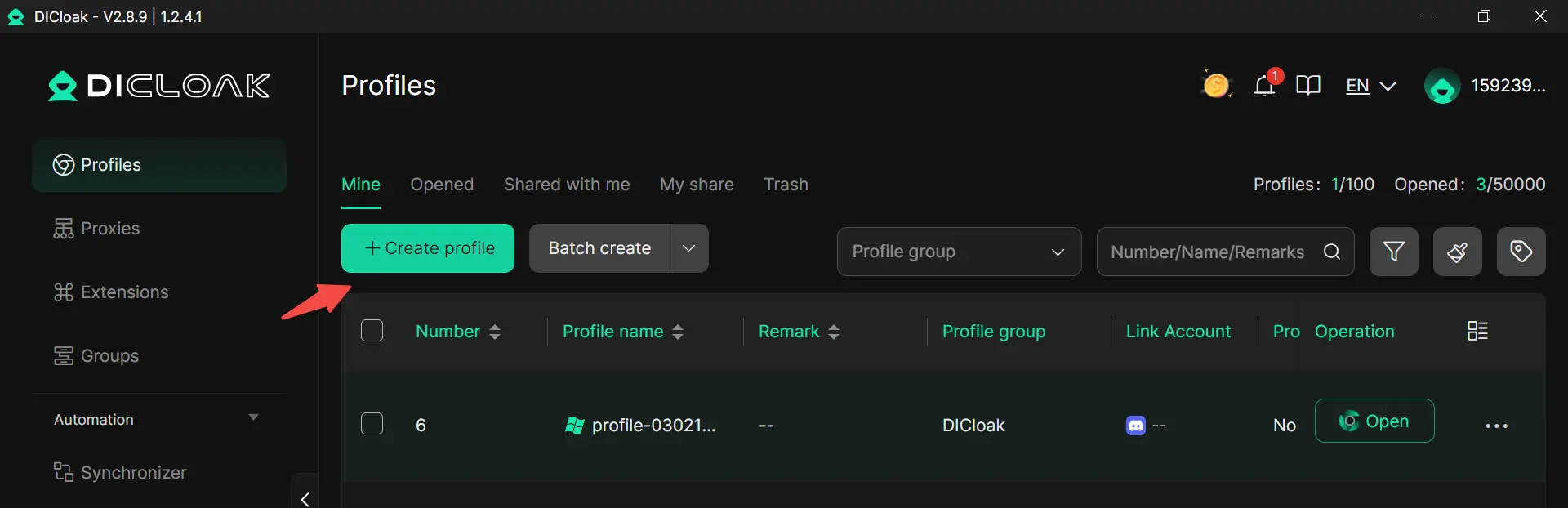
Profile creation
Each X account will need its own profile, and creating one is easy. Click Create profile in the top right to start the setup.
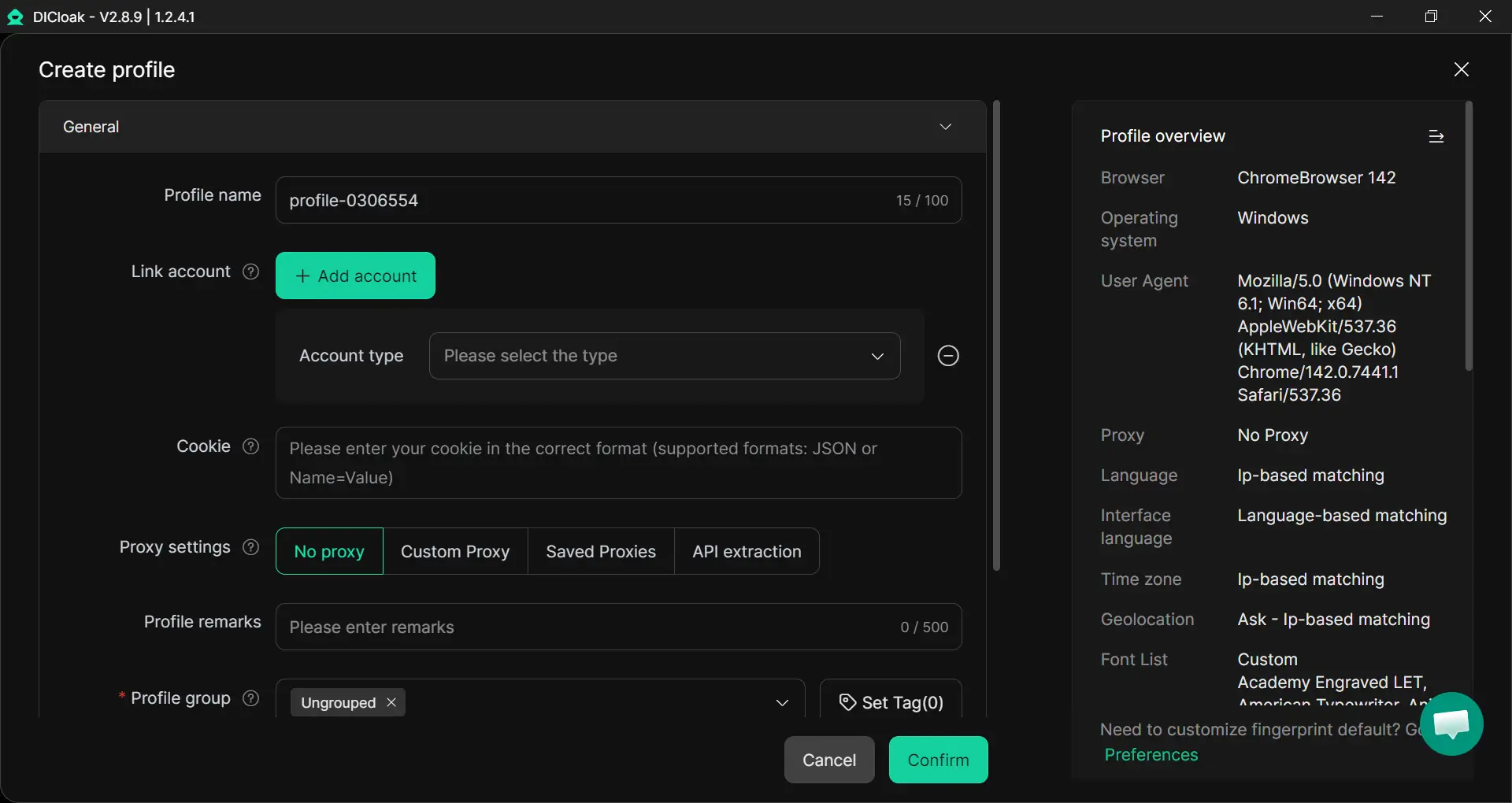
Here is where you’ll input in the profile’s genral settings. What you need to do:
- Enter a profile name.
- Configure your purchased proxies.
- Set the profile group if you want to organize better.
- Click confirm.
Open profiles
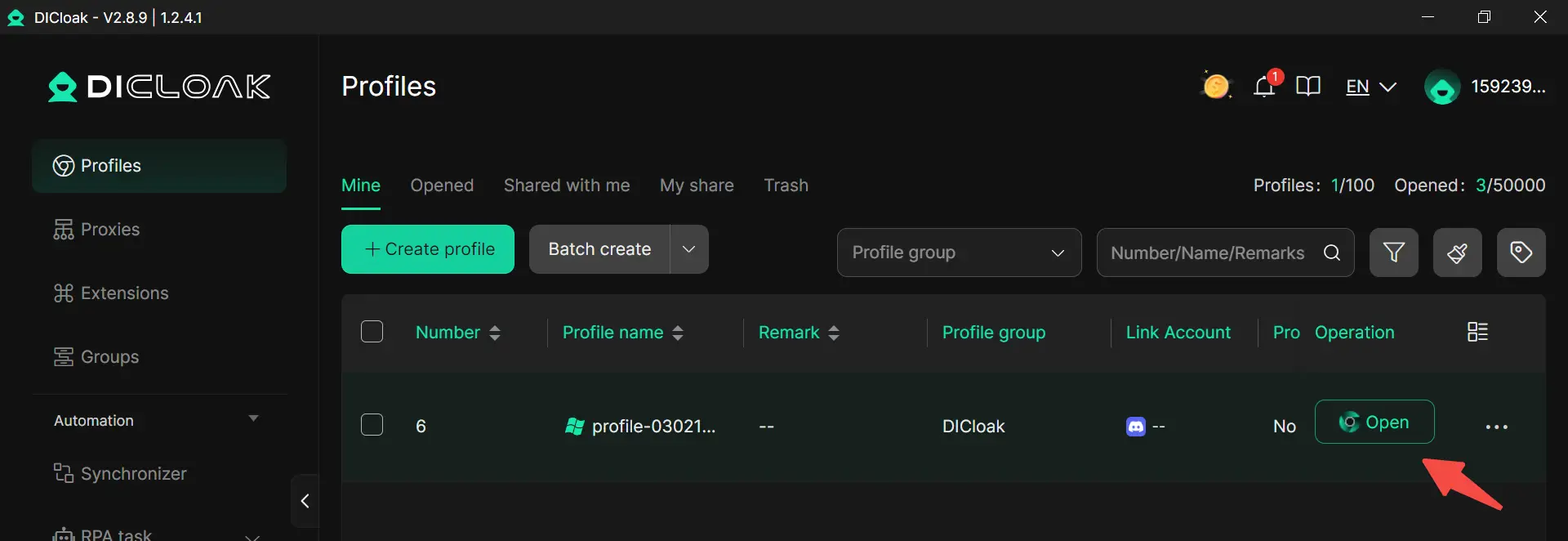
Your new profile will now be visible on the dashboard. Clicking Open will launch a DICloak browser instance. It behaves like the browsers you’re used to, meaning you can import bookmarks, set up extensions, and, most importantly, log into accounts. The profile’s fingerprint is unique an independent of your device’s real hardware specs.
Linking an X account to the profile
From here, logging into an X account as you usually would is enough to associate it with the active profile. DICloak remembers not just the credentials, but also the IP settings and browser fingerprints. They persist between sessions, ensuring no cross-contamination and letting you get right back to work.
Running several X accounts simultaneously
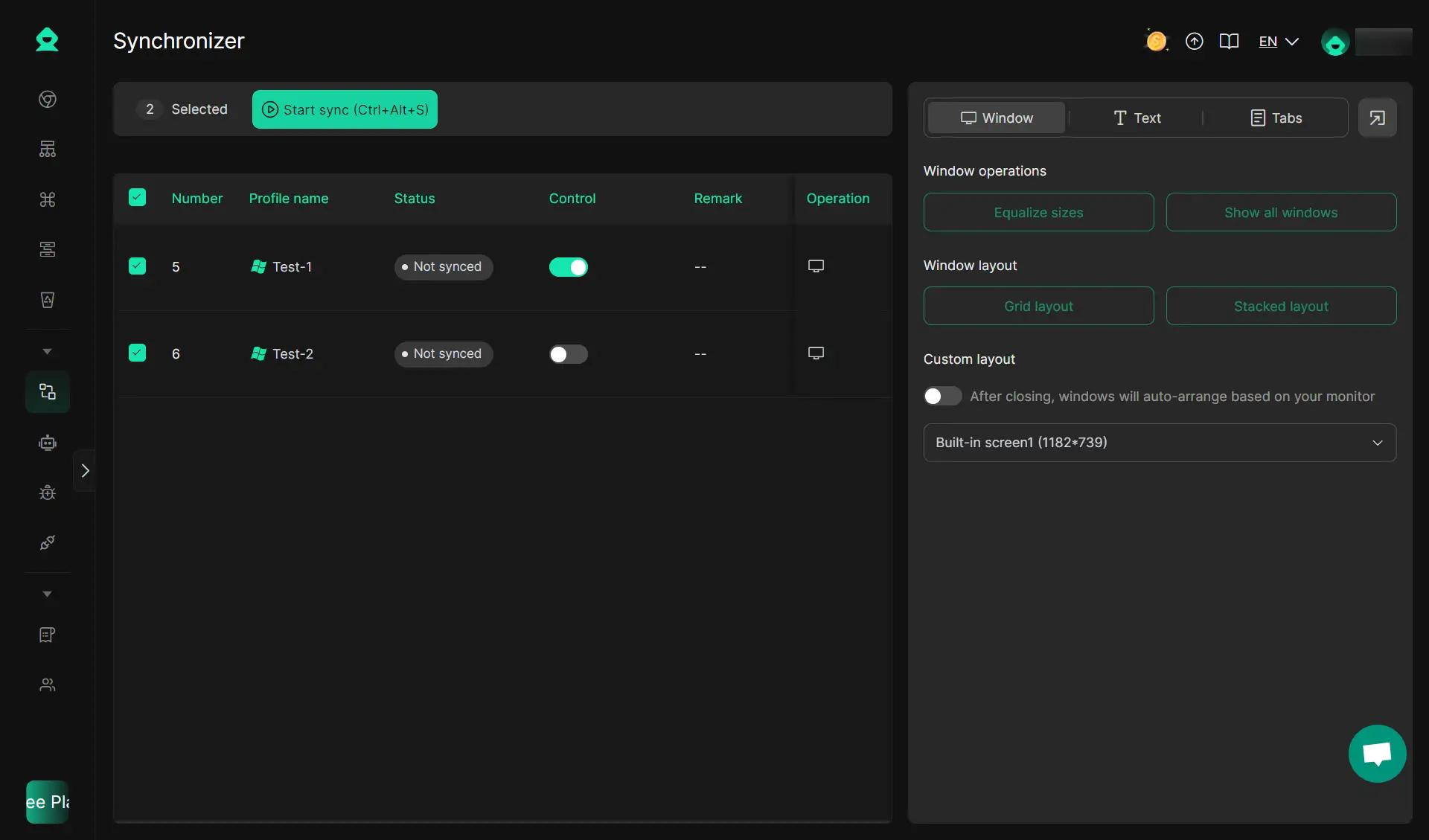
You now have the template for creating DICloak profiles and linking them to X accounts. Also, you can follow this guide to batch import profiles. As the list grows, it’s a good idea to start thinking about synchronizing your workflow by using DICloak's synchronizer. Choose one window to be the Control Window. Click the button to Start Sync. Now, whatever you do in the Control Window will happen in all the others instantly.
Conclusion
Dealing with an x account suspended notice can be a major setback, but it doesn't have to be the end of your journey. In 2026, the key to surviving on X is understanding that the platform prizes "real" human behavior above all else. Whether you are a casual user sharing your day or a business owner managing a large brand, following the rules and staying patient during the appeal process is the best way to get back online.
If you are managing a growing business, the best defense is a good offense. Many professionals who once felt their x account suspended for no reason now use tools like DICloak to stay safe. By isolating each profile and configuring proxies, they ensure that a single mistake on one account doesn't ruin their entire business network.
FAQs About Your X/Twitter Account is Suspended
Is it legal to buy Facebook aged accounts for my business?
Buying accounts is not against the law, but it does go against Facebook’s Terms of Service. This is why you must be very careful. If Facebook realizes you did not create the account yourself, they might close it. However, most professional marketers choose to buy facebook aged accounts because it is the only way to run a large business without waiting months for a new profile to be "trusted" by the system.
How much does it usually cost to buy facebook aged accounts?
The price changes depending on how old the account is and what features it has. A simple account from 2-3 years ago might cost $20 to $50. However, if you want to buy facebook aged accounts that are over 10 years old or have a high ad spending limit, the price can go over $100. It is often better to pay a little more for a high-quality account than to buy a cheap one that gets blocked in one day.
Will I get banned immediately after I buy Facebook aged accounts?
You will not get banned if you use the right tools. Most bans happen because users log in from a new city without a "shield." Before you buy facebook aged accounts, make sure you have an anti-detect browser like DICloak and a high-quality residential proxy. If you log in slowly and act like a real person, Facebook’s AI will likely see you as a safe, normal user.
What is the difference between a "Warmed Up" and a "Raw" account?
When you look to buy facebook aged accounts, you will see these terms. A "Raw" account is old but has no recent activity. A "Warmed Up" account is much better because a professional has spent weeks logging in, liking posts, and scrolling the feed. "Warmed Up" accounts are much safer for running ads because they look like they belong to an active, real person.
Can I change the name and password once I buy Facebook aged accounts?
Yes, but you must move slowly! If you change the name, password, and email all in the first five minutes, Facebook will think the account was hacked. The best way to stay safe after you buy facebook aged accounts is to wait 24 to 48 hours before changing any major details. Change one thing at a time so the security system stays calm and trusts your new login.
 Web Proxy Tools
 Free Tools
 Cookie Plugin
 UA Generator
 MAC Address Generator
 IP Generator
 IP Address List
 2FA Code Generator
 World Clock
 Anonymous Check
 WebRTC Leak Test
 UUID Generator
 Free Web Proxy Site
 Proxy Checker
 FB Ad Checker
 AI Web Scraping
 Free SMM Tools
 Twitter Shadowban Checker
 Instagram Name Checker
 UTM Generator
 Username Generator
 AI Hashtag Generator
 LinkedIn Headline Generator
 Social Media Image Resizer