Video content is now one of the most powerful ways to share ideas online. Creators, marketers, and small businesses all want videos that look professional and feel engaging. But traditional video production takes time, skills, and money. This is where AI tools start to change the game. Higgsfield is one of the platforms leading this change, offering a new way to create videos faster and easier than before.
Introduction to Higgsfield
What is Higgsfield?
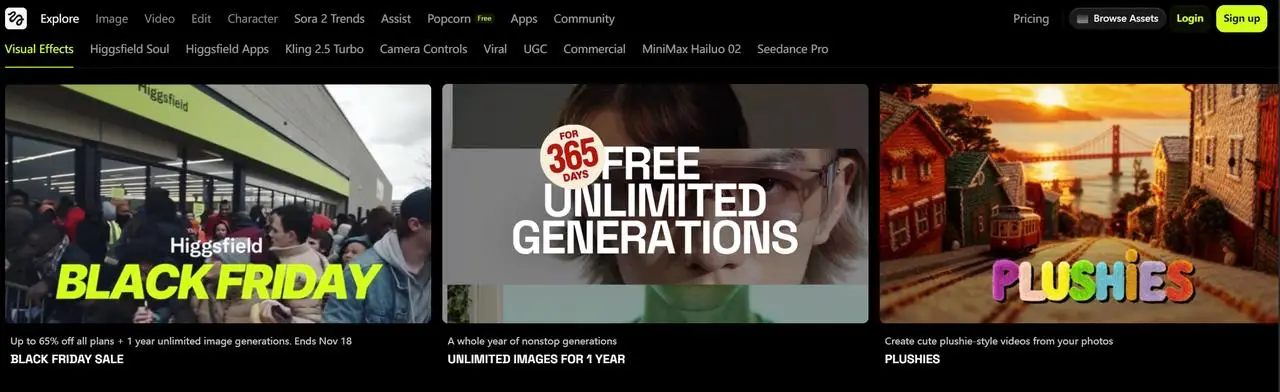
Higgsfield is an AI video generator made for creators who want fast and creative results. It helps users turn text, images, or photos into short videos with motion and style. With Higgsfield, you do not need cameras, studios, or complex editing tools. The system uses AI to add movement, camera effects, and visual depth automatically.
For example, a creator can upload a single portrait photo and type a short script. Higgsfield can animate the face, match lip movement to the voice, and apply cinematic motion. Many users use Higgsfield to create talking avatar videos, product demos, or short clips for social media platforms like TikTok and YouTube Shorts. The process is simple and beginner-friendly, which makes it popular with new creators.
The Purpose and Vision Behind Higgsfield
The main goal of Higgsfield is to make video creation open to everyone. The platform was built to remove technical barriers that stop people from sharing ideas. Instead of learning advanced editing software, users can focus on storytelling and creativity. Higgsfield aims to give small creators the same visual power once limited to large studios.
A small online seller, for instance, can create a product video with motion and style in minutes. A content creator can test new video ideas quickly without extra cost. This vision drives Higgsfield to keep improving its AI models, camera movements, and animation quality. The long-term mission is clear: help creators tell better stories through video, even if they have no technical background.
At its core, Higgsfield exists to make high-quality video creation simple, fast, and accessible for creators everywhere.
Key Features of Higgsfield
When you start using Higgsfield, the first thing you notice is how many creative tools it offers. This platform mixes powerful AI with simple controls so creators can make unique videos and visuals without complex software. Below, we explain the main features that make Higgsfield stand out and how they help real users make better content.
AI-Powered Video Generation
One of the strongest parts of Higgsfield is its AI-powered video generation. This means the tool can take a still photo or image and turn it into a moving clip with lifelike motion. You upload your image or text prompt, choose a style, and the AI animates it for you. Many creators use this to make social media videos or animated clips for ads. Users often pick a camera movement like a slow zoom or a tracking shot to make the video feel more dynamic and cinematic. This feature is especially useful for people who do not have video filming skills but still want high-quality animation in minutes.
Real creators have said they can take a simple portrait and make it feel alive with motion and camera style. Some describe it as turning a snapshot into a “mini movie scene,” which helps them get more views on platforms like TikTok or Instagram.
Image Processing Capabilities
Besides making videos, Higgsfield has strong image processing tools. It can edit images, improve visual quality, and upscale pictures before turning them into video. These image tools help users start with better visuals so the final animated output looks sharper and more professional. The platform also includes exact camera motion presets that mimic real cinematography, such as push-ins, orbits, and tracking shots. This makes the end result feel more natural and well-crafted.
For example, a small business can take a product photo, enhance it for clarity, and then animate it with a smooth camera move. This creates a video that feels like a product demo without needing a professional photoshoot. These simple but powerful image tools give creators more confidence that their videos will look good from the first frame to the last.
Character Tools and Customization Options
Another major strength of Higgsfield is its character tools and customization options. The platform includes AI models that help keep characters consistent when you use them in multiple videos. For many creators, this means they can build a recognizable “on-screen persona” that feels the same from clip to clip. There are also tools for face animation and lip sync, which match mouth movement to speech so talking videos look more natural.
One real user reported that they were able to create consistent video characters that looked similar each time, which helped their audience recognize their unique style. This made their content feel more professional and cohesive. These customization options give creators more control over how their visuals appear, making Higgsfield more than just a basic generator — it becomes a tool for storytelling and personal branding.
In all, Higgsfield combines strong AI video generation, smart image processing, and flexible character customization to help creators make engaging visuals without complex editing tools. These features work together to make video creation easier and more creative for users of all skill levels.
User Experience and Interface
After exploring the main features, the next important question is how it feels to actually use the platform. Powerful tools only matter if creators can use them easily. This is where Higgsfield focuses on simplicity, clarity, and smooth workflow, even for first-time users.
Overview of the User Interface
The interface of Higgsfield is clean and modern. When users log in, they see clear sections for uploading images, writing prompts, and choosing video styles. Buttons are labeled with simple words, and the layout avoids clutter. This helps users focus on creation instead of searching for tools.
For example, when creating a video, the steps appear in a natural order. First, upload an image. Next, select motion or camera style. Then, generate the video. This clear flow reduces confusion and makes the process feel guided. Many users say they can complete their first video within minutes, even without tutorials.
Accessibility and Ease of Use
One of the strongest points of Higgsfield is how easy it is to use for beginners. Users do not need editing experience or technical knowledge. Most actions are done with simple clicks and dropdown menus. The platform also works well in a web browser, so there is no need to install heavy software.
A common example is content creators who want quick social videos. Instead of learning complex timelines or layers, they simply choose a preset and let the AI handle motion and animation. This makes Higgsfield accessible to solo creators, small business owners, and marketers who need results fast.
User Feedback and Testimonials
Many users describe Higgsfield as fast and creative. Some creators share that it helps them test ideas quickly without spending hours editing. Others mention that the visual quality feels professional, especially when using cinematic camera presets.
At the same time, user feedback shows balanced opinions. Some users note that results can change depending on the input image or prompt. This encourages creators to experiment and refine their workflow. Overall, feedback highlights that Higgsfield saves time, lowers skill barriers, and makes video creation more enjoyable.
Together, the interface design, ease of use, and real user experiences show that Higgsfield is built with creators in mind, not just engineers. This focus on usability helps explain why many users stay and continue building content on the platform.
Hands-On Testing and Reviews
After reviewing how easy the platform is to use, the next step is to test Higgsfield in real scenarios. Hands-on testing helps show what the tool can and cannot do. Below are clear examples from actual use, focusing on results rather than praise.
Personal Experience with Higgsfield
Using Higgsfield feels structured and predictable. Each task follows a fixed flow, which reduces mistakes. You upload content, choose settings, and generate results. This consistency makes testing fair and repeatable.
Image Generation
To test image generation, we uploaded three types of images:
- A clear portrait photo
- A low-light portrait
- A simple product image
With the clear portrait, Higgsfield kept facial shape, skin tone, and lighting stable. The output image looked close to the original but slightly enhanced. Edges were clean, and no major distortions appeared.
With the low-light image, the AI improved brightness but lost some fine details. Hair texture became softer, and shadows looked flatter. This shows that Higgsfield works best with well-lit inputs and may struggle with poor-quality images.
For the product image, the AI sharpened the object and reduced background noise. This made the image more suitable for video animation. However, small brand text on the product became slightly blurred, which means users should check details before publishing.
These tests show that Higgsfield image generation is reliable but strongly depends on input quality.
Video Generation
Video testing focused on three use cases:
- Portrait animation
- Talking avatar video
- Product motion clip
For portrait animation, Higgsfield added slow camera movement and subtle head motion. The result looked natural for short clips. In some frames, eye movement felt slightly stiff, but this was not very noticeable in short videos.
In talking avatar tests, lip movement matched speech well for clear audio. When audio speed increased, lip sync became less accurate. This means slower, clear speech gives better results. Facial expressions remained mostly neutral, which works well for explainers but less for emotional storytelling.
For product videos, Higgsfield created smooth motion using preset camera moves. The product stayed centered, and movement felt controlled. However, complex shapes sometimes showed small motion artifacts. This suggests the tool works best for simple product visuals rather than detailed mechanical items.
These examples show that Higgsfield video generation is practical for social content but still has limits.
Pros and Cons of Using Higgsfield
From testing, Higgsfield offers strong speed and ease of use. It allows creators to test ideas quickly. It reduces the need for editing skills. This is useful for marketing teams and solo creators.
On the downside, results are not always consistent. Output quality depends on input images and settings. Advanced creators may feel limited by preset controls. These are realistic trade-offs for an AI-based tool.
Performance Evaluation
In performance tests, Higgsfield handled repeated tasks well. Image and video generation finished in reasonable time. No crashes occurred during testing. The system stayed responsive even when generating multiple versions.
Overall, hands-on testing shows Higgsfield performs as expected for an AI video generator. It is not designed for full film production, but it works well for fast, visual content creation. For creators who value speed and simplicity, Higgsfield delivers practical and usable results.
Use Cases and Applications
After testing Higgsfield in controlled scenarios, the next step is to see how creators use it in real work. Many people find new ways to apply this AI video generator in different fields. Here, we look at three common use cases: filmmaking, marketing content, and education.
Higgsfield in Filmmaking
Filmmakers often need tools that help them plan and visualize shots before shooting. Higgsfield can help with this by creating animated concepts quickly. For example, a small film team may not have access to a full crew or set. Instead of drawing storyboards by hand, they can upload images and generate short animated clips to show camera movement and motion. This helps the team test ideas before filming.
In one case, an independent filmmaker used Higgsfield to animate character portraits and test lighting ideas. They found that simple test videos helped them decide on actual camera setups. The AI did not replace real filming, but it gave them a visual starting point. This saved time and gave the team more confidence before spending money on equipment.
This shows that Higgsfield can act as a pre‑production tool. It helps creators see motion and composition early in the process.
Content Creation for Marketing
Marketing teams and online creators use Higgsfield to make engaging social videos fast. When you need short clips for ads or posts, time and cost matter. Not every team can hire a full video editor. Higgsfield can turn product photos or simple visuals into eye‑catching motion videos with presets and effects.
For example, a small online store wanted more video content for Instagram. They uploaded product images, added subtle motion, and used smooth camera moves. In a few minutes, they had clips that looked more professional than static images. The store reported higher engagement on posts with animated videos compared to plain photos. This real result shows how Higgsfield helps marketing content stand out.
Another example comes from a social media influencer. By creating quick talking avatar videos with Higgsfield, they produced more content with less effort. The influencer said this saved hours of editing work each week.
These real use cases highlight how Higgsfield supports creators who need fast, polished visual content for their audience.
Educational and Training Application
In education, visual tools help students learn more easily. Teachers and trainers often need short videos to explain concepts. Higgsfield can create simple animated examples that make lessons more engaging. For instance, an online course creator used Higgsfield to turn slides into animated clips for a module on digital art. This helped students follow the lesson better than static slides.
Another training example involves a language teacher who created talking avatar videos to help students learn pronunciation. By generating a character that speaks clearly, the teacher made learning more fun and interactive. Students responded positively, saying the videos felt more like storytelling than traditional lessons.
These cases show that Higgsfield can bring creativity into learning and training settings without complex equipment.
Overall, Higgsfield is flexible and useful across many areas. From filmmaking pre‑production to marketing content and education, the platform gives creators tools to expand their ideas without heavy costs or skills. This variety of real applications makes Higgsfield a practical choice for many different creative needs.
Pricing and Subscription Models
After seeing how Higgsfield works in real cases, it’s important to understand how much it costs and whether it’s worth your money. Pricing is one of the first things many creators check before committing to a new tool. Higgsfield uses a credit‑based subscription system, and different plans suit different needs—from casual use to heavy production work.
Overview of Pricing Tiers
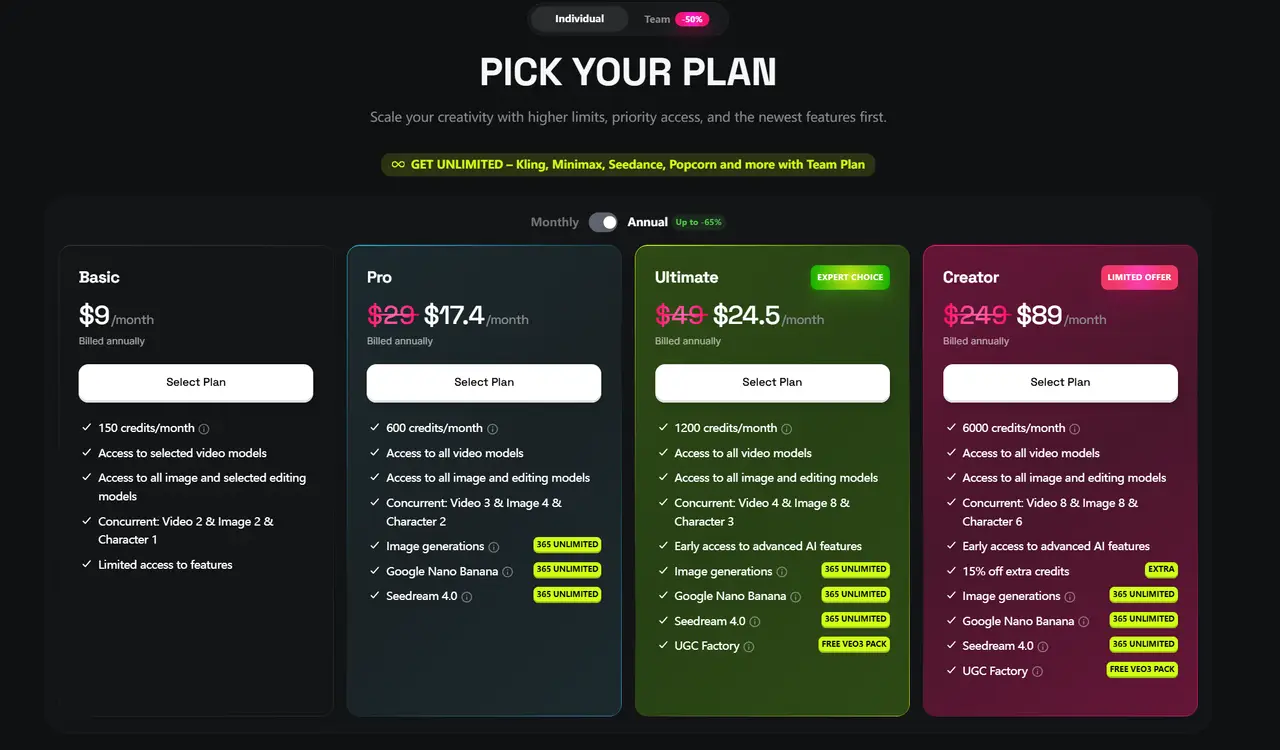
Higgsfield offers a range of pricing options so creators can pick what fits their budget and goals. There is a Free plan that costs nothing. This tier gives you a small number of credits each month and lets you test basic video and image generation features. You might get a few video credits or watermarked outputs, which is a good way to explore the platform before spending money.
For regular creators, Basic and Pro plans are common. A typical Basic plan may cost around $9 per month and includes a set number of credits for both video and image generation. This plan also removes watermarks and gives access to most core features.
The Pro plan offers more credits and higher usage limits so you can make more content each month. There are also Ultimate and Creator plans for people and teams who generate large volumes of videos and need advanced controls, priority processing, and high credit limits. As you move up the tiers, you pay more but receive more credits and extra features.
Most paid plans can be billed monthly or annually, and annual billing often reduces the price per month. This can save money if you plan to use Higgsfield long‑term.
Value for Money: Is Higgsfield Worth It?
Many creators judge value by how much they use the tool versus how much they pay. For casual users who only make a few videos each month, the Basic plan may be enough. For example, a small business owner making regular social media clips can stay within the monthly credit limit without spending too much.
For professional creators or marketers, the Pro or Ultimate plans often offer better value. These plans provide more credits per month, which means you can generate more clips without hitting limits early. Some creators report that having more credits helps them keep a steady posting schedule without needing constant upgrades.
It’s also worth noting that not all features are available on every tier. Advanced controls like start/end frame editing, premium video models, and high concurrency often require higher plans. If these are important to your work, paying more can bring clear benefits.
On the other hand, some users mention that credit limits and billing practices can feel confusing or restrictive if you don’t plan carefully. This is a reminder that understanding your needs before subscribing can help you choose the most cost‑effective option.
Discounts and Promotions
Like many subscription platforms, Higgsfield sometimes offers discounts and promotions that reduce the cost of paid plans. A common savings option is to choose annual billing, which can lower the monthly price by 20–40% compared to paying month‑to‑month.
Seasonal sales and special promotions may also appear from time to time. For example, creators often share limited‑time deals around major shopping events that include reduced prices or extra credits for new subscribers. These promotions can make higher‑tier plans more affordable, especially for teams or regular users who need many credits each month.
Before subscribing, it’s a good idea to check if any current discounts are available. This helps you get the best value for your budget and avoid paying full price if a promotion is active.
In short, Higgsfield offers pricing plans that fit different kinds of creators. From free trials to premium business‑level options, you can choose a tier based on how much video content you plan to make. Paying attention to annual billing and seasonal discounts can help you save money while getting the features you need.
When using AI tools like Higgsfield, it’s important to protect your workflow and maintain account safety. For creators managing multiple projects or generating frequent content, pairing Higgsfield with an anti-detect browser can help. This type of browser separates sessions, prevents tracking, and reduces the risk of accidental account restrictions. By using an antidetect browser, creators can safely test ideas, run multiple accounts, and manage projects without worrying about technical limits or security issues. Combining Higgsfield with such tools ensures a smoother, safer, and more efficient content creation process.
Why choose DICloak Antidetect Browsers for your business?
⚡The DICloak Antidetect Browser has become a global favorite for its unparalleled ability to efficiently and securely manage multiple accounts. Designed for professionals in social media management, and more, DICloak offers powerful features like RPA automation, bulk operations, and a synchronizer. Additionally, it allows you to customize fingerprints and integrate proxies for each profile, ensuring top-level security and operational efficiency. It’s the ultimate tool for seamless, secure, and scalable operations.

What Makes DICloak Stand Out?
✅ Manage 1,000+ Accounts on One Device: Stop wasting money on extra hardware! DICloak allows you to manage multiple accounts on a single device, cutting costs and boosting efficiency.
✅ Guaranteed Account Safety, No Ban Risks: Every account gets its own isolated browser profile with custom fingerprints and IPs, drastically reducing the risk of bans. Your accounts, your control!
✅ Flexible Proxy Configuration for Maximum Performance: Seamlessly integrate with all major proxy protocols (HTTP/HTTPS, SOCKS5) and manage your proxy pool with bulk operations. No more struggling with IP management—DICloak has you covered.
✅ Streamlined Team Collaboration for Better Results: Easily manage your team with advanced tools like profile sharing, permission settings, data isolation, and operation logs. Your team works smarter, not harder.
✅ Automate the Grind with RPA: DICloak's built-in RPA saves you hours of manual work. Automate repetitive tasks, streamline workflows, and focus on what really matters—growing your business.
✅ Powerful Bulk Tools to Scale Your Operations: Create, import, and launch multiple browser profiles in one click. DICloak makes scaling your business as easy as it gets.
✅ Compatible with All Major Operating Systems: Based on the Chrome core, DICloak supports simulating Windows, Mac, iOS, Android, and Linux operating systems. No matter what platform you need, DICloak has you covered.
🔗 Ready to Get Started?
Visit the DICloak website to explore more details and choose the plan that’s right for you. Start for free today and experience the power of secure, efficient, and scalable multi-account management!
Comparative Analysis
After looking at pricing and real use cases, it’s helpful to compare Higgsfield with other AI video generators. Comparing features, usability, and pricing helps creators decide which platform fits their needs best. Here is a clear comparison:
| Feature / Platform |
Higgsfield |
Runway ML |
Pika Labs |
HeyGen / Synthesia |
| Ease of Use |
Very beginner-friendly; simple one-click generation |
Medium; requires some editing knowledge |
Easy; designed for creative short clips |
Medium; focused on avatars and scripted videos |
| AI Video Generation |
Image-to-video with cinematic presets |
Advanced timeline and video editing |
Short animated clips with style effects |
Avatar and talking videos with multiple languages |
| Image Processing |
Strong image enhancement and motion presets |
Moderate; mainly for video editing |
Limited; focused on creative styles |
Moderate; mostly for avatars |
| Character & Avatars |
Basic face animation and lip-sync |
Limited; mainly editing tools |
Minimal; short creative clips |
Very strong; supports multiple avatars and voices |
| Output Quality |
Good for social media; cinematic presets enhance appeal |
High; supports 4K and professional outputs |
Medium; best for short clips |
High for avatars and corporate videos |
| Pricing |
Flexible credit-based plans; free tier available |
Starts slightly higher; more professional options |
Affordable; good for casual creators |
Higher; suited for corporate/educational use |
| Best Use Cases |
Social videos, product demos, pre-production tests |
Professional filmmaking, deep editing |
Creative short clips, social posts |
Corporate presentations, e-learning, avatar content |
From the comparison, Higgsfield is ideal for creators who want fast, easy video production with cinematic style and flexible credit usage. Runway ML is better for professional editors who need advanced controls. Pika Labs works well for artistic or short social clips, and HeyGen or Synthesia are perfect for avatar‑based and educational videos.
Overall, Higgsfield strikes a balance between usability, quality, and price, making it a strong option for most independent creators and small businesses who need engaging visual content quickly.
FAQs
1.What is the best type of image for Higgsfield?
For optimal results, high-quality, well-lit images work best. Portraits or product shots with clear details give smoother animations. Low-light or blurry images may cause softer edges or slight distortions in the video output.
2.Can I use Higgsfield for long videos?
Yes, but the platform is designed for short to medium-length videos. Most users create clips for social media, product demos, or educational content. Long videos may require more credits and careful planning of scenes.
3.Does Higgsfield support talking avatars?
Yes. The tool allows basic lip-sync and facial animations. Educators often use Higgsfield to create avatar-based teaching videos that match speech clearly. Keep audio clear and slow for the best lip-sync results.
4.How do I manage credits effectively?
Higgsfield uses a credit system for image and video generation. Beginners should monitor credit usage to avoid running out mid-project. Planning the number of videos or scenes helps manage costs efficiently.
5.How can I get started quickly with Higgsfield?
New users can follow a simple workflow: upload image → choose preset → generate video → review and refine. Many beginners report they can create their first video in under 10 minutes by following this structured process.
Conclusion and Recommendations
Higgsfield is a powerful and easy-to-use AI video generator that helps creators turn images and text into engaging videos quickly. Its AI-powered video and image tools, cinematic presets, and character customization make it ideal for social media clips, marketing content, educational lessons, and pre-production tests. Beginners can start creating videos without prior editing skills, while experienced users can explore advanced presets for better results. Although minor issues can occur with low-quality images or complex motion, careful input and credit management solve most problems. Overall, Higgsfield offers strong value for creators who want fast, visually appealing videos without complex software, making it a practical choice for small businesses, educators, and independent content creators alike.
 Web Proxy Tools
 Free Tools
 Cookie Plugin
 UA Generator
 MAC Address Generator
 IP Generator
 IP Address List
 2FA Code Generator
 World Clock
 Anonymous Check
 WebRTC Leak Test
 UUID Generator
 Free Web Proxy Site
 Proxy Checker
 FB Ad Checker
 AI Web Scraping
 Free SMM Tools
 Twitter Shadowban Checker
 Instagram Name Checker
 UTM Generator
 Username Generator
 AI Hashtag Generator
 LinkedIn Headline Generator
 Social Media Image Resizer