Verifying your PayPal account is an important step if you want to send money, receive payments, or run an online business without unnecessary account limits. The process usually involves linking and confirming a bank account, but PayPal may also ask you to confirm a payment card or provide identity documents. The exact steps depend on your account type, country, and how you use PayPal.
If you are wondering how to verify a PayPal account, this guide will walk you through the available methods. You will learn how to confirm a personal or business account, what to do if you do not have a bank account, and how to fix common verification problems. We will also explain why linking a payment method does not always mean every identity check is complete.
How to Verify a Personal PayPal Account via Linked Bank Account
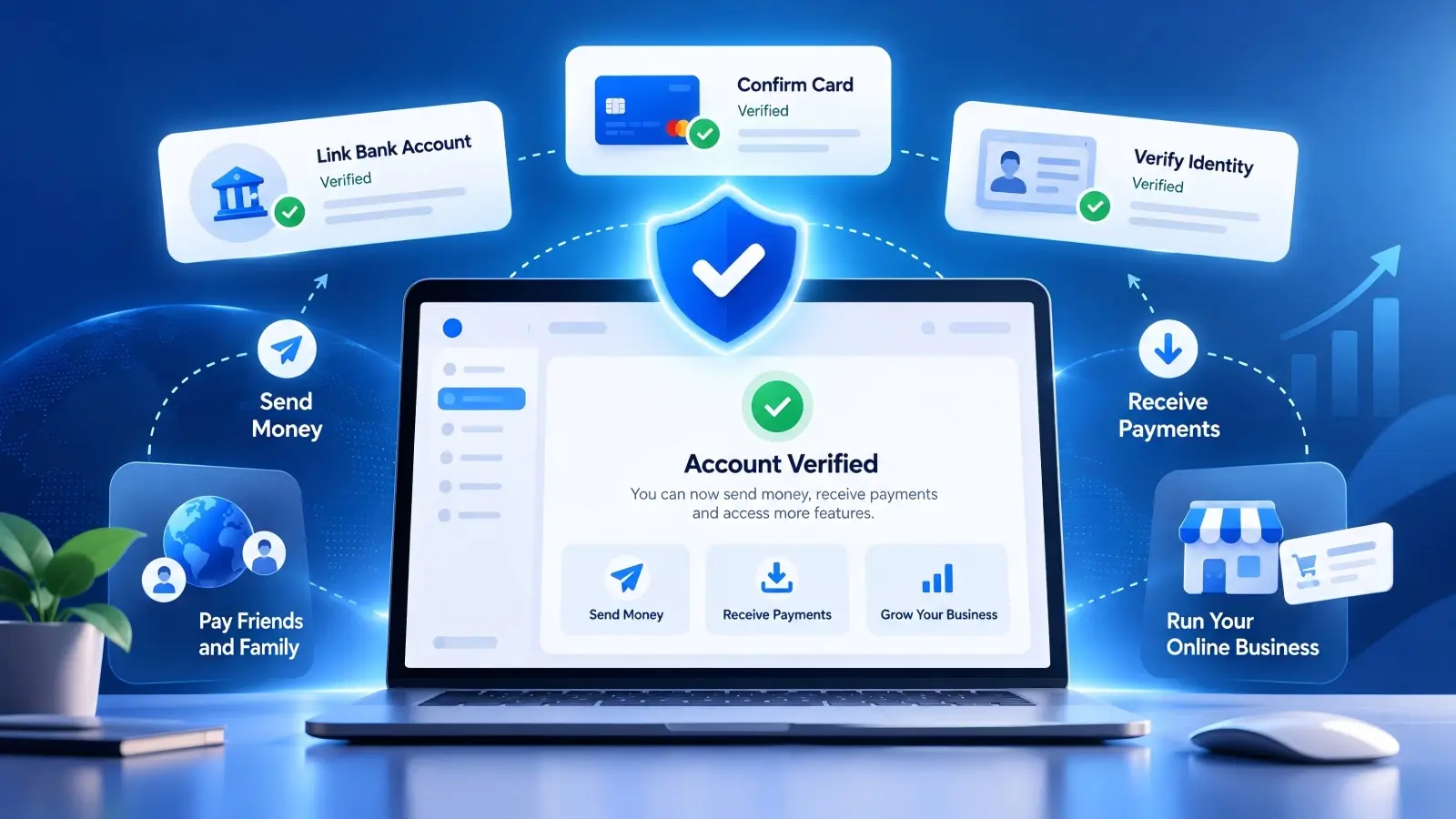
For many personal PayPal users, linking and confirming a bank account is a direct way to complete financial account verification. PayPal offers instant bank confirmation for eligible banks and a small-deposit method for users who prefer manual confirmation. The steps below focus on the PayPal website, although similar options may appear in the mobile app.
Prerequisites for Personal Bank Verification
Before starting, make sure you can sign in to your PayPal account and access your bank account details. The name on your bank account should match the legal name registered with PayPal. For a U.S. PayPal account, the bank generally needs to be a supported U.S. bank. You should also have access to online banking or bank statements if you plan to use small deposits for confirmation.
Check that your bank account is not already linked to another PayPal account in a way that prevents a new connection. PayPal also has limits on how many bank accounts can be linked and how often a bank account can be used across PayPal accounts. Some online-only banks and prepaid accounts may not be compatible. If you are unsure whether your account is supported, check the linking options shown in your Wallet before changing any bank details.
Step-by-Step Process to Link and Confirm Your Personal Bank Account
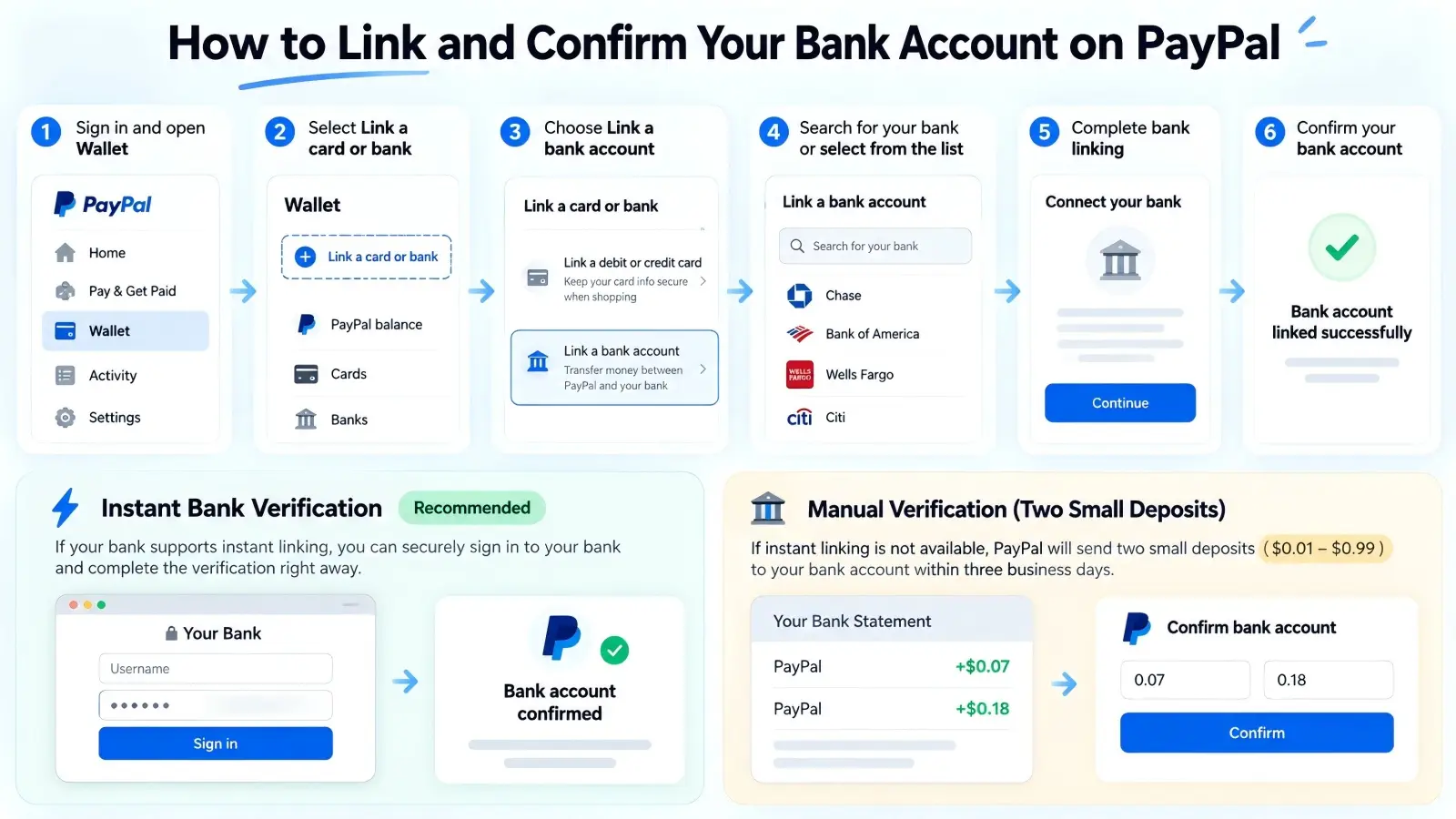
To verify your PayPal account with a bank account, you first need to add that bank to your PayPal Wallet. The instant method is usually the quickest option when your bank supports it. If instant confirmation is unavailable, PayPal may offer manual verification using two small deposits.
Follow these steps to link your personal bank account:
- Sign in to your PayPal account and open Wallet.
- Select Link a card or bank.
- Choose Link a bank account.
- Search for your bank or select it from the list.
- If instant linking is available, follow the secure bank sign-in instructions.
- If you prefer manual linking, select Link your bank another way and enter the required bank details.
- Follow the instructions shown by PayPal to finish the confirmation.
When you choose manual confirmation in the U.S., PayPal normally sends two small deposits to your bank account within three business days. Each deposit is between $0.01 and $0.99. For example, your statement might show deposits of $0.07 and $0.18. Return to PayPal, open Wallet, select the bank account, and enter both amounts exactly as shown. After you submit the correct amounts, PayPal can confirm the bank account. The temporary deposits are later taken back.
If you use instant confirmation, PayPal may connect through a third-party provider to check your bank details. You should review the permissions shown during this process before agreeing. If you do not want to use that connection method, manual verification may be available instead. Once the bank is confirmed, check your PayPal account for any other requests that still need attention.
Additional Identity Verification When Prompted by PayPal
Confirming your bank account does not always complete PayPal's identity requirements. PayPal may separately ask you to confirm your full name, residential address, date of birth, or other personal details. In some cases, you may need to upload a government-issued photo ID and proof of address. The exact documents depend on your account and the reason for the review.
For example, suppose you linked your bank account successfully but later receive a notification asking you to confirm your identity. You should open PayPal directly and follow the instructions in your account. PayPal may ask for a driver's license, passport, or another accepted photo ID. It may also request a recent bank statement or utility bill to confirm your home address. Make sure the information on the documents matches your PayPal account before submitting them.
PayPal may also offer identity checks through its mobile app, including scanning an ID and taking a selfie. If you are asked to complete this process, use the official PayPal app or website. Avoid sending identity documents through an unexpected email or message. The review may take several business days, so check your account notifications for updates.
How to Verify a PayPal Business Account With Your Bank Account
Verifying a PayPal Business account can involve more steps than verifying a personal account. PayPal needs to confirm business details and may also need information about owners or people who control the company. Linking a bank account is another important step, especially if the business wants to transfer its PayPal funds to a bank.
Documents and Information You Need for Business Account Verification
The documents required for PayPal Business verification depend on your business structure. A sole proprietor may need to provide personal and business information, while a registered company may need official company records. PayPal may check some information through available databases before requesting documents. Preparing accurate records in advance can help you respond faster if additional verification is needed.
Here is a general guide to the information PayPal may request for U.S. business accounts:
| Information |
What you may need |
| Business identity |
Registered business name, business type, and address |
| Account holder |
Legal name, home address, and required identity details |
| Tax information |
SSN, ITIN, EIN, or other applicable tax details |
| Business ownership |
Information about owners and controlling individuals |
| Business documents |
Registration records, business license, or similar proof |
| Bank information |
Supported bank account details matching the account holder or business |
| Additional documents |
Government-issued ID, proof of address, or requested financial records |
For example, a small company registered as an LLC may need to provide its legal company name and tax details. PayPal may also ask about individuals who own a significant share of the business or have control over its operations. If the company uses a trading name that differs from its legal name, the owner should make sure both are entered in the correct fields. Using the trading name where PayPal expects the registered legal name can create verification problems.
Step-by-Step Guide to Link & Validate Bank for PayPal Business
Once your business information is ready, you can add a bank account to your PayPal Business account. The bank confirmation process is similar to the one used for personal accounts, but you should pay close attention to account ownership and legal names. A business bank account should match the information PayPal expects for the registered business. If the names or account types do not match, you may need to contact PayPal before continuing.
Follow these steps to link and confirm your business bank account:
- Sign in to your PayPal Business account.
- Open Wallet and choose Link a card or bank.
- Select Link a bank account.
- Find your bank and choose an available linking method.
- Enter the requested bank details or complete the secure bank connection.
- If manual confirmation is required, wait for the small deposits to appear.
- Return to Wallet and enter the correct deposit amounts to confirm the bank.
After confirming the bank account, check your business dashboard for any remaining verification tasks. PayPal may still need to review company details, ownership information, or supporting documents before the business verification is complete. For many eligible merchants, business information can be verified quickly, while cases that need extra documents take longer. Do not assume that a successful bank connection means the business has passed every required check.
Understand Small Deposit and Temporary Charge Verification Methods
PayPal uses different methods to confirm ownership of financial accounts. Bank verification commonly uses instant confirmation or two small deposits, while card confirmation may involve a temporary charge and a four-digit code. These methods serve similar ownership-checking purposes, but they are not interchangeable. You need to follow the method shown for the financial account you are confirming.
| Verification method |
How it works |
Typical U.S. timing |
| Instant bank confirmation |
Connect through an eligible banking service |
Often completed during linking |
| Manual bank confirmation |
Enter the amounts of two small deposits |
Within 3 business days |
| Debit or credit card confirmation |
Enter the code from a temporary card charge |
Usually 2–3 business days |
| Business document review |
Submit requested business or identity documents |
Depends on the review |
For example, if PayPal sends two deposits of $0.11 and $0.24 to your business bank, those are the figures you must enter for bank confirmation. You should not look for a four-digit card code because that belongs to a different process. Likewise, if PayPal places a card verification charge on your business debit card, entering bank deposit amounts will not confirm that card. Always check which payment method is awaiting confirmation before taking the next step.
How to Verify PayPal Account Using Debit or Credit Card
If you prefer to use a debit or credit card, PayPal allows you to link one through your Wallet. In some cases, PayPal will ask you to confirm the card before it can be used. Card confirmation proves that you can access the card's transaction information, but it does not necessarily complete every requirement for a verified PayPal account. You may still need bank confirmation or identity verification, depending on your account.
Key Points Before Linking Your Card
Before adding a debit or credit card, check that the card is active and supported by PayPal. You should have the card number, expiration date, security code, and billing address ready. The billing address must match the details held by your card issuer. You also need access to your card statement in case PayPal asks you to enter a confirmation code.
For example, suppose you recently moved to a new address but your bank still has your old billing address. If you enter your new address when linking the card, PayPal may not be able to confirm the card information. Updating your address with the card issuer or using the correct registered billing details can solve this type of problem. You should also make sure the card can accept the small verification charge if PayPal requests one.
Complete Card Verification With Temporary Charge and Confirmation Code
To confirm a card, start by linking it to your PayPal account. Some cards are confirmed automatically, so you may not need to enter a code. If PayPal displays a Confirm Card option, you must complete the requested confirmation before using that card for certain payments.
Here is how to link and confirm your card:
- Sign in to PayPal and open Wallet.
- Select Link a debit or credit card and enter your card details.
- Save the card and return to its details in Wallet.
- If Confirm Card appears, select it and follow the instructions.
- Check your card statement for the temporary PayPal charge and four-digit code.
- Return to Wallet, open the card, and enter the code.
- Select Confirm to finish the card confirmation.
For U.S. users, PayPal currently describes a $1.95 confirmation charge that appears with a four-digit code on the card statement. The code usually becomes available within two to three business days, although some users may see it sooner. A transaction description might look like PP*1234 CODE, where the four digits are the code you need to enter. After successful confirmation, PayPal refunds the charge, but your card issuer may take up to 30 days to post the credit.
If you request another confirmation code, use the latest code PayPal issued. Entering an older code may cause the confirmation to fail. If you cannot find the code, check both pending and completed transactions before requesting a replacement. PayPal limits the number of times you can request a new code, so avoid repeating the process without checking your statement first.
How to Verify PayPal Account Without a Bank Account
You can use some PayPal services without linking a bank account, but the features available depend on your location and account status. Adding a payment card and completing identity checks may allow you to use certain functions. However, this does not always replace bank verification where PayPal specifically requires it. The best approach is to complete the available steps and check what your account still needs.
Complete Credit or Debit Card Verification
If you do not have a bank account, start by adding an eligible debit or credit card to your PayPal Wallet. Follow the linking process and check whether PayPal asks you to confirm the card. If a confirmation code is required, complete that step using your card statement. This helps PayPal confirm ownership of the payment card and may make it available for supported transactions.
For example, a student who does not have a bank account may want to use PayPal for online purchases. After adding a supported debit card, the student may be able to pay through PayPal using that card. If PayPal requests card confirmation, the student can complete the code process without needing a separate bank account. However, the student should not assume that a confirmed card removes all account limits or completes every identity requirement.
Email Confirmation and Supplementary Identity Checks
Confirming your email address is another basic step when setting up a PayPal account. It helps establish that you can access the email address connected to the account. If your email is still unconfirmed, open your PayPal settings and look for the confirmation option. PayPal will send a message containing instructions to confirm the address.
After confirming your email, review your account notifications to see whether additional information is required. PayPal may ask for your date of birth, address, government-issued ID, or other identity details. You can complete these checks without necessarily adding a bank account, depending on the request. However, confirming your email and identity does not automatically satisfy a separate bank confirmation requirement.
For example, someone may have a confirmed email address and a verified identity but still see a request to link a bank account. This does not mean the previous checks failed. It means PayPal needs another type of information for the feature or activity involved. Read the wording of the request carefully so you do not repeat steps that are already complete.
Limitations When You Have No Linked Bank Account
Without a linked bank account, you may have fewer options for moving money between PayPal and your bank. Certain transfers or financial features may require a supported bank connection. The limits can also differ depending on your country and whether you use a personal or business account. PayPal may offer other withdrawal options in some locations, but their availability should be checked within your account.
For example, a freelance writer may receive payments through PayPal and use an eligible debit card for online purchases. That setup may work for everyday spending, but the writer may later need a bank account to access a particular transfer method. If the account also has an identity request, adding a card alone will not remove it. Users should choose their payment setup based on the features they actually need rather than assuming every linked payment method offers the same benefits.
Common PayPal Verification Issues and Troubleshooting
PayPal verification can fail for several reasons, including incorrect account details, missing documents, or unfinished bank confirmation. Most issues can be fixed once you identify the cause. Here are the most common problems and how to solve them.
Reasons Why Your PayPal Account Remains Unverified
Your PayPal account may remain unverified because you have not confirmed your linked bank account or payment card. For example, if PayPal sends two small deposits to your bank, you must enter both amounts in your Wallet to complete the process. Simply linking the bank account is not enough.
Another common reason is incorrect or missing personal information. Your PayPal name may not match your bank records, or your ID may be expired. Business accounts may also need additional documents, such as business registration records or ownership details. Even after confirming a bank account, PayPal may request separate identity verification.
Fixing Failed Verification: Checklist for Users
If your PayPal verification fails, start by checking the error message in your account. Different problems require different solutions, so avoid repeating the same verification steps without checking the cause.
| Problem |
How to fix it |
| Bank account cannot be linked |
Check your bank details and legal name |
| Small deposits are missing |
Wait up to 3 business days |
| Deposit amounts are rejected |
Enter the exact amounts from your statement |
| Card confirmation code is missing |
Check your latest card transactions |
| Identity verification fails |
Upload clear, valid documents |
| Business verification is pending |
Submit the requested business information |
| Account remains limited |
Check the Resolution Center |
For example, if you enter the wrong bank deposit amounts, check your statement before trying again. PayPal may disable the bank account after three incorrect attempts. If your ID is rejected, make sure it is not expired and that all details match your PayPal account. Correcting these issues can help you finish verification without unnecessary delays.
When to Reach Out to PayPal Customer Support
Contact PayPal support if your bank account becomes disabled, your documents keep getting rejected, or verification remains incomplete after you follow the instructions. Before contacting support, prepare the error message and explain which verification step failed. This helps the support team understand your problem more quickly.
You can visit the official PayPal Help Center or check the Resolution Center for account-specific instructions. If PayPal requests additional documents, submit them through the official website or app. Some reviews take several business days, so check your account notifications for updates.
Verifying your PayPal account is the first step toward managing payments with fewer interruptions. However, businesses that manage several legitimate PayPal accounts may also need a better way to organize account access and protect sensitive information. DICloak Antidetect Browser helps teams manage their browser sessions through separate Profiles, access controls, and activity logs. These features are especially useful when different employees handle payments for different business accounts.
Keep PayPal Accounts Separate with Browser Profiles
When you manage PayPal accounts for different businesses, switching between them in one browser can lead to login mistakes or mixed sessions. DICloak lets you create a separate browser Profile for each account, with its own cookies, local storage, and browser fingerprint settings. For example, a finance team can organize different business accounts into dedicated Profiles, making it easier to access the correct account without mixing browser data.

Track Team Activity with Operation Logs
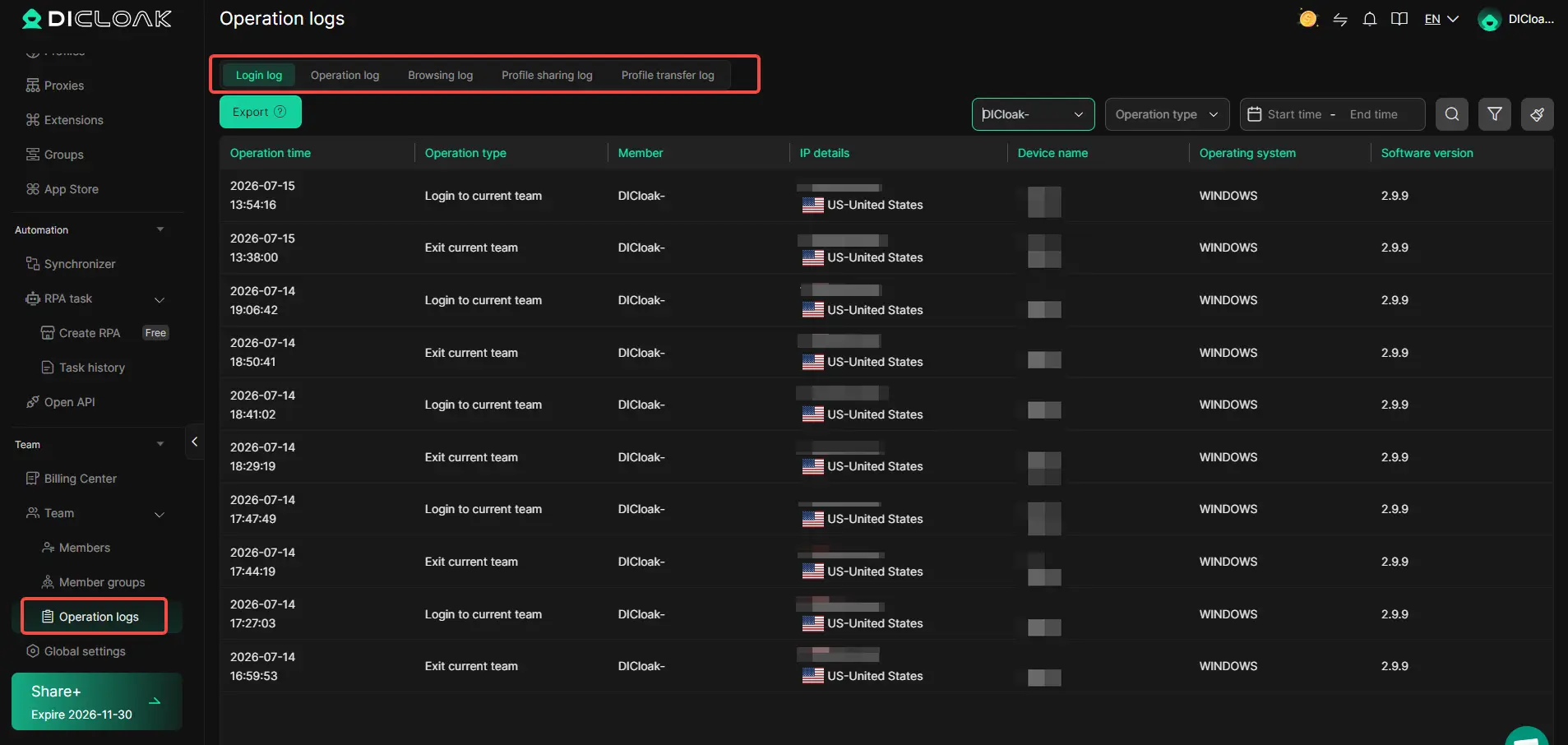
When several employees manage business accounts, knowing who accessed a Profile and when can help teams investigate mistakes. DICloak provides Operation Logs that record team activities, including logins, Profile operations, and Profile sharing. For example, if an unexpected account change occurs, an administrator can review the available logs to understand which team member accessed the relevant Profile. These records support internal oversight, although they do not replace PayPal's own transaction and security records.
Frequently Asked Questions About PayPal Account Verification
1. How do I verify my PayPal account?
To verify your PayPal account, log in to PayPal and link a bank account through your Wallet. Complete the bank confirmation steps and provide identity documents if PayPal requests them.
2. How long does PayPal account verification take?
PayPal account verification can be completed quickly with instant bank confirmation. Manual bank verification usually takes up to three business days, while identity reviews may take longer.
3. Can I verify my PayPal account without a bank account?
You can confirm a debit or credit card and complete identity checks without linking a bank account. However, these steps may not fully satisfy PayPal account verification requirements, depending on your account.
4. Why is my PayPal account still unverified after linking a bank account?
Your PayPal account may remain unverified because the bank confirmation is incomplete or additional identity information is required. Check your Wallet and Resolution Center for pending verification steps.
5. How do I know if my PayPal account is verified?
To check your PayPal verification status, sign in and review your Wallet, account notifications, and Resolution Center. A confirmed bank account is a useful indicator, but you should also check for any outstanding identity verification requests.
 Web Proxy Tools
 Free Tools
 Cookie Plugin
 UA Generator
 MAC Address Generator
 IP Generator
 IP Address List
 2FA Code Generator
 World Clock
 Anonymous Check
 WebRTC Leak Test
 UUID Generator
 Free Web Proxy Site
 Proxy Checker
 FB Ad Checker
 AI Web Scraping
 Free SMM Tools
 Twitter Shadowban Checker
 Instagram Name Checker
 UTM Generator
 Username Generator
 AI Hashtag Generator
 LinkedIn Headline Generator
 Social Media Image Resizer