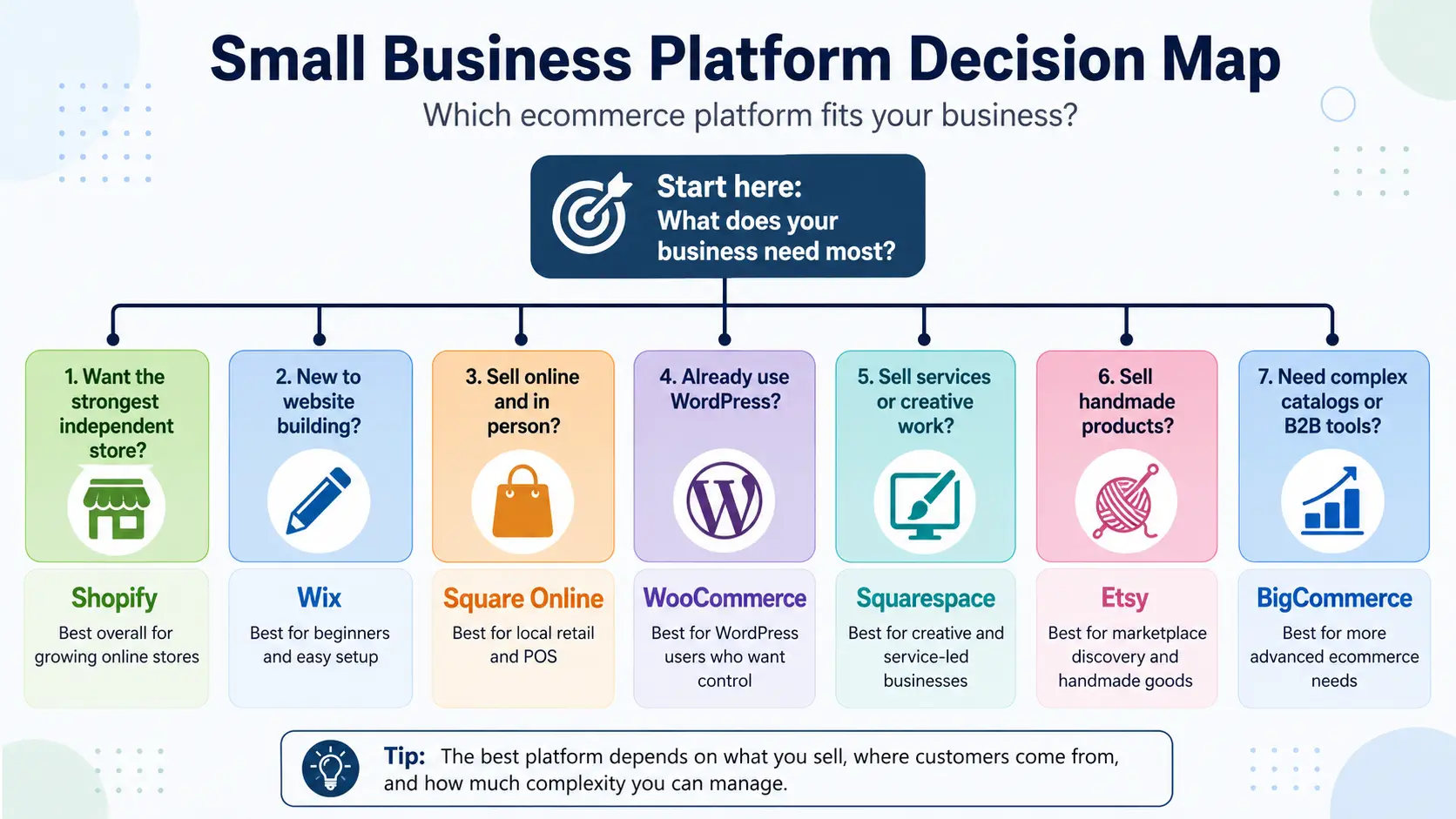
Choosing between ecommerce platforms is hard because each one is built for different products, customers, and skill levels. There is no single best ecommerce platform for small business in every situation. Shopify is a strong choice for a growing independent store, while Wix suits beginners. Square Online fits local retail, WooCommerce works for WordPress users, and Squarespace suits creative or service businesses. Etsy supports handmade marketplace sales, while BigCommerce fits more complex stores. Your final choice should reflect your product type, customer source, budget, technical ability, and available maintenance time. Start with this quick comparison.
Best Ecommerce Platforms for Small Businesses: Quick Comparison
| Platform |
Best for |
Ease of use |
Starting cost |
Main limitation |
| Shopify |
Growing independent stores |
Moderate |
Basic: $29/month annually |
Extra apps can raise costs |
| Wix |
Beginners and small catalogs |
Easy |
Core: $29/month annually |
Less suited to complex stores |
| Square Online |
Local and in-person retail |
Easy |
Square Free: $0/month |
Limited free-plan customization |
| WooCommerce |
WordPress users |
Moderate to high |
Free software; hosting costs extra |
Requires ongoing maintenance |
| Squarespace |
Creative and service businesses |
Easy |
Basic: $19/month annually |
Advanced tools need higher plans |
| Etsy |
Handmade marketplace sales |
Easy |
No required plan; $0.20 per listing |
Limited brand control |
| BigCommerce |
Complex stores |
Moderate |
Core: $29/month annually |
Revenue limits on lower plans |
Online Store Builder or Marketplace: Which Is Better for a Small Business?
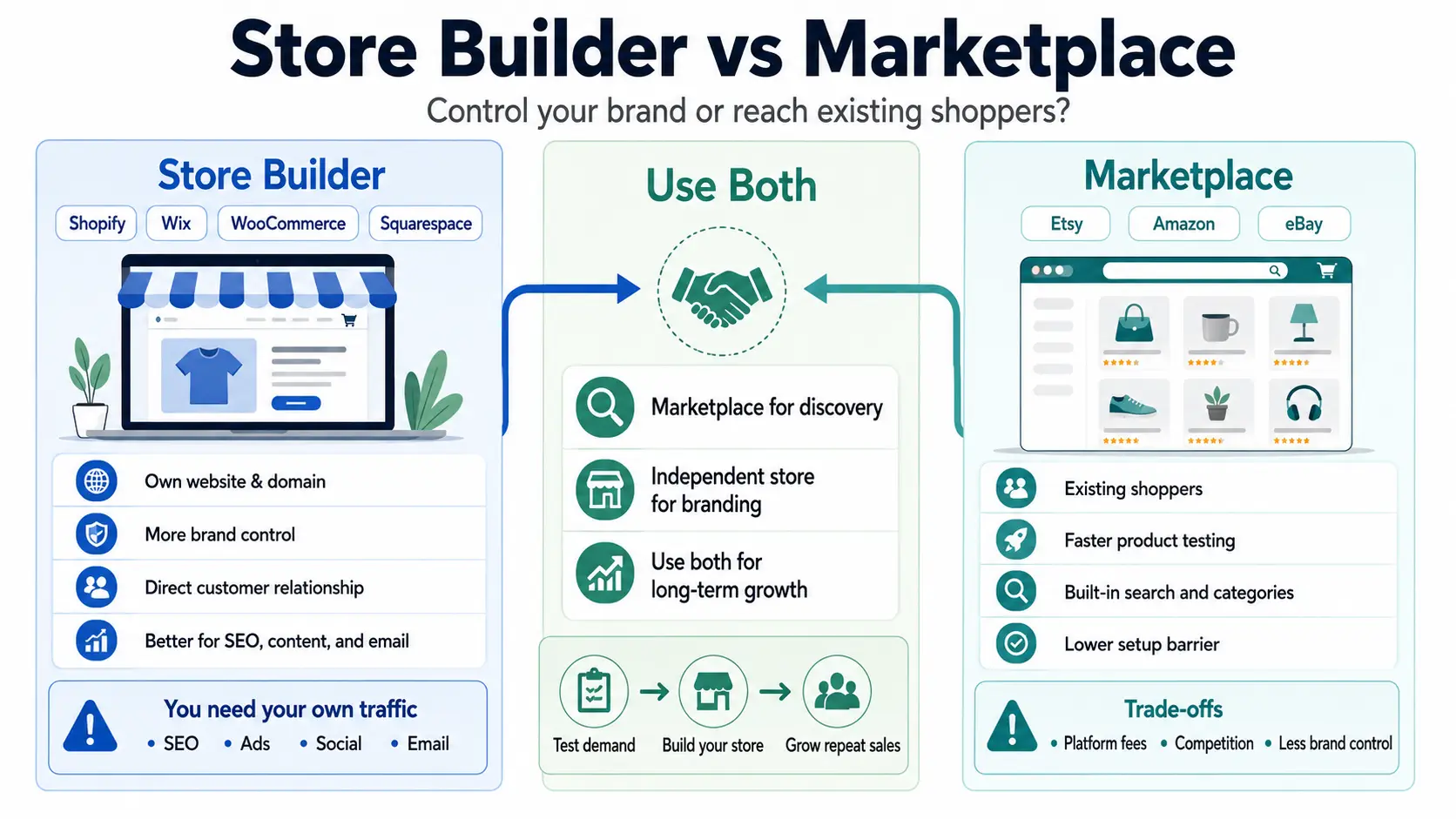
Store builders and marketplaces solve different problems. A store builder offers more ownership and brand control, while a marketplace offers access to shoppers already searching for products.
Choose a Store Builder for Brand Control
An independent store builder gives you a website under your own domain. You control the design, branding, product presentation, store policies, and customer experience across the full buying journey. It also gives you more direct access to customer relationships and purchasing data.
Shopify, Wix, WooCommerce, Squarespace, and BigCommerce are common store-building options. Your store can support SEO, content, email marketing, and paid advertising. However, the platform does not bring shoppers automatically. You must attract traffic through search, social media, advertising, partnerships, referrals, or an existing audience.
Choose a Marketplace for Existing Shopper Demand
A marketplace places your products in front of people already searching on that platform. Etsy, Amazon, and eBay can make it faster to list a product, test demand, and learn what shoppers respond to before building a larger sales channel.
The trade-off is control. You compete with other sellers, pay marketplace fees, and follow the platform’s rules. Branding options and direct customer relationships are also more limited. Marketplace visibility can help discovery, but it does not guarantee sales, and the marketplace is not an independent website that your business owns.
Use Both for Discovery and Long-Term Growth
A handmade seller might test several products on Etsy, then build an independent Shopify, Wix, or WooCommerce store after finding steady demand. The marketplace can support discovery, while the independent store gives the seller more room for branding, content, email marketing, and repeat customer relationships.
This is the practical answer to Shopify vs Etsy for small business: one channel does not always need to replace the other. Using both adds work, though. You must keep listings, inventory, prices, and orders accurate across channels.
The 7 Best Ecommerce Platforms for Small Businesses in 2026
Each platform below fits a different small business need. This ecommerce platform comparison for small businesses considers setup difficulty, current cost, selling tools, maintenance, and growth needs. The platform with the broadest feature set is not automatically the right choice. The better option is the one that matches how you sell and how much complexity you can manage.
Shopify — Best Overall for Growing Small Businesses
Shopify is the strongest all-around option for a small business building a long-term independent store.
Best for: Growing product businesses that want one system for online sales, inventory, shipping, payments, and multiple sales channels.
Shopify manages hosting and software updates while providing catalog, inventory, shipping, in-person, and multichannel tools. Its app market can cover specialized needs, but paid apps may raise the monthly cost.
In the United States, Basic costs $29 per month when billed annually or $39 monthly. It includes no additional staff accounts; Grow includes five. Basic charges a 2% third-party transaction fee when an outside payment provider is used. Shopify currently advertises a three-day free trial, with promotional pricing sometimes available.
Main limitation: Themes, apps, and transaction-related charges can make the real cost higher than the base plan.
Choose Shopify when you want a managed store and expect the catalog or team to grow. Avoid it when you need only a basic site or lack a plan to generate traffic.
Wix — Best Ecommerce Platform for Beginners
Wix is the best ecommerce platform for beginners who want visual control without managing hosting or code.
Best for: Small catalogs and businesses that combine products, services, bookings, and content.
Its drag-and-drop editor makes it simpler to change layouts and pages. The Core plan supports online payments, basic ecommerce, scheduling, 50 GB of storage, and five collaborators. This is enough for many new sellers without WordPress maintenance or developer support.
Core starts at $29 per month when billed annually. Prices vary by region, and the annual term is paid upfront. Wix has a free plan for testing, but it cannot accept online payments. Paid plans have a 14-day money-back period.
Main limitation: Complex inventory, B2B pricing, or advanced multichannel work may require a higher plan or another platform.
Choose Wix when quick setup and design control matter most. Avoid it when complex product rules or wholesale tools are already essential.
Square Online — Best for Local and In-Person Retail
Square Online is the best ecommerce platform for retail business when online orders must connect with in-person sales.
Best for: Local stores, restaurants, pop-up sellers, and businesses already using Square POS.
Its shared Square catalog helps keep online and counter sales connected. Stores can offer shipping, pickup, and local delivery. This is more useful for a local operator than an online-only brand needing deep storefront customization.
Square Free costs $0 per month per location but still charges payment processing fees. Standard U.S. online card payments cost 3.3% plus 30 cents. Square Plus costs $49 per month per location and lowers that rate to 2.9% plus 30 cents. Plus and Premium include 30-day trials.
Main limitation: Store design options are more limited than on design-led website builders.
Choose it when Square already handles counter sales and inventory. Avoid it when the website needs complex online merchandising.
WooCommerce — Best for WordPress Users
WooCommerce is the best fit for businesses already using WordPress and wanting more control over their store.
Best for: Content-led businesses, WordPress users, and owners with technical skills or reliable support.
WooCommerce is a free, open-source WordPress plugin. You choose the host, theme, payment provider, and extensions. This can work well when ecommerce sits beside a large blog, resource center, or SEO content strategy.
Calling it a free ecommerce platform for small business is misleading. The core plugin has no monthly platform fee, but hosting, domains, themes, extensions, backups, security, maintenance, and development still cost money. WooCommerce estimates hosting at $25 to $350 per month for most stores and paid extensions at $29 to $299 per year each.
Main limitation: The owner handles more updates, compatibility checks, security work, and troubleshooting.
Choose WooCommerce when WordPress control is worth the maintenance. Avoid it when you want one company to manage the technical system.
Squarespace — Best for Creative and Service Businesses
Squarespace is the best ecommerce platform for service business owners who need a polished website, content, and simple selling tools together.
Best for: Photographers, designers, consultants, creators, and service businesses with smaller product catalogs.
Its templates focus on images, portfolios, and clear service pages. Every current paid plan can sell products or services. Businesses can also combine a store with content, invoices, memberships, or booking tools, although Acuity Scheduling is a separate subscription.
Current plans are Basic, Core, Plus, and Advanced. Basic starts at $19 per month when billed annually and carries a 2% commerce transaction fee. Core removes that Squarespace fee, though payment processing still applies. Squarespace offers a 14-day free trial and no permanent free plan.
Main limitation: Complex inventory and highly customized ecommerce workflows may outgrow its simpler store management.
Choose it when presentation and services lead the business. Avoid it when advanced product operations matter more than design.
Etsy — Best Marketplace for Handmade Products
Etsy is a practical marketplace for eligible creative products, especially when a seller wants to test demand before building a full store.
Best for: Items made, designed, handpicked, or sourced by the seller under Etsy’s rules, including eligible handmade, custom, vintage, and creative goods.
Etsy gives sellers access to shoppers already searching within its marketplace. A first listing is faster than building an independent site, which can help test product ideas. However, visibility does not guarantee sales, and similar products compete on price, photos, reviews, and delivery.
Etsy charges $0.20 per listing and a 6.5% transaction fee on the order total. U.S. Etsy Payments processing is 3% plus $0.25. A one-time shop setup fee may apply and varies by location. Offsite Ads and optional tools can add costs.
Main limitation: Sellers have less control over branding, customer relationships, and marketplace rules.
Choose Etsy for eligible products that fit its shopper base. Avoid it when you need full brand ownership or sell outside Etsy’s allowed categories.
BigCommerce — Best for Complex or Fast-Growing Stores
BigCommerce is best for stores that already have clear catalog, channel, or B2B complexity.
Best for: Larger catalogs, multichannel sellers, and businesses that may need advanced B2B or wholesale workflows.
Its plans include multiple sales channels, staff accounts, reporting, and real-time shipping quotes. Higher plans add customer groups, abandoned cart tools, product filtering, and more inventory locations. Separate B2B capabilities support wholesalers and manufacturers.
Core costs $29 per month when billed annually or $39 monthly. It covers up to $30,000 in trailing 12-month GMV before an automatic move to Growth. Embedded payment providers have no added BigCommerce order fee, while an open provider can add a 2% fee on eligible Core orders. A 15-day free trial is available.
Main limitation: Revenue-based plan changes and a steeper setup process can be excessive for a new seller with a few products.
Choose BigCommerce when operational complexity already exists. Avoid it when the business needs a basic first store with minimal setup.
How to Choose the Best Ecommerce Platform for Your Small Business
Platform selection should start with the business model, not a long feature checklist. The right choice depends on what you sell, how customers find you, the real operating cost, your technical ability, and realistic growth needs.
Start With Your Product and Sales Model
Different sales models need different tools. Physical products, digital goods, custom items, services, subscriptions, local pickup, B2B sales, and in-person retail all create different needs for checkout, delivery, and order management.
Before comparing platforms, list the functions your business must support. Focus on the sales process you use now, not every feature you might want later.
Decide Where Your Customers Will Come From
Your customer source should shape the platform choice. Buyers may come from marketplace search, Google, content, social media, paid ads, local foot traffic, email, or repeat business.
An independent store does not create demand by itself. It usually needs a separate plan for traffic and customer acquisition from day one, while a marketplace may offer access to shoppers already searching there.
Compare the Real First-Year Cost
A useful ecommerce platform pricing comparison should include more than the monthly plan:
Subscription + platform transaction fees + payment processing + apps or plugins + themes + hosting + development and maintenance.
Subscription fees pay for access to the platform. Platform transaction fees are extra charges tied to sales, while payment processing fees go to the payment provider. A free plan or low monthly price can still cost more once add-ons, hosting, and support are included.
Match the Platform to Your Technical Skills
Knowing how to choose an ecommerce platform also means knowing how much technical work you can handle. Hosting, software updates, plugins, coding, security, and troubleshooting can take time each week.
Greater control often brings more responsibility. Choose a setup that matches your skills, maintenance time, and access to developer support rather than assuming a more technical platform is always better.
Consider What the Business May Need in Two Years
Think about growth that is likely, not just possible. More products, orders, employees, physical locations, sales channels, languages, currencies, wholesale buyers, and complex inventory can change what the business needs.
When comparing ecommerce platforms for small business, look for options that support realistic next steps without forcing you to pay for enterprise-level functions too early.
Common Mistakes When Choosing an Ecommerce Platform
A platform can look affordable or simple at launch but create more cost and work later. Most selection mistakes happen when owners focus only on setup instead of the full operating process.
Choosing Based Only on the Monthly Price
Searching for the cheapest ecommerce platform for small business can be misleading when you compare only the advertised monthly price.The lowest plan may miss key selling tools, while a free option may still require hosting, apps, plugins, or payment fees. As sales grow, transaction charges may matter more than the subscription. Compare the expected first-year cost before deciding.
Assuming the Platform Will Bring Customers
Launching a complete store does not mean shoppers will arrive. Independent stores usually need traffic from SEO, social media, advertising, email, partnerships, or an existing audience. Marketplaces may already have active shoppers, but each listing still competes for attention. Plan customer acquisition before choosing where to sell.
Adding Too Many Apps Before Making Sales
Installing too many tools early adds cost and maintenance before the business knows what it needs. Extra apps can slow the site and create more settings to manage. Start with essential checkout, payment, shipping, inventory, and customer communication functions. Add advanced tools only when real orders reveal a clear problem.
Ignoring Migration and Data Ownership
Before committing, check what data can be exported and what remains available after cancellation. Review products, customer records, order history, images, page content, URLs, redirects, and app or plugin data. Switching platforms is possible, but design, integrations, URLs, and some historical information may need manual rebuilding. Limited exports can make a later move slower and more expensive.
How to Test an Ecommerce Platform Before Committing
Feature pages do not show how a platform feels in daily use. The best test is to build the same small store on two shortlisted platforms and compare the full workflow from setup to support.
Build the Same Small Store on Two Platforms
Create the same five-product store on both platforms. Use identical product images, descriptions, variants, shipping rules, discount code, payment method, and return policy. Then compare how quickly you can create, edit, and organize the store. Pay attention to menus, product updates, and routine tasks that may become frustrating when repeated every week.
Test the Complete Customer Journey
Use each test store as a customer would. Check mobile browsing, page loading, product search or navigation, variants, cart, checkout, payment, confirmation emails, refunds, inventory updates, and the customer contact flow. A platform may feel simple to manage but awkward to shop from, or the reverse. Test both sides before making a decision.
Compare Cost, Maintenance, and Support
The final comparison should cover setup time, required paid upgrades, weekly maintenance, software updates, support access, help documentation, and how easily you can solve one test problem. Also note whether you need outside technical help. These checks make it easier to understand how to choose an ecommerce platform based on daily use, not marketing claims.The better option is the one that stays manageable after launch, not simply the one that produces the best first design.
How DICloak Supports Multi-Store Ecommerce Operations
An ecommerce platform helps you build and operate a sales channel, but it may not organize several browser sessions, marketplace accounts, ad accounts, or team access. DICloak becomes relevant when you already manage authorized workflows across a Shopify store, an Etsy shop, advertising accounts, or other online sales channels. It supports browser-based account management and does not replace your selling platforms.
Keep Store, Marketplace, and Ad Workspaces Separate
You can keep each store, marketplace, or ad account in its own browser profile. Each profile maintains separate cookies, login sessions, browser settings, and saved account data. You can also use profile names, groups, tags, and notes to make similar accounts easier to identify from one device.
Repeatedly logging in and out takes time. Similar dashboards and active sessions can also become difficult to tell apart when several accounts are opened in a standard browser.
For example, you might create profiles named Shopify_US, Etsy_Handmade, eBay_Outlet, and MetaAds_US. Each profile opens its saved session and related workspace. This reduces repeated login work, makes account handoffs clearer, and helps you switch between authorized workflows without losing track of the account currently open.
Give Team Members Access to Assigned Profiles
You can give each team member access only to the profiles required for their role. Profile sharing, permissions, profile groups, transfers, and access removal make it easier to manage a growing team without opening every business account to every member.
For example, a customer support worker can use the Etsy customer service profile. An advertising specialist can access only the related Meta or Google Ads profile, while the owner keeps control of the main store and other business profiles.
When someone changes roles or leaves the team, you can transfer the profile or remove their access. Operation logs also help you review who opened a profile and when. These controls make responsibilities and handoffs easier to manage, although they do not remove every possible security or misuse risk.

Reduce Repetitive Work With RPA, Synchronizer, and Bulk Operations
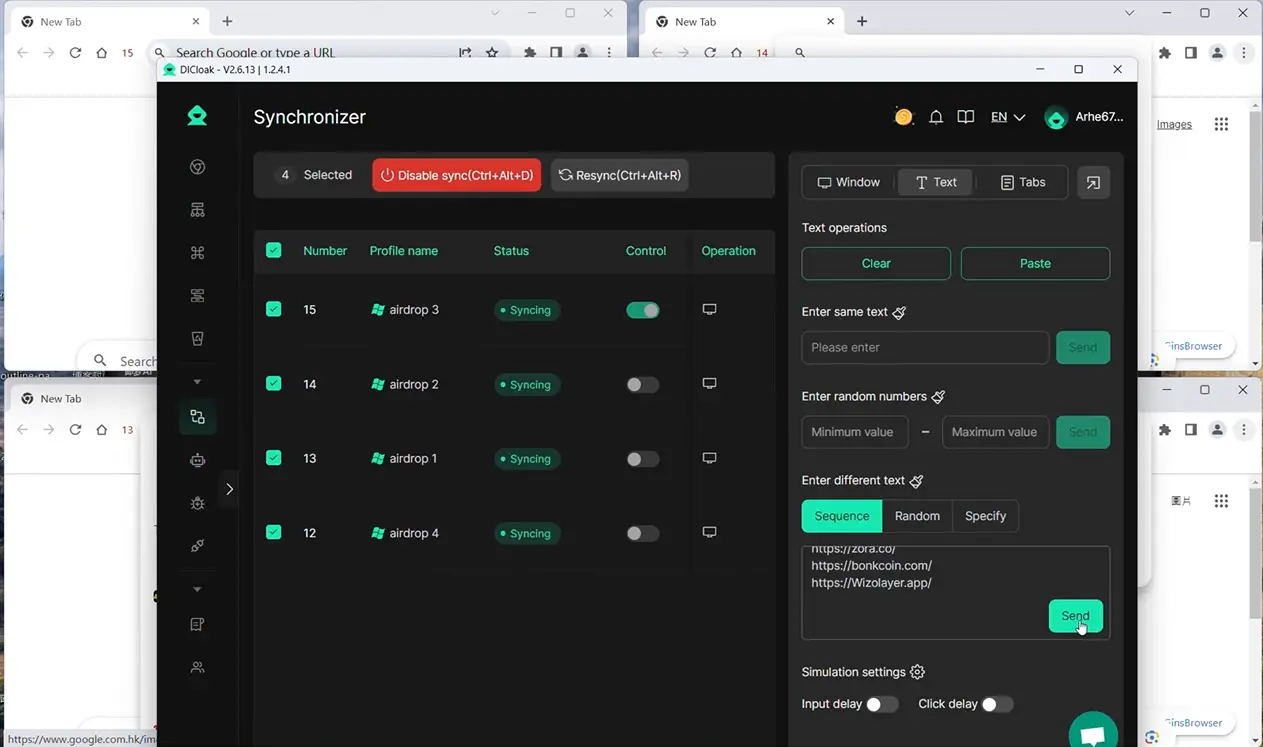
You can reduce repeated browser work as the number of profiles grows. You can use RPA for supported repeatable browser tasks, while Synchronizer applies the same action across several open profile windows. Bulk tools let you create, import, open, edit, group, share, or transfer several profiles at once.
For example, you can group profiles by marketplace, region, client, or campaign, then open the group required for the day’s work. This saves you from organizing and opening every profile individually.
These tools support browser-based workflows. They do not automatically manage orders, inventory, product listings, refunds, customer service, fulfillment, payments, or platform policies.
FAQ about best ecommerce platform for small business
What Is the best ecommerce platform for small business?
Shopify is the strongest all-around option for a growing independent store today. Wix suits beginners, Square Online fits local retail, WooCommerce works for WordPress users, and Squarespace serves creative or service businesses. Etsy helps handmade sellers reach marketplace shoppers, while BigCommerce fits more complex operations.
What Is the cheapest ecommerce platform for small business?
Square Online may offer a free entry plan, while WooCommerce provides a free core plugin. Neither removes all costs. Payment processing, hosting, apps, plugins, themes, and maintenance can still add up. The lowest advertised price is not always the lowest total cost over the first year.
What Is the best ecommerce platform for beginners?
Wix is one of the easiest options for visual setup and basic store management. Shopify offers stronger ecommerce tools with a manageable learning curve, while Square Online may feel simpler for businesses already using Square. The right beginner option depends on the products, sales channels, and support needed.
How Should You Compare Shopify vs Etsy for small business?
Shopify and Etsy serve different purposes. Shopify gives you an independent website with more control over branding and the customer experience. Etsy is a marketplace with shoppers already searching for products. Some sellers use Etsy for discovery and Shopify for brand building, content, and repeat customers.
Can I Switch Ecommerce Platforms Later?
Yes, switching ecommerce platforms later is possible. Products, customer records, and order history may be exportable, but designs, URLs, apps, integrations, and some historical data may need manual rebuilding. Before choosing a platform, check its export tools, redirect options, cancellation rules, and data access limits.
Managing several ecommerce stores, marketplace accounts, ad accounts, or team workflows? Consider whether separate browser profiles, team permissions, and browser automation could make daily work easier.Try DICloak for Free.
 Web Proxy Tools
 Free Tools
 Cookie Plugin
 UA Generator
 MAC Address Generator
 IP Generator
 IP Address List
 2FA Code Generator
 World Clock
 Anonymous Check
 WebRTC Leak Test
 UUID Generator
 Free Web Proxy Site
 Proxy Checker
 FB Ad Checker
 AI Web Scraping
 Free SMM Tools
 Twitter Shadowban Checker
 Instagram Name Checker
 UTM Generator
 Username Generator
 AI Hashtag Generator
 LinkedIn Headline Generator
 Social Media Image Resizer