With 136 million active buyers, about 2.5 billion live listings, and $22.2 billion in GMV in Q1 2026, eBay is still one of the biggest marketplaces for sellers who want to grow beyond one small store. That is why many sellers start thinking about multiple eBay accounts when they sell different product lines, enter new markets, or separate buying from selling. But more accounts also mean more risk if the setup is messy.
The real question is “How do I manage multiple eBay accounts without getting them linked or creating problems for my business?” eBay allows multiple accounts, but not when they are used to escape limits, restrictions, or unresolved issues. In this guide, you will learn where account links usually happen, how to keep daily operations separate, how to use DICloak Antidetect Browser for cleaner account environments, and which mistakes sellers should avoid before scaling too fast.
Can You Actually Have More Than One eBay Account?
Yes, you can have more than one eBay account. eBay allows multiple accounts, but it does not allow sellers to use another account to avoid limits, restrictions, or unresolved policy problems. The issue is not the number of accounts you own. The issue is whether each account has a real purpose, clean records, and stable performance.
Many sellers use separate accounts for normal reasons, such as keeping buying and selling apart, separating different product lines, or running different brands or markets. This makes sense when each account helps make daily work cleaner. But if your main account has selling limits, poor seller metrics, open cases, payout issues, or a restriction, another account will not fix the root problem. Two well-managed accounts are better than several messy accounts that share the same products, habits, and problems.
What Can a Second eBay Account Actually Help You Do?
A second eBay account can help when it makes your business easier to organize. It becomes risky when it is used to get around selling limits, restrictions, or problems on another account.
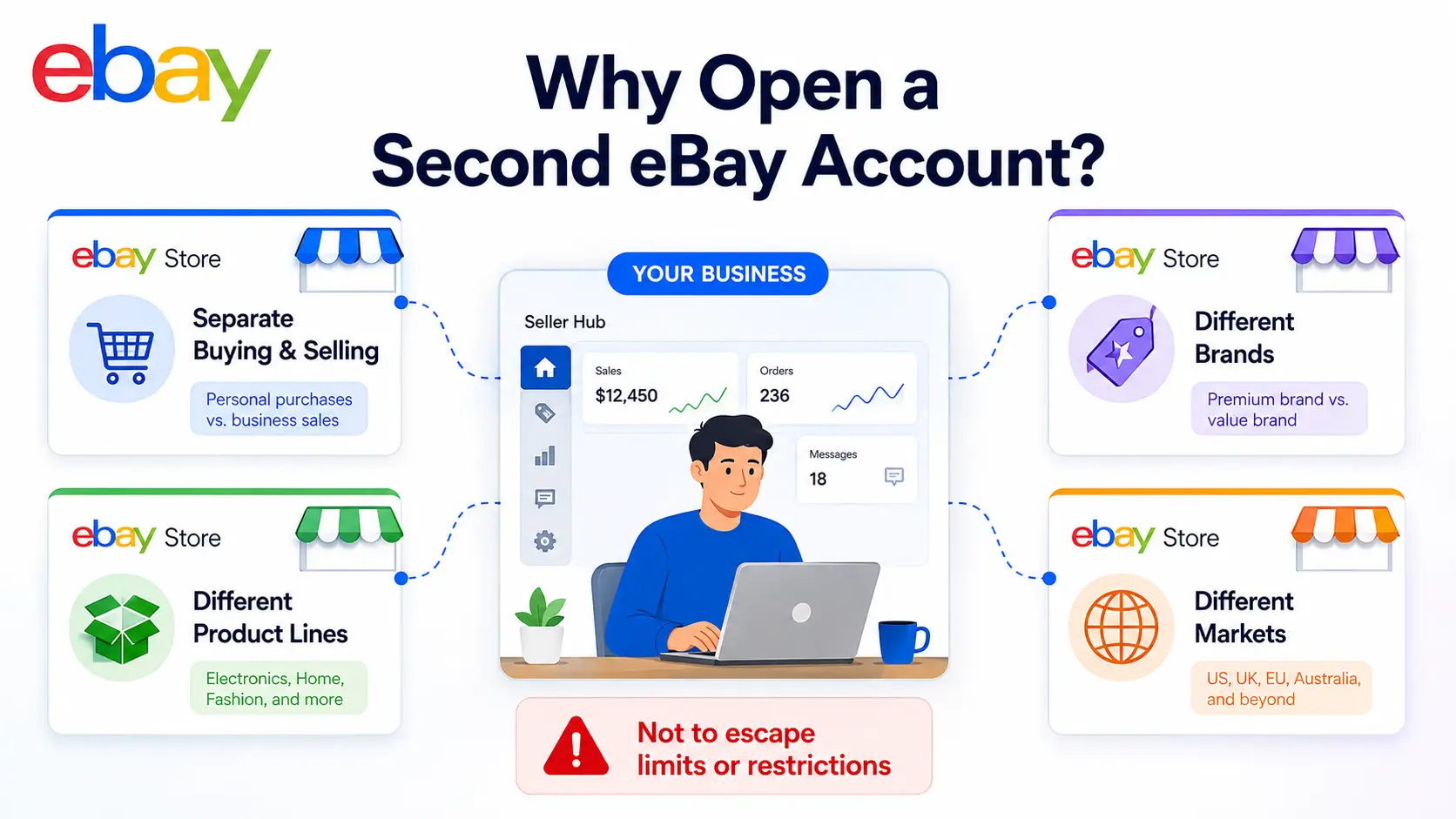
Many sellers use separate accounts because one account is no longer enough for clean daily work. This can make sense in a few common cases:
- You want to keep personal buying separate from business selling.
- You sell very different product lines, such as auto parts and collectibles.
- You run different brands with different store styles.
- You target different markets, countries, or buyer groups.
- You need separate workflows for listings, shipping, returns, and customer messages.
For example, a store that sells used car parts may need very different photos, descriptions, shipping rules, and return policies from a store that sells vintage toys. Keeping them under one account can make the store feel messy. A separate account can help each store speak to the right buyer and stay easier to manage.
But a second account should not be used as a shortcut to problems. If your first account has selling limits, open cases, poor seller metrics, payout issues, or restrictions, another account will not fix the real issue. It may only add more listings, more orders, and more account health problems to watch.
Before opening another account, ask yourself a few simple questions:
- Does this account have a clear business purpose?
- Will it make listings, orders, and inventory easier to manage?
- Can I keep its products and buyer messages separate?
- Is my first account already stable and healthy?
- Am I opening this account for growth, not to escape a problem?
Multiple eBay accounts work best when each one has a clear role and can stand on its own. If another account makes your operation cleaner, it may be useful. If it only exists because the first account is in trouble, it is probably the wrong move.
Where Do Multiple eBay Accounts Usually Get Linked?
Multiple eBay accounts usually get linked through repeated signals, not one single mistake. The most common signals come from the browser profile, account details, listings, inventory, and what a seller does after one account gets restricted.
The same browser turns into a mess very fast
Using one normal browser for several eBay accounts can get messy fast. Cookies, sessions, saved logins, extensions, and cached data may all sit in the same place. Even if the seller means to stay organized, it becomes easy to open the wrong account, reply to the wrong buyer, or edit the wrong listing.
This is not only a technical issue. It is also a daily work issue. When accounts share the same browser space, the seller has to remember which account is active every time they upload a product, check orders, or answer messages. One small mix-up can create buyer confusion or hurt the wrong store.
Reused account details can make stores look connected
Account details can also create links between stores. Email addresses, phone numbers, business names, payout details, tax details, return addresses, and shipping locations all tell part of the same story. If several accounts share many of these details, they may look like one connected operation.
This does not mean sellers should use fake information. That creates a different kind of risk. The better approach is to make every account’s details real, consistent, and easy to explain. If two accounts share a business address, there should be a clear reason, such as different product lines under the same business.
Same products, same photos, and same stock pool create extra risk
Many sellers focus only on login details, but listing behavior can also cause problems. If two accounts sell the same SKU, use the same photos, copy the same description, and pull from the same stock, the stores do not look separate in practice. It can also create duplicate listing risk and make inventory harder to control.
The problem gets worse when both accounts serve the same buyers with almost the same offer. Changing a few words in the title does not make the listing truly different. Real separation should show up in the product line, condition, bundle, market, shipping setup, or store purpose.
One restricted account can make the next move more risky
The highest-risk moment often comes after one account gets restricted. A seller may panic and move the same listings, products, and order flow to another account. That can make the second account look like it is being used to continue the same activity instead of solving the original issue.
A restriction should slow the seller down, not push them to move faster. Read the notice, check the affected listings or account metrics, and fix the problem first. If payouts are held or account actions are limited, adding more activity through another account can create more pressure instead of solving the issue.
| Risk area |
What it looks like |
Why it matters |
| Browser risk |
Several accounts used in one regular browser |
Cookies, sessions, and daily tasks can mix |
| Account detail risk |
Same contact, payout, tax, or return details without a clear reason |
Stores may look like one connected operation |
| Listing risk |
Same SKU, photos, title style, or description across accounts |
Can create duplicate listing and search quality issues |
| Inventory risk |
Several accounts selling from the same stock pool |
Increases overselling and fulfillment mistakes |
| Restriction risk |
Moving the same selling activity after one account is restricted |
Can make related accounts more exposed |
How Should You Manage Multiple eBay Accounts Day to Day?
To manage multiple eBay accounts safely, you need to reduce unnecessary connections between them. This is not only about where you log in. It is also about how you separate browser data, account roles, inventory, orders, returns, messages, and seller health.
Manual switching can get messy fast. If you use the same browser for several accounts, cookies, saved sessions, extensions, and daily tasks may overlap. You may open the wrong account, edit the wrong listing, reply to the wrong buyer, or upload tracking to the wrong order. These small mistakes are often what make multi-account selling hard to control.
Separate devices
Some sellers use a different device for each eBay account. This can reduce overlap because each account has its own machine, browser history, saved logins, and work routine. For one or two accounts, this setup can be simple enough.
But separate devices are not always practical as you grow. You still need to keep each account’s login habits, inventory, order flow, and seller health under control. More devices also mean more updates, more maintenance, and more chances for someone to use the wrong account on the wrong machine.
This setup works best when you manage only a small number of accounts and can clearly label each device. For example, one laptop may be used only for a “US auto parts store,” while another is used only for a “collectibles store.” If devices start getting shared casually, the benefit disappears quickly.
Each account should have a stable login environment. A dedicated proxy setup can help keep one account’s connection separate from another account’s connection. The key is consistency, not constant change.
Do not jump between random locations or keep changing the setup just because you can. Sudden changes in login patterns can create extra friction, especially when an account is new or already under review. Keep each account’s login routine simple, stable, and easy to track.
This also needs to match your account details. If an account is built around a certain business, market, or shipping location, its login setup should not look random. The goal is to make each account’s work environment clean and consistent.
Separate browser profiles
A cleaner way to manage multiple accounts on one device is to keep each eBay account in its own browser profile. Each account should have its own browser profile, cookies, saved session, extensions, bookmarks, and login history. This helps you avoid logging out of one account and logging into another inside the same normal browser every day.
This matters because eBay account management is not only about the login page. You may also use product research tools, shipping pages, spreadsheets, saved bookmarks, and customer service templates. Keeping those tools inside the right browser space helps you avoid mixing work between accounts.
A separate browser profile does not replace good seller behavior. You still need clean listings, accurate inventory, fast shipping, and careful customer service. It simply makes daily work easier to control when several accounts are handled from the same device.
Account roles and workflow control
Every account needs a clear role before you use it. You should be able to describe each account in one short phrase, such as “buying-only account,” “US auto parts store,” “UK market account,” or “collectibles store.” If you cannot explain what an account is for, it may only add more risk and more work.
The same separation should apply to daily operations. Know which account owns each SKU, which shipping template belongs to each store, which return address is used, and which buyer messages belong to which account. Multi-account problems often happen after login, when orders, stock, returns, and messages start to overlap.
Use a simple weekly check to keep every account under control:
- Does each account still have a clear business purpose?
- Are listings and SKUs separated by account?
- Are orders, returns, and buyer messages handled in the right account?
- Are tracking uploads, cancellations, and cases under control?
- Are there any payout holds, verification requests, or account warnings?
- Is the account healthy enough before you add more listings?
Managing multiple eBay accounts is not only about keeping logins separate. It is about keeping the full selling workflow separate, from browser sessions to inventory, shipping, messages, and seller health.
With DICloak, you can keep each eBay account in its own browser profile, with separate cookies, sessions, fingerprint settings, and proxy configuration. This setup cannot fix poor seller performance or duplicate listings, but it can make daily account separation much easier to manage.
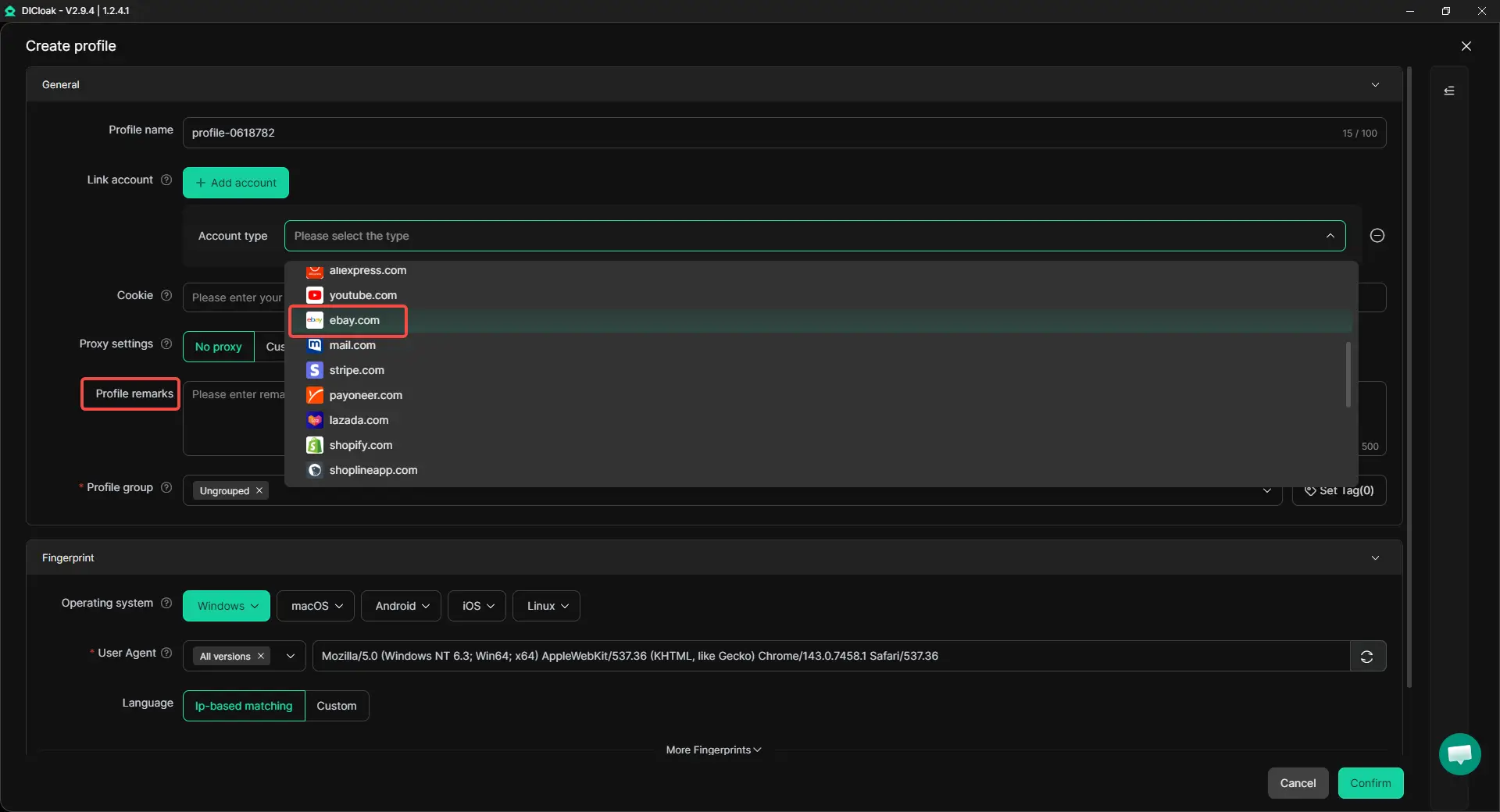
Create one DICloak profile for each eBay account
Start by downloading DICloak and creating your account. Then create one browser profile for each eBay account. Do not use one profile for several eBay accounts, even if it feels faster.
Use a clear profile name, such as “US Auto Parts,” “Collectibles Store,” or “Buying Account.” You can also use Profile Remarks to save short notes, such as account purpose, assigned operator, proxy reminder, or daily task rules. This helps you avoid opening the wrong profile when handling listings, orders, returns, or buyer messages.
Configure a stable proxy setup
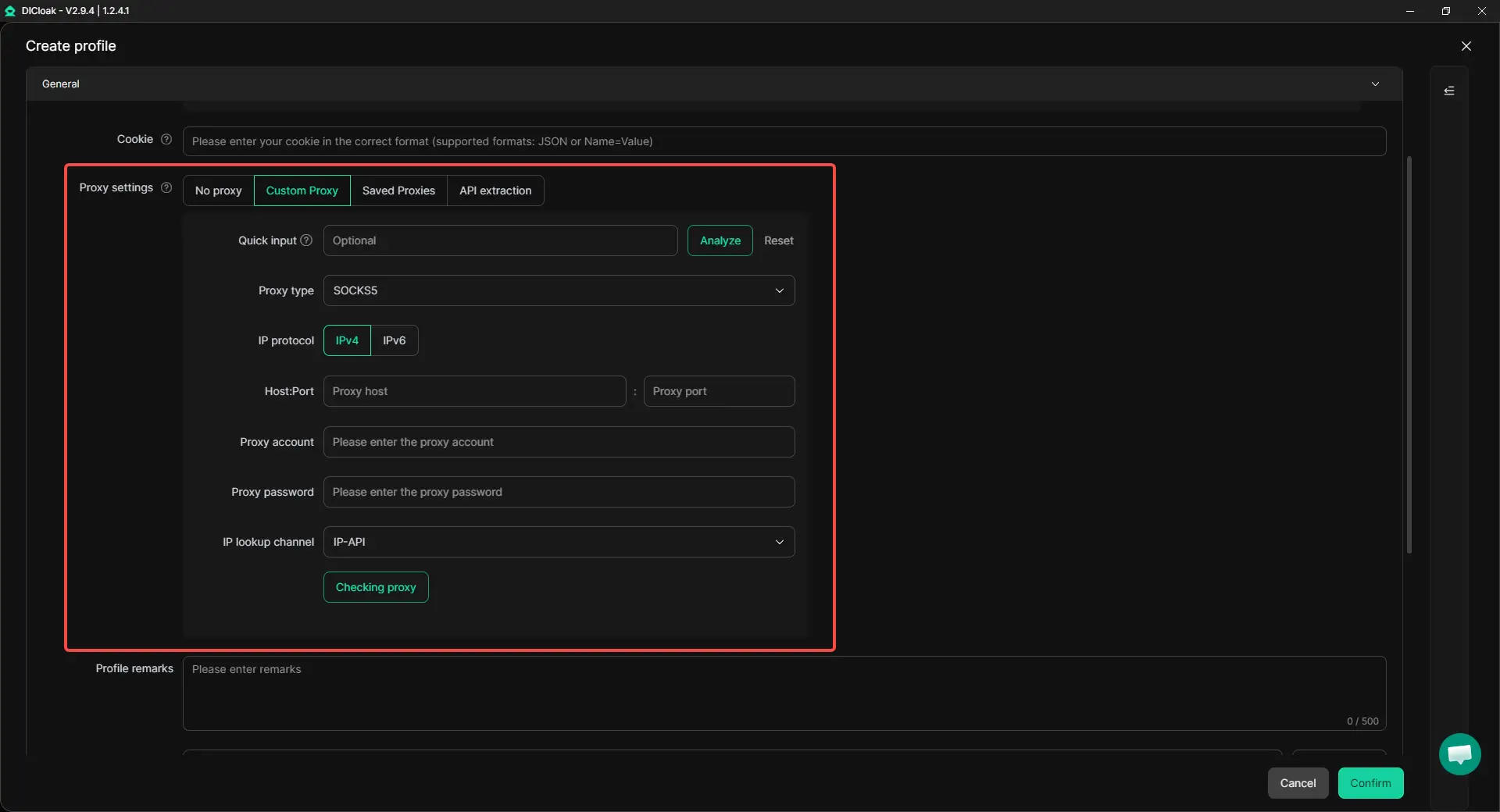
After creating the profile, configure the proxy settings for that account. The goal is not to keep changing connections. The goal is to give each eBay account a stable and consistent login environment.
A simple setup works best. One eBay account should match one DICloak profile and one stable proxy configuration. This makes your login routine easier to track and repeat.
Keep account tools inside the right profile
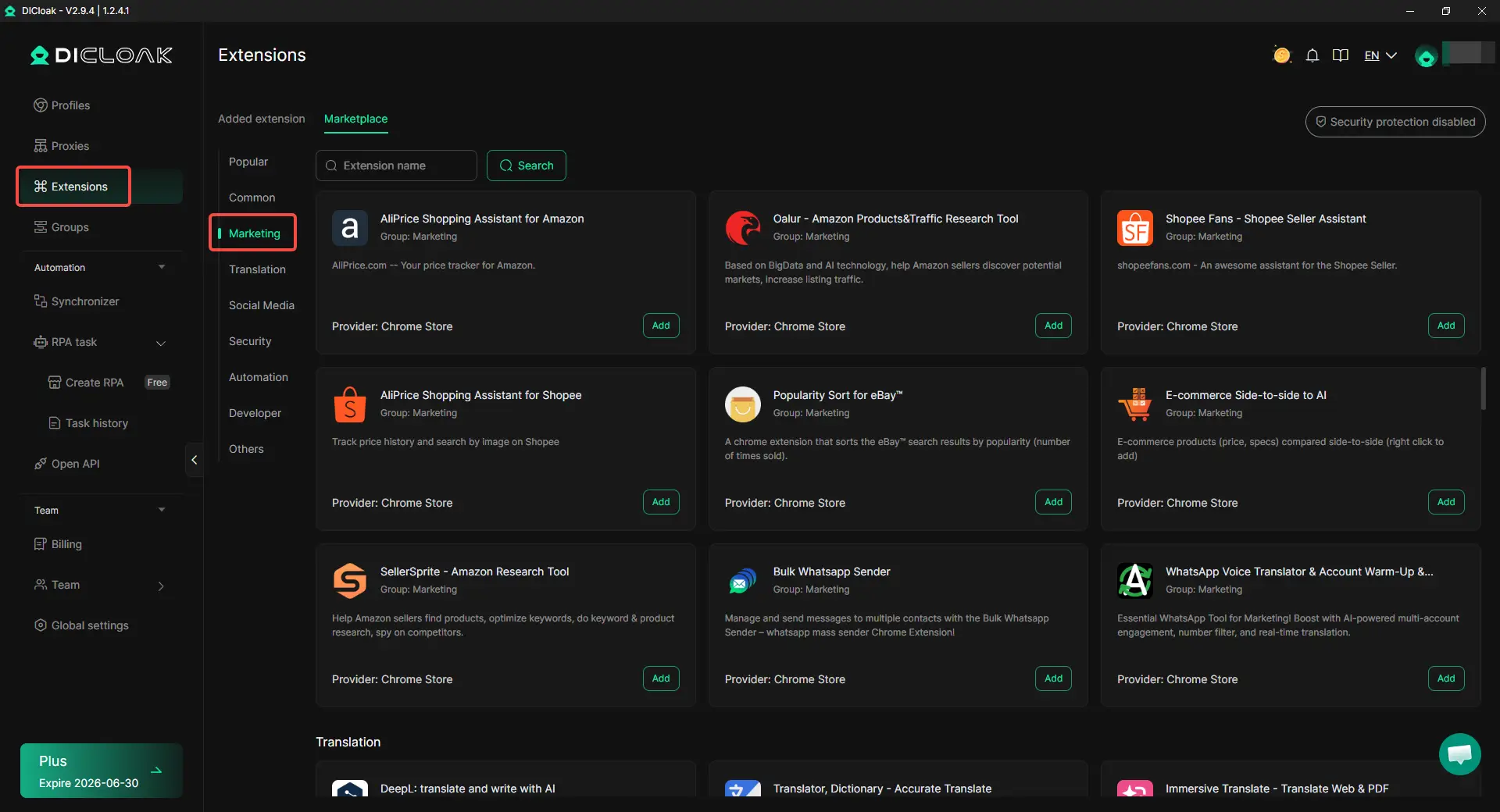
Each eBay account may need different tools, bookmarks, extensions, supplier pages, shipping pages, or buyer message templates. Keep these inside the matching DICloak profile so the account context stays clear.
When you open the profile again, everything should belong to that account. This reduces confusion, especially when several team members manage different stores.
Control team access
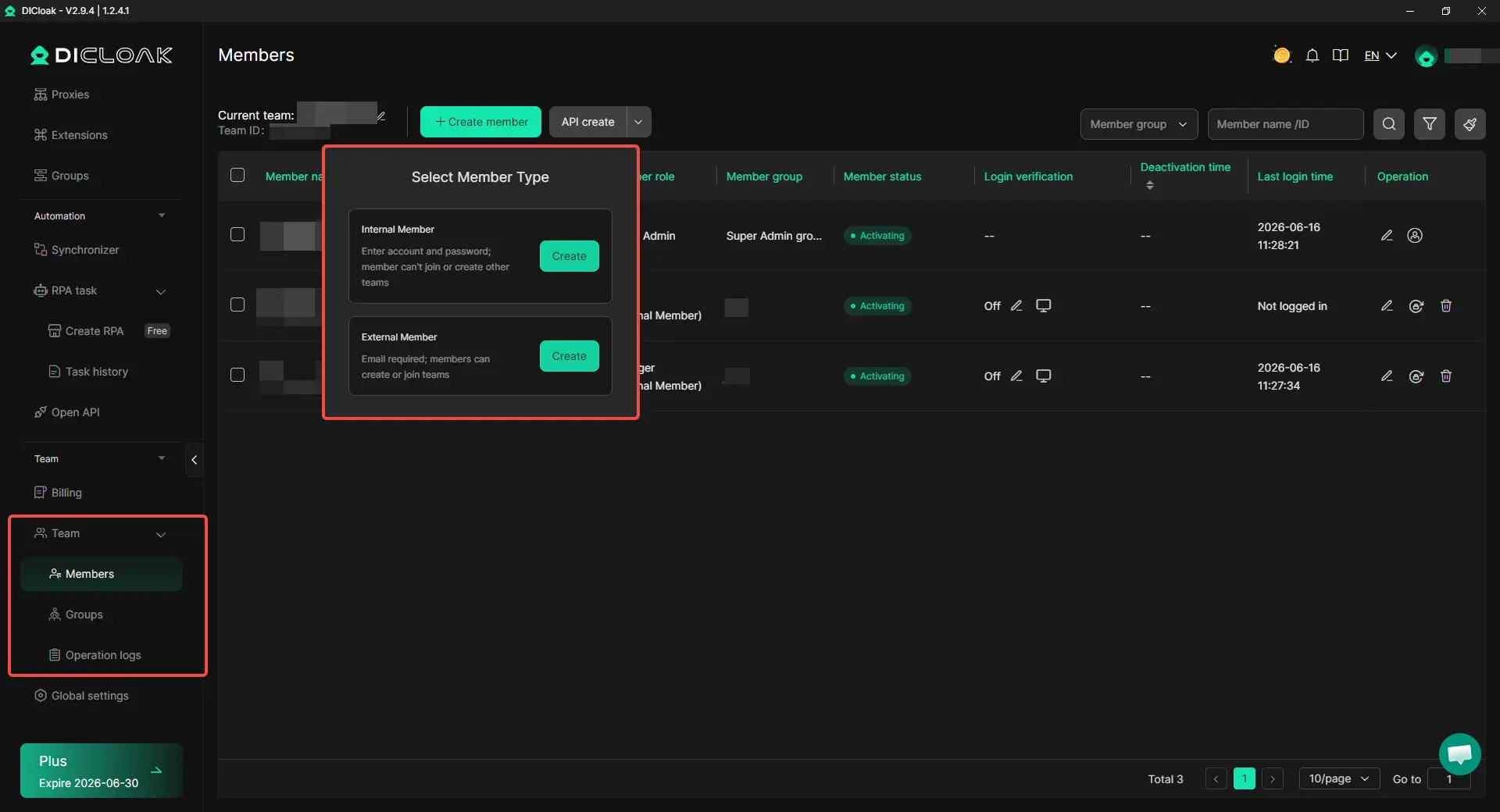
If more than one person works on your eBay accounts, not everyone needs access to every profile. With DICloak team permissions, you can control who can open which account profile.
Operation logs can also help you review changes. If a listing was edited, a profile was opened, or an account setting was changed, you can check the record instead of guessing who did it.
Check the setup before adding more accounts
Before adding another eBay account, make sure the first profile is already clean and stable:
- One eBay account matches one DICloak profile.
- The profile name shows the account’s purpose.
- Profile Remarks include useful notes.
- Cookies, sessions, bookmarks, and extensions stay inside the profile.
- The profile has a stable proxy configuration.
- Only the right team members can access it.
- Listings, orders, returns, and messages are handled from the matching profile.
With DICloak as part of a clean account workflow, you can separate browser profiles, proxy settings, sessions, team permissions, and operation records. Safe eBay management still depends on clear account roles, accurate inventory, fast shipping, and healthy seller performance.
Mistakes That Make Multiple eBay Accounts Harder to Keep Safe
Most multi-account problems start with messy decisions, not one single login mistake. If you open accounts for the wrong reason, copy the same listings, grow too fast, or let the team work without rules, your accounts become harder to manage and easier to connect.
Opening another account because the first one is weak
A second account will not fix a weak first account. If your main account has poor seller metrics, open cases, late shipments, payout issues, or selling limits, you should deal with those problems first. Opening another account too early may only copy the same bad habits into a new place.
This mistake usually happens when sellers feel pressure to keep sales moving. They think another account will give them a fresh start, but the same products, same workflow, and same fulfillment issues often follow. If the root problem is late shipping or poor buyer service, another account will not make the operation healthier.
Copying the same listing across stores
Do not casually copy the same item across multiple eBay accounts. If the product, photos, description, stock pool, and buyer offer are almost the same, changing a few words in the title does not make it a truly different listing. This can create duplicate listing risk and make your stores look less separate.
It also creates real inventory problems. Two accounts may sell from the same stock without clear tracking, which can lead to overselling, cancellations, and late shipments. If two stores sell similar products, make sure the difference is real, such as product condition, bundle, market, or store purpose.
Moving too fast on a new account
New accounts should grow at a pace you can actually support. Listing too many items, changing prices too often, switching categories quickly, or taking on more orders than you can ship can create problems fast. A new account needs stable listings, accurate stock, and clean order handling before you push harder.
Start with products you can fulfill well. Watch buyer messages, tracking uploads, returns, and cases closely. If small problems appear early, fix them before adding more listings or expanding into another product line.
Letting the team work without rules
When several people work on multiple accounts, the biggest risk is often confusion. Someone may open the wrong account, edit the wrong price, use the wrong shipping template, or reply to the wrong buyer. These mistakes can hurt buyer experience and make account performance harder to control.
Every account should have clear access rules and task ownership. One person may handle listings, another may handle orders, and another may answer messages, but everyone should know which account they are working in. Without that structure, multi-account selling turns into guesswork.
| Mistake |
Why it hurts |
What to do instead |
| Opening another account when the first one has problems |
It may repeat the same seller health issues |
Fix the original account first |
| Copying the same listing across accounts |
It can create duplicate listing and inventory risk |
Keep products, offers, and stock clearly separated |
| Scaling a new account too fast |
It increases pressure on shipping, support, and account health |
Grow only as fast as you can fulfill |
| Letting everyone access every account |
It makes mistakes hard to trace |
Set clear roles and account access rules |
| Ignoring weekly account checks |
Small issues can build up quietly |
Review metrics, messages, cases, and payout status often |
FAQs About Managing Multiple eBay Accounts Without Getting Them Linked
Can I use the same address for two eBay accounts?
Yes, two eBay accounts can share an address in real life, especially for one household or one business. But the same address can also connect accounts, so each account should have a clear purpose. Do not use false address details just to look separate.
Can two eBay accounts use the same bank account?
It depends on the real account owner and payout setup. Bank details should match the person or business behind the eBay account. If two accounts are part of the same business, keep clear sales, fee, return, and payout records for each account.
Can I sell the same item on two different eBay accounts?
It can be risky if the listings are almost the same. Same SKU, same photos, same stock pool, and same buyer offer can create duplicate listing and inventory problems. If there is no real difference in product, bundle, condition, market, or store purpose, keep the item under one account.
What happens if one eBay account is restricted?
Do not rush to move the same listings or sales activity to another account. First, read the notice, check the reason, and fix the issue. A restricted account may also affect payouts, so review orders, messages, returns, and related accounts before scaling again.
Is DICloak Antidetect Browser enough to manage multiple eBay accounts safely?
With DICloak Antidetect Browser, you can keep each eBay account in a separate browser profile with its own cookies, sessions, fingerprint settings, and proxy configuration. This helps reduce account mix-ups, especially when managing several stores from one device. But safe eBay management still depends on clear account roles, clean listings, accurate inventory, fast shipping, and healthy seller performance.
Conclusion
Managing multiple eBay accounts without getting them linked in 2026 is not about simply opening more accounts or changing where you log in. The safer approach is to give each account a clear business purpose, keep browser sessions and account details separate, avoid duplicate listings, manage inventory carefully, and maintain strong seller performance across every store.
eBay allows sellers to have more than one account, but those accounts should not be used to escape limits, restrictions, or unresolved problems. With DICloak Antidetect Browser, you can manage each eBay account in a separate browser profile with its own cookies, sessions, fingerprint settings, proxy configuration, and team access rules. Still, long-term safety depends on clean operations, accurate stock, fast shipping, clear account roles, and consistent account health checks.
 Web Proxy Tools
 Free Tools
 Cookie Plugin
 UA Generator
 MAC Address Generator
 IP Generator
 IP Address List
 2FA Code Generator
 World Clock
 Anonymous Check
 WebRTC Leak Test
 UUID Generator
 Free Web Proxy Site
 Proxy Checker
 FB Ad Checker
 AI Web Scraping
 Free SMM Tools
 Twitter Shadowban Checker
 Instagram Name Checker
 UTM Generator
 Username Generator
 AI Hashtag Generator
 LinkedIn Headline Generator
 Social Media Image Resizer