ChatGPT is one of the most popular tools online today. Millions of people use it every day to write emails, plan trips, learn new subjects, or even get help with work. ChatGPT grew fast because it is easy to use and can answer many types of questions. According to user reports and community discussions, many people ask a simple question: can I share my ChatGPT account with my family? This question also comes up as can I share my ChatGPT account with my wife, especially when families want to save money or make life easier.
At first, sharing sounds simple. If one person has ChatGPT, maybe their spouse or other family members can use the same login to save on costs. Some families already try this, sharing the same account to help kids with homework or plan family events. But ChatGPT’s maker, OpenAI, has rules about who can use one account. It is important to understand these rules before you decide to share. Knowing the official policy and the risks helps you protect your privacy and avoid problems like losing access to your account or having your data mixed up.
In this article, we will explore the question of whether you can share your ChatGPT account with your family, what the rules say, and why this matters for you. We will use clear examples that anyone can follow, so you get useful, real-world insight.
What’s ChatGPT Plus Subscription?
ChatGPT, developed by OpenAI, has grown fast into one of the most used AI tools in the world. Many people ask “Can I share my ChatGPT account with my family” , because they want to save money on subscriptions. To answer that question, it helps to understand the different ChatGPT plans and what each one offers.
OpenAI offers several plans for ChatGPT users. These include Free, Plus, Pro, Business, and Enterprise plans. Each plan has different features and price points to match user needs. Knowing these differences helps you decide which plan fits your situation best — whether you are an individual user, a student, a creator, or part of a team.
Here’s a simple comparison of the key plans based on information from the official ChatGPT pricing page:
| Plan |
Price (per month) |
Best For |
Key Features |
| Free |
$0 |
Casual users |
Basic GPT‑5 access, limited messages and uploads |
| Plus |
~$20 |
Individual heavy users |
Expanded GPT‑5.2 reasoning, faster responses, more uploads |
| Pro |
~$200 |
Power users |
Unlimited messages, full advanced models, fastest access |
| Business |
Custom (~$25‑30/user) |
Teams & companies |
Team workspace, admin controls, app integrations |
| Enterprise |
Custom |
Large orgs |
Enterprise security, large context, advanced controls |
ChatGPT Plus is the plan most people think of when they wonder “Can I share my ChatGPT account with my family.” For around $20 per month, Plus gives more power than the free plan. You get expanded access to the advanced GPT‑5.2 model, faster replies, bigger message limits, better image creation, advanced tools like tasks and deep research, and early access to some new features.
For example, a freelance writer might use ChatGPT Plus every day to brainstorm ideas, edit draft text, and create social posts without waiting in priority queues. A student might use the advanced reasoning tools to help research term papers or plan study projects. These everyday uses show why many people choose Plus over the free option.
By understanding the pricing plans, you can see that while ChatGPT Plus offers great value for individuals, sharing that one Plus account with others — like family members — isn’t the same as everyone having their own plan. Knowing this helps you decide whether to keep one Plus account for yourself or consider individual plans for each user instead.
Account Sharing Policies and Guidelines: Can I Share My ChatGPT Account with My Family?
Sharing your ChatGPT account with family might seem like a good way to save money, but it's important to understand OpenAI’s rules. In this section, we’ll go over OpenAI’s official stance and the legal and ethical concerns.
Official Stance from OpenAI
The answer is clear: no, you cannot share your ChatGPT Plus account with anyone, including family. OpenAI’s Terms of Service say the account is for individual use only, and sharing it violates their policy.
Why does OpenAI care? They want to prevent misuse of the service. When multiple people use the same account, it’s harder to track activity and enforce content rules. OpenAI tracks login locations and devices. If they see multiple logins from different places, they may flag your account.
If this happens, you could face a warning, temporary ban, or permanent suspension. Plus, OpenAI doesn’t offer refunds, making sharing a risky choice for saving $20 a month.
Legal and Ethical Considerations
Legally, sharing your account breaches OpenAI’s contract. Ethically, sharing accounts puts your privacy at risk, as others can access your personal information. Keeping your account secure is important for both your privacy and the integrity of the service.
In the next section, we will explore the risks involved with sharing accounts and why it’s best to follow OpenAI’s rules.
How Can I Share My ChatGPT Account with My Family?
When you ask “can I share my ChatGPT account with my family,” it’s natural to think of simple ways to let everyone use the same login. Some people also wonder “can I share my ChatGPT account with my wife.” In this section, we’ll look at the real options — both unsafe and safer — and explain official plans that let more than one person use ChatGPT without breaking the rules.
Direct Sharing of Credentials
The most obvious method is simple: you give your username and password to someone else. This is called direct sharing of credentials. For example, a husband might give his login to his wife so she can also use ChatGPT Plus.
While this might seem easy, it comes with clear risks. OpenAI tracks where and how accounts are used. If it sees that the same login is used from many devices or places, it may flag the account as suspicious. That could lead to warnings, temporary bans, or permanent loss of access. Users on community forums confirm that accounts can be locked or need verification when unusual logins appear.
This method also means both people see the same chat history and personal data. If your spouse uses the account while you are logged in, their chats may mix with yours. This puts your privacy and personal information at risk.
Safer Alternatives
Using Shared Devices for Access
One safer option is not to share passwords at all. Instead, family members can use the same device to log in when needed. For example, you might log into your ChatGPT account on a shared home computer for planning a family trip or writing a letter together. This keeps the login limited to one device at a time and reduces some risk of account flags.
However, this still does not change the fact that the account belongs to one person — it does not make it a true shared account under OpenAI rules.
Using Password Managers for Secure Sharing
If you must share credentials (for example, with your wife), a password manager like LastPass or 1Password can help you share login details securely. These tools let you share credentials without sending them in an email or chat message. You can also revoke access easily when needed.
Still, even with a password manager, the underlying problem remains: you are still sharing a login that is meant for one person only. This can still break OpenAI’s terms of service.
Official Family or Team Plans
OpenAI does not currently offer a dedicated “Family Plan” like Spotify or Netflix. Many users have requested this feature on official forums, but no family plan has launched yet.
However, OpenAI does offer multi-user plans designed for groups:
ChatGPT Business / Team Plans
The closest official solution is the ChatGPT Business or Team plan. This plan is made for 2 or more users and lets each person have their own login under one subscription. It also offers shared workspaces, admin controls, and advanced AI features — which are useful for real collaboration.
For example, if you want to share access with your spouse and a friend, you can add their emails under one Business plan subscription. Each user gets their own login and chat history. This is safer and fully compliant with OpenAI’s rules.
While this option costs more (about $25–$30 per user per month), it keeps you from violating the Terms of Service and protects your account. It also lets every user keep their own data separate.
Why Official Plans Are Better
Compared with direct sharing of credentials, official plans offer:
- Separate logins for each person
- User data privacy
- Rules-compliant use
- Less risk of account suspension
These benefits make official plans a better choice for families or teams that want stable and safe access to ChatGPT without breaking OpenAI’s policies.
While official plans like ChatGPT Business or Team are secure, they can be costly. If you're looking for a more affordable solution, DICloak is a great option. DICloak offers a cost-effective way to manage multiple users without violating OpenAI’s terms. In the next section, we'll walk you through a step-by-step guide on how to securely share your ChatGPT account with your family when using DICloak.
Sharing a ChatGPT account with family members may seem like a convenient solution, but it comes with significant risks, as we’ve discussed earlier. To maintain privacy and avoid violations of OpenAI’s terms, it's essential to find secure ways to share access. In this section, we’ll explore how using a tool like DICloak can help manage and protect a shared ChatGPT account safely, while still allowing multiple users to access the service. DICloak offers a variety of features that make sharing an account both safe and efficient. Here's how you can set up a shared ChatGPT account with DICloak:
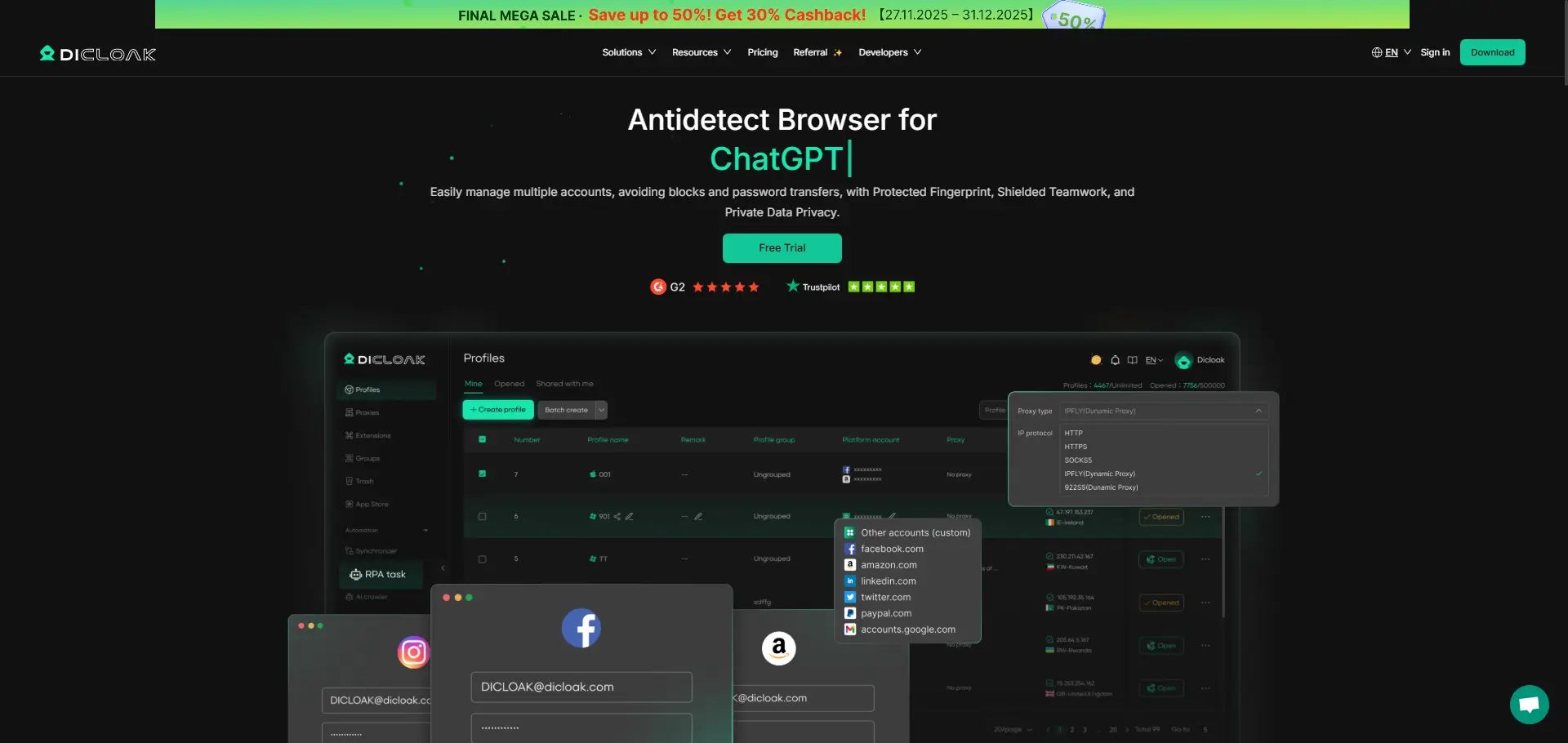
1. Download and Install DICloak
First, visit the official DICloak website, register for an account, and download the application onto your computer. The installation process is straightforward, and you don't need technical expertise to get started.
2. Choose the Right Plan
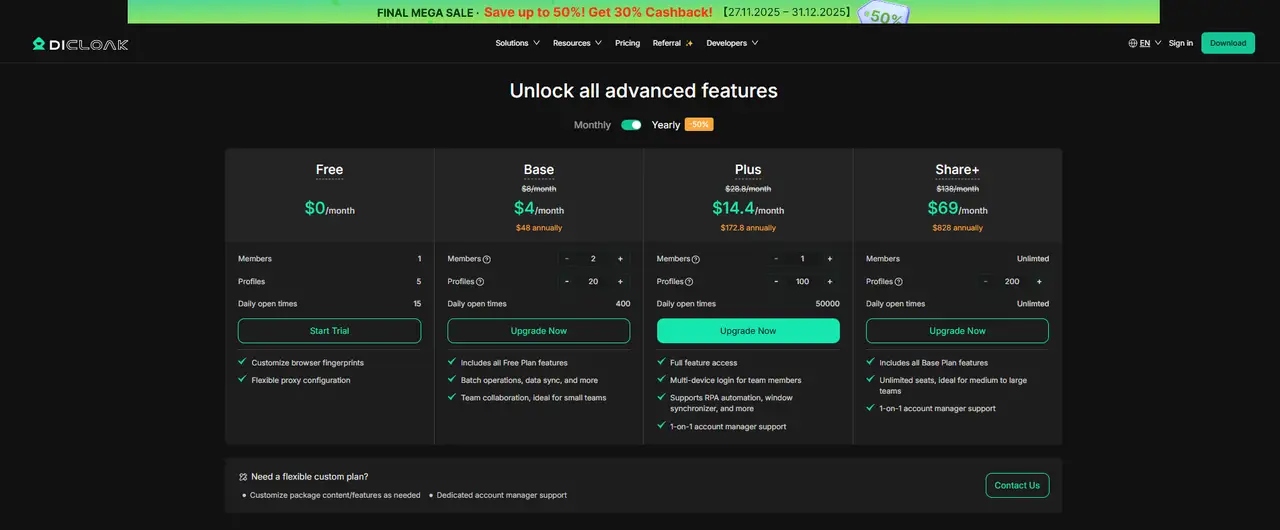
To share profiles securely, you’ll need to subscribe to a DICloak plan. The Base Plan is ideal for smaller teams or families, while the Share+ Plan is better for larger groups who need unlimited member access. Choose the plan that fits your family size or team’s needs.
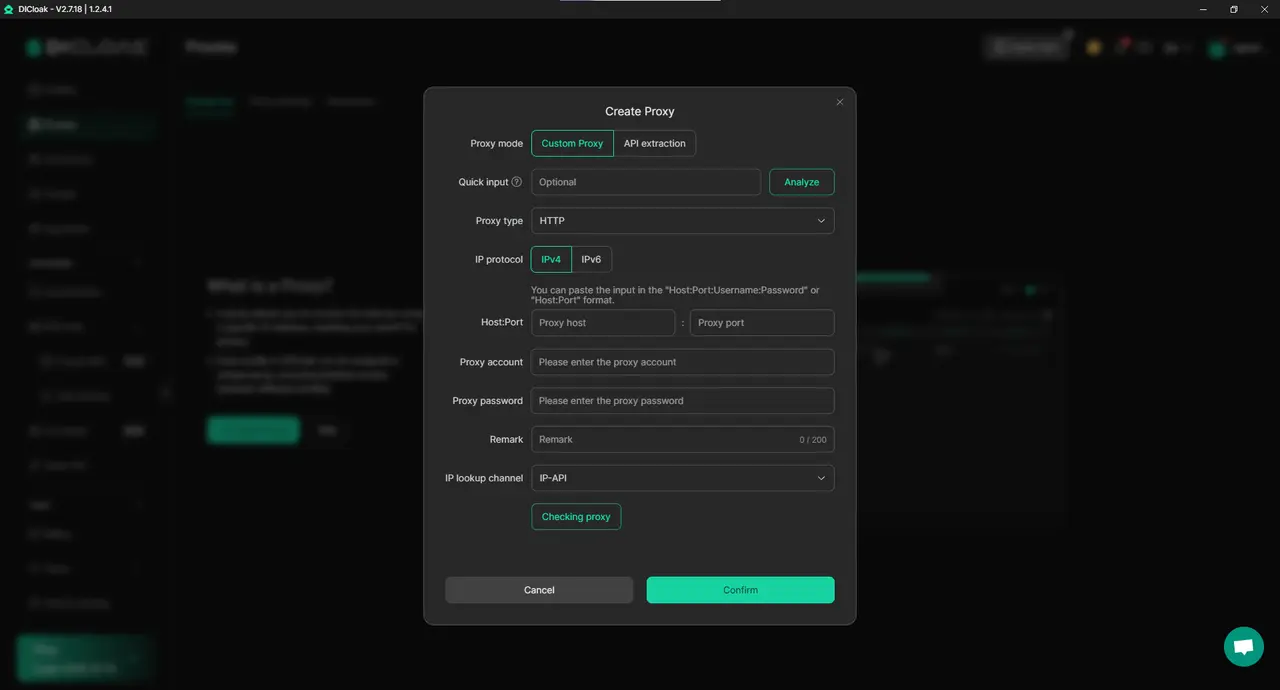
3. Set Up a Static Residential Proxy (Recommended)
While not required, using a static residential proxy is highly recommended. This provides a stable IP address for your shared profile, preventing ChatGPT's security system from flagging your account for logging in from multiple locations. By using a fixed proxy, you reduce the risk of forced logouts or other security problems. DICloak partners with third-party providers for proxy services.
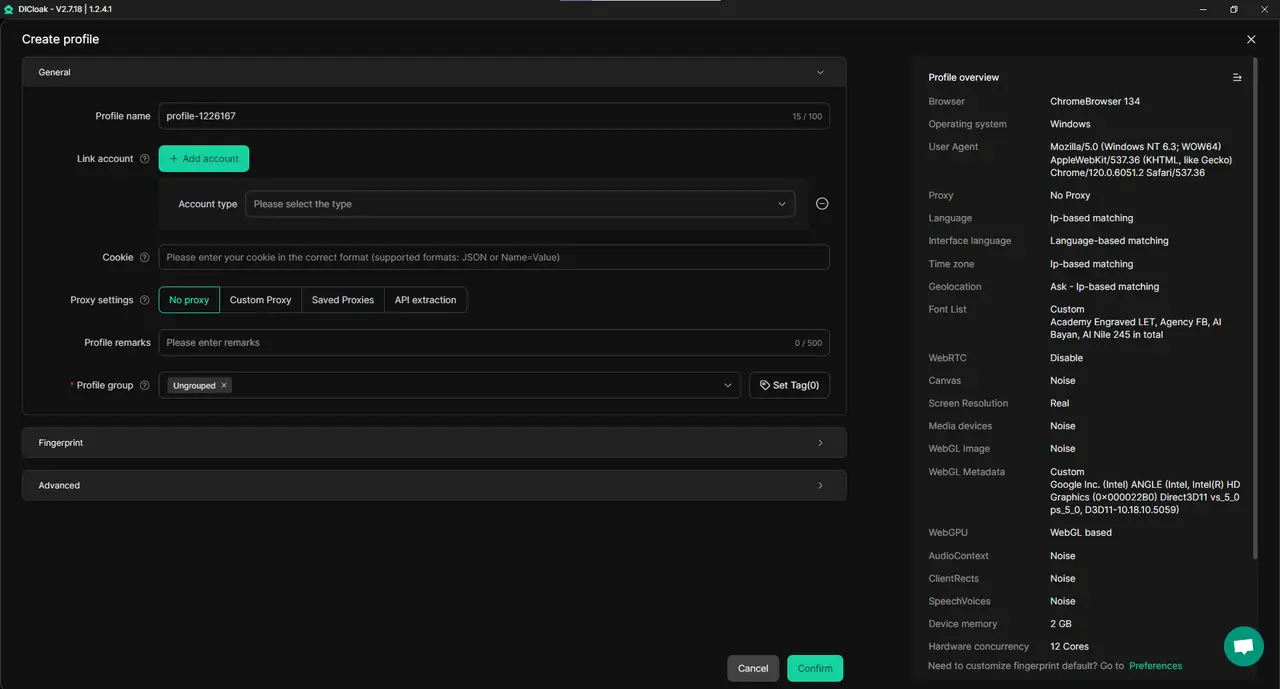
4. Create a New Browser Profile
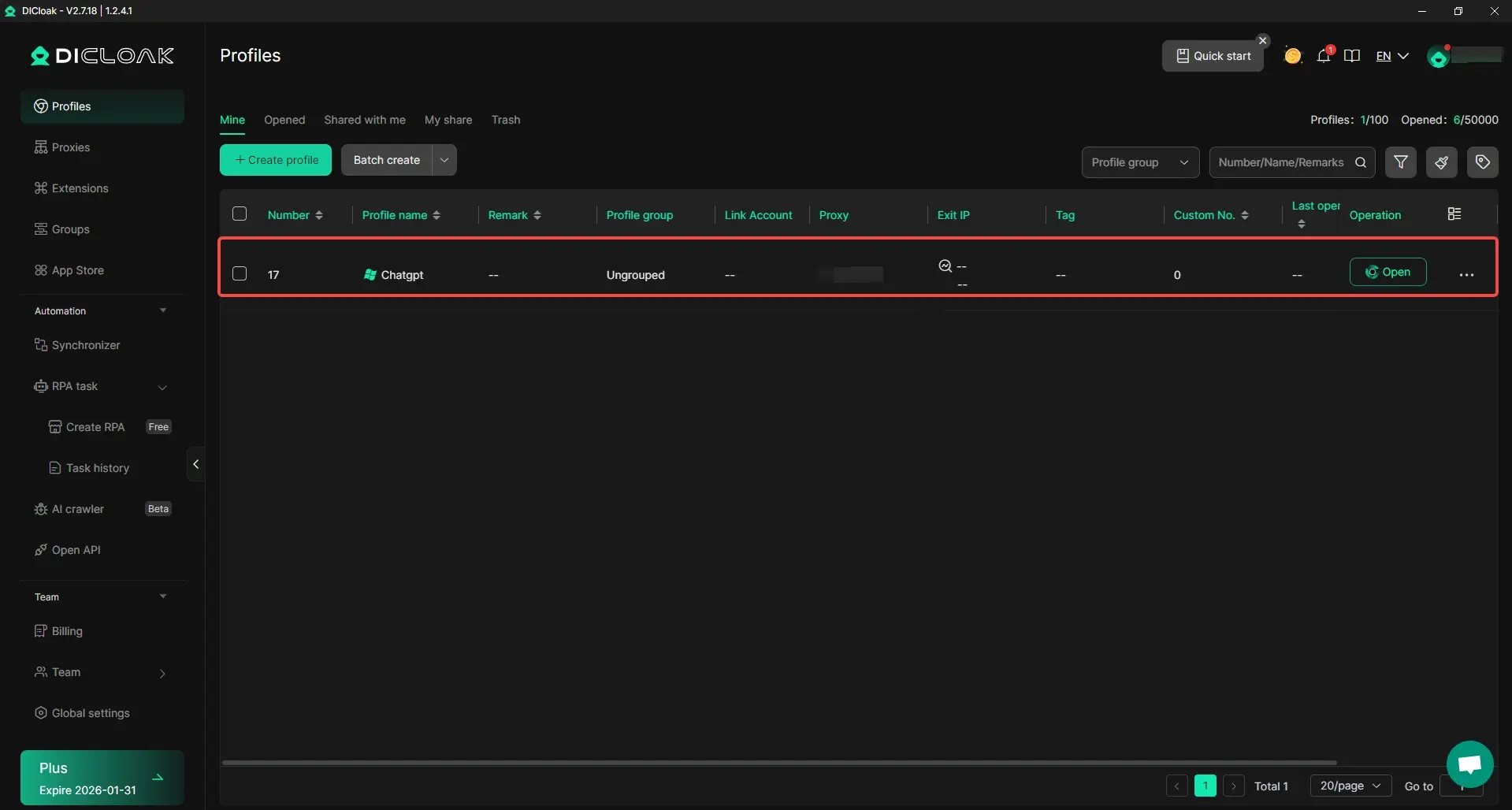
Inside the DICloak application, create a new browser profile that will act as the dedicated, secure profile for your shared ChatGPT account. This profile isolates your session, ensuring that all family members access ChatGPT through a secure, unified environment.
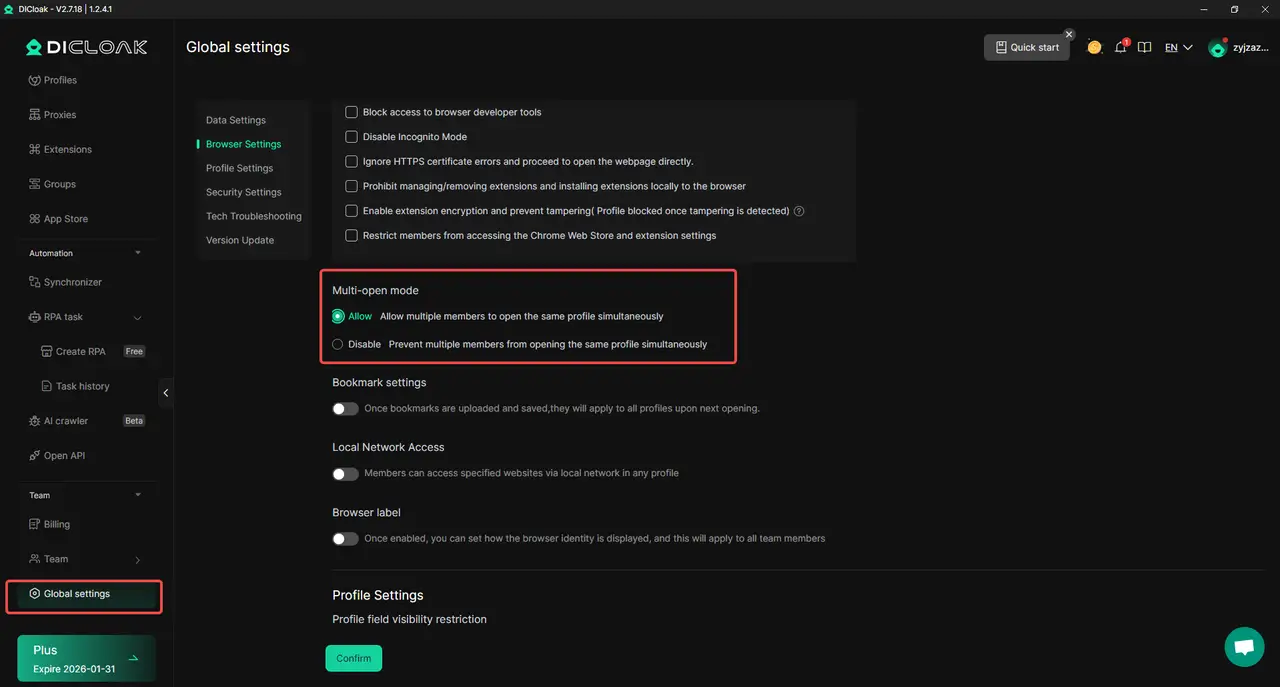
5. Enable Multi-Open Mode
To allow multiple users to access the same ChatGPT account simultaneously, go to Global Settings in DICloak and enable Multi-open mode. This feature ensures that your family members can log in and use the same account without interfering with each other's sessions.
6. Log In to ChatGPT
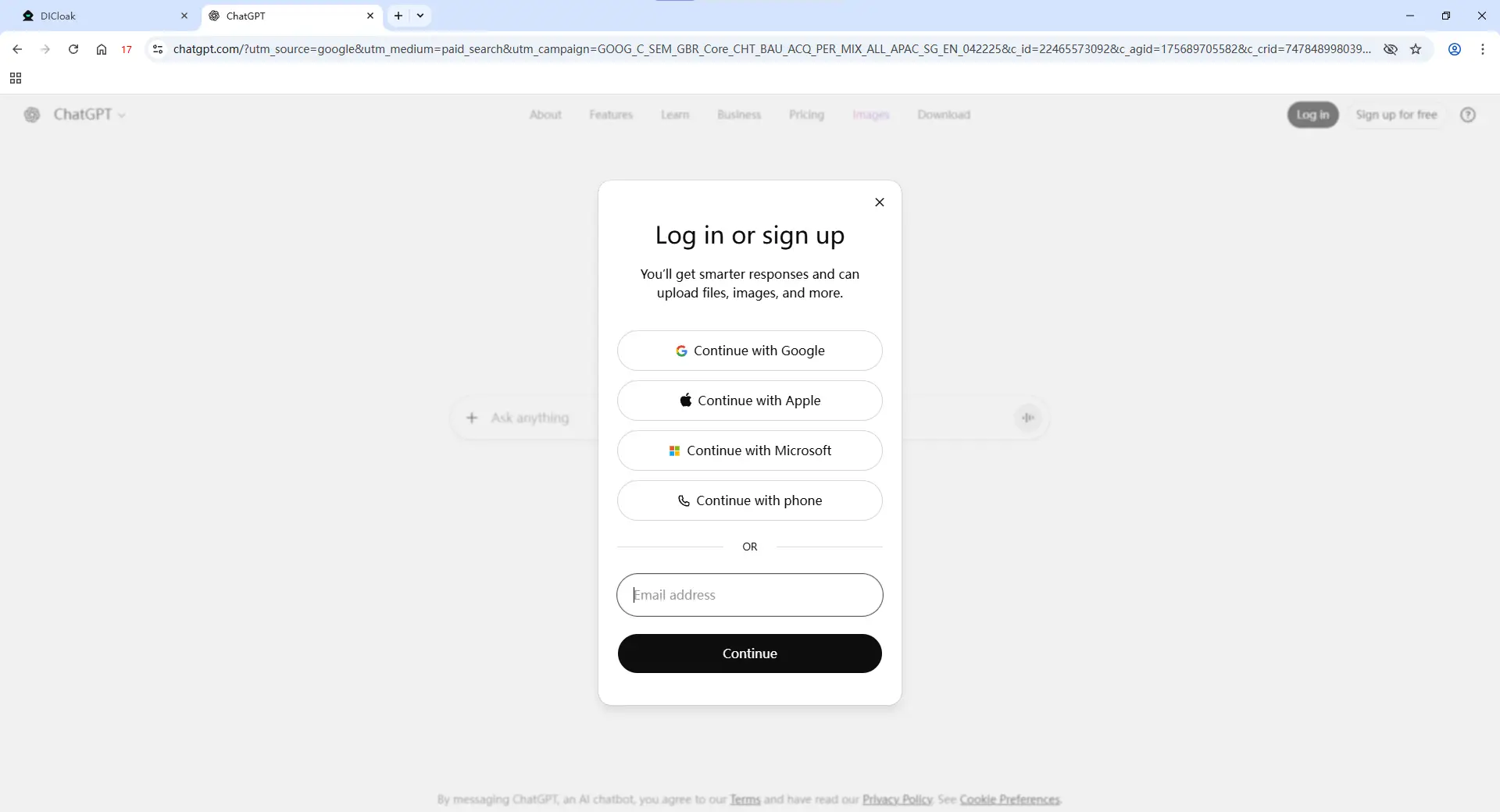
Launch the browser profile you’ve just created. This opens a new browser window. Navigate to the official ChatGPT website, and log in with your credentials.
7. Share the Profile with Your Family
Once your account is set up, you can invite family members to join the shared ChatGPT session. Use the team feature within DICloak to create and invite members. When they accept the invite, they’ll have access to the shared profile on their own devices.

8. Access the Shared Account
Once your family members accept the invitation, they’ll see the shared profile in their own DICloak application. They can launch it from their computers and be automatically logged into the same ChatGPT session, allowing for smooth, simultaneous use.
Advanced Controls of DICloak to Protect Your Shared ChatGPT Account
While sharing an account using DICloak is convenient, DICloak also offers a variety of advanced security features to ensure that your ChatGPT account remains safe from misuse:
- Hide the Password: DICloak’s built-in password manager allows users to log in with a single click without ever seeing the actual password. This keeps your login details safe from prying eyes.
- Prevent Cookie & Session Theft: By blocking access to browser developer tools and prohibiting users from installing their own extensions, DICloak prevents common methods for stealing account data.
- Block Malicious Software: DICloak can automatically block tools like Wireshark or Fiddler that capture network traffic, protecting your login data.
- Restrict Website Access: DICloak allows you to whitelist specific URLs, ensuring that users can only access chat.openai.com within the shared profile, preventing them from browsing other sites during the session.
- Hide Sensitive Information: The Web Element Hider extension in DICloak lets you hide specific parts of the ChatGPT page, such as billing details or account settings, so that they remain private when family members are using the shared account.
Conclusion
In this article, we explored whether you can share your ChatGPT account with your family. OpenAI’s Terms of Service clearly state that accounts are for individual use only, and sharing your credentials can lead to account suspension or bans. While safer alternatives like shared devices or password managers exist, they still don’t comply with OpenAI’s rules. OpenAI doesn’t offer a family plan, but their Business and Team plans allow for multiple users under one subscription, ensuring compliance.
Finally, using tools like DICloak can help securely share access while maintaining privacy and security. By creating isolated profiles and using static proxies, DICloak provides a compliant and cost-effective solution for sharing ChatGPT. In conclusion, sharing accounts directly isn’t recommended, but official plans or DICloak can offer a safer alternative.
FAQs About Sharing Your ChatGPT Account with Your Family
Can I share my ChatGPT account with my family?
OpenAI’s terms of service state that ChatGPT accounts are for individual use only, so sharing your account with your family violates these rules. It’s important to understand the risks of account suspension or banning when sharing your credentials.
Is it safe to share my ChatGPT account with my wife?
While sharing with your spouse may seem harmless, it still violates OpenAI’s policies. Direct sharing of login credentials increases the risk of security breaches and account flags, which can result in temporary or permanent suspension.
What are the consequences of sharing my ChatGPT account with my family?
Sharing your ChatGPT account can lead to account suspension, loss of access, or the need for identity verification. OpenAI tracks login locations, and if suspicious activity is detected, your account could be flagged.
Are there safer ways to share my ChatGPT account with my family?
If you want to share ChatGPT access, using password managers or shared devices is safer than directly sharing your credentials. These methods reduce the risk of account suspension and ensure your data remains secure.
Does OpenAI offer a family plan for ChatGPT?
Currently, OpenAI does not have a dedicated family plan. However, they offer Business or Team plans, which allow multiple users to share an account under one subscription without violating terms. This is a safer, compliant alternative to sharing your personal account.
 Web Proxy Tools
 Free Tools
 Cookie Plugin
 UA Generator
 MAC Address Generator
 IP Generator
 IP Address List
 2FA Code Generator
 World Clock
 Anonymous Check
 WebRTC Leak Test
 UUID Generator
 Free Web Proxy Site
 Proxy Checker
 FB Ad Checker
 AI Web Scraping
 Free SMM Tools
 Twitter Shadowban Checker
 Instagram Name Checker
 UTM Generator
 Username Generator
 AI Hashtag Generator
 LinkedIn Headline Generator
 Social Media Image Resizer