Splitting the $20/month cost of ChatGPT Plus with your team or friends seems like a smart way to manage costs, especially as more AI tools become essential for work and personal projects. It’s a common question: "Can I share my ChatGPT account?"
While the idea makes financial sense, OpenAI's official rules prohibit it, and sharing your password comes with hidden security risks. This guide is here to help you navigate this complex issue. We will cover the official rules, the dangers of improper sharing, and a secure, professional method for managing shared access with a tool called DICloak.
What OpenAI Says About a ChatGPT Account Share
First and foremost, OpenAI's terms of service explicitly prohibit sharing your account credentials with anyone else. As the account owner, you are responsible for all activities that happen on your account. If the person you share with violates the terms, you are the one who will be held accountable.
Why OpenAI Prohibits Account Sharing
OpenAI has several clear reasons for its strict policy:
• Revenue Protection: Sharing accounts directly impacts the subscription revenue that OpenAI relies on to be compensated fairly for its service.
• Security & Integrity: Shared accounts make it difficult to track malicious activities, creating vulnerabilities that could compromise the platform's security.
• Usage Analytics: To improve its AI models, OpenAI needs to accurately track how the service is being used, which is more difficult with shared accounts.
• Legal Compliance: Clear account ownership is essential for maintaining legal compliance and accountability in case of misuse.
• User Protection: Individual accounts provide better protection for a user's personal data and private conversation history.

The Risks of an Unsafe ChatGPT Account Share: More Than a Slap on the Wrist
If you are caught sharing your account, the consequences can be serious. OpenAI may suspend or terminate your account, which means you would lose your entire chat history and any other associated data.
Hidden Dangers of Sharing Your Password
Beyond an account ban, sharing your login details introduces several other risks:
• Privacy Breach: The person you share with can access your complete chat history, which may contain sensitive personal information, private conversations, or confidential work strategies.
• Professional Liability: If someone uses your account to generate inappropriate, copyrighted, or misleading content, it could damage your professional reputation and even lead to legal consequences.
• Creates a Confusing Digital Trail: When multiple people use one account from different locations, it’s like several people leaving different sets of footprints at a crime scene. It creates a mixed digital trail that makes it hard for platforms to know who the real user is and can link your activities in unintended ways.
• Financial Exposure: If your payment information is tied to the account, sharing credentials increases your risk of fraud or unauthorized charges.
• Account Suspension: OpenAI actively enforces its policies. In the past year, it suspended over 15,000 accounts for terms of service violations, with account sharing being a primary reason.
5 Common Methods to Share a ChatGPT Account (And Why They're Risky)
For any team leader trying to manage costs and boost productivity, the idea of sharing a single powerful account is a logical one. This often leads down a path of common workarounds, each promising a simple solution but delivering significant security risks, policy violations, and frustrating user experiences. Here are the failed attempts many have tried before finding a better way.
Sharing Your Chatgpt Account Password
This is the most direct method, but also the most dangerous. You simply give your username and password to your team members.
• Cons: This is a direct violation of OpenAI's policy and puts your account at high risk of being banned. It frequently triggers forced logouts due to access from different IP addresses and poses a major security risk, especially if your ChatGPT account is linked to your Google account or other services.

ChatGPT Group Buying Services
These services sell access to a single, shared premium account to dozens of people for a very low price (e.g., $3 per person).
• Cons: The user experience is extremely frustrating. With 40-50 people using one account, you will constantly hit usage limits. As one user noted, "...whenever I would take a 20-30 minute break, the chats would either be deleted by someone or disappear somewhere deep below..." Most importantly, it is a massive security concern, as any personal or company data you input is visible to everyone else sharing the account.
Using Remote Desktop Software
This method involves setting up ChatGPT on one host computer that remains on at all times. Team members then use remote desktop software (like TeamViewer) to access that computer's screen.
• Cons: The host computer must run 24/7. The experience for remote users is often slow and lagging. Crucially, this method gives team members remote access to the entire host computer, not just the ChatGPT application, creating a significant security vulnerability.
Upgrading to the ChatGPT Team Plan
This is OpenAI's official, sanctioned method for multi-user access. You pay a per-seat license for each team member.
• Cons: The cost is the single greatest drawback. For a team of five, the plan costs over $125 per month, a steep increase from a single $20 Plus account. While it's the safest official route, its price makes it impractical for many teams, especially those with occasional users.
The Safest Way to Share Your ChatGPT Account: Using DICloak
The safest, most reliable, and most efficient solution for sharing a ChatGPT account is by using an antidetect browser like DICloak. This technology is designed to manage multiple online identities securely, which makes it the perfect solution for controlled account sharing.
DICloak explicitly solves the problems detailed above.
• Unlike password sharing, your credentials are never exposed.
• Unlike remote desktops, the experience is fast, native, and secure, with no access to the host computer.
The result? Flawless team access without triggering security alerts.
How to Share ChatGPT Account Securely with DICloak
If sharing your password is too risky, a smarter solution is to use an antidetect browser like DICloak. This tool is designed to help you safely manage and share online accounts.
When multiple users need to share a single ChatGPT Pro, Plus, or Team account, DICloak provides a safe and consistent way to do it. By creating one dedicated browser profile for the shared account, you can lock in a stable proxy and a fixed fingerprint that always appears as the same legitimate user environment.
All team members simply launch that same browser profile when accessing ChatGPT. Since the platform detects one consistent fingerprint and one trusted IP, it prevents suspicious-login alerts caused by different devices, locations, or borwser profiles. This greatly reduces the risk of account flags, forced verifications, or bans—problems that usually happen when multiple users log in from different places.
With DICloak, everyone can use the same ChatGPT account smoothly, safely, and without raising red flags.
How DICloak Enables Safe Chatgpt Account Sharing
DICloak offers several key features that make it possible for multiple people to use the same account safely and at the same time.
• Simultaneous Access: DICloak’s "Multi-open mode" allows multiple team members to use the same ChatGPT account simultaneously without logging each other out.
• Consistent IP Address: By configuring a static residential proxy in the browser profile, all logins can appear to come from a single, stable location. Think of your IP address like a key to your house. If you use the same key every day, your security system knows it's you. But if ten different keys from all over the world suddenly start working, the system will lock everything down. A static proxy ensures everyone on your team uses the same "key," so OpenAI never gets suspicious.
• Synced Login Status: The "Data Sync" feature saves the login session information. Once the primary user logs in, other members can access the account without needing to re-enter the password.
• Secure Team Management: You can create separate member accounts within DICloak and grant them access only to the specific ChatGPT profile, keeping your other online accounts private and secure.
Step-by-Step Guide to a Secure ChatGPT Account Share with DICloak
Setting up a shared ChatGPT account with DICloak is a straightforward process that doesn't require technical expertise.
1.Download and Install DICloak
Visit the official DICloak website, register for an account, and download and install the application on your computer.

2. Choose the Right Plan
To share profiles with your team, you should subscribe to DICloak. The choice depends on your team size. The Base Plan is a good starting point for smaller teams, while the Share+ Plan is recommended for larger teams needing unlimited member access.
3. Step 3: Set Up a Static Residential Proxy (Recommended)
While not mandatory, using a single static residential proxy is highly recommended. This provides a stable, fixed IP address for your shared profile, which prevents ChatGPT's security systems from being flagged by logins from different locations. This greatly reduces the risk of forced logouts or other security issues. DICloak does not sell proxies but partners with several third-party providers.
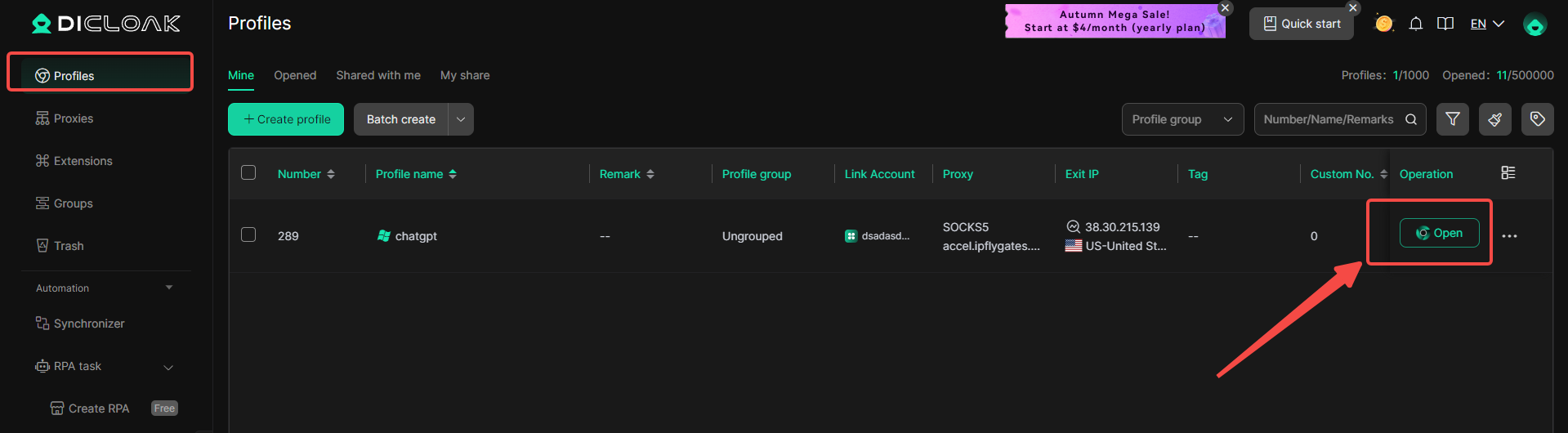
4. Create a New Browser Profile
Inside the DICloak application, create a new browser profile. This profile will serve as the dedicated, secure borwser profile for your shared ChatGPT account.

5.Enable Multi-open Mode
You shoud Go to [Global Settings], find the [Multi-open mode] option, and select [Allow].This feature allows multiple people access the same Chatgpt account at the same time.

6. Log In to ChatGPT
Launch the browser profile you just created. It will open a new browser window. Navigate to the official ChatGPT website and log in with your account credentials.

7. Share the Profile with Your Team
Return to the DICloak main screen. Use the team feature to create members to invite your friends to your DICloak Team.

8. Access the Shared Account
Once your teammate accepts the invite, the shared profile will appear in their DICloak application. They can launch it from their own computer and will be automatically logged into the same ChatGPT session.
Advanced Controls of DICloak to Protect Your Shared Chatgpt Account
In addition to enabling shared access, DICloak provides security features to protect the account owner from misuse.
• Hide the Password: You can use DICloak's built-in password manager, which allows users to log in with a single click without ever seeing the actual password.
• Prevent Cookie & Session Theft: Block access to browser developer tools and prohibit users from installing their own extensions, stopping common methods for stealing account data.
• Block Malicious Software: DICloak can automatically block packet capture software like Wireshark or Fiddler from inspecting your network traffic, protecting your login data.
• Restrict Website Access: The tool allows you to whitelist specific URLs, such as chat.openai.com, to ensure users cannot navigate to other websites within that browser profile.
• Hide Sensitive Information: DICloak includes a "Web Element Hider" extension that can conceal specific parts of the ChatGPT page, such as billing details, subscription status, or account settings, from other users.
Frequently Asked Questions (FAQs)
1. Is it illegal to share a ChatGPT account?
No, it is not a criminal offense. However, it is a direct violation of OpenAI's terms of service that can result in your account being suspended or terminated. The more significant issue is the security risk it poses to your personal data.
2. Will OpenAI ever offer a family plan for ChatGPT?
OpenAI has not announced any official plans for a family subscription. While it is a highly requested feature, waiting for a plan that may never arrive isn't practical. A tool like DICloak provides a working solution today.
3. Can I use DICloak to share other tools besides a ChatGPT account?
Yes, absolutely. DICloak works with any web-based platform. You can use it to manage and share access to other tools like Canva, Claude, or Midjourney, making it a versatile solution for all your shared subscriptions.
Conclusion: Don't Risk Your Account—Manage It Smartly
Sharing your ChatGPT account by handing out your password is an unprofessional practice that violates OpenAI's rules and puts your personal data in danger. Instead of gambling with your account, it's time to manage it intelligently.
A tool like DICloak offers more than a simple workaround; it provides a secure and professional management system for collaboration. It replaces the risky habit of password sharing with a controlled, efficient, and secure borwser profiles built for teamwork. By masking digital fingerprints and providing advanced security controls, it allows for seamless collaboration without the common pitfalls of traditional account sharing.
Explore DICloak's plans to find the right fit for your team, with options designed specifically for secure sharing.
 Web Proxy Tools
 Free Tools
 Cookie Plugin
 UA Generator
 MAC Address Generator
 IP Generator
 IP Address List
 2FA Code Generator
 World Clock
 Anonymous Check
 WebRTC Leak Test
 UUID Generator
 Free Web Proxy Site
 Proxy Checker
 FB Ad Checker
 AI Web Scraping
 Free SMM Tools
 Twitter Shadowban Checker
 Instagram Name Checker
 UTM Generator
 Username Generator
 AI Hashtag Generator
 LinkedIn Headline Generator
 Social Media Image Resizer