TikTok has become one of the most popular social media platforms in the world. Millions of creators, brands, and businesses use it every day to share videos and connect with audiences. Because of this popularity, TikTok accounts have also become valuable targets for hackers. Many users suddenly realize something is wrong when they see strange login alerts, unexpected posts, or messages they never sent. At that moment, people often start searching online for answers like “someone hacked my TikTok account and how do i get it back...”
If this happens to you, it can feel confusing and stressful. You may worry about losing your videos, followers, or personal information. The good news is that many hacked accounts can be recovered if you act quickly and follow the right steps.
In this guide, you will learn how to recognize the signs of a hacked account, understand the common causes behind TikTok security breaches, and follow a step-by-step process to recover your account. We will also share practical tips to help you protect your TikTok account in the future and manage multiple accounts more safely.
Signs Your TikTok Account Has Been Hacked By Someone
If you suddenly think, “someone hacked my TikTok account and how do I get it back?”, the first step is to look for warning signs. In many cases, a hacked account shows clear changes before the owner fully realizes what happened. Knowing these signs early can help you act fast and reduce the damage.
Here are some common signs that your TikTok account hacked situation may already be happening:
Unexpected login alerts
TikTok may send a notification that your account was logged in from a new device or location. For example, you might see a login alert from another country even though you never traveled there. If this happens, it may mean someone hacked my TikTok account and is trying to access it.
Password reset emails you didn’t request
Many users first notice something is wrong when they receive a password reset code they never asked for. This often means someone is trying to break into the account or already has partial access.
Changes to your account information
If your email address, phone number, username, or profile photo suddenly changes, that is a serious warning sign. In many real cases, hackers replace the recovery email so the original owner cannot reset the password.
Videos posted without your permission
Another common sign is content appearing on your account that you never uploaded. Some hacked accounts suddenly post spam videos, crypto promotions, or suspicious links.
Strange messages sent to your followers
Hackers often send direct messages from the hacked account. These messages may include phishing links or fake giveaways. If friends tell you they received unusual messages from your account, take it seriously.
You can no longer log in
If your password suddenly stops working and the recovery information has been changed, it may mean the attacker has already taken control. At this point, many users start searching “someone hacked my TikTok account and how do I get it back” because they cannot access the account anymore.
If you notice any of these signs, take action immediately. The sooner you secure your account, the better chance you have of getting it back.
Common Causes of TikTok Account Hacks
In most cases, the hack did not happen randomly. There are usually a few common mistakes or security gaps that attackers take advantage of. Understanding these causes can help you avoid the same problem. Here are some of the most common reasons a TikTok account hacked situation happens.
Weak or reused passwords
One of the biggest causes is using simple passwords or reusing the same password on many websites. For example, if someone uses the same password for TikTok and an old forum account, and that forum gets hacked, attackers can try the same login on TikTok. This method is called credential stuffing. Many users only realize this after thinking, “someone hacked my TikTok account but I never shared my password.”
Phishing links and fake login pages
Hackers often send messages that look like official TikTok notifications. The message may say something like “Your account has a problem. Please verify your login.” The link leads to a fake page that looks like TikTok. Once the user enters their login details, the attacker steals them. Security researchers report that many social media hacks start with phishing messages like this.
Logging in on unsafe public Wi-Fi
Public Wi-Fi in places like airports, cafés, or hotels can sometimes be insecure. If the network is poorly protected, attackers may try to intercept login sessions or trick users into connecting to fake Wi-Fi hotspots. Some people later realize their TikTok account hacked problem started right after they logged in on a public network.
Third-party apps requesting TikTok access
Some apps promise things like “more followers” or “analytics tools.” To use them, you may need to log in with your TikTok account. If the service is not trustworthy, it may store your login information or misuse your account. In real cases shared on creator forums, users reported losing control of their account after signing into unofficial growth tools.
Malware on a phone or computer
Sometimes the problem is not TikTok itself. If a device is infected with malware (malicious software), it may record keystrokes or steal login cookies. This allows attackers to enter the account without knowing the password.
What to do If Someone Hacked My TikTok Account: Step by Step Guide
If you suddenly realize someone hacked my TikTok account, try not to panic. Many users recover their accounts by acting quickly and following the right steps. The key is to secure your account as soon as possible before the attacker causes more damage.
Step 1: Try to reset your password immediately
The first thing you should do is change your password. Open the TikTok login page and choose “Forgot password?”. TikTok will send a verification code to your email or phone number linked to the account. After entering the code, create a new strong password that you have never used before. For example, some creators report noticing suspicious login alerts. They quickly reset the password and were able to block the hacker before any content was posted.
Step 2: Check your account information
Once you regain access, review your account details carefully. Hackers often change important information to keep control. Check these areas:
- Email address
- Phone number
- Username and profile photo
- Linked social accounts
If you see anything unfamiliar, update it right away.
Step 3: Turn on two-step verification
After securing your login, enable two-step verification in TikTok’s security settings. This feature adds another layer of protection. Even if someone steals your password, they still need a verification code sent to your phone or email.
Step 4: Remove unknown devices from your account
TikTok allows you to check which devices are currently logged in. Go to Settings → Security → Manage devices. If you see a device or location you do not recognize, remove it immediately.
Step 5: Contact TikTok support if you cannot log in
If the hacker has already changed your email or phone number and you cannot access the account, contact TikTok Support. Use the “Report a problem” option or the account recovery form. Explain that your TikTok account hacked situation happened and provide proof of ownership, such as:
- Your original email or phone number
- Your username
- Screenshots of your account or previous content
Many users have recovered their accounts this way, although it may take several days.
Step 6: Inform your followers and remove suspicious content
If the hacker posted videos or sent spam messages, delete them as soon as you regain access. You may also want to post a quick message explaining what happened. This helps protect your followers from scams or phishing links.
Taking these steps quickly can make a big difference. If you ever find yourself asking someone hacked my TikTok account and how do I get it back?, following this guide will give you the best chance of recovering your account safely.
Measures to Secure Your TikTok Account in the Future
After you recover access, the next step is to make sure it does not happen again. These steps are simple, but they work.
Use a Strong, Unique Password
Pick a password you do not use anywhere else. Do not use birthdays or easy words. A common TikTok account hacked case happens when a password was reused from another app. If that old app had a leak, attackers try the same login on TikTok.
Turn On Two-Step Verification (2FA)
Enable 2FA in TikTok security settings. This adds a code step when someone logs in from a new device. Even if a hacker gets your password, they still need that code. Doing it now lowers the risk fast.
Check and Remove Unknown Devices
Go to your TikTok security/device section and review logged-in devices. If you see a device you do not recognize, remove it right away. A real-world example is when users spot a login from another country they have never visited. That is often the first clue before a full takeover.
Avoid Fake Links and “Free Growth” Tools
Be careful with DMs or emails that say your account is in danger and ask you to “verify now.” Many of these links lead to fake login pages. Also avoid unofficial tools that promise free followers or likes. People often lose accounts after typing their TikTok login into these sites.
Keep Your Phone and Apps Updated
Update TikTok, your phone system, and your browser. Updates fix security bugs. If your device is old and never updated, it can be easier for attackers to steal saved logins.
Lock Down Your Recovery Options
Make sure your email and phone number on TikTok are correct and secure. If a hacker changes your recovery email, it becomes much harder to get your account back. Also secure your email account with its own strong password and two-step verification.
Recommendation for Multi-Account Security Management With DICloak
If you manage multiple TikTok accounts, whether you’re a brand marketer, a content creator, or part of a digital agency, account security becomes even more important after a hack. You’re not just trying to recover one login. You also want to avoid putting your other accounts at risk.
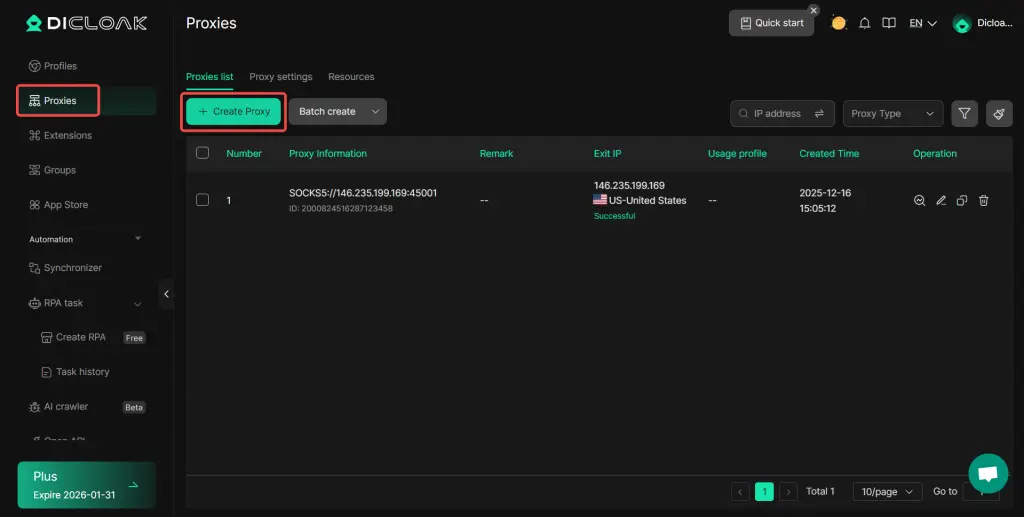
With DICloak, you can run each TikTok account inside its own isolated browser profile. This means every account keeps separate login sessions, cookies, and profile settings, so you’re less likely to mix identities by accident. You can also assign a dedicated proxy selecting from providers and then add it to each profile.
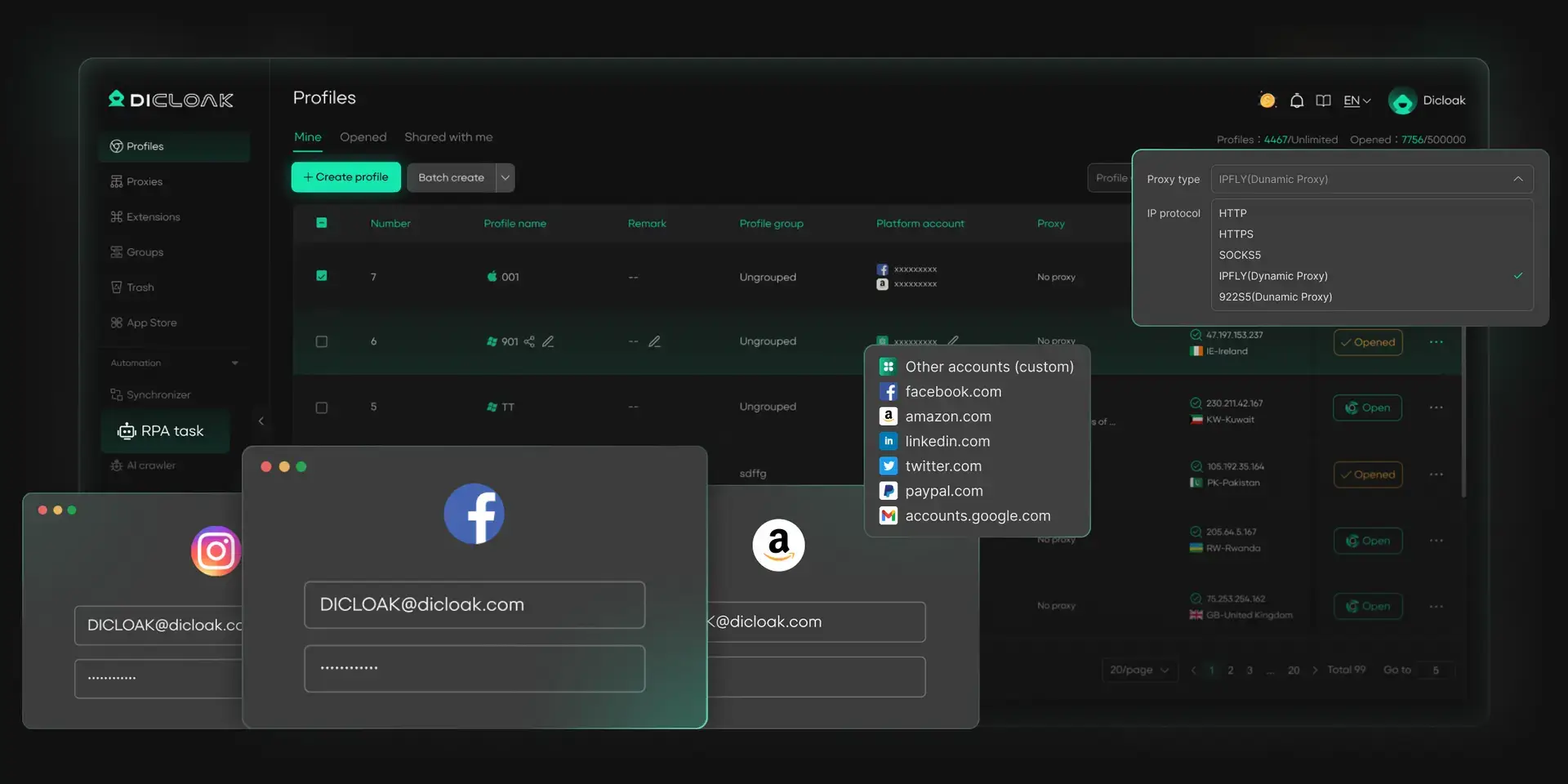
How DICloak Enhances TikTok Account Security:
- Isolated browser profiles for each account: You can run every TikTok account in its own DICloak profile, which helps keep logins separated and reduces cross-account overlap that can trigger security alerts.
- Independent fingerprint configurations per profile: Each profile can maintain its own browser fingerprint, so your accounts don’t all look identical when accessed from the same computer.
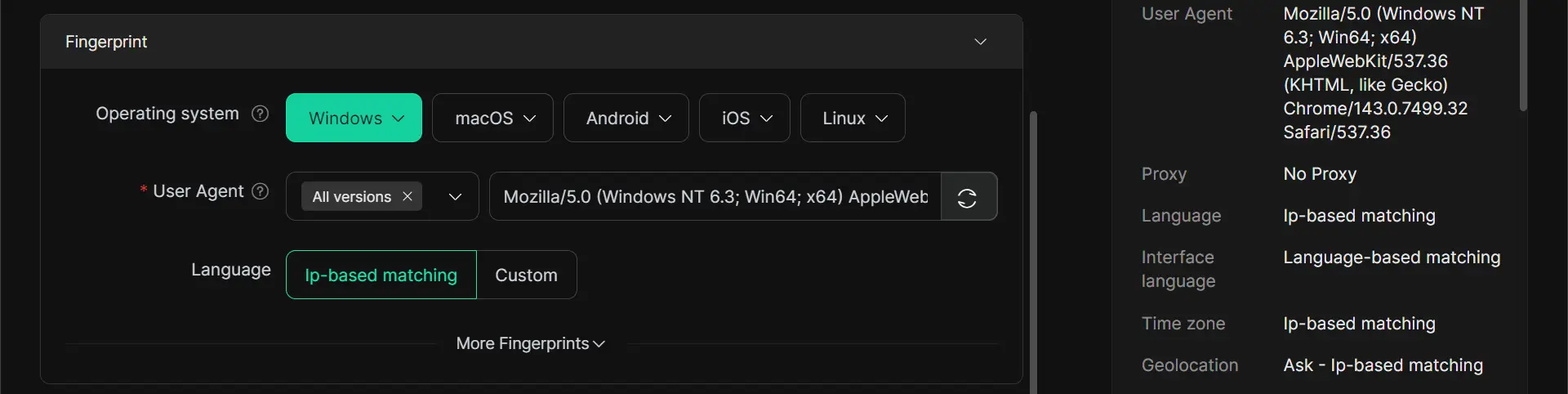
- User-configured proxy setup: DICloak supports adding proxies to profiles but it does not sell proxies. You purchase proxies from providers and then configure proxies to profile to keep network access separated across accounts.
- Strong session isolation: Cookies, cache, and local storage stay separated by profile. If one account faces a login issue or gets compromised, isolation helps reduce the chance that other accounts are affected through shared browser data.
- Team collaboration with clearer access control: If you manage TikTok accounts with a team, you can use DICloak to organize profiles and permissions so teammates only access the profile not credentials, reducing internal operational risk.
Conclusion
Getting hacked on TikTok is stressful, but it’s usually fixable if you move fast. Watch for early clues like odd login alerts, password reset codes you didn’t request, or posts and messages you didn’t create. If you suspect your TikTok account was hacked, reset your password, confirm your email and phone recovery details, turn on two-step verification, and remove unknown devices right away. Then protect yourself going forward by avoiding suspicious links and “free growth” tools, keeping your phone updated, and using separate browser profiles with DICloak if you manage multiple accounts so one incident is less likely to affect everything else.
FAQs About If Someone Hacked My TikTok Account
What should I do first if someone hacked my TikTok account?
The first step is to reset your password immediately using the “Forgot password?” option on the TikTok login page. After you regain access, check your email, phone number, and linked accounts to make sure the hacker did not change them. You should also enable two-step verification (2FA) and remove any unknown devices from your account settings.
How can I recover my account if someone hacked my TikTok account and changed my email?
If someone hacked your TikTok account and changed the recovery email, you can still try to recover it through TikTok Support. Go to TikTok’s “Report a problem” section and submit an account recovery request. Provide details such as your username, original email or phone number, and screenshots of your past content to prove ownership.
Why do people say “someone hacked my TikTok account” even though they never shared their password?
Many TikTok account hacked cases happen without the owner sharing their password. Common causes include phishing links, reused passwords, unsafe public Wi-Fi, or malicious third-party apps that collect login information. In some situations, malware on a device can also steal login sessions or saved passwords.
Can someone hacked my TikTok account access my other social media accounts?
They may not automatically access your other platforms. However, if you used the same password for multiple services or linked accounts together, the attacker could try logging into those platforms as well. This is why security experts recommend using different passwords for each account.
How can I prevent TikTok account hacked situation in the future?
Use a strong and unique password, enable two-step verification, avoid suspicious links, and do not log in through unknown third-party tools. If you manage multiple TikTok accounts, using separate browser profiles and secure login setups can also reduce the risk of cross-account security problems.
 Web Proxy Tools
 Free Tools
 Cookie Plugin
 UA Generator
 MAC Address Generator
 IP Generator
 IP Address List
 2FA Code Generator
 World Clock
 Anonymous Check
 WebRTC Leak Test
 UUID Generator
 Free Web Proxy Site
 Proxy Checker
 FB Ad Checker
 AI Web Scraping
 Free SMM Tools
 Twitter Shadowban Checker
 Instagram Name Checker
 UTM Generator
 Username Generator
 AI Hashtag Generator
 LinkedIn Headline Generator
 Social Media Image Resizer