If you want to know how to change IP address, there are several ways to do it. Some people change their IP address to fix network problems. Others do it for privacy, region testing, or better workflow control across different online tasks.
The best method depends on your goal. A simple router restart may be enough for basic use. But if you need more control, proxies and isolated browser profiles are usually more practical. In this guide, you will learn how to change IP address manually, automatically, and with tools that support cleaner profile separation.
What is an IP address?
An IP address is like your device’s home address on the internet.
When you use a phone, computer, or tablet online, it needs an address so websites and apps know where to send information. That address is called an IP address.
For example:
- You type in a website
- Your device sends a request
- The website sends the information back to your IP address
There are two main kinds:
- Public IP address: the address the internet sees
- Private IP address: the address your device uses inside your home or school network
In simple words, an IP address helps devices find each other and communicate online.
Why do people change their IP addresses?
There are many reasons people change their IP address. Some want to solve network conflicts or access location-based content. Others want more privacy while browsing or better control over multiple online environments.
In more advanced workflows, IP management can also help reduce overlap between sessions. For example, teams working across multiple browser profiles, regions, or accounts often prefer more structured network assignment. While an IP address is only one part of online identity, it is still an important part of keeping workflows organized and consistent.
How to Change IP Address: Understanding the Basics
Before learning how to change IP address, it helps to understand what an IP address actually does. An IP address is a numeric label used to identify a device or connection on a network. It helps websites and services know where traffic is coming from.
There are two basic distinctions to know:
Public vs. Private IP: A public IP is the address websites see on the internet. A private IP is used inside your local network, such as your home Wi-Fi.
Dynamic vs. Static IP: A dynamic IP may change over time based on your internet provider’s system. A static IP stays the same unless it is manually changed.
This matters because changing a local IP address is not always the same as changing the public IP address that websites can see.
How to Change IP Address with a Proxy
One of the most common answers to how to change IP address is to use a proxy. A proxy works as an intermediary between your device and the website you visit. Instead of seeing your original IP, the website sees the proxy server’s IP.
This method gives users more control than simply switching networks or restarting a router. It is often used to:
- change the public IP seen by websites
- test websites from different locations
- assign different network routes to different browser profiles
- reduce manual switching between online tasks
If your goal is long-term workflow control, proxy management is usually a more flexible option than basic network changes.
How to Change an IP Address at the Hardware and Router Level
Another common method is restarting the modem or router. On some internet connections, reconnecting the device may result in a new public IP address. However, this depends on the provider’s lease system, network design, and how the connection is managed.
In some cases, the public IP changes after a reboot. In others, the same address returns. Because of that, router restarts are not a reliable way to manage separate online identities or maintain stable multi-profile workflows.
For occasional privacy needs, this method may be enough. For more structured or repeatable use, it is usually not the most efficient option.
Advanced Strategies for Multi-Account Security and Network Isolation
For more advanced workflows, IP changes alone are often not enough. Many websites and anti-abuse systems may also review browser and device-level signals to evaluate whether sessions appear distinct and consistent.
That is why experienced teams often think in layers:
- network identity
- browser profile separation
- cookie and session isolation
- device and browser consistency
- workflow control across team members
A cleaner setup usually comes from keeping these layers aligned rather than changing only one signal at a time.
Objective Comparison of IP Modification Methods
| Method |
Speed of Rotation |
Reliability for Scaling |
Level of Privacy |
Best Use Case |
| Proxy Management |
Instant/Automatic |
High |
High |
Web scraping, multi-account management (DICloak). |
| Manual Configuration |
Slow |
Low |
Low |
Local network testing and conflict resolution. |
| Router Reboot |
10+ Minutes |
Low |
Medium |
Temporary refresh for home users. |
| Network Switching |
Fast |
Low |
Low |
Quick IP change via mobile hotspots. |
How DICloak Helps Manage IP and Browser Profile Separation
If your goal is not just how to change IP address, but also how to keep multiple browser profiles better organized, profile isolation tools can be more useful than manual methods alone.
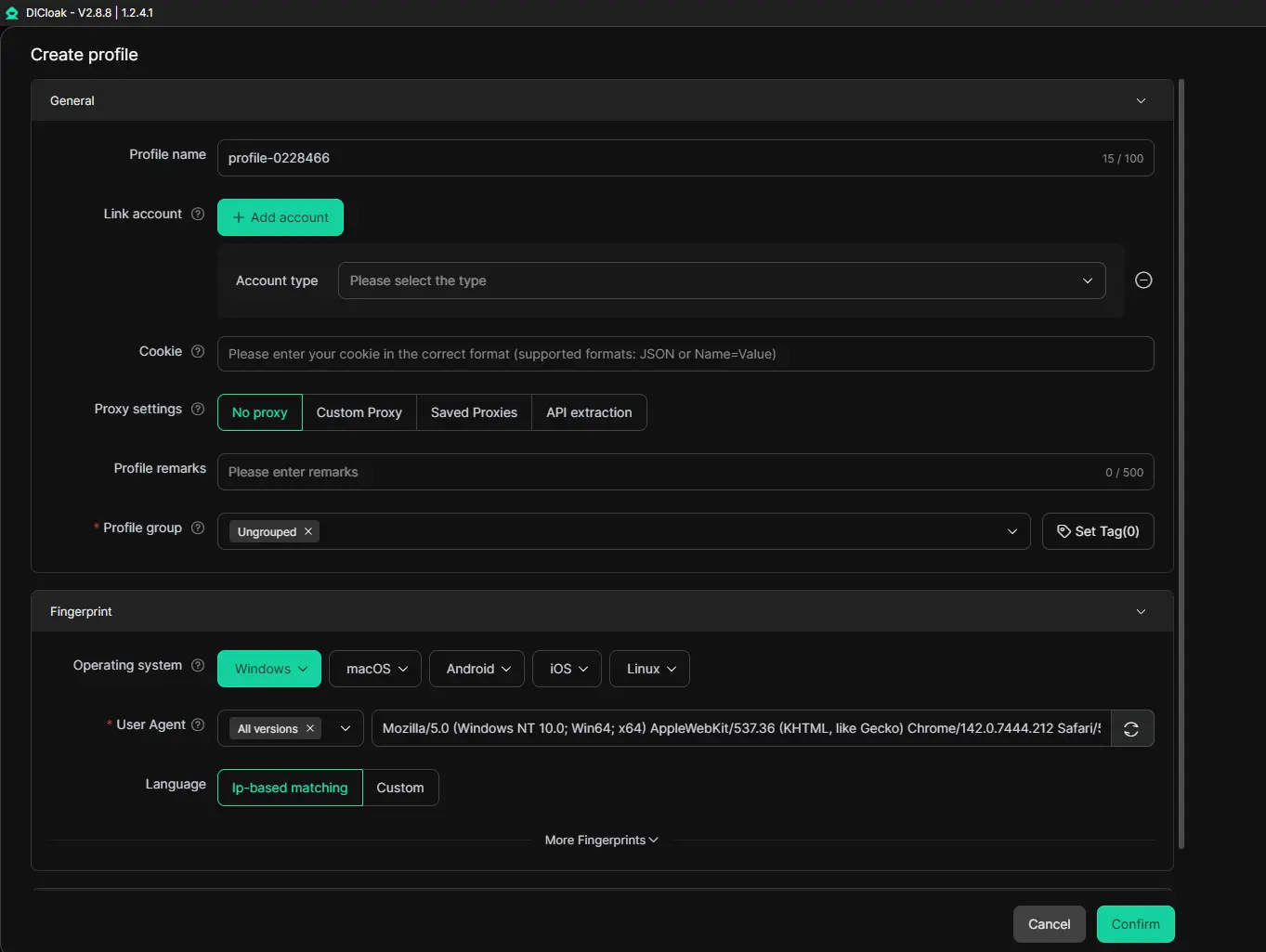
DICloak is designed for this kind of workflow. It helps users manage isolated browser profiles, assign proxies at the profile level, and keep different environments separate from one place. This is useful for teams or individuals who need a more structured way to manage multiple online tasks.
Some of the main benefits include:
- isolated browser profiles
- support for HTTP, HTTPS, and SOCKS5 proxies
- profile-level proxy assignment
- automation and synchronization tools
- team collaboration and permission control
For users managing more than one online environment, this setup can make day-to-day work more organized and easier to control.
Conclusion
Changing an IP address can help with privacy, troubleshooting, and workflow separation, but it is only one part of a larger identity setup. In many real-world environments, stable profile separation also depends on browser consistency, session handling, and clean network management.
For simple needs, manual IP changes or router restarts may be enough. For more structured workflows, proxy management and profile isolation are usually more practical. DICloak helps bring these elements together through isolated browser profiles, proxy support, automation, and collaboration tools, making it a useful option for teams that need a more organized way to manage multiple online environments.
Frequently Asked Questions Regarding How to Change IP Address
Is it legal to change my IP address?
In general, yes. Changing an IP address is a normal part of network administration and internet use. Many connections already use dynamic public IPs that may change over time.
Does a router reboot always change the IP?
No. Sometimes it does, but sometimes it does not. It depends on your provider’s lease rules, connection type, and whether the network reassigns the same public address after reconnecting.
What is the difference between a public and private IP?
A public IP is the external address seen by websites and online services. A private IP is used inside your local network, such as between your router, laptop, printer, or phone.
 Web Proxy Tools
 Free Tools
 Cookie Plugin
 UA Generator
 MAC Address Generator
 IP Generator
 IP Address List
 2FA Code Generator
 World Clock
 Anonymous Check
 WebRTC Leak Test
 UUID Generator
 Free Web Proxy Site
 Proxy Checker
 FB Ad Checker
 AI Web Scraping
 Free SMM Tools
 Twitter Shadowban Checker
 Instagram Name Checker
 UTM Generator
 Username Generator
 AI Hashtag Generator
 LinkedIn Headline Generator
 Social Media Image Resizer