Two colleagues are comparing Claude Pro subscriptions. One says, “Why not split one plan instead of paying for two?” It sounds practical when both people work on the same content, research, or client tasks. But the first question should be direct: can i share my claude account?
For anyone considering a claude shared account, the answer starts with the claude account sharing policy, not with the monthly price. This guide explains the rule, why teams still consider sharing, and why passing around a raw password quickly becomes messy. It also covers what Claude Team and Enterprise handle inside Claude, how Claude Code collaboration works, and how you can manage the browser-layer workspace around authorized access with DICloak.
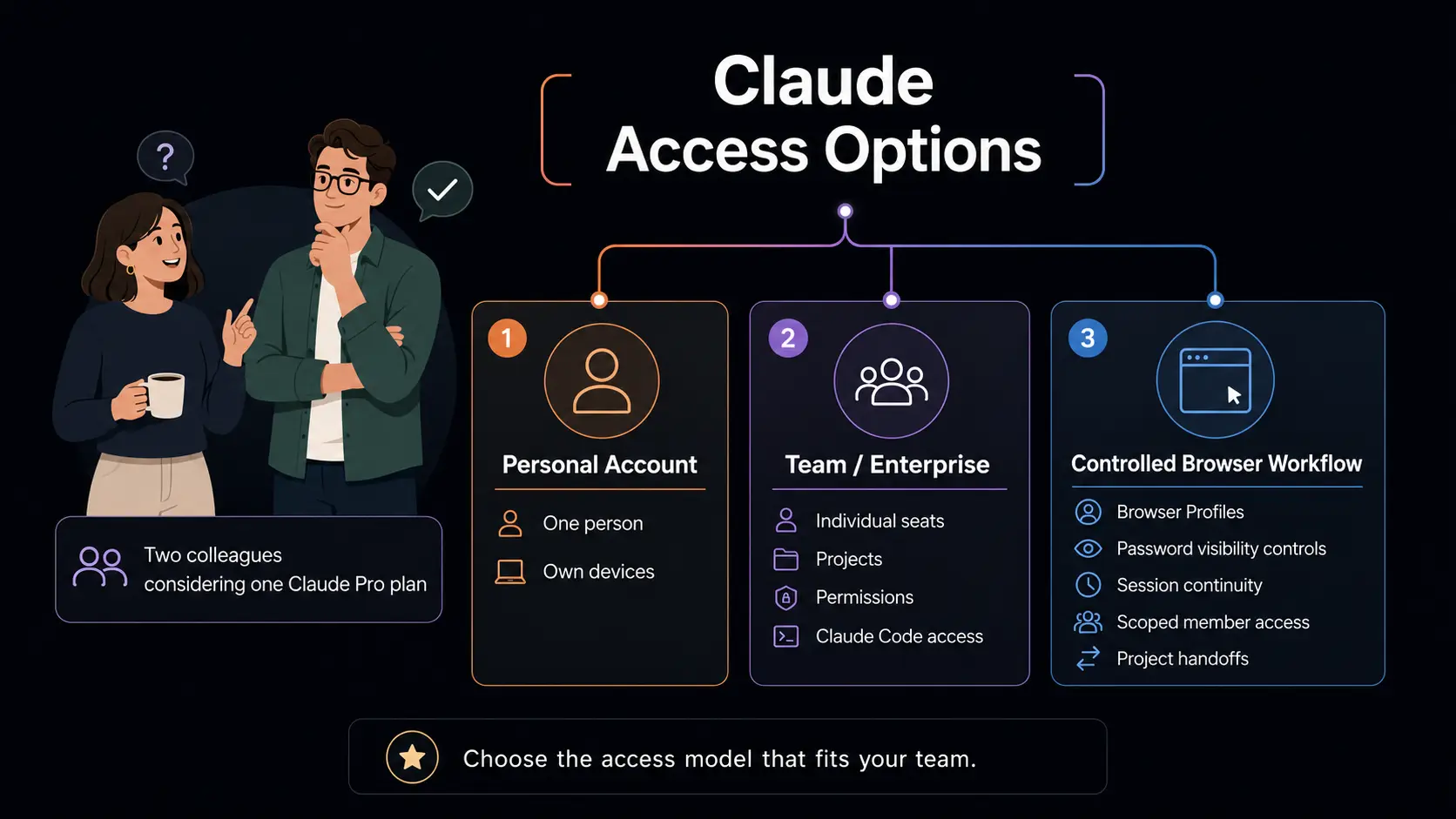
Can You Share a Claude Account?
No. Anthropic’s consumer rules do not allow one person to give another person access to their personal Claude login. That answer matters before you consider pricing, convenience, or a workaround.
What Anthropic’s Terms Say
Anthropic’s Consumer Terms are clear: “You may not share your Account login information, Anthropic API key, or Account credentials with anyone else.” The terms also say you may not make your account available to someone else. In other words, a claude shared account is not allowed under the claude account sharing policy.
This applies to individual Claude.ai accounts, including Free, Pro, and Max plans. A paid plan adds features and capacity for the account holder; it does not turn a personal account into a multi-person workspace. It is a personal-login restriction, not just a recommendation about password hygiene. The terms also state that you are responsible for activity under your account. That makes sharing risky for both the account owner and anyone using the login.
Can You Share It With a Coworker, Friend, or Family Member?
You cannot give your personal Claude login to a coworker, friend, spouse, family member, classmate, or contractor. Whether can i share my claude account is asked about work, school, or home, the answer is no.
Using your own Claude account on your own devices is different. You can sign in to your account on your phone, laptop, or tablet. Anthropic even provides a way to sign out of active sessions across browsers and mobile devices. But that does not give another person permission to use your credentials. A second device is still your device; a second person is a separate user.
Next, let’s look at the more specific question: can you share a Claude Pro account?
Can You Share a Claude Pro Account?
A Pro subscription gives one person more Claude capacity and features. It does not change Anthropic’s rule that a personal account must not be shared with another person.
Why Teams Still Look for a Claude Shared Account
The direct answer to can i share my claude pro account is no. Paying for Pro does not make a personal Claude login available for a coworker, partner, or other teammate to use.
Still, the question comes up for understandable reasons. Two people may only need Claude for light research a few times each week, so paying for separate subscriptions can feel hard to justify. A small content team may work from the same research brief, content calendar, or codebase and want one place to continue the same thread. A freelancer and assistant may both touch the same client workflow. These situations make one login seem convenient.
The problem often becomes practical before it becomes a policy discussion. Teams do not want raw passwords sitting in Slack messages, Notion pages, spreadsheets, or shared notes. They also do not want to rebuild tabs, bookmarks, research pages, and browser settings every time work moves to a different person or device. Those are real workflow pains, but they do not make account sharing permitted.
Why Cost Is Part of the Decision
The answer to can two people use one claude account is no. The same answer applies to can multiple people use the same claude account: no, regardless of whether the group has two people or twenty.
Cost is still a real part of planning. Small teams often compare the cost of multiple individual subscriptions or Team seats with their actual usage, access needs, and browser-workflow requirements. Some people need daily access and separate Projects. Others only need occasional help with research, writing, or code review. Those differences should shape the plan a team chooses.
But price does not override the account rule. A personal Pro plan is for one account holder, not a shared team resource. Once more than one person needs regular access, the team should look at the right access model instead of treating one password as a shared workspace.
That leads to the next issue: even aside from policy, direct password sharing breaks down fast.
Why Direct Password Sharing Breaks Down
Even if a team ignores the account rule, one shared login creates problems fast. The issue is not only who can sign in, but also what they can see, change, and pass on.
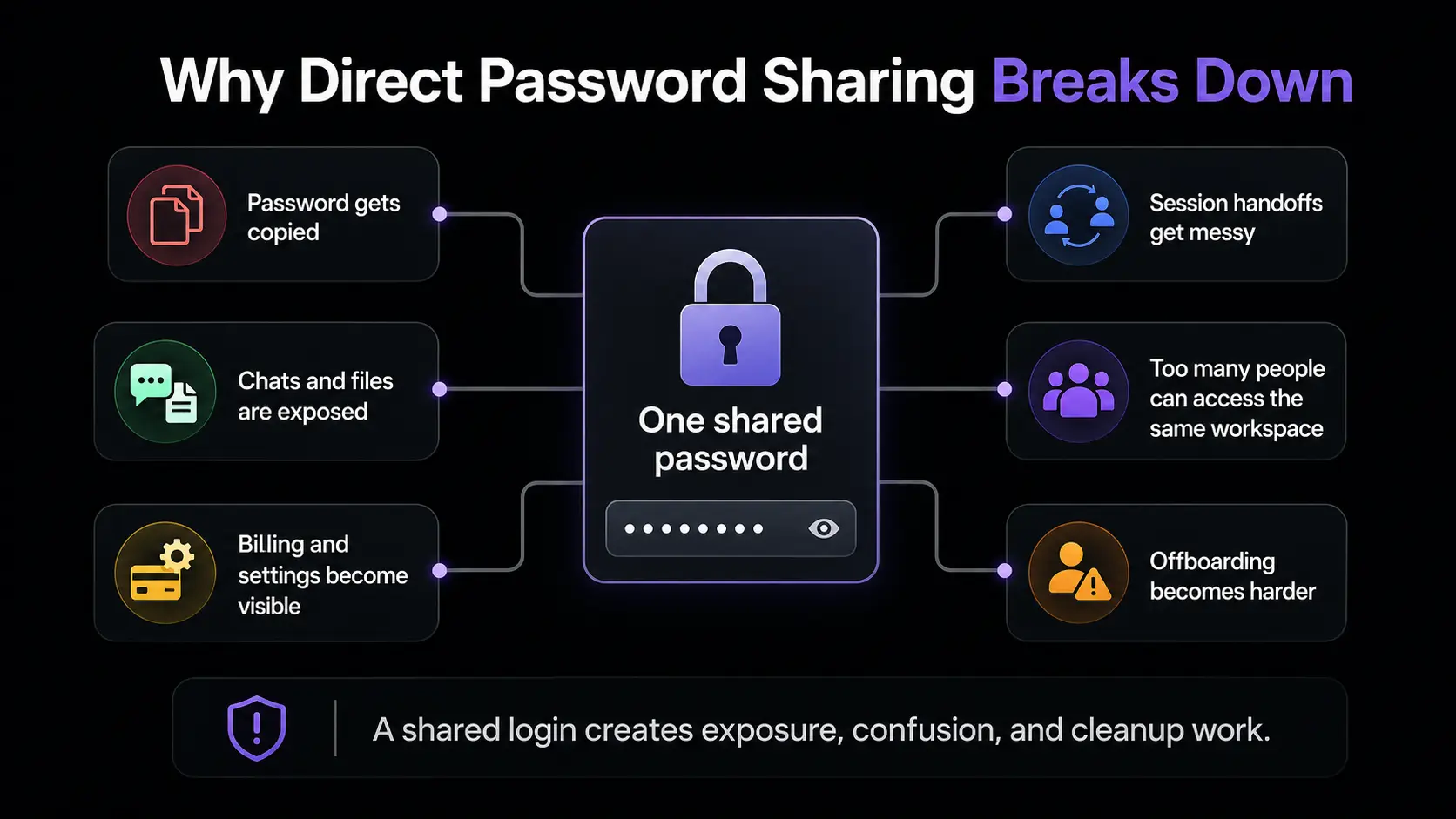
One Password Creates Too Much Exposure
A Claude login is not just a way to open a chat window. Whoever has the password can usually see the full conversation history, uploaded files, saved Projects, and other account content tied to that login.
That may include client research, draft articles, internal planning notes, code snippets, meeting summaries, or files that were only meant for a small group. One person may need to check a project brief, while another only needs to review a final draft. A shared password does not separate those needs.
The password itself is also a separate risk. Once it appears in a Slack message, Notion page, spreadsheet, email, or private chat, it can be copied, forwarded, or left behind after a project ends. That exposure exists even before you consider Claude’s account-sharing policy.
Shared Sessions Are Hard to Hand Off
Password sharing also turns ordinary handoffs into a repeated task. When one person finishes research and another person takes over the writing, someone may need to resend the password, sign in again, and work out where the previous task stopped.
The new person may also need to reopen tabs, find bookmarks, locate source documents, and trace the last useful Claude conversation. Important context can be buried in a long thread, a browser tab group, or a page that was never saved clearly. The team spends time rebuilding the setup instead of continuing the work.
This gets worse when people switch devices, work different hours, or cover several client projects. A login may be shared, but the working context is not. That makes every change of person feel like a restart rather than a smooth handoff.
Teams Need Access Controls, Not Just a Login
The real need is rarely “a password to share.” Teams need to know who has access, what each person can see, and whether that access still makes sense when a project, role, or client changes.
A single password cannot provide that control. It gives every holder the same all-or-nothing access. You cannot limit one person to a specific client workspace while keeping unrelated work out of reach. You also cannot easily confirm who used the login at a certain time or remove access for one person without changing the password for everyone else.
A better team setup separates access from a shared credential. Inside Claude, that means using the native tools built for members, seats, Projects, and permissions. Around that authorized access, teams may still need to manage browser workspaces, connected tools, session continuity, and handoffs with clear controls.
That leads to what Claude Team and Enterprise handle natively—and what remains outside Claude itself.
What Claude Team and Enterprise Solve
Claude Team and Enterprise are Anthropic’s official collaboration options for organizations that need more than one person to use Claude. They create a shared organization with separate member access, rather than turning one personal login into a team login.
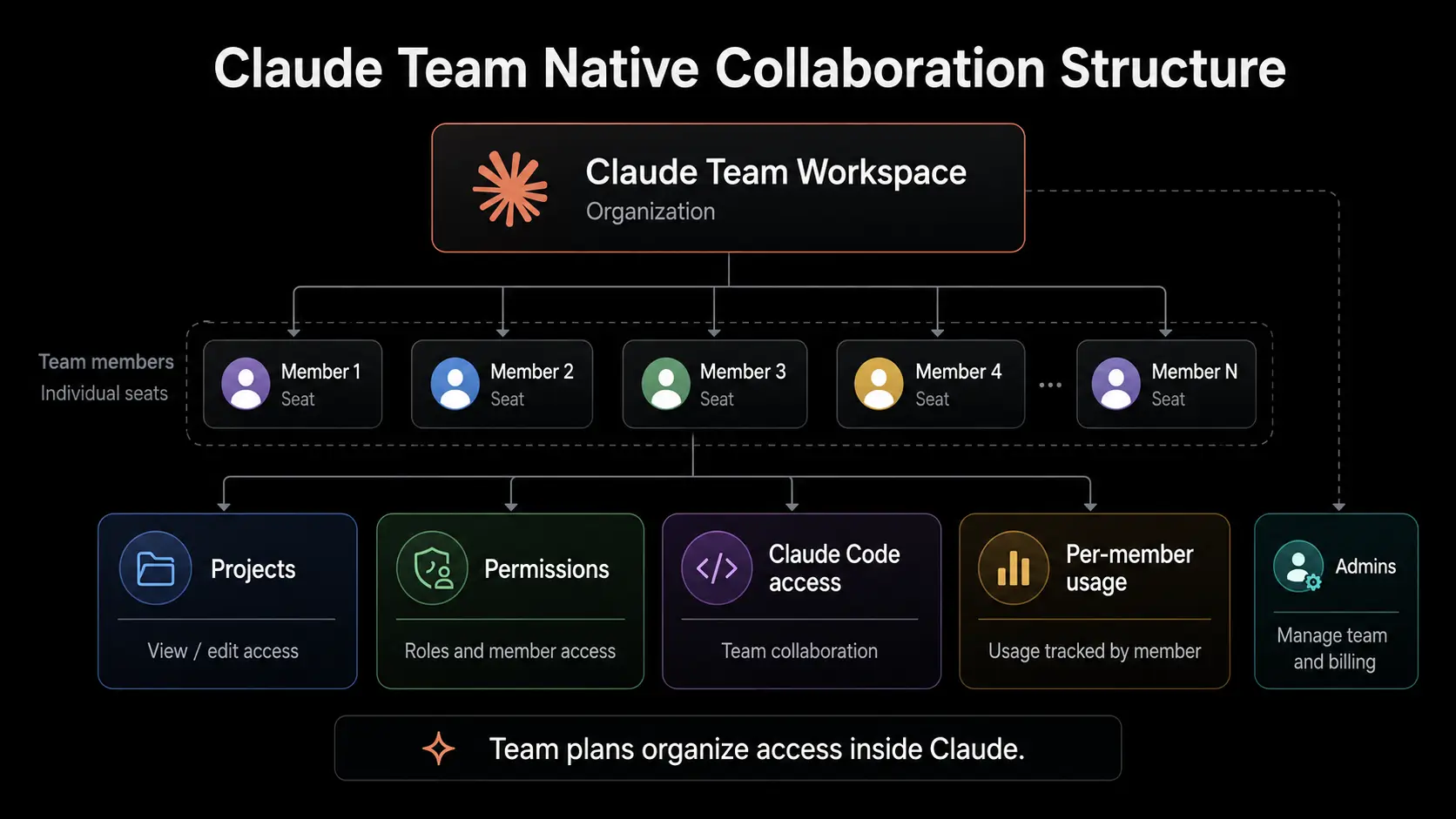
Individual Seats, Logins, and Per-Member Usage
For teams asking how to share a claude subscription, the official answer is not to pass around one login. A claude team plan gives each person an individual seat and their own Claude login inside the same organization.
That means each member signs in as themselves. Their work, usage, and account activity stay tied to their own access instead of one shared personal account. Team-plan usage is also per member, not pooled across the whole organization. If one member reaches their included limit, that does not reduce another member’s available usage.
Claude Team currently requires at least five members. In the United States, Standard seats are $30 per member per month on monthly billing or $25 per member per month on annual billing, before applicable taxes.Premium seats cost more and are intended for people with heavier usage needs. Pricing, taxes, and available options can vary by region, so teams should check the current upgrade page before purchasing.
Projects, Permissions, and Claude Code Access for Teams
If you are asking can i add someone to my claude account or how do i give someone access to my claude account, the correct approach is to invite them to a Team or Enterprise organization. You are not giving them your personal login. Instead, an admin assigns a seat, selects the person’s role, and sends an invitation to their email address.
Team and Enterprise also support shared Projects. You can share a Project with selected members, give them “Can use” or “Can edit” permission, and remove access later when needed. Project knowledge, files, and instructions can stay available to the right group. Chats are not automatically shared just because people work in the same organization or Project.
Claude Code is included with every current Team seat. Each developer authenticates with their own Team or Enterprise account to use Claude Code in the terminal or supported IDEs. This keeps access linked to the individual developer, not to one shared set of credentials.
What Native Claude Access Does and Does Not Manage
Team and Enterprise manage collaboration inside Claude. That includes organization seats, member invitations, roles, Projects, project permissions, organization-level billing, and Claude Code access.
This is the right layer for deciding who can use Claude, which Projects they can open, and what organization features they can access. Enterprise can add more advanced controls for larger organizations, such as custom roles, groups, and broader admin settings.
Even with that structure in place, teams often still need to manage work happening around Claude in the browser. For example, a contractor may need access to one client’s portal but not another client’s tools. A new team member may need the right research tabs, bookmarks, and work context ready for a handoff. And when a project ends, someone still needs to review and remove access to the surrounding browser-based tools.
That browser-layer side of teamwork is what the rest of this guide covers. Next, let’s look more closely at collaboration rules for Claude Code.
Can Multiple People Use the Same Claude Code Account?
Working on the same codebase does not mean developers need to use the same Claude credentials. Claude Code supports team collaboration, but legitimate collaboration starts with each person having their own authorized access.
Shared Claude Code Credentials vs. Team Collaboration
The answer to can multiple people use the same claude code account is no. The same account-sharing rule applies when Claude Code is used through a personal account. A claude code share account is not the right way for a development team to work on one repository.
It is easy to see why the idea comes up. Several developers may contribute to the same app, review the same pull requests, or work from the same project instructions. But a shared repository and a shared login are two different things. A repository can have many contributors, while Claude access remains linked to each developer.
So, can i share claude code account credentials with a teammate? No. Each developer should sign in with their own authorized account or assigned organization seat. This keeps access tied to the person using Claude Code and avoids turning one set of credentials into an unclear team handoff.
How a Claude Code Team Collaborates
The answer to can you collaborate on claude code is yes. Teams can standardize useful parts of their Claude Code setup without sharing credentials.
Claude Code supports project-level settings that can be committed to a repository. A team can share permission rules, hooks, MCP server settings, and plugins through the project configuration. For example, developers working on the same product can keep the same approved tools, automation hooks, and project rules available when they clone the repository. Each person still uses their own login, but the working setup stays more consistent.
For a claude code team, Team or Enterprise provides the proper access model: each member receives Claude Code through their own seat. That is the claude code team plan approach. It supports shared development standards while keeping account access individual.
Claude Code collaboration solves the access question inside the development environment. Teams may still need to manage the browser Profiles, connected tools, and handoffs that surround authorized work.
How DICloak Helps Teams Control Shared Browser Profiles
Teams often need more than a password. They need a controlled browser Profile with clear access scope, prepared workspace context, and easier handoffs between assigned people. These browser controls do not change Claude’s account rules: Team or Enterprise remains the right way to give people their own authorized Claude access.
Let Members Use a Profile Without Seeing the Password
A project lead may need an assigned teammate to use a browser-based client tool, but does not want the real login password copied into Slack, Notion, spreadsheets, or private messages. Once credentials are shared in those places, they are hard to track and even harder to remove cleanly.
With Hide Password and the built-in password manager, you can bind approved credentials to a Profile. Assigned members can open that Profile and use one-click access without seeing the actual password. This helps you keep credentials out of everyday handoff messages while still giving the right person access to the prepared browser workspace.
The goal is not to turn a personal Claude account into a shared account. It is to give assigned members controlled access to the browser tools and workspaces that support an organization’s authorized workflows.
Keep the Profile Setup, Session State, and Network Configuration Consistent
A useful workspace is more than a login page. It may already contain the right tabs, client portals, saved bookmarks, research pages, extensions, and reference materials for one project. Rebuilding that setup every time work moves to another person wastes time and creates avoidable gaps in context.
With Synced Session and Data Sync, you can keep selected Profile data available across approved devices. The next assigned teammate can open the same prepared workspace instead of starting with an empty browser and searching for the previous person’s tabs or bookmarks. This supports smoother handoffs when research, drafting, review, and publishing involve different people.
You can also keep a stable Profile-level proxy configuration for that workspace. Here, the purpose is configuration consistency: the Profile keeps the same network setup as team members continue work in that Profile. It is part of maintaining a predictable workspace setup, not a way to change platform rules, prevent detection, or avoid verification.
Give Each Member Only the Access They Need
Consider a small agency that handles several client projects. A contractor working on Client A may need one specific research stack, content tool, and client portal. That person should not automatically see Client B’s Profile, documents, saved tabs, or connected services.
With Profile sharing, member permissions, Advanced Controls, and Separate Profiles, you can organize access by client, task, or workstream. You can create one labeled Profile for each client or project, then assign only the members who need that workspace. A writer can receive access to a content-research Profile, while an account lead keeps access to a separate billing or client-management Profile.
This keeps the browser layer easier to understand. Instead of one broad workspace that exposes everything to everyone, each person opens the Profile that matches their current assignment. It also makes role changes less disruptive because access can be adjusted at the Profile level.
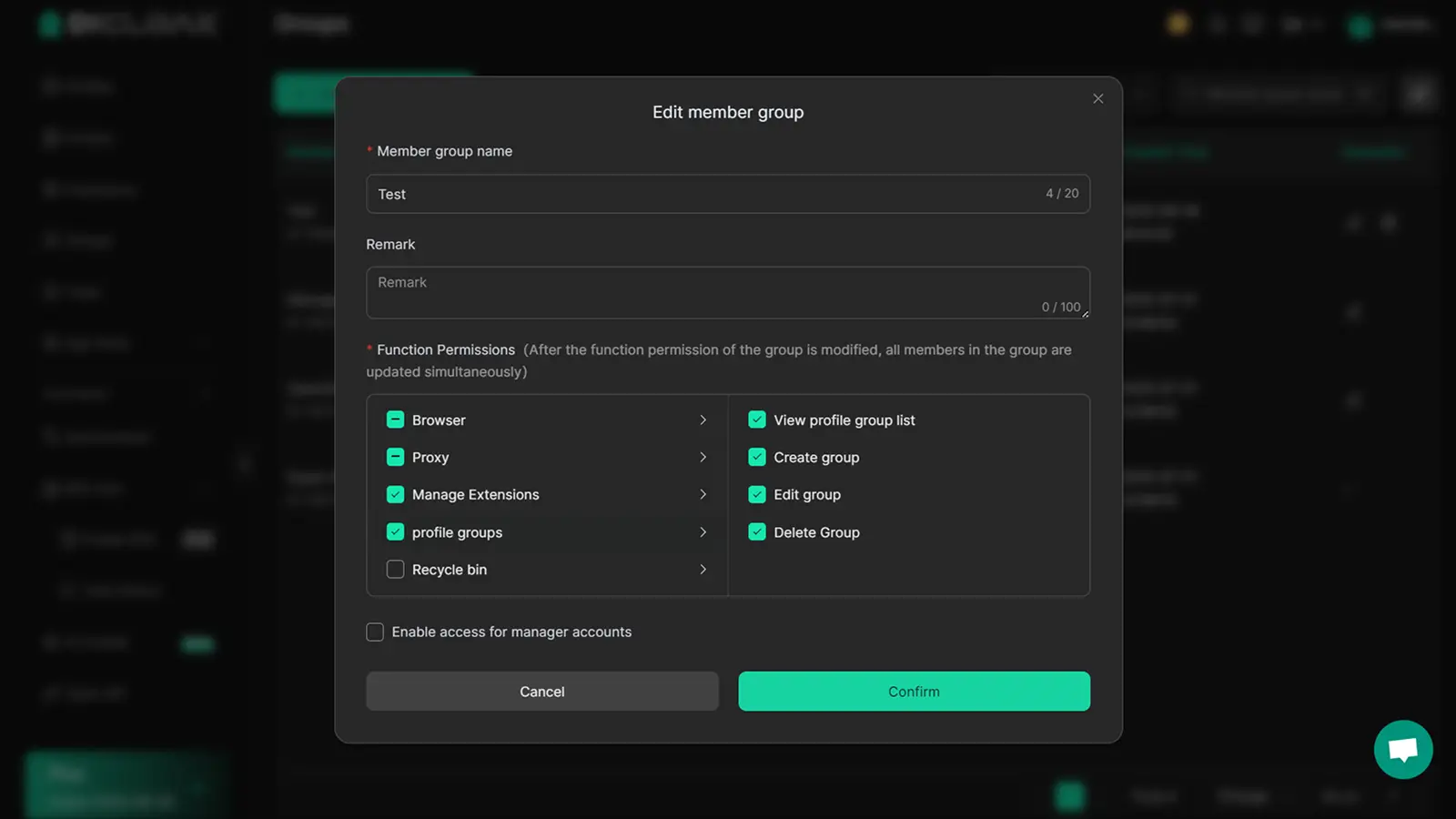
Protect Sensitive Areas and Make Handoffs Easier
Some browser workspaces include pages that not every assigned member needs to see or change. This may include billing settings, account-management pages, saved payment details, internal admin controls, or unrelated client tools.
You can use URL restrictions to limit which sites or pages are available inside a Profile. Web Element Hider can conceal sensitive on-page fields or controls, such as billing details or settings entries, while leaving the task-related parts of the page available. You can also apply developer-tool and extension restrictions to limit changes that do not belong in a controlled project workspace.
Operation logs give you a way to review Profile activity when a handoff needs clarification. When a contractor leaves, a client project ends, or responsibilities change, you can revoke that person’s Profile access without changing access for every other member or touching unrelated Profiles. This gives you a cleaner offboarding path than asking everyone to stop using one shared password.
FAQs About Claude Account Sharing
Can I use Claude on multiple devices?
Yes. You can use your own Claude account on your own phone, laptop, or tablet. But you cannot give another person access to your login.
Is account sharing bannable in Claude?
It can be. Anthropic’s Terms do not allow you to share account credentials or make your account available to someone else. Violations can lead to account suspension or termination.
Can I Share My Claude Account With My Wife or Family?
No. The same rule applies to a spouse, family member, friend, or coworker. Claude does not currently offer a family-sharing plan.
Can Anyone Access My Chats With Claude?
Anyone who can log in may be able to see your chats, files, and Projects. That is why a personal account should not be used as a shared workspace.
How Do I Invite Someone to Claude?
Use Claude Team or Enterprise. Invite each person by email so they receive their own login, seat, and access permissions.
Understanding Claude’s account-sharing rules helps your team choose the right access model and avoid unnecessary password exposure. DICloak helps you manage browser Profiles, control credential visibility, and handle project handoffs around approved workflows. Try DICloak for Free.
 Web Proxy Tools
 Free Tools
 Cookie Plugin
 UA Generator
 MAC Address Generator
 IP Generator
 IP Address List
 2FA Code Generator
 World Clock
 Anonymous Check
 WebRTC Leak Test
 UUID Generator
 Free Web Proxy Site
 Proxy Checker
 FB Ad Checker
 AI Web Scraping
 Free SMM Tools
 Twitter Shadowban Checker
 Instagram Name Checker
 UTM Generator
 Username Generator
 AI Hashtag Generator
 LinkedIn Headline Generator
 Social Media Image Resizer