You’re ready to sell on eBay, but knowing where to start, and what actually moves the needle, isn’t obvious. Listing more items doesn’t always mean more sales, and copying what top sellers do can backfire if you miss the details that matter for your own niche. The most common frustration: your listings get views, but conversions stall, or worse, a sudden restriction hits just as you think you’re gaining ground.
Plenty of new eBay sellers get stuck tweaking photos or lowering prices, thinking those small changes will solve slow growth. But real progress usually comes from getting a handle on the tradeoffs between risk, reach, and account stability. Chasing trends, using multiple accounts, or jumping into paid ads without a plan can set you up for short-term wins and long-term headaches.
What actually works in 2026? The sellers who keep results steady are the ones who test small, keep their account history clean, and spot trouble before it hits. They use repeatable routines for product research, manage their seller reputation closely, and avoid shortcuts that trigger detection. Understanding how to sell on eBay successfully is less about hacks and more about building a workflow that doesn’t break under stress.
Ready to see which tips for selling on eBay make the difference now? Start with the basics that most overlook.
What to Check Before Listing Your First Item on eBay
Before you post your first item, you need to make sure your account, product, and compliance steps are locked in. Skipping any step here raises your risk of account limits or pulled listings, problems far harder to fix than to prevent. Start with the basics below and you’ll avoid the headaches that cause most new sellers to stall.
Account Verification and Seller Policies
Your eBay account must be fully verified. That means confirming your identity, linking a valid payment method, and passing whatever seller checks eBay sets for your country. Read through eBay’s seller policies, especially the sections on restricted items and account holds. If you try to list before finishing all the checks, your first sale can get stuck in a review, or you might see selling limits you weren’t expecting.
Product Selection and Market Research
Quick wins usually come from selling items with steady demand and low risk of policy violations. Here’s what to check:
- Search completed listings for your item to confirm people are actually buying it, ignore only-listed, never-sold pages.
- Double-check that your product isn’t on eBay’s restricted or prohibited list (like certain electronics, medical items, or branded goods).
- Scan seller forums for recent bans or warnings linked to your product category.
Compliance and Tax Considerations
Even for a one-off sale, eBay’s tax reporting rules can catch you off guard. If you plan to sell more than a handful of items, you’ll need to handle taxes and business documentation from the start. For most US sellers, eBay now issues 1099-K forms if your sales cross certain thresholds, but local rules vary.
Checklist:
- Register for a sales tax permit in your state or region if required by law.
- Set up a simple spreadsheet or bookkeeping app to record every sale, cost, and fee, don’t rely on memory.
- Collect and save digital copies of all purchase invoices and item receipts in case of an audit or buyer dispute.
Missing any of these steps is a common reason new eBay sellers run into sudden restrictions or tax problems. Most give up because they didn't spot the roadblocks early. Now that the foundation is set, it’s time to look at the mistakes that trip up even experienced sellers, and how to sidestep them.
Why Many eBay Sellers Struggle: Common Mistakes and How to Avoid Them
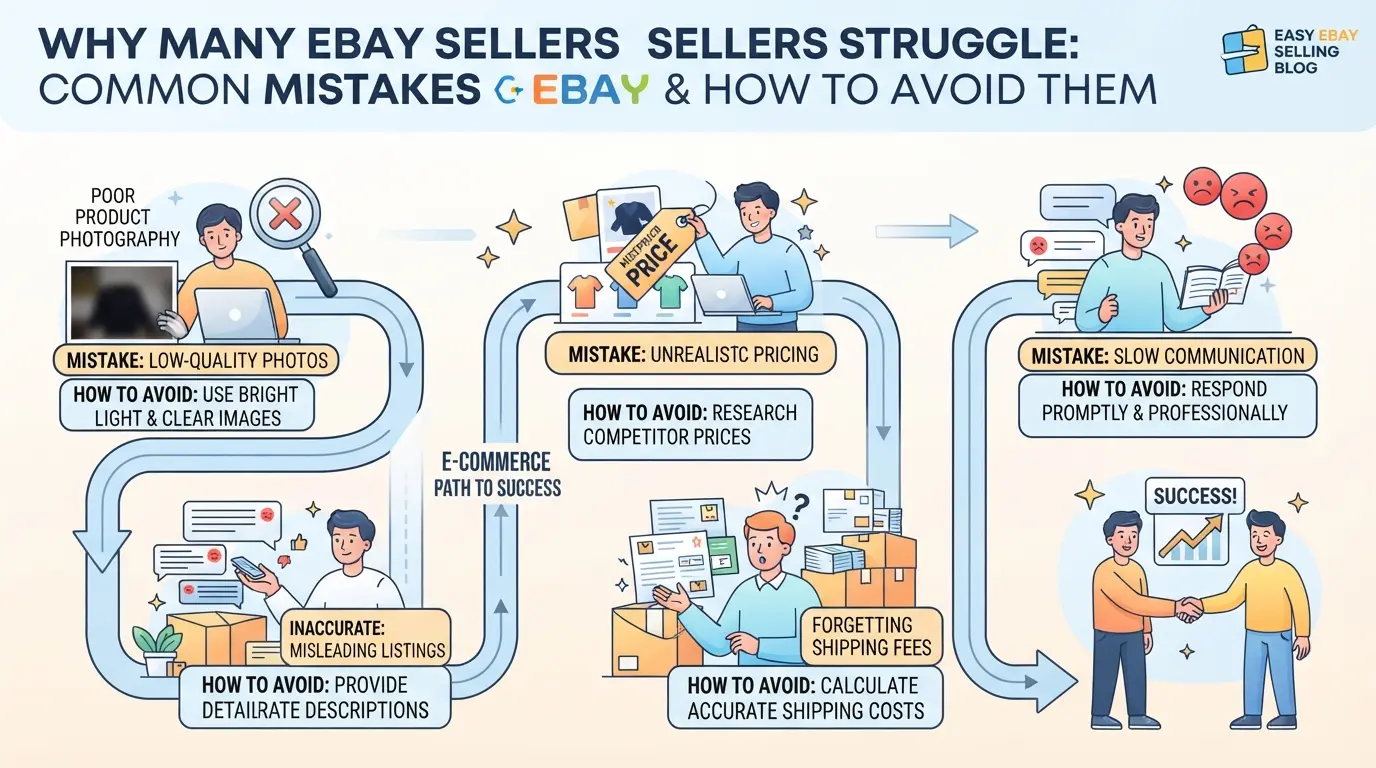
Most eBay sellers trip up on issues that seem minor at first but lead to account restrictions, lost sales, or harsh feedback. The sellers who last know how to spot these mistakes early and build safer routines.
Listing Errors and Inaccurate Descriptions
Overpromising or skipping key details in your item description is the fastest way to get negative reviews. Buyers notice missing specs or misleading photos and will file complaints, accurate, clear listings keep your account history clean.
Pricing Mistakes and Hidden Fees
Pricing without checking eBay’s fees leaves you earning less than planned.
- Underpricing: You lose margin after fees and shipping.
- Overpricing: Your item sits unsold while competitors move inventory.
The safer move is to use eBay’s fee calculator before listing, this avoids surprises and helps you set a price that covers all costs.
Shipping Delays and Poor Packaging
Late shipments or sloppy packaging can trigger refund claims and damage your feedback score. Plan for realistic ship times, and use sturdy, fitted boxes, bubble wrap for fragile items is a must.
Ignoring Buyer Communication
Slow replies or dodging disputes hurt seller ratings. Fast, direct answers to buyer questions and proactive resolution of issues make buyers trust you, most complaints fade if you act within 24 hours.
Clean up these basics, and you’re ready to build listings that convert.
How to Create High-Converting eBay Listings: Step-by-Step Guide
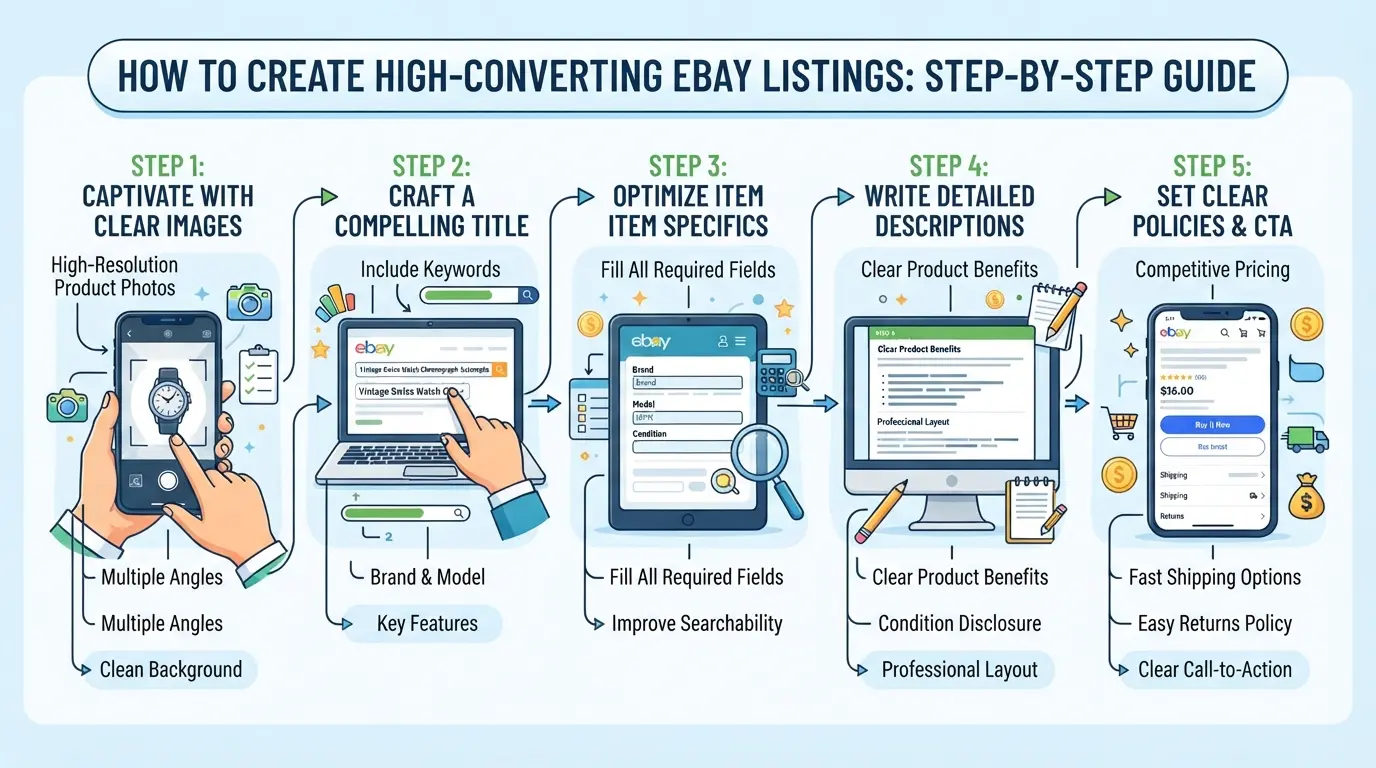
Getting steady sales on eBay rarely comes from luck or copying generic templates. If you want listings that actually convert, the process starts with tight attention to detail, titles, descriptions, photos, and format all count. The biggest difference comes from making your listings easy for buyers to find and trust.
Writing Keyword-Rich Titles
- Find the main search terms buyers use for your product, check eBay's autocomplete for clues.
- Put the most relevant keyword at the front of your title. Buyers scan the first few words before anything else.
- Skip filler words and fluff. “Brand, Model, Feature, Condition” beats “Amazing, Must-See, Best Deal.”
- Avoid keyword stuffing. If your title looks like a random list, buyers (and eBay’s search) will ignore it.
Crafting Clear, Honest Descriptions
- Start with the real benefits, don’t just echo specs. If it’s “waterproof,” say what that means in practice.
- Call out any flaws right away. Buyers trust listings that mention scratches, missing pieces, or wear.
- Explain what’s included. If the power cable or original box is missing, say so up front.
- Use short sentences and bullet points for the main features so buyers can skim quickly.
Uploading High-Quality Photos
- Shoot in natural light; avoid glare and heavy shadows. One bad photo can cut your click-through rate in half.
- Use multiple angles, front, back, sides, and close-up of any defects.
- Keep backgrounds plain and clear. Busy backgrounds distract buyers and can hide product issues.
- Upload at least 3-5 images for most items. For collectibles or electronics, go up to 8 if you need to show details.
Choosing the Right Listing Format
- Use “Buy It Now” for items with stable prices like new electronics or branded goods, buyers hate waiting for auctions.
- Try “Auction” for rare, collectible, or high-demand items where bidding could drive up the price.
- Set a reasonable starting bid, too low can spark interest, but too high means your listing sits unsold.
- Don’t mix formats for the same item across accounts; buyers can spot duplicate listings and lose trust.
If you’ve nailed these steps, you’ll avoid the usual conversion killers: vague titles, blurry photos, or missing details. That’s the groundwork for pricing decisions, which are the next layer in making your sales stick.
What Actually Affects eBay Pricing: Factors, Strategies, and Mistakes
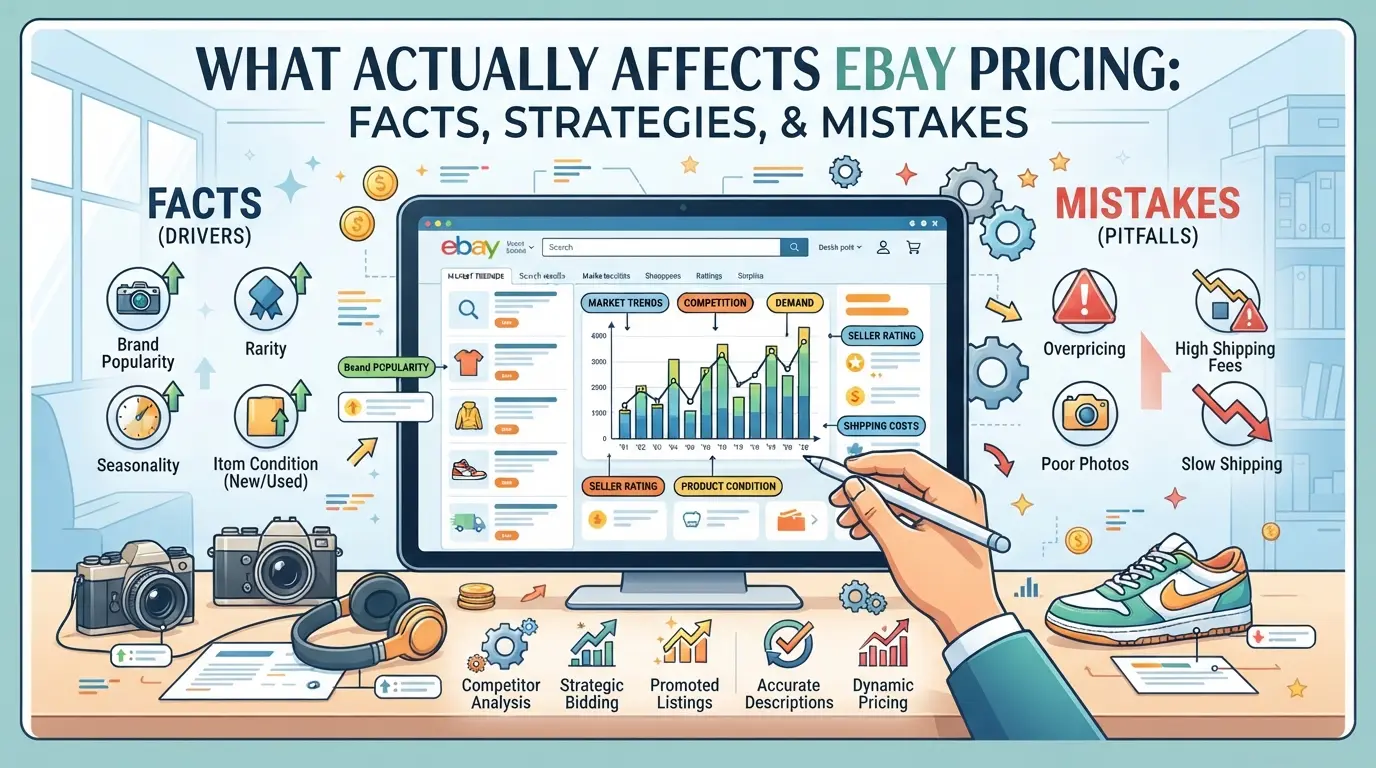
The right price on eBay isn’t random, it’s the result of watching the market, picking the right selling format, and dodging a few common traps. If you want sales that stick, you need a strategy that matches what buyers actually pay, not just what you hope to get.
Market Trends and Competitor Pricing
Checking what similar items sold for last week matters more than asking price. Use eBay’s “Sold Listings” filter to spot real numbers, ignore outliers and focus on recent, completed sales. If demand spikes around holidays or product launches, prices can swing by 10-20% in a week.
Auction vs Fixed Price: Pros and Cons
Auctions attract more impulse buyers when you have rare or hot items, bidding wars can drive up the final price. With fixed price, you set a clear target, but risk sitting unsold if you misjudge the market. For example, listing a trending gadget at a fixed price above recent sales often means zero bites, while a low starting auction might spark a flurry of bids but sometimes closes at less than you’d hoped.
Fee Structure and Hidden Costs
eBay takes a cut of every sale, and final value fees can reach 13-14% for most categories. What catches new sellers off guard are the extras, like $0.30 per order and optional “promoted listings” costs. A $100 sale can easily drop to $85 after all fees.
| Fee Type |
Description |
Typical Impact |
| Final Value Fee |
% of sale price + shipping |
13-14% per sale |
| Per-Order Fee |
Flat fee per transaction |
$0.30 per order |
| Promoted Listings |
Ad fee if the item sells via ad |
2-10% extra |
Table: eBay fee types and typical impact on seller proceeds (2026)
Pricing Mistakes That Hurt Sales
- Pricing lower than cost, buyers expect problems or think it’s a scam
- Listing above the recent sold average, your item will likely sit unsold
- Ignoring shipping costs, undercuts your profit or shocks buyers at checkout
The most reliable eBay sellers check both their costs and the market before setting a price, guesswork rarely pays off.
How Multi-Account Sellers Can Manage eBay Operations More Safely with DICloak
Many advanced eBay sellers hit a wall when they try to manage several accounts on one device. Keeping sessions separate, tracking which browser window matches which account, and handling team handoffs quickly become a mess. For those running more than one eBay account, using separate browser profiles and controlled connections is the only way to avoid cross-contamination and workflow mistakes. Here’s how operators use DICloak to handle these pain points, step by step.
Isolating Each eBay Account with Separate Browser Profiles and Fingerprint Configuration
Operators can create a new browser profile in DICloak for every eBay account they manage. Each profile stores its own browser profile, including device signals like User Agent, time zone, language, and screen resolution, so login sessions and cookies don’t mix. This setup means you can hand off accounts to different staff or switch between them without leaking profile data between sessions. The scope here stays at the browser-profile layer; it never controls listings or eBay-native objects.

User-Provided Proxy Configuration for Assigned Profiles
When account workflows need a separate network route, operators can assign a user-owned proxy to each profile. In DICloak, you enter your proxy details, then run a built-in connectivity test to confirm the location and exit IP are correct before logging in. Operators control which proxy goes with which profile, DICloak only applies what’s configured and doesn’t supply or manage proxies itself. This keeps network identity management in your hands.

Using Bulk Operations to Manage Multiple Profiles Efficiently
As your operation grows, managing dozens of profiles one by one is a waste of time. Teams can select multiple profiles in DICloak and apply batch actions, opening or closing profiles, updating tags, assigning proxy settings, or clearing cache, in a few clicks. The main advantage is speed: bulk actions cut hours of repetitive work, but a careless edit affects every selected profile, so double-check before running a batch task.

Done right, this setup lets multi-account sellers keep workflows clean without risking accidental cross-linking, setting the stage for building a solid eBay reputation next.
How to Build and Maintain a Strong eBay Seller Reputation
Building a strong eBay seller reputation isn’t about chasing hacks, steady results come from simple habits: consistent quality, fast responses, and handling feedback with care. These are the real ebay selling tips that keep sellers in the Top Rated bracket and out of trouble.
Delivering Consistent Quality and Service
- Ship exactly what you list, photos and descriptions must match the item, or buyers will flag you fast.
- Pack orders so items arrive undamaged. Skimping on packaging is the easiest way to rack up complaints.
- Handle returns quickly. If a buyer asks for a return, respond within 24 hours and issue refunds without drama, slow replies lead to negative feedback.
- Update buyers if shipping delays pop up. Silence kills trust.
Responding Promptly to Buyer Inquiries
- Reply to questions within 12 hours. Even a short message can stop a buyer from opening a dispute.
- Be direct when something goes wrong. Don’t hide problems, buyers appreciate honesty and will usually work with you if you explain.
- Use eBay’s message templates for common questions. It saves time and keeps answers clear.
- If you miss a deadline, message the buyer immediately. Waiting only makes the situation worse.
Managing Negative Feedback and Disputes
- Reach out to unhappy buyers before they escalate. A quick apology and a fix can turn a bad review into a positive one.
- If feedback is unfair or violates eBay rules, use the feedback revision tool. Attach proof, screenshots or tracking numbers work best.
- Don’t argue in public responses. Keep replies professional and stick to facts, drama pushes buyers away.
- Track dispute patterns. If one product keeps causing issues, pull it from your listings until you sort the root cause.
A reputation built on these habits is easier to scale, when your account history is clean, you can grow inventory and automate with fewer headaches. Skipping steps here means every future sale carries the weight of old mistakes.
When Scaling Your eBay Business Makes Sense: Inventory, Automation, and Analytics
Moving from solo sales to a real eBay operation isn’t about listing more , it’s about handling more without chaos. The right time to scale is when you’re spending too much time fixing mistakes, missing orders, or losing track of stock. That’s the line between “side hustle” and “business.”
Inventory Management for Growing Sellers
Small sellers can juggle 10-20 items by hand, but once orders hit daily or you’re restocking every week, manual tracking breaks down fast. Overselling leads to canceled orders and unhappy buyers. Here’s how main inventory options compare:
| Method |
Stock Visibility |
Oversell Risk |
Setup Effort |
| Manual spreadsheet |
Low |
High |
Low |
| eBay’s built-in |
Medium |
Medium |
Low |
| Third-party tool |
High |
Low |
Medium |
Spreadsheet tracking works for a handful of items, but third-party tools with real-time sync prevent most stock mistakes. If you get more than one “out of stock” message per month, it’s time to upgrade.
Automation Tools and Workflow Efficiency
Batch listing and auto-messaging tools save hours after you reach steady weekly sales. But if you automate too early, you risk generic listings and missed details that cost you feedback or sales. Skip full automation until your manual workflow is stretched thin.
Using Analytics to Guide Scaling Decisions
Tracking sales trends and conversion rates shows which listings actually drive profit. Sellers who watch their numbers spot slow sellers and double down on winners, while others waste time guessing what works. Use analytics to “trim the fat” before investing in bulk tools.
Frequently Asked Questions About ebay selling tips
What are the best eBay selling tips for beginners in 2026?
Start by researching popular items to sell. Use clear photos and write honest, keyword-rich titles and descriptions. Set up your seller profile with complete details. Ship quickly and offer great customer service. Keep your communication professional to build a good reputation, and always follow eBay’s rules to avoid problems.
How do I avoid getting my eBay account restricted or suspended?
Follow all eBay policies, including accurate listings and fair pricing. Don’t sell banned or counterfeit items. Ship orders on time and respond quickly to buyer messages. If you manage more than one account, keep accounts completely separate and never share info between them. Double-check your listings to avoid mistakes.
Can I manage multiple eBay accounts safely, and what tools help?
You can manage multiple eBay accounts by using separate browser profiles or user accounts on your computer. Use different IP addresses for each account, often with the help of proxies. Advanced sellers use tools to automate these steps, but always make sure each account’s data stays fully separate to avoid linking.
What is the best way to price items on eBay for maximum sales?
Start by searching for similar items and check their “sold” prices. Factor in eBay and PayPal fees when setting your price. Fixed-price listings work best for most items, but auctions can help rare or in-demand products. Competitive, realistic pricing increases your chances of a fast, successful sale.
How do I handle returns and negative feedback as an eBay seller?
Always accept returns within eBay’s policy window. Respond to buyers quickly and politely to work out solutions. If you get negative feedback, don’t argue publicly, offer to fix the issue or refund if needed. Request a feedback revision if you resolve the problem. Good communication helps protect your seller reputation.
Take a moment to review your listings and identify where you can improve photos, descriptions, or pricing strategies for better results. Implementing even one new approach can make your next sale smoother and more profitable. Try DICloak For Free
 Web Proxy Tools
 Free Tools
 Cookie Plugin
 UA Generator
 MAC Address Generator
 IP Generator
 IP Address List
 2FA Code Generator
 World Clock
 Anonymous Check
 WebRTC Leak Test
 UUID Generator
 Free Web Proxy Site
 Proxy Checker
 FB Ad Checker
 AI Web Scraping
 Free SMM Tools
 Twitter Shadowban Checker
 Instagram Name Checker
 UTM Generator
 Username Generator
 AI Hashtag Generator
 LinkedIn Headline Generator
 Social Media Image Resizer