Instagram Reels can help a business reach people who have never heard of the brand. Yet reach alone does not create growth. A Reel needs to attract the right viewer, explain a clear benefit, and lead that person toward a useful next step.
A strong Instagram Reels for business strategy should connect three stages. First, the Reel earns attention. Next, the content builds trust. Finally, the viewer visits a product page, sends a message, books a service, or follows the account.
Recent data also shows why businesses should not treat every Instagram format in the same way. Reels tend to produce the widest reach, while carousels often create deeper engagement. Buffer’s 2026 research found that Reels received 36% more reach than carousels, but carousels earned more engagement per person reached. Reels are therefore best used for discovery, while carousels and Stories can help explain details and continue the conversation.
This guide explains how to plan, create, promote, measure, and scale Instagram Reels marketing in 2026.
Why Instagram Reels Are Essential for Business Growth
Reels give businesses a practical way to introduce products, skills, and brand stories to new viewers. They are most useful when the content solves a real problem instead of acting like a traditional commercial.
How Reels Improve Engagement Compared with Regular Posts
Reels can generate more total interaction than a basic image because they often reach more people. Motion, sound, spoken explanations, and demonstrations also give viewers more reasons to stop scrolling.
However, businesses should understand the difference between reach and engagement rate. Buffer’s analysis of more than four million Instagram posts found that Reels received 125% more reach than single-image posts and 36% more reach than carousels. Carousels still received 12% more engagement than Reels.
This does not mean Reels are weak. It means each format has a different role.
For example, a home furniture store could publish a 20-second Reel showing how a small dining table extends to seat six people. The Reel may reach many new viewers because the result is easy to understand. The store could then publish a carousel with dimensions, available colors, delivery details, and care tips.
The Reel attracts attention. The carousel helps the customer make a decision.
Engagement also depends on what the video asks viewers to do. “Buy now” gives most viewers little reason to respond. “Which color would fit your dining room?” creates a natural conversation around the product.
The Unique Advantage of Reels for Reaching New Audiences
The Reels feed is built around discovery. People enter it to watch content based on their interests, not only content from accounts they already follow.
This gives smaller businesses an opportunity that regular follower-based posting may not provide. A new account can still reach a useful audience when the topic, opening, and viewer response are strong. Buffer’s research describes this dedicated discovery feed as a key reason Reels receive more reach than other Instagram post types. (Buffer)
Imagine a small bakery that publishes a Reel called “Why our sourdough takes 36 hours.”
The first shot shows the finished loaf breaking open. The next shots show the starter, the slow rise, and the baking process. The Reel ends by showing the bakery’s location.
Someone interested in baking or local food may see the video without following the bakery. That viewer may save the post, send it to a friend, or visit the store that weekend.
The business did not need a huge audience. It needed a topic that matched an existing interest.
Why Businesses That Ignore Reels Risk Falling Behind
A business does not need to publish every day or copy every trend. It does need a way to show its value in video.
Customers often want to see a product in use before buying it. They may want to hear how a service works, understand the size of an item, watch a real result, or meet the people behind the brand.
A single product image cannot always answer these questions.
Consider two local fitness studios. One posts only photos of equipment. The other publishes short Reels showing beginner exercises, class atmosphere, trainer advice, and member progress.
The second studio gives potential customers more context. Viewers can picture themselves joining the class. This reduces uncertainty before they send a message or book a trial.
Ignoring Reels can therefore create a communication gap. Competitors may not have a better product, but they may be doing a better job of showing why their product matters.
How to Create Instagram Reels That Attract Customers
A good Reel does not need a large production budget. It needs one clear idea, a strong opening, and enough proof to make the message believable.
A Step-by-Step Guide to Filming and Editing Reels
Step 1: Choose one business goal. Decide what the Reel should achieve before writing the script. It may need to introduce a product, answer a common question, collect leads, explain a service, or support a sale. Trying to achieve all five goals in one Reel usually creates a confusing video.
Step 2: Find the customer problem. Start with something the viewer already cares about. A hair salon might use, “Why does your hair color fade after two weeks?” A software company might use, “Still copying these numbers by hand?” A kitchen brand might ask, “Why does food stick to your new pan?”
The opening should help the right customer recognize the problem immediately.
Step 3: Show the result early. Do not save the most useful image for the final second. If the Reel is about a room makeover, show a quick view of the finished room at the beginning. If it is about a product test, show the surprising result first and then explain how it happened.
Step 4: Plan a simple shot sequence. A useful product Reel may need only four shots: the problem, the product, the product in use, and the result. A service Reel may show the customer’s starting point, one part of the process, the final result, and the booking instructions.
Step 5: Film in a vertical format. Instagram accepts several Reel ratios, but 9:16 fills the phone screen and is usually the strongest choice. Instagram recommends at least 720-pixel resolution and 30 frames per second. Important text and product details should stay away from the screen edges, where buttons or captions may cover them.
Step 6: Remove anything that slows the message. Cut long greetings, repeated points, empty pauses, and slow logo openings. A customer does not need to hear, “Hi everyone, welcome back to our page,” before learning what the video is about.
Step 7: Add clear captions. Spoken words should be easy to follow even when the viewer cannot hear the audio. Captions also help when a speaker has a strong accent or the video includes product names that may be unfamiliar.
Step 8: End with one next step. The call to action should match the goal. A tutorial may ask viewers to save the Reel. A product launch may direct them to the profile link. A service provider may ask them to send a specific word by direct message.
For example, a coffee equipment company could create a 25-second Reel with this structure:
The opening says, “Your coffee may taste weak because of this one setting.” The next shot shows the wrong grind size. The third shot shows the correct grind and brewing result. The Reel ends with, “Save this before your next brew.”
That video teaches one useful lesson. It also connects the lesson naturally to the product.
How to Choose the Right Music and Effects for Your Brand
Music should support the message rather than control it.
A youth fashion brand may use fast audio, strong cuts, and playful text. A financial firm may need calm background music, a clear voice, and limited visual effects. Both can create effective Reels without sounding the same.
Businesses must also check usage rights. Instagram explains that music in its licensed library is intended mainly for personal and non-commercial use. Some business accounts have limited access to that library. Meta’s Sound Collection offers royalty-free audio that can be used in commercial content and ads.
This matters when a business may later turn an organic Reel into an advertisement. A popular song may work in the original post but prevent the content from being promoted.
Original voiceovers are often a practical choice. They make the message more personal and reduce the brand’s dependence on one song. A restaurant owner explaining why a dish is prepared in a certain way may create more trust than background music alone.
Effects should also have a clear job. A close zoom can show a product detail. A split screen can compare two results. A transition can connect a before-and-after scene.
Common Mistakes to Avoid When Making Reels
The most common mistake is creating a Reel around what the business wants to announce instead of what the customer wants to know.
“We have launched a new bag” is brand-focused. “This small bag holds everything needed for a full workday” is customer-focused.
Another mistake is waiting too long to explain the topic. A slow logo animation may use the first three seconds without giving the viewer a reason to stay. The brand name can appear naturally on the product, packaging, uniform, or final screen.
Poor text placement also causes problems. Captions placed too low may be covered by the Instagram description. Text placed too far right may sit under interface buttons. Review the video inside a phone-sized preview before publishing.
Businesses should also avoid copying another creator too closely. A trend can provide a structure, but the script, examples, filming, and point of view should belong to the brand.
Finally, do not make every Reel look like an advertisement. A feed filled with discounts and product claims gives people little reason to follow. Useful teaching, honest demonstrations, and human stories usually create a stronger long-term relationship.
What Types of Content Work Best for Instagram Reels?
The best Instagram Reels ideas make a product easier to understand or a business easier to trust. A team can build a strong strategy around a few repeatable formats instead of creating a completely new idea each week.
High-Engagement Product Demonstration Reels
Product demonstrations work because they replace claims with visible proof.
A luggage brand could place a week of clothing beside a carry-on case. The opening asks, “Can seven days of clothes fit in this bag?” The Reel then shows the packing process and final result.
This is more persuasive than listing the bag’s capacity in a caption. The viewer sees the benefit in a real situation.
A cleaning product company could show one stained surface divided into two parts. One side receives the normal method. The other uses the product. The difference becomes the main story.
The best demonstrations focus on one benefit. A video that tries to show ten product features often moves too quickly for the viewer to remember any of them.
Eligible shops can also tag products inside Reels. Viewers can tap the product tag to learn more, save the item, or purchase it through available shopping features. Availability and commerce requirements can vary by market and account.
Build Trust with Tutorials and Practical Videos
Tutorials help a business show expertise before asking for a sale.
A makeup brand might explain how to stop foundation from separating around the nose. A real estate agent could show three things to check during an apartment viewing. An accountant could explain which receipt a small business owner should keep.
Each Reel solves one small problem. This is important because a narrow topic is easier to understand, search for, and share.
A useful tutorial should also include enough detail to produce a real result. “Use better lighting” is too broad. “Stand facing a window and turn off the ceiling light to remove shadows” gives the viewer a clear action.
The product can appear when it helps complete the task. It does not need to be mentioned in every sentence.
Create Relatable Behind-the-Scenes Content
Behind-the-scenes content helps customers understand the work, people, and standards behind a business.
A clothing company could show how one order moves from fabric selection to cutting, sewing, inspection, and packaging. A restaurant could show how the kitchen prepares before opening. A software team could show how one customer request becomes a tested update.
The topic should be more specific than “a day in our office.”
A stronger opening would be, “What happens after you place an order at 4 p.m.?” This gives the story a clear start and end.
Behind-the-scenes Reels can also make imperfect moments useful. A bakery may show what it does when a cake decoration does not work. A furniture maker may explain why one table failed a quality check.
Handled honestly, these stories show standards and problem-solving. They make the brand feel human without making it look careless.
How to Promote Products and Services with Instagram Reels
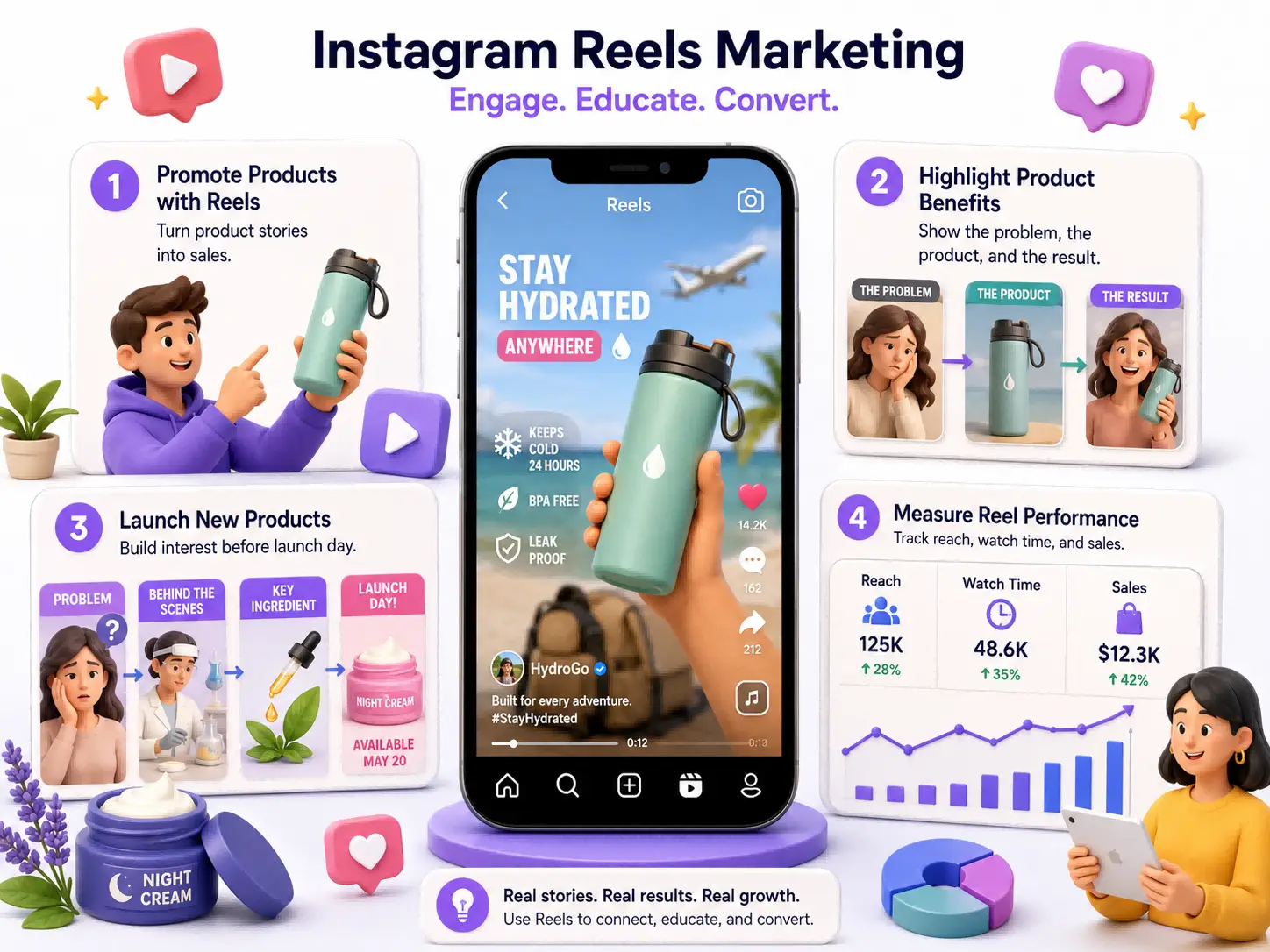
Promotional Reels work best when the product is part of a useful story. A discount alone may attract attention, but the viewer still needs to understand why the offer is valuable.
Strategies for Highlighting Product Benefits in Reels
A feature describes what a product has. A benefit explains what the customer can do because of that feature.
A travel bottle may keep water cold for 24 hours. That is the feature. The benefit is having cold water through a long airport journey, a beach day, or a road trip.
The Reel should show that real situation.
A simple benefit-focused structure begins with the customer’s problem. It then shows the product being used and ends with a clear result. Proof may come from a timer, measurement, close-up, comparison, or customer experience.
For example, a project management service should not open with a list of dashboard features. It could show a manager searching through five message threads for one approval. The next scene shows the same approval inside one organized project view.
The result is easy to understand: less time searching and fewer missed decisions.
Avoid empty claims such as “life-changing,” “perfect,” or “the best.” A specific result is more believable.
Use Reels to Announce a New Product Launch
One announcement is rarely enough for a full launch. A better approach uses several Reels to answer different customer questions.
The first Reel may introduce the problem that inspired the product. The next can show part of the design or testing process. A third Reel can demonstrate the result. The final launch Reel should explain availability, price, and the next step.
Consider a skincare brand launching a night cream.
The first Reel asks why skin may still feel dry in the morning. The second shows the texture and application. The third explains one key ingredient. The launch Reel shows the full product, release date, and order details.
Each Reel has its own value. A viewer does not need to see the full series to understand one video.
After the launch, the brand can publish Reels answering real customer questions. These may cover skin type, application order, packaging, or expected usage time.
This turns the launch into an ongoing education campaign instead of a one-day announcement.
How to Measure Instagram Reels Marketing Performance
Views are useful, but they cannot show the full value of a Reel. Businesses should connect content metrics with customer actions.
Key Metrics for Evaluating Reel Performance
Start with the goal of the Reel.
For an awareness Reel, accounts reached and non-follower exposure matter most. Views can show how often the video started or replayed, but reach shows how many unique accounts saw it.
For an educational Reel, average watch time, saves, shares, and comments give more useful information. A save suggests the viewer wants to return. A share suggests the video was useful or relevant enough to send to someone else.
For a sales Reel, profile visits, website clicks, direct messages, product views, leads, and purchases matter more than likes.
Instagram’s Reel Insights can show views, watch time, average watch time, accounts reached, follows, likes, comments, saves, and shares. Instagram notes that views may include replays, while accounts reached refers to unique accounts.
This difference prevents a common reporting mistake. A Reel with 20,000 views may not have reached 20,000 people if many viewers watched it more than once.
A business should therefore avoid judging performance from one number.
Use Instagram Insights to Improve Future Reels
Instagram Insights becomes useful when the team compares similar content.
Suppose a fitness brand publishes four product demonstrations and four educational Reels during one month. The demonstrations receive more views, but the educational videos create more saves and website visits.
The business should not call one format the winner. The demonstrations are working at the discovery stage. The tutorials are helping interested viewers move closer to a purchase.
Professional accounts can filter content and review performance across different time periods. Account Insights can also show follower locations, age ranges, and active times when enough data is available.
Review Reels in groups based on topic, length, opening style, product, and goal.
Change one major variable at a time. If the team changes the topic, length, posting time, music, editing style, and call to action in the same test, it will not know what caused the result.
A simple test may compare two openings for similar videos. One begins with a question. The other begins with the final result. After several posts, the team can compare watch time, shares, and profile visits.
Signs That Reels Are Driving Business Growth
Business growth appears when content activity begins to influence customer behavior.
A useful Reel may lead to more profile visits from non-followers. Customers may begin asking specific questions about the product. Direct messages may mention a demonstration or tutorial. More people may use a Reel-only discount code.
Website data can also show whether Instagram visitors explore product pages, join an email list, or complete a purchase.
Not every Reel will create an immediate sale. Some customers may watch several videos before taking action. This is common for higher-priced products and professional services.
A home renovation company may not receive a booking from the first Reel someone watches. However, after seeing project tours, cost explanations, and behind-the-scenes work for several weeks, that viewer may contact the company.
Ask new customers how they found the business. A simple checkout or sales-call question can reveal influence that platform reports do not fully show.
How to Use Trends Without Losing Your Brand Identity
Trends can make a format feel familiar, but they should never replace the brand’s message. A useful trend gives the business a new way to communicate something it already believes.
Identify Trends That Match Your Business Goals
Start with trends inside the customer’s world.
Listen to the questions people repeat in comments. Review the sounds and formats used by relevant creators. Watch for seasonal problems, industry news, common mistakes, and customer frustrations.
Then ask whether the trend can carry a useful business message.
A “things that make sense” format could work for a home organization brand showing storage choices. A quick “before you buy” format could work for an electronics store. A first-person story format may help a founder explain why a product was created.
The trend does not need to be used in its original form. Keep the structure but change the example, language, and visual style.
A useful trend helps the target customer understand the brand. A poor trend attracts attention that has no connection to the offer.
Balance Trending Content with Brand Voice
A business should sound recognizable even when it uses a popular format.
A luxury hotel may use a trending sound with slow room shots and calm text. It does not need to copy the rapid editing of a comedy account. A law firm can take part in a common question format without using humor that weakens trust.
Keep the brand’s normal vocabulary, visual standards, and level of emotion.
Trend content should also sit beside original content. Tutorials, product demonstrations, customer stories, and behind-the-scenes videos give the account a stable identity. Trends can add variety, but they should not become the entire strategy.
Before posting, remove the trending sound and look at the video again. Ask whether the Reel still communicates something useful. If the answer is no, the concept may depend too heavily on the trend.
Risks of Following Too Many Trends
An account that follows every trend can become difficult to understand.
One Reel may look like a comedy page. The next looks like a luxury campaign. Another copies a personal lifestyle creator. The business may collect views, but viewers may not know what it sells or why they should follow it.
Trends can also attract the wrong audience. A large group of viewers with no interest in the product may increase views without improving website traffic, leads, or sales.
Timing is another risk. A trend may already feel old by the time a larger team approves and publishes the video.
The business should set a clear rule: use a trend only when it supports a customer problem, product benefit, or brand story. This keeps the content relevant after the trend loses popularity.
Strengthen Your Reels Marketing Strategy with Influencers
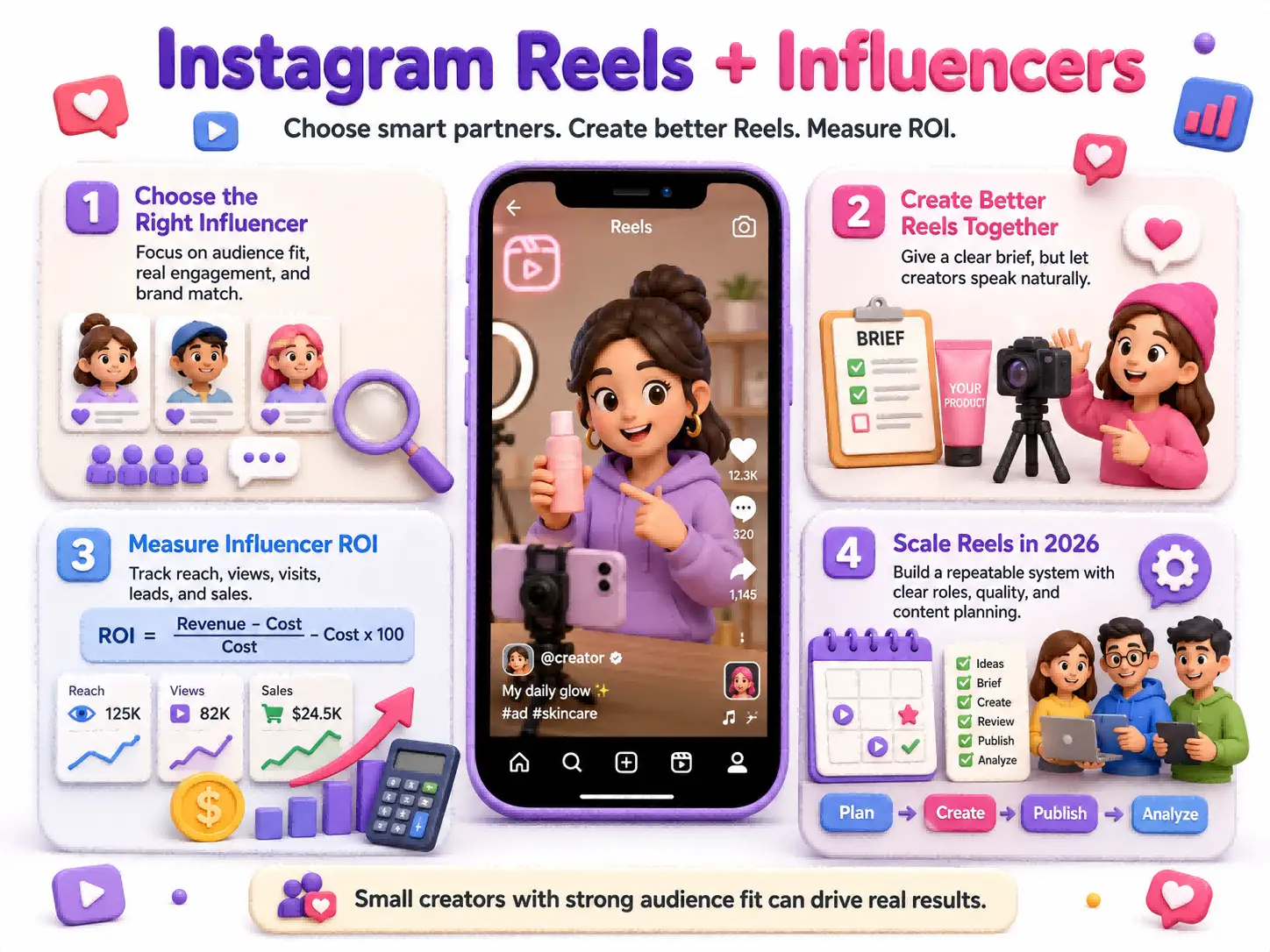
Influencer partnerships can help a business enter a trusted community. The right creator does not simply show the product. They explain it in a way their audience accepts and understands.
How to Choose the Right Influencers for Your Brand
Follower count should not be the first filter.
Start with audience fit. A creator’s followers should match the people the business wants to reach by interest, language, location, age, or buying need.
Next, review several recent posts. Look at whether the creator receives real questions and thoughtful comments. One viral Reel may not represent normal performance.
The creator’s communication style must also fit the product. A technical product may need someone who can explain details clearly. A fashion product may need someone with strong visual storytelling. A local service needs an audience that is actually located near the business.
Review previous brand work as well. Too many unrelated promotions may reduce trust. The creator should be able to describe why the product fits their normal content.
Instagram’s Creator Marketplace allows eligible professional accounts to search for creators and review available insights. The feature may not be available to every business or market.
A smaller creator with a focused audience may produce better business results than a large creator with broad but weak relevance.
Best Practices for Creating Reels with Influencers
Give the creator a clear direction, but do not write every sentence.
The brief should explain the customer problem, key product benefit, required facts, claims that cannot be made, visual needs, deadline, and call to action. It should also define whether the business can reuse the content in ads, product pages, email campaigns, or other channels.
Allow the creator to speak in their normal voice. Their audience follows them because their content feels familiar. A script filled with formal brand language may sound unnatural.
For example, a meal delivery brand might require the creator to show the package, cooking time, final meal, and discount code. The creator can still decide whether the story begins with a busy workday, an empty refrigerator, or a failed cooking attempt.
Paid and gifted collaborations must be disclosed correctly. Meta states that branded content, including content influenced by free products or affiliate relationships, should use the paid partnership label.
How to Measure Influencer Marketing ROI
Influencer performance should be measured against the purpose of the campaign.
An awareness campaign may focus on qualified reach, video views, watch time, and profile visits. A consideration campaign may focus on saves, shares, product page visits, and direct messages. A sales campaign should track codes, tagged links, leads, purchases, and customer acquisition cost.
The basic formula is:
Influencer ROI = (Attributed revenue − total campaign cost) ÷ total campaign cost × 100
Total cost should include the creator fee, free products, shipping, paid promotion, production, agency support, and internal team time.
Suppose a campaign costs $4,000 and produces $10,000 in tracked revenue. The campaign generated $6,000 after the campaign cost. Its measured ROI is 150%.
That result still needs context. The business should check refunds, profit margin, new customer quality, and whether sales continued after the campaign.
Businesses can also turn eligible creator content into partnership ads. Meta reports that advertisers adding partnership ads to Reels campaigns saw a 25% better click-through rate and a 5% lower cost per ad in its cited tests. These results are useful benchmarks, but they are not guaranteed for every campaign.
How to Scale Instagram Reels in 2026
Scaling should make production more reliable, not make the content more generic. The team needs a system that protects good ideas, brand quality, and clear ownership.
Plan a Content Calendar for Consistent Publishing
Begin with a small number of content themes.
A skincare company might use product demonstrations, customer questions, ingredient education, routines, and behind-the-scenes development. A software company might use tutorials, common mistakes, customer workflows, feature examples, and team stories.
Each theme should have a clear purpose.
The calendar can then assign a repeatable format to each publishing day. Tuesday may focus on education. Thursday may show a product or service. Saturday may share a customer story or behind-the-scenes moment.
Do not force a daily Reel when the team cannot maintain quality. Buffer’s July 2026 analysis of 9.6 million Instagram posts suggests that three to five total Instagram feed posts per week can provide a practical balance. This total may include Reels, carousels, and images, rather than five Reels alone.
A small team might start with two Reels each week, one carousel, and regular Stories.
Practical Tools for Producing Reels Efficiently
The right tools remove production delays. They should not add more steps than they save.
A shared spreadsheet, project board, or calendar can track the topic, goal, owner, filming date, approval status, caption, and publishing date.
For video production, Meta’s Edits app supports planning, editing, captions, direct sharing, and clean exports. Meta’s April 2026 update also describes an Ideas area where saved Reels, audio, and notes can sit in one workspace.
Canva and Adobe Express can help with simple title cards, covers, and brand templates. Videoleap can support mobile editing. Meta also lists these tools among its Reels production partners.
The workflow matters more than the number of tools.
For example, the writer can place an approved script in the project board. The video creator can upload the draft to one shared folder. The manager can leave feedback in one location. The final caption and cover can remain attached to the same task.
This is much faster than sending several versions through private messages.
How to Repurpose Reels Across Platforms
Repurposing works best when the team starts with a clean master video.
Do not export a video with another platform’s logo or interface. Keep the original file without watermarks, platform captions, or fixed music that may have different rights elsewhere.
The core lesson can remain the same, but the packaging should change.
A 40-second Instagram tutorial could become a shorter opening for TikTok, a search-focused YouTube Short, a professional clip for LinkedIn, and a carousel that explains each step in more detail.
Change the hook and call to action for each platform.
On Instagram, the goal may be to save the Reel or visit the profile. On YouTube, the title may answer a specific search question. On LinkedIn, the same example may focus on the business lesson.
Repurposing does not mean uploading an identical file everywhere. It means getting more value from one strong idea.
How to Simplify Instagram Reels Marketing with DICloak
Managing one Instagram account is mostly a content problem. Managing several client, brand, or regional accounts also becomes an organization and access problem.
Teams need to keep login sessions, browser data, account ownership, and repeated tasks from becoming mixed.
You can use DICloak to create a separate browser profile for each authorized Instagram account, client, campaign, or region.
Each browser profile can maintain its own cookies, login session, local data, and browser settings. You can also customize fingerprints and integrate a suitable proxy for each profile. The product reference identifies isolated profile management, fingerprint settings, proxy integration, RPA, bulk operations, and the Synchronizer as key parts of its multi-account workflow.
For example, an agency could create profiles named ClientA_Main, ClientA_US_Support, and ClientB_Product. The team can open the correct workspace without signing in and out of unrelated accounts in one normal browser.

This does not increase Instagram’s account limits or replace official access features. It helps the team keep approved accounts and their working data separated.
Team managers can also assign browser profiles according to each person’s role. A creator may work only on the brand account they support, while a manager can access several client profiles for approval and reporting.
You can use profile sharing, member permissions, data isolation, and operation logs to keep account access clearer across a remote team. These team controls are also listed in the product reference.
When a contractor leaves, access can be removed from the relevant profiles instead of changing every workflow without a record.
Automate Repetitive Tasks and Save Reels Management Time
Reels still require human judgment. A person should decide the topic, claims, visuals, caption, and customer response.
However, some browser work around content production is repetitive.
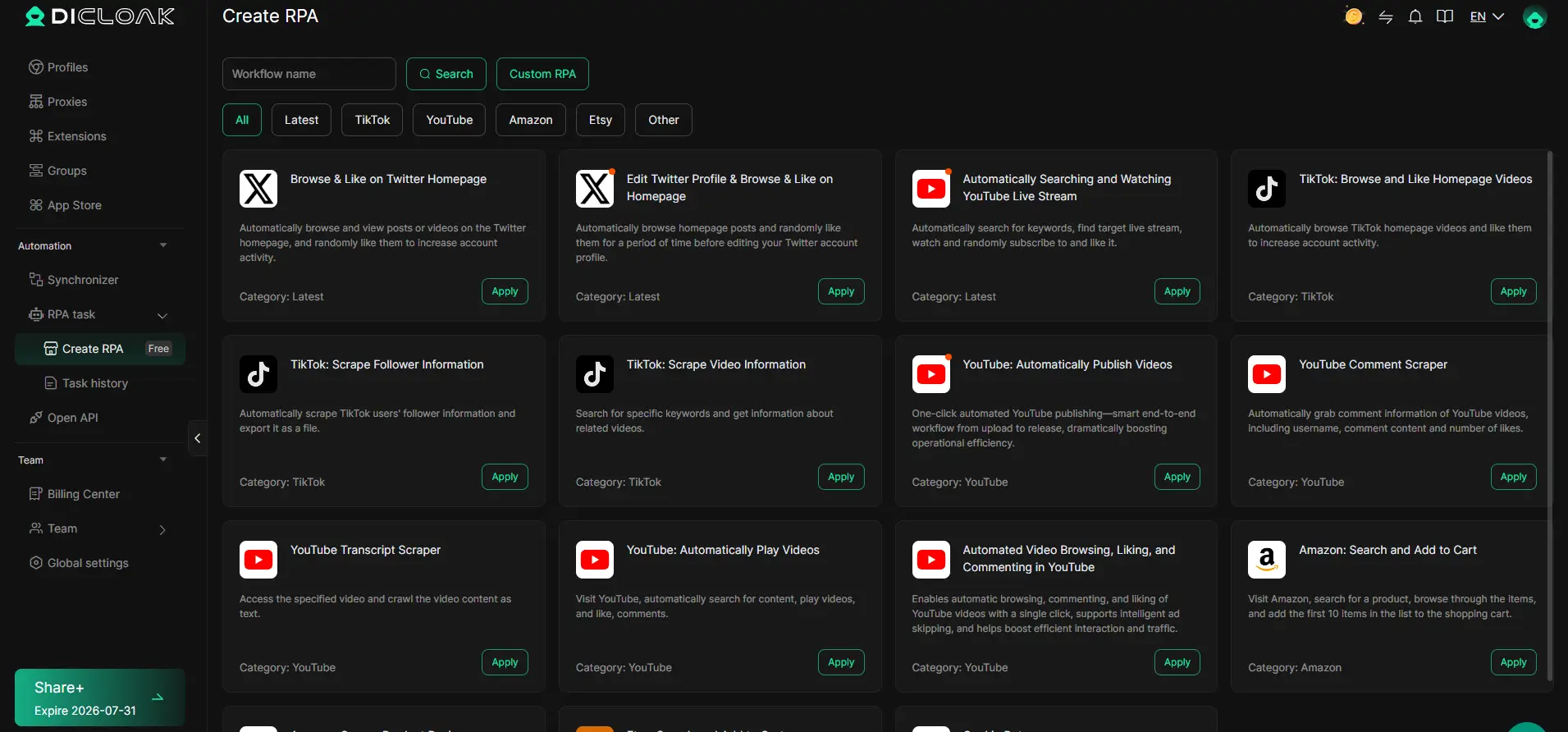
You can use RPA workflows in DICloak for tested tasks such as opening required research pages, preparing a standard browser workspace, collecting approved public information, or completing routine internal checks.
You can also use the Synchronizer when the same approved browser action needs to be repeated across selected workspaces. This may be useful for internal setup, opening the same reporting page, or checking account information.
It should not be treated as a tool for fake engagement, mass comments, or uncontrolled activity. Automation works best when the task is predictable, reviewed, and allowed by the platform.
A practical agency workflow could begin with separate client profiles. The team opens the profiles needed for that day, runs an approved setup process, completes the creative work manually, and records the results in its normal project system.
The value comes from reducing repeated setup work, not replacing content strategy.
Frequently Asked Questions About Instagram Reels for Business
What Instagram Reels Length Gets the Most Engagement?
There is no single best length for every Reel.
Instagram expanded Reels to a maximum of three minutes in 2025. This gives businesses more room for tutorials and stories, but it does not mean every video should use the full limit.
A quick product result may need only 10 to 20 seconds. A demonstration may need 20 to 45 seconds. A detailed tutorial may need 45 to 90 seconds.
The best length is the shortest time needed to deliver the full value. Compare average watch time, completion, shares, and business actions across your own videos.
Can Businesses Reach More Customers with Instagram Reels Ads?
Yes. Businesses can create Reels ads in Meta Ads Manager for goals such as awareness, traffic, engagement, leads, app promotion, and sales. Reels ads appear between organic videos, and viewers can like, comment, share, view, or skip them.
Creative should feel natural inside the Reels feed. Meta reports that 9:16 video ads with audio and important elements inside the safe zone produced a 34.5% lower cost per result than image ads in its Reels campaign tests. This is a research result, not a guarantee for every business.
Technical limits may differ depending on whether the business uses Ads Manager or boosts an existing Reel directly. Check the current requirements before producing the final version.
How Can a Business Find Trending Music for Reels?
Watch relevant Reels, open audio pages, and review the sounds used by creators in your market. A trend that appears across several recent posts may be growing, but the music still needs to fit the brand and customer.
Businesses must check usage rights before publishing. Instagram’s licensed library is mainly intended for personal, non-commercial use, and some business accounts may have limited access. Meta’s Sound Collection offers royalty-free music for commercial content and ads.
Original voiceovers and brand-owned sounds are also useful. They make the content easier to reuse in future campaigns.
What Is the Best Time to Post Instagram Reels for Business?
The best time to post Instagram Reels depends on the audience.
Instagram Insights can show when followers are most active when the professional account has enough audience data. This should be the main source for scheduling decisions.
As a wider benchmark, Buffer’s July 2026 analysis found strong Instagram performance during evening hours, especially on Wednesday and Thursday. Its data suggests testing between 6 p.m. and 11 p.m. local time for Reels, while noting that the study included all Instagram content types rather than only Reels.
Use this as a starting point. Test several times for at least four weeks, then compare reach, watch time, shares, and conversions.
How Can a Business Encourage Followers to Share Its Reels?
People share content that helps them solve a problem, explain a feeling, warn someone, or start a conversation.
A useful Reel may make the viewer think, “My coworker needs this,” “This is exactly what my friend is doing wrong,” or “We should try this.”
Specific content is easier to share than broad advice. “Three mistakes that make a small room feel crowded” is more useful than “Interior design tips.”
The call to action should also give a reason to share. “Send this to someone planning a kitchen renovation” feels more natural than adding “Please share” to every post.
 Web Proxy Tools
 Free Tools
 Cookie Plugin
 UA Generator
 MAC Address Generator
 IP Generator
 IP Address List
 2FA Code Generator
 World Clock
 Anonymous Check
 WebRTC Leak Test
 UUID Generator
 Free Web Proxy Site
 Proxy Checker
 FB Ad Checker
 AI Web Scraping
 Free SMM Tools
 Twitter Shadowban Checker
 Instagram Name Checker
 UTM Generator
 Username Generator
 AI Hashtag Generator
 LinkedIn Headline Generator
 Social Media Image Resizer