You open Facebook and find a Feed filled with irrelevant posts, repetitive Reels, unwanted creators, or topics that no longer match your interests. When people search for how to reset Facebook algorithm, they often expect one button that removes everything Facebook has learned.
Facebook does not provide a complete one-click reset. Instead, you can clean up old recommendation signals and gradually teach your Feed and Reels what you want to see next. This guide explains how to change Feed recommendations, adjust Reels and ads, review old activity, and understand why some changes take time. It also shows businesses how to keep several authorized Facebook accounts organized. Clearing the cache or reinstalling the app may fix technical problems, but neither action fully resets account recommendations.
Can You Really Reset the Facebook Algorithm?
No. Facebook does not offer a button that erases all recommendation data. A reset is better understood as cleaning up old signals and building a clearer content direction.
What a Facebook Algorithm Reset Actually Means
Facebook uses account activity and direct feedback to decide what appears in your Feed. Past follows, views, searches, reactions, comments, saves, and shares can all influence which sources and topics receive more attention.
To reset Facebook algorithm recommendations, you are not deleting Facebook’s full recommendation model. You are reducing the influence of old interests, changing recurring content sources, and giving Facebook clearer feedback about what you want next.
Your future activity will continue shaping the result. For this reason, “reset” is a useful search term, but “clean up and retrain” is more accurate. The goal is to retrain Facebook algorithm recommendations with more relevant sources and consistent future behavior.
Why Your Facebook Feed Shows Irrelevant Content
The main cause of Facebook feed showing irrelevant content is mixed or outdated activity. Watching a post or Reel for a long time can signal interest. Opening content out of curiosity may have a similar effect.
Likes, comments, shares, and saves also show that a post received your attention. At the same time, old Pages, Groups, friends, and creators may continue publishing content that matched your interests years ago but no longer matters.
The problem can also appear when an account changes purpose. A personal account used for business research may need a different content direction than before. New accounts may have the opposite problem because they have not developed a clear pattern yet.
Facebook cannot always understand why you opened a post. Repeated attention may still look like interest, even when the content was surprising, annoying, or controversial.
Why Clearing Cache Does Not Reset Recommendations
Cache is temporary information stored by the Facebook app or your browser. Clearing it may help when the Feed is blank, posts do not load, the app freezes, or images and videos fail to appear.
Recommendation problems are different. Irrelevant posts, repetitive videos, unwanted topics, and content from sources you no longer care about are mainly connected to your Facebook account activity and preferences.
Deleting or reinstalling the app does not erase that full account history. Clearing search or watch records may remove some visible activity, but it does not rebuild the entire recommendation system by itself.
If Facebook loads normally but shows the wrong content, you need to change content sources and recommendation signals rather than only clear local app data.
Reset Your Facebook Feed Recommendations in 4 Steps
To understand how to reset Facebook algorithm recommendations in practice, remove weak or outdated content sources and then provide clearer new signals. The same core process applies to how to reset Facebook algorithm on iPhone and how to reset Facebook algorithm on Android, although menu names may vary by device, region, account, and app version.
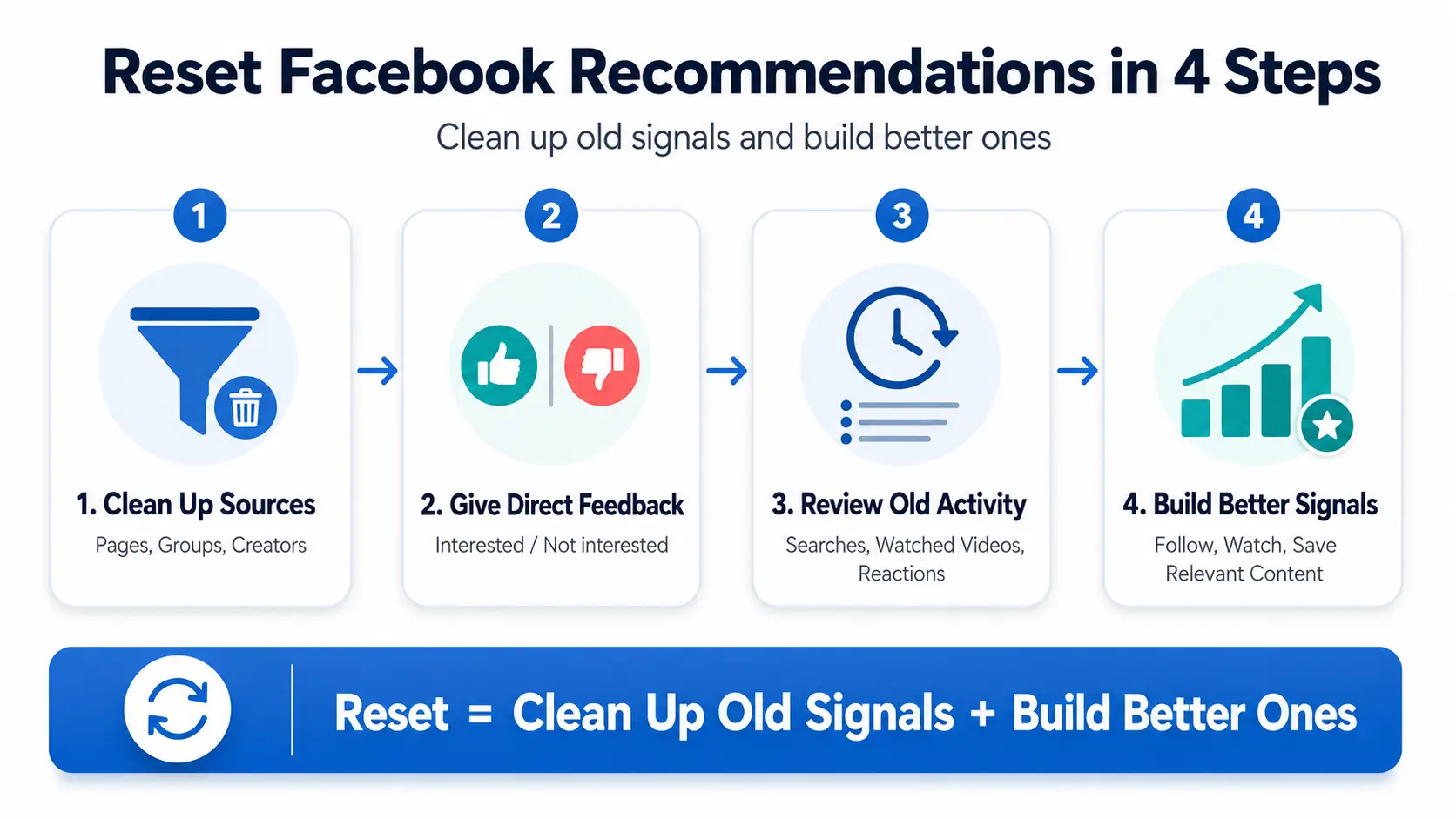
Open Content Preferences and Clean Up Content Sources
Start with Content preferences because it brings several Feed controls into one place. On Facebook.com, you can usually open your profile picture, choose Settings & privacy, and then select Content preferences. In the mobile app, you may need to open Menu first.
The exact path can differ across devices and accounts. Look for Content preferences or related Feed controls inside Facebook settings rather than assuming every device uses the same menu layout.
Choose each control based on the problem:
- Favorites gives selected friends and Pages higher priority in Feed.
- Unfollow stops posts from a person, Page, or Group without always unfriending the person or leaving the Group.
- Reconnect restores content from sources you previously unfollowed.
- Snooze temporarily pauses posts from a person, Page, or Group.
- Sensitive Content adjusts how much sensitive recommended content may appear when the option is available.
The most important task is reviewing recurring sources. A Page followed for an old job, hobby, product, event, or community may still post often. An active Group can also keep the same topic visible long after it stops being useful.
Changing a recurring source is usually more effective than hiding its posts one by one. Hide one post when the problem is limited to that item. Use Unfollow when the same source repeatedly fills the Feed with content you no longer want.
Do not follow dozens of new Pages in an attempt to overwrite the old Feed. To reset Facebook feed recommendations, keep a smaller number of sources that clearly match your current interests.
Use Interested and Not Interested
Direct feedback gives Facebook a clearer message than passive scrolling alone. Interested tells Facebook that you want more related recommendations. Not interested asks Facebook to reduce similar recommended content.
These choices may appear in a post menu or below certain recommendations. Their location and availability can vary by post type, device, region, and account.
Hide post is useful when you only want to remove one item. It may not solve a repeated problem from the same person, Page, or creator. In that case, Unfollow is often the stronger choice because it addresses the source rather than one post.
Your later behavior should support the feedback you give. Do not select Not interested and then continue watching the content, reading its comments, visiting the source, or opening similar posts repeatedly.
One feedback action can influence future ranking, but it does not permanently block an entire topic. Use the available controls again when unwanted recommendations return.
Review Your Activity Log
Activity Log can show why certain topics continue appearing. Open your profile picture or Menu, go to Settings & privacy, and choose Activity log. Categories may differ by device and app version.
Useful areas can include:
- Search history
- Videos watched
- Likes and reactions
- Comments
- Saved content
- Follow and connection records
You may be able to remove searches or manage other recorded activity from the relevant category. This can clean up old records and help you understand which habits shaped your Feed.
However, deleting part of your search, watch, or interaction history does not erase Facebook’s full recommendation model. Activity Log is a review and cleanup tool, not a complete reset button.
Use it to identify old patterns, remove records you no longer need where possible, and decide which content sources or behaviors should change.
Build and Maintain Better Content Signals
Removing unwanted signals is only half of the process. You also need to show Facebook what should replace them.
Search for topics that match your current interests. Follow a limited number of useful Pages and creators, and join only Groups that are active and closely related to what you want to learn or discuss.
Save or share posts that are genuinely useful. Spend more time reading or watching content that matches your current goals. Keep these actions natural instead of following, liking, or saving many items in one session.
Avoid curiosity clicks on topics you do not want. Do not repeatedly open unwanted posts just to see whether they still appear. That attention can conflict with the feedback you already provided.
For example, someone who wants more small-business marketing content could follow several trusted marketing Pages, join one or two useful business Groups, and spend more time reading posts about paid ads, content planning, and customer research. This creates a clearer pattern than following every marketing source that appears.
Future behavior matters because Facebook continues learning after you change the settings. One accidental click usually matters less than repeated viewing, saving, sharing, commenting, or profile visits.
To retrain Facebook algorithm recommendations, keep your feedback and normal browsing pointed in the same direction. Natural and consistent activity is more useful than one large burst of follows or reactions.
Consistent signals matter more than frequent attempts to reset the Feed.
Reels uses some different feedback options and viewing signals. If unwanted short videos are the main problem, adjust Reels directly rather than relying only on the main Feed controls.
Resetting Your Facebook Reels Recommendations
Reels recommendations are strongly influenced by what you watch and how you respond. When learning how to reset Facebook Reels algorithm results, users who mainly see unwanted short videos should adjust Reels directly.
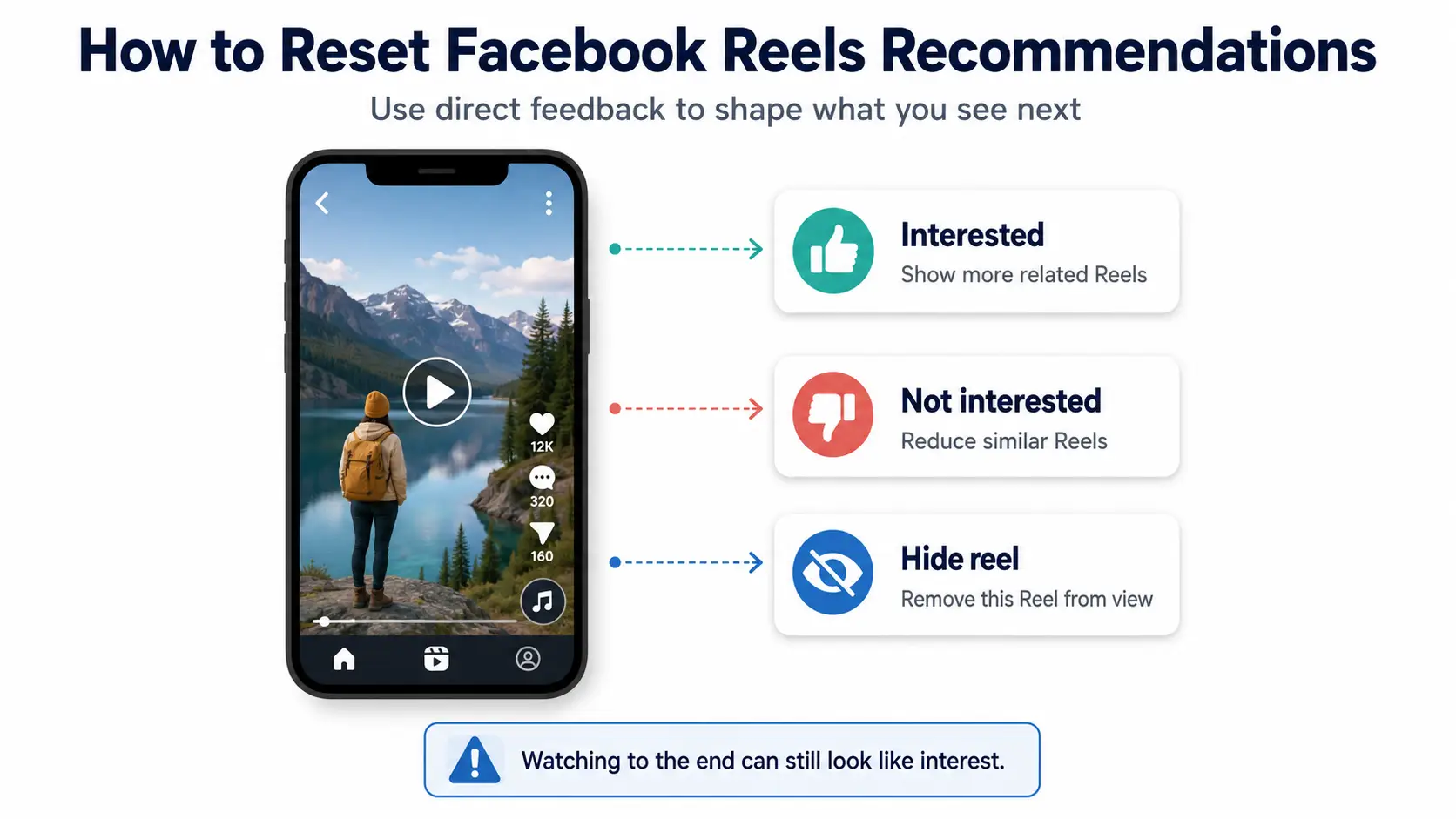
Give Facebook Direct Feedback on Reels
Use the feedback controls on individual Reels to tell Facebook which videos you want to see more or less often. Open the More menu while viewing a Reel. Depending on your device, account, app version, and region, you may see Interested, Not interested, or Hide reel.
Interested can increase related recommendations. Not interested can reduce similar videos. Hide reel removes the current video from view.
When the same creator appears repeatedly, an option to reduce content from that creator may be more useful than hiding one video at a time, if that control is available.
To reset Facebook Reels recommendations, use the option that matches the problem. One action can guide future suggestions, but it does not permanently remove every video connected to a topic.
Stop Reinforcing Unwanted Topics
Facebook can measure attention, but it cannot always understand why you gave that attention. Watching an unwanted Reel to the end, replaying it, or pausing for a long time may still suggest that the video held your interest.
Opening and reading comments adds more attention to the same Reel. Sharing it to criticize or joke about it may also keep the topic active. The same applies when you visit the creator’s profile or watch several similar videos out of curiosity.
Emotional dislike does not automatically cancel those actions. Facebook may know that you spent time with a video, but it cannot always determine whether you found it useful, annoying, or controversial.
Swipe away sooner when an unwanted topic appears. Use Not interested when available, and avoid repeatedly checking whether the same category has returned.
Build a New Reels Content Direction
Reducing unwanted Reels is only part of the process. You also need to show Facebook what should replace them.
Search for topics that match your current interests. Watch useful Reels for longer, follow relevant creators, and save or share videos that you genuinely value. Use Interested when a suitable recommendation appears.
Build the new pattern gradually. Do not follow, save, and react to a large number of videos in one session. A few clear actions repeated through normal use create a more focused direction.
For example, a small-business owner who wants more e-commerce content could search for product photography, paid social ads, customer research, and online store tips. They could then follow several useful creators and spend more time watching relevant tutorials.
Consistency matters more than one burst of activity. Your future viewing choices will continue shaping the Reels mix.
Changing Feed or Reels preferences does not fully control which ads appear. Facebook uses separate controls for ad personalization.
Adjusting Facebook Ad Recommendations
Facebook uses separate settings for ad personalization, so Feed and Reels changes will not fully change the advertising you see. Facebook ad preferences can improve relevance and limit certain uses of your information, but they cannot remove every ad.
Review Advertisers and Ad Topics
Review the advertisers and topics connected to ads you have recently seen. You can usually open Facebook settings, go to Accounts Center, and select Ad preferences. The exact path may vary by device, region, app version, or account.
Under advertiser controls, you may find businesses whose ads you recently saw or interacted with. Hiding an advertiser can reduce ads from that specific business. It does not block every company selling similar products.
Ad Topics works at a broader level. Where available, you may be able to choose to see less advertising related to certain sensitive or unwanted subjects.
These actions solve different problems. Hiding an advertiser affects one advertiser. Adjusting a topic affects a wider type of advertising.
Neither control changes ordinary posts from friends, Pages, or Groups. Choosing to see less of a topic can reduce related ads, but it does not guarantee that the topic will never appear again.
Manage Activity Information Used for Ads
Some Facebook ads are personalized with information from activity that happens outside Facebook. Meta refers to this as activity information from ad partners.
Businesses, websites, and apps may share information through advertising and measurement tools. This can include website visits, app activity, purchases, or other interactions connected to a business.
You can usually review this control through Accounts Center, Ad preferences, and Manage info. The menu path and available choices may vary.
You may be able to limit whether activity information from ad partners is used for certain personalized ads. Changing this setting affects one source of ad personalization.
It does not delete all activity data, prevent all information sharing, or stop businesses from reaching broad audiences. You may also continue seeing ads based on actions that happen directly on Facebook, such as following a Page or clicking an ad.
Why Ads Still Appear
Changing ad preferences affects personalization, not the existence of advertising on Facebook. Normal preference settings do not provide a way to permanently remove every ad.
Hiding one advertiser does not remove ads from other businesses. Choosing to see less of one topic also does not create a permanent block.
Some ads may be selected using broad details such as age range, general location, device, or activity on Facebook. An advertiser may also choose a wide audience instead of targeting one narrow interest. This can result in ads that feel unrelated.
Preference changes may also need time to affect the overall mix of advertising you receive.
Do not trust apps, extensions, or websites that promise to remove every Facebook ad by accessing your account. Never give a third-party tool your Facebook password so it can change ad recommendations.
Some users still see irrelevant Feed, Reels, or ad content after changing the available settings. This does not always mean the controls failed.
Why Your Facebook Algorithm Still Feels Wrong
Some changes affect one source quickly, while the wider recommendation mix changes more gradually. Old activity, recurring sources, and Facebook’s continued use of recommended posts can all make the result feel incomplete.
Recommendation Changes Take Time
Changing one setting does not rebuild the full recommendation pattern immediately. Unfollowing a Page or hiding one source may affect that source quickly, but the wider Feed and Reels mix depends on many past and future signals.
Accounts with years of viewing, following, and interaction history may have stronger old patterns. New feedback needs to remain consistent before it can shape a larger share of the content you see.
Old recurring sources can also continue affecting the mix. An active Group, frequently viewed creator, or Page followed for a past interest may keep producing relevant-looking signals until you change that source or stop interacting with it.
Different parts of Facebook may update at different speeds. Feed changes, Reels changes, and ad changes may not appear at the same time.
Meta does not provide one fixed timeline that applies to every account. Judge the wider pattern over time instead of refreshing the Feed repeatedly.
Avoid making many unrelated changes at once. A focused set of changes makes it easier to see which action improves the content mix.
Recommended Posts Cannot Be Completely Removed
Facebook may continue showing recommended posts from Pages, creators, or communities you do not follow. These recommendations are part of the main Feed experience.
Not interested can lower the ranking of a post and similar content, but it does not create a permanent topic block. Hiding one post also removes only that item rather than disabling recommendations.
Favorites can give selected friends and Pages higher priority. Alternative Feed views can also make selected sources easier to browse. However, these controls do not permanently convert the main Feed into a friends-only or recommendation-free view.
Facebook may continue testing new topics that could match your interests. When a new unwanted category begins appearing, use the available feedback instead of expecting earlier changes to block every future recommendation.
If the Feed is blank, frozen, or not loading, treat it as a technical problem. Close and reopen the app, check the connection, update Facebook, clear the cache where available, or reinstall the app if needed. These actions may fix loading and performance issues, but they do not erase server-side recommendation signals.
Once your Feed begins to improve, the next step is keeping it on track. That depends on consistent future behavior and, for teams, keeping each account’s activity and access clearly separated.
How to Keep Facebook Recommendations Relevant
Facebook continues learning after you adjust your settings. Keeping recommendations useful depends on what you do next.
Keep Future Signals Consistent
Continue reading, watching, saving, and sharing content that matches your current interests.
Reduce curiosity clicks on unwanted topics. Do not repeatedly open irrelevant posts simply to see whether they still appear. That attention may conflict with the feedback you already gave.
You do not need to perform many actions at once. A small number of meaningful follows, reactions, and saves creates a clearer pattern than a large burst of random activity.
Review recurring Pages, Groups, and creators when your Feed becomes less useful. Your needs may change after a new job, project, hobby, market, or research goal.
There is no required weekly or monthly reset schedule. Review your sources when the Feed quality changes or when the purpose of the account shifts.
Keep Multiple Facebook Accounts and Owners Organized
Managing recommendations becomes harder when a business operates Facebook accounts for different brands, clients, or markets. An operator may accidentally research a topic from the wrong account, causing unrelated activity to shape that account’s Feed.
Keep a simple record of each account’s purpose, market, content direction, and owner. For clearer session management, place each authorized Facebook account in a separate DICloak browser Profile. Each Profile keeps its own cookies, login state, and browsing session.
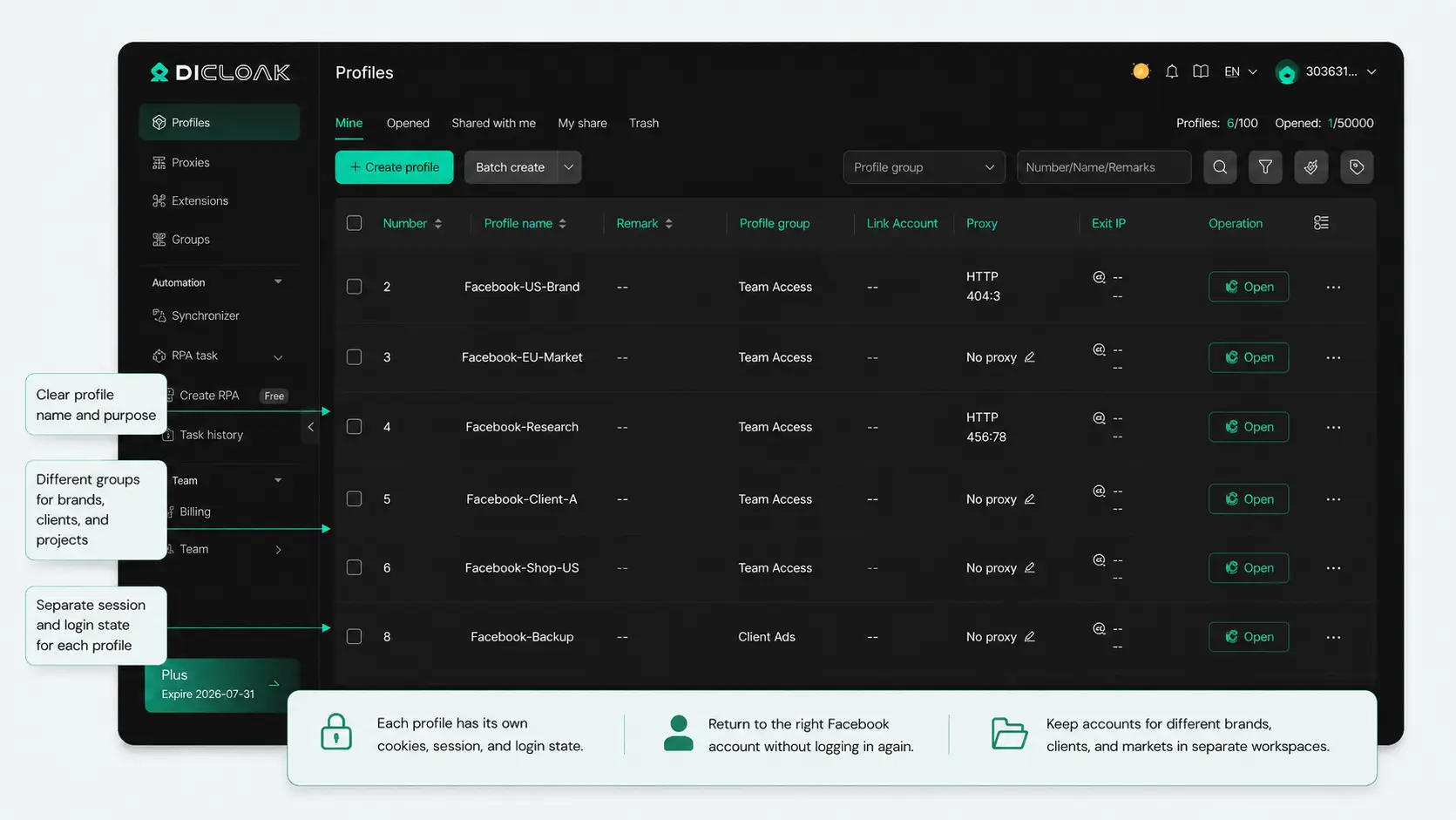
For team workflows, you can share specific Profiles or Profile Groups with the members responsible for them. A person working on one client or market does not need access to every account. When responsibilities change, the next team member can continue from the assigned Profile and saved session instead of rebuilding the login environment.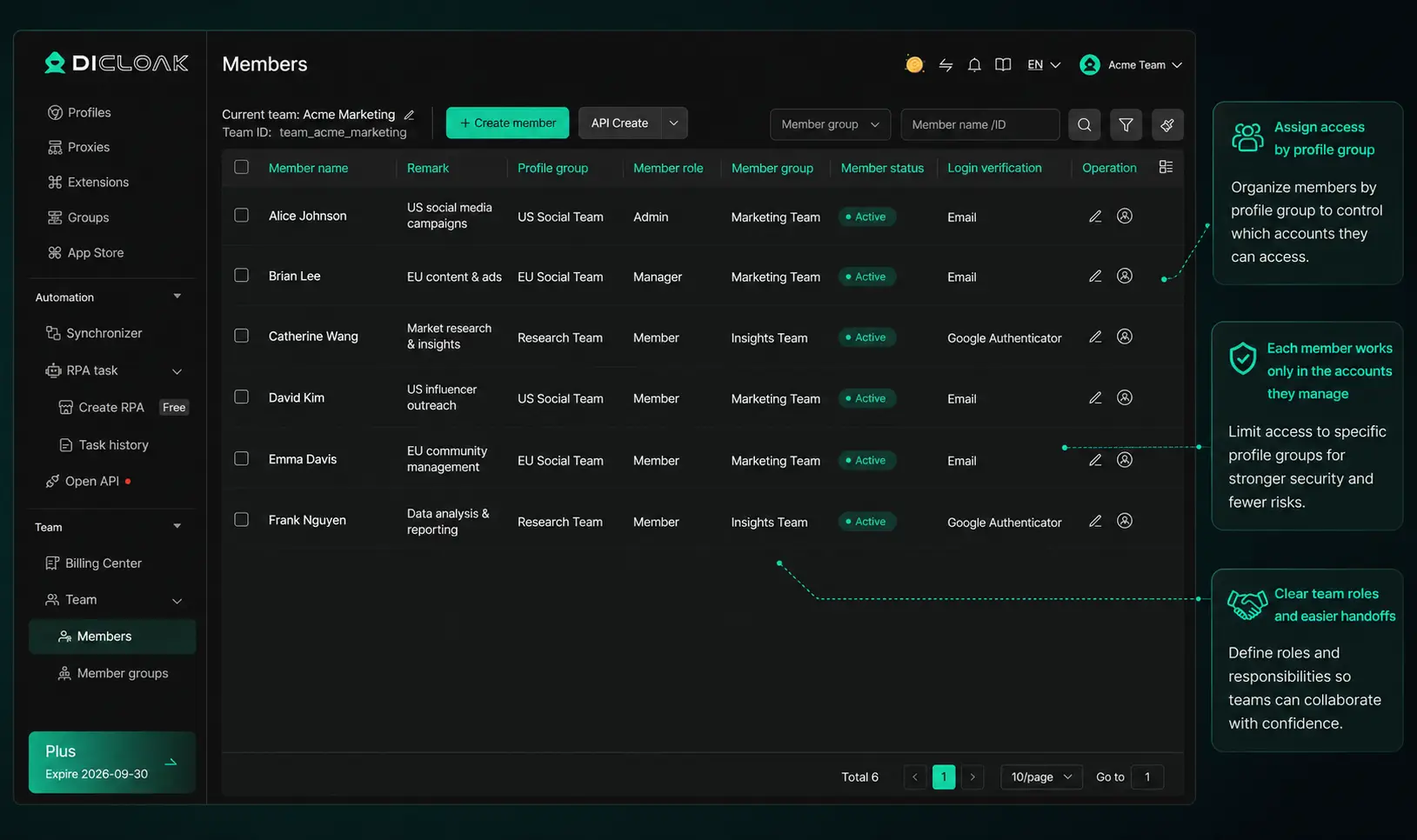
FAQ About Resetting the Facebook Algorithm
Does Clearing Facebook Cache Reset the Algorithm?
No. Clearing the cache removes temporary app or browser data. It may fix loading, display, or performance problems, but recommendation signals remain connected to your Facebook account. You still need to change content sources, use direct feedback, and support the new direction through future behavior.
Does Deleting the Facebook App Reset Recommendations?
No. Deleting or reinstalling Facebook does not erase server-side recommendation data. Your follows, interactions, account activity, and preferences remain connected after you sign in again. Reinstallation may solve app errors, but it does not restart your Feed or Reels recommendations from zero.
Does Deactivating Facebook Reset the Algorithm?
No. Temporarily deactivating Facebook is not a way to reset Facebook algorithm recommendations. Deactivation pauses or hides the account until you return. It does not guarantee that old recommendation signals are deleted, so past follows, viewing habits, and interactions may still affect the account after reactivation.
How Long Does It Take to Retrain the Facebook Algorithm?
There is no fixed timeline. A source-specific action such as Unfollow may affect that source quickly. The wider Feed or Reels direction usually depends on repeated new feedback and future behavior. The result varies according to the account’s history, current follows, and content activity.
Can You Turn Off the Facebook Algorithm Completely?
No. Facebook does not let users fully disable its ranking and recommendation systems through normal settings. Favorites and alternative Feed views can make selected sources easier to browse. Content Preferences can reduce unwanted sources and topics, but they do not permanently create a recommendation-free main Feed.
Learning how to reset Facebook algorithm recommendations means cleaning up signals that no longer match your interests. Review recurring content sources, use Interested and Not interested, clean up old activity where useful, and build clearer signals around the content you want. Keep your future behavior consistent with that direction.
Businesses managing several Facebook accounts should also keep account workspaces, purposes, and responsibilities clearly organized. When each account receives the right content activity from the right person, its Feed is easier to maintain. Clear choices and consistent daily habits provide the strongest long-term result.Try DICloak for Free.
 Web Proxy Tools
 Free Tools
 Cookie Plugin
 UA Generator
 MAC Address Generator
 IP Generator
 IP Address List
 2FA Code Generator
 World Clock
 Anonymous Check
 WebRTC Leak Test
 UUID Generator
 Free Web Proxy Site
 Proxy Checker
 FB Ad Checker
 AI Web Scraping
 Free SMM Tools
 Twitter Shadowban Checker
 Instagram Name Checker
 UTM Generator
 Username Generator
 AI Hashtag Generator
 LinkedIn Headline Generator
 Social Media Image Resizer