Understanding Kling 2.1 Master for Professional Video Generation
Kling 2.1 Master represents a significant technical evolution in Kuaishou’s generative AI ecosystem. Since the initial 1.0 release in June 2024, the model has transitioned from a general-purpose tool into a specialized platform for professional filmmaking and high-stakes advertising. Kling 2.1 Master targets professional workflows by providing high-precision prompt adherence and native 1080p resolution, ensuring that outputs meet the visual standards of commercial broadcast and digital cinema.
The primary technical advantage of version 2.1 lies in its advanced motion simulation engine. The model utilizes sophisticated physics calculations to handle complex biological and environmental interactions. This includes realistic muscle shifts during locomotion, the kinetic flow of various fabric densities, and the stochastic movement of hair in response to wind. By accurately simulating these physical properties, Kling 2.1 Master eliminates the visual artifacts that typically characterize lower-tier AI video generators.
The Foundational Kling Prompt Guide Formula for Text-to-Video
Executing a predictable generative workflow requires a structured prompt architecture. Professionals utilize a standardized formula to minimize randomization: Subject + Subject Description + Subject Movement + Scene + Scene Description + Camera/Lighting/Atmosphere.
Precision in subject definition directly impacts the Return on Investment (ROI) per generation. Vague terms like "person" force the model to extrapolate from a massive dataset, leading to inconsistent results and significant credit wastage. Defining a subject as a "professional chef" or "endurance athlete" provides the rendering engine with a specific anatomical and stylistic framework. By maximizing the precision of the initial prompt, creators reduce the number of iterations required to achieve a production-ready clip.
Pro-Tip: Focus subject movements on actions that realistically fit within a 5-10 second window. Over-complex, multi-stage narrative requests often exceed the model's current kinetic processing window, resulting in distorted motion or "stiff" character rendering.
Advanced Subject and Scene Characterization
The Kling rendering engine processes descriptive sentences to determine the physical properties of every surface in the frame. Specifically detailing textures—such as "satin fabric" versus "heavy denim"—dictates how the model calculates light reflection and movement physics. This level of granularity guides the engine to produce high-fidelity architectural details and consistent character features, effectively reducing the ambiguity that leads to generic assets.
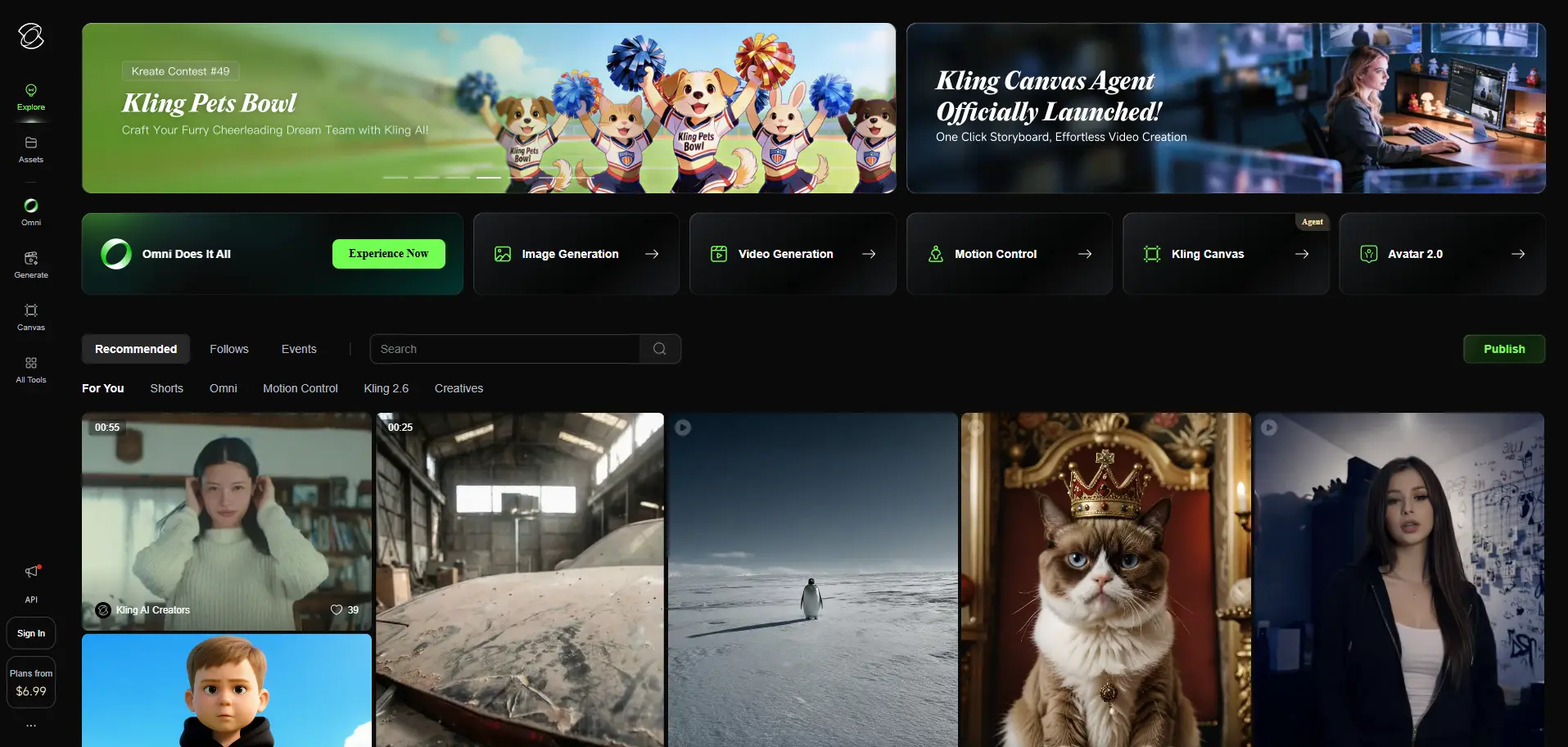
Mastering Camera Language Within Your Kling Prompt Guide
Camera language serves as the mechanical bridge between a static AI generation and a cinematic sequence. Kling 2.1 Master supports a sophisticated range of professional cinematography techniques, including ultra-wide angle shots, tracking shots, and variable zooms. These commands do not merely change the view; they instruct the AI to re-calculate the perspective and scale of the entire environment.
Directing Motion and Depth of Field
Commands such as "telephoto lens" or "background blur" (bokeh) allow for granular control over the depth of field. By isolating the subject through focus, creators can simulate the behavior of high-end optical glass. This technical layering ensures that the AI prioritizes the rendering of the primary subject while treating background elements as secondary, blurred assets, mirroring traditional studio environments.
Optimizing Lighting and Atmosphere for Visual Consistency
Lighting functions as a global modifier within the Kling architecture, dictating the emotional tone and visual sophistication of the output. Specific lighting choices, such as "Golden hour" for warmth or "harsh studio lighting" for high-contrast commercial aesthetics, fundamentally change the shadow mapping and color saturation of the video.
In a professional commercial scenario, an analyst might specify "warm, dim ambient lighting with soft-focus highlights" to establish a luxury brand aesthetic. Atmospheric adjectives—including cinematic, sophisticated, or energetic—act as final weightings for the AI, helping that the visual style remains unified across different shots in a campaign.
Transitioning to Image-to-Video: A Simplified Kling Prompt Guide
The Image-to-Video (I2V) workflow utilizes a streamlined formula: Subject + Movement, Background + Movement. Technically, I2V requires less descriptive input because the source image provides the "visual grounding"—the pixels define the subject's appearance and the scene's composition. The AI performs interpolation between the source pixels rather than extrapolating entirely from text.
Isolating Subject vs. Background Movement
A critical advantage of the I2V mechanism is the ability to animate environmental elements while maintaining subject stability. By providing specific instructions like "trees swaying gently while the subject remains still," creators prevent the warping effects often associated with holistic frame movement. This isolation is essential for high-quality cinemagraphs and professional social media assets.
The Multi-Account Challenge in AI Video Distribution
Scaling an AI video operation necessitates distributing content across dozens or hundreds of accounts on platforms like TikTok, Instagram, and YouTube. However, this creates a significant technical vulnerability. Platforms employ "device fingerprinting" to identify unique browser artifacts, hardware signatures, and network configurations.
If multiple accounts are accessed from a single device, platforms can associate them through shared fingerprints, leading to "checkpoints," shadowbans, or permanent account restrictions. For the digital growth expert, maintaining strict isolation between these profiles is the only way to ensure the long-term health of the distribution network.
How a Professional Kling Prompt Guide Strategy Integrates with DICloak
DICloak provides the necessary infrastructure for secure, high-volume account management. It functions by creating isolated browser profiles, each with a unique, customizable digital fingerprint and dedicated network configuration. This prevents platform security algorithms from linking multiple accounts to a single operator.
Simulating Diverse Environments and Operating Systems
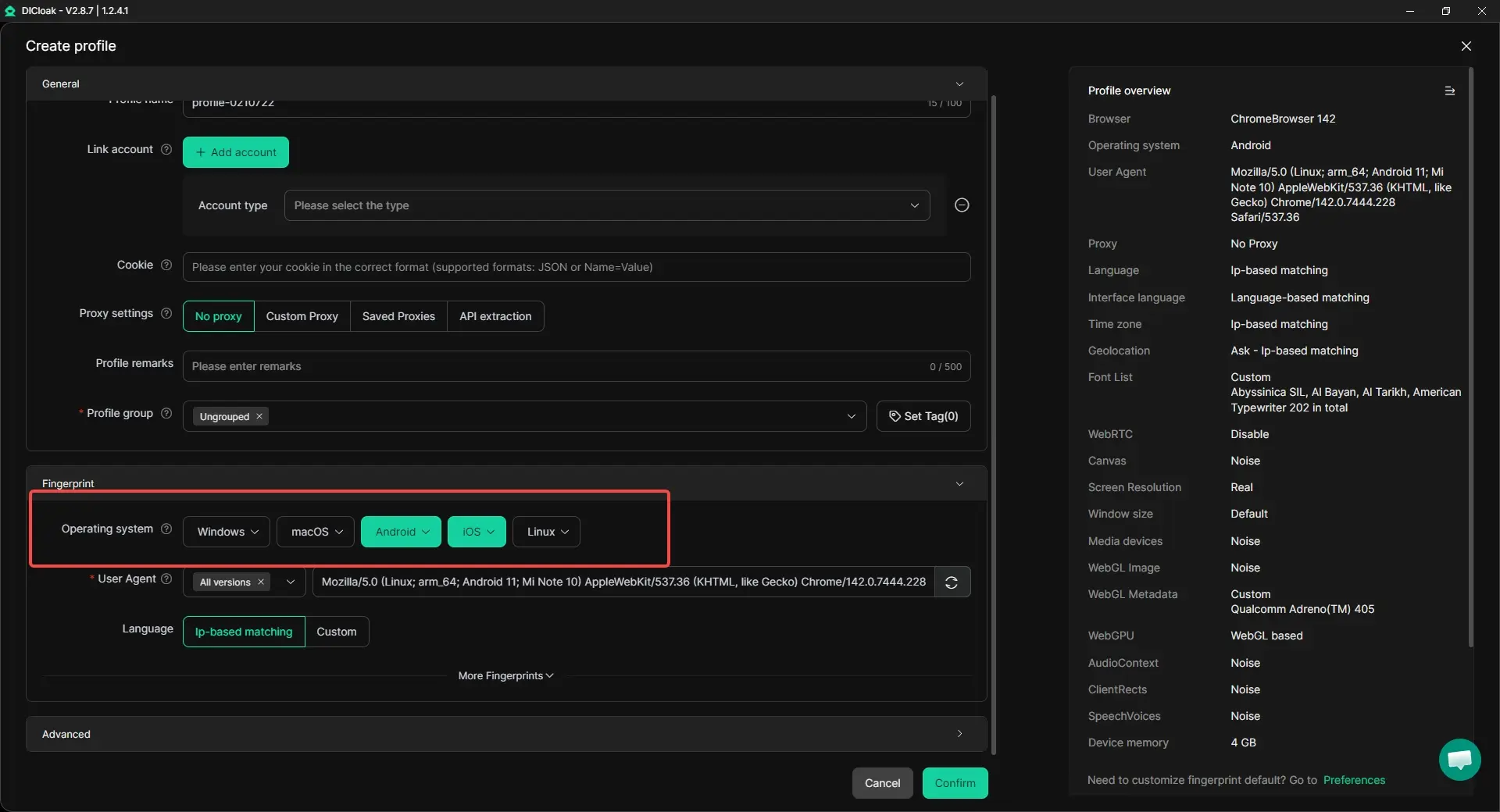
DICloak’s core is built on the Chrome engine, allowing it to simulate various operating systems including Windows, Mac, iOS, Android, and Linux. This flexibility allows analysts to present their account activity as originating from a diverse range of hardware, further reducing the risk of being flagged as an automated or linked network.
Standard Management Methods vs. DICloak Infrastructure
| Feature |
Standard Methods (Single Browser/Hardware) |
DICloak Infrastructure |
| Account Isolation |
Accounts share local storage and cache. |
Each profile has isolated data and cookies. |
| Hardware Costs |
High; requires a fleet of physical devices to scale safely. |
Low; manage 1,000+ profiles on a single workstation. |
| Ban Risk |
Extreme; platform association leads to network-wide bans. |
Minimal; unique fingerprints and IPs for every account. |
| Operational Efficiency |
Manual; repetitive and prone to human error. |
High; utilizes RPA and bulk management tools. |
Automating Workflows Using RPA and Bulk Tools
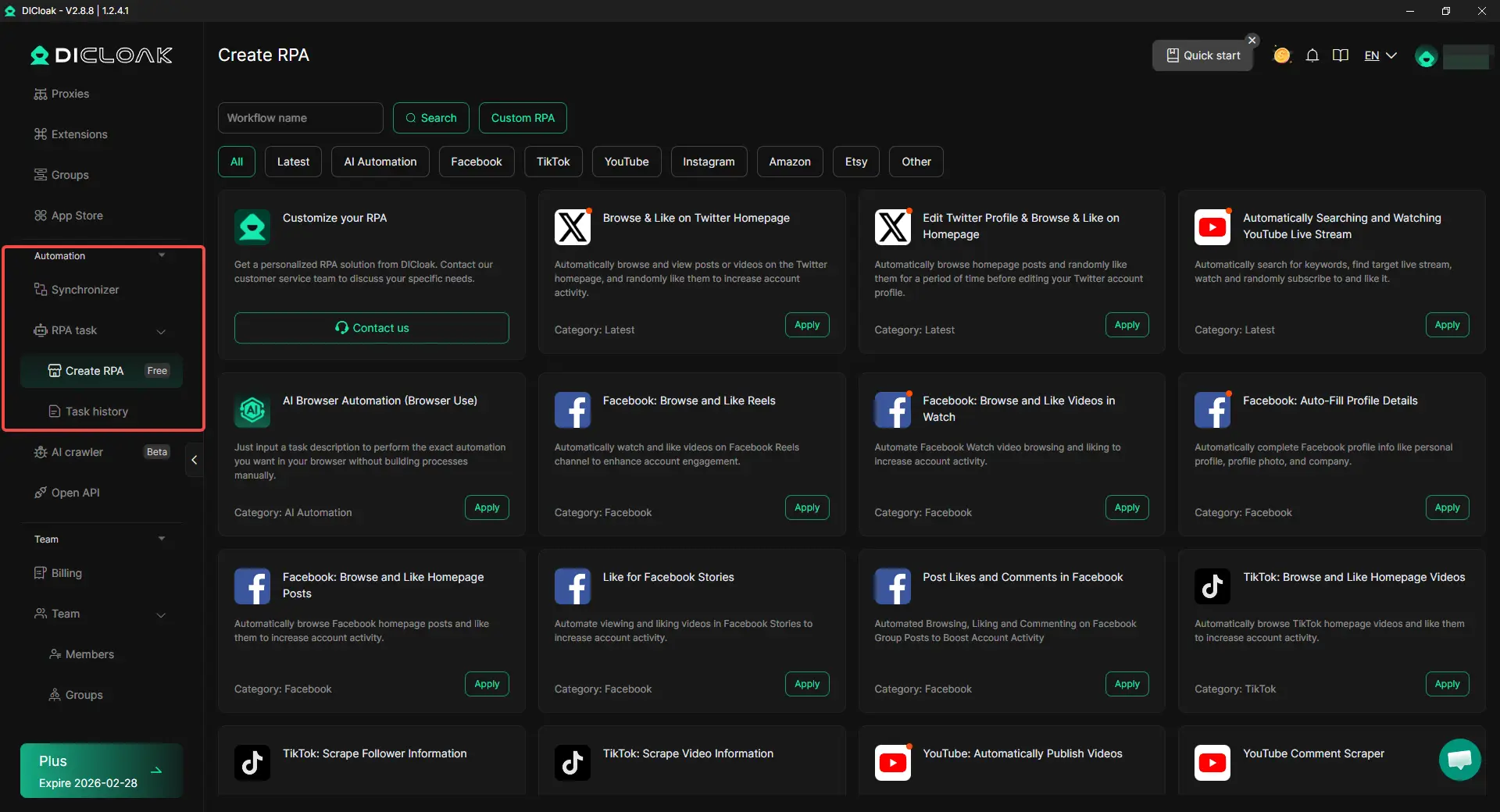
DICloak integrates Robotic Process Automation (RPA) and Synchronizer to handle the high-volume, repetitive tasks inherent in multi-platform distribution. Through bulk operations, creators can launch, update, and manage hundreds of profiles simultaneously. This automation reduces the manual overhead required to sustain a large-scale content network.
Streamlining Team-Based Video Operations
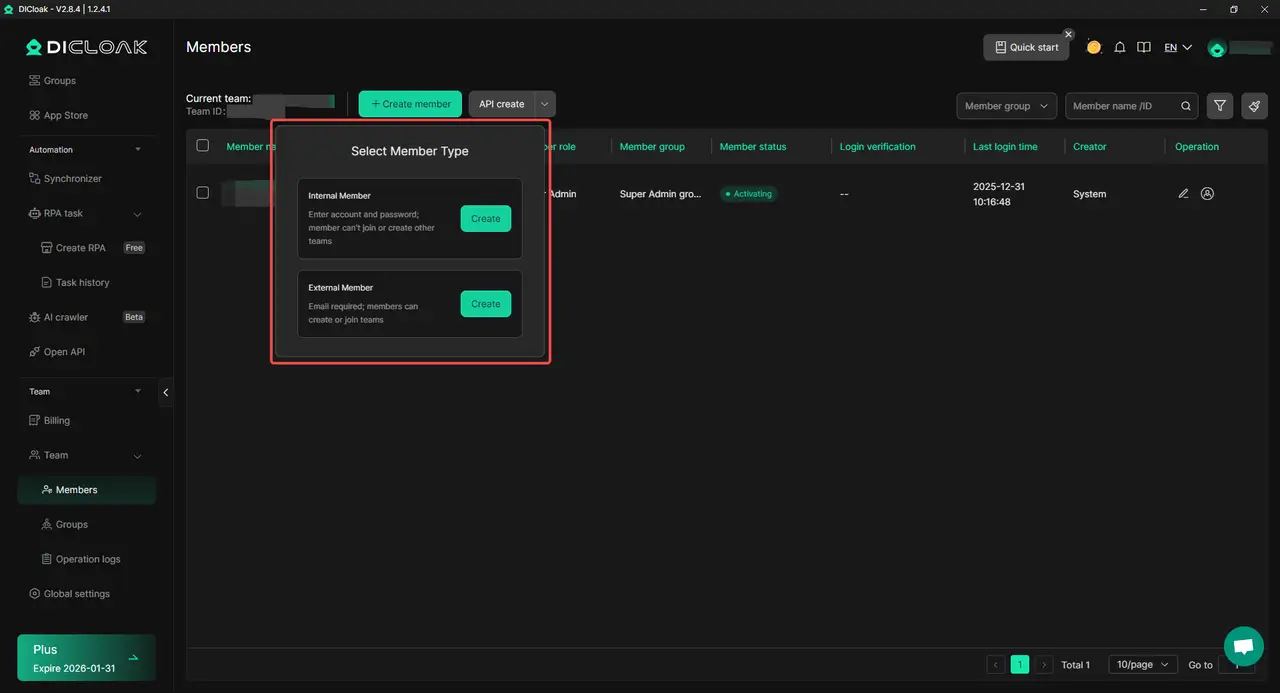
In collaborative environments, DICloak enables professional asset management through profile sharing and granular permission settings. Detailed operation logs provide managers with a transparent audit trail of account activity, helping that data isolation protocols are maintained across the entire team.
Objective Analysis of Using DICloak for Scaling AI Content
Pros:
- Massive Scalability: Supports the management of over 1,000 unique profiles on a single machine.
- Advanced Risk Mitigation: Provides comprehensive isolation of browser artifacts (Canvas, WebGL, AudioContext).
- Operational Automation: Built-in RPA streamlines the "generate-to-publish" pipeline.
- Network Versatility: Compatible with all major proxy protocols (HTTP/HTTPS, SOCKS5).
Cons:
- Limited Platform Support: Currently available only on Windows and macOS.

Securing the Connection: Custom Proxy Configuration and IP Protection
For effective network isolation, DICloak profiles must be paired with residential or mobile proxies. This ensures that each account has a distinct network identity that matches its digital fingerprint. DICloak’s proxy management interface prevents "leaky" configurations where a DNS or WebRTC leak might expose the operator's actual local IP address, which is a common trigger for platform security flags.
Pro-Tip: Avoid mixing datacenter and residential proxies within the same account cluster. Datacenter IPs are easily identified by platform security as "commercial" or "non-organic," increasing the risk of detection.
Scaling Content with RPA: Technical Implementation
Advanced infrastructure experts use DICloak's RPA to automate the distribution of Kling-generated assets across 50 or more unique profiles. This process requires a coordinated workflow to evade sophisticated detection algorithms.
Customizing Fingerprints to Evade Detection
The RPA workflow typically follows a standardized technical sequence:
- Asset Acquisition: Generate videos in Kling and store them in a centralized, secure directory.
- Profile Initialization: The DICloak RPA trigger launches a batch of 50 profiles, each with randomized hardware and canvas fingerprints.
- Automated Interaction: The script navigates to the target platform (e.g., TikTok), handles the login via cookies, and initiates the upload process.
- Metadata Entry: RPA automatically populates titles, hashtags, and scheduling data, ensuring each profile behaves like a distinct, organic user.
Frequently Asked Questions about Kling and Account Security
How do I stop my Kling videos from looking stiff?
Stiff motion often results from a lack of descriptive verbs or attempting to force too much action into a short duration. Use specific verbs (e.g., "sprints" instead of "runs") and ensure the motion is achievable within 5-10 seconds.
Can I use one account for multiple platforms?
Technically yes, but it increases the risk of cross-platform association. A professional strategy utilizes isolated DICloak profiles for each account-platform pairing to contain risk and prevent a ban on one platform from affecting the entire network.
How many accounts can I run on one PC?
Using DICloak’s infrastructure, a standard professional workstation can support 1,000+ isolated profiles. The actual limit is dictated by the system's RAM and CPU capacity, as each active profile consumes hardware resources.
What is the best way to avoid account bans when posting AI content?
The most effective mitigation strategy is the combination of strict device fingerprinting isolation and unique IP management. By using DICloak to keep no two accounts share hardware or network artifacts, the risk of automated platform detection is minimized.
 Web Proxy Tools
 Free Tools
 Cookie Plugin
 UA Generator
 MAC Address Generator
 IP Generator
 IP Address List
 2FA Code Generator
 World Clock
 Anonymous Check
 WebRTC Leak Test
 UUID Generator
 Free Web Proxy Site
 Proxy Checker
 FB Ad Checker
 AI Web Scraping
 Free SMM Tools
 Twitter Shadowban Checker
 Instagram Name Checker
 UTM Generator
 Username Generator
 AI Hashtag Generator
 LinkedIn Headline Generator
 Social Media Image Resizer





