You can set up a Shopify store in under an hour, but no amount of speed will fix picking the wrong product or being unprepared for your first customer dispute. Sellers hit “launch” and expect orders to roll in, then spend weeks wrestling with payment holds, shipping mix-ups, or ad accounts getting flagged. The steps to launch an online store are easy to Google, but the real problems start when you try to turn a live listing into actual, repeat sales.
That’s where most guides fall short, walking through registration and product uploads, but skipping the headaches you’ll face if you miss a detail early. For example, skip checking return policy settings, and you can end up refunding a scam order out of pocket. Forget to separate ad accounts, and one ban can freeze your whole operation. The risk isn’t just about missing a sale; it’s about burning time and money fixing mistakes that were easy to avoid with the right setup.
If you want to know how to start an ecommerce business without learning every lesson the hard way, you need more than a checklist. You need a step-by-step roadmap built from what actually works, and what breaks, when you move from idea to your first real sale.
Start with choosing your product and market, everything else builds from there.
What Should You Know Before Starting an Ecommerce Business in 2026?
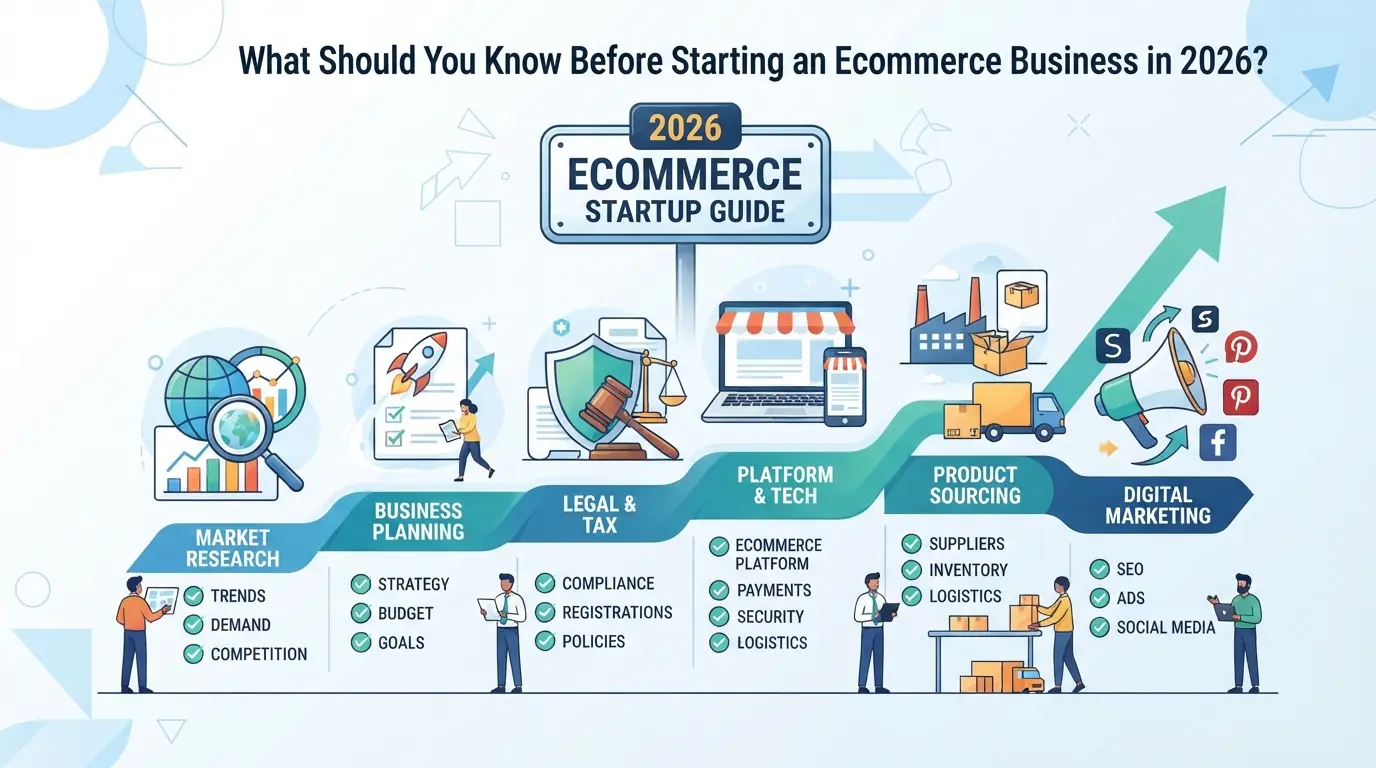 Starting now means facing more crowded markets, stricter platform rules, and higher expectations for both speed and service. If you’re serious about launching, you need a clear-eyed view of the risks, not just the rewards. The basics are easy to find online, but the pitfalls, missed compliance steps, supplier failures, unexpected platform bans, are what actually trip up new sellers.
Why ecommerce is more competitive in 2026
More sellers target the same trending products, and “easy” niches from a few years ago are now packed. Platform policies on Amazon, eBay, and Shopify have tightened, with faster bans for duplicate accounts or rule-breaking listings. Margins shrink unless you carve out a real difference or find a gap in the existing market.
What risks new sellers often overlook
The most common blind spot is how quickly an account can get banned or restricted for reasons that aren’t obvious up front. For example, using the same bank card or IP address across multiple stores can flag your operation, leading to sudden loss of access, even if you think you’re following the rules. Payment processors like Stripe and PayPal freeze funds over minor mismatches in business details, leaving you unable to pay suppliers or refund customers. Suppliers may look reliable on paper but can disappear or send low-quality stock, forcing expensive refunds or triggering chargebacks. Miss a single compliance step (like collecting the right tax info), and you can’t withdraw your balance or might even face retroactive penalties. The real risk isn’t just losing a store, it’s getting locked out of your own cash while scrambling to fix problems that could have been avoided with better setup.
How to set realistic goals and timelines
- Don’t expect profit in the first month; most sellers spend weeks on setup, product sourcing, and waiting for the first sale.
- Plan for at least one delay, suppliers, shipping, or payment holds almost always push back your launch date.
- Set three clear milestones: store live, first sale, first payout. Track your actual time to each step so you catch bottlenecks before they burn your budget.
Even with a solid plan, you’ll run into slow periods and setbacks. What matters is spotting warning signs early and adjusting fast.
Once you’re clear on the realities, your next move is picking a model and niche that fits your budget and risk tolerance, because not every approach works for every new seller.
How to Choose the Right Ecommerce Model and Niche for You
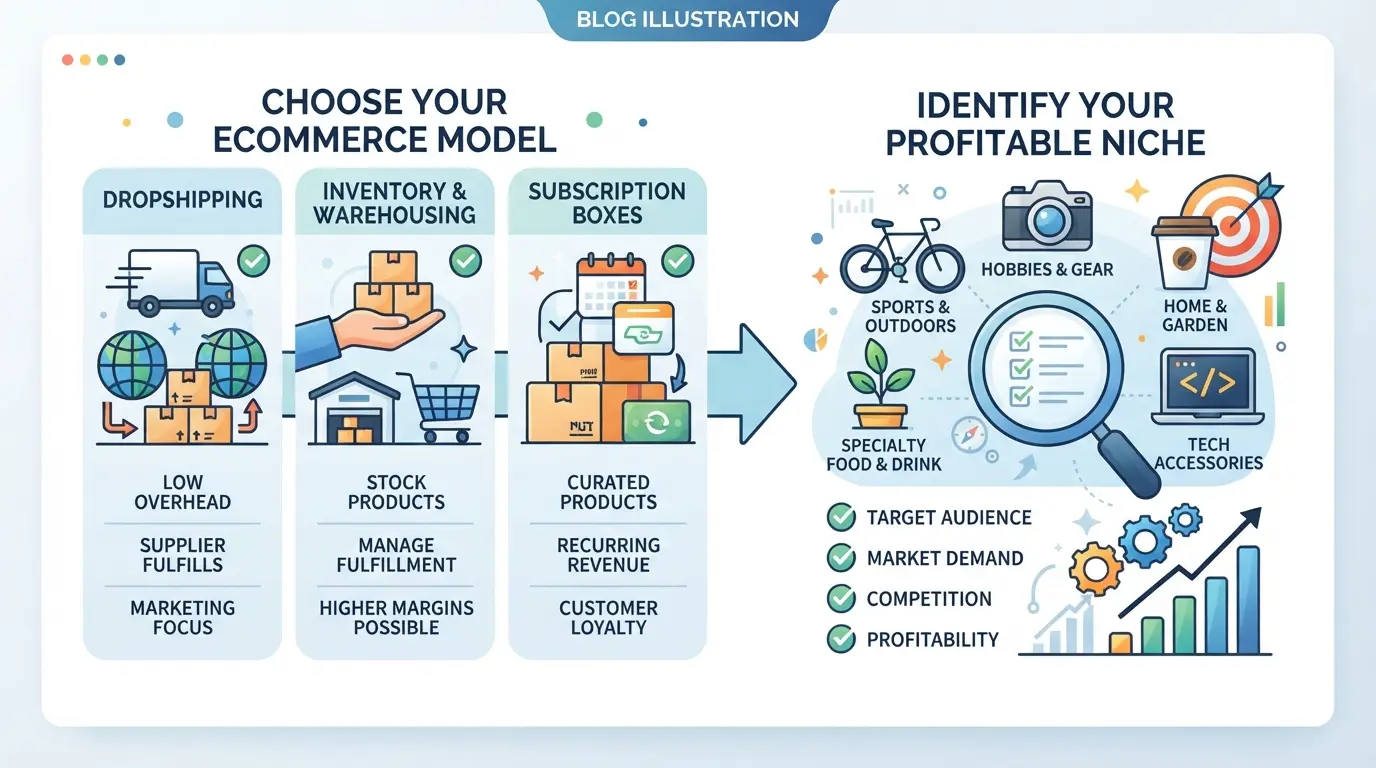 The ecommerce model and niche you pick shape everything that follows, store setup, costs, daily work, and even how you handle risk. If you rush this step, you can get stuck with dead inventory, constant refunds, or a business you hate running.
Comparing ecommerce business models: pros and cons
Every model has tradeoffs. Dropshipping is cheap to start but you give up control over shipping and quality. Holding inventory means more upfront cash and risk but lets you ship faster and build a brand. Print-on-demand cuts inventory risk but profit per sale is usually low. Selling on a marketplace like Amazon or eBay gives instant traffic, but you pay fees and follow strict rules; a standalone store takes more work to promote but you control the experience.
| Model |
Startup Cost |
Risk |
Control |
Example Platforms |
| Dropshipping |
Low |
Low-med |
Low |
Shopify, WooCommerce |
| Inventory (Stock) |
Medium-high |
High |
High |
Amazon, eBay |
| Print-on-demand |
Low |
Low |
Low |
Printful, Teespring |
| Marketplace |
Varies |
Low |
Low |
Amazon, eBay |
| Standalone Store |
Med-high |
Med-high |
High |
Shopify, WooCommerce |
Table: Compare ecommerce models by cost, risk, and control.
How to research and validate a profitable niche
Don’t pick a product just because you like it or see it trending on social media. Make sure there’s actual demand and the competition isn’t impossible. Start by searching for your product idea on Amazon, eBay, and Google Shopping, if the first page is crowded with established brands and hundreds of similar listings, breaking in will be hard without a novel angle or deep pockets. Check Google Trends for seasonality; a spike last winter doesn’t mean it will sell in June. Use marketplace tools or Chrome extensions to see estimated monthly sales and price points. If you find an item with steady search volume, moderate competition, and clear customer pain points (bad reviews, missing features), you’re on the right track. But if you skip this step, you risk launching into a niche that dries up fast or can’t compete with big sellers, burning weeks or months before you realize it.
Mistakes to avoid when picking your first product
- Jumping on a fad, trendy products can vanish overnight, leaving you with dead stock or blocked ads.
- Ignoring sourcing, if your supplier can’t deliver on time or the product is always out of stock, your store reputation tanks.
- Overlooking shipping and returns, heavy, fragile, or bulky items lead to high shipping costs, more damage in transit, and more angry customers.
Before you move to setup, double-check your model and niche pass these tests. If something feels shaky at this stage, fixing it now saves far more pain later.
What Steps Should You Follow to Launch Your Ecommerce Store?
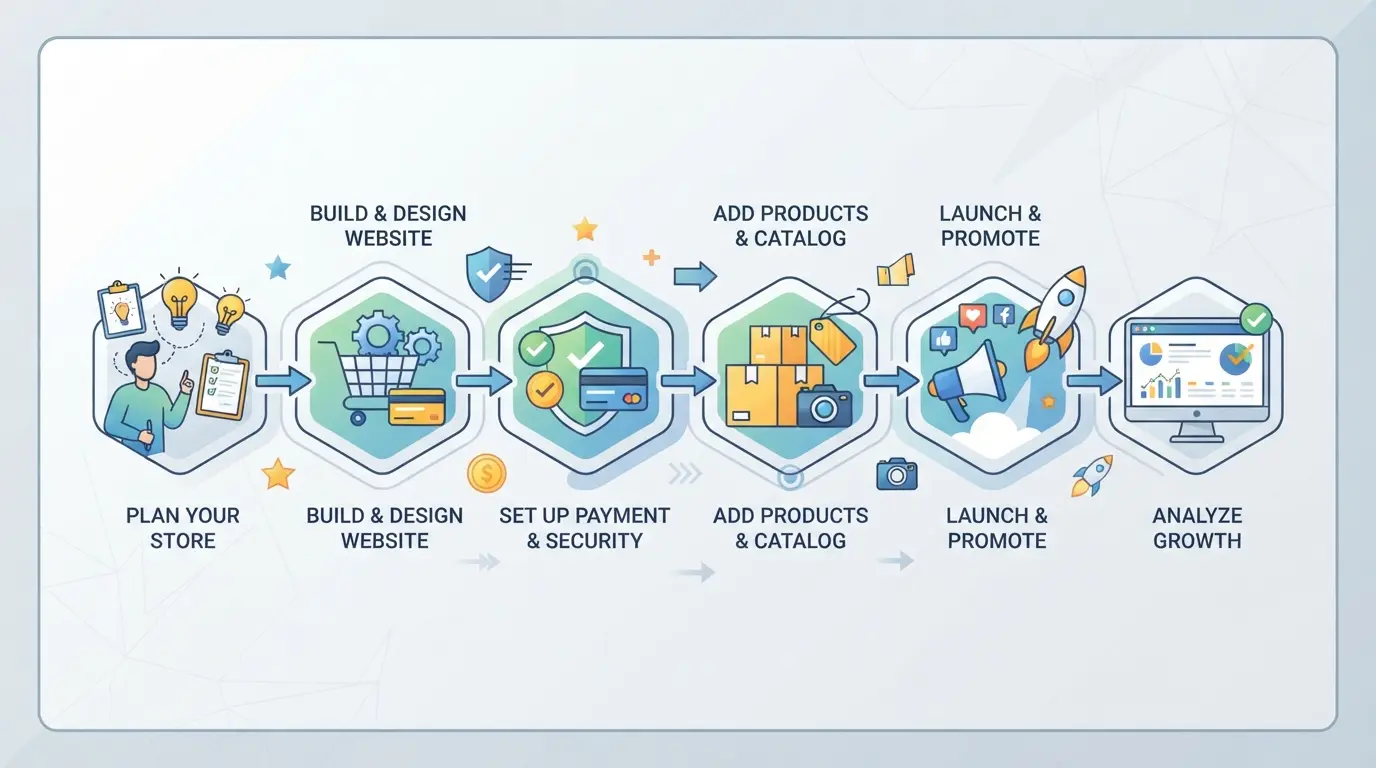 You’ve picked your niche and business model. Now the real work starts: setting up your store so you don’t waste time or money fixing rookie mistakes. Here’s a direct, step-by-step workflow that covers what actually matters between idea and launch.
Step 1: Validate your idea and research competitors
- List your main product ideas, don’t skip this step, or you risk guessing wrong about demand.
- Search your top three competitors. Read their reviews and sort by “most recent” to spot new complaints or pain points.
- Check bestsellers in your category on Amazon or eBay. If your top product isn’t already in the top 50, dig deeper into why, maybe demand is lower than you think, or competitors are running heavy ads.
Step 2: Register your business and handle legal basics
- Pick a business structure (sole proprietorship, LLC, or similar) that fits your risk tolerance and budget. For most, LLC is the safer call.
- Register your business name and get any required licenses. Miss this and you could get hit with surprise fines or lose payment processor access.
- Apply for a tax ID, essential if you plan to hire or sell across state lines.
Step 3: Build your brand and online presence
- Choose a name with an available .com domain. If the exact match is gone, avoid names with dashes or hard-to-spell words.
- Design a simple logo and pick 1-2 brand colors. Don’t spend weeks here; plain but clean beats “unique” but confusing.
- Claim your handles on major social platforms, even if you won’t use them right away.
Step 4: Set up your ecommerce website or marketplace account
- Decide if you’ll use a hosted platform (Shopify, BigCommerce) or self-hosted (WooCommerce). Hosted is faster for most beginners but costs more monthly.
- Register and connect your domain.
- Set up must-have pages: product listings, cart, checkout, shipping, and a privacy policy. Miss a core page and customers can drop off without warning.
- Test payment processing, run at least one real purchase, then refund yourself. Payment failures are a common early killer.
Step 5: Source products and set up fulfillment
- Contact at least two suppliers for every product, even if one looks “perfect.” Supplier delays or low stock can stall your launch.
- Decide on fulfillment: ship yourself, use dropshipping, or a third-party logistics (3PL) company. Each has tradeoffs in speed, cost, and control.
- Set up a basic returns process, if you skip this, your first unhappy customer could turn into a chargeback or bad review before you notice.
Check these steps off before you start budgeting for ads or new features. Rushing setup usually leads to hidden costs that show up after launch.
How Much Does It Really Cost to Start an Ecommerce Business?
You don’t need a huge budget to launch, but skipping real cost planning can wipe out your first profits fast. Here’s what you’re actually paying for when starting an ecommerce business.
Typical startup costs by business model
| Model |
Upfront Inventory |
Website & Branding |
Legal Setup |
Typical Total |
| Inventory-based |
$1,000–$5,000 |
$200–$700 |
$100–$500 |
$1,300–$6,200 |
| Dropshipping |
$0 |
$200–$700 |
$100–$500 |
$300–$1,200 |
| Print-on-demand |
$0 |
$200–$700 |
$100–$500 |
$300–$1,200 |
The biggest upfront cost is buying inventory; dropshipping and print-on-demand skip this but may have higher per-order costs later.
Recurring expenses and cash flow planning
Monthly platform fees, paid ads, and shipping can add up to $100–$700 or more. If you miss a week of sales, these bills don’t pause, so always keep a small cash reserve.
What Mistakes Cause Most New Ecommerce Businesses to Fail?
Startups crash less from bad luck and more from skipping steps that seem minor, until they trigger bans, cash losses, or days spent fixing issues that could have been avoided with tighter checks upfront. If you want to avoid the classic traps, watch for these:
Ignoring platform rules and compliance
Getting banned often starts with missing a document, using mismatched info, or failing a simple ID check. Once an account is flagged, recovery can take weeks, if you get it back at all. The biggest avoidable mistake is reusing personal details or skipping required verifications when registering new store accounts. If a platform asks for extra proof, treat it as urgent, delayed uploads or inconsistent data almost always lead to trouble.
Choosing unreliable suppliers or payment partners
- Always request supplier references and verify sample shipments before listing new products
- Avoid payment processors known for freezing new accounts or holding funds for 30+ days
- Double-check supplier business licenses and payment details for mismatches
Scaling too fast without workflow controls
Rushing to grow before your systems can handle it usually leads to missed orders, lost inventory, and account lockouts. Most new sellers skip access controls and end up with ex-team members who still have admin rights.
- Set separate logins and permissions for each team member
- Track inventory and orders with a real-time tool, not shared spreadsheets
- Rotate passwords and revoke old access after any staff change
Using DICloak to Separate Store Accounts and Team Access in Ecommerce Workflows
Once you’re managing more than one store, or letting anyone else touch your accounts, the risk shifts from just platform compliance to your own setup. Sharing browser sessions or logins, even for a day, can tangle account histories and expose you to bans you never saw coming. For operators scaling beyond a solo operation, the only way to keep things straight is to give each account and each team member their own isolated environment. If you’re wondering how to start an ecommerce business and avoid the “one mistake, all accounts burned” problem, DICloak’s browser-profile controls and permission settings are where that starts.
Separating store sessions with profile isolation and fingerprint configuration
Operators who run multiple Shopify, Amazon, or eBay stores can create a separate browser profile in DICloak for each account. Each profile stores its own cookies, cache, and browser-identification signals, like user agent, timezone, and screen size, so session data never crosses between stores. This means team members working on different stores aren’t stepping on each other’s data or mixing up sessions. The scope here is browser-level separation and fingerprint configuration; it does not change settings inside the store platform itself.

Assigning proxies to each store profile for location and IP control
If your workflow needs each profile to use a different network, DICloak lets you assign your own proxy, HTTP, HTTPS, or SOCKS5, to any browser profile. You can test the connection and check the exit IP before launching the session, so you know exactly which network each store is using. Operators are responsible for sourcing and configuring these proxies themselves; DICloak just applies the settings at the profile level.

Team Permissions for Assigned Browser Profiles
With more hands in the mix, admins can assign team members to groups and give access only to the profiles they need. You can also restrict editing, so regular users can’t change settings or see other store environments. This setup keeps team actions separated and limits accidental leaks or changes. Permissions here only control access inside DICloak, not on the ecommerce platform.

Ready to move from setup to growth? The next step is putting these controls to work as you scale your marketing and reach new customers.
How to Market and Grow Your Ecommerce Business in 2026
Customers won’t come just because your store is online. The real work starts when you pick the right channels, run targeted campaigns, and track what actually brings sales, otherwise, you risk spending your budget with nothing to show for it.
Choosing the right marketing channels for your niche
Not every channel fits every product or audience. Use this checklist to filter your options fast:
- Social ads: Hit fast-moving trends and reach impulse buyers, but watch for rising costs in crowded niches.
- Search and shopping ads: Good for high-intent buyers, works best if you can win on price or reviews.
- Influencer and marketplace ads: Useful for products with visual appeal or built-in communities, but real ROI depends on picking the right partners.
Optimizing campaigns and tracking results
You’ll get stuck if you just “set and forget” campaigns. The better approach is to use analytics tools to measure click-through rates, conversion costs, and sales by channel. For example, test two ad headlines at once, keep the one with a lower cost per sale, then raise the budget on that winner. If you don’t track the right numbers, you’ll waste money on ads that look busy but produce no profit. The most reliable growth comes from fixing what’s not working and scaling up what’s proven, guesswork rarely pays off. Missing this step is why stores with a strong product can still stall out after launch.
Frequently Asked Questions About how to start an ecommerce business
Can I start an ecommerce business with no money in 2026?
You can begin with almost no money by using dropshipping, print-on-demand, or selling digital products. These models avoid inventory costs. Still, you’ll face real expenses like buying a domain, hosting, and basic marketing. Expect to spend at least $50–$200 to launch. Free tools help, but total “zero cost” setups usually struggle to gain traction.
How long does it take to get your first sale after launching?
Most new stores get their first sale within a few weeks, but timing depends on your product, marketing, and website quality. If you follow key steps to launch an online store, like optimizing pages and running ads, you might see results faster. Some niches take longer, especially with no paid traffic.
Do I need technical skills to build an ecommerce website?
No advanced skills are needed with today’s platforms like Shopify and Wix. They offer drag-and-drop tools and helpful guides. If you want custom features or a unique design, hiring a developer can help. Many successful store owners start by learning the basics and use built-in support.
Is it legal to run multiple store accounts on the same platform?
Platforms like Shopify and Amazon allow multiple stores, but you usually need separate accounts and emails. Breaking their rules could lead to account suspension. Keeping stores separate helps with taxes, branding, and managing risks. Always check the terms of service before opening more than one store.
What’s the safest way to share store access with a remote team?
Use account features that let you create separate logins for each team member. Assign only the permissions they need, never share your main password. This reduces risk if someone leaves or makes a mistake. Most ecommerce platforms support user roles and access levels to help keep your business safe.
Take your idea from concept to reality by outlining your product offerings and setting up your online store using reliable tools. Once you have your initial setup, focus on building trust with customers and streamlining your operations for growth. Try DICloak For Free
 Web Proxy Tools
 Free Tools
 Cookie Plugin
 UA Generator
 MAC Address Generator
 IP Generator
 IP Address List
 2FA Code Generator
 World Clock
 Anonymous Check
 WebRTC Leak Test
 UUID Generator
 Free Web Proxy Site
 Proxy Checker
 FB Ad Checker
 AI Web Scraping
 Free SMM Tools
 Twitter Shadowban Checker
 Instagram Name Checker
 UTM Generator
 Username Generator
 AI Hashtag Generator
 LinkedIn Headline Generator
 Social Media Image Resizer